
If you keep pasting the same instructions into Claude Code, save them as a skill instead. A skill is a saved set of instructions that Claude loads only when a task needs it, so the whole team uses one up-to-date version instead of copies scattered across chats.
Imagine you paste the same three paragraphs into Claude Code every week: how your team names its work, which checks must pass before a change goes for review, and a reminder not to reformat everything while fixing one bug. You edit the version in your notes but forget the one in chat, so the two drift apart. When a new teammate asks where “the good prompt” lives, you point at an old chat thread.
This is the fourth post of the Claude Code tutorial. The earlier post covered the claude command and its options. Here you will see what skills are, how they differ from the project notes Claude reads at the start of every session, where their files live, how to add one, how to run one by name, and when Claude loads one without you asking. If you need to know which Claude product is which first, use the Claude product map.
The facts below follow the official docs at code.claude.com/docs/en/skills. Settings fields and version details keep moving, so re-check the live page before you write team policy for a hundred projects.
What a skill is, in plain English
A skill is a packaged set of instructions that Claude can load when needed. On disk it is usually a folder with a required file named SKILL.md, and that file has two parts:
- Frontmatter, which is a small settings block at the top, written in YAML, a simple plain-text settings format, and placed between
---markers. It needs at least a gooddescriptionso Claude knows when the skill is relevant. - A markdown (a plain text format that marks headings and lists with simple symbols) body, which holds the checklist, conventions, steps, or reference material that Claude should follow when the skill runs.
You can run a skill directly by typing / plus the skill name, which is the folder name for personal and project skills. Claude can also load a skill on its own when your conversation matches the description. The official docs put it simply: create a skill when you keep pasting the same instructions, checklist, or multi-step procedure, or when a section of CLAUDE.md has grown from a standing fact into a procedure.
Skills follow a shared format called Agent Skills that several AI tools use. An agent is an AI that can take actions on its own, not just answer. Claude Code adds its own controls on top, such as who may run a skill, an option to run it in a helper agent, and a way to feed live data into it. You do not need the whole advanced catalog on day one. You need one working skill that replaces a sticky note.
Plain definition: A skill is an on-demand playbook. The short description is always cheap to list, and the long body loads when you run the skill or when Claude decides it is relevant.
Skills versus CLAUDE.md: how each one loads
People mash these together because both are markdown files that steer Claude. The difference is when each one loads, and that difference is the whole reason skills exist.
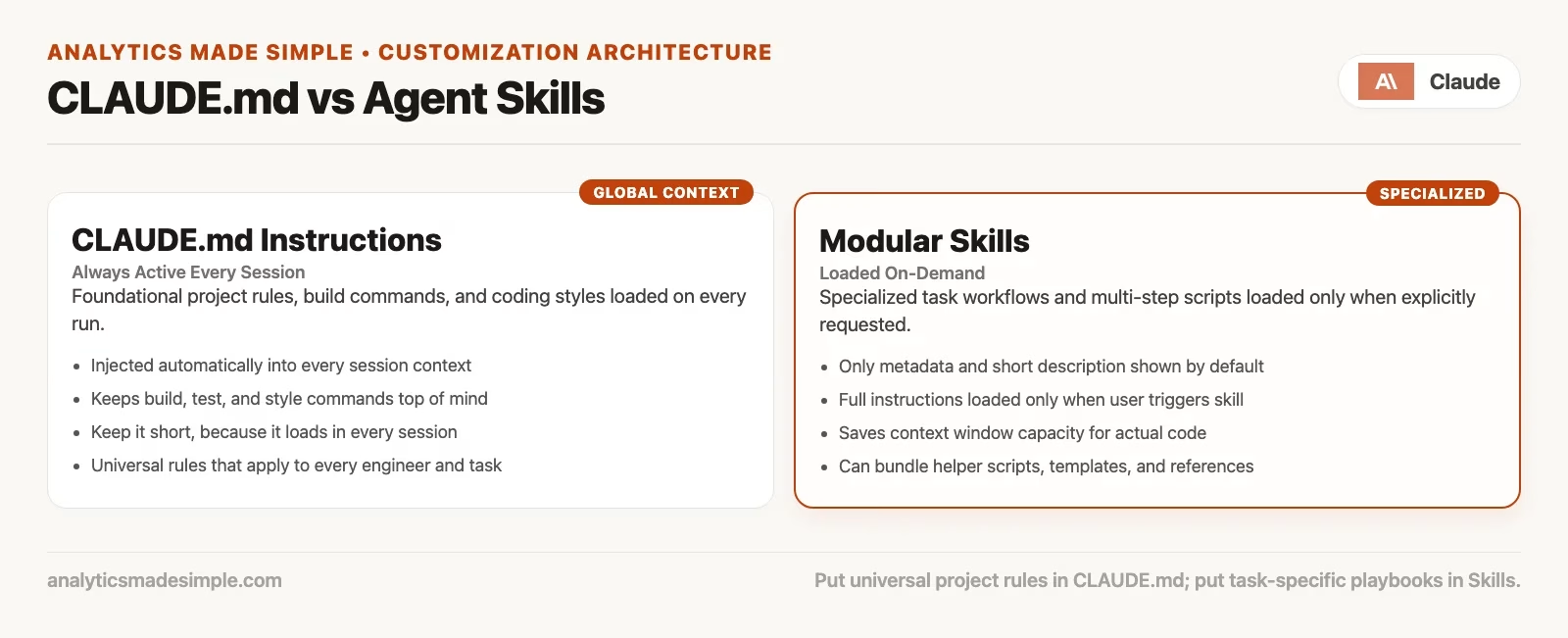
The CLAUDE.md file, and files like it, is always-on project memory for a session. Standing facts live here, such as the language version, how to run tests, naming conventions that apply to almost every task, “never commit secrets,” and preferred libraries. Official guidance treats this as context Claude reads early so it does not rediscover the basics each time. The catch is that always-on text costs working space even when the task is unrelated, so stuffing a 400-line deploy runbook into it wastes effort on a typo fix.
Skills keep a short description available so Claude knows the toolkit entry exists, and the long body loads only when it is used. That makes long reference material almost free until you need it. Deploy checklists, PR (pull request, a proposed change waiting for review) templates with many steps, catalogs of a domain’s API (a way for one program to ask another for data), and incident response playbooks are all the right shape for a skill.
| Question | Prefer CLAUDE.md | Prefer a skill |
|---|---|---|
| Does this apply to nearly every task in the repo? | Yes | No |
| Is it a long multi-step procedure? | Usually no | Yes |
Do you want a named slash entry like /deploy-staging? | No | Yes |
| Should Claude sometimes load it without you typing a name? | It is always loaded | Yes, when description matches |
| Is the content mostly “how we always work” facts? | Yes | Only if short; else skill |
The official skill docs give a practical migration rule. If a section of CLAUDE.md became a procedure, move it into a skill, and leave the always-on file for constraints and facts. A later post in this series goes deeper on instruction files, and keeping this split in mind now will stop you from building the wrong thing this week.
Where skills live
The location decides who gets the skill.
| Scope | Typical path | Who gets it |
|---|---|---|
| Personal | ~/.claude/skills/<skill-name>/SKILL.md | You, across projects on that machine |
| Project | .claude/skills/<skill-name>/SKILL.md | Anyone working this repo (commit it) |
| Plugin | Plugin’s skills/ tree | Where the plugin is enabled |
| Enterprise / managed | Managed settings paths | Org-wide (admin story) |
Name precedence matters when the same skill name appears at more than one level. The official docs describe overrides such as enterprise over personal over project, and a skill at any of those levels can override a bundled skill with the same name. Plugin skills use a namespaced form, so they do not collide in the same way. Skills inside package folders of a large shared code repository (a project folder that keeps every version of its files) can appear with folder-qualified names. You do not need every edge case memorized before your first skill, but you do need to pick personal or project on purpose.
Personal is perfect for your own taste, such as how you like commit messages, your preferred explore checklist, or a habit of summarizing a diff. Project is for team truth, such as how this service deploys, which tests gate a PR, and the domain language of this product. If team deploy steps live only in your home folder, the next engineer ships without the checklist.
The older commands folder still works
Older custom commands were markdown files under .claude/commands/ for a project, or ~/.claude/commands/ for personal use. The official docs are explicit that custom commands have been merged into skills. A file at .claude/commands/deploy.md and a skill at .claude/skills/deploy/SKILL.md both create /deploy, and both work the same way when you run them. Existing command files keep working, and skills add optional power: a folder for supporting files, frontmatter to control who can run the skill, and automatic loading when it is relevant.
If you already have command files, do not rush to migrate on a Friday. Prefer skills for anything new, and when a command grows, convert it into a skill folder so you can attach examples, scripts, and references without one giant markdown blob.
Bundled skills, including /code-review
Claude Code ships with bundled skills such as /code-review, plus others documented alongside commands. The examples in the docs include playbooks for debugging, batch-style work, and a health check, depending on your version. Bundled skills are prompt-based, meaning they give Claude detailed instructions and let it orchestrate its tools. Most built-in commands instead run fixed product logic.
You run a bundled skill the same way as any other skill, by typing / and the name. Some may load on their own when relevant, while others, including longer checks such as code review in recent versions, may run only when you ask, so that you stay in control of time and tokens (small chunks of text, about three-quarters of a word each). The exact auto-run rules can change by version, so when a long review starts by itself and you did not want it, check the skill visibility settings and the release notes.
You can also override a bundled skill by shipping a skill with the same name in your project or personal folder, if your team needs different review standards. Do that carefully, because a surprise override confuses newcomers who expected the stock behavior.
Add your first skill: a worked path
We will build a small personal skill that summarizes uncommitted changes and flags risks. It follows the shape of the official getting-started examples without pretending your project is their demo.
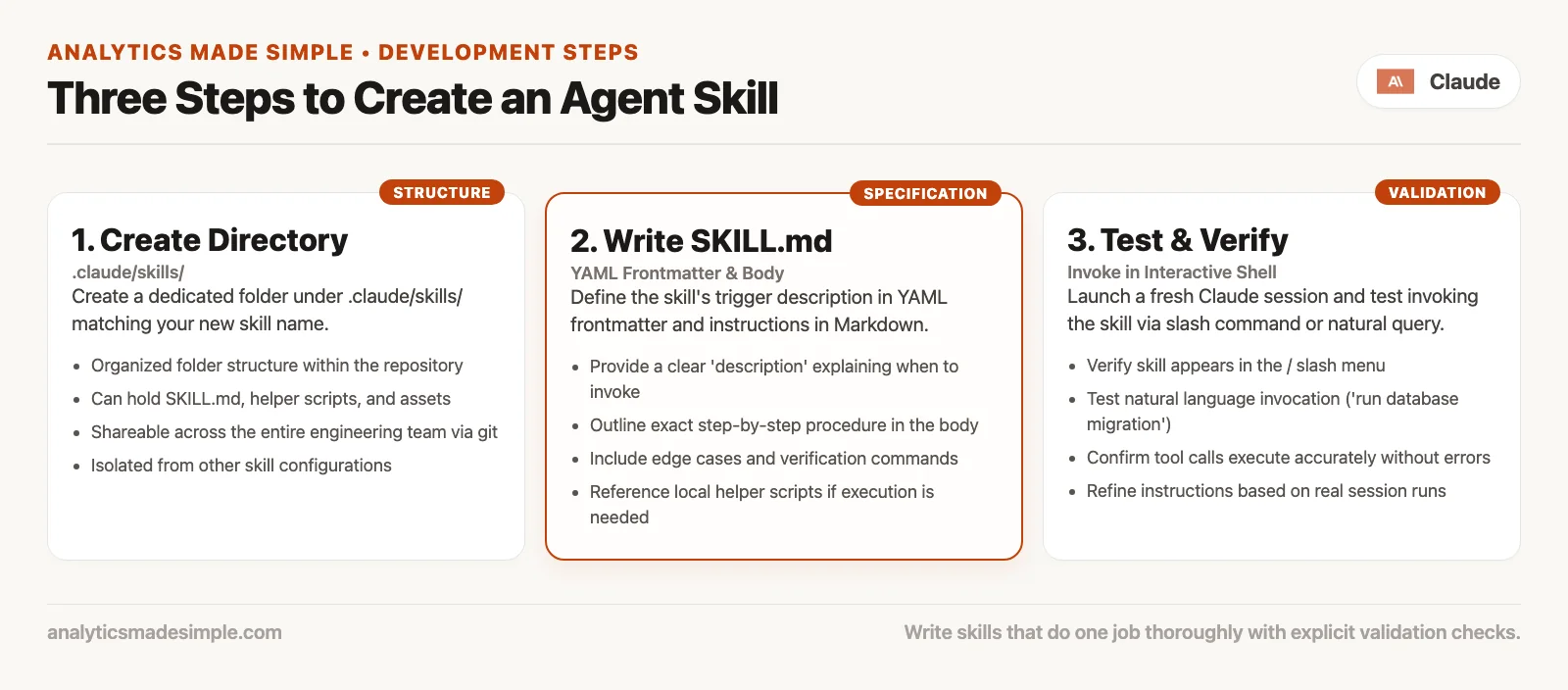
Step 1: create the folder
mkdir -p ~/.claude/skills/summarize-changesFor a team skill, use the project path instead:
mkdir -p .claude/skills/summarize-changesStep 2: write SKILL.md
Create ~/.claude/skills/summarize-changes/SKILL.md, or the project path, with this minimum useful shape:
---
description: Summarizes uncommitted changes and flags anything risky. Use when the user asks what changed, wants a commit message, or asks to review their diff.
---

## Instructions

1. Inspect the current git status and uncommitted diff.
2. Summarize the changes in two or three bullet points a teammate could skim.
3. List risks: missing tests, hardcoded secrets, drive-by refactors, unclear naming.
4. If there are no uncommitted changes, say so and stop.

Keep the tone plain. Do not invent files that are not in the diff.
This is the whole skill file: a description that tells Claude when to use the skill, and four numbered instructions for what to do. The description matters most, because Claude reads it to decide whether your request matches.
The folder name becomes the command you type, which is /summarize-changes. The description is what Claude uses to decide whether to load the skill on its own, so put the key use case first. Vague descriptions cause wrong or missed loads.
Official examples often inject live shell output into the skill body using a special !`command` form, so Claude sees real data before it reasons. That is powerful and worth learning once you are comfortable with the basics. Your first skill can stay simpler by telling Claude which tools and git commands to use in the instructions, and you can add live injection later.
Step 3: test it two ways
Open a project tracked in git, make a tiny edit, and start Claude Code:
cd ~/work/my-app
# make a small edit to any tracked file
claude
These lines move into a project folder and start Claude Code there. Making a small edit first gives the skill something to summarize when you test it.
Manual run:
/summarize-changesTyping the skill’s name with a slash runs it directly, which is the manual test. If this works but a plain request does not trigger it, the description needs rewording.
A natural-language request that should match the description:
What did I change? Flag anything risky before I commit.If auto-load fails but the manual run works, fix the description. If neither works, check the path, the exact file name SKILL.md, and whether slash skills are disabled for the session. Live change detection usually picks up skill edits in watched folders without a reinstall. If you create a brand-new top-level skills folder that did not exist when the session started, you may need to restart Claude Code so it can watch the new folder.
Frontmatter you will actually use
Every frontmatter field is optional in the strict sense, but description is the one you should treat as required for quality. Here is a short practical set:
| Field | Why you care |
|---|---|
description | Auto-load targeting and human understanding |
disable-model-invocation: true | Only you can run it (deploys, sends, commits with side effects) |
user-invocable: false | Background knowledge Claude may load; not a meaningful menu action |
argument-hint | Autocomplete hint for expected args |
allowed-tools | Pre-approve tools for the invoke turn (review carefully in shared repos) |
context: fork | Run the skill in an isolated subagent context for task-shaped work |
Skills with side effects should almost always set disable-model-invocation: true. You do not want Claude deciding that your code “looks ready” and firing /deploy because the description matched a victory lap in chat. Knowledge packs that make no sense as a menu button can hide from the menu with user-invocable: false, while still informing the model when relevant.
Arguments and stacking
Any text you type after the skill name becomes arguments, and a skill can refer to them with $ARGUMENTS, or with numbered forms, in its body. Here is the shape:
---
description: Fix a GitHub issue by number following repo standards. Use when the user wants a full issue fix workflow.
disable-model-invocation: true
---

Fix GitHub issue $ARGUMENTS.

1. Read the issue and restate acceptance criteria.
2. Implement the smallest change that meets them.
3. Add or update tests.
4. Summarize residual risks. Do not push unless asked.
This skill file takes the issue number you type after its name: $ARGUMENTS is replaced by that text. The line disable-model-invocation: true means Claude never starts this skill on its own, only when you call it, which suits a skill that changes code.
Then you run it like this:
/fix-issue 1234Newer versions can stack several skills at the start of a message and share the trailing arguments across them. Treat stacking as an advanced convenience once your single-skill habits are solid. If a skill runs as a forked helper agent, stacking rules may stop expanding there. When behavior surprises you, simplify to one skill plus plain follow-up chat.
Supporting files and keeping SKILL.md short
A skill folder can hold more than one file:
my-skill/
├── SKILL.md           # required entrypoint
├── reference.md       # long API notes, load when needed
├── examples/
│   └── sample.md
└── scripts/
    └── validate.sh
Point to those files from SKILL.md so Claude knows when to open them. The official tips push for a concise body, on the order of hundreds of lines and not a novel. Once a skill loads, its content stays in the conversation for the rest of the session, so every line is a recurring cost. Write instructions, not essays about how proud the team is of the process.
Worked workplace examples
Project skill: a PR checklist
Commit .claude/skills/pr-ready/SKILL.md with these steps: run the unit-test command your README.md names, check for leftover debug logs, confirm that database migration files can be undone if your stack needs that, and draft a PR summary with a risk section. Set disable-model-invocation: true if you want only humans to trigger the ship ritual.
Personal skill: explore first
A personal skill can force a map-before-edit habit, where Claude lists the entry points, cites three files, proposes a plan, and waits for your approval. That is useful if you personally tend to approve too fast. Not every teammate may want your caution ritual as project law.
Domain skill: analytics SQL house rules
If your team generates SQL (the standard language for asking a database questions) with agents, a skill can hold rules for what one row means, required filters such as customer and date, and a habit of asking for the query (a question written for a database) plan before large scans. Pair that with human review. Our guide on how to check AI-written SQL still applies after a skill runs.
How auto-load should feel
When descriptions are sharp, auto-load feels like a competent teammate grabbing the right binder. When descriptions overlap or stay vague, Claude may load the wrong skill or miss the right one. Write descriptions with trigger language real people use, such as “when the user asks for a commit message,” “when reviewing a pull request,” or “when changing billing migrations.”
If auto-load becomes annoying, you have a few options. You can tighten the description, set disable-model-invocation: true for manual-only skills, or use skill visibility overrides in settings so that a skill is name-only, user-only, or off. The official docs describe a /skills menu for listing and adjusting visibility without hand-editing files every time.
Skills in other places you run Claude
Local Claude Code sessions read the personal and project skill folders on your machine. Cowork sessions and some cloud sessions do not automatically mount your home ~/.claude/skills/ folder the way a laptop session does. Cloud work often relies on project skills committed to the repository, plugins declared for the environment, or account-level skills, depending on the product. If a routine says a skill was not found, check whether the skill exists only on your laptop. The practical rule is that team-critical skills belong in the repository or in managed distribution, and not only on one engineer’s disk.
Six mistakes to avoid
Putting a novel in CLAUDE.md
Always-on memory is for always-true facts, and long procedures belong in skills. If every task pays for a deploy essay, your typo fixes get worse and not better.
Writing vague descriptions
“Helps with code” matches everything and nothing. Name the job and the trigger phrases.
Side-effect skills without disable-model-invocation
Deploys, messages to customers, force pushes, and production data fixes should be triggered by a human only, unless you have a very deliberate automation design.
Keeping team rituals in personal skills
If the skill is how the service ships, commit it under the project .claude/skills/ folder. Onboarding should not require cloning your home directory.
Using allowed-tools without review
Pre-approving broad shell patterns in a committed project skill is a trust decision. Read the skill before you accept workspace trust prompts, and treat a surprise allowed-tools line the way you would treat a surprise secret in your automated build settings.
Expecting skills to replace judgment
A perfect /code-review run is still not a merge. Skills improve consistency, but they do not own outcomes.
Common questions
Is a skill the same as a slash command?
They look the same when you run them, because both use /name. Built-in commands are fixed product actions, while skills, including bundled ones, are playbooks. Custom commands and skills both create slash entries, and skills are the recommended packaging now.
Can Claude invent a skill without a file?
It can follow instructions you type in chat, but that is not a skill. A skill is a lasting file that others can share and run by name, so if you keep retyping something, write the file.
Do I need plugins first?
No. Personal and project skills work without plugins. Plugins become useful when you want bundles that others can install and that have more moving parts, and a later post in this series covers plugins and connectors.
Will skills replace CLAUDE.md?
No, because they do different loading jobs. Always-on facts stay in instruction files, and on-demand procedures move to skills. Healthy projects use both.
Series notes
The next post in the Claude Code tutorial covers memory and context, meaning what sticks across sessions, what resets, and how compaction interacts with skills and instruction files. The one after that goes deep on CLAUDE.md, AGENTS.md, and similar files, and later posts cover plugins, agent loops, diff review, and team safety rails.
For product-family orientation, see the Claude product map. Everyday chat habits remain in Learn Claude from scratch, and verification culture without vendor lock-in sits in the Practical AI series.
Quick recap
- A skill is a
SKILL.mdplaybook that Claude can load on demand or when it is relevant. - Run one with
/skill-name, because the folder name is the command for personal and project skills. - The
CLAUDE.mdfile is always on, and skill bodies load on demand, so peel procedures out of always-on memory. - The personal path is
~/.claude/skills/and the project path is.claude/skills/, and you should commit the team’s truth. - The older
.claude/commands/folder still works, but prefer skills for new work. - Bundled skills like
/code-revieware playbooks and not fixed light switches. - Write sharp descriptions, keep side effects to human-run skills, and review
allowed-toolsin shared projects.
Try it: three prompts you paste more than twice
- List three prompts you paste more than twice a month, and circle one that is a procedure and not a standing fact.
- Create a personal skill folder and a minimal
SKILL.mdwith a sharp description. - Test
/your-skill-nameon a real small change, then test a natural-language prompt that should load it on its own. - If auto-load fails, rewrite only the description and try again before you add more frontmatter.
- Promote one team ritual into the project
.claude/skills/folder, and open a PR that adds only the skill plus a one-line note in theREADME.mdfile. - Run a bundled skill such as
/code-reviewon a throwaway branch, and compare its notes with your own reading of the diff, the list of changed lines.
Sources
Official Claude Code documentation used for skills claims in this article (re-check after upgrades):
- Extend Claude with skills: https://code.claude.com/docs/en/skills
- Commands reference (built-ins vs bundled skills): https://code.claude.com/docs/en/commands
- Features overview: https://code.claude.com/docs/en/features-overview
- Claude Code overview (CLAUDE.md and skills in the product story): https://code.claude.com/docs/en/overview
- Best practices (when to create skills): https://code.claude.com/docs/en/best-practices
- Context window notes (skills and compaction): https://code.claude.com/docs/en/context-window
- CLI reference: https://code.claude.com/docs/en/cli-reference
- Glossary (skill and bundled skills definitions): https://code.claude.com/docs/en/glossary
- Analytics Made Simple: Claude Code tutorial series
- Analytics Made Simple: Claude product map series
Keep going
Same lessons in your feed
Short diagrams, hooks, and weekly tutorials on Substack, Instagram, X, and Facebook.



