
Before you share a Custom GPT with your team, give it one named owner, a short version log, and a list of things it must refuse to do. A Custom GPT is a saved set of instructions inside ChatGPT that other people can open and chat with. Without those three things, ghost copies pile up, nobody can edit the instructions, and the whole thing turns into a group chat with a logo.
Say you open your team’s “Ops Status Helper” on Monday to draft the weekly update, and the coworker next to you gets a different answer to the same question. You are on “v3,” they are on a copy called “(copy, do not use),” and the original was built on the paid account of someone who left in April. Your two answers disagree about whether a “week” starts on Sunday or Monday, and you cannot fix it because you do not know who is allowed to edit the instructions. Then you notice a teammate has pasted a customer email into it “because it is our GPT.” The problem is not that Custom GPTs are useless. A shared recipe with no owner is just a group chat with a logo. This post shows how to fix that.
Why “share the link” is not a team process
Sharing screens, plan names, and admin menus change often. Treat the process below as the lasting part. Check the OpenAI help center and your workspace admin the week you write a real policy.
What “share” actually means
Sharing a Custom GPT means other people can open a conversation that already carries your name, your instructions, and optional knowledge files. Sometimes it also carries actions, which let the GPT call other tools. Nobody installs software on a laptop. They start chats under a saved recipe, which is useful and easy to oversell.
Sharing is not the same as any of these four things:
- Official company policy (“Legal approved this for customer data”)
- A trusted source of facts such as warehouse numbers, the state of a deal in your CRM (customer relationship management system, where sales tracks customers and deals), or what a customer was billed
- A shared editor where five people rewrite the instructions at once, the way they would in a Google Doc
- A full product with its own uptime promise (a service-level agreement, or SLA), a sign-in system, and an audit trail. That is closer to building on the developer platform
The earlier post on the ChatGPT product map said a GPT is a recipe, not a shipped application. So treat that recipe like a shared tool with a named steward. Otherwise it becomes a meme that floats around Slack forever.
Rule of thumb: If you cannot name one living owner and write one sentence about what the GPT is for, do not share it with the team yet.
The five-part share kit
Memorize this strip the way you memorize who owns a dashboard. It is the whole post in one picture and one table.
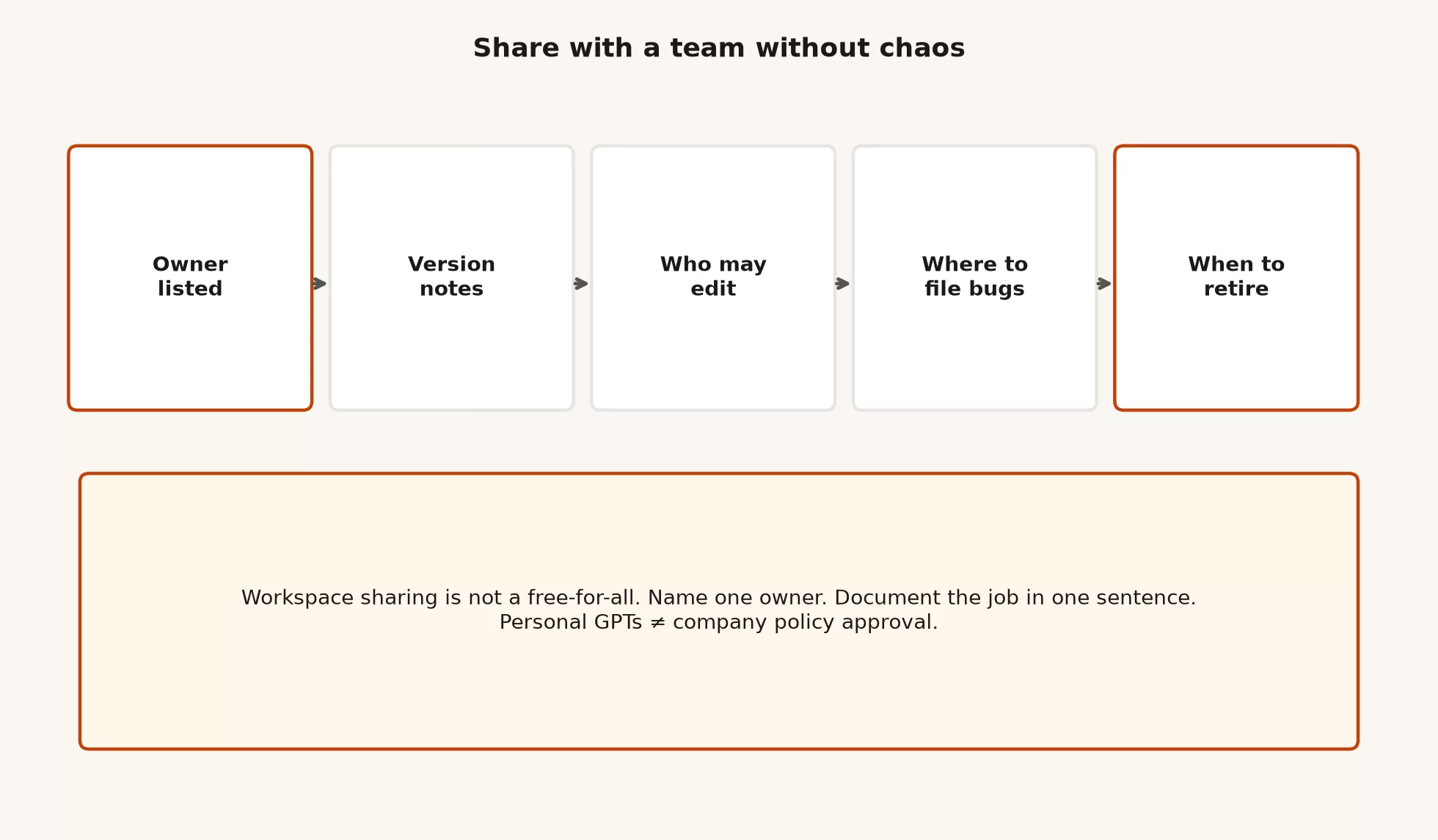
| Piece | What good looks like | What fails |
|---|---|---|
| Owner listed | One human name (and a backup) in the description or wiki | “We all own it” until nobody does |
| Version notes | Date, what changed, and why, in a short log | Silent instruction rewrites, so the outputs drift |
| Who may edit | One builder, or a deliberate handoff process | Five people “improving” the same bot |
| Where to file bugs | A team chat channel, a ticket form, or an email alias | Scattered direct messages and duplicate ghost GPTs |
| When to retire | A sunset date or a trigger, such as the role going away or the format dying | Zombie GPTs with stale knowledge |
1. Owner listed
An owner is the person who decides what the GPT is for, what it must refuse, and when the instructions change. They do not have to write every line. They do have to be able to answer “is this still the official recipe?”
Put the owner where people actually look:
- The first line of the GPT description, for example
Owner: the ops lead. Backup: the ops analyst. - A team wiki or Notion page for “approved internal GPTs”
- The Slack channel topic, if the bot is well known in a channel
On Team and similar workspaces, builder rights often stay with the person who created the GPT until an admin reassigns them. Do not assume “shared with the workspace” means “anyone can edit.” Help pages describe reassigning ownership through admin tools, though the menus move around. Your process should name a human even if the screens change next quarter.
2. Version notes
Instructions drift, and knowledge files go stale. Someone “just tweaks the tone,” and suddenly every status update invents a new metric name. Version notes are how you keep trust when that happens.
Keep a short log in the description, in a knowledge file named CHANGELOG.md, or on a wiki page:
# Ops Status Helper: version notes
2026-09-12  v1.4  ops lead  Output must include assumptions list; ban invented KPIs
2026-08-28  v1.3  ops lead  Swapped knowledge: Q3 playbook → Q4 playbook.pdf
2026-08-01  v1.2  ops analyst  Tightened refuse list: no customer PII in prompts
2026-07-15  v1.0  ops lead  Initial share for ops pod only
You do not need fancy version numbers. You need a date, a person, and a one-line reason. When someone says the output “feels off,” the first question becomes “which version were they on?” It stops being “is the model broken this week?”
3. Who may edit
Edit rights are where chaos starts. A GPT that everyone can rebuild is not collaborative. Every change can overwrite someone else’s, the same way two people saving the same file collide.
A good default rule for small teams has three parts:
- One builder (usually the owner) edits the instructions and the knowledge files.
- Everyone else uses the GPT and files bug reports.
- Handoff is explicit. When the owner leaves, the backup becomes the owner, a version note records the change, and an admin reassigns builder rights if the product requires it.
If two people must write the instructions together, do not take turns live-editing the shared version. Draft the changes in a document instead. Review them the way engineers review a pull request, which is a proposed change someone else reads before it goes in. Then the owner pastes in the approved text. That sounds heavy for a chatbot, but it is lighter than three competing “final” GPTs.
4. Where to file bugs
Users will hit bad outputs sooner or later. If there is no place to report them, people make their own copies. The copies get names like “Ops Status Helper Fixed,” “Ops Status Helper the real one,” and “Use this one, trust me.” Your inventory then explodes.
Pick one channel and stick to it. Here is an example bug template you can pin:
GPT name + version (if known):
What I asked (paste or summary):
What I expected:
What I got (paste the bad bit):
Did it invent numbers / ignore refuse list / wrong format?
Sensitive data? (yes/no; redact if yes)
The owner reads the reports weekly and does one of three things. They fix the instructions, update the knowledge, or mark the report as the wrong job for this GPT. Close the loop in the channel so people stop hoarding private copies.
5. When to retire
Every shared GPT should have a condition under which it retires. Any of these is a good reason:
- The repeating job died, for instance because a weekly format was replaced by a real dashboard
- The knowledge is out of date and nobody will refresh it
- The owner left and no backup accepted the job
- Company policy changed, and this kind of data is no longer allowed in ChatGPT
- The team moved the recipe into ChatGPT Work, an internal app, or the API (the way one program asks another for data)
Retiring a GPT is not a failure. Leaving a zombie in the workspace sidebar is the failure, because people trust it. Unshare it or restrict access. Rename it [RETIRED] if needed, note which tool replaced it, and archive the wiki page. Nobody should discover that “the official bot” only understands last year’s glossary.
The share ladder
Share as narrowly as the job allows, because wider is not always wiser.
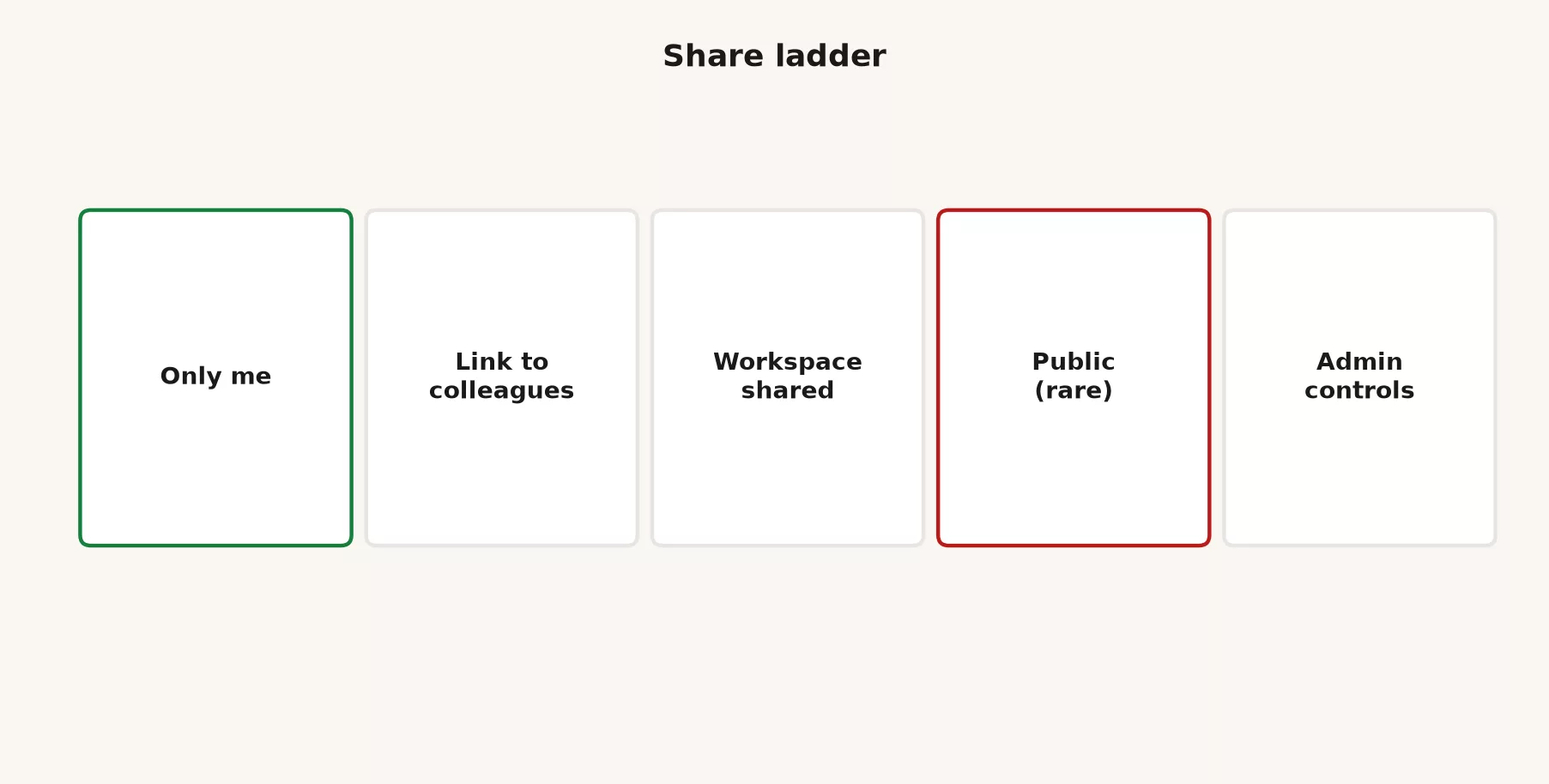
| Level | Who can use it | When it fits | Main risk |
|---|---|---|---|
| Only me | You | The recipe is still unstable, or it is personal productivity | None for others, so this is fine |
| Link to colleagues | People with the link (product rules apply) | A pilot with 2 to 5 users | The link leaks, and nobody keeps a list of who has it |
| Workspace shared | Team, Business, or Enterprise members as configured | A stable job, a named owner, and an approved kind of data | People assume it is “official” |
| Public or store-style | The broader world, where the product allows it | Rare for internal ops recipes | Brand, data, and support burden |
| Admin controls | Whatever owners and admins allow for creating, sharing, and actions | Always, on managed workspaces | Ignoring the admin rules |
Think of sharing as a ladder with four steps: only you, a link for a small pilot group, your whole workspace, and the public. Move up one step at a time. Stay on “only me” until three real tasks work. Stay on a link pilot until the bug reports dry up. Move to a workspace share only after the five-part kit is filled in. Public sharing is almost never right for internal operations, finance, or anything that touches customer language. Admin controls are not a share level at all. They are the ceiling that can block the rungs above you, so read them before you promise the department a bot.
Personal convenience is not company policy
Your personal Custom GPT on a consumer plan can be a brilliant weekly helper for you. That does not make it approved for the following:
- Customer personal data, health data, payment data, or credentials
- “Official” answers that other teams will treat as the truth
- Knowledge files full of unreleased forecasts or merger notes
- Actions that reach into production systems without a security review
Enterprise and Edu workspaces often have controls for who can create and share GPTs, rules for connectors, and retention settings. Team plans have workspace sharing and admin screens that differ from a personal Plus plan. A consumer plan is not a free pass to route company secrets through a hobby bot.
Here is a practical way to sort what people claim:
| Statement | True? |
|---|---|
| “I built a GPT that helps me write status notes.” | A personal tool, if the data is allowed |
| “The company uses this GPT for customer replies.” | Needs a policy, an owner, and usually a managed workspace |
| “Legal signed off because I shared a link in Slack.” | Almost never |
| “IT said use only the workspace GPT list.” | Follow that list |
If your company has no written AI policy yet, do not invent one inside a GPT description. Use redacted examples and non-secret playbooks. Ask IT or security before you climb the share ladder. The earlier privacy posts in the ChatGPT track still apply. Sharing multiplies the damage a mistake can do, because one leaked file reaches everyone who can open the GPT.
Worked example: a five-person ops pod
Say you lead a small operations team and own a Monday status recipe. The team needs consistent structure: blockers, decisions needed, risks, and next week. They do not need five different tones and five invented metric names.
Before sharing (only me)
You run the recipe in plain chat for two weeks, as the earlier posts in this tutorial describe. Then you freeze the instructions, add a non-secret playbook PDF, and test it on three real Mondays. Finally you write the refuse list. It says no invented KPIs (key performance indicators, the numbers the team is judged on), no customer names from memory, and ask for missing facts instead of guessing.
Pilot (link to colleagues)
You share with two teammates only. The description lists the owner and the version, and bug reports go to #ops-gpt-bugs. After one week you fix two format problems and add a line to the version notes.
Workspace share
You post this in the ops channel:
Official (for now): Ops Status Helper v1.4
Owner: ops lead · Backup: ops analyst
Job: turn rough notes into Monday status shell
Not for: customer PII, financial forecasts, legal language
Bugs: #ops-gpt-bugs with the pinned template
Edit rights: ops lead only
Retire if: we move status into the new dashboard (target Nov)
That message is the governance. The custom avatar is optional.
What the team decides not to do
- No public store listing for an internal ops format
- No “everyone can edit”
- No uploading the full customer roster as knowledge “for context”
- No treating GPT output as the source of the numbers, because the numbers still come from the sheet or the business intelligence (BI) tool that humans check
Inventory: one list beats twelve ghosts
If your company has more than three shared GPTs, keep a single inventory page. The columns can be boring, and boring is the point:
| Name | One-line job | Owner | Share level | Version | Data class | Retire trigger |
|---|---|---|---|---|---|---|
| Ops Status Helper | Monday status shell | Ops lead | Workspace | 1.4 | Internal non-secret | Dashboard replaces format |
| Tone Rewriter | Email tone pass | Sales ops | Link pilot | 0.9 | No customer secrets | Not promoted by Oct 1 |
| [RETIRED] FAQ bot | Old handbook Q&A | n/a | Unshared | 2.1 | n/a | Handbook moved to wiki search |
Review the list monthly for fifteen minutes. Delete or retire more GPTs than you create. A short inventory means the team pays attention. It is not paperwork for its own sake.
How sharing interacts with actions and knowledge
The earlier post on building a GPT introduced three layers: instructions first, knowledge second, and actions last. Sharing raises the stakes on every layer. Here they are one at a time.
- Instructions: a team-wide mistake scales to the whole team, so keep the refuse list and the output format explicit.
- Knowledge: everyone with access may see content from those files come up in a conversation. Do not upload secrets “just for the owner,” because there is no private drawer once the GPT is shared.
- Actions: calls to outside services and connectors are a different risk class, and workspace admins may restrict them. Do not turn actions on for a casually shared GPT because a demo looked cool. Treat them like production integrations, with an owner, a review, and the fewest permissions that still work.
If the job needs live mail, a calendar, or multi-file office assembly with approvals, check whether ChatGPT Work is the better fit. If the job is changing code in a repository (a project’s folder of code and its history), stay in Codex. A shared GPT is not a workaround for picking the wrong tool.
Common mistakes
| Mistake | What happens | Fix |
|---|---|---|
| Share before the recipe is stable | The team learns a moving target | Stay on “only me” until three solid runs |
| No owner in the description | Nobody maintains the knowledge | Name an owner and a backup on day one of sharing |
| Everyone can edit | Silent instruction wars | One builder; review changes offline |
| No bug channel | Ghost copies multiply | One template, one place |
| Public share for internal ops | Brand and data risk | Stay workspace-only or link-only |
| A personal Plus bot as the “company standard” | Policy and access fail when people leave | Managed workspace plus an inventory |
| Secrets in knowledge files | Every user can reach them | Redact them, and use approved systems |
| Never retiring | Stale answers look official | Sunset triggers and [RETIRED] naming |
| GPT as the source of the numbers | Invented or stale figures | A human checks the source systems |
| Skipping admin settings | Sharing is blocked or too open | Read the workspace GPT controls first |
Practice: pick one GPT you already use
- Pick one GPT you already use, or the one from the earlier posts in this tutorial, and write a one-sentence job line.
- Fill in the five-part kit on a sticky note or wiki page: owner, where the version notes live, edit rights, bug path, and retire trigger.
- Set the share level one rung below your impulse. If you wanted a workspace share, try a link pilot first.
- Add the owner and version to the description, and create a three-line changelog.
- Pin a bug template somewhere teammates will see it.
- List every GPT your team already uses, and mark the ghosts for retirement.
- Confirm with IT or your manager whether your kind of data is allowed before any wider share.
Questions people ask
Can the whole team edit one GPT together like a Google Doc?
Usually not in a smooth multiplayer sense. Many Team setups treat the creator, or a reassigned builder, as the editor. Plan for one builder and an offline review of instruction changes. Check the current admin help pages for your plan instead of assuming several people can edit at once.
What if the owner leaves the company?
That is exactly why you named a backup and kept version notes outside one person’s head. An admin reassigns builder rights if the product requires it. You then update the inventory. If nobody accepts ownership, retire the GPT.
Should we put every team process into a GPT?
No. A GPT fits only stable, repeating, chat-shaped jobs that use allowed data. One-off tasks stay in plain chat. Heavy multi-step office work leans toward Work, and code leans toward Codex. The next post in the tutorial is a full chooser for when a Custom GPT is the wrong solution.
Is a workspace-shared GPT automatically approved by Legal?
No. Share settings are product controls and not a compliance stamp. Your company’s AI, privacy, and data-handling rules still apply, so when in doubt, ask before you upload knowledge or turn on actions.
Share is a process, not only a toggle
- Sharing works because of the process around it, not because of the switch.
- The five-part kit is owner, version notes, edit rights, bug reports, and retirement.
- Climb the share ladder slowly, because public is rare for internal work.
- Personal convenience is not the same as company policy approval.
- Keep one inventory and retire the zombies.
- Knowledge and actions raise the risk when shared, so keep secrets out.
- Next up is when a Custom GPT is the wrong solution.
Your next step
Pick one shared GPT, project, or prompt your team relies on and fill in the five-part kit for it: owner, version notes, who can edit, how to report bugs, and when it retires. Add it to a single inventory. Doing it once for the most-used item makes the habit easy to copy.
Series notes
This is Part 3 of the Custom GPTs tutorial. The earlier posts cover building a simple GPT and then its instructions, knowledge files, and actions. The next one covers when not to use a Custom GPT.
| Post | Focus |
|---|---|
| First | Build a simple GPT for a repeating task |
| Second | Instructions, knowledge files, and actions (light) |
| Third (this post) | Share with a team without creating chaos |
| Fourth | When a Custom GPT is the wrong solution (series close) |
Related shelves for the full ChatGPT track on this site:
- Learn ChatGPT from scratch
- ChatGPT product map
- ChatGPT everyday tutorial
- ChatGPT Work tutorial
- ChatGPT Codex / coding tutorial
- Custom GPTs tutorial (this series)
The next post closes both this series and the ChatGPT deep track: when a GPT is the wrong tool, a recap of all six series, and optional next steps.
Sources
Research and further reading used for this article:
- OpenAI: Introducing GPTs (product intent: personal, company, or public GPTs; enterprise internal use)
- OpenAI Help: Managing GPT access in Enterprise and Edu workspaces (create, share, governance controls; verify current labels)
- OpenAI Help Center (search current articles for sharing and publishing GPTs, Team/Business features, and builder rights)
- OpenAI: ChatGPT product overview (plans and surface names change; re-check before policy)
- OpenAI Community: Cannot edit/publish GPTs as a team (ownership and reassignment patterns discussed for Team workspaces; not a substitute for official Help)
- Analytics Made Simple: Custom GPTs tutorial (this series)
- Analytics Made Simple: ChatGPT product map (Custom GPTs vs plain chat; recipe vs full product)
- Analytics Made Simple: ChatGPT Work tutorial (when multi-step office agents beat a saved chat recipe)
- Analytics Made Simple: ChatGPT Codex / coding tutorial (repo work is a different tool)
- Analytics Made Simple: Learn (related paths on this site)
Keep going
Same lessons in your feed
Short diagrams, hooks, and weekly tutorials on Substack, Instagram, X, and Facebook.



