
You can use one personal AI checklist for SQL (the standard language for asking a database for data) queries, charts, Python notebooks, and emails to stakeholders. The habit is the same every time: let the AI draft, check the result against a number you trust, and only then send it out under your name.
Say you already have a checklist that keeps AI-written SQL from embarrassing you. Then a chart needs a redesign, a Python notebook (a document that mixes code, results, and notes) needs a cleaning step, and a stakeholder asks for “two bullets and a confident subject line by end of day.” The model helps with all three jobs, and the risk is the same each time: you move fast without a system of your own for checking the work. This post is a practical routine you can copy, and it needs no new theory.
One habit that fits four kinds of work
Whether the thing you are making is a query (a written request for data), a chart, a notebook, or a message, the same five steps hold:
- Purpose: what decision or obligation does this serve?
- Constraints: the meaning of one row, the time window, company policy, the audience, and which tool you are allowed to use.
- Draft: let the AI speed up the typing and offer options.
- Verify: you check the result against reality instead of trusting how confident it sounds.
- Ship with ownership: your name is on the number, the plot, or the sentence.
Earlier posts in this series made the point that AI assists you but never takes over your responsibility for the numbers. This post shows what that looks like on a real calendar.
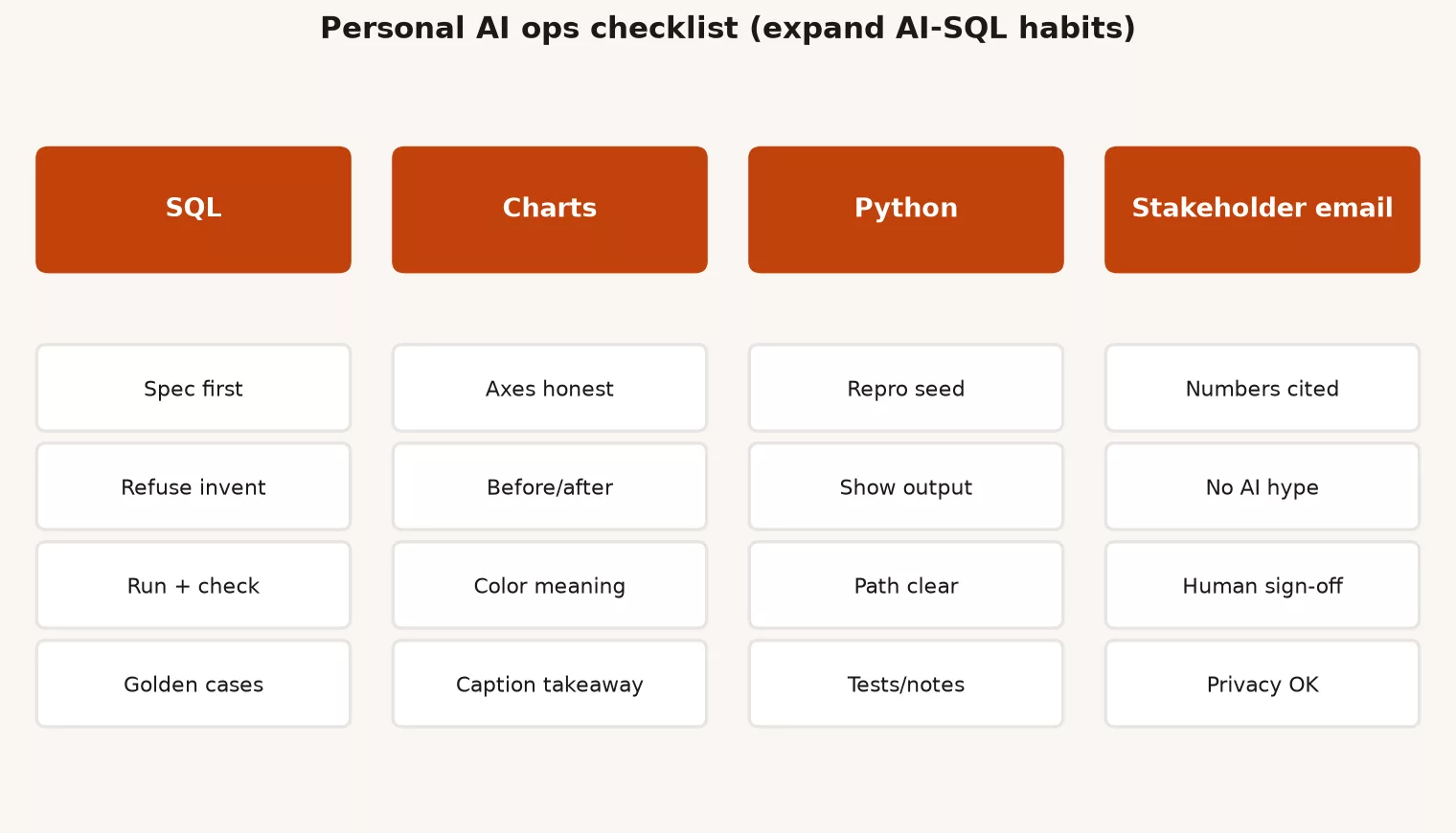
SQL: the short version of the classic checklist
The full guide to checking AI-written SQL still lives in its own post. For your personal board, squeeze it down to five gates that you never skip. Each gate is a question, and each one has a sign that tells you it failed.
| Gate | Question | Fail signal |
|---|---|---|
| Grain | One row means what? | You cannot finish the sentence |
| Joins | Every join type justified? | Unexpected row fan-out |
| Filters | Tenant, date, status present? | Open-ended prod scans |
| Names | Tables and columns exist? | Invented fields in the draft |
| Reconcile | Small window matches a known number? | “Looks fine” without comparison |
The prompting habit from the earlier post on prompts still pays off: ask for the SQL first, the explanation second, and tell the model to refuse to invent columns. The privacy habit from the post on pasting data into chat tools applies here too, so in any tool your company has not approved, share only the table layout and made-up sample rows.
-- Pre-ship micro check (keep next to the AI draft). 1) Grain uniqueness on the business key. 2) One-day totals vs trusted dashboard
SELECT COUNT(*) AS rows_n,
       COUNT(DISTINCT order_id) AS orders_n,
       ROUND(SUM(amount), 2) AS revenue
FROM analytics.certified.weekly_order_facts
WHERE week_end_date = DATE '2026-02-28';
This query counts the rows and the distinct orders for one week and adds up revenue. If the row count and the order count differ, some orders appear twice; if the revenue does not match your trusted dashboard for that week, the AI’s draft is not ready to ship.
Charts
AI is good at suggesting chart types and writing the plotting code. It is also good at making chart mistakes with total confidence, such as axes that start in the wrong place, rainbow heatmaps, two-scale charts that mislead, and pie charts with twelve slices. These are the gates for your board:
- Purpose first: decide whether you are exploring or explaining, because the two jobs allow different amounts of clutter.
- Honest encoding: bars that show sizes should start at zero unless you clearly label a rare exception, and line charts should make the scale easy to read.
- Color with meaning: use it to tell things apart, never as decoration, and keep it readable for your audience.
- A title that makes the point: write the takeaway, and skip labels like “Chart 1.”
- A data source note: show what one row means, the date range, and what you left out, either on the chart or in an appendix.
- No secret pastes: when the real labels are personal, give the AI a made-up series to help with the redesign.
When the AI hands back plotting code or dashboard (a screen of charts that tracks key numbers) steps, run the code or rebuild the chart yourself, then ask whether it would pass the honesty bar from the earlier post on visualization. If the model proposes two vertical axes “to show both stories,” treat that as a warning sign. It is not a gift.
# Chart self-check prompt add-on
Before plotting, restate:
- question the chart answers in one sentence
- x encoding, y encoding, mark type
- what would make this misleading
Refuse dual axes unless I explicitly allow them.
Use the synthetic table I provide; do not invent series names from my company.
Python notebooks
Notebooks are where AI shines and where quiet bugs hide. Typical examples are joining on the wrong column, a fill step that invents zeros, a grouping that changes what one row means, and file paths that only work on the author’s computer. These gates catch most of them:
| Gate | What you do | Pass criteria |
|---|---|---|
| Inputs | Print shape, dtypes, head on real load | Matches expectations before transforms |
| Grain | Assert uniqueness on business keys after merges | No silent fan-out |
| Missingness | Count nulls before/after fill | Fills are intentional and documented |
| Reproducibility | Pin versions or note environment | Someone else can re-run the idea |
| Side effects | No unreviewed writes to prod paths | Exports go to sandbox first |
| Secrets | No keys in notebooks or prompts | Env vars / secret store only |
# Minimal post-AI merge guard
import pandas as pd

left = pd.read_csv("synthetic_orders.csv")
right = pd.read_csv("synthetic_customers.csv")

before = len(left)
merged = left.merge(right, on="customer_id", how="left", validate="m:1")
after = len(merged)

assert after == before, f"fan-out: {before} -> {after}"
assert merged["customer_id"].isna().mean() < 0.05, "too many unmatched customers"
print("merge gate passed", after)
This Python check joins orders to customers and stops with an error if the join adds rows (one order matched to two customers) or if more than 5% of orders found no customer. Run it after any AI-written merge, because both problems change totals without any visible error.
Even if the model wrote the merge, you still own the assert (the line that stops the code when something looks wrong). The earlier post on agents and tools made the same point at a larger scale: code runs with checks around it, and nobody trusts it blindly.
Emails to stakeholders
This is where good analysts get sloppy, because writing an update feels like “just communication.” An AI-written update can sound certain when it should not, tuck the uncertainty away, or repeat a wrong number in perfect prose. Use these gates before you hit send:
- Where each number came from: every headline figure traces back to a query, dashboard, or notebook cell that you ran yourself.
- A clear time window: “week ending 28 Feb” beats “recently.”
- Uncertainty in the open: mention partial weeks, known pipeline (the automatic steps that load data) delays, and definitions that people may read differently.
- A clear ask: say what you need from the reader, whether that is a decision, awareness, or help getting unstuck.
- No sensitive rows in the thread: send totals and links to controlled tools, and skip the CSV (a plain spreadsheet-style text file) attachments.
- Your own tone: cut the hype and the fake precision, such as “precisely 12.473%” when the process is noisy.
# Stakeholder update skeleton (AI may draft; you fill numbers)

Subject: Weekly net revenue (week ending 2026-02-28): needs Finance glance on refunds

Body:
1) Headline: net revenue $X (vs $Y prior week, Z%)
2) Drivers: top 2 regions / products with sources
3) Caveats: refunds pipeline delayed 4h Monday; final may move ±0.5%
4) Ask: confirm we still exclude test orders from board pack
5) Links: certified dashboard + dictionary card (not a personal extract)

Numbers source: analytics.certified.weekly_order_facts, run 2026-03-02 09:10 by me
AI used: draft wording only; figures entered by hand from query
The last two lines of that template matter most. They record that the AI drafted the wording and that you typed the figures by hand from a run you can defend. That small note is your ownership stamp.
Gates that apply to every kind of work
Pin these five above the four sections on your board, because they apply no matter what you are making.
- Is the tool approved? Consumer chat, enterprise chat, and your company’s internal tools carry different rules, as the privacy post explained.
- Is the paste safe? Send the table layout, made-up rows, or totals, or stop.
- Is there a tiny test? Run one known-answer check or a spot-check before you scale anything up, as the post on evals suggested.
- Can an agent (an AI tool that takes several steps on its own to finish a task) act? If a tool can write files or send messages, a person approves each side effect.
- Do the docs need updating? If your work changes an official definition, have a person verify the dictionary entry, as the documentation post described.
A fifteen-minute weekly check-up
Daily gates catch bad drafts. A weekly check-up catches slow drift: new tools creep in, old pastes pile up, and your set of test questions goes stale.
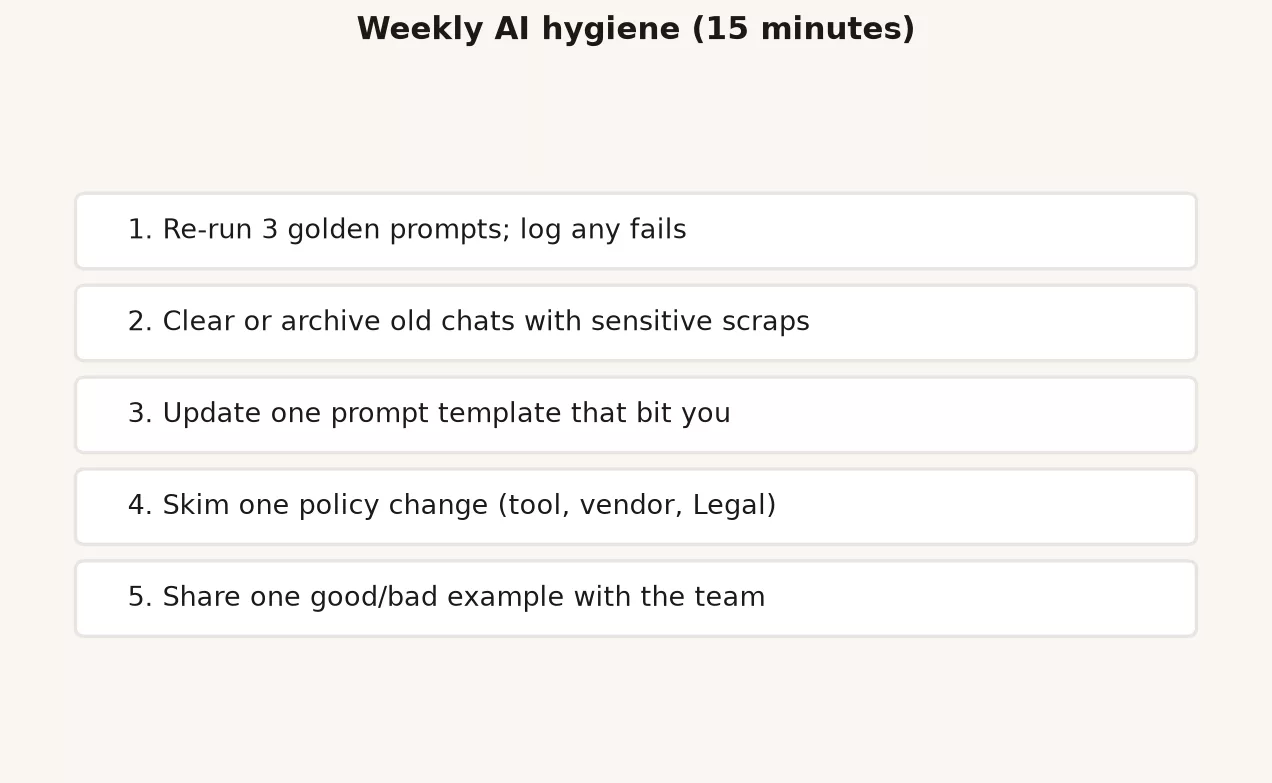
| Minute block | Action | Done when |
|---|---|---|
| 0 to 3 | List AI tools you used this week for work | Each has approved/unknown status |
| 3 to 6 | Scan for risky pastes (memory + chat history policy allows) | Deletes or escalations noted |
| 6 to 9 | Re-run one golden SQL or Python check from your set of 10 | Pass/fail logged |
| 9 to 12 | Update one dictionary card or do-not-use rule if anything changed | last_reviewed bumped or N/A |
| 12 to 15 | Pick one improvement for next week (prompt template, assert, chart rule) | Single sticky note, not a manifesto |
# Weekly AI hygiene log (keep in team wiki)

week_of: 2026-03-02
tools_used: [company_enterprise_chat, local_notebook]
unknown_tools: []
risky_pastes_found: 0
golden_check: weekly_net_revenue_2026-02-28 (pass)
dict_updates: none
next_week_focus: "add merge validate=m:1 to churn notebook template"
notes: "refused dual-axis suggestion on exec chart"
When to say no to AI help
A checklist is no instruction to use AI for everything. Say no, or go offline, in these situations:
- The only way to write the prompt is to paste data you are not allowed to share.
- You could not explain your method if someone challenged it in five minutes.
- The task is a production write, an access grant, or a legal decision.
- You are too tired to verify the result, and the deadline is political rather than real.
- The model keeps inventing table layouts after two corrections, which means you should fix the context you gave it instead of hoping for better luck.
Saying no is a senior habit. Speed that creates rework or an incident was never speed.
One workday, four artifacts, one checklist
In the morning the AI drafts SQL for regional net revenue. You pass the gates for row meaning, filters, and reconciling against a known number. Around midday it suggests a bar chart, you reject the truncated axis, and you ship a zero-baseline chart with a source note. In the afternoon it sketches pandas code to attach each customer’s plan tier, so you add an assert for merge fan-out (extra rows created by a bad join) and send the export to a sandbox first. At the end of the day it drafts the stakeholder email, and you overwrite every number with the morning query’s results, add the refund caveat, and send it.
That is the same five steps four times, with different checks for each surface. It is what personal AI operations looks like in practice.
Common mistakes
| Mistake | Why it hurts | Better habit |
|---|---|---|
| SQL checklist only | Bugs move to charts and email | Four-lane board |
| No weekly hygiene | Tool sprawl and paste drift | Fifteen-minute Friday |
| AI numbers in email | Fluent wrong headlines | Hand-entered figures from runs |
| Skipping asserts in Python | Silent join fan-out | validate and count gates |
| Chart cosmetics over honesty | Pretty misleading decks | Encoding and axis checks first |
| Never refusing | Policy and quality failures | Stop rules on the board |
How to practice this week
- Copy the four-section board into your notes app, and keep it open for five workdays, so the habit forms on real work instead of staying a plan.
- Build a starter set of 10 prompts and checks: mix SQL, one chart, one Python task, and one email skeleton.
- Run the fifteen-minute check-up once, and log it even if everything passes.
- Share the board with one teammate so you agree on which tools are approved and what may be pasted.
- Pick one link to other work: update a dictionary entry that AI touched, or a request habit from the stewardship series.
Quick recap
- Personal AI operations means purpose, constraints, draft, verify, and own the result.
- Stretch your SQL gates to cover charts, Python, and stakeholder email.
- Five gates apply everywhere: an approved tool, a safe paste, a tiny test, a person approving side effects, and updated docs when a meaning changes.
- Fifteen minutes a week keeps the habits from drifting.
- Knowing when to say no belongs in the system.
The whole series in one table
This series is the practice layer of AI for people who already ship analysis. Background vocabulary still lives in older AMS posts on large language models and vector databases. The table below is the Monday system, one row per post.
| Part | Focus | Monday habit |
|---|---|---|
| I1 | What AI can and cannot do for analysis; assist vs replace; liability for numbers | State what the model is allowed to draft vs what you must own |
| I2 | Tokens, context windows, cost intuition | Prefer small relevant context; chunk long pastes; watch cost |
| I3 | Prompt patterns for data work | Specs, constraints, SQL-then-explain, refuse invented columns |
| I4 | Evals for humans | Spot-checks, golden questions, a regression set of about 10 prompts |
| I5 | RAG in plain English | Retrieve the right docs; do not pretend the model memorized your wiki |
| I6 | Agents, tools, harnesses | Guardrails, least privilege tools, human-in-the-loop for side effects |
| I7 | Privacy when pasting into chat tools | Never list, risk ladder, synthetic samples, pre-paste card |
| I8 | AI for documentation and data dictionaries | Draft then verify; no certified fiction |
| I9 | Personal AI checklist (ops) | Four-lane board + weekly hygiene |
If you only remember five lines from the whole series, make them these:
- AI drafts, and you own the numbers, the plots, and the messages.
- Small, structured context beats giant pastes for quality, cost, and privacy.
- Known-answer checks beat a shrug of “looks good.”
- Agents need limits, pastes need a risk ladder, and dictionaries need a human to verify them.
- A personal board keeps the habits alive after the excitement fades.
Where to go next
You do not need another nine posts to start. You need the board, the SQL checking post, and the craft skills underneath AI.
- Learn hub for the full path map across SQL, Python, quality, metrics, pipelines, stewardship, and AI
- How to check AI-written SQL before you ship it for the original query gates
- Data stewardship at work for the privacy, access, and legal habits that make safe pasting real
- Data quality for checks that catch bad drafts before stakeholders do
- Metrics that matter for definitions worth putting in dictionary entries
- What are large language models? and Vector databases for the background vocabulary behind retrieval-based AI
Two standalone posts may follow later: how to choose a model for work by weighing speed, cost, and company policy, and a short one on sending charts and screenshots to models, with the same paste risks. Until those exist, the board above is enough to work safely and usefully.
Practical AI for analytics people is about keeping your judgment while machines type faster. Run the board, verify the outputs, protect the people in your data, and publish a definition only after it is true. That is the whole job.
Series notes
This closes Practical AI for analytics people. It is Part 9 of nine. Earlier posts covered limits, tokens, prompts, evals, retrieval, agents, privacy, and documentation.
Sources
- National Institute of Standards and Technology (NIST) AI Risk Management Framework (govern, map, measure, manage as an ops mindset for AI use).
- NIST AI RMF 1.0 publication (core structure for organizational AI risk practices).
- Open Worldwide Application Security Project (OWASP) Top 10 for Large Language Model Applications (overreliance, sensitive disclosure, excessive agency; design stop rules accordingly).
- NIST Privacy Framework (privacy risk outcomes that weekly hygiene and paste rules support).
- International Association of Privacy Professionals (IAPP): Glossary of privacy terms (shared language when ops checklists mention personal data).
- EUR-Lex: General Data Protection Regulation (GDPR) official text (high-level personal data principles; not a substitute for counsel).
- International Organization for Standardization (ISO) 42001:2023 AI management systems (organizational AI management system concepts for teams that need program language).
- Analytics Made Simple: How to Check AI-Written SQL.
- Analytics Made Simple: Learn.
- Analytics Made Simple: Data stewardship at work.
- Analytics Made Simple: Data quality.
Keep going
Same lessons in your feed
Short diagrams, hooks, and weekly tutorials on Substack, Instagram, X, and Facebook.



