
Learn data skills in order, one at a time: first SQL (the standard language for asking a database for data), then Python, then AI tools, with a small weekly plan for each step. Say you bought three courses and bookmarked forty videos, yet you still cannot answer a simple interview question such as “Walk me through how you would check last month’s revenue.” Motivation is not the problem. Your learning looks like a browser history, not a plan: a week of SQL, then a shiny Python notebook (a document that mixes code, results, and notes), then an AI chatbot that writes both for you until you cannot fix either one.
This post is a stand-alone guide to building a personal learning plan that moves you from solid SQL to practical Python and then to AI tools, without skipping the foundation. You will leave with a skill ladder, a weekly template and a worked example for someone with about eight hours a week. It is a plan you can actually follow.
Why “I’ll just learn as I go” stalls
Learning as you go works when the work itself comes in a sensible order, but many analyst jobs do not. One week you clean a CSV (a plain spreadsheet-style text file) file, the next week someone asks for a chart of customer groups, and then leadership wants something with AI. Your calendar becomes a random sample of whatever is fashionable in the industry, and it is not a curriculum.
Three failure modes show up again and again.
- Tool hopping: you start SQL, see a viral Python video, jump to pandas, and then switch to a no-code AI demo, so none of the skills build on each other.
- Passive consumption: you watch full courses without writing any queries or scripts, and your confidence feels high until you face a blank editor.
- Leaning on AI too early: the model writes a join you do not understand, and when the number is wrong you cannot audit it. To learn how to check AI-written SQL specifically, see our tutorial on how to check AI-written SQL.
A personal plan fixes the order. You decide what good enough looks like at each stage before you add the next tool. That sounds boring on paper, and it feels freeing in practice.
The skill ladder: SQL, then Python, then AI
Think of three layers that stack, and not of three separate careers.
Layer 1: SQL as your thinking language
SQL is how you talk to the data in a warehouse, through filters, joins, totals, window functions and grain. Grain means what one row of a table stands for. If you cannot finish the sentence “one row means…” and prove it with a query, Python will only make the mess faster, and AI will only make the mess look polished.
The minimum skill for an analyst path, as opposed to an engineer path, looks like this.
- The basic clauses
SELECT,WHERE,GROUP BYandHAVING, used with the correct grain. - Inner and left joins that do not accidentally repeat rows.
- If-then logic, written with
CASE, for business rules. - Window functions for rankings, running totals and comparisons between periods.
- Named steps at the top of a query, called common table expressions, that read like a story and replace nested subqueries that nobody trusts.
When you can rebuild a weekly key number from fairly raw tables and explain every filter, you are ready to add Python. For structured practice, use the SQL series on this site and the broader paths on Learn.
Layer 2: Python as your workshop
Python is not a better SQL. Think of it as the workshop next door, where you handle APIs (connections that let programs ask other programs for data), files, charts, tests, automation and light modeling. Analysts who learn Python well use it for the jobs SQL does awkwardly, and they do not rewrite every warehouse query in pandas just because a blog told them to.
The minimum skill for a practical analyst plan looks like this.
- Virtual environments, which are isolated sets of installed packages, and a simple project folder layout.
- pandas, a Python library, for table work that you already understand in SQL terms.
- Reading CSV or Parquet files, basic joins, grouping and sanity checks.
- A plotting library, used well enough to make one honest chart and not twenty chart types.
- Functions, small scripts and a README file (a short note that explains the project), so that you can re-run the work next month.
Pair this layer with the Python series when you want progressive practice. The point of the plan is not to finish Python. It is to complete two analyses from start to finish, where SQL feeds Python or Python feeds a clear decision.
Layer 3: AI as a multiplier you can audit
AI tools, such as chat assistants, coding copilots and document question-and-answer tools, help when you already know what a correct answer looks like. They hurt when you use them to skip the fundamentals. Your plan should introduce AI only after you can do three things.
- Spot a wrong join or a wrong grain in SQL.
- Read a short Python script without panic, because you need to check what AI-written code does before you trust its numbers.
- State the business question before you paste anything into a model.
After that, practice a disciplined loop. Ask the model for a draft, restate the logic in your own words, run checks, and only then ship the result. To learn the concepts behind these models and generative tools, start with what LLMs and generative AI actually are (LLMs, or large language models, are the AI behind chatbots) and the Practical AI series.
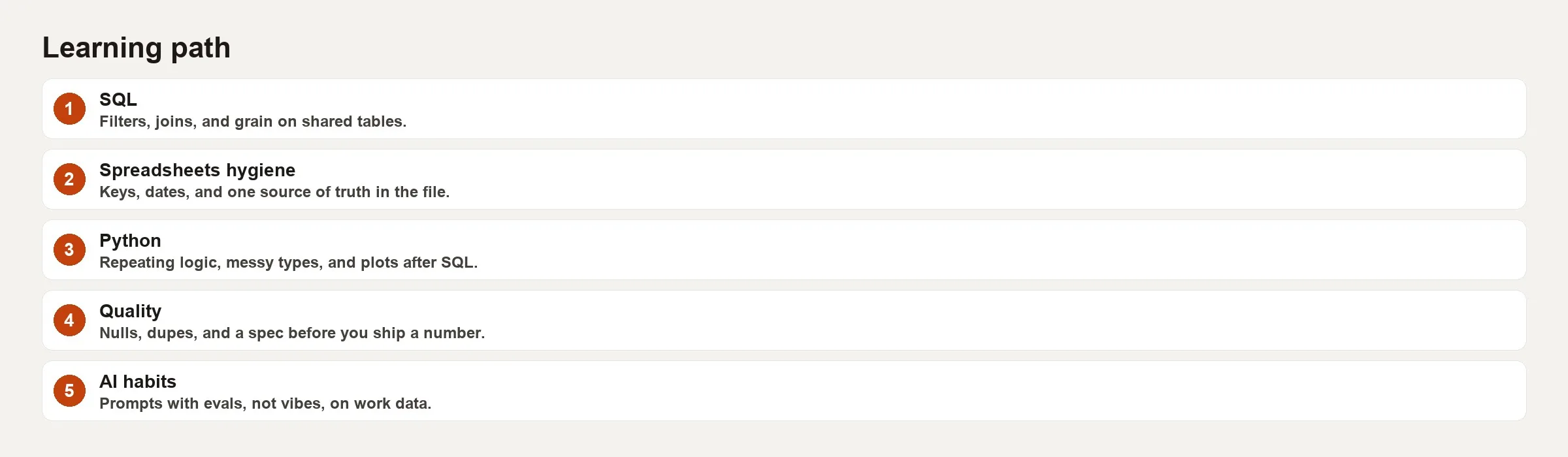
The diagram is a ladder and not a menu. You can peek at the higher rungs for motivation, but you should not live there until the rung below has proof, and proof means projects and not certificates alone.
Write goals as proof, not vibes
Vague goals such as “get better at SQL” invite endless scrolling, while goals that require proof invite practice. Use this template.
By a set date, I can demonstrate a specific skill with a specific file, checked by a specific rule.
Here are three examples.
- By week 4, I can write a chain of named query steps that computes weekly active users and retention, saved as
wau_retention.sql, with a one-page note on grain and edge cases. - By week 8, I can load that result into Python, chart it and write a three-paragraph decision memo for a fictional product lead.
- By week 12, I can use an AI assistant to draft a variant query, and then catch at least two deliberate mistakes that I planted in the prompt history.
Notice that each goal names a file. Screenshots of course progress are weak proof, while files you can re-run and short write-ups are strong proof. Hiring managers prefer the second kind, and so will you when you look back months from now.
Budget hours like a scarce resource
Many learners overestimate what they will do on a heroic weekend and underestimate what small weekday slices can add up to. Design your plan for the schedule you already have.
| Weekly hours | Realistic focus | What to cut |
|---|---|---|
| 4 hours | One layer only (usually SQL) for 8-10 weeks | Side tools, multiple courses, AI deep dives |
| 6-8 hours | Primary layer + light secondary (notes, tiny scripts) | Long video marathons; prefer docs + practice |
| 10-12 hours | Two layers with clear split (e.g. 7 SQL / 4 Python) | Social comparison projects that expand forever |
| 15+ hours | Faster ladder, still proof-based | Tool shopping disguised as learning |
Split each study block into three parts. In the learn part you do a short reading or study one concept. In the do part you write a query or a script. In the reflect part you write five sentences on what broke. Reflection is not optional fluff, because it is how you stop repeating the same join mistake for six months.
A sample 12-week path
This plan assumes roughly eight hours a week and some access to sample data, either from public datasets or from a company sandbox. It does not expect you to become a platform engineer.
Weeks 1-4: SQL proof
- Week 1: filters, totals and grain checks on one table.
- Week 2: joins, and checks for repeated rows using row counts before and after.
- Week 3: if-then rules and a documented definition of a key number.
- Week 4: window functions and named query steps, ending with
kpi_v1.sqland a one-page definition.
Weeks 5-8: Python workshop
- Week 5: set up your environment and project folder, and load the same key number output as a file.
- Week 6: repeat transforms you already understand from SQL, and check the row counts in code.
- Week 7: one clear chart and a short memo.
- Week 8: reorganize the code into functions and add a README that explains how to re-run it.
Weeks 9-12: AI with a leash
- Week 9: use AI to draft SQL only after you write the question and the expected grain by hand.
- Week 10: hunt for errors on purpose, such as wrong join keys and time zone traps.
- Week 11: use AI to help clean up your Python, while you keep ownership of the tests and the README.
- Week 12: package one story that is ready for a portfolio, with the question, method, checks and decision.
If eight hours is too much, stretch each block to six weeks. Do not speed through by deleting the checks, because speed without checks is how you end up producing confidently wrong analyses.
A worked example: an eight-hour week
Say you lead a customer support operations team and want an analytics role. You have Tuesday and Thursday evenings, 90 minutes each, and about five hours on Saturday morning. You do not have a warehouse job yet, so you use a public e-commerce sample dataset, a free SQL editor and a local Python install.
Your main proof for the 12 weeks is this: publish a folder in a code repository (a project’s folder of code and its history) with (1) SQL that defines weekly revenue and repeat-purchase rate, (2) a Python notebook turned into a script that charts both, (3) a one-page memo that a fictional merchandising lead could act on, and (4) a short log of the AI prompts you rejected and why.
A single week in the middle of the SQL month might look like this.
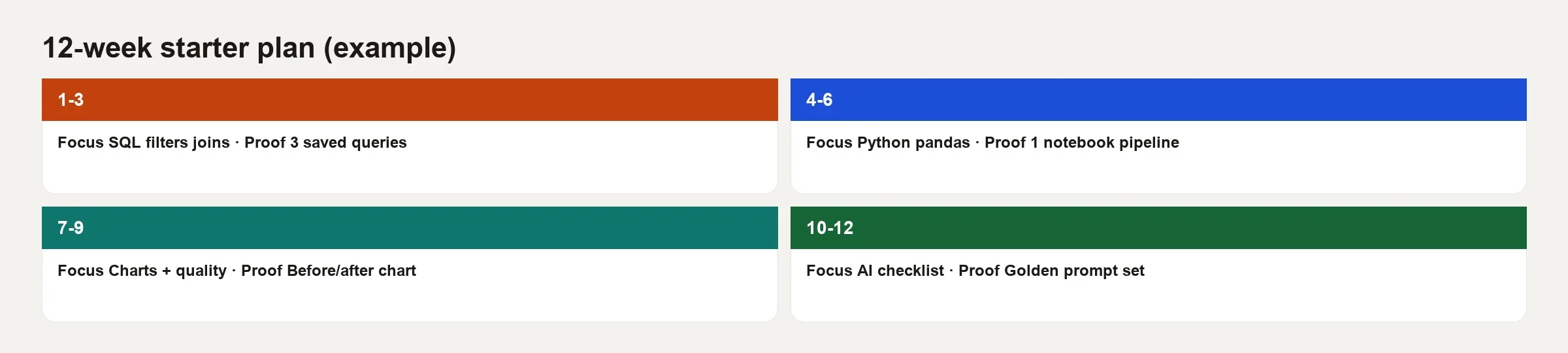
Here is the same week as a simple schedule table that you can paste into a notes app.
| Block | Time | Learn | Do | Reflect |
|---|---|---|---|---|
| Tue | 90 min | Read one join pitfall note | Write join of orders + customers; compare row counts | What fan-out risk did I miss? |
| Thu | 90 min | Skim window function examples | Add lag for prior-week revenue | Did the window partition match grain? |
| Sat AM | 5 hr | 15 min review of notes only | Ship CTE version + save weekly_revenue_v2.sql | Write five sentences for the definition doc |
Your mid-plan SQL proof for repeat purchases might start like this. It uses a toy schema (the layout of tables and columns), so focus on the structure.
WITH order_facts AS (
  SELECT
    o.order_id,
    o.customer_id,
    DATE_TRUNC('week', o.order_ts) AS order_week,
    o.order_amount
  FROM orders o
  WHERE o.status = 'completed'
),
customer_weeks AS (
  SELECT
    customer_id,
    order_week,
    SUM(order_amount) AS revenue,
    COUNT(*) AS orders
  FROM order_facts
  GROUP BY 1, 2
)
SELECT
  order_week,
  COUNT(DISTINCT customer_id) AS active_customers,
  SUM(revenue) AS weekly_revenue,
  SUM(CASE WHEN orders >= 2 THEN 1 ELSE 0 END) AS multi_order_customers
FROM customer_weeks
GROUP BY 1
ORDER BY 1;
This query works in three steps: it picks completed orders and tags each with its week, totals each customer’s orders and revenue per week, and then counts, for each week, the active customers, the revenue, and the customers who ordered at least twice. The last number is the repeat-purchase signal the plan is about.
Your reflection after the first run might read, “I treated repeat orders as same-week only. The merchandising question might mean a repeat within 30 days. I need a definition line before I chart this.” That sentence is more valuable than three more tutorials. Later, when you invite AI to rewrite the query, you already know what wrong answers look like.
In the Python weeks you save the SQL output to a file, so learning pandas does not turn into debugging the warehouse and the notebook at once. In the AI weeks you keep a rejection log like this one.
# ai_rejection_log.md (excerpt)
- Prompt: "join customers to orders"
  Rejected: model used INNER JOIN; we need customers with zero orders for funnel.
- Prompt: "weekly revenue by region"
  Rejected: model filtered test orders after aggregation; fixed by moving filter earlier.
That log is great material for an interview, and it works as personal quality control. It also keeps AI in the role of a multiplier.
Resources that fit the ladder, and not a shopping list
Pick one main resource for each layer and stop browsing. Here are some free or low-effort examples.
- SQL: the official docs for the database engine you use, such as Postgres, BigQuery or Snowflake, plus practice from the Analytics Made Simple SQL series.
- Python: the official tutorial plus the pandas user guide for the operations you already do in SQL.
- AI literacy: overviews that are not tied to one vendor, plus the Practical AI series here, always paired with habits for verifying results.
If your work later involves data pipelines or metric definitions, you can branch into the data pipelines and metrics series after the ladder and not instead of it.
Common mistakes
- Collecting courses like trading cards: one finished path beats five badges for courses you only started.
- Skipping grain and definitions: fancy window functions on a broken grain still produce wrong dashboards.
- Learning Python only through notebook demos: if you never re-run the work from a clean environment, you did not learn how to package it for real work.
- Letting AI write unchecked SQL: you end up practicing how to type prompts instead of practicing analysis.
- No public or private portfolio piece: without a file and a write-up, your brain drops the skill as soon as the next shiny topic appears.
- Comparing your week 2 to someone else’s year 5 on LinkedIn: plans die from unfair comparisons, so track only your own proof.
- All input and no output: if a week has no saved queries or scripts, it was entertainment.
Quick recap
- Random tutorials feel productive and rarely build on each other, while a ladder in a clear order does.
- Learn SQL first for thinking and for the truth in the warehouse, Python second for workshop power, and AI third as a multiplier you can audit.
- Goals need files and check rules and cannot run on good feelings.
- Budget the hours you really have, and split each block into learn, do and reflect.
- The 12-week sample path is a template and not a rulebook, so stretch it before you skip any checks.
- A rejection log for AI drafts turns the tool into training and keeps you from relying on it for everything.
Practice: 30 minutes this week
Open a blank document and write four short sections.
- Hours I truly have: a real number for the next 12 weeks and not a fantasy number.
- Layer I am on: SQL, Python or AI with a leash. Pick one main layer.
- Proof goal: one sentence that names the files you will produce.
- This week’s three blocks: a learn block, a do block and a reflect block, each with a time on your calendar.
Then create a folder called learning-plan/ with proofs/ and notes/ inside it. Save one tiny file today, even if it is a 15-line query. The plan becomes real when the folder is not empty.
If you want structured modules after the plan exists, browse Learn and stick to the path you wrote down.
Sources
- PostgreSQL official documentation (SQL reference for a common teaching dialect): https://www.postgresql.org/docs/current/
- Python Software Foundation, The Python Tutorial: https://docs.python.org/3/tutorial/
- pandas documentation, user guide: https://pandas.pydata.org/docs/user_guide/index.html
- Mode Analytics SQL Tutorial (free structured SQL practice many analysts use): https://mode.com/sql-tutorial/
- Google, People + AI Guidebook (practical AI product and use considerations): https://pair.withgoogle.com/guidebook/
- NIST AI Risk Management Framework (organizational risk framing for AI use): https://www.nist.gov/itl/ai-risk-management-framework
Keep going
Same lessons in your feed
Short diagrams, hooks, and weekly tutorials on Substack, Instagram, X, and Facebook.



