
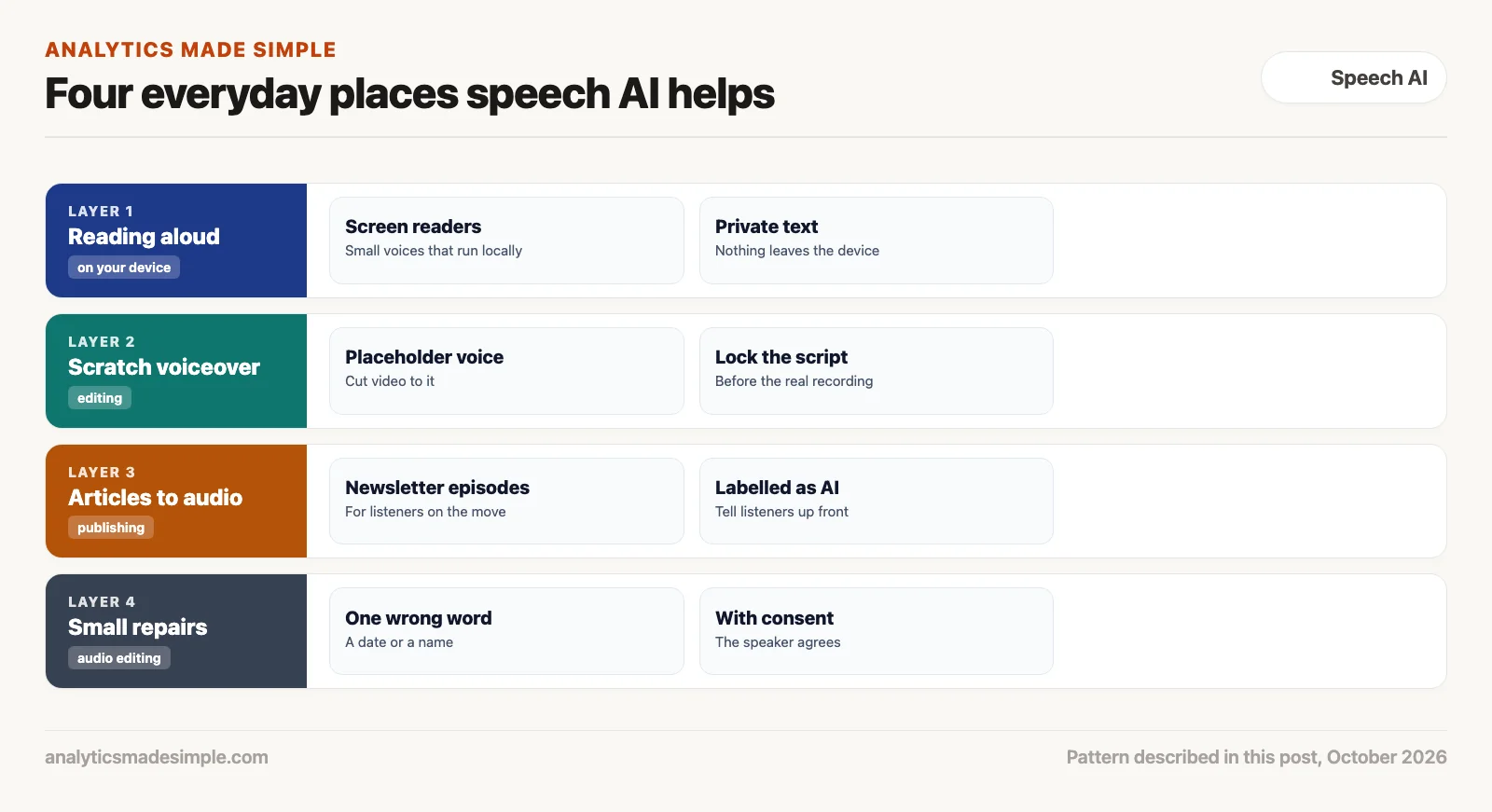
Speech AI is most useful in everyday work in a few modest places: reading text aloud for people who need it, giving video editors a stand-in voice to cut against, turning articles into audio, and fixing a wrong word in a recording. Each one works best with a little care over pronunciation and volume.
Say you publish a weekly newsletter and want an audio version for readers who commute. You paste an issue into a tool that reads text aloud. It spells out a technical term letter by letter, gets a product name wrong, and comes out much quieter than every other show in your listener’s app. All of that is fixable. You just need to know where to look.
This post covers reading aloud for accessibility, telling a voice exactly how to say a word, scratch voiceovers for video, articles and small repairs for podcasts, getting the volume right, and a short program that handles pronunciation and loudness.
Reading aloud for accessibility
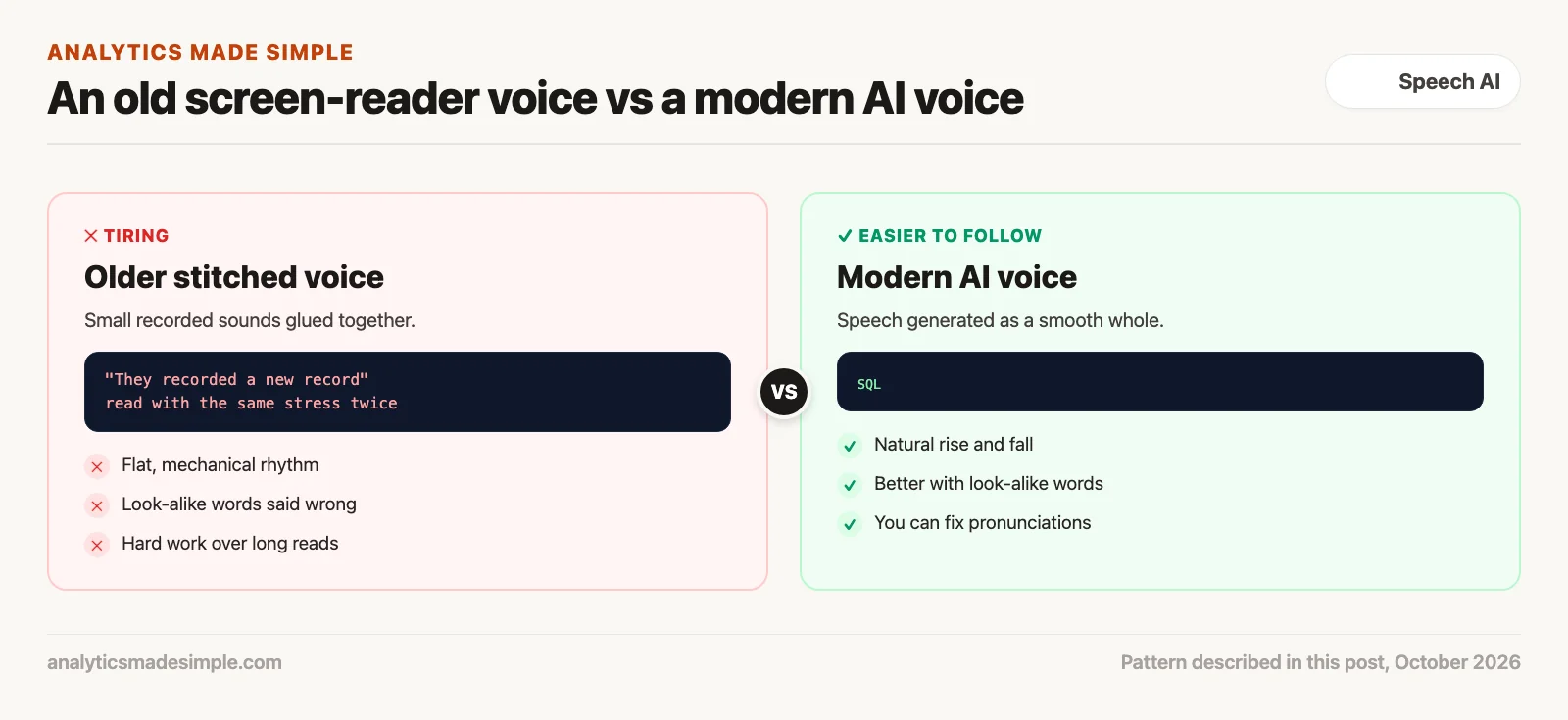
Screen readers read on-screen text aloud for people who are blind, have low vision, or find reading hard. Older voices were built by gluing small recorded sounds together, which gave them a flat, mechanical rhythm that can be tiring over long reads. Many people still choose those voices because they stay clear at high speed. So ask users first. The WebAIM Screen Reader User Survey is a good place to learn how people actually use these tools.
Newer AI voices generate speech as a smooth whole, so the rise and fall of a sentence sounds more natural. They also tend to handle words that are spelled the same but said differently, like “read” in “I read it yesterday” and “please read this.” Small open models, such as Kokoro-82M (Apache-2.0 license), can run on an ordinary computer, which keeps private text on the device.
Tell the voice exactly how to say a word
Pronunciation is the hard part. Getting it right is often harder than getting a natural sound. A technical article is full of acronyms, product names, and code words that a voice will guess at. Speech Synthesis Markup Language (SSML), a W3C standard, lets you mark up text with instructions such as “say this word like that” or “pause here.” Many speech services accept it, though each supports a different set of tags, so check your tool’s documentation.
<speak>
  Today we query the data with <sub alias="sequel">SQL</sub>.
  <break time="250ms"/>
  Then we load it into <sub alias="A W S">AWS</sub>.
</speak>
In plain words, the sub tag tells the voice to say “sequel” where the text says SQL (the standard language for asking a database for data), and the break tag adds a quarter-second pause so the listener can take in one idea before the next.
Scratch voiceovers for video
Video edits often stall on the voiceover. You book a voice actor, the recording arrives, and then a paragraph runs too long or the wording changes, so you book another session. A scratch track, a quick AI read of the draft script, lets you cut the picture against something with real timing before anyone records.
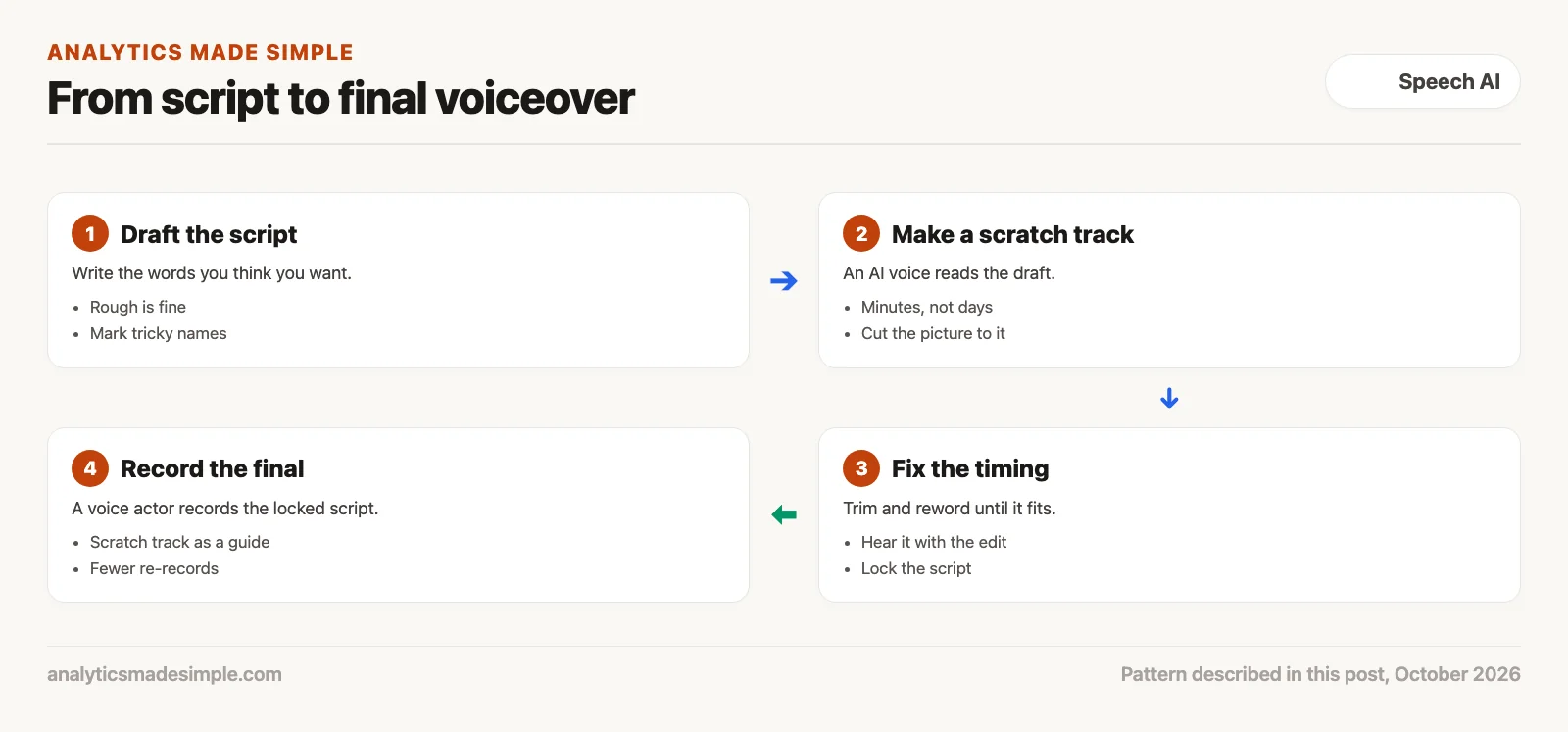
You can trim and reword during a review and hear the result in minutes. By the time the voice actor records, the script is locked, and the scratch track shows the timing the edit needs. If you plan to keep an AI voice in the final, say so to your audience and check the tool’s terms for commercial use.
Articles to audio, and small repairs
An audio version of a written article helps people who want to listen while commuting or exercising. It is not a replacement for a real conversation, so be open that it is read by an AI voice, and use the pronunciation fixes above for names and terms.
Small repairs are the other everyday use. If a host says the wrong date or misreads a web address, a voice model trained on that host’s voice can generate the one corrected phrase. Do this only with the speaker’s consent. Keep it small.
- Match the room: A clean AI clip dropped into a recording made in a real room sounds out of place. Add a little of the room’s own background sound under it.
- Blend the edges: Fade the patch in and out over a few hundredths of a second so you do not hear a click.
- Keep it short: Use it for a date, a number, or a name, a few words at most, never to change what someone meant.
Get the volume right
Volume matters too. A clean voice file can still sound wrong if it is much louder or quieter than everything around it. Loudness is measured in LUFS (loudness units relative to full scale), a scale that tracks how loud audio sounds to people. Apple’s podcast audio requirements ask for about −16 LKFS (the same scale under another name), within 1 dB, with peaks no higher than −1 dB. European broadcasters follow the European Broadcasting Union’s R128 recommendation, often written EBU R128, which sets programme loudness at −23 LUFS. Both were checked October 3, 2026.
A loudness meter tells you where your file is now. The free Python library pyloudnorm can measure it, and most audio editors include a meter.
A script for pronunciation and volume
The short Python program below does two jobs. It turns plain text into SSML (a way to mark up text with speaking instructions), swapping in the pronunciations you choose and adding a pause after each sentence. Then it works out how much to raise or lower a file to hit two loudness targets. The text and the measured loudness are made up for practice, and it needs nothing beyond Python.
# Prepare text for a speech engine, then check the loudness of the result.
# The sentences and the measured loudness are made up for practice.
import re
from xml.sax.saxutils import escape

# How you want tricky words said, written the way they sound.
SAY_AS = {"SQL": "sequel", "AWS": "A W S", "PostgreSQL": "post gress Q L"}


def to_ssml(text):
    """Wrap text in SSML: swap in pronunciations and add a short pause after each sentence."""
    parts = []
    for sentence in re.split(r"(?<=[.!?])\s+", text.strip()):
        safe = escape(sentence)  # turns & < > into safe forms
        for word, spoken in SAY_AS.items():
            safe = re.sub(rf"\b{word}\b", f'<sub alias="{spoken}">{word}</sub>', safe)
        parts.append(safe + ' <break time="250ms"/>')
    return "<speak>\n  " + "\n  ".join(parts) + "\n</speak>"


print(to_ssml("Today we copy a PostgreSQL table to AWS. Then we check it with SQL & a quick count."))

# Loudness: how much to turn the file up or down to hit a platform's target.
TARGETS = {"Apple Podcasts": -16.0, "EBU R128 broadcast": -23.0}
measured = -19.4  # what a loudness meter reported for your file, in LUFS
for platform, target in TARGETS.items():
    print(f"{platform}: change gain by {target - measured:+.1f} dB")
Running it prints:
<speak>
Today we copy a <sub alias="post gress Q L">PostgreSQL</sub> table to <sub alias="A W S">AWS</sub>. <break time="250ms"/>
Then we check it with <sub alias="sequel">SQL</sub> & a quick count. <break time="250ms"/>
</speak>
Apple Podcasts: change gain by +3.4 dB
EBU R128 broadcast: change gain by -3.6 dBIn plain words, the program first makes the text safe for markup, so the “&” becomes “&” instead of breaking the SSML. It then wraps each tricky word in a sub tag with the way it should sound, and adds a short pause after each sentence. For volume, it subtracts the measured loudness, −19.4 LUFS, from each target. The file needs to come up 3.4 dB for Apple Podcasts and down 3.6 dB for European broadcast.
Pick the setup for the job
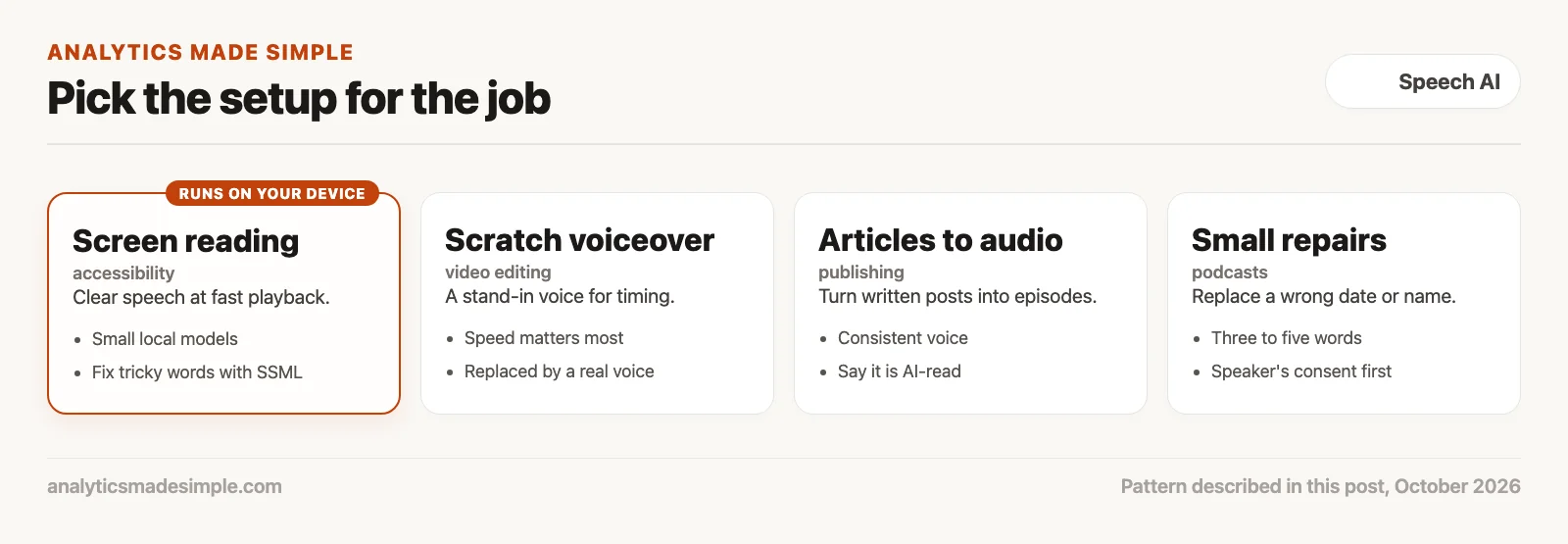
A large cloud voice is wasted on reading a screen aloud, and it sends text somewhere it does not need to go. A tiny local voice may sound flat for long narration with several characters. Match the voice to the job. Keep sensitive text on your own device when you can.
Quick recap
- Speech AI helps most with reading aloud, scratch voiceovers, article audio, and small repairs.
- Ask screen reader users what they prefer before changing voices.
- SSML lets you set pronunciation and pauses for tricky words.
- Hit the loudness target for where the audio will play, such as −16 LKFS for Apple Podcasts.
Your next step this week
Take one article you have written and list every acronym, product name, and code word in it, because terms you know well are the ones you forget to explain. Write how each should be said, put them into the program above, and listen to the result in a text-to-speech tool that accepts SSML.
Series notes
This is Part 2 of Voice models from scratch. Previous: text-to-speech, speech-to-text, and voice cloning. Next: the speech AI product map.
Sources
- W3C, Speech Synthesis Markup Language (SSML) Version 1.1.
- European Broadcasting Union, R128 loudness recommendation, checked October 3, 2026.
- Apple, Podcast audio requirements, checked October 3, 2026.
- WebAIM, Screen Reader User Survey #10 results.
- hexgrad, Kokoro-82M on Hugging Face, Apache-2.0 license.
- Christian Steinmetz, pyloudnorm, a free Python loudness meter.
Keep going
Same lessons in your feed
Short diagrams, hooks, and weekly tutorials on Substack, Instagram, X, and Facebook.



