

A merge combines two tables into one by matching rows that share a value, such as a customer ID. In pandas, the Python library for working with tables of data, you do it with pd.merge, which does the same job as VLOOKUP (the spreadsheet function that pulls a matching value from another sheet) or a JOIN in SQL (the language for asking a database questions). The one thing to watch is the row count, because a merge can quietly turn one customer into several rows and double your totals without any error.
Imagine you have two CSV files (plain text tables that any spreadsheet app can open), one listing customers and one listing their orders. You merge them, the report looks fine, and only after it goes out does someone notice revenue came out twice as high as it should. This post shows how to pick the right kind of merge and check the row count before that happens.
This post is part of a Python for analytics series for people who already think in spreadsheets or SQL and want pandas to feel like the same mental model with better repeatability. Earlier posts showed how to filter and group data. Now you will combine tables without turning one customer into twelve phantom buyers.
How merging works
Joins are matching rules, not magic
Row-count story of a simple inner merge:
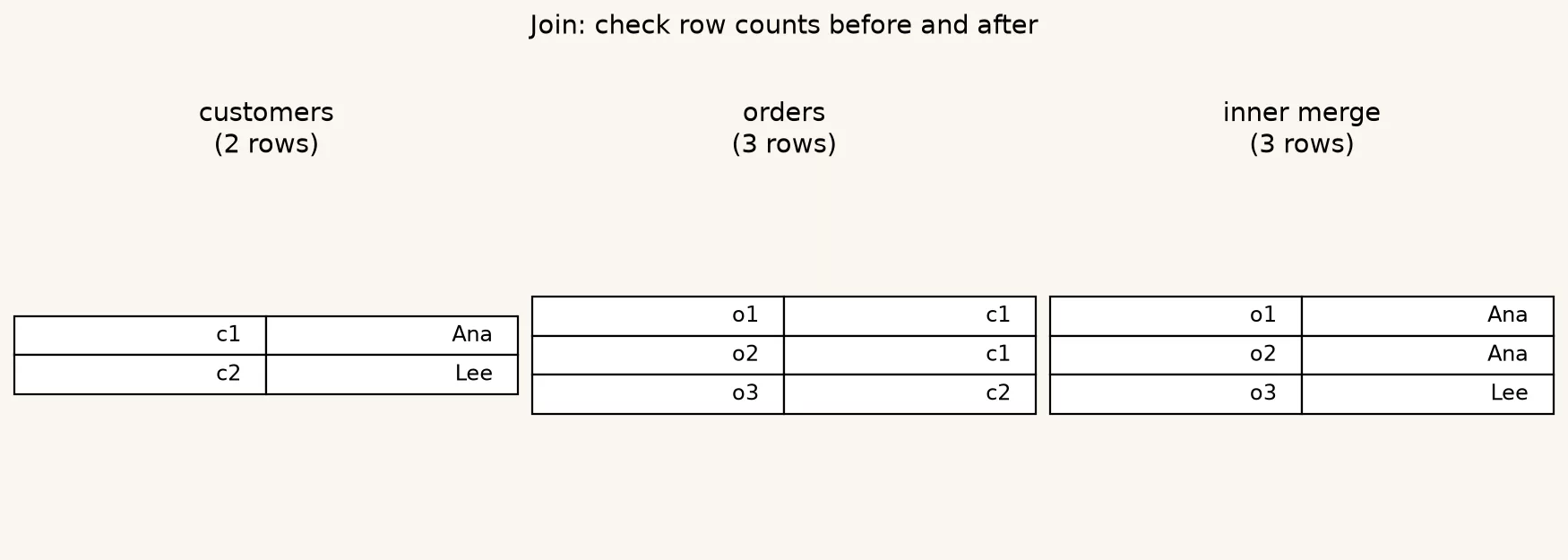
A join (or merge) answers one question: for each row on the left and each row on the right, when do we consider them the same entity and paste their columns together? The matching key might be customer_id, an email, or a combination of region and account code. Everything else is policy about what to do with unmatched rows and duplicate keys.
If you came from the SQL series, you already know INNER, LEFT, RIGHT, and FULL OUTER joins, and pandas uses the same ideas with slightly different names. If you came from spreadsheets through moving from spreadsheets to real data, think of VLOOKUP as a clumsy left join that returns the first match and gives a less helpful signal when the keys are wrong.
The skill that matters at work is not memorizing the keyword but predicting which rows survive and whether one input row can become many output rows. That prediction is how you catch bad keys before leadership sees a revenue spike that was really a Cartesian accident, meaning every row was paired with every other row.
SQL join types in pandas terms
Here is the map you will reuse constantly, so keep it next to your notebook (the Jupyter or Colab file where you run your pandas code) until it is second nature.
| SQL idea | pandas how= | Who survives | Workplace use |
|---|---|---|---|
| INNER JOIN | inner (default) | Only keys in both tables | Orders that have a known customer |
| LEFT JOIN | left | All left rows; right fills or nulls | All customers, attach last order if any |
| RIGHT JOIN | right | All right rows; left fills or nulls | Rare; usually flip tables and use left |
| FULL OUTER JOIN | outer | Keys from either side | Reconcile two lists and find mismatches |
There is also a cross join pattern, where every left row is paired with every right row, and you almost never want it for customer analytics. If your row count jumps from thousands to millions with no filter, check whether you merged without a key or with a broken key that is all nulls.
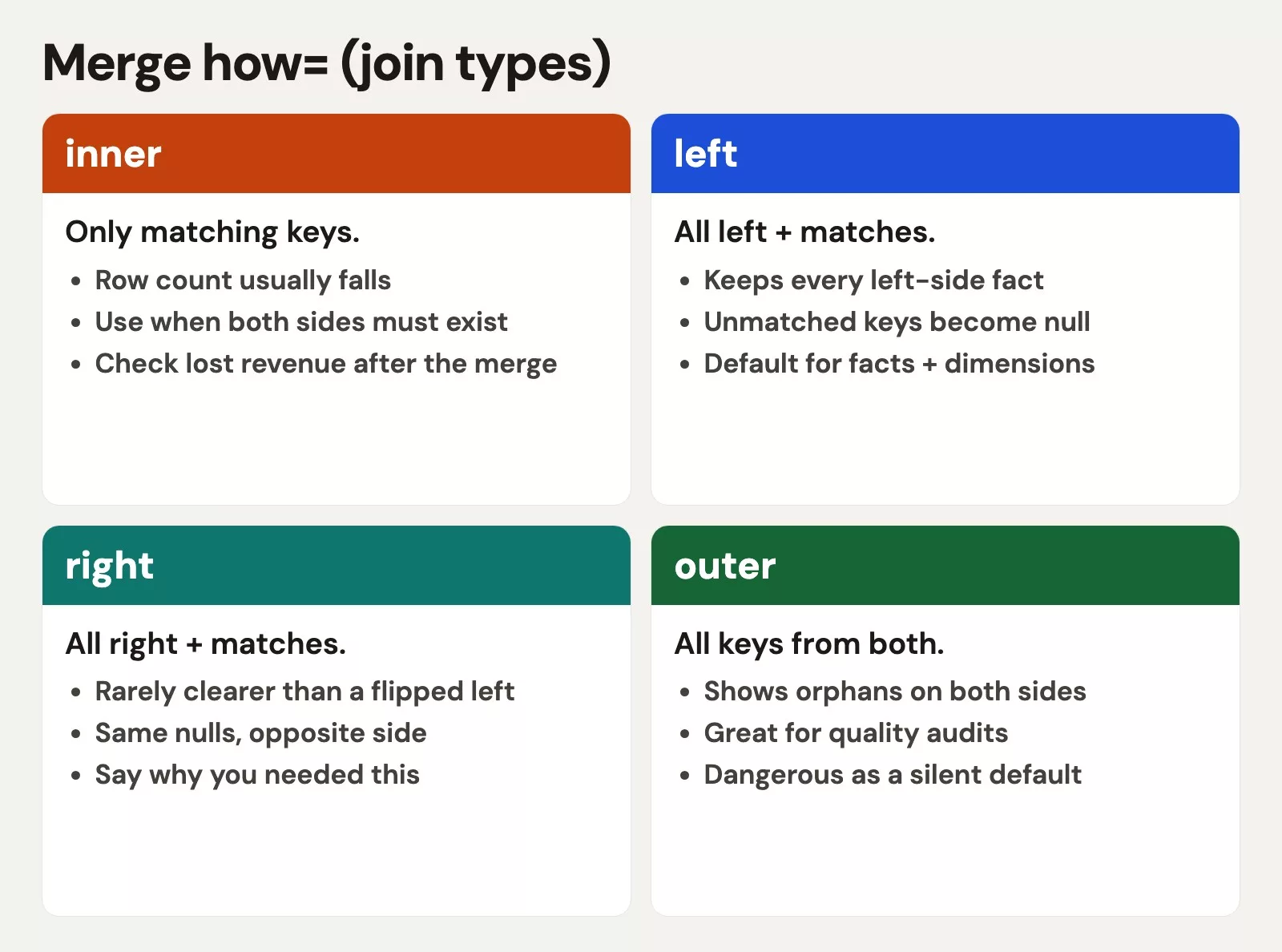
Picture two overlapping circles of keys. An inner merge keeps only the overlap, a left merge keeps the whole left circle and fills in right-side details where they match, and an outer merge keeps everything and leaves holes where one side has no partner. That picture is enough to brief a stakeholder who does not care about function names.
The core call: pd.merge
Most analytics merges look like this.
import pandas as pd

result = pd.merge(
    left_df,
    right_df,
    how="left",
    on="customer_id",
)
Example:
| how | rows_in | rows_out | note |
|---|---|---|---|
| inner | 2×3 keys | 2 | matches only |
| left | 2 cust + 3 ord | 3 | keep all left |
| outer | 2 cust + 3 ord | 3 | all keys |
Example output:
| order_id | customer_id | amount | name | region |
|---|---|---|---|---|
| 10 | 1 | 40 | Ana | East |
| 11 | 1 | 15 | Ana | East |
| 12 | 2 | 22 | Lee | West |
If both tables share the same key column name, on= is clean. If the names differ, use left_on and right_on:
result = pd.merge(
    customers,
    orders,
    how="left",
    left_on="id",
    right_on="customer_id",
)
After a merge on differently named keys, you often keep both key columns. Decide which one is the official one, drop the other, and rename it so the next person is not guessing whether id means customer or order.
Suffixes when both sides share column names
If both tables have a column called region, the merge adds suffixes (by default _x and _y), which is pandas telling you the columns conflicted. It is better to rename them before the merge. This snippet uses the customers and orders tables built in the worked example below:
customers = customers.rename(columns={"region": "customer_region"})
orders = orders.rename(columns={"region": "order_region"})

result = pd.merge(customers, orders, how="left", on="customer_id")
Clear names beat default suffixes in every handoff, and your future self will thank you.
Keys, row meaning, and the many-to-many explosion
The join type is only half the story. The other half is multiplicity, which asks whether the key is unique on the left, on the right, on both sides, or on neither.
- One-to-one means each key appears at most once on each side. This is safe, and it is rare in real operational data.
- One-to-many means one customer has many orders, which is expected. The output has one row per order for an inner join on
customer_id, with the customer columns repeated on each row. - Many-to-many means the same key repeats on both sides, so every left match pairs with every right match. Three left rows and four right rows for key
Abecome twelve output rows forA.
Many-to-many is not always wrong, because sometimes both tables legitimately have several rows for the same key, as with student course enrollments joined to student club memberships. In revenue work, though, it often means your key is incomplete. You may have needed customer_id plus brand, or you joined on email when several accounts share one email.
From the analytics foundations series, remember the idea of grain, which means what one row stands for. After a merge, restate what one row means. If you started with one row per customer and ended with one row per order, say so, because if you still believe you have one row per customer you will double-count revenue the moment you sum.
Worked example: customers and orders
We will build tiny tables you can type from memory. That is intentional, because small data makes join behavior obvious while big data hides the same bugs under impressive file sizes.
import pandas as pd

customers = pd.DataFrame(
    {
        "customer_id": [1, 2, 3, 4],
        "name": ["Ada", "Ben", "Cara", "Dee"],
        "segment": ["Pro", "Pro", "Free", "Pro"],
    }
)

orders = pd.DataFrame(
    {
        "order_id": [101, 102, 103, 104, 105],
        "customer_id": [1, 1, 2, 2, 9],
        "amount": [40.0, 15.0, 22.0, 30.0, 99.0],
    }
)

print("customers", len(customers))
print("orders", len(orders))
Keep these facts in your head before any merge:
- There are 4 customers, and customers 3 and 4 have no orders.
- There are 5 orders, and order 105 belongs to customer_id 9, which is an orphan order with no customer row.
- Customers 1 and 2 each have two orders, which is one-to-many on customer_id.
Inner merge: only successful matches
inner = pd.merge(customers, orders, how="inner", on="customer_id")
print(inner)
print("rows", len(inner))
You should get 4 rows, which are the two orders for customer 1 and the two orders for customer 2. Customers 3 and 4 drop out, and so does order 105. An inner merge is the strict club where both sides must show up with a matching key.
Left merge: keep every customer
left = pd.merge(customers, orders, how="left", on="customer_id")
print(left)
print("rows", len(left))
You should get 6 rows: four order lines for customers 1 and 2, plus customers 3 and 4 with nulls in the order columns. That is the classic “customer list with optional order facts” pattern. Notice that what one row means has changed, because customers who ordered more than once no longer have a single row.
Outer merge: find the orphans
outer = pd.merge(customers, orders, how="outer", on="customer_id", indicator=True)
print(outer)
print(outer["_merge"].value_counts())
indicator=True adds a column that labels each row as both, left_only, or right_only. For reconciliation work that column is gold, since right_only is your orphan order 105 and left_only is customers 3 and 4. Filtering on those labels is how you build a Monday morning data quality checklist without a full platform project.
Outcome table for this toy dataset
| Merge type | Expected rows | Who is missing | Good for |
|---|---|---|---|
| inner | 4 | Customers 3 and 4, order 105 | Analysis of matched activity only |
| left (customers left) | 6 | order 105 only | Customer coverage; null orders = inactive |
| right (orders right) | 5 | Customers 3 and 4 | Order facts with optional customer attributes |
| outer | 7 | nobody in the union | Reconciling two systems |
Print the expected count before you run the merge, and if reality disagrees, stop. Do not average first and investigate later.
Row count checks before and after
Professional merge habits are boring, and they save careers. Use a short checklist every time two tables touch:
def merge_with_checks(left, right, **kwargs):
    left_n = len(left)
    right_n = len(right)
    left_key = kwargs.get("on") or kwargs.get("left_on")
    print(f"left rows={left_n}, right rows={right_n}")
    print(f"left key nulls={left[left_key].isna().sum() if isinstance(left_key, str) else 'check manually'}")

    out = pd.merge(left, right, **kwargs)
    print(f"result rows={len(out)}")

    if kwargs.get("how", "inner") == "left" and isinstance(left_key, str):
        # One-to-many can grow; never shrink below left unique keys without reason
        print(f"left unique keys={left[left_key].nunique()}")
        print(f"result unique keys={out[left_key].nunique()}")
    return out

matched = merge_with_checks(
    customers,
    orders,
    how="left",
    on="customer_id",
    validate="one_to_many",  # fails if keys are not as assumed
)
Example:
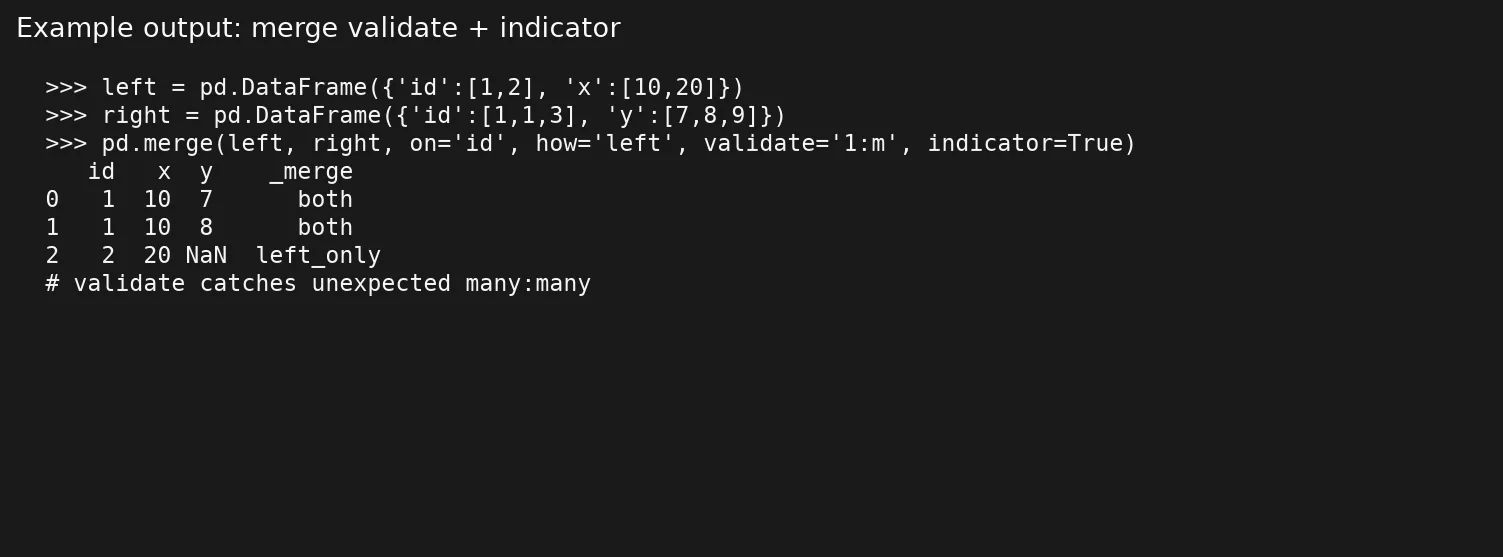
The optional validate argument is underused. Pass "one_to_one", "one_to_many", "many_to_one", or "many_to_many", and if the data breaks your assumption, pandas raises an error. That is a feature, because silent wrong joins are how dashboards invent customers.
Also check how many nulls are in the key before merging. Null keys do not match each other in a useful way for business keys, and a blank customer_id on both sides does not mean “same customer,” so clean or drop null keys deliberately.
When VLOOKUP thinking hurts you
Spreadsheet habits say to look up one value from a table. That is roughly a left join that returns a single column and, in many spreadsheet tools, only the first match. Pandas will happily return every match, so if your lookup table is not unique on the key, you will multiply rows and then wonder why average order value looks odd after a sum is divided by the wrong count.
If you truly want one row per left key, enforce uniqueness on the right side first. Total the orders up to one row per customer, then left-merge:
orders_by_customer = (
    orders.groupby("customer_id", as_index=False)
    .agg(
        order_count=("order_id", "count"),
        revenue=("amount", "sum"),
        last_order_id=("order_id", "max"),
    )
)

customer_summary = pd.merge(
    customers,
    orders_by_customer,
    how="left",
    on="customer_id",
    validate="one_to_one",
)

print(len(customers), len(customer_summary))  # should match
That pattern matches how many teams think in SQL too, which is to summarize the detailed table down to the level of the lookup table and then join. The earlier post in this series covered grouping, and a merge after a grouping is a standard workplace combination and not a clever trick.
Composite keys and almost-matches
Real companies rarely join on a single tidy id forever. You may need account_id plus brand, or store_id plus business_date. In pandas you pass a list:
merged = pd.merge(
    sales,
    targets,
    how="left",
    on=["store_id", "business_date"],
    validate="many_to_one",
)
If one side uses biz_date and the other uses business_date, align the names first, or use left_on and right_on lists of equal length. Partial keys are a frequent source of trouble, for example when you join only on store and then wonder why every date multiplies. When coverage looks low after a left join, sample the unmatched keys and ask whether the key is incomplete, mistyped, or truly absent.
Fuzzy matching on names, such as “Acme Corp” versus “ACME Corporation,” is a different job. Do not expect merge to solve it. Keep fuzzy work in an explicit earlier step with a review file, and then merge on a resolved id, because your future self will not want to debug string similarity inside a revenue join.
Common mistakes
- Joining on the wrong level of detail. An example is joining order lines to monthly targets without a month key, so always state both levels in a sentence before you code.
- Ignoring type mismatches. If
customer_idis a number on one side and text on the other, you get zero matches and a column of nulls after a left join, so checkdtypesand cast both sides. - Whitespace and capitalization in text keys. The value
"ADA "does not equal"ada", so trim and normalize human-entered keys before you merge. - Summing after a one-to-many merge without summarizing again. Customer details repeated on every order row make a plain sum of customer-level fields explode.
- Using the default inner join when you meant left. Missing customers disappear, and your inactive rate looks artificially good.
- Skipping
validate. You assume one-to-many, the data is many-to-many, your laptop fans spin, and your metrics lie.
Quick recap
pd.mergeis SQL joins with pandas names:inner,left,right, andouter.- Use
onwhen names match, and useleft_onandright_onwhen they do not, because naming the keys explicitly prevents accidental joins on the wrong columns. - Many-to-many merges multiply rows, so check uniqueness and restate what one row means after every merge.
- Row counts before and after, plus the optional
validateandindicator, catch disasters early. - Prefer summarizing first and merging second when you need one row per entity and not one row per event.
Practice and next step
Take any two related exports you already have, such as contacts from your CRM (the system your company uses to track customers) and billing charges, tickets and accounts, or campaigns and spend. Write the join type and the approximate row count you expect on paper first, then merge in pandas with indicator=True and validate=, and compare the paper to the output.
When you are ready for messy reality, the next post in the series covers missing data and column types. Nulls, empty strings, and bad date conversions are the usual reason a join returns nothing even though the logic was fine. For a broader map of paths on the site, visit the Learn hub.
Sources
- pandas documentation,
pandas.merge: https://pandas.pydata.org/docs/reference/api/pandas.merge.html - pandas user guide, Merge, join, concatenate and compare: https://pandas.pydata.org/docs/user_guide/merging.html
- Python Software Foundation, Python documentation: https://docs.python.org/3/
- Analytics Made Simple, SQL series: https://analyticsmadesimple.com/series/sql/
- Analytics Made Simple, Learn hub: https://analyticsmadesimple.com/learn/
Keep going
Same lessons in your feed
Short diagrams, hooks, and weekly tutorials on Substack, Instagram, X, and Facebook.



