
Before you send a spreadsheet export to anyone, check the dates, the ID columns, and the text encoding, and write a short note saying what one row means. Exporting a spreadsheet is the moment your habits become someone else’s problem. A CSV file (a plain text file of rows and columns) that looks fine on your computer can break a data load, swap the day and month in a date, or turn long ID numbers into scientific notation. Getting a clean export takes skill, and no single button does it for you.
This post is about handing your data to SQL (the standard language for asking a database for data), a warehouse (a database built for company reporting), or a colleague’s script (a small program file) without nasty surprises. It follows the earlier posts on tidy tables, keys and cleaning in the series on moving from spreadsheets to real data.
Say you send your data team the monthly orders file on a Friday. It opens fine for you, but on their side the ID column has lost its leading zeros and a totals row is sitting at the bottom. Nobody notices until Monday, when the dashboard (a screen of charts that tracks key numbers) shows numbers that are roughly double what everyone expected. Everything in this post is meant to prevent that kind of morning.
| check | ok |
|---|---|
| UTF-8 | yes |
| ISO dates | yes |
| No totals row | fix first |
| Types noted | yes |
Prefer boring files
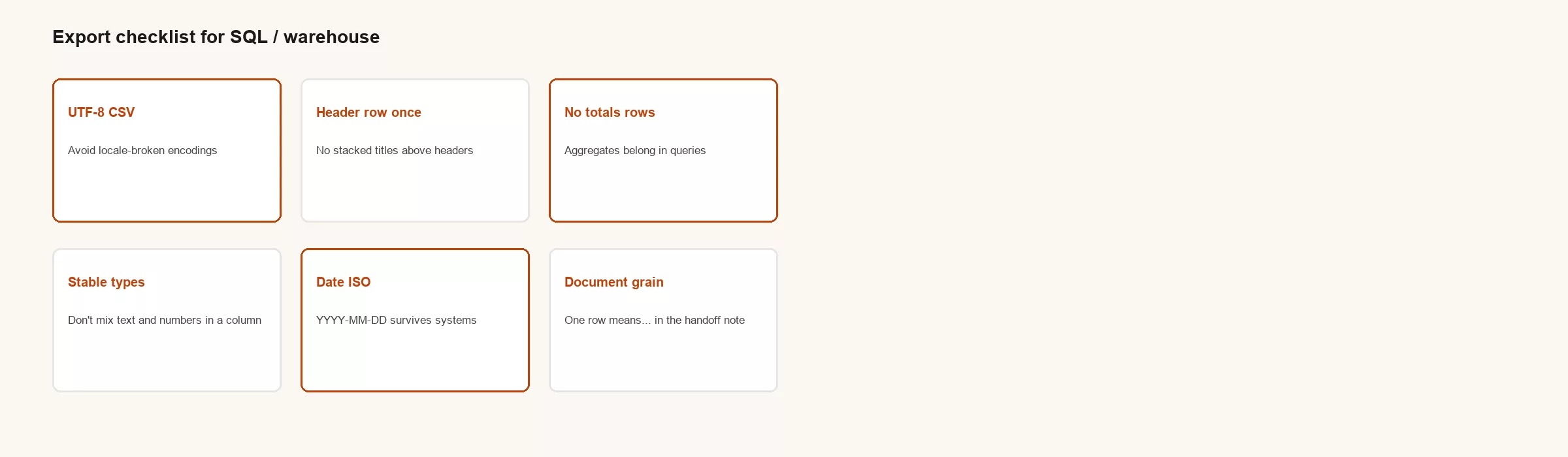
The safest export is a UTF-8 CSV with a single header row and no decorative lines above it. UTF-8 is a standard way of storing text so that accents and symbols survive the trip. That file type is hard to love, but it is also hard to kill, and it works in almost every tool. Excel workbooks are fine inside a company that has standardized on them, and CSV is safer when the file crosses between different tools.
Pitfalls that show up constantly
Six problems cause most failed loads. The table pairs each one with the symptom you will see and the fix, and it is worth checking every export against it.
| Pitfall | Symptom | Fix |
|---|---|---|
| Totals row in body | Sums double | Remove it, or flag it with a row_type column |
| Multiple header lines | Columns shift | One header only |
| Text dates | Sorting and load errors | Use ISO dates written as YYYY-MM-DD |
| IDs saved as numbers | Leading zeros lost | Export IDs as text |
| Regional decimal styles | 1.234 is read as 1234 | Agree on one decimal rule |
| Unknown text encoding | Strange characters | Use UTF-8 |
Every column makes a promise about its type
Each column promises a kind of value, such as a number, a date, or a piece of text. If you mix “12”, “N/A” and “see notes” in the same column, the loading tool has to invent its own rule for what to do, and it will not tell you what it chose. It is better to set the rules yourself first. Leave missing values empty, put comments in a separate column, and keep number columns purely numeric.
A handoff note to paste with the file
A short note travels with the file and answers the questions people would otherwise chase you for in chat. It states what one row means, how many rows there should be, and what was left out. Here is an example you can copy.
HANDOFF
File: orders_clean_2026-07-22.csv
Grain: one row per order_id
Primary key: order_id
Rows: 15432
As-of: 2026-07-21 23:00 UTC
Owner: data-owner@company
Exclusions: test accounts, voided drafts
Known issues: region US-WEST missing for 2026-07-18
Do not use for: audited revenue (use finance mart)
Scientific notation and other Excel “helps”
Excel tries to be helpful in ways that damage data. Long numeric IDs become something like 1.23E+14, and zip codes lose their leading zeros. Open the CSV in a plain text editor before you decide you are done. The best fix is to format the column as text before you export. Adding a harmless character in front of the IDs works too, but keep that as a last resort.
Worked example: the pipeline that hated Fridays
Every Friday, someone on the team exported the file with a filter still switched on, so the CSV held only a subset of the rows. The warehouse loaded it “successfully” with partial data, and the dashboards looked calm. Then the Monday corrections looked like incidents. The fix was a short checklist: clear all filters, include the header, write the row count in the handoff note, and compare it with the count shown in the sheet’s status bar.
Toward SQL
Once your exports are boring, loading them into SQL becomes routine. The SQL series assumes your inputs have a clear meaning for one row and consistent types, so your export habits are the on-ramp. The check below runs right after a load and confirms that nothing was duplicated.
-- After load, sanity checks beat optimism
SELECT COUNT(*) AS n, COUNT(DISTINCT order_id) AS orders
FROM staging.orders_csv;
-- n should equal orders if order_id is unique
If the two numbers differ, some order appears more than once, and you should find out why before anyone builds a report on it.
Common mistakes
- Emailing filtered exports as if they were full extracts
- Leaving grand total rows in the CSV
- Changing column order without telling the people who use the file
- Leaving off an as-of date from the file name or the note
An agreement between the person exporting and the person loading
| export_check | status |
|---|---|
| UTF-8 CSV | OK |
| Dates ISO | OK |
| No totals row | FAIL → remove |
| Types noted | OK |
| Owner + grain | OK |
An export works like an API (a fixed way for one program to hand data to another), even when it is only a CSV sent by email. Anything like that needs a stable layout, because if you rename a column you break everyone downstream. Version your extracts when you can, with names like orders_v1 and orders_v2 or a schema_version column. At the very least, announce changes in the same channel people use when a dashboard breaks.
File names should carry the as-of date. A file called orders.csv is a mystery, while orders_2026-07-22T03.csv is a fact. Add the row count to the handoff note and you can catch a partial export before an executive does.
Be careful with the “Save as CSV” defaults in Excel, because encodings and separators differ between operating systems. If international text matters, confirm that the file is UTF-8. If your language uses commas as decimal marks, agree on a standard before finance and engineering end up a factor of a thousand apart.
Checks belong to the export too
Whoever exports should know a few facts the file must satisfy. Keys should be unique, required fields should be filled in, dates should fall in the expected range, and the row count should be close to last week’s. Put those checks in the sheet or in a tiny script. A load job that only checks that the file arrived will happily load garbage.
When you move the data into SQL, keep a raw staging table that matches the file exactly, then build clean tables from it with tests. Do not bury business rules in the load script with no notes about them. That is how a warehouse turns into a new liability with a nicer logo.
Human factors
People export the tab they are looking at, which is not always the tab they mean. Label the right tab EXPORT_ME in loud letters, and hide or protect the raw tabs if you need to. A checklist beats memory every time. If partial Friday exports keep happening, remove the human step by scheduling an automatic extract from the source system.
Filters, permissions and “why is prod empty?”
Hidden filters and restricted views in Google Sheets are classic traps. Before you export, confirm that nothing is filtered. After the load, compare the row counts with a control total you trust. Permissions matter too, because a collaborator may export a limited view and believe it holds everything. Write down who the file is meant to cover in every handoff note.
If your organization can afford it, use scheduled extracts straight from the original source system instead of people downloading tabs. Until then, make the human route hard to do wrong.
Putting it into daily practice
Think about the last time two dashboards disagreed. The argument was rarely about chart colors. It was about definitions, filters, and who changed a file without telling anyone. Spreadsheet discipline exists to make those arguments shorter and rarer, so investing in keys, cleaning and contracts means fewer emergency meetings and more decisions that stay decided.
A good test for any process is vacation resilience. If the owner disappears for two weeks, can someone else reproduce the number from written rules and one official file? If the answer depends on what one person remembers, you have a single point of failure dressed up as a friendly grid. Write down the boring parts while they are still small enough to remember.
Tools will keep changing: sheets today, a warehouse tomorrow, a notebook (a document that mixes code, results, and notes) the week after. Habits carry over, and so does ownership. Hopeful name matching does not, because it simply fails again in a new syntax. Build habits that survive the next platform pitch from a vendor or a well-meaning executive.
Stakeholders tend to reward speed visibly and quality invisibly. Part of your job is to make quality visible with row counts, as-of times, exclusion lists and links to definitions. Visible quality can be valued. Invisible quality gets treated as optional polish, and then people blame you when something breaks in public.
None of this requires perfection. It requires a minimum standard for structure, identity, cleanliness, handoff and memory. Below that standard, analysis turns into theater. Above it, even simple tools can support serious work until you truly need heavier infrastructure.
If you teach one sentence from this series to a new hire, make it this: say what one row means before you add anything up. That habit prevents a surprising share of wrong totals, broken joins, and confident nonsense in slides that look expensive.
Quick recap
A clean export is part of the quality of your analysis. Use boring UTF-8 CSV files with one header row, honest column types, ISO dates (the international year-month-day format, such as 2026-07-22), and a short handoff note that says what one row means and what was excluded. Check the row counts. SQL and warehouses amplify whatever you send them, including mistakes.
The next post in the series covers writing a first table contract, a one-page note that records what a table means and who owns it.
Practice this week
- Export one critical tab to a UTF-8 CSV and open it in a text editor.
- Add a handoff note template next to your export checklist, so every file goes out with its definitions and caveats.
- Fix one ID column that loses its leading zeros.
- Record the row counts before and after one load.
Series notes
This is Part 5 of From spreadsheets to real data. Next is Your first table contract.
Sources
- IETF RFC 4180 (CSV format common definition): https://datatracker.ietf.org/doc/html/rfc4180
- Analytics Made Simple SQL series; the earlier posts in this series on tables, keys and cleaning
Keep going
Same lessons in your feed
Short diagrams, hooks, and weekly tutorials on Substack, Instagram, X, and Facebook.



