An AI coding tool that says “done” has told you a story about its work, and reading the actual changes is how you check the story. The habit is simple: read the diff (the list of lines the agent added and removed), run the automated checks, check that no passwords slipped in, confirm it only changed what you asked for, and only then let a person save the change for good (a “commit”).
Say it is late on a Friday and Claude Code, Anthropic’s coding assistant, has just finished a “small” fix: the filter on your sales dashboard (the screen of live charts your team checks) was ignoring old, closed accounts. Its message in the chat sounds cheerful, and it says the automated checks are “probably fine.” You glance at the green checkmarks in the terminal (the text window where you type commands), feel the pull of the weekend, and almost type the command that sends your changes to the shared copy of the code, without opening the diff. Then you open it and find forty-three changed files, a whole set of automated tests deleted, and a new line holding what looks like a real password for an outside service. The one-line fix you asked for is buried among changes to dozens of files you never asked it to touch. The model is not evil. Shipping blind is simply how small fixes turn into late-night emergencies.
This is the ninth post in the Claude Code tutorial. By now you have installed the tool, learned its shortcuts and settings, and let it work through multi-step tasks on its own. Letting it work alone without checking its work doesn’t save time, because the cleanup just happens later. This post is the brake: how to read the changes, undo safely, spot warning signs, and keep a person in charge of what gets saved.
The tool’s screens and what it asks permission for keep changing, so treat the commands below as patterns. Before you write a policy memo for the whole company, re-check the Claude Code docs and your team’s own rules for saving code changes.
Why “it compiled” is not a review
Claude Code is good at producing plausible sets of changes, and that is exactly the product. Plausible is not the same as correct, complete, or limited to what you asked. A change can do any of the following.
- Pass a unit test that never covered the real edge case
- Fix the bug and also “clean up” three unrelated modules you did not ask about
- Delete a flaky test instead of fixing the flake
- Hardcode a secret “just for local” that later lands on a shared branch
- Rename something everywhere in a way that breaks a plugin you forgot existed
If you only look at the chat summary, you are reviewing the story the agent told about the work. If you look at the diff, you are reviewing the work itself, and those are two different jobs. Analysts already know this pattern from AI-written SQL (the language for asking a database questions), where a fluent explanation can sit on top of the wrong answer. Code carries the same class of risk. For the SQL version of this habit, see how to check AI-written SQL before you ship it.
The review loop: do not skip steps
After Claude finishes a change that touches many files, run this loop in order. Make it boring, because boring is the point.
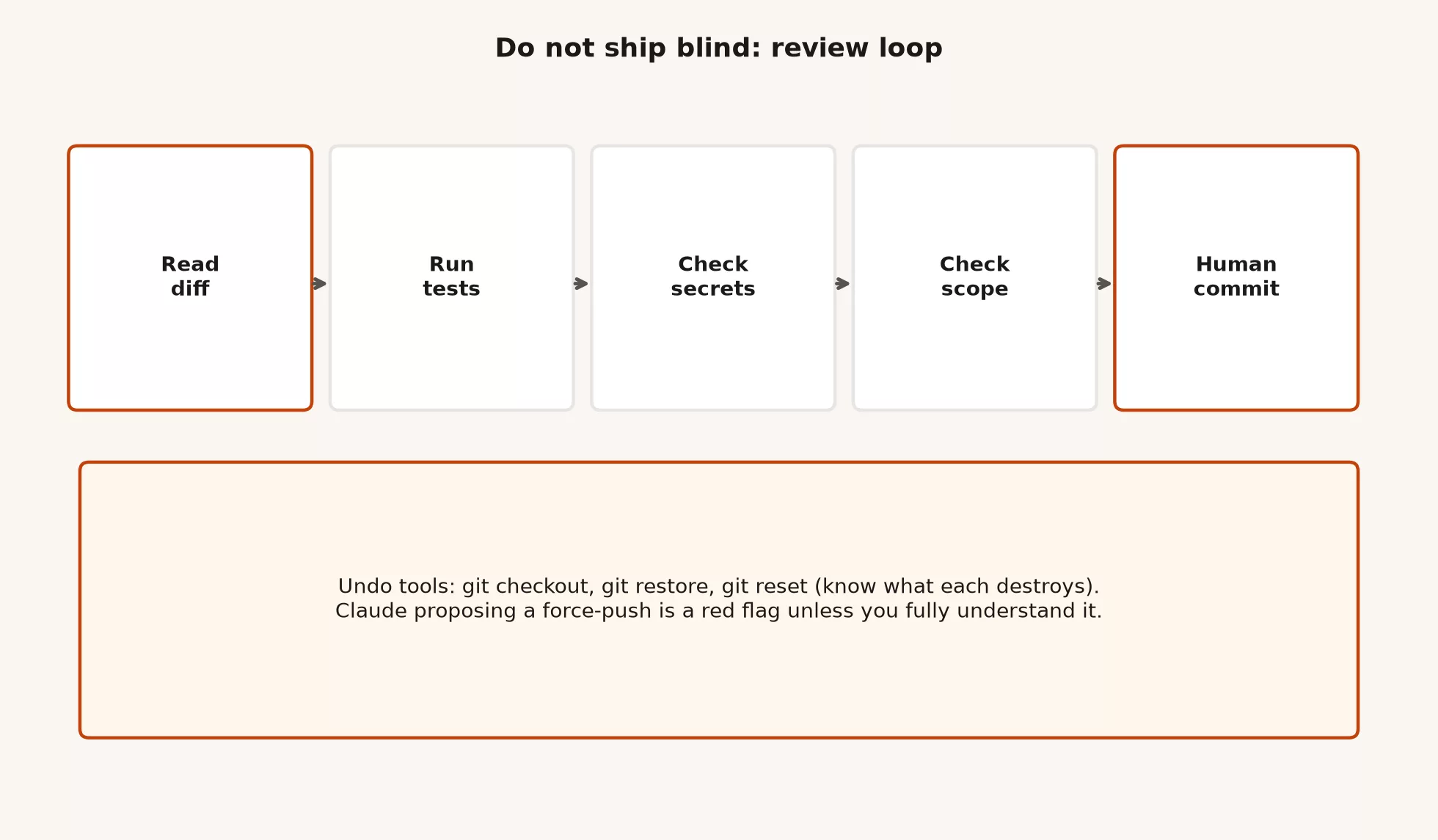
Step 1: read the diff
Start with the list of files and not with the first changed hunk. Ask whether the list matches the ticket, and open every file outside the obvious area to find out why it is there. Then read the hunks that touch business logic, login and permissions, money, personal data, database changes, and configuration. Skim pure formatting only after you know nothing dangerous hides inside a “style” commit.
These git views are worth running yourself, because the agent’s paraphrase is not evidence.
# What changed?
git status

# File list + short stats
git diff --stat

# Full unstaged patch
git diff

# Staged only
git diff --cached

# Against main (adjust branch name)
git diff main...HEAD
In a code editor (also called an IDE), the same idea appears as a side-by-side diff for every touched file. A terminal or a graphical tool are both fine. The one thing that cannot be skipped is a human looking at the actual patch before the commit leaves your machine, or at least before it reaches the shared default branch.
Step 2: run the tests that matter
“The agent said tests passed” is only a rumor until you run them in your own shell or see the automated checks (known as CI) pass on the pull request. Use the project’s documented commands from CLAUDE.md, the README (the project’s main instructions file), or the package scripts. If the project has a fast suite and a slow suite, run the fast one always, and run the slow one when the change touches risky areas like login, payments, data migrations, or shared libraries.
# Examples only. Use your repo’s real scripts.
npm test
npm run typecheck
npm run lint

# Or
pytest -q
go test ./...
cargo test
If tests fail, fix the problem or roll the change back, and do not “commit green later.” If tests pass but you never understood them, you still have not reviewed the logic. Tests reduce risk, but they do not replace reading the login change.
Step 3: check for secrets
Search the diff for keys, tokens, connection strings, private URLs, and samples of customer data. Agents sometimes invent placeholders that look real, or paste values from local environment files into source code. Both are bad, because a placeholder that looks real confuses the next human and a real secret in git is an incident.
# Crude but useful smell search on the patch
git diff | rg -i 'api[_-]?key|secret|password|token|BEGIN (RSA |OPENSSH )?PRIVATE|AKIA[0-9A-Z]{16}'

# Also check newly added files
git status --short
If something secret landed in your working folder, remove it before you commit. If it already reached a shared branch, follow your security process: change the secret, and scrub history only with people who know what they are doing. Do not casually rewrite shared history by yourself at the end of a long day.
Step 4: check the scope
Scope is the question of whether you only did the job you asked for. Agents love helpful extras, such as renaming for consistency, pulling out a helper function, updating docs, reformatting imports, or upgrading a dependency “while we’re here.” Extras can be fine on a dedicated cleanup pull request. On a bug fix, they hide the real change and make the review much bigger.
Here is a practical rule. If the ticket was “fix filter on archived accounts,” the pull request should mostly hold the filter, its tests, and maybe a one-line comment. If the same pull request also upgrades TypeScript, you have two tickets wearing one jacket.
Step 5: a human makes the commit
You, or a teammate who owns the code, write the commit message and decide what lands. Let Claude draft a message if you like, then edit it until it is true. “Assorted improvements” is not a message, but “Fix archived-account filter in dashboard query; add regression test” is. (A regression test checks that an old bug stays fixed.)
git add path/to/relevant/files
git commit -m "Fix archived-account filter in dashboard query"

# Push a feature branch, not necessarily main
git push -u origin fix/archived-filter
The default habit is a feature branch plus a pull request. Pushing straight to main is a team policy decision and not something a permission prompt should settle. The next post in this series covers team rails, and for now you can assume you still own the commit button.
Rule of thumb: The chat summary is a pitch, and the diff is the evidence. Tests are a second opinion. The commit is your signature.
Diff warning signs: stop and reassess
Use this checklist when something feels off, or as a routine gate for larger agent runs. Any one item is enough to pause. Two items mean you almost certainly need to split the work, revert it, or ask again with a tighter goal.
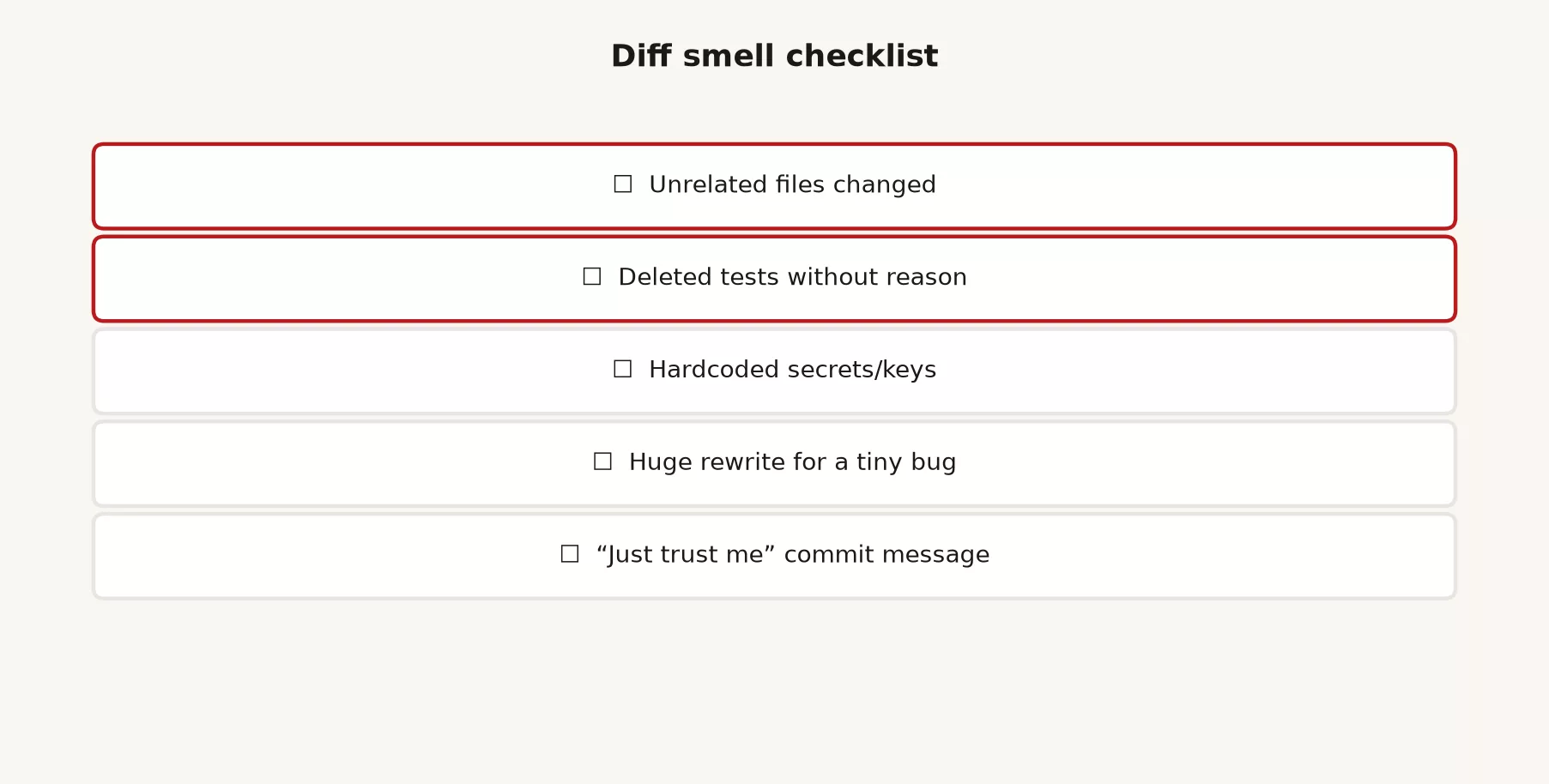
| Warning sign | What it often means | What to do |
|---|---|---|
| Unrelated files changed | Scope creep, or the agent found the wrong root cause | Restore those files and ask again for a narrower edit |
| Deleted tests without a clear reason | The agent “fixed” a red result by removing the proof | Restore the tests, then fix the code or mark a skip with a ticket |
| Hardcoded secrets or keys | Confusion about environment settings, or bad example code | Remove them, change the secret if needed, and use an environment file or secret store |
| Huge rewrite for a tiny bug | The agent overfit to a vague prompt | Reset, then restate the bug with file and line limits |
| A “just trust me” commit message | Nobody can review the intent later | Rewrite the message, and if you cannot, you do not understand the patch |
| New dependencies you did not ask for | Convenience over control | Demand a reason, and check the license and where the code comes from |
| Permission or login code touched “by accident” | A lot could break if it is wrong | Slow down, get a second reviewer, and add tests |
When you find a warning sign, say it plainly to the agent in your next message, for example, “Revert changes outside src/filters/ and the related test. Do not reformat. Do not touch package.json.” Tight limits after a bad run work better than scolding the model for being creative.
Undo without making it worse
Undoing is a skill in its own right. The wrong undo turns a local mess into a team mess, so learn the safe defaults first.
Discard uncommitted edits, which is usually safest
If Claude edited files and you have not committed yet, you can throw away the changes for one file or for the whole working folder.
# Throw away unstaged edits to one file (modern git)
git restore path/to/file.ts

# Throw away all unstaged edits in the working tree
git restore .

# Unstage without discarding contents
git restore --staged path/to/file.ts

# Older equivalent people still use
git checkout -- path/to/file.ts
git restore is the clearer modern command for “make the working folder match the last commit (or another source).” The older git checkout -- file still works in many setups, but older docs used it for two different jobs, switching branches and restoring files. Prefer restore when your git version supports it. The official references are git-restore and git-checkout.
Undo a local commit carefully
If you committed only on your own machine and have not pushed, or only pushed to a personal branch that you fully control, you can move the branch pointer back.
# Soft: undo commit, keep all changes staged
git reset --soft HEAD~1

# Mixed (default): undo commit, keep changes unstaged
git reset HEAD~1

# Hard: undo commit AND discard those changes (destructive)
git reset --hard HEAD~1
The --hard option is a shredder for uncommitted work and reset commits, so use it only when you are sure you want the agent’s work gone. Prefer --soft or the default mixed mode when you still want to salvage pieces. The official reference is git-reset.
Force-push is dangerous
A force-push rewrites history on the shared server. On a shared branch it can erase a teammate’s commits, break open pull requests, and confuse the automated checks. Even on a personal branch it can surprise anyone who already pulled your work. Treat git push --force and git push --force-with-lease as tools for deliberate recovery by people who know the risks, and not as the default cleanup after an agent mistake.
If Claude suggests force-pushing to “clean up” a bad commit on main, treat that as a red flag and stop. A reverse commit or a new fix commit is safer, and a controlled reset is fine only if your team’s process allows it and you know who else has the branch.
# Safer pattern for a bad commit already on a shared branch:
# add a reverse commit instead of rewriting history
git revert HEAD
git push
If the agent keeps offering to rewrite history, restate the policy in the chat and in CLAUDE.md with a line like “Never force-push shared branches. Prefer revert. Ask before any history rewrite.”
A worked example: the “small filter fix”
Imagine you gave Claude this request.
In src/dashboard/query.ts, include archived accounts only when
includeArchived is true. Add a unit test. Do not reformat other files.
Do not change dependencies.
Claude comes back with a cheerful “done,” so you run the review loop.
$ git diff --stat
 src/dashboard/query.ts           |  12 ++++--
 src/dashboard/query.test.ts      |  28 +++++++++++++
 src/utils/format.ts              | 140 ++++++++++++++++++----------------
 src/utils/dates.ts               |  88 +++++++++++---------
 package.json                     |   2 +-
 tests/legacy/dashboard.spec.js   | 210 --------------------------------
 .env.example                     |   1 +
 7 files changed, 200 insertions(+), 281 deletions(-)
The stats already tell you a lot before you open a single hunk.
query.tsandquery.test.tslook like they belong to the task.format.tsanddates.tslook like rewrites nobody asked for.package.jsonwas never requested, so it should not have changed.- A large test deletion is a classic warning sign.
.env.examplemight be fine or might hide a bad pattern, so open it.
The recovery path keeps the good files and drops the rest of the agent’s surprises.
# Keep the good files, drop the rest of the agent’s surprise
git restore src/utils/format.ts src/utils/dates.ts package.json tests/legacy/dashboard.spec.js

# Inspect remaining diff carefully
git diff

# Run tests
npm test -- src/dashboard/query.test.ts

# Commit only the intentional paths
git add src/dashboard/query.ts src/dashboard/query.test.ts
git commit -m "Respect includeArchived in dashboard query"
Then tell Claude what you did and why, so the next turn does not apply the junk again.
I restored format.ts, dates.ts, package.json, and the legacy dashboard spec.
Keep only query.ts + query.test.ts for this task. Do not reformat utils.
Do not delete tests. Confirm with git diff --stat before more edits.
That conversation pattern matters as much as the git commands do. Agents will happily widen the scope again if you quietly delete files and keep chatting as if the bigger plan still stands.
Permissions help, but review still wins
Claude Code’s permission system is real protection. It asks for your approval before many actions, lets you set allow and deny rules, and offers modes that trade speed for caution. It is not a substitute for reading the patch, though, because approving “write to these three files” still requires you to understand what was written. High-trust modes that skip the prompts raise speed and risk together. Anthropic documents permissions and modes in the Claude Code docs, so start from Configure permissions. Treat flags like --dangerously-skip-permissions as specialist tools and not as defaults for a shared production project.
If the earlier post on agent loops left you tempted to walk away while the agent runs, this post is the answer. Walk away only when the rails exist, meaning tests, no secrets, a narrow scope, and a separate branch, and only when you still plan a human review before anything merges. Autonomy without a merge gate is just cosplay.
A lightweight personal policy you can paste into your instruction file
Short and true beats long and aspirational.
## Safety and review
- Prefer smallest change that fixes the ticket.
- Do not reformat unrelated files.
- Do not delete or skip tests without explicit approval.
- Never commit secrets, .env files, or customer data samples.
- Do not force-push shared branches; prefer git revert.
- After multi-file edits, stop and show git diff --stat; wait for human review.
- Human owns the final commit message and push.
Project instruction files, which an earlier post in this series covered, only help if they match real behavior. If your team ignores the policy, fix the team habit and not just the markdown file. The next post covers that team layer.
Mistakes to avoid
- Reviewing only the chat recap. Recaps leave out silent deletions and drive-by refactors.
- Trusting a single green unit test for a risk that spans systems. Match the depth of your tests to how much could break.
- Using
reset --hardon a branch you already shared. You may destroy other people’s work. - Force-pushing to “make the history pretty.” Pretty is optional, but being able to recover is not.
- Leaving deleted tests behind because CI was annoying. You traded a red bar for a future incident.
- Committing a
.envfile “just this once.” Once is how secrets end up in forks and laptop backups. - Letting the agent commit and push unattended in your first week with Claude Code. Earn that autonomy after you can undo and review without panic.
- Sending a huge prompt like “clean up the whole codebase while fixing the bug.” You ordered the mess.
Practice: 25 minutes on a throwaway branch
- Clone or open a safe project, such as a personal project or a training fork.
- Create a branch with
git checkout -b practice/review-loop. - Ask Claude Code for a small feature with tight limits: one folder, add tests, no reformatting.
- Run the five-step loop, and fill in the warning sign checklist out loud or in a note.
- Deliberately ask for a second, messier change, such as “also clean up utils.” Then practice
git restoreon the extras. - Make one local commit, then practice
git reset --soft HEAD~1and commit again cleanly. - Do not force-push anything shared. End with a normal push of the practice branch, or delete the branch locally.
How this fits the rest of the tutorial
The earlier posts taught you to start, explore, command, add skills, manage memory, write instruction files, add tools carefully, and run multi-step loops. This one is the professional filter between “the agent produced files” and “the team can live with this.” The final post closes the tutorial with team habits: a shared CLAUDE.md, pull request requirements, automated checks, a secrets policy, and teaching newer developers to review before they get high autonomy.
If you are still working out which Claude product you need day to day, the Claude product map and Learn Claude from scratch series stay useful. You can find more paths on the Learn hub.
Quick recap
- Always work in this order: read the diff, run the tests, check for secrets, check the scope, and let a human commit.
- Watch for unrelated files, deleted tests, secrets, huge rewrites, and vague commit messages.
- Undo with
git restoreor a carefulreset, and treat force-push as exceptional and dangerous on shared history. - Permission modes reduce accidents, but they do not read the patch for you.
- Write review rules into
CLAUDE.md, then follow them yourself so the agent has a model of good behavior.
Series notes
This is Part 9 of the Claude Code tutorial. Next up is team habits and safety rails, which closes the series and points you toward Claude Cowork for agent work outside code, plus the earlier map and learn tracks for product orientation.
Sources
Docs and related reading used for review, undo, and permission habits:
- Claude Code documentation: Overview (product behavior and entry points; re-check before policy write-ups)
- Claude Code documentation: Configure permissions (permission rules, modes, and that rules are enforced by the product, not only by prompt text)
- Anthropic Engineering: How we built Claude Code auto mode (default approve-before-act posture and tradeoffs of skipping prompts)
- Git: git-diff (inspecting patches before you trust a summary)
- Git: git-restore (discard or unstage working tree changes)
- Git: git-checkout (older restore patterns; branch switching vs file restore)
- Git: git-reset (soft/mixed/hard; know what each destroys)
- Git: git-revert (undo on shared history without force-push)
- OWASP Top 10 for LLM Applications (over-reliance and sensitive information risk classes)
- Analytics Made Simple: How to check AI-written SQL before you ship it (same “fluent ≠ correct” verify habit)
- Analytics Made Simple: Learn (related paths on this site)
Keep going
Same lessons in your feed
Short diagrams, hooks, and weekly tutorials on Substack, Instagram, X, and Facebook.