Claude Code already does a lot before you add anything to it, and every extra connector or plugin adds both power and risk. The smart order is to use the built-in tools first, add outside connections only when a task truly needs them, and install bundles last.
Say your teammate tells you Claude Code is “fully set up.” What they mean is three plugins from a marketplace, two connections to Jira and a shared drive, a personal skill nobody documented, and a settings file that will break the day someone rotates a login token. You open a fresh copy of the project, and none of that is in it. You type a normal task anyway. Claude can still read files, search, run shell commands, and talk to git. Suddenly the plugins look less like oxygen and more like optional spice.
This is the seventh post in the Claude Code tutorial. The earlier posts covered install and first run, talking to a codebase, slash commands, skills, memory, and instruction files such as CLAUDE.md. Here we map the outer layer: built-in tools, MCP connectors, and plugins that bundle skills, subagents, hooks, and MCP settings into one install. The goal is a clear ladder, so you add complexity only when a plain task plus good instructions is not enough.
Product screens, marketplace names, and install steps keep moving, so treat this post as a durable mental model. Before you write team policy or put secrets into a shared config, verify the live details in the Claude Code docs, the plugins docs, and the Model Context Protocol materials.
Three boxes on one map
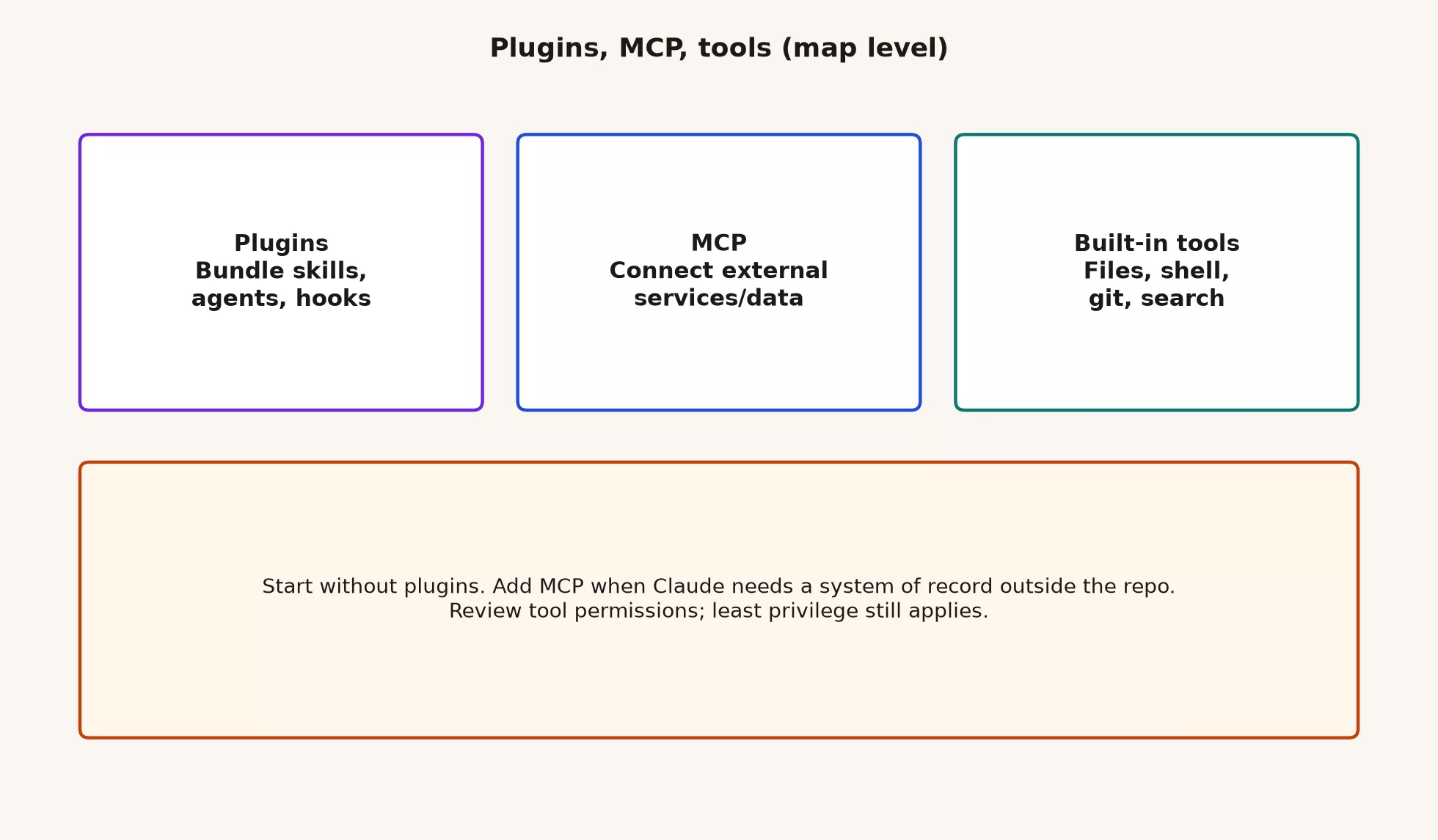
People mash “tools,” “MCP,” and “plugins” into one foggy word. Once you separate them, the product gets quieter.
Built-in tools
Out of the box, Claude Code can work inside a project without a marketplace install. The exact names vary by product version, but typical built-in abilities include reading and writing files, searching the folder tree, running shell commands with your permission, and using git-related workflows. That is already a serious agent for software work. It can explore, edit, test, and commit. If your job is “fix the failing test in this repo,” you may never need a plugin.
Think of built-ins as the kitchen tools that come with the apartment: a knife, a cutting board, and a stove. You can cook dinner with those. A pasta machine is optional until pasta is your job.
MCP, the connector to systems outside the chat
MCP stands for Model Context Protocol. In plain English, it is a standard way for an AI app to talk to outside tools and data sources. A server offers actions and resources, such as listing tickets, fetching a document, querying a database, or calling a custom internal API. Claude Code, or another MCP client, connects to that server and can use those tools during a run, within the permissions and settings you choose.
Common examples include Jira or Linear for tickets, Google Drive or a similar service for documents, and a company-built server for your data warehouse or release system. MCP is not a magic memory of the internet. It is a pipe that you configure. If the pipe is wrong, Claude confidently works with wrong or empty data. If the pipe has broad write access, mistakes can travel far outside the project folder.
Rule of thumb: Use built-in tools for the code that sits on your disk. Reach for MCP when the official record lives outside the folder, such as tickets, documents, cloud APIs, or custom operations tools.
Plugins, the bundles you install
A plugin is a packaging unit. Instead of wiring five separate pieces by hand, you install one bundle that can include skills, subagents, hooks, MCP settings, and related commands or configuration. Official docs and Anthropic’s plugin ecosystem describe plugins as shareable packages for Claude Code workflows, and not as a second code editor.
Plugins answer a team problem: everyone keeps reinventing the same stack of skills, connectors, and slash commands. They also create a new one, invisible complexity. A plugin can add tools you did not ask for. Treat installs like any other software dependency. Prefer known sources, read what lands on your machine, and keep a written list of what your team relies on.
What lives inside a plugin
You do not need to author plugins on day one. You do need to know what you are accepting when someone says “just install this.”
| Piece | Plain English | Why it shows up in a plugin |
|---|---|---|
| Skills | Reusable playbooks that Claude can use for a certain kind of job | The team wants the same way of writing pull requests or running quality checks |
| Subagents | Specialized agent roles for one slice of the work | They give you parallel or focused helpers without rewriting prompts each time |
| Hooks | Triggers or safety checks that fire around certain steps | They enforce checks, logging, or process moments |
| MCP settings | Connector configurations that point at outside servers | You can ship “Jira plus release notes” as one package instead of tribal setup |
| Commands and other configuration | Slash commands, editor helpers, and metadata | One install gives the whole team a consistent setup |
Skills still matter without plugins. The earlier post on skills covered them as reusable instructions, and plugins are how organizations and marketplaces ship sets of those pieces together. If you only need one skill, a local skill file is often enough. If you need the same five pieces on ten machines, a plugin starts to make sense.
Subagents show up more in multi-step work, which the next post covers. For now, a subagent is not a second human. It is a bounded helper with a role, and plugins can ship those roles pre-shaped so you are not inventing them in the middle of an incident.
Built-in tools: win here first
Before you add connectors, stress-test what the agent can already do in a normal project.
- Files: Claude can read, create, edit, and reorganize files under your review, and multi-file features live here.
- Search: It can find symbols, strings, and patterns across the folder tree, so you are not the lossy clipboard.
- Shell: It can run tests, style checks, build scripts, and one-off commands, and permission dialogs mean you still own “approve” or “deny.”
- Git: It can inspect status, write commits, and open pull request workflows, depending on your version, and destructive git commands deserve extra caution.
Here is a useful practice. Pick a ticket that only needs the repo, with no Jira write-back and no Drive upload, and force the session to stay on disk tools. You will learn permissions, diffs, and test loops without also debugging a login flow. Many “we need MCP” requests are really “we never wrote a good CLAUDE.md” or “we keep re-explaining our test command.”
MCP: when the world outside the folder matters
MCP earns its keep when Claude must act on or read systems that are not files in your copy of the project.
Good fits
- Pull a ticket’s acceptance criteria from Jira, or a similar tool, instead of pasting walls of text
- Fetch a design doc or runbook from Drive or a wiki when that is the real source of truth
- Call a custom internal MCP server that your platform team maintains for status checks, feature flags, or safe release helpers
- Query a database through a carefully scoped read-only server, and not through “root credentials in settings”
Weak fits, or high risk
- Write-everything production credentials in a personal config file
- Ten half-configured servers, so that every prompt pays a context tax for tools you never use
- Using MCP to paper over secrets that should live in a vault as short-lived tokens
- Connecting a system that your security policy already bans from AI apps
Anthropic and the MCP community have written about tool definition bloat. Too many tools in context burn tokens (the small units a model reads and writes, which you pay for) before the real work starts. Smarter tool search may improve this, but the human habit still matters. Connect what you need for the job, disconnect your experiments, and document which servers your team has approved.
Connectors versus “I pasted the PDF”
Pasting is fine for a one-off document. Connectors matter when the content changes under you, when several people need the same pipe, or when actions and not only reads are part of the workflow. If the design doc updates weekly and people keep pasting last Tuesday’s version, then MCP or a deliberate fetch habit beats digging through everyone’s clipboard.
The complexity ladder: add only when stuck
Most teams climb too fast. They install a plugin bundle on day one and then spend a week debugging permissions for a task that only needed a clearer prompt. Use this ladder in order.
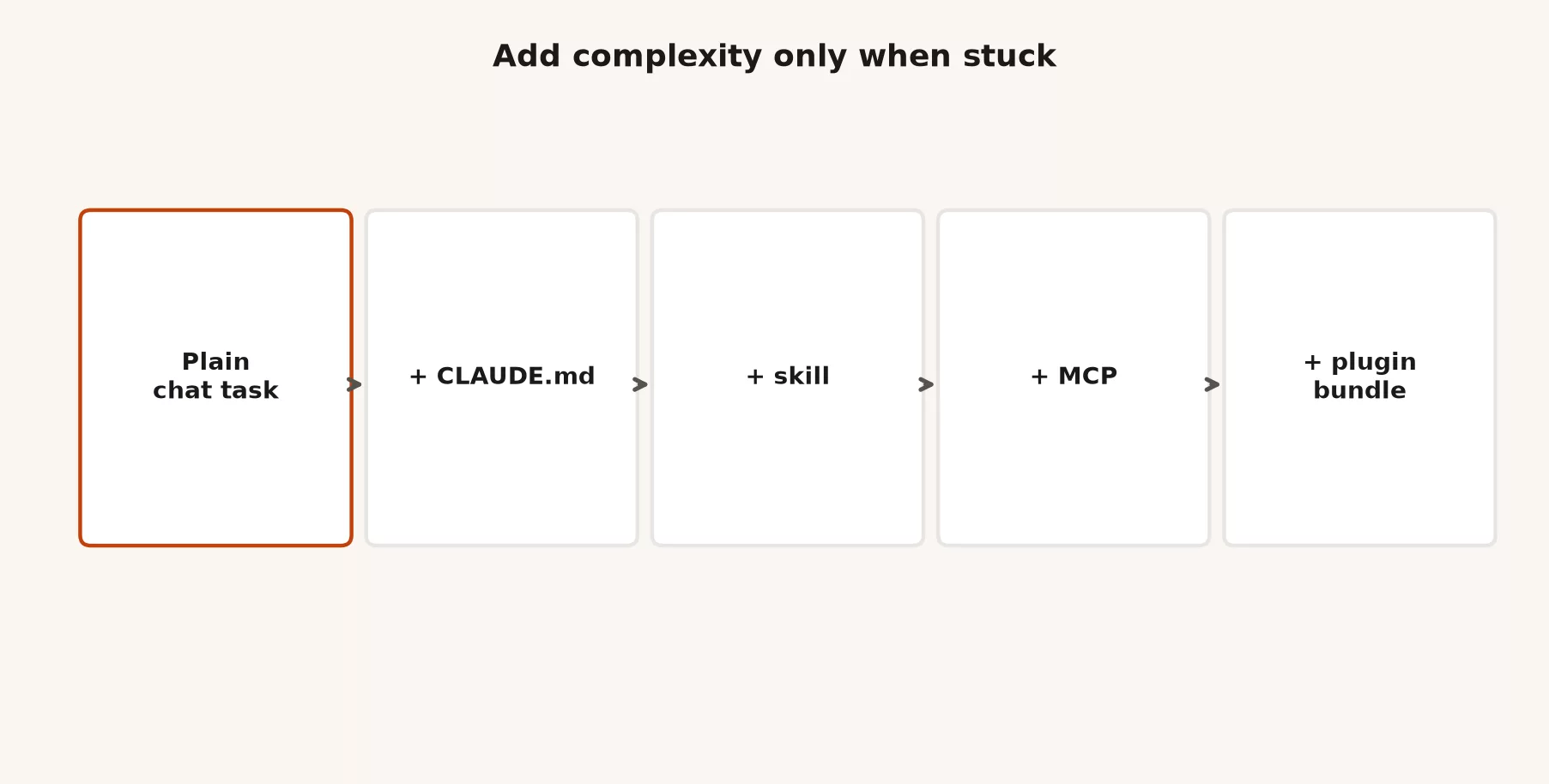
- Plain task. Give one goal, your limits, and a definition of done, and use built-in tools only. For example, “Fix the null check in
checkout.ts, add a unit test, and do not refactor neighbors.” - Project instructions (
CLAUDE.mdand similar files). Put stable rules here, such as how to run tests, the package layout, coding conventions, and “never touch /infra.” The earlier post on instruction files covered this layer. Fix the file before you invent a skill for the same sentence. - Skill. This is a reusable playbook for a job you do often, such as cutting a release note, adding a React form the way your team does it, or triaging a failing automated check. Skills beat pasting the same essay every Monday.
- MCP. Use it when the next bottleneck is outside data or actions and not missing prose. Connect the official source with the least access it needs.
- Plugin. Use it when you need to distribute a whole stack of skills, connectors, hooks, and agents across people or machines, or when a maintained marketplace package matches a workflow you actually run.
You can skip rungs when the need is obvious. A platform team shipping a blessed “incident toolkit” plugin is fine. A beginner installing five community plugins before their first passing test is usually buying fog.
A worked example: the same ticket on five rungs
Here is the ticket: “Users on mobile lose the cart badge count after login. Fix it and cover it with a test. Link the Jira ticket in the pull request.”
Rung 1: a plain task
You paste the acceptance criteria once, point at the mobile cart component, and ask Claude Code to reproduce the bug with tests if possible, fix it, and write a pull request description. The built-in file, search, shell, and git tools are enough if you already have the criteria in the chat.
Rung 2: CLAUDE.md
The repo instructions already say the mobile app lives under apps/mobile, tests run through npm test -- cart, the pull request template lives in .github/PULL_REQUEST_TEMPLATE.md, and native dependencies do not change without a flag. Claude stops inventing yarn in an npm project, and no plugin is required.
Rung 3: a skill
Your team keeps shipping cart bugs with the same review checklist. You add a skill called “Mobile cart regression” that forces repro steps, platform notes for iOS and Android, and a short risk note. You use it whenever a ticket smells like cart state, and you still have no MCP.
Rung 4: MCP
Your product team insists that Jira is the source of truth and that comments change during the day. An MCP server lets Claude read the ticket, here ABC-123, for the latest acceptance criteria and post a pull request link back if writing is allowed. You scope reading carefully and writing even more carefully. The fix still happens with built-in tools, and MCP only handles the ticket system.
Rung 5: a plugin
Three squads share mobile cart work, so a platform team packages a plugin. It holds the cart skill, a Jira connector settings template, a subagent brief for splitting UI-only changes from state-layer changes, and a hook that reminds you to run the cart tests. New hires install one thing. The cost is ownership, because someone must maintain the plugin when Jira login or the test commands change.
If you are a team of one learning Claude Code, stop at rung 2 or 3 for a while. Climbing to rung 5 because a blog post looked cool is how settings files become folklore.
Permissions, secrets, and least privilege
Every new tool makes a mistake bigger. Built-in shell access can already hurt a laptop, MCP can hurt a cloud account, and plugins can enable both at once. Least privilege means giving each tool only the access it needs. That habit keeps the damage small.
- Prefer read-only MCP scopes until a write is proven necessary.
- Prefer short-lived tokens and secrets managed by your organization over personal long-lived keys in a dotfile.
- Prefer allowlists of approved commands and servers for shared machines.
- Prefer explicit approval for network, release, and production-adjacent actions.
- Never commit application passwords, API keys, or OAuth refresh tokens into the repo “so the plugin works for everyone.”
If your security team keeps a software allowlist, MCP servers and marketplaces count as software. Shadow-installing a community server that can write to production is not a cute hack. It is an incident waiting for a confident agent.
How this fits skills, memory, and instruction files
The earlier posts taught skills, instruction files, memory, and context. Plugins sit on top of those ideas and do not replace a good CLAUDE.md. They package habits so more people share them.
| Layer | Job | Fails when… |
|---|---|---|
| Session chat | This task’s goal and limits | You never state the done criteria |
| Memory and context | What sticks across turns, and what resets | You assume last week’s thread is still loaded |
CLAUDE.md or AGENTS.md | The rules of the repo | The file is a novel that nobody maintains |
| Skill | A repeatable playbook | You make a skill for a one-off |
| MCP | External systems | You connect everything “just in case” |
| Plugin | Distribution of a whole stack | Nobody owns versioning or login expiry |
When something goes wrong, debug from the bottom of that table upward. Is the prompt clear? Are the project instructions wrong? Is a skill out of date? Is MCP returning stale data? Did a plugin update change the hooks? Jumping straight to “plugins are broken” skips the cheaper checks.
Marketplaces and “official” bundles
Anthropic maintains documentation for Claude Code plugins and an official-style plugins directory on GitHub for high-quality packages, and community marketplaces exist as well. Quality and security vary, and plugin catalogs change, so check what is listed in the week you decide. For work, follow these four habits.
- Prefer sources your organization has approved.
- Read the plugin’s listed skills, MCP servers, and permissions.
- Pin or note versions when your process allows it.
- Test in a throwaway repo or branch before you standardize a team install.
A plugin that “does DevOps” is not automatically safe for your production cloud, because marketing copy is not a threat model.
Mistakes to avoid
Installing the whole zoo on day one
Five MCP servers, three plugins, and two experimental skills make every prompt slower, noisier, and harder to debug. Start with zero extras, and add one only when a real task is blocked without it.
Confusing MCP with “Claude knows our company”
Without a connected source of truth, Claude only has its training knowledge plus whatever you put in context. MCP does not invent a private data warehouse for you, so you have to wire the warehouse carefully yourself.
Treating plugins as unreviewed code
Plugins can add hooks and tools that run in your environment, so review them the way you would review a new command-line tool. If you cannot explain what a plugin adds, do not install it on a machine that holds production credentials.
Putting secrets in shareable config
Teams love “it just works” onboarding, and attackers love committed tokens. Use environment variables, secret managers, and per-user login flows instead. Document the setup steps without pasting real keys into a wiki screenshot.
Skipping the ladder because a plugin is fashionable
If the failure is “Claude keeps using the wrong package manager,” fix CLAUDE.md. A plugin will not heal a missing one-liner if you never write the one-liner.
How to practice this week
- Complete one real task using only built-in tools, and write down which tools Claude actually used, such as files, tests, and git.
- Open your project instruction file and add one missing operational fact, like the test command, the package manager, or “do not touch” paths.
- If you repeat a multi-step playbook every week, draft a skill or improve an existing one, and do not turn it into a plugin yet.
- List the outside systems you wish Claude could read and pick at most one. Check your policy, and if it is allowed, connect a narrow MCP server and try a read-only task.
- Only after that, evaluate one plugin or internal bundle, and write three bullets on what it adds, what credentials it needs, and who owns updates.
Quick recap
- Built-in tools for files, shell, git, and search already cover most coding work.
- MCP connects outside data and tools such as Jira, Drive, or custom servers.
- Plugins bundle skills, subagents, hooks, MCP settings, and related configuration for distribution.
- Climb the ladder from a plain task to
CLAUDE.md, then a skill, then MCP, then a plugin, and stop when the job is unblocked. - Least privilege and secret hygiene matter more as you leave the boundary of the repo.
Series notes
This is Part 7 of the Claude Code tutorial. The next post covers loops and agentic runs, which is where tools and plugins meet the goal, plan, act, and observe loop, along with usage burn, subagents, and how much autonomy you should grant. Related: Claude product map.
Sources
Research and further reading used for this article:
- Claude Code documentation: Overview (product surfaces and baseline capabilities)
- Claude Code documentation: Plugins (plugin packaging model and install concepts)
- GitHub: anthropics/claude-plugins-official (Anthropic-managed plugin directory reference)
- Model Context Protocol (open standard for connecting models to tools and data)
- Anthropic: Introducing the Model Context Protocol (MCP announcement context)
- Anthropic engineering: Code execution with MCP (tool definition and result token costs)
- Anthropic engineering: Advanced tool use (tool search, large tool libraries, agent patterns)
- Anthropic: Building effective agents (agent design principles behind multi-step tool use)
- Claude Code product page (positioning and access paths; verify plans live)
- Analytics Made Simple: Claude product map (where Code sits next to chat and Cowork)
Keep going
Same lessons in your feed
Short diagrams, hooks, and weekly tutorials on Substack, Instagram, X, and Facebook.