

Give Claude Code one short file of rules for your project, so it follows your team’s habits instead of guessing. An AI coding assistant does not know how your team works unless a file tells it. Many projects keep a few plain-text notes for this: one for newcomers, one for how the team works, and one at the top of the project, named CLAUDE.md, written for the AI. This post explains what each file is for and how to keep them short enough to help.
Say you hire a contractor to work on your house. You would hand over a one-page list: where the shutoff valve is, which paint to use, and which walls not to touch. You would not hand over the building code. An instruction file for Claude Code is that one-page list. The earlier post in this tutorial covered what Claude remembers and what resets between sessions, and this one gets concrete about the files that carry your rules forward. You will leave with a starter skeleton, a table that divides the work between files, and one rule that saves more pain than any template: short and true beats long and aspirational.
The details follow Anthropic’s public docs on memory and the CLAUDE.md file. Other tools keep changing their own conventions for AGENTS.md and rule files, so confirm your own tool’s docs before you make a company standard. When in doubt, put the shared truth in git, the version-history system where every tool can read a file.
Why instruction files exist at all
Agents do not inherit your team’s folklore. A session’s chat history resets when you type /clear or start a new session, as the earlier post on memory explained. Auto memory can carry a few learnings forward if it is turned on, but it is no substitute for rules the whole team has committed. An instruction file lets you say something once, in a place the next session will load: here is the project, here are the commands, here is the style, and here is what you must never do.
Humans need a different cut of the same truth. A new hire opens the README.md file to learn what the product is, how to install it, and where the docs live. That person does not need a bullet saying “use 2-space indentation” when a formatter already enforces it. Agents do best with checkable constraints, while people do best with motivation, diagrams, and the reason behind a choice. One file that tries to serve both audiences at full volume usually becomes a 2,000-line swamp that neither one reads.
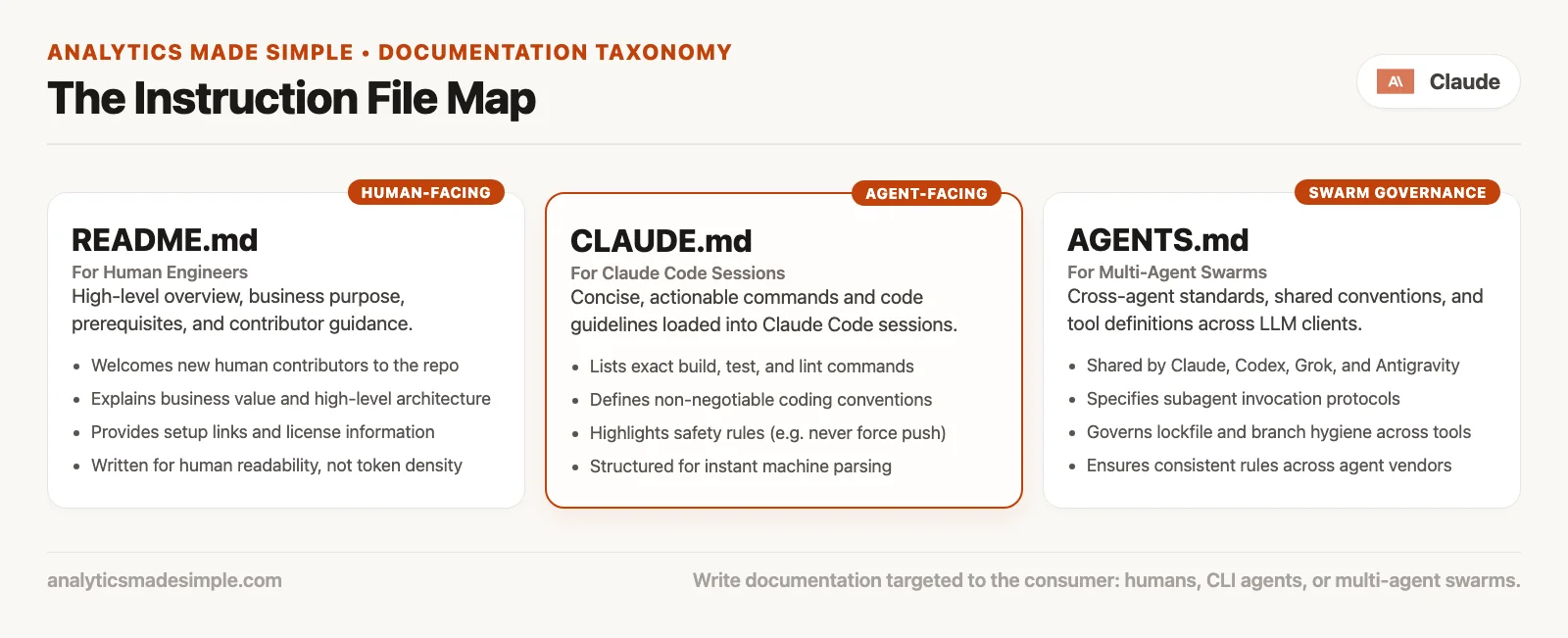
The cast of characters
The README file, for humans first
The README.md file is the front door. It answers what this project is, how to run it, where more detail lives, and who owns it. A good one is written for a tired person on their first day, and it can include architecture sketches and links. It should not become a dumping ground for every agent (an AI that takes actions on its own) preference, because people stop scrolling and the agent still needs a denser brief somewhere else.
A practical split looks like this:
README.mdholds the purpose, prerequisites, install steps, common scripts, and a link to deeper docs.CLAUDE.mdholds the agent-facing limits and the short command list Claude should not have to guess.- Both can mention the same test command, since repeating a one-liner is harmless. Repeating a 40-line essay is how the two files start to drift apart.
The CLAUDE.md file, a project brief for Claude Code
Claude Code reads CLAUDE.md and a few related paths: .claude/CLAUDE.md, a personal ~/.claude/CLAUDE.md, a local-only CLAUDE.local.md, and files managed by an organization. According to the official docs, you write these files and Claude loads them at the start of a session. The content is guidance placed in front of the model, not a hard barrier, so keep it specific and short. Favor facts that prevent repeated mistakes, such as build commands, conventions, layout, and “always” or “never” rules that are actually true.
When the same mistake shows up a second time, that is a candidate for this file. When a procedure has many steps and comes up rarely, it is usually a skill instead. A skill is a set of instructions that loads only when needed, and the earlier post on skills covers them.
The AGENTS.md file, shared conventions for many tools
Many coding tools and agent workflows use AGENTS.md, or a similarly named file, as one shared place for conventions that more than one agent should follow. Think of it as a house style for automation. It says how tools should behave in this project, which deploy notes agents need, and where the limits are.
Here is the fact that surprises people. According to the memory docs, Claude Code reads CLAUDE.md and does not read AGENTS.md by default. If your project already has an AGENTS.md for other tools, the documented pattern is to create a CLAUDE.md that imports it, for example with the line @AGENTS.md. That way both tools share one set of rules without copy-paste drift. A symlink, which is a shortcut that makes one file appear in two places, can also work when you do not need Claude-specific additions. On Windows, the import line is often easier than a symlink.
So an AGENTS.md file is fine for Claude users. It is a convention shared across tools, and you simply have to connect Claude to it on purpose.
Other files you will meet
| File or folder | Primary reader | Typical job |
|---|---|---|
README.md | Humans | What / why / how to run |
CLAUDE.md | Claude Code | Session-start project instructions |
AGENTS.md | Multiple agents / tools | Shared automation conventions |
CLAUDE.local.md | You only | Personal URLs, sandbox notes (often gitignored) |
.claude/rules/ | Claude Code | Modular or path-scoped rules |
.cursor/rules etc. | Other editors / agents | Tool-specific rules; /init may harvest some into CLAUDE.md |
Skills (SKILL.md) | Claude when invoked | On-demand procedures, not always-on brief |
What a good CLAUDE.md contains
The docs and everyday practice agree on a few sections. The names can vary, but the content should stay checkable.
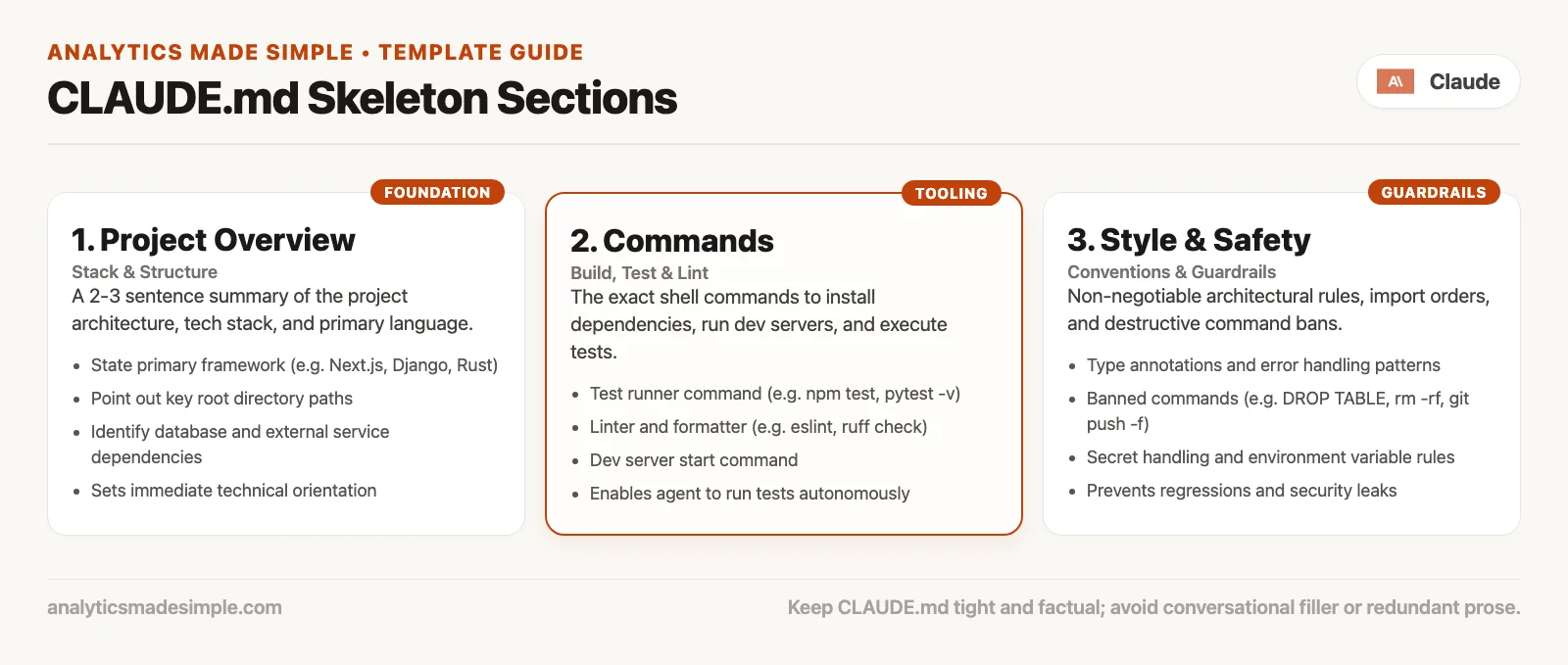
Project brief
Write two to six sentences about what the product is, what the project contains, and what “done” roughly means in daily work. Leave out marketing and any roadmap for 2029. The goal is only that Claude does not invent a second product out of a folder name.
Commands
List how to install, test, lint, check types, and run locally, using the exact strings your team uses. If the truth is pnpm test, do not write “run the test suite.” If a suite is slow, say which smaller subset is fine for a quick loop. Wrong commands waste the agent’s working space and your trust in it.
Style
Include only what a formatter or linter (a tool that flags style problems) does not already handle. “Use 2-space indentation” is fine if the project is not auto-formatted. “Prefer early returns in new TypeScript files under src/api” is better than “write clean code.” Link to an existing style guide if you have one, and do not paste the whole guide.
Safety
Cover secrets, production data, force pushes, destructive database changes, and customer exports. Write rules that a junior teammate could follow under pressure. Remember that this file is guidance and not a lock, so pair the high-cost rules with permissions, hooks, and human review, which later posts in this series cover.
Architecture notes (optional and short)
Say where new code should go, which parts are legacy, and which package is the official home for each area. These are the notes that stop the agent from “helpfully” extending the wrong file. If a note is true for only one folder, a path-scoped rule under .claude/rules/ may be a better home, so the main file stays small.
A sample CLAUDE.md to paste and thin
Below is a realistic skeleton for a small TypeScript service. Delete every line that is not true for your project, and add the three facts your last agent session got wrong. Resist the urge to write a novel.
# CLAUDE.md

## Project brief
Analytics dashboard API for internal ops. TypeScript on Node 20.
HTTP handlers live in `src/api`. Domain logic in `src/domain`.
Do not add new business rules to `src/legacy/`.

## Commands
- Install: `pnpm install`
- Dev server: `pnpm dev`
- Unit tests: `pnpm test`
- Typecheck: `pnpm typecheck`
- Lint: `pnpm lint`
- Prefer `pnpm`, not `npm` or `yarn`

## Style
- TypeScript strict already enabled; do not weaken `tsconfig`
- Prefer named exports for new modules under `src/`
- No default exports in new `src/api` handlers
- Match existing error shape: `{ error: { code, message } }`

## Safety
- Never commit `.env`, credentials, or production data dumps
- Do not run `pnpm migrate:prod` from agent sessions
- Do not force-push to `main`
- Redact customer emails in logs and fixtures

## Architecture notes
- Auth middleware: `src/api/middleware/auth.ts`
- Feature flags: `src/config/flags.ts` (not env sprawl)
- When adding an endpoint, add a test under `src/api/__tests__/`

## Imports for multi-tool teams (optional)
# If AGENTS.md already holds shared agent rules:
# @AGENTS.md
If you use the import line, keep the Claude-specific extras below it so both tools share the same core. The official docs show a pattern of importing AGENTS.md and then adding a short Claude-only section.
How the three files divide the work
The same facts get a different cut depending on who reads them, and this table shows the split.
| Concern | README | CLAUDE.md | AGENTS.md |
|---|---|---|---|
| What the product is | Yes, human prose | Short brief | Short if agents need it |
| Install for people | Primary home | Command list only | If agents install |
| Exact test command | Often listed | Required | Shared if multi-tool |
| Code style details | Link out | Checkable bullets | Shared conventions |
| Safety rails | High-level | Explicit never-do list | Shared agent policy |
| Onboarding story | Yes | No essays | No essays |
| Loaded by Claude Code | Only if imported | Yes | Via import or symlink |
Git remains the source of truth for all of them. An instruction file that lives on only one laptop does not help the automated review bot, the new hire, or the continuous integration (CI) machine that runs your tests on every change. Preferences that are yours alone belong in CLAUDE.local.md or a personal user-level file, ideally kept out of git when they contain personal paths.
How files load, enough to debug “it ignored me”
The memory docs suggest a useful debugging order, and each step rules out one common cause.
- Run
/contextand check which memory files loaded. - Run
/memoryto open or create the files you expected. - Confirm you are in the folder you think you are, because nested
CLAUDE.mdfiles load by documented rules, and files in subfolders may load only when Claude reads something there. - Make the instruction specific enough to verify, since “format nicely” loses to “use 2-space indentation.”
- Search for contradictions across the root file, nested files, and rules, because conflicting rules make the agent pick one arbitrarily.
The chat history is not where lasting rules live. If you said something only once in conversation, a clear or a new session can wipe it out, so move the rule into CLAUDE.md when it should stick for everyone.
Short true beats long aspirational
This is the quality bar for every instruction file you keep for agents. A short, true rule is one a junior engineer could check in a code review. Here are three examples:
- “Run
pnpm testbefore claiming done.” - “API handlers live in
src/api/handlers/.” (The API is the part of the app other programs talk to.) - “Never commit
.env.”
A long, aspirational rule is a value statement that nobody can fail in a concrete way. These three are typical:
- “We pursue excellence in craft and delight users.”
- “Write elegant, scalable, future-proof abstractions.”
- “Always think carefully about edge cases.”
Aspirational text is fine in a company handbook. In CLAUDE.md it uses up the agent’s limited working space and waters down the lines that matter, and the docs say plainly that longer files reduce how well the agent follows them. Aim for roughly under 200 lines in the main file, and push depth into path-scoped rules or skills.
When you catch yourself writing “always prefer maintainable solutions,” stop and ask what a diff would look like if the rule were followed or broken. A diff is the list of changed lines a reviewer reads. If you cannot picture the answer, delete the sentence.
Worked example: one project, three files, no drama
Suppose you maintain a small internal metrics service. New people need a story, Claude needs a short list of limits, and any other agent needs the same limits. Here is one file for each audience.
The README.md excerpt for humans:
# Metrics API

Internal service that serves weekly ops metrics for the dashboard team.

## Quick start
1. Node 20+
2. `pnpm install`
3. Copy `.env.example` to `.env`
4. `pnpm dev`

## Docs
- Architecture: docs/architecture.md
- Runbooks: docs/runbooks/
The AGENTS.md file, with shared automation conventions:
# Agent conventions

## Tooling
- Package manager: pnpm only
- Tests: `pnpm test` (unit), `pnpm test:integration` only when asked
- Do not invent Docker workflows; we run on the host for local dev

## Safety
- No production database URLs in agent sessions
- No force-push
- Secrets stay in `.env` (gitignored)

## Layout
- Handlers: `src/api`
- Domain: `src/domain`
- Legacy: `src/legacy` (read-only unless ticket says otherwise)
The CLAUDE.md file, as the Claude entry point with an optional import:
@AGENTS.md

## Claude Code
- Prefer plan mode for changes under `src/billing/` if that folder exists
- After API changes, run `pnpm typecheck` before summarizing done
Humans get a friendly README.md, and multiple agents share AGENTS.md. Claude loads AGENTS.md through CLAUDE.md and adds one or two Claude-specific notes, so you are not maintaining three contradictory novels.
Bootstrap without a blank page
Claude Code documents an /init command that generates a starting CLAUDE.md from your codebase, using the build commands, tests, and conventions it can find. If a file already exists, it suggests improvements instead of overwriting. Treat the draft as a first pass, delete the guesses, and add the tribal knowledge only your team knows, such as “the billing team owns those tables, so do not rename them without asking.”
Two more commands help. Run /doctor, when your version has it, for a health check of your setup, and use /memory when you are unsure which files are in play. The goal is not a perfect template but a short file the next session will actually follow.
Rules, skills, and when to stop growing CLAUDE.md
As the project grows, the always-loaded brief should not grow at the same rate. Each of these is a better home for some kinds of guidance:
- Path-scoped rules in
.claude/rules/load only when matching files are in play, so they suit constraints that apply to the API code or the front end alone. - Skills package multi-step workflows that load on demand, which suits release checklists, export recipes, and deploy steps.
- Hooks and permissions enforce the must-not behaviors that a markdown (plain text with simple formatting marks) file cannot guarantee.
If your CLAUDE.md has turned into a table of contents for the whole engineering wiki, it is the wrong kind of file. Link out to the wiki and split the content up, so the startup load stays lean and leaves room for the files the task really needs.
Seven mistakes to avoid
- One mega-file for humans and agents. Neither audience finishes it, so split the
README.mdfromCLAUDE.mdandAGENTS.md. - Assuming Claude reads
AGENTS.mdon its own. Connect it through an import line or a symlink. - Aspirational filler. If you cannot fail the rule in a review, cut it.
- Contradictions across nested files. Give each rule one owner.
- Personal secrets in a committed
CLAUDE.md. Use local files and keep them out of git. - Never updating after reality changes. Dead commands teach agents to improvise badly.
- Expecting markdown to replace a review. Instruction files guide the agent, but the changes it makes still need a human reader, as a later post on reviewing agent output explains.
Quick recap
- The
README.mdfile is for humans,CLAUDE.mdis the session brief for Claude Code, andAGENTS.mdholds conventions shared across tools. - Claude Code loads
CLAUDE.md, so importAGENTS.mdwhen you want one shared set of rules. - Put the project brief, commands, style, and safety rules in short, checkable form.
- Short and true beats long and aspirational, because the agent’s working space is limited and it follows long files less closely.
- Git holds the lasting truth. Chat still resets, and instruction files are how the next session starts well informed.
Try it on a real project
- Open a real project and list which of
README.md,CLAUDE.md, andAGENTS.mdalready exist, because the agent’s behavior depends on which of these files it finds. - Write or trim a
CLAUDE.mdto under roughly 80 lines using the skeleton above, keeping only true lines. - If an
AGENTS.mdexists for other tools, import it fromCLAUDE.mdinstead of duplicating it. - Start a new Claude Code session, run
/context, and confirm the file loaded. - Ask for a small change that would break a safety or layout rule, and see whether the agent hesitates or goes ahead. Tighten the wording if it goes ahead.
- Commit the shared files, and keep your personal paths local.
The next post in the tutorial moves to plugins, connectors, and tools, meaning how outside capabilities attach to Claude without turning every session into a permission maze. For the broader map of Claude products, see the Claude product map series and the paths on the Learn page.
Sources
Research and further reading used for this article:
- Claude Code docs: How Claude remembers your project (CLAUDE.md locations, AGENTS.md import, rules, auto memory, writing effective instructions)
- Claude Code docs: Explore the context window (why instruction size matters next to file reads)
- Claude Code docs: Skills (on-demand workflows versus always-on markdown)
- Claude Code docs: Extend Claude Code (when to use CLAUDE.md vs skills vs rules vs hooks vs MCP)
- Claude Code docs: Best practices (context as a primary constraint)
- Claude Code docs: Hooks guide (enforcement when markdown guidance is not enough)
- Claude Code docs: Commands (
/init,/memory,/context, and related) - Claude Code docs: Overview (product entry and doc index)
- Analytics Made Simple: Learn (series map on this site)
Keep going
Same lessons in your feed
Short diagrams, hooks, and weekly tutorials on Substack, Instagram, X, and Facebook.



