Claude Code works best when you talk to it in three steps: ask, explore, then change. Say the install worked, claude --version printed something sensible, and you are looking at a prompt inside a real project folder. Now comes the hard part, which is deciding what to type.
The tempting move is to jump straight to “rewrite auth” because that is the ticket on the board. The agent (Claude Code, working on its own) then invents a helper that does not exist, edits six files, and leaves you with a diff (the list of every changed line) that you cannot defend in review. The fix is not a secret prompt template. The fix is a three-step conversation of ask, explore, and then change, which is the same order you would use with a sharp junior engineer on their first day in a big shared codebase.
This post is part of the Claude Code tutorial. The earlier post covered installing the tool, signing in, the different ways to run it, and staying safe on your first run. If you still need the wider product map, use the Claude product map. For everyday chat skills that carry over here, such as clear goals and iterative follow-ups, keep Learn Claude from scratch nearby.
Commands and menu labels change between releases, so re-check the quickstart, common workflows, and best practices pages when you write down team habits. The details in this post come from those pages as checked in July 2026.
The three beats: ask, explore, change
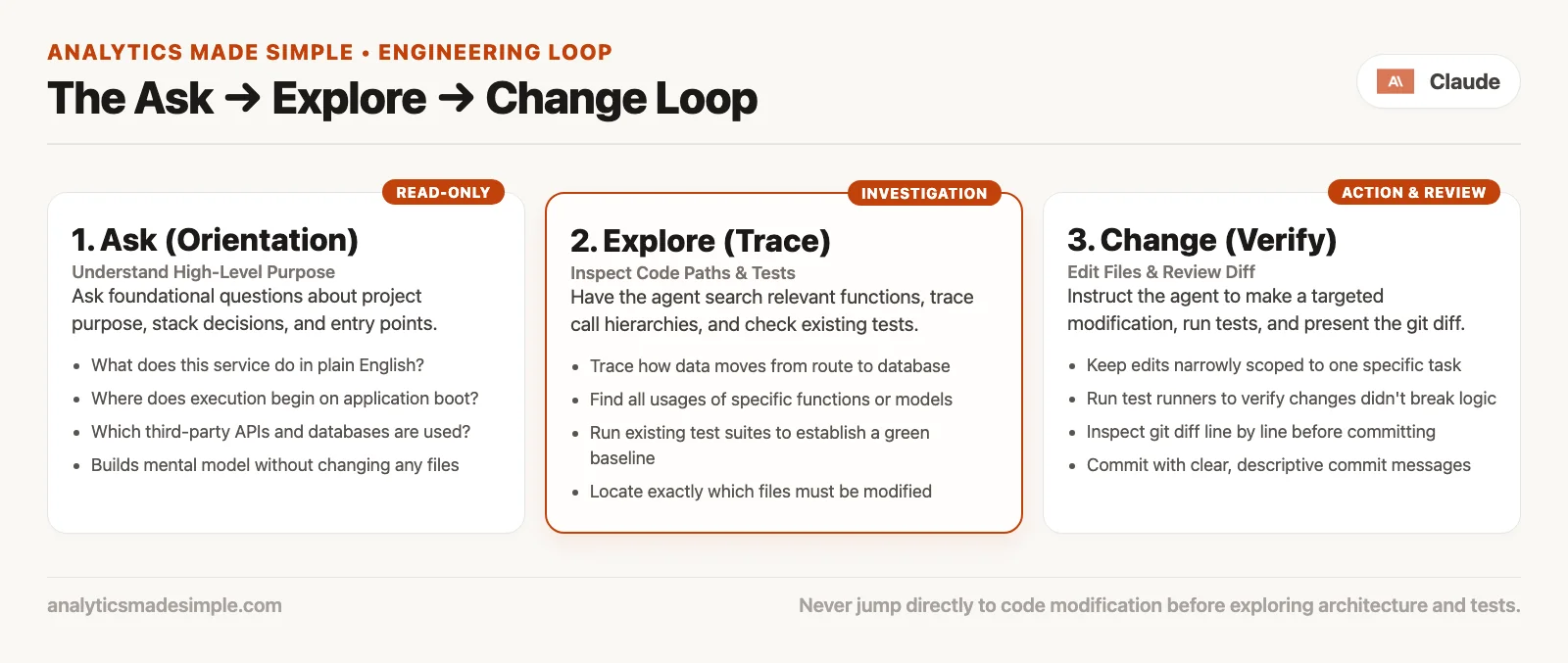
Think of Claude Code as a teammate who can read the whole project faster than you and write faster than you. That speed only helps if the shared map is right, and the three steps keep the map honest.
| Step | Your job | Agent’s job | Done when |
|---|---|---|---|
| Ask | State role, goal, and constraints in plain language | Answer with structure and file paths | You can open the cited files and they match the story |
| Explore | Dig into one area and ask for examples and tests | Search, read, summarize, and maybe run commands that only read | You know where a change should live and what might break |
| Change | Name the smallest useful patch; review every diff | Edit under your permission mode; run checks if asked | You can explain the patch in one sentence and tests (or a manual check) hold |
People squash the steps together because tickets are written as outcomes (“dark mode”) and not as investigations (“where is theme state owned today?”). Claude will happily squash them with you, so your job is to refuse until the map is good enough.
Step 1: ask questions that force a map
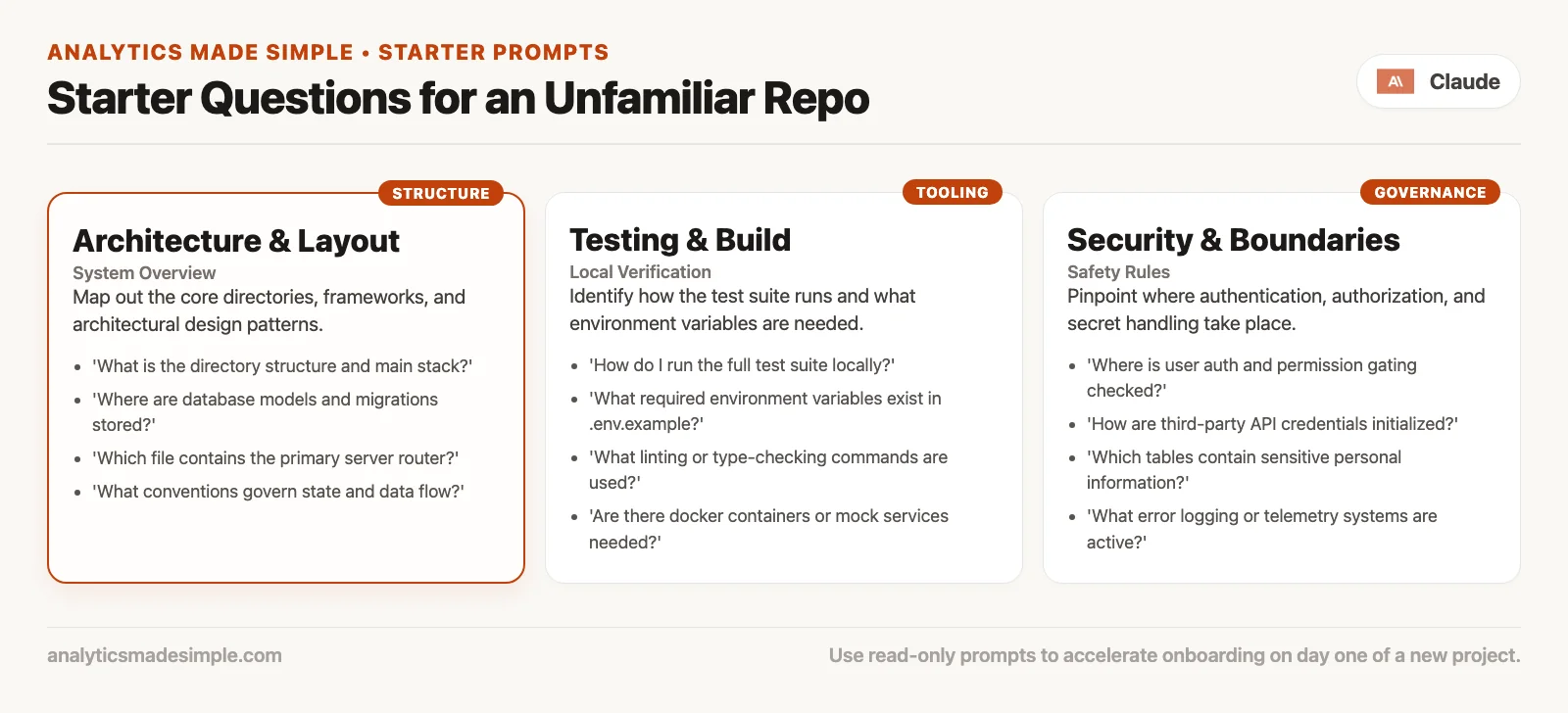
The official quickstart starters are intentionally boring, and that is a feature. On a project you have never seen, try variants of these:
what does this project do?where is the main entry point?what technologies does this project use?explain the folder structureThen move from brochure language to working language:
how do I run tests and start the app locally? quote the exact commands from the repowhere is user authentication enforced for HTTP requests? list file pathswhich package owns billing, and which package only consumes it?These questions ask for file paths, exact commands, and boundaries, and they do not ask for vibes. An answer like “this is a modern scalable platform” is useless. A useful answer points at real files, including the API, the part of the app other programs talk to. An answer like “the web entry is apps/web/src/main.tsx, the API is services/api, and the auth check is services/api/src/middleware/auth.ts” is gold, but only after you open those files and see that it is true.
Tell it who you are and what is off limits
Claude does not know whether you are a new hire, a contractor, or the original author unless you say so. A short framing block at the start of a session saves a lot of back and forth:
I am new to this repo. I can run basic git and tests.
I am not allowed to change production deploy config today.
Goal: understand how notes are created, then fix a small validation bug.
Prefer small diffs and existing patterns over new frameworks.
That block is not ceremony. It stops “helpful” refactors, like swapping in a new state library (a package of ready-made code), when all you asked about was the required fields on a form.
What good answers look like
- They name files you can open in under ten seconds.
- They separate “I read this” from “I am guessing,” so if the agent never shows any doubt on a messy project, be suspicious.
- They match what
package.json,pyproject.toml, or theREADMEfile already say about how to run things. - They stop when you say “enough map, next question,” and they do not pitch a rewrite.
If answers stay abstract after two tries, change tactics and say, “Show the contents of the top-level directory and tell me what each top-level folder is for.” Agents get better when the question is tied to something concrete on disk.
Step 2: explore like you mean it
Exploring is still mostly reading. You may allow shell commands that list files, search, or run tests, but you should still hesitate before allowing anything that writes. Plan mode is built for this phase, because it lets Claude research and propose without editing source files until you approve. In the version this post was checked against, you cycle into it with Shift+Tab, or you can start with a plan-oriented prompt.
Follow the path, not the slogan
When Claude says authentication lives in middleware (code that runs on every request before your own handler does), open that file and skim its imports. Then ask the next question based on what you see:
in services/api/src/middleware/auth.ts, where do tokens get verified?
is there a test that covers an expired token?
This is the human part that many people skip. If you only read the chat pane, you are reviewing a book report and not the code.
Find the sibling feature
Almost every “new” feature has a cousin. If you want a new webhook (an automatic message one app sends another when something happens), find the last webhook, and if you want a new admin filter, find the last admin filter. Then point Claude at it:
find an existing admin list filter and explain the pattern end to end:
route, query params, UI control, tests.
I want to add a filter for createdAfter using the same pattern.
Agents imitate structure they can see. When a similar feature is clear, the first change is boring in the best way. When none exists, say that out loud with something like “This may be a new pattern, so stay minimal.”
Use tests as a map
If the project has tests, ask where behavior is already specified before you invent new behavior:
which tests cover note creation?
run the smallest relevant test command after you identify it
do not change code yet
Read the permission prompts for test commands. Running tests is usually lower risk than rewriting packages, but “run tests” should not quietly turn into “upgrade the entire toolchain,” so deny any command you do not recognize.
Prompts that keep Claude in research mode
Your wording matters, and these phrases keep the agent from editing too early:
- “Do not edit files yet.”
- “List the options with tradeoffs, recommend one, and wait for my pick.”
- “Quote the existing function names you would call.”
- “What could break if we change X?”
If you are in default mode and Claude still proposes edits too early, answer with “plan only” or switch to plan mode. You are allowed to slow the tool down, and doing so is leadership and not fear.
Step 3: change small, then review
Only after the map is good enough do you invite writes. “Good enough” means you know the main files, the pattern to copy, and a check you will run, such as a test, a script (a small program), or a manual click path.
Write the request like a ticket for a careful teammate
A weak request, the kind people often type first, names only the problem:
fix validationThose two words are the whole request you would type to Claude. They name no file, no rule and no way to check the result, so Claude has to guess what you mean and may change far more than you wanted.
A stronger request names the place, the rule, the check, and what to leave alone:
In the note creation API, reject empty titles with a 400 and a clear error body
matching existing error shape in this service.
Add or update a test next to the existing note creation tests.
Do not change database schema.
Do not refactor unrelated files.
Being specific is a kindness to everyone involved. It also makes a bad diff obvious, because if the patch touches the database schema (the layout of tables and columns) or renames half a module, something went wrong relative to what you asked.
Stay on default permissions for early changes
In the default mode, Claude asks before most edits. Read each prompt and check the path and the action. Later, once you trust the loop and will review with git diff, a mode called acceptEdits is fine. Plan mode is for design before any edit. In the terminal (the text window where you type commands) you cycle between them with Shift+Tab, and the permission modes page lists all current modes, including ones your account may enable beyond the basic cycle.
Review before you commit
After the edits land, run these two commands to see what changed:
git status
git diff
Ask Claude to explain the diff if you want a guided tour, then distrust the tour until the changed lines actually match it. Look for these warning signs:
- Files you did not mention.
- New dependencies you did not approve.
- Deleted tests, or checks that were quietly made weaker.
- Formatting-only changes that hide a real logic change.
- “Helpful” renames that break the public interface other code depends on.
Commit only when you can defend the patch. If Claude drafts the commit message, rewrite anything you could not say out loud to your team. Later posts in this series go deeper on reviewing diffs and undoing bad runs, but the habit starts now, with no blind commits.
Worked example: empty title on notes API
For this example, you are in ~/src/notes-api, in default permission mode, and the tests run with npm test.
Ask
what does this project do?
where is the HTTP entry point?
how are notes created today?
Claude points at src/server.js, src/routes/notes.js, and src/db.js. You open notes.js and find a POST /notes handler that inserts title and body with almost no checks.
Explore
do not edit yet
how does this service format 400 errors for other routes?
where are tests for POST /notes?
what command runs only those tests if possible?
You learn that errors look like { "error": "message" } with status 400. The tests live in test/notes.test.js, and the command is npm test -- test/notes.test.js. You allow the test run, and the existing tests pass, but none of them cover an empty title.
Change
Add validation so POST /notes returns 400 with { "error": "title is required" }
when title is missing or only whitespace.
Add a test in test/notes.test.js next to the other POST tests.
Do not change the database schema or other routes.
Claude proposes a small guard and a test, and you approve both file edits after reading the paths. You ask it to run the notes tests again, and they pass. Then you run git diff and see two files and no surprise lockfile. You commit with the message “fix: reject empty note titles with 400.”
That loop took longer than a single “fix validation” prompt. It also produced something you can merge without praying.
Prompt patterns that transfer
| Pattern | Example stub | When |
|---|---|---|
| Map first | “Explain X with file paths; no edits.” | New area of the tree |
| Sibling clone | “Match the pattern in FILE; list steps; wait.” | Feature similar to an existing one |
| Check what else is affected | “What else imports this symbol?” | Before renames or signature changes |
| Test seatbelt | “Write a failing test first, show it, then implement.” | Behavior bugs with a clear expected result |
| Scope lock | “Touch only these paths: …” | Any time the agent gets ambitious |
| Rollback line | “If tests fail, stop and summarize; do not keep hacking.” | Long agent loops |
You will invent your own stubs. Keep them short, and paste them at the top of a session when the project is unfamiliar.
When to switch modes mid-conversation
- Default (ask each time): use it while learning, in sensitive areas, for the first change in a session, and for anything near sign-in, payments, or deploys.
- Plan: use it for a feature that spans many files and that you do not yet understand, when you want a written approach before anything changes on disk.
- acceptEdits: use it for a tight loop on a well-understood set of changes, while you check
git diffoften.
If you enter acceptEdits and the agent starts roaming, hit the brakes. Stop the run if needed, return to default or plan mode, and restate the scope. Modes are not a loyalty program, so switch whenever the risk changes.
Signs you should go back to asking questions
- The agent cannot name a file path for a claim it just made.
- It introduces a library the repo does not use anywhere else.
- The first proposed patch is larger than the ticket description.
- Tests are “left for later” on a behavior change.
- You feel lost reading the diff, and that feeling is useful information.
- It keeps re-explaining the architecture and does not answer “where.”
- Permission prompts show folders outside the project, or commands that delete things.
When you see these signs, say so in the session with something like “Stop editing. Summarize current project facts with paths only. We will replan.” Clearing context with /clear, which the session commands documentation describes, can help when the conversation has piled up wrong assumptions. A clean, short question beats a polluted long thread.
Talking to Code vs talking to chat
Chat, in the style of claude.ai, is strong at explaining concepts, drafting designs, and reviewing snippets you paste in. Claude Code is strong when the truth lives in a tree of files that you should not paste by hand. The conversation skills from Learn Claude still carry over: clear goals, iterative questions, and skepticism toward fluent nonsense. What changes is the evidence. In Code, evidence means paths, diffs, and command output, and a confident paragraph alone does not count.
If you catch yourself pasting whole files into web chat because “it feels safer,” notice the cost. You became the go-between for the tool and your files. Use Code for work grounded in your project, and use chat for product thinking that is not yet tied to this code. The product map series is the long version of that choice.
Team habits that make the loop stick
Even as a beginner you can set team norms:
- Descriptions of pull requests (proposed changes waiting for review) say what was explored and not only what was edited.
- Screenshots of passing tests, or links to automated checks, beat “seems fine.”
- Large agent diffs get a human walkthrough in review and not a rubber stamp.
- Secrets and production data stay out of prompts.
- Instruction files (
CLAUDE.mdand similar) get updated on purpose later and not as drive-by noise in a bug fix.
Later posts in this tutorial cover slash commands, skills, memory, instruction files, plugins, longer agent loops, and team safety rails. None of those replace ask, explore, and change. They only speed it up.
Common mistakes
Starting mid-sentence with the biggest refactor
If your first real prompt is “migrate us to the new framework,” you skipped the basics. Map first, then migrate one small, self-contained module, then expand.
Treating the first summary as ground truth
On messy projects, summaries can make up structure that is not there. The paths you open yourself are the ground truth. When a readme file disagrees with the code, that needs a human decision and not more fluent text.
Approving edits to “just see what happens”
Git helps, but not if you never look at what it recorded. Curiosity is fine on a throwaway branch with a plan to reset. It is not fine on your main branch late on a Friday.
Forgetting to say what not to do
Constraints are part of the prompt, such as no schema changes, no new dependencies, and no drive-by renames. Agents fill silence with ambition.
Confusing green tests with correct product
Test suites lag behind the product, so click through the user path yourself and check the error wording. Also ask whether your team requires analytics events or feature flags before you call the work done.
Questions people ask
How long should explore last before I allow edits?
Until you can name the main files and a check. Sometimes that takes five minutes, and sometimes it takes an afternoon on an old service. The clock is not the point, the map is.
Should I use plan mode every time?
No. Use it when the change spans many files, is unfamiliar, or is high risk. A tiny typo fix in a file you already have open does not need a full planning ritual.
What if the repo has no tests?
Keep changes smaller, because a small change is easy to read and easy to undo. Prefer feature flags if your team uses them, and write a minimal test if the project will accept one. Manual checklists become mandatory and not optional.
Can I skip ask/explore once I know the codebase?
You can compress them, but you should not delete them. Even experts ask “where is this enforced now?” because code moves. Compressing looks like two sharp questions and a pointer to a similar feature, and it never looks like zero questions and a hope.
Practice on a sample project
- Open a sandbox or a well-known sample app with Claude Code, once it is installed, so your first experiments cannot damage real work.
- Run a pure asking session about the project’s purpose, its entry point, and how its tests run, with no edits.
- Explore one part of the project with questions that force file paths, and open every file it cites.
- Make one small behavior or documentation change with an explicit “do not touch” list, so the change stays small enough to review.
- Review
git diff, then commit or discard on purpose. - Repeat once in plan mode for a slightly larger idea, and approve or reject the plan before any write.
Quick recap
- Ask for maps with paths and commands and do not accept slogans.
- Explore until you know where to change things and what might break, and use plan mode to help.
- Change things with a tight scope, review the diffs, and commit only what you can defend.
- Warning signs such as missing paths, surprise dependencies, and huge diffs mean you should return to questions.
- Chat skills carry over, and Code adds evidence from your project. Stay oriented with the product map and Learn Claude.
Your next step
Open a project you know in Claude Code and ask only for a map: the main folders, how to run the tests, and where one feature lives. Check the answer against what you know. If the map is right, ask for one small change and review the diff before you commit anything.
Series notes
This is Part 2 of the Claude Code tutorial. The next post covers slash commands and common command patterns, so you spend less time rediscovering session tools in the middle of your work.
Sources
Research and further reading used for this article (re-check before you freeze team process):
- Claude Code Docs: Quickstart (first questions, first change, git conversation examples, permission mode pointer)
- Claude Code Docs: Common workflows (plan-before-edit and everyday task patterns)
- Claude Code Docs: Best practices (prompting and project setup guidance)
- Claude Code Docs: Choose a permission mode (default, acceptEdits, plan, cycling)
- Claude Code Docs: How Claude Code works (agent loop and tools orientation)
- Claude Code Docs: Interactive mode (session keyboard shortcuts)
- Claude Code Docs: Overview (product surfaces and framing)
- Analytics Made Simple: Claude product map (when Code vs chat vs Cowork)
- Analytics Made Simple: Learn Claude from scratch (everyday conversation habits)
Keep going
Same lessons in your feed
Short diagrams, hooks, and weekly tutorials on Substack, Instagram, X, and Facebook.