So far this series mostly read data. Real workplaces also write it. Someone onboards a customer. Finance corrects an amount. Ops retires a test order that should never have landed in production. Those jobs use INSERT, UPDATE, and DELETE. They are short keywords with long consequences. One missing WHERE can rewrite every row in a table before your coffee cools.
This is Part 8 of the SQL series. Part 7 nested queries so you could filter with answers from other answers. Now you change rows on purpose, with habits that keep you employable. The path is on the SQL series page. Related skills for messy inputs live in From spreadsheets to real data and the Learn hub.
What you will learn
- How to insert one row or several with explicit column lists
- How to update and delete with filters you can prove first
- Why SELECT-the-target before you mutate is non-negotiable
- A light introduction to transactions (all succeed together or roll back)
- Backup and staging habits before mass updates
- Optional notes on
RETURNINGand dialect differences
Read access and write access are different jobs
Many analysts live in warehouses with read-only credentials, and that is healthy. Modification skills still matter because you will eventually own a practice database, a staging schema, an operational app table, or a small SQLite file that powers an internal tool. The mental model is the same: rows have grain, keys link tables, and filters decide whose day you ruin.
In production systems, writes often go through applications, APIs, or approved pipelines rather than ad-hoc SQL in a console. Learning the statements still helps you review what those systems do, debug bad rows, and fix practice environments without guessing.
Toy schema reminder
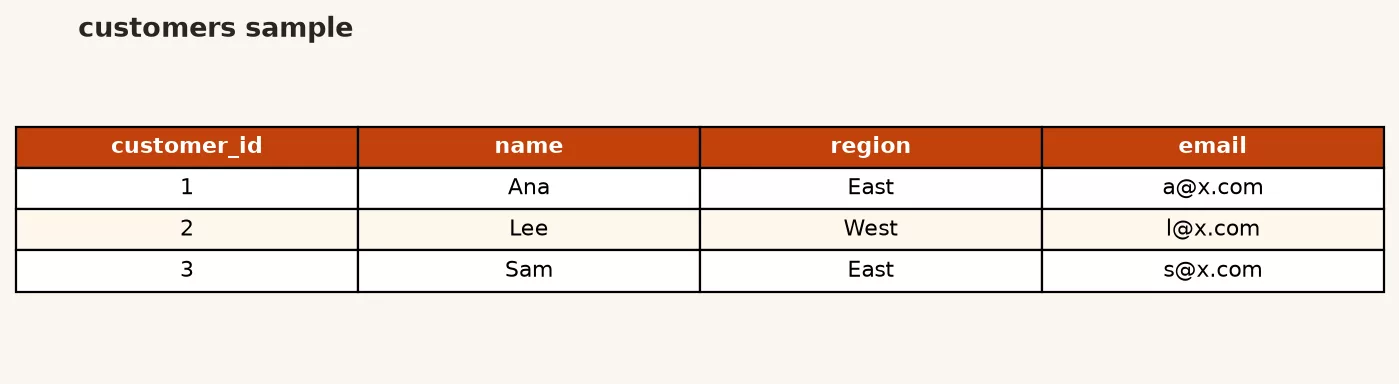
We keep using customers and orders. One customer can have many orders. Primary keys identify rows. Foreign keys (even if your practice DB does not enforce them yet) are the logical links you must respect when deleting.
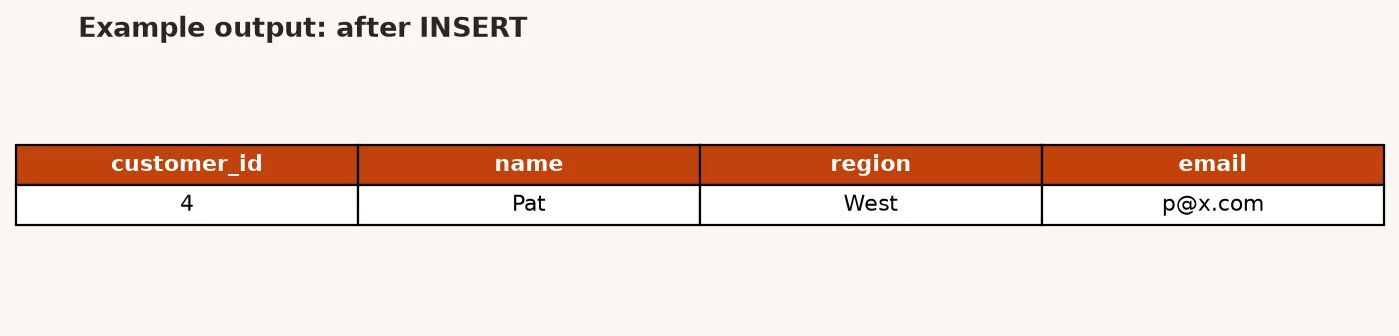
Example output:
INSERT: add rows without mystery columns
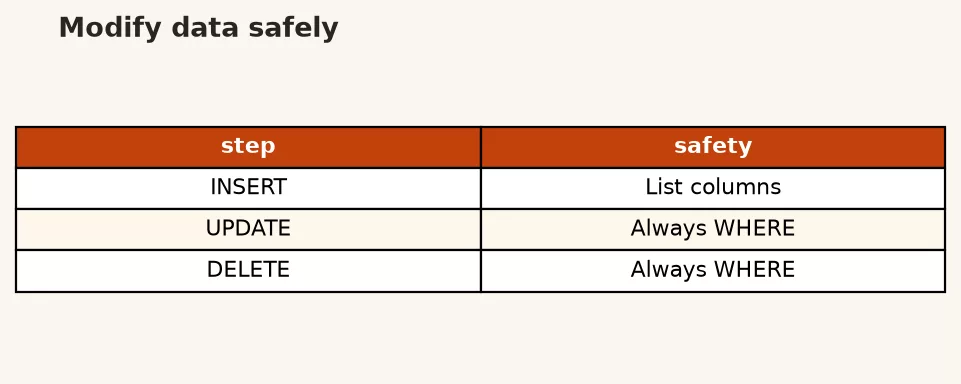
INSERT adds one or more rows. Always list the columns you are filling. Relying on “values in table order” breaks the moment someone adds a column in the middle.
INSERT INTO customers (
  customer_id,
  name,
  email,
  region,
  signup_date
)
VALUES (
  6,
  'Fran Lopez',
  'fran@example.com',
  'East',
  '2024-06-15'
);
That statement creates one customer. If customer_id is generated by the database (identity or serial), you omit it and let the engine assign the key. In teaching examples we often set ids explicitly so results stay predictable.
Multiple rows in one statement:
INSERT INTO orders (
  order_id,
  customer_id,
  order_date,
  amount,
  status
)
VALUES
  (107, 6, '2024-06-16', 95.00, 'paid'),
  (108, 6, '2024-06-18', 40.00, 'paid');
Some engines also support INSERT ... SELECT, which copies or transforms rows from a query into a table. That pattern is powerful for backfills and dangerous without a dry run, because it can insert thousands of rows from a slightly wrong filter.
INSERT INTO orders (
  order_id,
  customer_id,
  order_date,
  amount,
  status
)
SELECT
  order_id + 1000,
  customer_id,
  order_date,
  amount,
  'paid'
FROM orders
WHERE status = 'paid'
  AND order_date = '2024-05-01';
That example is intentionally odd (it manufactures new ids by offset). In real work you would generate proper keys and never invent business rows for fun. The lesson is structural: the SELECT defines the candidate set, so write and run that SELECT alone first.
Example output:
UPDATE: change only the rows you mean
UPDATE rewrites column values for rows that match a condition. The scary version has no WHERE and updates the entire table. Treat that as a loaded tool, not a default.
Step 1: select the target set.
SELECT
  customer_id,
  name,
  region,
  email
FROM customers
WHERE customer_id = 6;
Step 2: update with the same filter.
UPDATE customers
SET email = 'fran.lopez@example.com'
WHERE customer_id = 6;
Step 3: select again to verify.
SELECT
  customer_id,
  name,
  email
FROM customers
WHERE customer_id = 6;
For mass updates, count first:
SELECT COUNT(*) AS rows_to_touch
FROM orders
WHERE status = 'paid'
  AND amount < 50;
If the count is 12 and you expected 12, proceed. If it is 12,000 and you expected 12, stop. That single SELECT has saved more careers than any fancy index tip.
Example mass update with a clear business rule (mark tiny paid orders for review using a status your schema allows, or update a note column if you have one). Here we bump status only for a narrow set:
UPDATE orders
SET status = 'refunded'
WHERE order_id = 104
  AND status = 'paid';
Including both the id and the current status makes the statement safer if another process already changed the row. This is a light form of optimistic thinking: only mutate if the world still looks like you think it does.
DELETE: remove rows, not relationships you forgot
DELETE removes whole rows. It does not “clear a cell.” For that you update a column to null (if allowed) or to a sentinel value. Deletes are about entire facts disappearing from the table.
DELETE FROM orders
WHERE order_id = 108
  AND customer_id = 6;
Again, match on a primary key when you can. Deleting by a broad attribute (“all West region orders”) is a project, not a one-liner you invent in production at 4:55 p.m.
Parent and child tables matter. If orders.customer_id points at customers, deleting a customer while orders remain may fail under foreign key constraints, or worse, leave orphan orders if constraints are missing. Decide the business rule first: cascade delete, block delete, or soft-delete with a flag. Analysts often prefer soft-delete columns (is_active, deleted_at) in warehouse models so history survives.
The preview habit (write it on a sticky note)
For any UPDATE or DELETE:
- Write the
WHEREclause as a SELECT and inspect rows. - Check
COUNT(*)against expectation. - In production-like systems, prefer a transaction so you can roll back if verification fails.
- Re-select after the change.
- Log what you did in the ticket, not only in chat folklore.
Rule of thumb: If you cannot paste the SELECT that identifies the target rows into the ticket, you are not ready to run the UPDATE.
Transactions: all of it, or none of it
A transaction groups statements so they commit together or roll back together. If you insert a customer and two orders, you usually want all three rows or zero rows, not a half-created account. Engines differ in default autocommit behavior. The concept still travels:
BEGIN;

INSERT INTO customers (
  customer_id, name, email, region, signup_date
) VALUES (
  7, 'Gus Park', 'gus@example.com', 'West', '2024-07-01'
);

INSERT INTO orders (
  order_id, customer_id, order_date, amount, status
) VALUES (
  109, 7, '2024-07-02', 220.00, 'paid'
);

-- If something looks wrong: ROLLBACK;
-- If verification SELECTs look right:
COMMIT;
Inside an open transaction you can SELECT the new rows and confirm. If the second insert fails (duplicate key, missing parent), you roll back and the first insert disappears too. That atomicity is how you avoid half-written business objects.
You do not need to become a concurrency theorist today. Know that concurrent writers can interleave, that long transactions can lock rows other people need, and that “I’ll just leave this transaction open while I think” is how support channels light up. Keep transactions short. Do analysis outside them when possible.
Backups and staging before mass updates
Before a wide UPDATE:
- Backup or snapshot according to your platform (managed backup, dump file, table clone).
- Copy targets into a staging table when practical:
CREATE TABLE orders_backup_20240615 AS SELECT * FROM orders WHERE ...(syntax varies). - Run the change in a non-production environment first with similar data shape.
- Prefer reversible designs when you can (update a flag instead of hard delete).
If you inherit a database with no backup story, that is a Part 13 problem you should escalate, not a hero moment for reckless SQL. Analysts who care about quality already know that silent wrong data is worse than loud failure. The data quality series pairs well with write discipline: validate after you change, not only before you chart.
Optional: RETURNING and dialect quirks
Some engines (notably PostgreSQL) support RETURNING so an INSERT, UPDATE, or DELETE can hand back the affected rows in one round trip:
UPDATE customers
SET region = 'East'
WHERE customer_id = 7
RETURNING customer_id, name, region;
Handy in application code and scripts. Not universal. SQLite has been expanding related features over time, MySQL historically leaned on separate SELECTs, and warehouses may restrict or rewrite DML entirely. Treat RETURNING as a convenience when your engine documents it, not as portable standard SQL you assume everywhere.
Other dialect notes that bite people:
LIMITon UPDATE/DELETE exists in some engines and not others.- Identity columns, sequences, and autoincrement each have their own insert rules.
- Case sensitivity of identifiers and string comparisons depends on collation and engine.
- Warehouse platforms may make tables append-only or charge differently for DML.
When in doubt, read your engine’s INSERT/UPDATE/DELETE page and practice on a disposable database. The SQL series is dialect-friendly on purpose: concepts first, exact keywords second.
Worked story: correct a bad email, then add a replacement order
Support says customer 6’s email has a typo and one practice order should be replaced. You work in a transaction on a practice database.
BEGIN;

-- 1) Confirm target customer
SELECT customer_id, name, email
FROM customers
WHERE customer_id = 6;

UPDATE customers
SET email = 'fran.lopez@example.com'
WHERE customer_id = 6;

-- 2) Remove the mistaken order only
SELECT order_id, customer_id, amount, status
FROM orders
WHERE order_id = 108;

DELETE FROM orders
WHERE order_id = 108
  AND customer_id = 6;

-- 3) Insert the corrected order
INSERT INTO orders (
  order_id, customer_id, order_date, amount, status
) VALUES (
  110, 6, '2024-06-18', 42.50, 'paid'
);

-- 4) Verify
SELECT * FROM customers WHERE customer_id = 6;
SELECT * FROM orders WHERE customer_id = 6 ORDER BY order_id;

COMMIT;
If any verification SELECT looks wrong, you ROLLBACK instead of COMMIT. That story is more valuable than memorizing keyword order. Stakeholders remember the analyst who fixed data carefully, not the one who shipped a flashy window function while corrupting emails.
Permissions reality check
Having SELECT privilege does not imply INSERT, UPDATE, or DELETE. Production grants should be least privilege. If your UPDATE fails with a permission error, that is often a feature of a well-run system. Request access through the proper channel, explain the business need, and prefer a controlled job or admin path for wide changes. Part 13 returns to grants and on-call hygiene for people who inherit databases.
Soft deletes, idempotent loads, and “run it twice”
Hard DELETE removes history. Many operational and analytics designs prefer a soft delete: set is_active = false or fill deleted_at instead of removing the row. Reports filter active rows. Auditors can still see what existed. Restores after mistakes get easier because the row never left. Soft delete is not free (tables grow, filters must be consistent), but it is often safer than permanent erasure for business entities.
Loads and corrections should aim for idempotence where possible: running the same statement twice should not create duplicate customers or double-count revenue. That might mean:
- Using natural keys or unique constraints so a second insert fails loudly
- Upsert patterns your engine supports (
ON CONFLICT,MERGE, and cousins) when the business rule is “insert or update” - Deleting a known batch key before re-inserting a full replace for that batch
- Never generating new surrogate keys on every retry of the same logical entity
On the toy schema, practice a careful “reload Friday’s orders” story: delete only rows for that date in a staging table, insert the corrected set, verify counts, then promote. On production systems, that story becomes a pipeline with monitoring. The SQL verbs stay the same. The operational wrapper is what Part 13 will call maintenance hygiene.
One more workplace habit: separate correction from new facts. A wrong email is an UPDATE. A replacement order after a cancellation might be a status change plus a new order row, not an overwrite of history that erases the cancellation. Talk to the business owner before you “clean” rows in place. Analytics consumers downstream may already have exported the old values into decks. Your UPDATE can desync every copy that is not live-querying the database.
Common mistakes
- UPDATE or DELETE without WHERE. Practice only on disposable data until muscle memory includes the filter.
- Skipping the preview SELECT. Counts and sample rows are cheaper than restores.
- Inserting without an explicit column list. Schema drift will bite you.
- Deleting parents while children remain, or the reverse, without a policy.
- Running mass DML on production first because staging “takes too long.”
- Leaving transactions open while you investigate in another window.
- Assuming RETURNING or LIMIT on UPDATE is portable. Check docs per engine.
How to practice
- Clone your toy database file or schema so you can reset freely.
- Insert two customers and three orders, then update one email and delete one order inside a transaction.
- Deliberately write a bad WHERE on a copy, see the damage, restore from backup, and write the postmortem for yourself.
- Practice
INSERT ... SELECTinto a staging table from a filtered query you already trust. - If you also use Python, practice the same mutations via parameterized SQL later so you never string-build values. The Python series pairs well when you automate checks around loads.
Quick recap
INSERTadds rows; list columns explicitly.UPDATEandDELETEneed filters you proved with SELECT first.- Transactions group related changes so they commit or roll back together.
- Backups, staging copies, and dry runs belong before mass updates.
RETURNINGand other conveniences are engine-specific bonuses.
Part 9 covers views for reuse and indexes for faster lookups, including tradeoffs so you do not treat either as magic. Continue on the SQL series or explore more on Learn.
Sources
Research and further reading used for this article: