

Use a subquery when one answer has to feed another, such as finding the customers who spent more than average. A subquery is a small query tucked inside a bigger one, so you can work out the average and use it in the same step, with no trip to a spreadsheet. Say your manager asks for exactly that list for last quarter. In SQL (the standard language for asking a database for data), that means a full SELECT sitting inside another statement so you can filter, compare, or reshape.
This tutorial is part of the SQL series on Analytics Made Simple. Earlier guides covered picking columns, filtering, sorting, totals, and joins. Now you nest queries so one answer can drive another. The full path lives on the SQL series page, and the broader map sits on the Learn hub.
What you will learn
- What a subquery is in plain language, and where it can sit (
WHERE,FROM,SELECT). - Scalar subqueries that return one value for comparisons.
- Multi-row patterns with
INand existence checks withEXISTS. - Derived tables in the
FROMclause when you need a temporary result shape. - When a common table expression (covered in our advanced guide) is clearer than nesting forever.
- Worked examples on the same customers and orders toy schema (the layout of tables and columns in a database) as the rest of the series.
Subqueries are questions inside questions
A subquery (also called a nested query or inner query) is a SELECT enclosed in parentheses and used by an outer statement. The database runs the inner logic, then uses that result to complete the outer logic. You already did mental subqueries when you said, “First find the average order amount, then list orders above that average.” SQL just makes the order of those thoughts explicit.
Think of three common shapes:
- Scalar: returns one value (one row, one column), great for comparisons like “greater than the average.”.
- Multi-row: returns a list of values, usually paired with
IN,NOT IN, or a join rewrite. - Existence: returns “yes, at least one row matched” or “no,” usually with
EXISTS/NOT EXISTS.
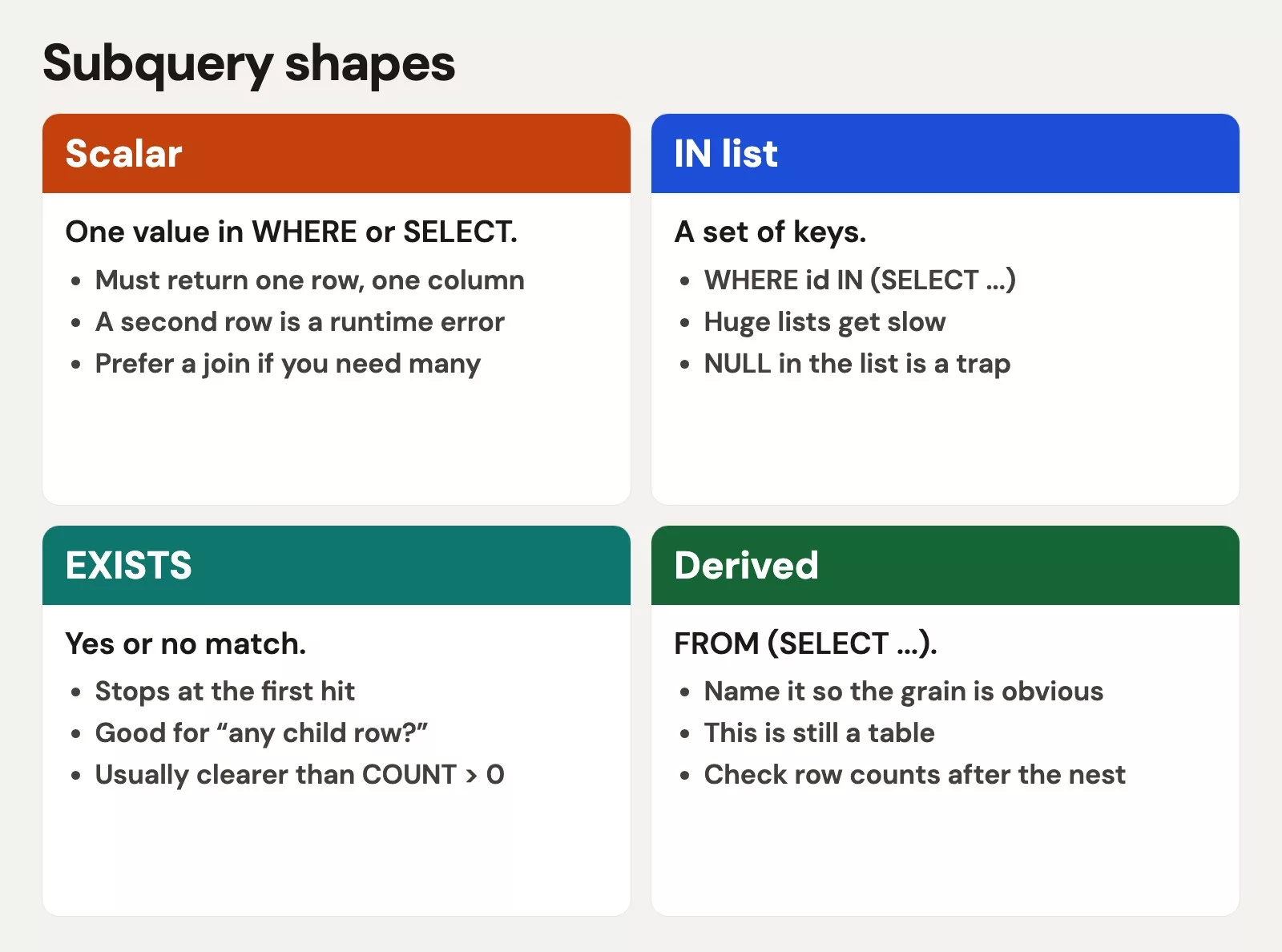
You will also meet the derived table: a subquery in the FROM clause that acts like a temporary table for the outer query. That pattern is how many analysts stage intermediate grains before a final join or filter. Later, our advanced techniques guide will show how common table expressions (CTEs) give those intermediate steps names and make long pipelines readable. Subqueries are certainly not obsolete; rather, they remain the most compact form while CTEs offer maximum readability.
The toy schema we reuse
Same two tables as earlier parts. One row in customers is a person or account. One row in orders is a single purchase linked by customer_id.
| Table | Columns (simplified) | Grain |
|---|---|---|
customers | customer_id, name, email, region, signup_date | One customer |
orders | order_id, customer_id, order_date, amount, status | One order |
Example output:
| customer_id | name | region | |
|---|---|---|---|
| 1 | Ana | East | a@x.com |
| 2 | Lee | West | l@x.com |
| 3 | Sam | East | s@x.com |
Example output:
| order_id | customer_id | order_date | amount | status |
|---|---|---|---|---|
| 10 | 1 | 2026-01-03 | 120.0 | paid |
| 11 | 1 | 2026-01-04 | 40.0 | paid |
| 12 | 2 | 2026-01-04 | 200.0 | paid |
| 13 | 3 | 2026-01-05 | 15.0 | pending |
When you practice, load a handful of rows so you can predict the result before you run the query. Predicting your result set in advance represents half of query fluency. Blindly running nested SQL is how wrong lists ship into Monday standups.
Suggested practice rows keep the mental math easy: a few customers across East, West, and South; a mix of paid and refunded orders; at least one customer with multiple paid orders and one customer with none. When the inner query returns three ids, you should be able to say which three before the outer query runs. If you cannot, the nesting is not ready for a stakeholder deck.
Scalar subqueries: one number, many uses
A scalar subquery returns a single value. Engines treat it like a constant for each outer row (or once for the whole query when it does not depend on the outer row). Classic workplace uses: compare to an average, a max date, a budget threshold stored in another table, or a config flag.
Here we list paid orders whose amount is above the overall average paid amount:
SELECT
  order_id,
  customer_id,
  amount
FROM orders
WHERE status = 'paid'
  AND amount > (
    SELECT AVG(amount)
    FROM orders
    WHERE status = 'paid'
  )
ORDER BY amount DESC;
Read it top to bottom: outer query wants paid orders. The parentheses compute one average. Each candidate row’s amount is compared to that single number. If the inner query accidentally returned two rows, many engines would error. That is a feature. Scalar means one value, not a secret multi-row list.
You can also place a scalar subquery in the SELECT list to stamp every row with a benchmark:
SELECT
  order_id,
  amount,
  (
    SELECT AVG(amount)
    FROM orders
    WHERE status = 'paid'
  ) AS avg_paid_amount
FROM orders
WHERE status = 'paid';
Useful for a quick export where finance wants both the line amount and the company benchmark on every row. For heavy production work you may prefer computing the average once in a CTE or joining an aggregate. The scalar form is still excellent for exploration and small reports.
Scalar subqueries also show up as “lookup” helpers: fetch a single config value, a fiscal period end date, or a threshold stored in a small settings table. That keeps magic numbers out of five different queries. Just remember the contract: one value. If the settings table might have two active rows, the scalar form will complain, which is better than silently picking an arbitrary row in some engines and not others.
Multi-row with IN: membership in a set
When the inner query returns a list of values, IN asks whether the outer column is a member of that set. Example: customers who placed at least one refunded order.
SELECT
  customer_id,
  name,
  region
FROM customers
WHERE customer_id IN (
  SELECT customer_id
  FROM orders
  WHERE status = 'refunded'
)
ORDER BY name;
The inner SELECT builds the set of customer ids that appear on refunded orders. The outer SELECT keeps only customers in that set. This is often equivalent to a semi-join pattern. You could rewrite many IN cases as joins with care about duplicates, but IN is honest about the intent: “keep rows whose key is among these.”
NOT IN is the reverse membership test, with a sharp edge: if the subquery can return NULL, NOT IN logic gets weird because comparisons with null are not true. Prefer NOT EXISTS when nulls are possible in the subquery result. That single habit prevents mysterious empty results that waste an afternoon.
EXISTS: do any matching rows show up?
EXISTS does not care what columns the subquery selects. It cares whether the subquery returns at least one row. That makes it perfect for “customers who have any paid order” style questions, especially when the join would multiply rows and you only need a yes/no.
SELECT
  c.customer_id,
  c.name,
  c.region
FROM customers AS c
WHERE EXISTS (
  SELECT 1
  FROM orders AS o
  WHERE o.customer_id = c.customer_id
    AND o.status = 'paid'
    AND o.amount >= 100
)
ORDER BY c.name;
Notice SELECT 1. The column list is almost decorative. The correlation o.customer_id = c.customer_id ties the inner query to the current outer customer. That is a correlated subquery: it can re-evaluate per outer row. Engines often optimize this well, especially with indexes on join keys, but you should still prefer clear intent over micro-optimizing by folklore.
NOT EXISTS finds the complementary set: customers with no matching paid order of at least 100, for example. Ops teams love this pattern for “accounts with no activity in 90 days” once you add a date filter inside the subquery.
Derived tables: subquery in FROM
Sometimes you need a temporary table shape: spend per customer, then join that back to customer attributes, then filter. A derived table does that in one statement:
SELECT
  c.name,
  c.region,
  s.order_count,
  s.total_spend
FROM customers AS c
INNER JOIN (
  SELECT
    customer_id,
    COUNT(*) AS order_count,
    SUM(amount) AS total_spend
  FROM orders
  WHERE status = 'paid'
  GROUP BY customer_id
) AS s
  ON s.customer_id = c.customer_id
WHERE s.total_spend >= 150
ORDER BY s.total_spend DESC;
The inner block builds one row per customer with paid order metrics. The outer block joins names and regions, then keeps high spenders. You must alias the derived table (AS s). Most engines require that name so the outer query can refer to columns cleanly.
Example output:
| name | amount |
|---|---|
| Lee | 200.0 |
If this nesting starts to feel like Russian dolls, that is your cue to preview our upcoming CTE tutorial. Same logic, named steps, easier code review. Use the compact subquery when the inner piece is short. Use a CTE when a teammate will need to maintain it six months later without you in the room.
Correlated versus independent: a practical split
An independent subquery does not reference the outer query. The average paid amount example is independent: compute once (conceptually), reuse. A correlated subquery references outer columns, like the EXISTS example. Both are valid. Correlation is not a dirty word. It is a tool for “for this outer row, check something nearby.”
When correlation makes a query hard to read, try:
- Rewriting as a join to a pre-aggregated derived table.
- Moving the logic into a
CTEwith clear step names. - Computing the intermediate set into a temp table in a notebook or script for exploration (then folding the final form into production SQL).
Readability is a performance feature for humans. Slow queries get fixed. Confusing queries get copied wrong forever.
Subquery versus join: which should you write?
Write a subquery when you only need to keep rows that match a list, and write a join when you need columns from the other table. Many filters written with IN or EXISTS can also be written with joins. These are rules of thumb, not laws:
| Intent | Often clearer as | Why |
|---|---|---|
| Keep rows that match a set | IN / EXISTS | States membership without inventing extra columns |
| Attach columns from another table | JOIN | You need the other table’s fields, not only a filter |
| Filter on an aggregate of related rows | Derived table + join, or CTE | Grain stays honest; averages and counts stay grouped |
| Compare each row to a single global statistic | Scalar subquery or CTE | One number, many comparisons |
If you join for a filter-only purpose and forget that one customer has many orders, you can duplicate customers in the result. Semi-join style tools (EXISTS, careful IN, or DISTINCT after a join) protect the customer grain. Grain discipline from earlier parts still applies. If you need a refresher on matching tables, revisit joins in the SQL series and the pandas analog in the Python series.
Worked story: above-average East customers
Scenario: marketing wants East region customers whose total paid spend is above the average paid spend among customers who have at least one paid order. That is two nested ideas: a per-customer total, and a threshold defined from those totals.
SELECT
  c.customer_id,
  c.name,
  s.total_spend
FROM customers AS c
INNER JOIN (
  SELECT
    customer_id,
    SUM(amount) AS total_spend
  FROM orders
  WHERE status = 'paid'
  GROUP BY customer_id
) AS s
  ON s.customer_id = c.customer_id
WHERE c.region = 'East'
  AND s.total_spend > (
    SELECT AVG(total_spend)
    FROM (
      SELECT
        customer_id,
        SUM(amount) AS total_spend
      FROM orders
      WHERE status = 'paid'
      GROUP BY customer_id
    ) AS per_customer
  )
ORDER BY s.total_spend DESC;
Yes, the paid spend aggregate appears twice. That is intentional for teaching. In real life you would almost always name that aggregate once with a common table expression (our advanced guide) so the definition cannot drift. While nested SQL is perfectly legal syntax, duplicating business logic across queries introduces serious reporting risk. When you review AI-generated SQL, watch for the same aggregate written three slightly different ways. That is how “average” silently means three different filters.
Debugging nested queries without losing a day
When a nested query returns nothing, or returns “too much,” resist the urge to rewrite the entire statement at once. Peel it like an onion.
- Run the innermost
SELECTalone. Confirm columns, filters, and row counts match your story. - If it is a scalar subquery, confirm it returns exactly one row and one column on your sample.
- If it is an
INlist, glance for unexpected nulls and for ids you did not expect in the set. - If it is
EXISTS, temporarily change it to a join and inspect the matching rows (then switch back if you only needed existence). - Align status and date filters between inner and outer queries so “average of X” really means the same X.
A second workplace pattern: finance asks for “customers above average,” sales asks for “customers above average in their region.” Those are different thresholds. A global scalar average is not a regional average. Spell the population in the ticket before you nest anything. Subqueries make it easy to encode the wrong population cleanly, which is how wrong answers look professional.
A third pattern: you need both the filter and attributes from another table. Start with the membership subquery or EXISTS to get the right customer set, then join for attributes in an outer layer, or reverse the order with a derived table of metrics. What you should not do is join first, aggregate later, and hope the fanout cancels out. Hope is not a grain strategy.
If you are pairing with AI-generated SQL, ask the model to output the inner query first, then the full nested form. Compare both against your hand-written expected row counts on the toy schema. The series introduction and the later AI-aware habits in analytics work all point the same way: generated SQL is a draft, not a certificate of correctness. Your job is still the business definition.
Common mistakes
- Assuming a scalar subquery can return many rows. Database engines will usually throw an immediate runtime error (an error that happens while the query runs). Fix the inner query with aggregation or a tighter filter.
- Using
NOT INwith nullable columns. PreferNOT EXISTSwhen nulls can appear. - Forgetting the alias on a derived table.
FROM (is required in most dialects.SELECT...) AS t - Joining when you only needed existence, then counting duplicate customers in a “unique buyers” chart.
- Nesting so deep nobody can edit it. If you need a diagram to explain the query, reach for
CTEssoon. - Copying production filters into the outer query only. If the subquery uses different status rules than the outer filter, your “above average” is not the average of the same population.
Rule of thumb: Write the inner question as its own
SELECTfirst. Run the inner query standalone, carefully verify the resulting rows, and only then wrap it in the outer statement. A bug inside a nested query is still an ordinary bug, just harder to see.
How to practice
- On the toy schema, list orders above the median amount if your engine has a median function, or above the average if not.
- List customers with no orders at all using
NOT EXISTS. - Build a derived table of monthly revenue, then select only months above 500 (adjust thresholds to your data).
- Rewrite one
INquery as a join and compare row counts carefully. - Save a messy nested version and a cleaner two-step version. Show both to a teammate and ask which they would maintain.
If your practice data is messy CSV chaos first, tidy habits from From spreadsheets to real data still matter. Subqueries amplify bad keys. They do not fix them. For broader quality checks once results feed dashboards, keep the data quality series nearby.
Quick recap
- Subqueries nest a
SELECTinside another statement so one answer can drive another. - Scalar subqueries return one value for comparisons or
SELECT-list benchmarks. INtests membership in a list;EXISTStests whether any matching row appears.- Derived tables in
FROMstage intermediate grains before a final join or filter. - When nesting hurts readability, preview our upcoming
CTEtutorial and name your intermediate steps.
If you only remember three moves from this part, make them these: run the inner query alone first, prefer EXISTS when nulls make NOT IN dangerous, and promote messy nesting to named CTEs as soon as a teammate (or future you) must maintain the logic. Those three habits prevent most subquery pain in weekly analytics work.
Our next tutorial shifts from reading data to changing it safely with INSERT, UPDATE, and DELETE. Read-only habits still apply: know the grain, preview the rows, and never mass-update without a backup story. Continue through the SQL series or browse more paths on Learn.
Sources
Research and further reading used for this article:
- PostgreSQL documentation: Subquery expressions (EXISTS, IN, and related forms)
- PostgreSQL documentation:
SELECT(including subqueries inFROMand WITH) - MySQL Reference Manual: Subqueries
- SQLite documentation: Expressions (subquery forms in the language grammar)
- Analytics Made Simple: SQL series
- Analytics Made Simple: Learn hub
Keep going
Same lessons in your feed
Short diagrams, hooks, and weekly tutorials on Substack, Instagram, X, and Facebook.



