

Customer region lives in one table. Order amounts live in another. The business question ignores your feelings about tidy single sheets and asks anyway: “Paid revenue by region.” That sentence is a join. Done well, it is the heart of relational analytics. Done carelessly, it is how revenue doubles overnight and nobody knows why until finance yells.
This is Part 6 of the SQL series on Analytics Made Simple. We connect customers and orders with INNER and LEFT joins, talk keys in plain English, watch row counts like a hawk, and name cases where joining is the wrong move. Hub: SQL series.
What you will learn
- Why related data is split across tables
- What primary keys and foreign keys are for
- How INNER JOIN keeps matched rows only
- How LEFT JOIN keeps all rows from the left table
- How to spot and prevent row-count explosions
- When not to join, and what to do instead
Two tables, one business
Recall the grain:
customers: one row per customerorders: one row per order, withcustomer_idpointing at a customer
That pointer is the relationship. Join means: combine rows where the relationship holds, under rules you choose (matched only, keep unmatched left side, and so on).

Example output:
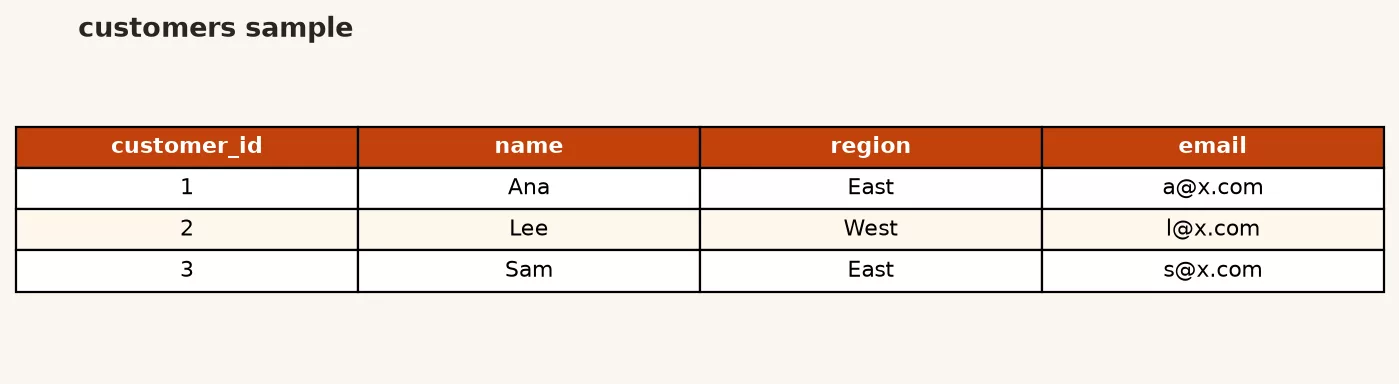
Example output:
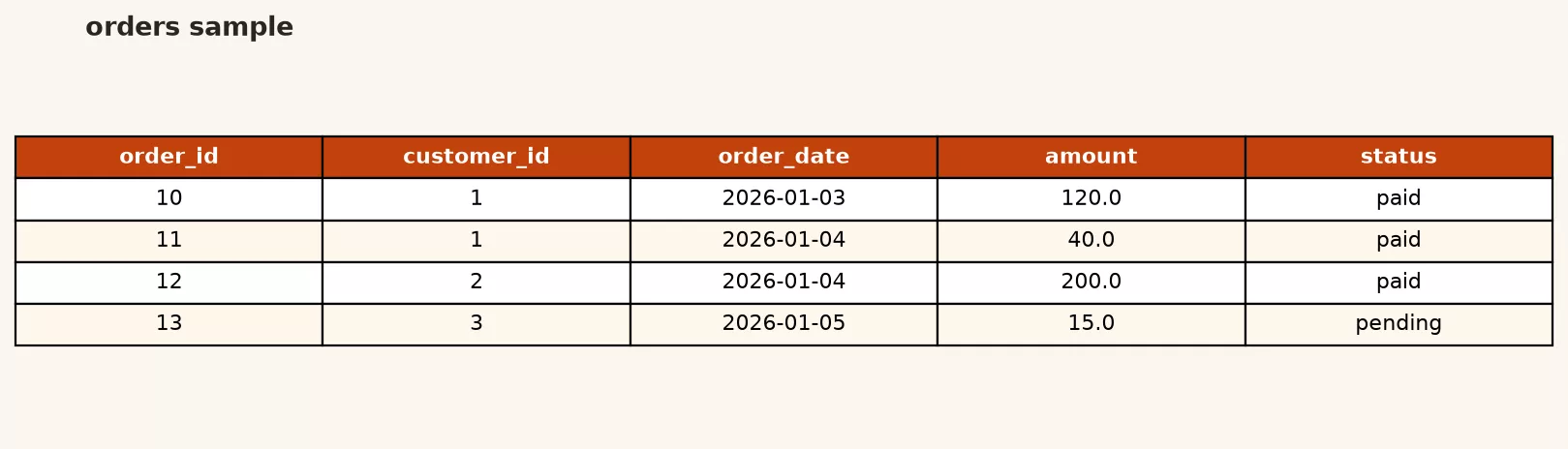
Keys without the textbook fog
A primary key uniquely identifies a row in its table. Here, customers.customer_id and orders.order_id.
A foreign key is a value that references a primary key in another table. Here, orders.customer_id references customers.customer_id.
You join on the shared business meaning, usually the key pair. Joining on names or emails is a last resort when keys are broken, and it is a data quality project as much as a SQL exercise.
INNER JOIN: only matches
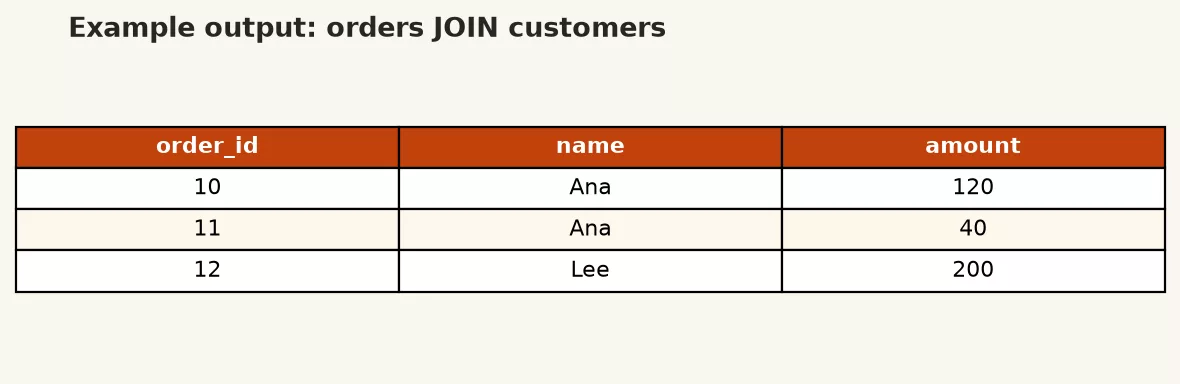
INNER JOIN returns rows when the join condition finds a match on both sides. Customers with no orders disappear. Orders with a missing customer id disappear (or never should have existed).
SELECT
  c.customer_id,
  c.name,
  c.region,
  o.order_id,
  o.amount,
  o.status
FROM customers AS c
INNER JOIN orders AS o
  ON c.customer_id = o.customer_id
ORDER BY c.customer_id, o.order_id;
Example output:
Notes:
- Table aliases (
c,o) keep column references short and unambiguous. - Qualify columns as
c.regionando.amountso engines and humans know which table owns them. - Result grain is now one row per order (with customer fields repeated). It is not one row per customer unless each customer has exactly one order.
That grain shift is the whole game. If you COUNT(*) after this join, you are counting orders, not customers, even though customer columns are visible.
LEFT JOIN: keep the left side
LEFT JOIN (also called LEFT OUTER JOIN) keeps every row from the left table. When no match exists on the right, right-side columns are NULL.
SELECT
  c.customer_id,
  c.name,
  o.order_id,
  o.amount,
  o.status
FROM customers AS c
LEFT JOIN orders AS o
  ON c.customer_id = o.customer_id
ORDER BY c.customer_id, o.order_id;
If you later insert a customer with zero orders, they still appear, with null order fields. That is how you find “registered but never purchased” style lists:
SELECT
  c.customer_id,
  c.name,
  c.email
FROM customers AS c
LEFT JOIN orders AS o
  ON c.customer_id = o.customer_id
WHERE o.order_id IS NULL
ORDER BY c.customer_id;
Pattern: LEFT JOIN, then filter where the right key IS NULL. That is an anti-join in everyday clothing.
Filter placement with joins
Paid revenue by region:
SELECT
  c.region,
  COUNT(*) AS paid_orders,
  SUM(o.amount) AS paid_revenue
FROM customers AS c
INNER JOIN orders AS o
  ON c.customer_id = o.customer_id
WHERE o.status = 'paid'
GROUP BY c.region
ORDER BY paid_revenue DESC;
WHERE filters paid rows after the join machinery (logically; engines optimize). You could also filter orders in a subquery first. Either way, decide whether unpaid rows should ever participate.
Be careful filtering right-table columns in a WHERE after a LEFT JOIN. A condition like WHERE o.status = 'paid' removes left rows that had no match, because NULL status fails the test. If you needed left rows preserved, put right-side filters in the ON clause or use a two-step pattern. This is a frequent real-world foot-gun.
Row count explosions
Joins multiply rows when matches are many-to-many, or when your key is not unique on one side.
Healthy case here: one customer to many orders. Joining customers to orders yields about as many rows as orders (for customers who ordered). Customer fields repeat. That is expected.
Unhealthy case: you join on a non-unique column, or you join two fact tables that both fan out. Example disaster shape: orders joined to a promotions table where each order matches three promo rows. Revenue summed after that join can triple.
Defense habits:
- Before joining,
SELECT COUNT(*)on each filtered side. - After joining,
SELECT COUNT(*)again. If it exploded, stop and inspect keys. - Check uniqueness: can one left key match multiple right rows on purpose?
- Aggregate to the correct grain before joining when you need one-to-one attachments.
- Never trust a pretty total that you cannot reconcile to a simpler query.
Mini check on the toy data:
SELECT COUNT(*) AS customers FROM customers;

SELECT COUNT(*) AS orders FROM orders;

SELECT COUNT(*) AS joined_rows
FROM customers AS c
INNER JOIN orders AS o
  ON c.customer_id = o.customer_id;
Joined rows should match the orders count if every order has a valid customer. If joined rows exceed orders, something is wrong with keys or duplicates.
RIGHT and FULL joins (awareness only)
RIGHT JOIN keeps all right-table rows. FULL OUTER JOIN keeps unmatched rows from both sides. SQLite historically lacked FULL OUTER JOIN (workarounds exist). Many teams stick to INNER and LEFT for clarity, rewriting rights as lefts by swapping table order. Learn the two workhorses deeply before collecting the whole zoo.
When not to join
- When one table already answers the question. Status mix on orders does not need customers.
- When you need existence only. Sometimes a semi-join pattern or
IN (SELECT …)is clearer than a wide join you immediately throw away. - When keys are dirty. Joining on raw emails with inconsistent casing creates silent misses. Clean or standardize first; quality work belongs here.
- When you are stitching two large extracts in a panic. Prefer a controlled warehouse model over ad hoc multi-join monsters in a dashboard SQL slot.
- When the real need is a lookup you should pre-model. Repeated join logic for the same grain is a view or mart candidate (Part 9 themes).
Worked example: region revenue without self-deception
Step 1: paid orders only, no join yet.
SELECT
  COUNT(*) AS paid_orders,
  SUM(amount) AS paid_revenue
FROM orders
WHERE status = 'paid';
Step 2: same metrics after join, overall (should match if every paid order has a customer).
SELECT
  COUNT(*) AS paid_orders,
  SUM(o.amount) AS paid_revenue
FROM customers AS c
INNER JOIN orders AS o
  ON c.customer_id = o.customer_id
WHERE o.status = 'paid';
Step 3: break down by region.
SELECT
  c.region,
  COUNT(*) AS paid_orders,
  SUM(o.amount) AS paid_revenue
FROM customers AS c
INNER JOIN orders AS o
  ON c.customer_id = o.customer_id
WHERE o.status = 'paid'
GROUP BY c.region
ORDER BY paid_revenue DESC;
If step 2 disagrees with step 1, fix keys before you publish step 3. This reconcile habit is more valuable than memorizing join type names.
Customer-level paid revenue with names:
SELECT
  c.customer_id,
  c.name,
  c.region,
  COUNT(*) AS paid_orders,
  SUM(o.amount) AS paid_revenue
FROM customers AS c
INNER JOIN orders AS o
  ON c.customer_id = o.customer_id
WHERE o.status = 'paid'
GROUP BY c.customer_id, c.name, c.region
ORDER BY paid_revenue DESC;
GROUP BY includes the descriptive columns you select alongside the key. That keeps engines and reviewers happy.
Mental model: multiply, then collapse
A useful way to think about joins is: the engine builds a wider intermediate row set according to your join rules, then your WHERE, GROUP BY, and SELECT shape that set into the answer. If the intermediate set is wrong, every later clause works on wrong raw material. That is why “the SUM looks fine in SQL” can still be a business disaster: the grammar ran; the grain did not.
Walk a tiny story. Customer Amina has two paid orders. After an INNER JOIN to orders, Amina appears twice. If you COUNT(*), you get two. If you wanted customers, you needed COUNT(DISTINCT c.customer_id) or a pre-aggregate. If you SUM(o.amount), two is correct for order revenue. Same join, two valid metrics, two different grains. Say the grain out loud every time.
Naming columns after a join
Joins surface name collisions. Both tables might have a created_at or a generic status in real systems. Qualify everything in the SELECT list and alias aggressively for handoffs:
SELECT
  c.customer_id,
  c.name AS customer_name,
  c.region AS customer_region,
  o.order_id,
  o.order_date,
  o.amount AS order_amount,
  o.status AS order_status
FROM customers AS c
INNER JOIN orders AS o
  ON c.customer_id = o.customer_id
WHERE o.status = 'paid'
ORDER BY o.order_date DESC
LIMIT 20;
Future you, or a teammate in Python, should never wonder whether status meant the customer lifecycle or the order lifecycle. The Python series is happier when SQL arrives with unambiguous names. Spreadsheet handoffs benefit the same way; see spreadsheets to data.
A note on many-to-many and bridge tables
Our toy model is one-to-many: one customer, many orders. Real models often include many-to-many shapes, like orders to products through an order_items bridge. Each hop can multiply rows. The fix is not “never join.” The fix is to know which hop you are on, aggregate to a safe grain when attaching facts, and validate counts. If your workplace has a dimensional model (facts and dimensions), prefer joining facts to cleaned dimensions over joining raw operational tables ad hoc.
When keys disagree across systems, that is a quality and master-data problem as much as a SQL problem. Document the mismatch; do not paper over it with DISTINCT and hope. The data quality series is the companion track.
Common mistakes
- Forgetting the ON condition (or accidentally creating a cartesian product). Always state the key match.
- Joining on the wrong grain and then summing money.
- Using SELECT * on joins, then drowning in duplicate column names.
- Filtering a LEFT JOIN into an INNER JOIN by accident in WHERE.
- Counting customers with COUNT(*) after an orders join. Use COUNT(DISTINCT c.customer_id) or aggregate in two steps.
- Assuming INNER vs LEFT does not matter because “everyone has orders.” Until they do not.
Practice
- Write an INNER JOIN listing name, region, order_id, amount.
- Write a LEFT JOIN and invent a customer with no orders to see nulls (insert, query, optional delete).
- Reconcile paid revenue before and after joining.
- Build paid revenue by region and by customer.
- Find customers with no orders using LEFT JOIN and IS NULL.
- Sketch on paper what one result row means after each query.
- Continue with Part 7 (subqueries) when a join-only shape feels awkward. Related AMS paths: Learn, Python, data quality, spreadsheets to data.
Quick recap
- Joins combine related tables using keys, usually primary/foreign pairs.
- INNER JOIN keeps matches; LEFT JOIN keeps all left rows and null-fills gaps.
- Result grain often becomes the many side (orders), even when customer columns show.
- Row explosions destroy sums; count before and after; reconcile totals.
- Do not join when one table, a simple existence check, or a cleaner model answers better.
- Qualify columns, alias tables, and state the ON condition every time.
You now have the core reading path of this series: setup, verbs, select craft, filters, aggregates, and joins. Parts 7 through 13 go deeper on subqueries, safe modifications, database objects, advanced patterns, and caretaking. Keep practicing on the toy schema until the shapes feel boring. Boring is fluent.
FAQ: joins in plain language
Do I always need a join to report by region?
Only if region lives on another table. If your warehouse already denormalizes region onto a fact table, you might filter and group without a join. Prefer the documented model your team trusts. For our toy schema, region is on customers, so revenue by region needs a join (or a pre-built view that does it for you).
Is LEFT JOIN “safer” than INNER JOIN?
Neither is universally safer. LEFT JOIN is safer when you must not lose left-side entities. INNER JOIN is clearer when unmatched rows should not appear. Using LEFT JOIN everywhere and then filtering away nulls in WHERE often recreates INNER JOIN with extra confusion. Choose based on the business sentence, not on a vague preference for “keeping everything.”
Why did my revenue double after I added a dimension?
Almost always fanout: the dimension or bridge matched more than one row per fact. Reconcile with a no-join total, inspect the join key uniqueness, and aggregate the many side before joining when you need a single attribute per key. DISTINCT on the final SELECT can hide the problem without fixing it.
Should I learn RIGHT JOIN next?
Optional. Most analytical SQL is INNER, LEFT, and occasional anti-join patterns. If you can rewrite a RIGHT JOIN as a LEFT JOIN by swapping table order, you already have the skill. Spend the study time on grain checks and clean keys instead.
Sources
Join references and series links:
- SQLite: SELECT (FROM and join clauses)
- PostgreSQL tutorial: joins
- PostgreSQL: joined tables
- Wikipedia: Join (SQL) (overview of join types; pair with primary docs)
- Analytics Made Simple: SQL series
- Analytics Made Simple: Learn
- Analytics Made Simple: Data quality series
- Analytics Made Simple: Python series
- Analytics Made Simple: Spreadsheets to data
Keep going
Same lessons in your feed
Short diagrams, hooks, and weekly tutorials on Substack, Instagram, X, and Facebook.
Merch on Etsy
Open store → Naive Bayes Mouse Pad, Data Science Mouse Pad, Analytics Mouse Pad, Bayesian Mouse Pad
View on Etsy →
Naive Bayes Mouse Pad, Data Science Mouse Pad, Analytics Mouse Pad, Bayesian Mouse Pad
View on Etsy →
 Mute Mouse Pad, Data Science Mouse Pad, Analytics Mouse Pad, You're On Mute
View on Etsy →
Mute Mouse Pad, Data Science Mouse Pad, Analytics Mouse Pad, You're On Mute
View on Etsy →
 Good Cheap Fast White Ceramic Coffee Mug, Data Science Mug, Data Mug, Analytics Mug, Statistics Mug, Programming Mug, Gift Mug, Coffee Mug
View on Etsy →
Good Cheap Fast White Ceramic Coffee Mug, Data Science Mug, Data Mug, Analytics Mug, Statistics Mug, Programming Mug, Gift Mug, Coffee Mug
View on Etsy →
 You're On Mute White Ceramic Coffee Mug, Data Science Mug, Data Mug, Analytics Mug, Statistics Mug, Programming Mug, Gift Mug, Coffee Mug
View on Etsy →
You're On Mute White Ceramic Coffee Mug, Data Science Mug, Data Mug, Analytics Mug, Statistics Mug, Programming Mug, Gift Mug, Coffee Mug
View on Etsy →