Most work in SQL, the standard language for asking a database for data, comes down to four actions: read rows, add rows, change rows, and remove rows. Three of those change your data, so they deserve extra care. This tutorial shows all four, with habits that keep you from changing the wrong rows.
This tutorial covers the core write and query commands for our SQL series on Analytics Made Simple. You should have a practice database from our setup guide with customers and orders. Today we walk through SELECT, INSERT, UPDATE, and DELETE on that toy shop, with safety habits you will reuse forever. Series hub: SQL series.
What you will learn
- What each core command does in plain English.
- How
SELECTprovides your default querying tool and safety net. - How
INSERTstatements append rows without requiring full dumps. - How
UPDATEstatements modify existing values with care. - How
DELETEstatements purge obsolete records safely. - The non-negotiable rule: never run an update or delete statement without an explicit
WHEREclause (unless you truly mean every row). - Preview-then-write workflows you can defend in a code review.
CRUD without the buzzword fog
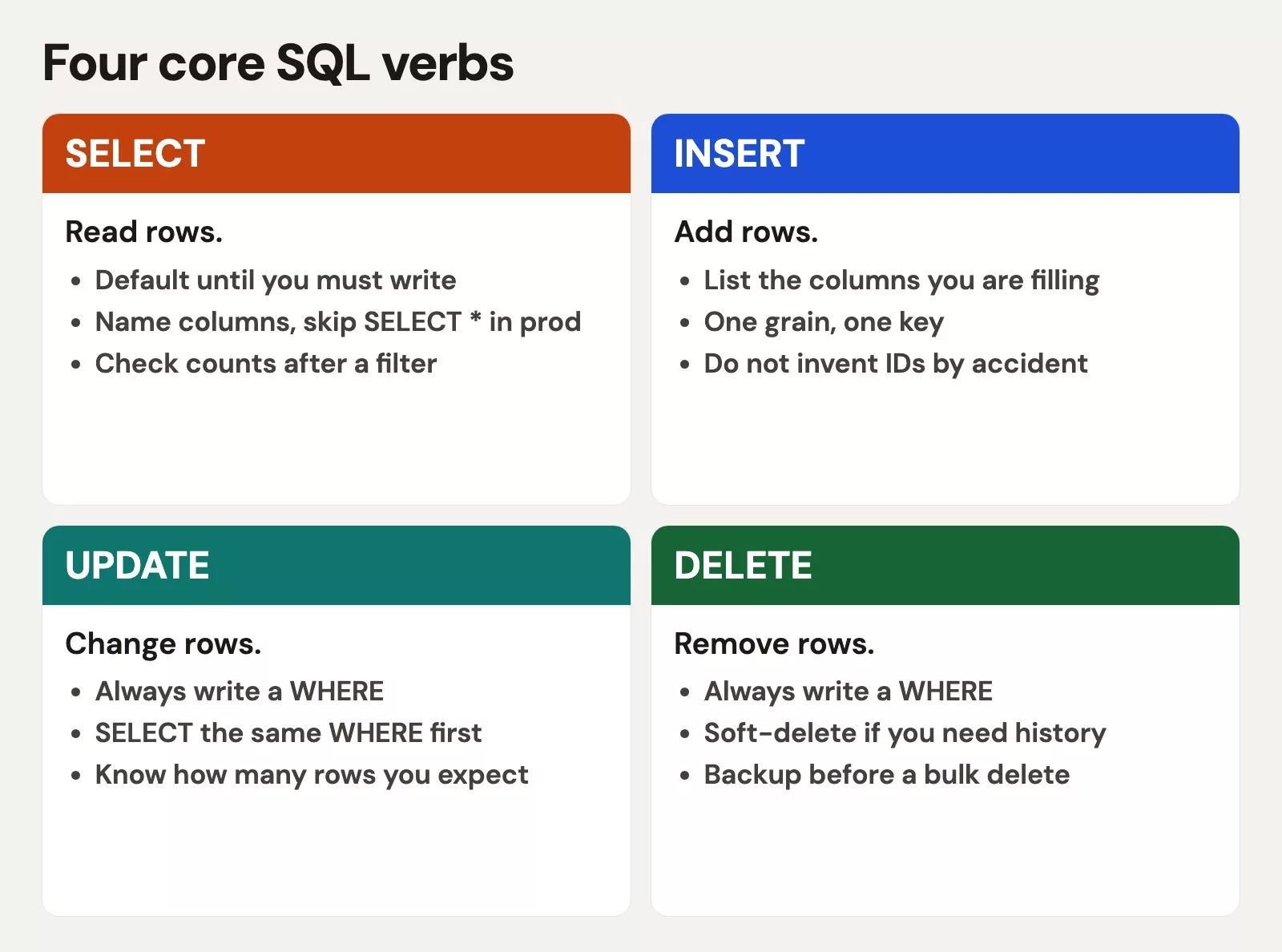
Engineers summarize these operations as create, read, update, delete (CRUD). In SQL that maps roughly to INSERT, SELECT, UPDATE, and DELETE. Remembering the acronym is fine, but building safe operational habits matters far more: know which statements only read, and which change durable state.
| Command | Intent | Touches stored data? |
|---|---|---|
SELECT | Read and shape a result | No (read-only) |
INSERT | Add new rows | Yes |
UPDATE | Change values in existing rows | Yes |
DELETE | Remove existing rows | Yes |
Analysts run SELECT queries most of the time. Engineers and operators live in all four. Even if your role is “read only,” you should understand writes so you can review someone else’s migration, or so you never run a dangerous snippet you found on the internet “to clean the table real quick.”
SELECT: querying is the primary job
SELECT returns a result set. It does not change the table. That is why it is safe to explore with, and why every write should start as a SELECT that shows the rows you plan to touch.
Basic shape:
SELECT
  order_id,
  customer_id,
  amount,
  status
FROM orders
ORDER BY order_id;
On our initial practice seed data, you get the full toy order list. Keep this query nearby; it is your “what does the table look like right now?” button.
Example output:
| customer_id | name | region | |
|---|---|---|---|
| 1 | Ana | East | a@x.com |
| 2 | Lee | West | l@x.com |
| 3 | Sam | East | s@x.com |
Our subsequent guides go deep on columns, filters, and aggregate summaries. For this part, remember three SELECT jobs:
- Explore a table.
- Answer a question.
- Preview the exact rows a later
UPDATEorDELETEwill hit.
INSERT: add rows
INSERT creates new rows. You list columns (recommended) and then, after the keyword VALUES, the values to put in each of those columns, in the same order.
INSERT INTO customers (customer_id, name, region, email)
VALUES (6, 'Fran Wu', 'East', 'fran@example.com');
Prove it landed:
SELECT
  customer_id,
  name,
  region
FROM customers
WHERE customer_id = 6;
This reads back the customer you just inserted, by its id. Seeing the row come back with the right name and region proves the insert worked before you build anything on it.
Multiple rows in one statement:
INSERT INTO orders (order_id, customer_id, order_date, amount, status)
VALUES
  (109, 6, '2026-02-01', 55.00, 'pending'),
  (110, 6, '2026-02-03', 80.00, 'paid');
This adds two orders for customer 6 in one statement, one pending and one paid, by listing several rows of values after VALUES. Naming the columns first means each value lands in the right column even if someone later adds a column to the table.
Workplace notes:
- Name your columns. Relying on table order is fragile when someone adds a column later.
- Always respect unique constraints and primary keys. Inserting a second
customer_id = 6should fail if the primary key (the column whose value is unique for every row) is enforced. - Prefer application paths or controlled pipelines for production inserts. Hand SQL inserts are for practice, fixes, and admin work with review.
UPDATE: changing existing rows
UPDATE sets new values on rows that already exist. The greatest danger in write operations is unintended scope. If you omit the filter, many engines will happily rewrite every row in the table.
Hard rule: Never run
UPDATEwithout aWHEREclause unless you truly intend to update every row, and even then write the intention in a comment and get a second pair of eyes.
Safe pattern: SELECT the target rows first.
SELECT
  order_id,
  status,
  amount
FROM orders
WHERE order_id = 103;
This shows the one order you are about to update, with its current status and amount. If it returns exactly that row, the update that follows, with the same WHERE condition, will change only that order.
Then update only that order, for example when a pending payment clears:
UPDATE orders
SET status = 'paid'
WHERE order_id = 103;
Verify:
SELECT
  order_id,
  status
FROM orders
WHERE order_id = 103;
Updating several columns at once:
UPDATE customers
SET
  region = 'Central',
  email = 'ben.ortiz@example.com'
WHERE customer_id = 2;
This changes two columns for one customer at once: the region and the email of customer 2. The single WHERE condition on the customer id is what keeps the change to that one row.
Still maintain one WHERE clause, and always run a preview query first if the filter is more complex than a primary key.
The preview trick for multi-row updates
Suppose you want to cancel all pending orders older than a cutoff in a real system. In practice you would write:
SELECT
  order_id,
  order_date,
  status
FROM orders
WHERE status = 'pending'
  AND order_date < '2026-01-15';
Stare at the result. Always verify the reported row count after executing. Only then mirror the same WHERE into UPDATE:
UPDATE orders
SET status = 'cancelled'
WHERE status = 'pending'
  AND order_date < '2026-01-15';
If the SELECT returned zero rows, stop. Do not “run the update anyway.” Something about your assumption was wrong.
DELETE: removing rows
DELETE removes entire rows. This carries the exact same scope risk as an update command, which requires adhering to the exact same safety rules.
Hard rule: Never run
DELETEwithout aWHEREclause unless you intend to empty the table, and that should be rare, explicit, and usually replaced by a safer bulk process.
Preview:
SELECT
  order_id,
  status
FROM orders
WHERE order_id = 105;
This shows the single order you plan to delete, using the same WHERE condition as the delete. Checking that it returns exactly one row is the safety step before you remove anything.
Delete that cancelled demo row if you want it gone from the practice file:
DELETE FROM orders
WHERE order_id = 105;
Confirm absence:
SELECT
  order_id
FROM orders
WHERE order_id = 105;
Empty result is success here. In production, prefer soft-delete patterns (a status or deleted flag) when history matters for audits. Hard deletes are for data you truly should not keep.
Worked example: fix a status, end to end
Scenario: Ops says order 109 should be paid, not pending. You are in the practice database, not production, but you still rehearse the safe sequence.
Step 1: show the orders table shape you care about.
SELECT
  order_id,
  customer_id,
  order_date,
  amount,
  status
FROM orders
ORDER BY order_id;
This lists every order with its customer, date, amount, and status, sorted by order number. Looking at the whole small table first shows you what order 109 looks like now, before you change anything.
Example output:
| order_id | customer_id | order_date | amount | status |
|---|---|---|---|---|
| 10 | 1 | 2026-01-03 | 120.0 | paid |
| 11 | 1 | 2026-01-04 | 40.0 | paid |
| 12 | 2 | 2026-01-04 | 200.0 | paid |
| 13 | 3 | 2026-01-05 | 15.0 | pending |
Step 2: preview the single row.
SELECT
  order_id,
  status
FROM orders
WHERE order_id = 109;
Step 3: update with the same filter.
UPDATE orders
SET status = 'paid'
WHERE order_id = 109;
Step 4: verify, then optionally count paid orders for a sanity check.
SELECT
  status,
  COUNT(*) AS n
FROM orders
GROUP BY status
ORDER BY status;
That last query is a light aggregate; Our aggregate queries guide will explain GROUP BY properly. Here it is only a dashboard-style check that your write did not create chaos.
Transactions: the seatbelt (concept)
Many engines let you wrap changes in a transaction: begin, run statements, then COMMIT to persist them or ROLLBACK to undo. In a serious workplace update, that is how you avoid half-applied messes. Local SQLite databases support transactional rollbacks as well.
BEGIN;

UPDATE orders
SET status = 'paid'
WHERE order_id = 103;

-- look with SELECT in the same session if your client allows
-- COMMIT;   -- keep
-- ROLLBACK; -- undo
Exact client configuration and transaction settings will vary across tools. The idea does not: practice the muscle of “I can undo this batch” before you touch shared data. Our advanced modification guide returns to this discipline with more depth.
Permissions and roles (why SELECT-only jobs exist)
In real companies, analysts often receive read-only warehouse roles. Limiting write permissions is not an insult to your abilities; it is standard risk control to protect production systems. Write operations may live in application services, controlled extract, transform, load (ETL) pipelines, or admin paths. If your role is read-only, master SELECT deeply. Still learn write syntax so you understand pipelines and can review change scripts when asked.
If someone hands you write access on production “for convenience,” push for a sandbox. Convenience is how tables get emptied on a Friday afternoon.
A short incident story (fictional, familiar)
Say you need to mark a handful of pending orders as paid. You draft an UPDATE, get interrupted, and run it without the WHERE clause. Every order in your practice database flips to paid. On a toy file that costs a few minutes. On a real system it would be a very long night.
The recovery pattern, even on a toy database, is worth rehearsing: stop, do not run more writes, restore from backup or reseed from your script (a short program that runs a list of steps for you), then rewrite the change with a preview SELECT and a tight filter. If your workplace has point-in-time recovery, great. If not, prevention is the whole job. That is why this part sounds repetitive about WHERE. Repetition is cheaper than restore drills.
When you review someone else’s change script, look for the same things you want in your own: preview queries, key-based filters, explicit column lists on INSERT, and a stated row-count expectation (“should touch 12 rows”). If the script cannot say how many rows it should affect, it is not ready.
Common mistakes
- Running an
UPDATEstatement without aWHEREclause. This classic beginner mistake overwrites every single row in the table with identical values, resetting emails or wiping financial balances across your entire dataset. Always verify your filter before running a write command. - Running a
DELETEstatement without aWHEREclause. This operational error empties the entire target table immediately, resulting in costly downtime and painful backup restoration. - Skipping the preview
SELECTquery. If you cannot inspect the exact rows you plan to touch beforehand, you are guessing about the impact of your query. - Writing to the wrong table while using the right filter. Always double-check your target table name, especially when working across multiple client tabs simultaneously.
- Inserting orphan orders. An
orders.customer_idthat does not exist incustomersbreaks relational sense even if the engine allows it. - Treating
SELECT* dumps as a backup strategy. Learn real backup tools for production.SELECTis not a recovery plan. - Practicing writes only in your head. Break the toy database on purpose, then reseed. Fear shrinks with reps.
How to practice
- Insert a new customer and two orders. Select them back by id.
- Update one order status with the preview pattern. Update one customer email the same way.
- Delete one order you created for practice. Confirm it is gone.
- Intentionally write an
UPDATEwith aWHEREthat matches zero rows. Observe that nothing changes. That is a useful failure mode. - Write a one-page personal rule: “I preview with
SELECT; I filter every write; I do not use production for learning.”. - When your data issues are about trust rather than syntax, keep data quality nearby. For broader paths, see Learn, Python, and spreadsheets to data.
Quick recap
SELECTreads data safely,INSERTcreates records,UPDATEalters values, andDELETEremoves rows.- Most analytics work centers on
SELECTqueries, but write literacy remains vital for understanding upstream systems. - Always name target columns on
INSERT, and prefer primary key filters for targeted single-row fixes. - Never run an
UPDATEorDELETEcommand without an explicitWHEREclause unless you truly intend to alter every row. - Preview with
SELECT, then reuse the same filter on the write. - Transactions and least-privilege roles reduce the scope of accidental damage at work.
Next: make SELECT precise. Columns, aliases, DISTINCT, and LIMIT are how you stop hauling whole tables into meetings. That is the focus of our next tutorial.
Sources
Language references for the core commands:
- SQLite:
SELECT - SQLite:
INSERT - SQLite:
UPDATE - SQLite:
DELETE - PostgreSQL: Data Manipulation (
INSERT,UPDATE,DELETEoverview) - Analytics Made Simple: SQL series
- Analytics Made Simple: Learn
- Analytics Made Simple: Data quality series
- Analytics Made Simple: Python series
- Analytics Made Simple: Spreadsheets to data
Keep going
Same lessons in your feed
Short diagrams, hooks, and weekly tutorials on Substack, Instagram, X, and Facebook.