MCP (Model Context Protocol) and A2A (Agent2Agent) are two open standards for AI agents, which are AIs that work through several steps on their own instead of answering one message and stopping. MCP connects one AI app to tools and data, such as a database or a calendar. A2A lets one agent hand work to another agent, even one built by a different company. They solve different problems, and a growing number of systems use both.
Imagine you ask an AI assistant at work to prepare next week’s sales report. It needs last week’s numbers from your company database, which is a tool. It also needs a forecast from the finance team’s own AI agent, which is another agent with its own rules. MCP covers the first connection and A2A covers the second, so the two names come up together more and more.
A standard, here, is an agreed set of rules for how two programs talk, so anything that follows the rules can connect without custom work. This post explains what each standard does, how they fit together, where you will meet them, and how to use them safely, using the official documentation checked on October 8, 2026.
What is MCP?
MCP is “an open-source standard for connecting AI applications to external systems,” according to the MCP introduction (checked October 8, 2026). The site compares it to a USB-C port: one shape of plug that works with many devices, so each tool only has to be connected once.
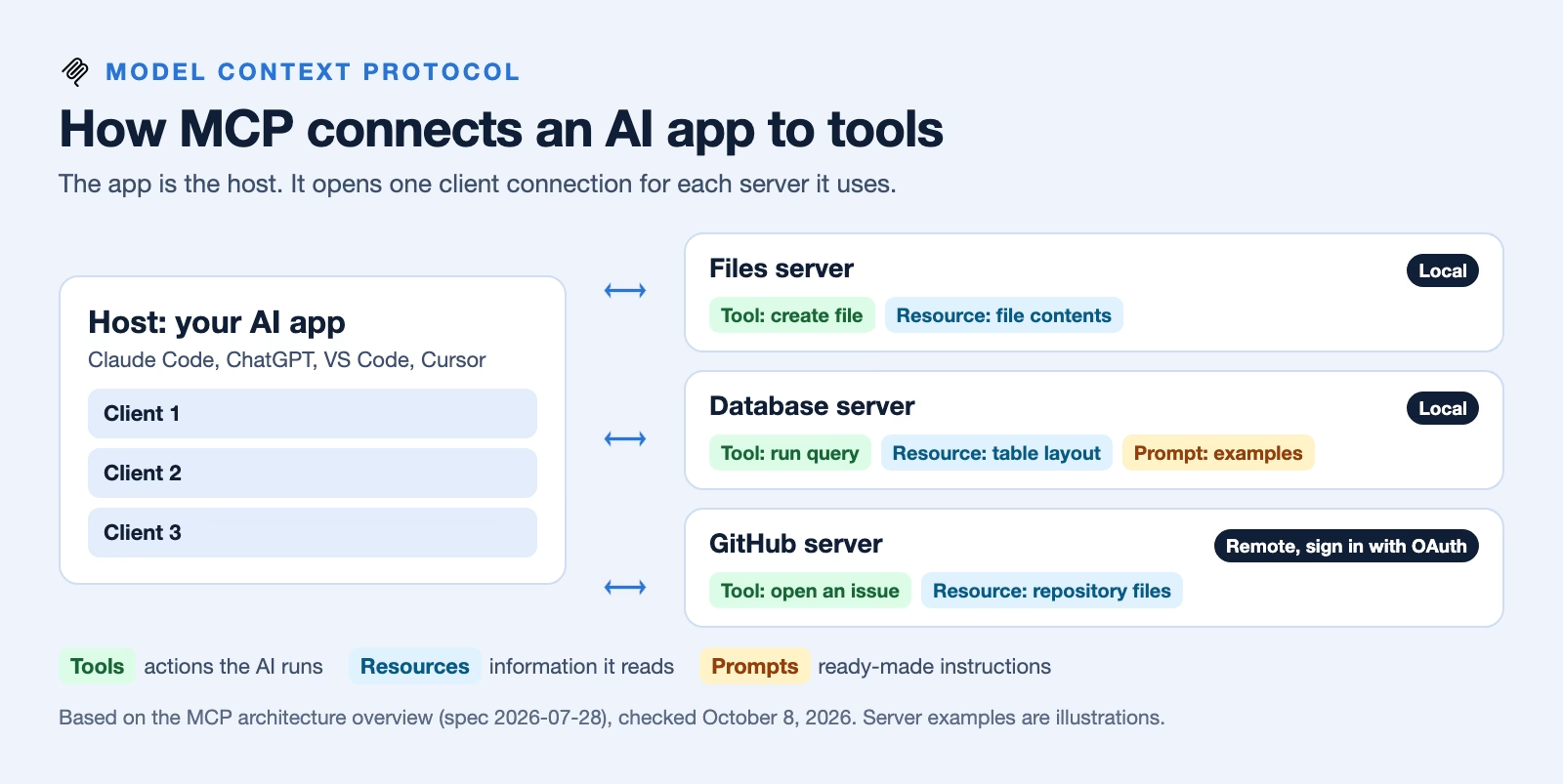
Three parts take part in every MCP connection. The host is the AI app you use, such as Claude Code or Visual Studio Code. The server is a small program that offers something useful, like access to your files or to a service such as GitHub. The client is the piece inside the host that keeps one connection open to one server, and the host makes one client for each server, per the architecture overview.
A server can offer three kinds of things. Tools are actions the AI can run, such as searching a database or creating a file. Resources are information it can read, such as a file’s contents or a database’s layout. Prompts are ready-made instructions that help the AI use the server well.
Servers run in one of two ways. A local server runs on your own computer and talks to the app directly. A remote server runs on the internet, and the documentation recommends OAuth for it, which is the “sign in with your account” flow you already use on many websites. MCP is supported by Claude, ChatGPT, Visual Studio Code, Cursor, and many other tools, according to the same introduction.
What is A2A?
A2A is an open standard for communication and teamwork between AI agents, according to the A2A project site (checked October 8, 2026). Google first developed it and donated it to the Linux Foundation, a nonprofit that looks after shared open-source projects, and it is free to use under the Apache 2.0 license.
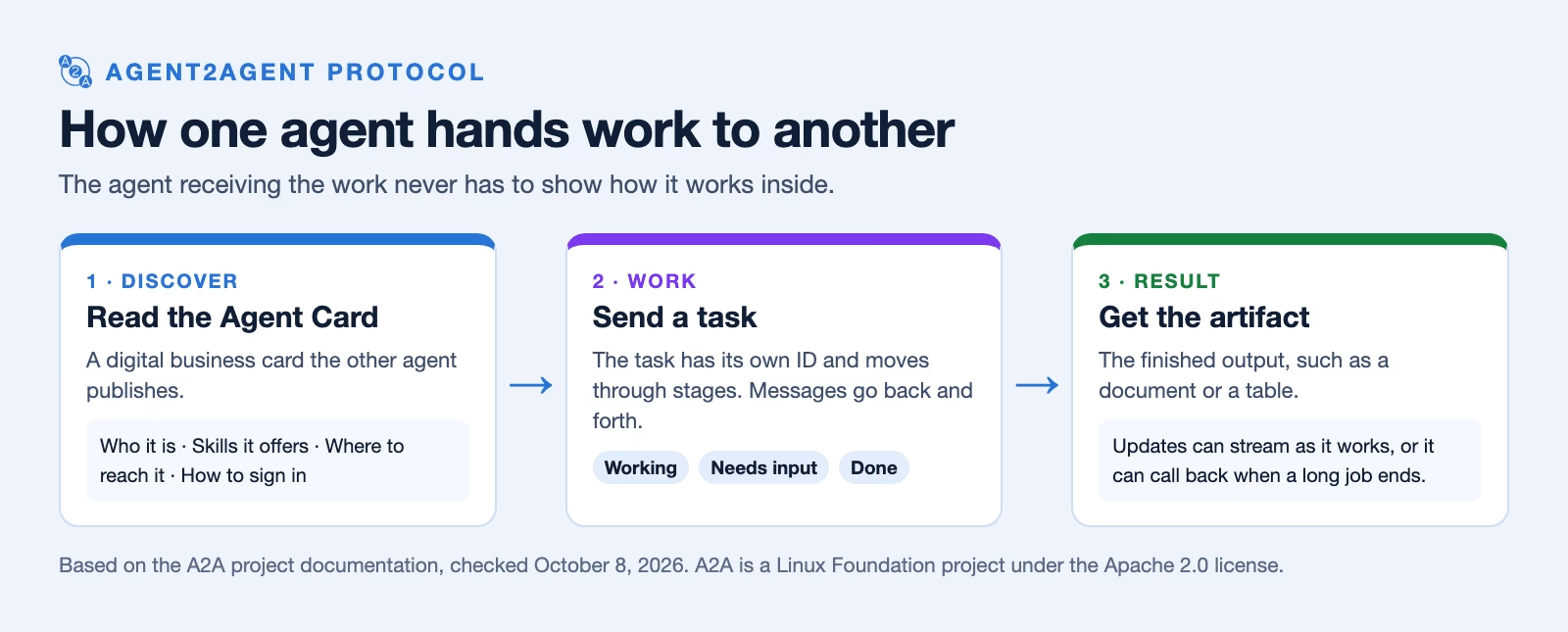
Every A2A agent publishes an Agent Card, which works like a digital business card. It says who the agent is, what skills it offers, where to reach it, and how to sign in. Another agent reads that card to decide whether to send it work.
The work itself is a task. A task has its own ID and moves through stages, such as working, needing more input, or done, so a job can take minutes or days without getting lost. The agents exchange messages while they work, and the finished result comes back as an artifact, such as a document or a table. An agent can send updates as it goes, or call back later when a long job finishes.
The important part is what A2A does not require. The agent you send work to does not have to show you how it works inside or which AI model it uses. It only has to follow the standard, which is why two companies can connect their agents without sharing their code.
How do MCP and A2A fit together?
MCP gives one agent more abilities, and A2A connects separate agents. The A2A project puts it simply in its guide to A2A and MCP: “MCP is vertical. It deepens a single agent,” while “A2A is horizontal. It connects agents across that boundary.”
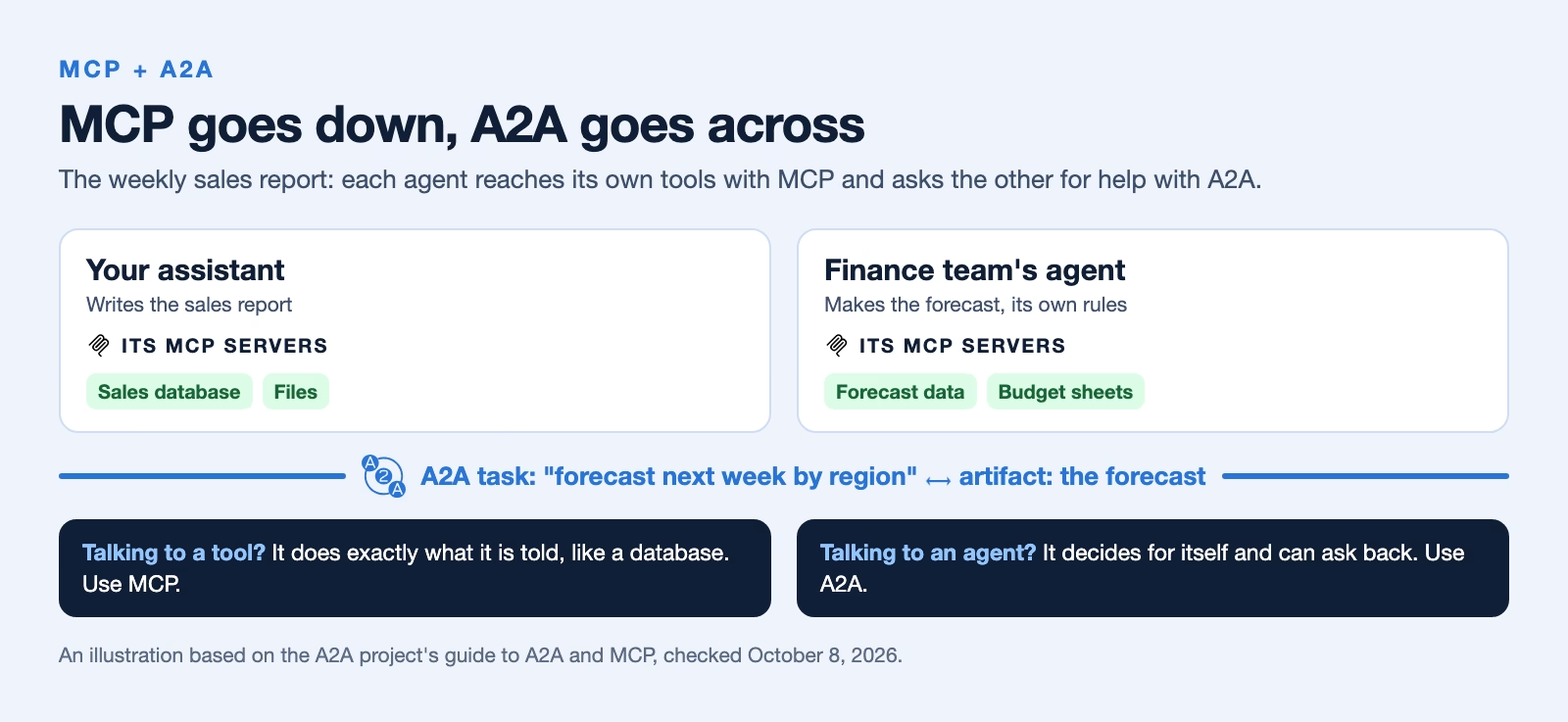
A useful test is to ask what the agent is talking to. If it is talking to a tool that does exactly what it is told, such as a database or a calculator, that is MCP. If it is talking to another agent that makes its own decisions and might ask questions back, that is A2A. The same guide sums it up as agents “partnering” on tasks in A2A and “using” capabilities in MCP.
They are not rivals. A single agent often uses both: MCP to reach its own tools, and A2A to ask a partner agent for help with the part it cannot do.
A worked example: the weekly sales report
Here is the sales report from the start of this post, step by step, as a practice example. It shows which standard carries each step.
- You ask your assistant for next week’s sales report. The assistant is the MCP host.
- It calls the sales database through an MCP server, running a query tool to pull last week’s numbers. That is MCP.
- It reads the finance team’s Agent Card, sees a forecasting skill, and sends that agent a task. That is A2A.
- The finance agent asks a question back: which regions to include. Your assistant answers, and the task moves on. That is still A2A.
- The finance agent uses its own MCP servers to reach its forecasting data. Your assistant never sees those tools.
- The forecast comes back as an artifact. Your assistant combines it with the sales numbers and saves the report through a file tool, over MCP.
Notice who controls what. The finance team decides which tools its agent uses and what it shares, and you decide what your assistant can touch. Neither side has to trust the other with its passwords.
Where you will meet them
You have likely used MCP already without seeing the name. Claude, ChatGPT, Visual Studio Code, and Cursor all connect to MCP servers, and newer agent products build on it too. xAI’s Grok Bot supports MCP servers, as the post on what Grok Bot is explains, and Claude Code lets you add them alongside its new mods, covered in the post on Claude Code mods.
A2A shows up more in company systems, where one team’s agent needs to work with another’s. On April 9, 2026, the Linux Foundation reported that more than 150 organizations supported A2A, including Amazon Web Services, Cisco, Google, Microsoft, Salesforce, and ServiceNow, and that it was built into the major cloud platforms. Software kits for building A2A agents exist in five programming languages, including Python and Java.
How to use them safely
Both standards connect AI to real systems, so the risks are real too. An MCP server is a program that runs with the access you give it, and an A2A agent is a stranger until you check who it is.
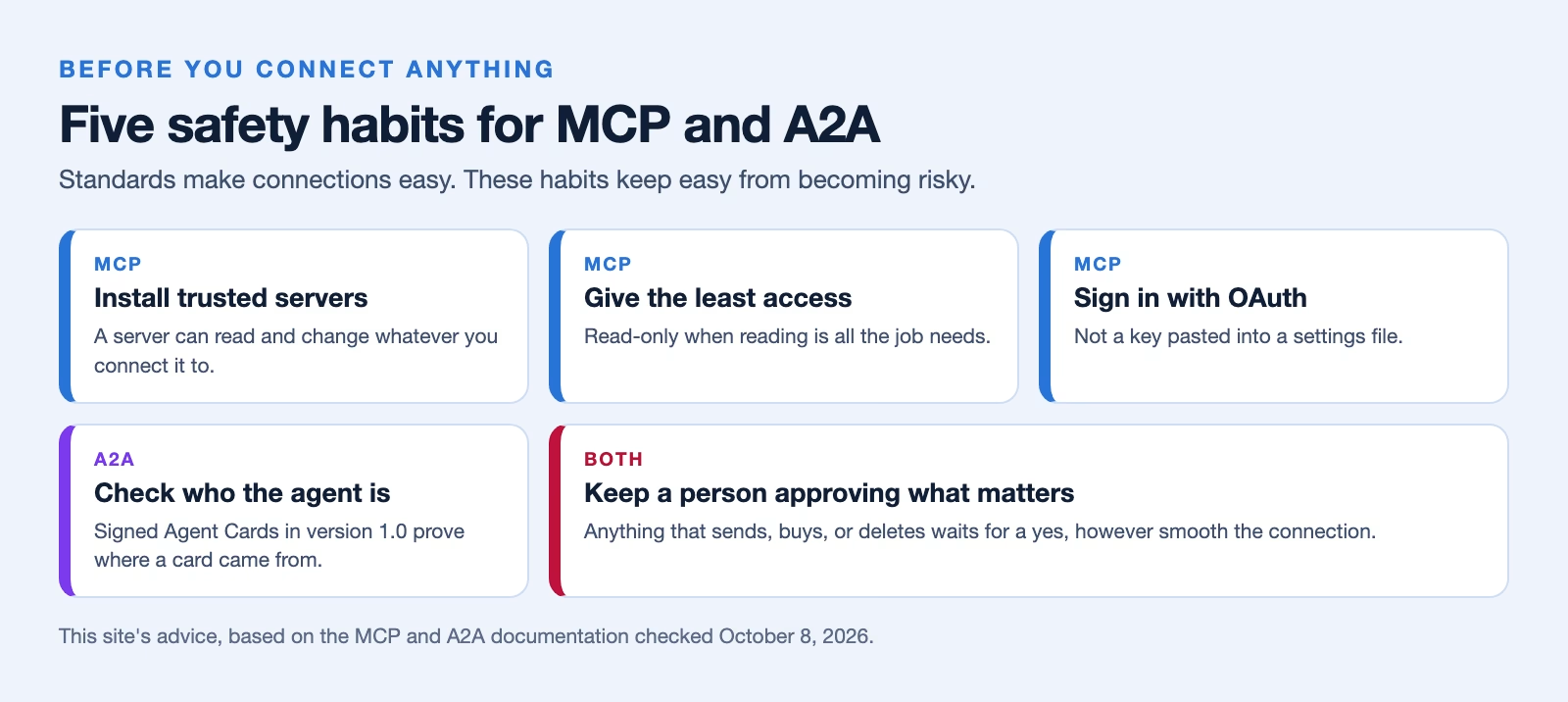
- Install MCP servers only from sources you trust. A server can read and change whatever you connect it to, so treat it like any other software you download.
- Give each server the least access that does the job. A server that only needs to read a folder should not be able to delete files in it.
- Prefer sign-in through OAuth for remote servers over pasting passwords or keys into a settings file, because a pasted key works for anyone who finds it.
- Check an agent’s identity before you send it work. A2A version 1.0 added signed Agent Cards, which let you confirm a card really came from the company it names.
- Keep approval steps for anything that sends, buys, or deletes. A standard makes connections easy, and that is exactly why a person should approve the actions that matter.
Recap
- MCP connects one AI app to tools and data: the host is your app, servers offer tools, resources, and prompts, and it is supported by Claude, ChatGPT, Visual Studio Code, and Cursor.
- A2A connects agents to each other: Agent Cards say what an agent can do, and tasks carry the work until an artifact comes back.
- MCP is vertical and A2A is horizontal, and many systems use both.
- Install servers you trust, give them little access, check agent identities, and keep a person approving actions that matter.
Try it this week: open the settings of an AI app you already use, find its list of connected MCP servers or connectors, and remove any you no longer need.
Sources
- Model Context Protocol: What is MCP? (definition, USB-C comparison, supporting apps)
- Model Context Protocol: Architecture overview (host, client, server; tools, resources, prompts; local and remote servers; OAuth)
- A2A Protocol (definition, Google origin, Linux Foundation, Apache 2.0 license)
- A2A Protocol: A2A and MCP (vertical versus horizontal, using versus partnering)
- Linux Foundation: A2A Protocol surpasses 150 organizations (supporters, cloud platforms, SDK languages (April 9, 2026))
Keep going
Same lessons in your feed
Short diagrams, hooks, and weekly tutorials on Substack, Instagram, X, and Facebook.