Before you download an AI model from Hugging Face, check who posted it and what files it has. The first search result is often a copy, and a broken copy can waste hours of costly computer time.
Say you rent a powerful computer to retrain a model you found by searching. Hours later you learn the copy came from an unknown account and has a broken file inside. The money is gone, and nothing you trained can be used.
The search trap: why keyword hunting fails
Type a generic phrase like llama 3 code assistant into the Hugging Face search bar. You’ll get thousands of near-identical repo names back. Without a plan, you end up wading through student side projects, broken compressed versions, and uploads nobody maintains anymore.
The root problem is that the Hub is open to everyone. When a research lab publishes a major new model, hundreds of people copy it, merge it with other models, or shrink it down, often within days. That open remix culture is exactly what makes the field move fast. It also buries the original, trustworthy version under a pile of copies.
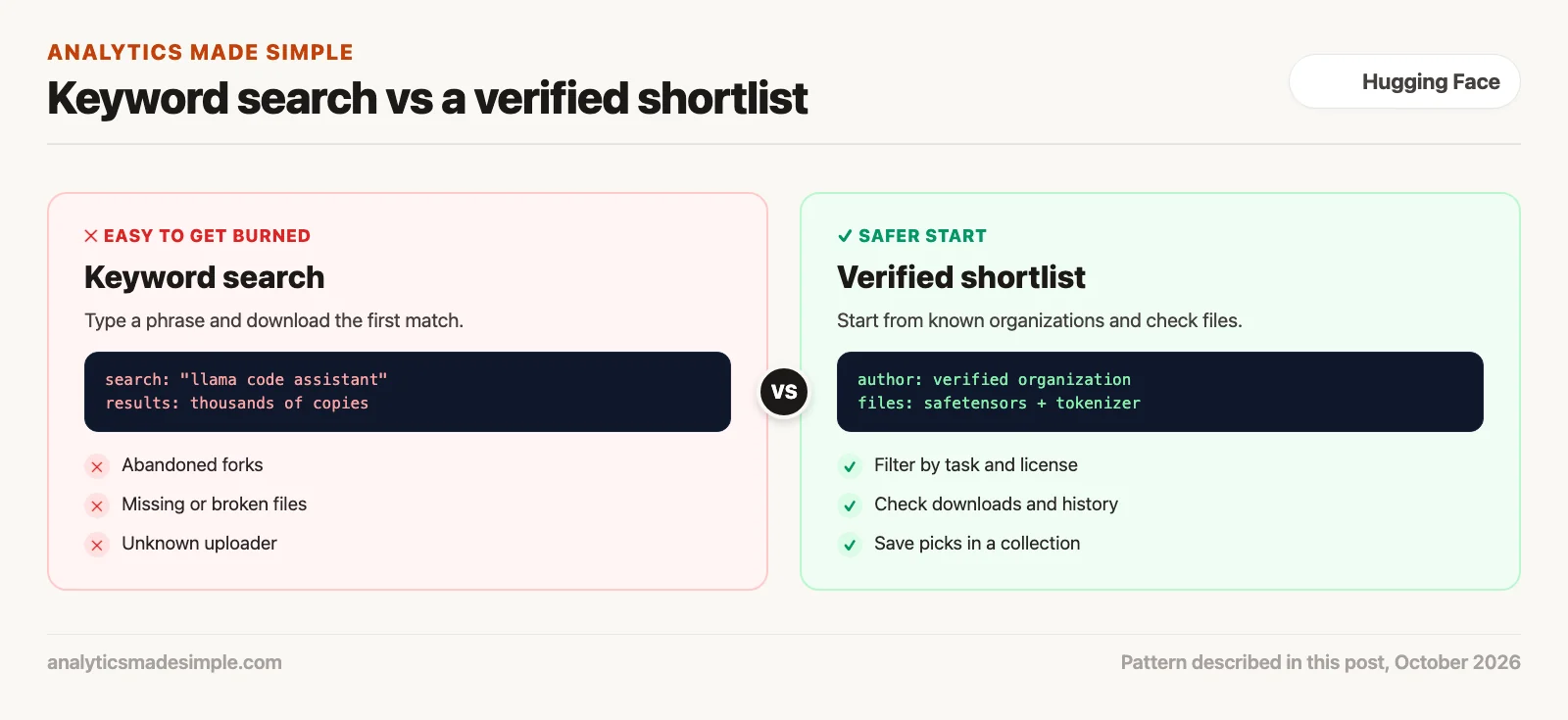
Unfiltered keyword hunting
Typing broad terms into the search bar. You find abandoned forks, missing chat setup files, corrupted weight files, and unverified accounts. You waste GPU (graphics processing unit, the chip that runs AI models) time debugging an experiment nobody else can reproduce.
Guided, verified discovery
Going straight to verified creator accounts, starred repos, and team collections. You check monthly downloads, commit history, and benchmark scores (results on standard tests) before you download a single file.
Figure 1 shows the difference between an unguided search and a disciplined, step-by-step way of finding files on the Hub.
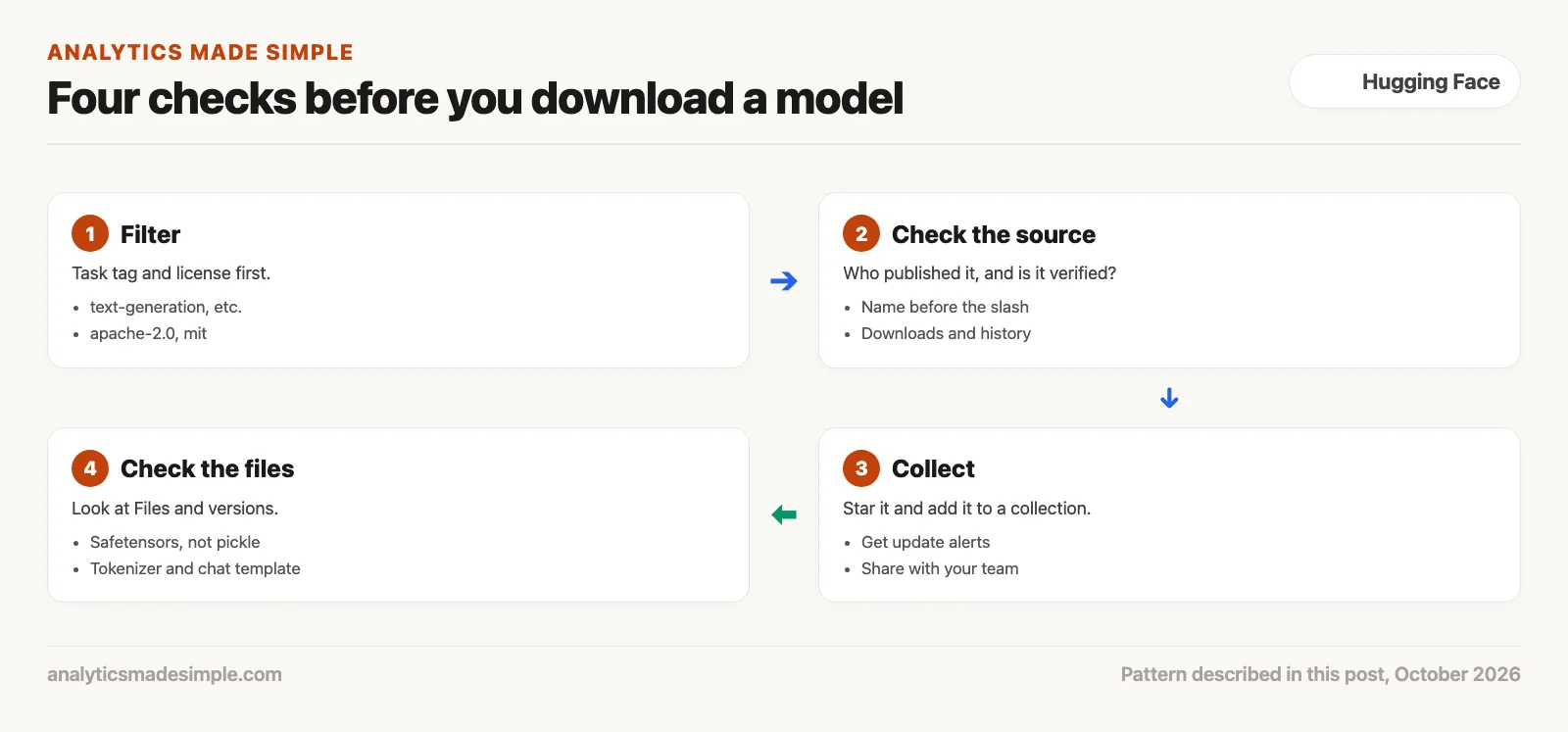
The four-stage discovery and verification loop
Keep broken checkpoints, meaning saved model files, out of your work. Run every model, dataset, and demo through four steps: filter by task, check who made it, star and collect it, and check the files inside.
Skip the gut feeling and the social media recommendation. Follow this same four-step process every time you check something new on the Hub.
- Filter by task and license: Narrow your search using Hugging Face’s built-in task tags, like text-generation or automatic-speech-recognition, so you only see models built for your job. Add a license tag such as apache-2.0 or mit at the same time. That rules out anything your company legally can’t use.
- Check who actually made it: Look at the account name before the slash in the repo name (for example,
meta-llama/ormistralai/). Look for the blue checkmark that means Hugging Face has verified that organization. Then check the monthly download count. High, steady download counts are a rough sign that many people rely on a model, though they are not proof of quality. - Star it and add it to a collection: A star works like a bookmark that also alerts you when the creator pushes a security fix or a new version. Group related files, a base model, its training data, and a working demo, into one collection so your team can find them again.
- Check the files before you write any code: Open the Files and Versions tab first. Make sure the model ships as
model.safetensors, a safer file format, rather than an older pickle file, which can run hidden code when you load it. Confirmtokenizer.jsonis there. Checkchat_template.jinja, the file that tells the model how to format a conversation.
Figure 2 shows this four-step loop, filter, check, collect, and audit, running on repeat for every new checkpoint you evaluate.
The four levels of the Hub
The Hugging Face Hub has four levels: your personal profile, company organizations, collections you curate, and individual repos. Permissions and visibility pass between these levels. That starts to matter the moment more than one person on your team gets involved.
Figure 3 breaks down these four levels. It shows how your personal login, your company’s organization settings, topic-based collections, and Large File Storage (LFS), the system the Hub uses for big files, all work together.
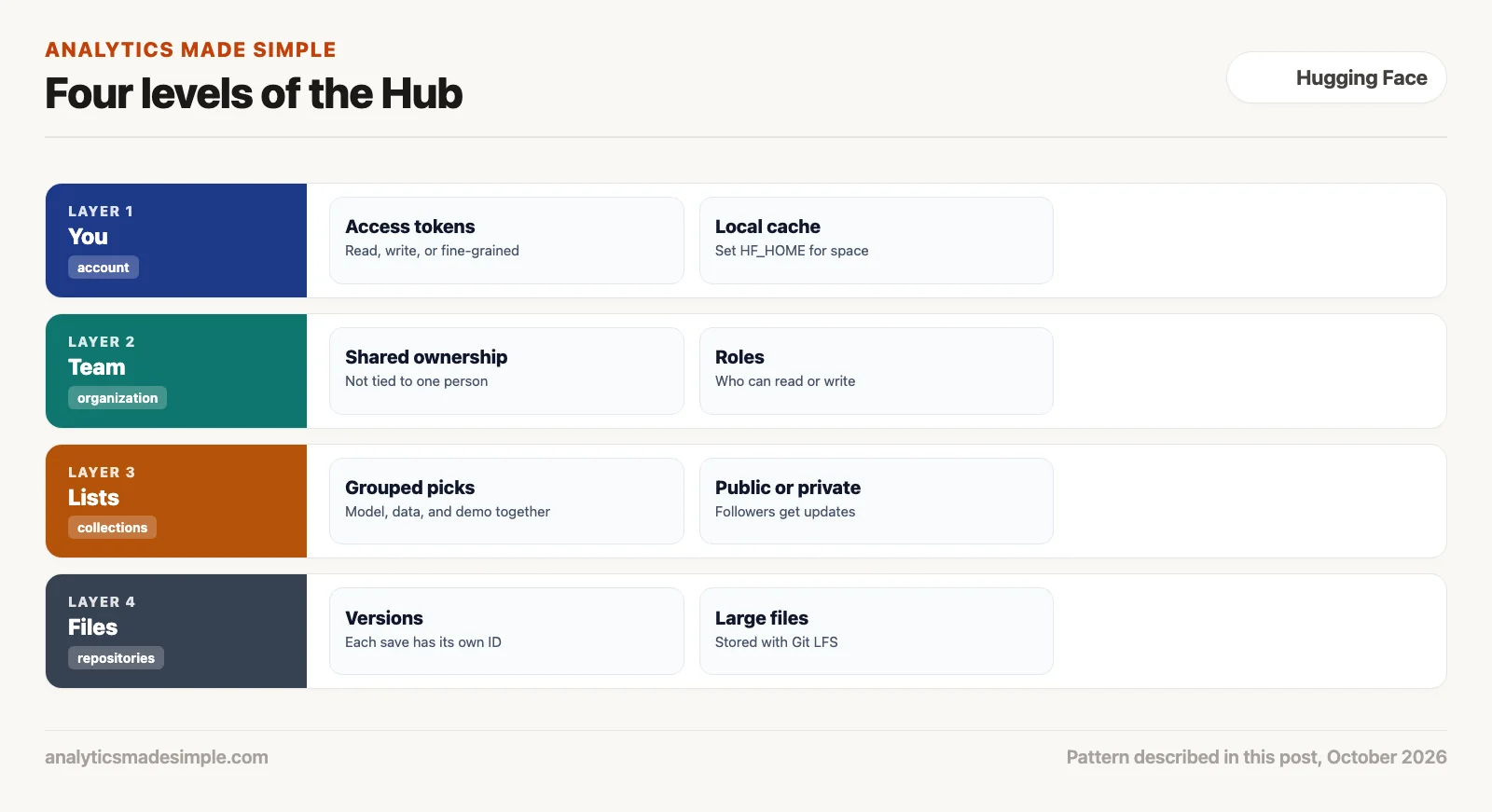
Personal accounts and token security
When you create a personal account, your main dashboard lives under Settings. The most important thing you’ll manage there is your User Access Tokens, passwords that scripts use to sign in as you, found at huggingface.co/settings/tokens. Never create a token with full write access and paste it into a public notebook (a shared page that mixes code and results) or training script.
You can limit what each token can do (docs, checked October 5, 2026):
| Token Scope. | What it’s for. | What it can do. | Risk if it leaks. |
|---|---|---|---|
read. | Running inference scripts, downloading models, streaming datasets. | Read public repos, access gated models if you’re approved. | Low. |
write. | Uploading your own trained weights, updating dataset info. | Create repos, push large file updates, edit metadata. | High. |
fine-grained. | Automated pipelines that build, test, and deploy code without a person clicking a button. | Limited to the specific repos, organizations, or endpoints you choose. | Lowest. |
Managing local storage and cache directories
One real headache is running out of disk space. By default, when you download a model with the transformers library (a package of ready-made code) or the hf command-line tool, the files get saved to your home folder, under ~/.cache/huggingface/hub/. Open models today range from four gigabytes for a small, compressed version up to one hundred forty gigabytes for a large one. Pull down three or four models to compare, and you can fill your laptop’s drive in one afternoon.
Behind the scenes, Hugging Face stores files by content, using shortcuts called symbolic links, so it never downloads the same file twice. Each version lives in its own folder named after its commit, a unique ID for that save point. To avoid running out of space, set the HF_HOME environment variable, a setting your computer passes to programs. That moves the folder of downloaded files to a separate drive or shared network storage instead.
# Point the cache at a drive with more space
export HF_HOME="/Volumes/BigDrive/huggingface_cache"

# See what is cached and how much space it uses
hf cache list

# Remove a model you no longer need (preview it first with --dry-run)
hf cache rm model/openai-community/gpt2 --dry-run
hf cache rm model/openai-community/gpt2
hf cache list shows each cached model and dataset with its size, so you can remove old experiments with hf cache rm and keep the ones you still use. The hf command replaced the older huggingface-cli name in recent versions of the library.
Organizations: shared control for teams
Organizations are shared team spaces, similar to how GitHub organizations work. If your team stores an internal model or dataset under one person’s personal account, you’ve created a single point of failure. When that person leaves the company, your automated deploy pipelines lose access to that private repo.
Set up a dedicated Hugging Face organization instead. It lets you manage who can own, edit, or just read each repo. It also lets you require two-factor authentication, handle billing for private storage and hosted model endpoints, and keep your company’s work under company control, not one employee’s account.
Collections: no more scattered links
Before Hugging Face added Collections, teams tracked their recommended models in messy spreadsheets, Notion pages, or pinned Slack messages. When someone new joined a project, they had to dig through dozens of scattered links. They needed the base model, the tokenizing script, the test dataset, and the working demo.
Collections fix this. They’re shareable folders, built right into the Hub, that group related files together. One collection can hold.
- The official foundation model (for example,
meta-llama/Llama-3.1-8B-Instruct). - Compressed, laptop-friendly model files (GGUF) for local testing.
- The dataset used to fine-tune it, meaning retrain it on your own examples (for example,
tatsu-lab/alpaca). - A working demo Space, built with Gradio, so non-technical coworkers can try out prompt changes themselves.
- The benchmark dataset used to check accuracy before anything ships.
You can make a collection public, so anyone can see it, or private, for internal roadmaps you don’t want to share yet. Anyone who stars and follows a public collection gets notified whenever your team adds or updates something in it.
How to judge whether a model is trustworthy
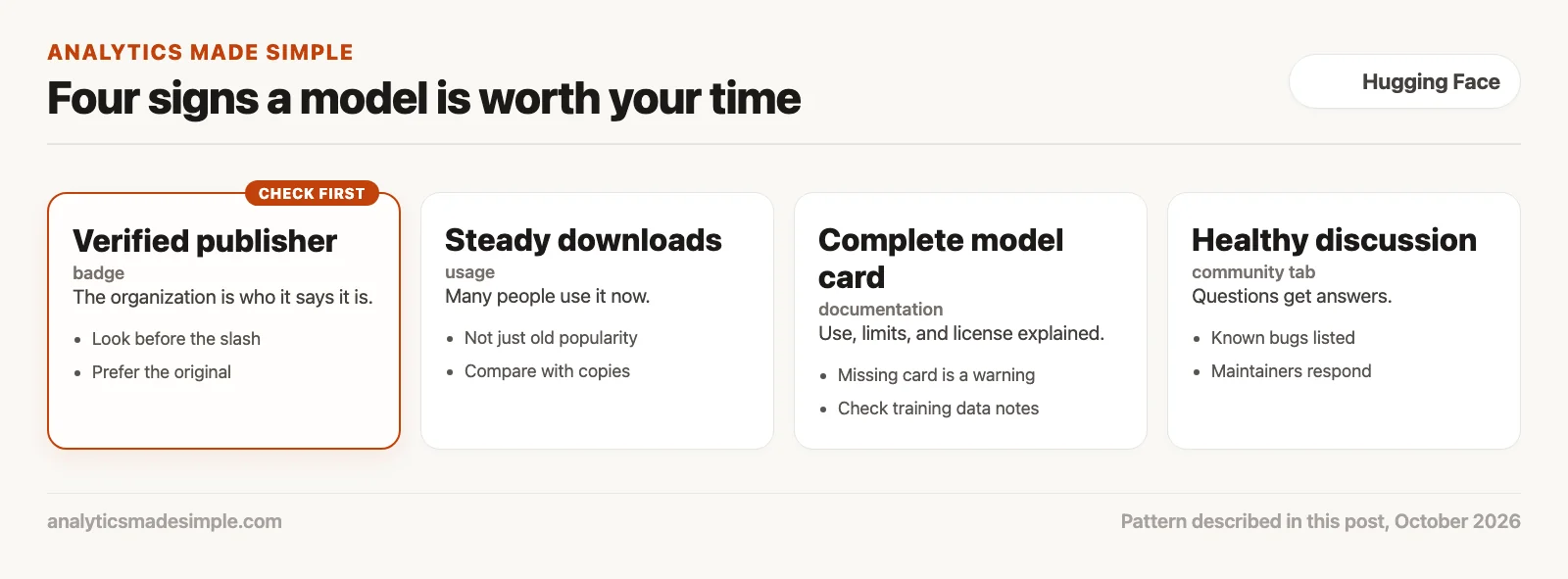
How do you know an unfamiliar repo is safe and worth your time? Check four things: the verified badge, how many people download it each month, how complete the documentation is, and whether the discussion tab shows active, healthy conversation.
Figure 4 breaks down these four signals and the specific risk each one protects you from.
Automating discovery with Python
The Hugging Face website is easy to use by hand. But once you’re managing this across a whole team, you’ll want to automate discovery, check an organization’s repos, and manage collections with code instead.
The huggingface_hub Python library gives you functions to search verified organizations, check starred items, and manage collections directly in code.
# check_hub_models.py
import os
from huggingface_hub import HfApi

api = HfApi(token=os.getenv("HF_TOKEN"))  # a token is optional for public models

# 1. The five most-downloaded text-generation models from one organization
print("Most-downloaded text-generation models from Qwen:")
for m in api.list_models(author="Qwen", pipeline_tag="text-generation",
                         sort="downloads", limit=5):
    print(f"  {m.id:45} downloads: {m.downloads:>12,}")

# 2. Check that a model ships the files you expect before you download it
target = "Qwen/Qwen3-Coder-30B-A3B-Instruct"
files = api.list_repo_files(target)
print(f"\nFiles check for {target}:")
print(f"  Safetensors weights (the model’s learned numbers): {any(f.endswith('.safetensors') for f in files)}")
print(f"  Tokenizer:           {'tokenizer.json' in files}")
print(f"  Tokenizer config:    {'tokenizer_config.json' in files}")
print(f"  Pickle weights:      {any(f.endswith('.bin') for f in files)}")
Run on October 5, 2026, with huggingface_hub 1.33.0 and no token, it printed the following. The list and counts change over time.
Most-downloaded text-generation models from Qwen:
  Qwen/Qwen3-0.6B                               downloads:   30,037,022
  Qwen/Qwen3-8B                                 downloads:   10,080,256
  Qwen/Qwen2.5-0.5B-Instruct                    downloads:    8,635,884
  Qwen/Qwen2.5-7B-Instruct                      downloads:    8,272,384
  Qwen/Qwen3-4B                                 downloads:    7,637,056

Files check for Qwen/Qwen3-Coder-30B-A3B-Instruct:
  Safetensors weights (the model’s learned numbers): True
  Tokenizer:           True
  Tokenizer config:    True
  Pickle weights:      False
In plain words, the script asks the Hub for Qwen’s five most-downloaded text-generation models, then lists the files in one model without downloading them. It confirms the weights (the numbers a model learned during training) come as Safetensors. It checks that the tokenizer files (which split text into the pieces a model reads) are there. It also checks that there are no older pickle files that could run hidden code.
Top organizations to follow on the Hub
If you want the releases that actually matter to show up in your Hub feed, start by following these research labs and engineering teams.
- meta-llama: Meta’s official account. The source for the Llama family of models.
- mistralai: A leading European AI lab, known for the Mistral and Mixtral models, several released under the Apache 2.0 license.
- Qwen: Alibaba Cloud’s research team, responsible for the Qwen family of models for general use, coding, math, and vision.
- google: Google DeepMind’s open releases, including the Gemma family of models.
- HuggingFaceH4: Hugging Face’s own alignment and post-training research team. They publish widely-used instruction-tuning datasets (UltraChat) and training recipes (Zephyr).
- bartowski: A well-known community member who specializes in high-quality GGUF compressed versions for running models locally with tools like llama.cpp and Ollama.
Monday morning action plan
To bring some order to how your team finds models on Hugging Face, do these three things this week.
- Follow five core organizations: Go to the Hub profiles for
meta-llama,mistralai,Qwen,google, andHuggingFaceH4. Click Follow on each one so verified releases show up in your feed automatically. - Build your first collection: Click your profile icon, select Collections, and create one called Production AI Stack. Add two foundation models, one training dataset, and one demo Space you use often.
- Create a fine-grained read token: Go to
huggingface.co/settings/tokensand create a token with read-only access for your local development machine. Save it in your shell configuration asHF_TOKENso your scripts can authenticate automatically.
Series notes
This is Part 2 of Learn Hugging Face from scratch. Previous: what the Hub is. Next: reading model cards and licenses.
Sources
- Hugging Face, Collections.
- Hugging Face, User access tokens.
- Hugging Face, Organizations.
- Hugging Face, HfApi client reference and cache guide.
Keep going
Same lessons in your feed
Short diagrams, hooks, and weekly tutorials on Substack, Instagram, X, and Facebook.