
A paper notebook still wins when you need to think a hard problem through before anyone, or any AI, starts building. Do the thinking on paper, then bring in an AI assistant to read your page and do the repetitive work, and check what it read before you hand anything off.
Say you sit down to plan a new feature with three chat windows open, a coding assistant offering suggestions, and messages arriving every few minutes. An hour later you have lots of text and no clearer idea of what you are building. You close the laptop, open a notebook, and in twenty minutes the plan is on one page.
This post covers why that happens, a four-step loop from paper to finished work, a short program that checks what an AI read from a photo of your notes, and how to pick between paper, an e-ink tablet, a notes app, and an AI assistant.
Why a busy screen makes hard thinking harder
Switching between tasks has a cost. The researcher Sophie Leroy named it attention residue: when you move from one task to another before finishing the first, part of your mind stays on the old task, and you do worse on the new one. A screen full of tabs and alerts invites that kind of switching all day.
AI chat adds a second trap. When a problem feels hard, it is tempting to paste half-formed thoughts into a chat box and hope the model sorts them out. A language model, the kind of AI behind ChatGPT and Claude, writes a likely reply to whatever you give it. If your description of the problem is vague or contradicts itself, you often get that same confusion back, written in confident, polished sentences.
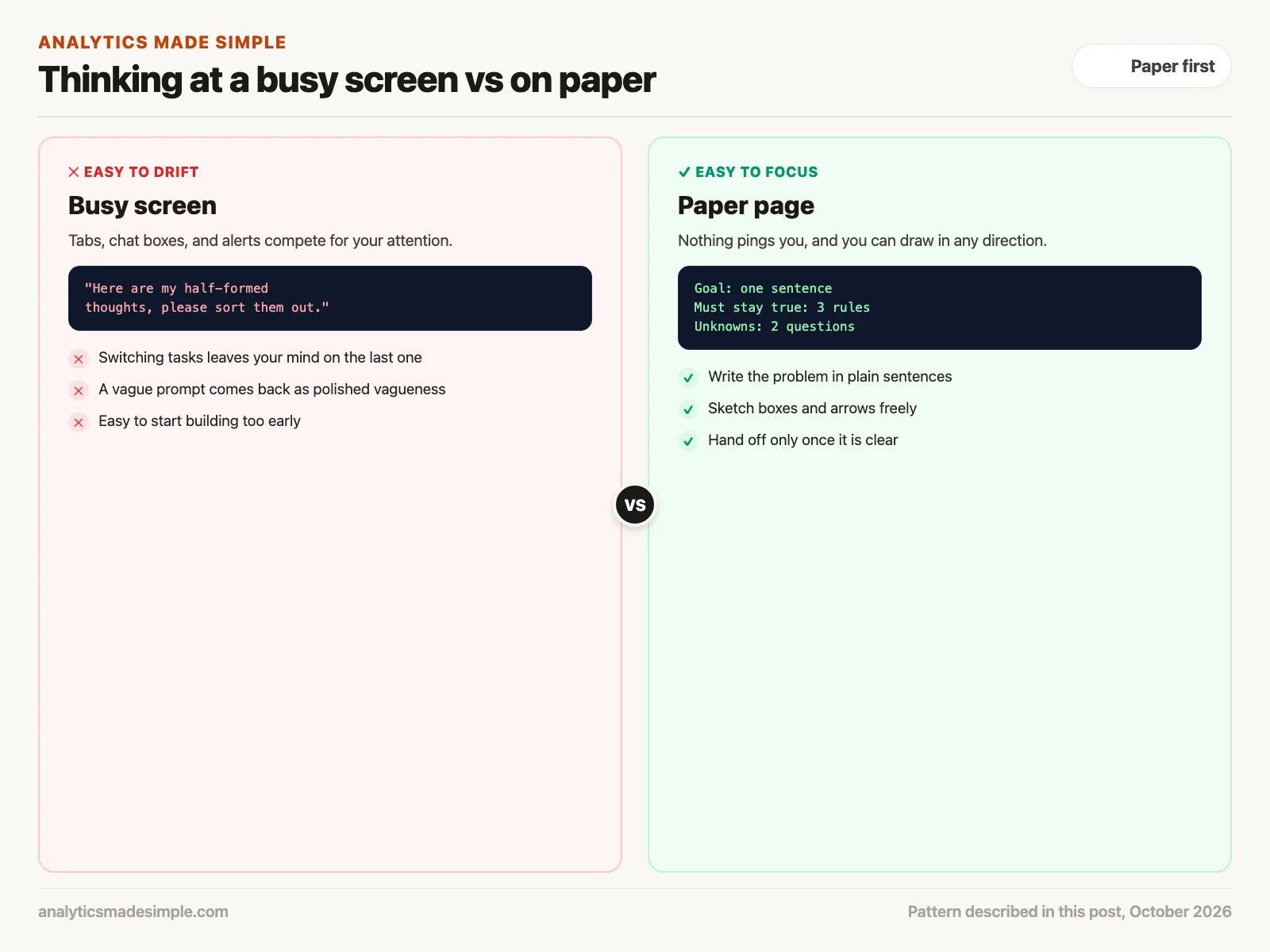
Paper does not fix this by magic. It helps because it removes the interruptions and slows you down. A page cannot ping you, and you cannot paste into it, so you have to decide what you mean before you write it. You can also draw in any direction, which suits plans that have parts and connections rather than a straight list.
You may have heard that writing by hand makes you learn more than typing. The best-known study, by Mueller and Oppenheimer in 2014, found that students who typed lecture notes copied more words exactly and did worse on some questions. A direct repeat of that study in 2021 found the same copying pattern but no clear difference in quiz scores. So the honest reason to use paper here is focus and freedom to sketch, not a proven memory boost.
The four steps from a notebook page to finished work
You do not have to choose between paper and AI. The useful order is paper for the thinking, then AI for reading your notes and doing the repetitive work, with a check by you in between.
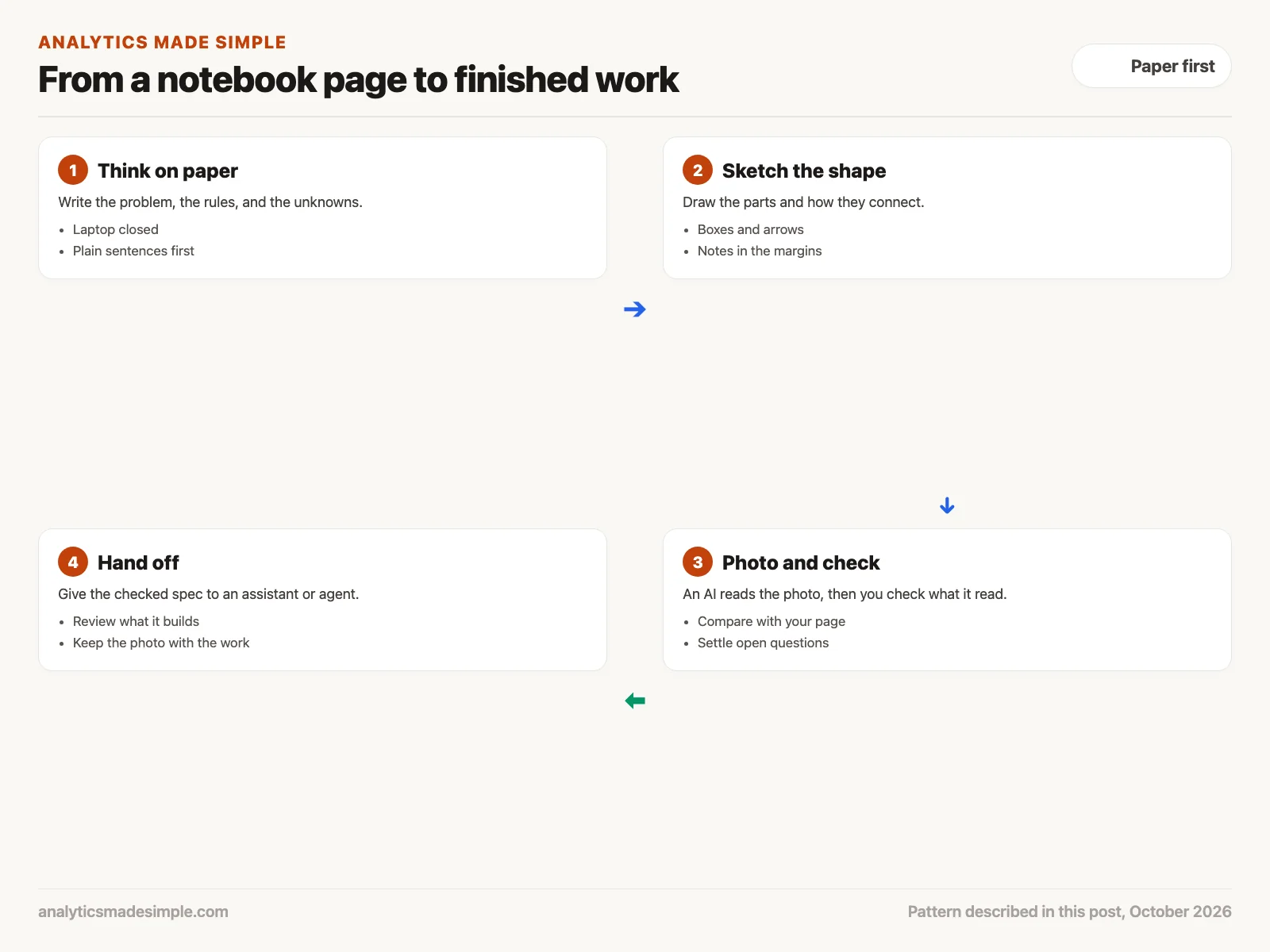
1. Think on paper first
Close the laptop and write the problem out in plain sentences. List what has to stay true no matter what, what you know for sure, what you are only assuming, and the questions you still cannot answer. This keeps you from building too early, because the gaps show up on the page instead of halfway through the work.
2. Sketch the shape
Draw the parts of the plan as boxes and the connections as arrows. For a sign-up flow, that might be a form, an email check, a welcome email, and a database (where the sign-ups are stored). Put open questions in the margin with a question mark, so you can see at a glance what is still undecided. The same works at home: planning a move might be boxes for packing, movers, utilities, and the new address, with arrows for what has to happen first.
3. Take a photo and check what the AI read
Take a clear photo of the page and give it to an AI model that can read images. Many chat assistants accept photos, and developers can send images through an API (the way one program asks another for data), as described in OpenAI’s images and vision guide. Ask it to list your boxes, arrows, and notes in a fixed format.
Then check the result against your page. The same OpenAI guide warns that its models can misread small or rotated text, struggle with exact positions, and sometimes describe an image wrongly. Messy handwriting makes this more likely, so a quick check is part of the step, not an extra.
4. Hand off the checked plan
Now give the checked plan to the assistant or coding agent you use, meaning an AI tool that can carry out several steps on its own. Because the plan is clear, it has less to guess. Read what it produces as carefully as you would a coworker’s draft. Save the photo of your page next to the finished work, so you can find the reasoning later.
A checker you can run today
The short Python program below plays the role of step three. It holds the kind of reply an AI might give after reading a photo of your sketch, with a few made-up mistakes, and compares it with the box names you typed yourself. It needs nothing beyond Python.
# Check what an AI read from a photo of your notebook page before you use it.
# The "extracted" data below is made up for practice: it is the kind of reply
# a vision model might return after reading a hand-drawn sketch.
extracted = {
    "boxes": ["Signup form", "Email check", "Welcome email", "Databse"],
    "arrows": [
        ["Signup form", "Email check"],
        ["Email check", "Welcome email"],
        ["Email check", "Database"],
    ],
    "notes": ["Send welcome within 5 min?", "Retry twice if email fails"],
}

# The box names you actually wrote, typed once by you as the source of truth.
my_boxes = {"Signup form", "Email check", "Welcome email", "Database"}

problems = []
for box in extracted["boxes"]:
    if box not in my_boxes:
        problems.append(f"Box '{box}' is not on your page (misread handwriting?)")
for start, end in extracted["arrows"]:
    for name in (start, end):
        if name not in extracted["boxes"]:
            problems.append(f"Arrow {start} -> {end} points at '{name}', which is not a box")
for missing in sorted(my_boxes - set(extracted["boxes"])):
    problems.append(f"Box '{missing}' from your page was not read")
for note in extracted["notes"]:
    if note.endswith("?"):
        problems.append(f"Open question, decide before handing off: {note}")

if problems:
    print("Fix these before you give the spec to an agent:")
    for p in problems:
        print(" -", p)
else:
    print("Spec matches your page. Ready to hand off.")
Running it prints:
Fix these before you give the spec to an agent:
 - Box 'Databse' is not on your page (misread handwriting?)
 - Arrow Email check -> Database points at 'Database', which is not a box
 - Box 'Database' from your page was not read
 - Open question, decide before handing off: Send welcome within 5 min?
In plain words, the program keeps your own box names in a set, which acts as the source of truth. It then flags any box the AI read that is not on your page, any arrow that points at a box that does not exist, any box from your page the AI missed, and any note that ends with a question mark. Here the AI misread “Database” as “Databse,” which breaks one arrow, and one question is still open. You fix those two things before handing the plan to anyone.
Keep each kind of work in its own lane
It helps to think of the work as four lanes, each with its own tool. Your thinking stays on paper. Reading the page is the AI’s job, checked by you. Building is the assistant’s job, reviewed by you. Keeping a record is the job of your notes app.
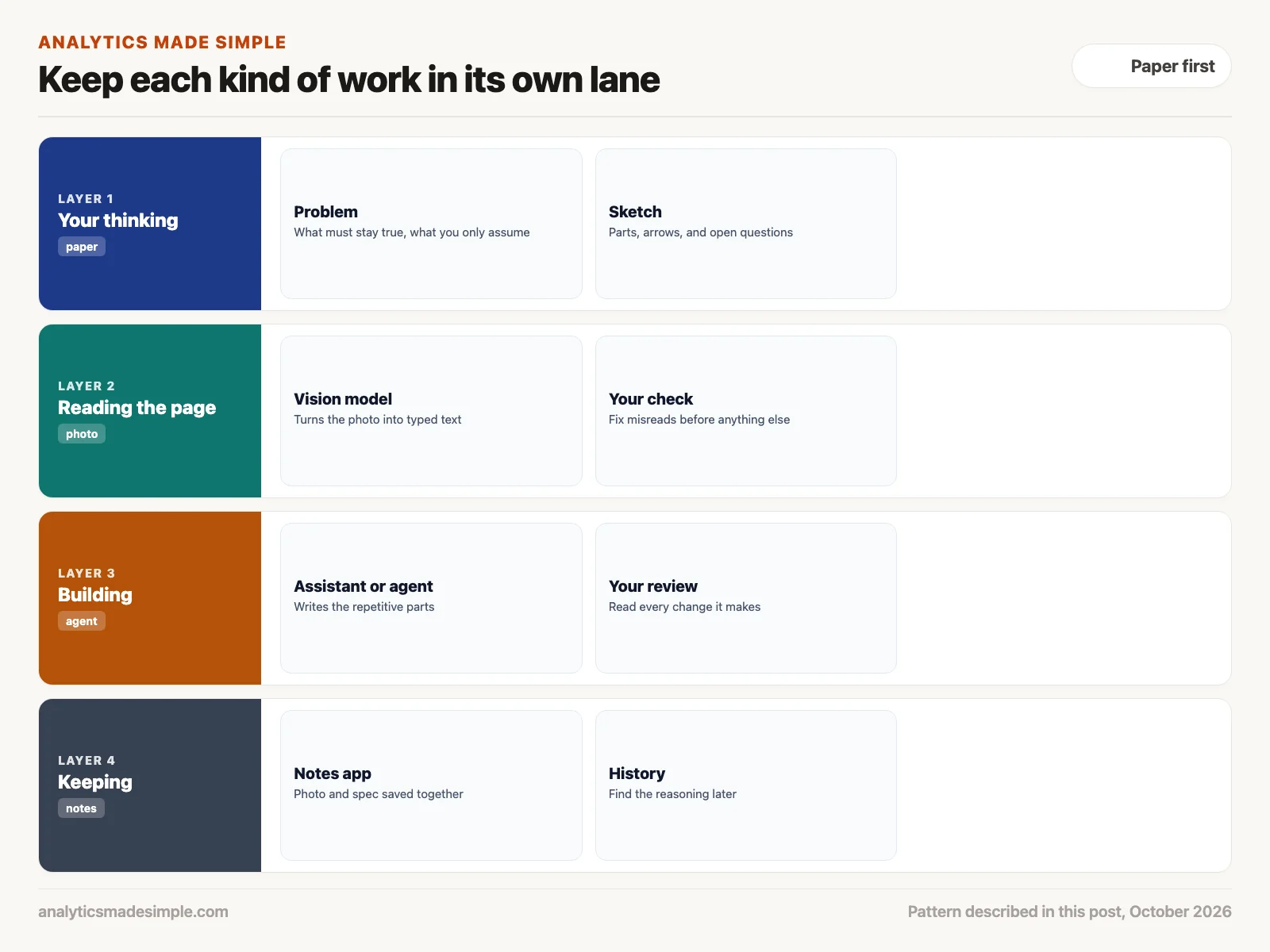
The lanes keep the parts from mixing. While you are in the first lane, nothing interrupts you, and you only think about the problem. The AI steps in later, where its speed with repetitive work helps and your plan is already settled.
Pick the medium that fits the job
No single tool covers everything. Match the tool to the kind of work.
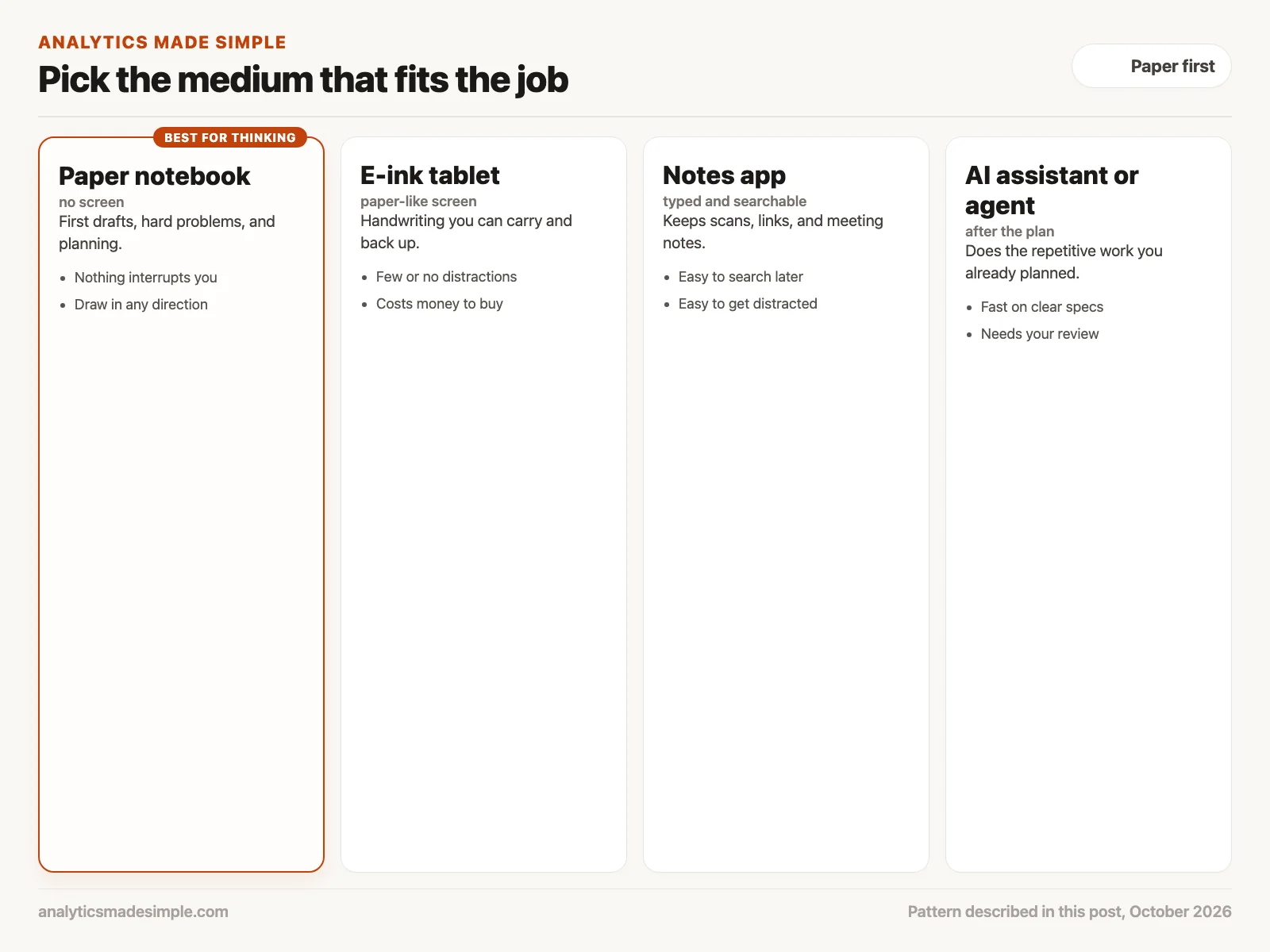
- Paper notebook: First drafts, hard problems, and planning. Nothing interrupts you, and you can draw anywhere on the page. A page can still be lost or read by someone else, so keep private details out of it as you would anywhere.
- E-ink tablet: A tablet with a paper-like screen, such as a reMarkable or a Supernote, lets you write by hand and back your notes up. It costs money, and you should check what each model can and cannot do before you buy one.
- Notes app: A typed notes app, such as Obsidian, is good for keeping meeting notes, links, and the photos of your paper pages. It is easy to search later, and easy to get distracted in.
- AI assistant or agent: Use it for repetitive work you have already planned, such as first drafts of routine code, tests, or summaries. It is fast when the plan is clear, and you still review what it does.
Quick recap
- Switching between tasks leaves part of your mind on the last one, and a busy screen invites that switching.
- A vague prompt often comes back as polished confusion, so get clear on paper first.
- The research on handwriting and memory is mixed, so use paper for focus and sketching, not a promised memory boost.
- Think on paper, sketch, let an AI read the photo, check what it read, then hand off.
Your next step this week
Pick one task you have been putting off because it feels fuzzy. Spend fifteen minutes on paper writing the goal in one sentence, the rules that must hold, and your open questions, then sketch the parts. Only after that, open your AI assistant and give it the page, and check what it read before you ask it to build anything.
Series notes
This is Part 8 of AI assistants everyday, and it closes the planned everyday track. Previous: turning meetings into checked action items.
Sources
- Sophie Leroy, Why is it so hard to do my work? The challenge of attention residue when switching between work tasks, Organizational Behavior and Human Decision Processes, 2009.
- Pam A. Mueller and Daniel M. Oppenheimer, The pen is mightier than the keyboard: advantages of longhand over laptop note taking, Psychological Science, 2014.
- Heather L. Urry and others, Don’t ditch the laptop just yet: a direct replication of Mueller and Oppenheimer’s (2014) Study 1 plus mini meta-analyses across similar studies, Psychological Science, 2021.
- OpenAI, Images and vision guide, including its list of limitations, checked October 3, 2026.
Keep going
Same lessons in your feed
Short diagrams, hooks, and weekly tutorials on Substack, Instagram, X, and Facebook.



