
When you prepare documents for AI search, how you cut them into pieces decides what the search can find later. Pieces that are too big mix several topics, so a search for one fact drags in a lot of noise. Pieces that are too small lose the words around a fact that make it make sense. Cut on natural breaks, like paragraphs, and let neighboring pieces overlap a little. Cutting documents into pieces is called chunking. It is the first step in RAG, a setup where an AI looks up your own documents before it answers.
Imagine you look up a rule about a denied insurance claim, and the answer quotes only half of it. The exception on the next line never shows up, because the document was cut so small that each sentence stood alone. Cut on paragraph and sentence breaks, and let neighboring pieces share a line or two, and the full rule and its exception come back together.
Why chunking is the single most consequential choice in RAG
Chunking sets the basic unit of meaning inside your search database. Get it right and each stored piece, once turned into a vector embedding (a list of numbers that captures what a piece of text means), stands for one clear idea. Get it wrong and that piece turns into a blurry average of several unrelated ideas, and search quality drops with it.
Building a search index means deciding how much text belongs in each entry. Think of an old library catalog: you could index by whole book, by chapter, by page, or by single sentence, and each choice trades something away for something else.
This tradeoff gets bigger once you add an embedding model, the piece of software that reads a block of text and turns its meaning into one point in space (a list of numbers called a vector). Feed it a 3,000-word product whitepaper covering pricing, security, system requirements, and case studies, and that single point has to stand in for all four topics at once. The result is a washed-out average, lukewarm on every topic, and rarely close enough to a search question to beat a single focused paragraph. Cosine similarity, the math search uses to compare a question to a stored chunk, rewards a sharp, specific vector over a blurry one.
Go too small, though, and you lose that background context. Say you chunk by individual 20-word sentences. Each vector turns razor sharp. A sentence like “The maximum penalty for this violation is $50,000 per occurrence” matches a search about money penalties. It still leaves out which violation, which regulation, and which department it belongs to. When that chunk gets pasted into the AI’s prompt, the model has to guess what “this violation” even means.
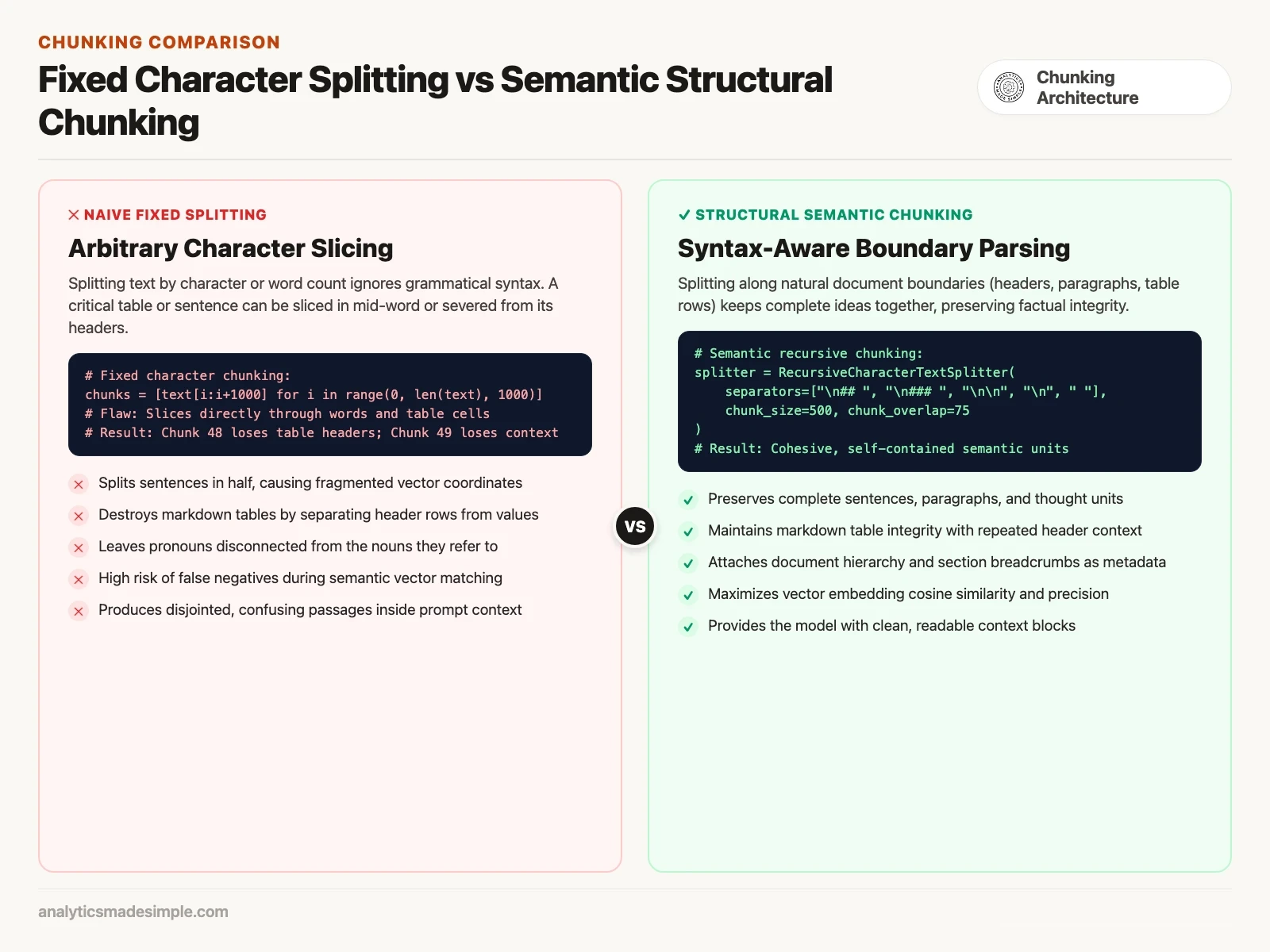
Getting chunking right means finding the size in between. A good chunk stays compact enough that the embedding focuses on one idea. It also stays complete enough that a person can grasp the fact from that one chunk alone. The model reading it should not have to hunt through the rest of the document.
The Goldilocks zone: comparing fixed, recursive, and semantic chunking
Most teams building search systems reach for one of four chunking strategies. You can slice text into fixed token counts for raw, uniform data. A token is a small chunk of text, often part of a word. You can split along natural breaks, which is the default for most documents. You can track when the meaning drifts, for loose prose. Or you can build a parent-child hierarchy for complex technical documentation.
To pick the right one for your company’s documents, it helps to see how each works in practice:
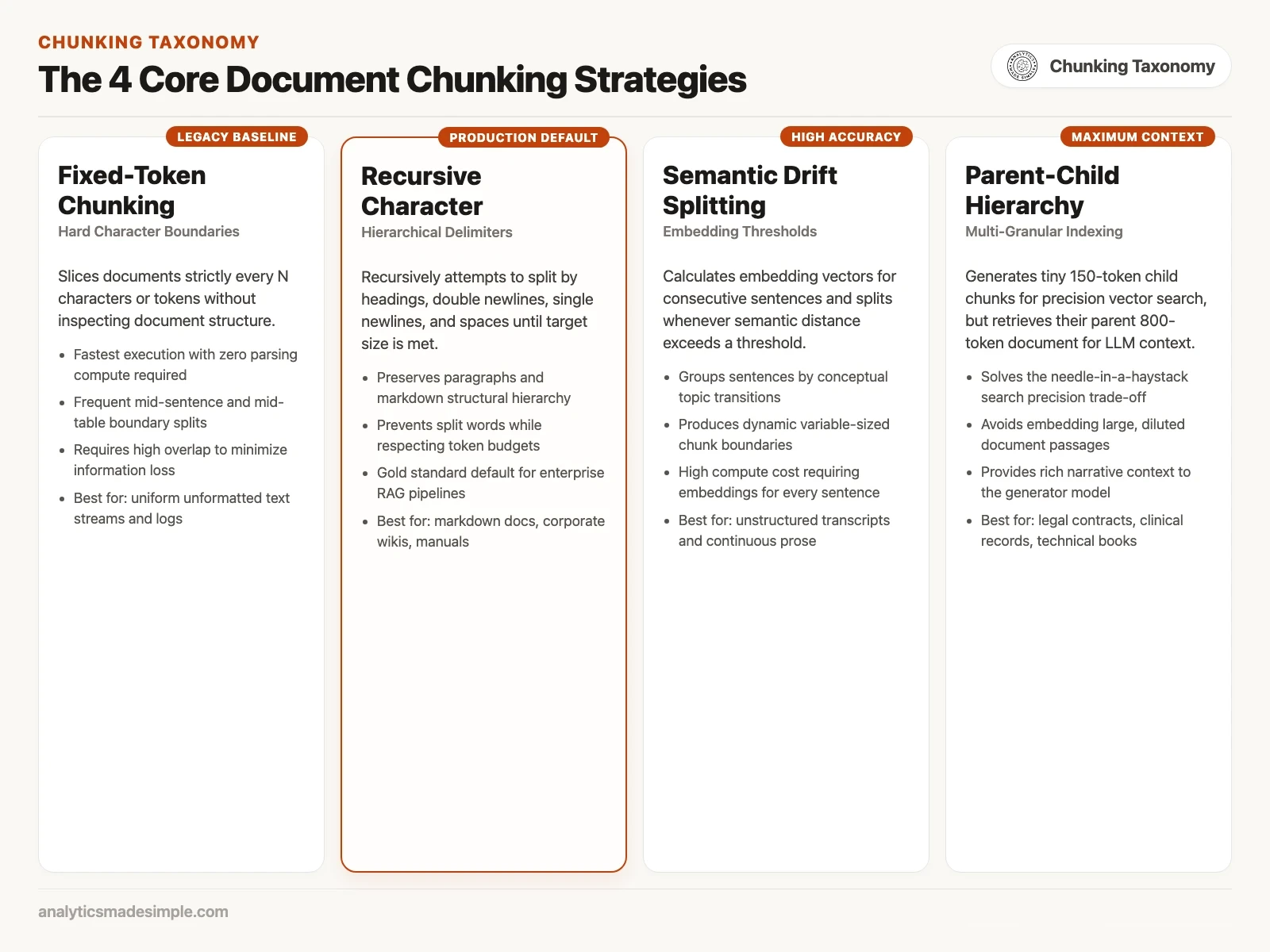
Here is what each strategy actually does when it runs:
- 1. Fixed-token chunking. Cut the document at exact token counts, say every 500 tokens, with no regard for what’s on the page. It needs no language processing and runs in a fraction of a second. It is blind to structure. It regularly splits a word in half, cuts a sentence mid-thought, or breaks a table apart. Save it for raw text streams or log files that have no real formatting to respect.
- 2. Recursive character splitting, the default most teams use. This is the workhorse behind most production search systems, popularized by frameworks like LangChain and LlamaIndex (two open-source toolkits for building AI apps on top of your own documents). Instead of cutting text at a fixed spot, it looks for natural breaks in order. Section headers come first (
##), then paragraph breaks (), then line breaks ( - 3. Semantic drift splitting. Lets the meaning of the text decide where to cut. It turns each sentence into its own embedding and measures how far each sentence’s meaning has drifted from the one before it. Once that drift crosses a threshold, say when the text shifts from system architecture to pricing, it starts a new chunk. The boundaries it finds feel natural, but generating an embedding for every single sentence during setup makes it slower and more expensive to run.
- 4. Hierarchical parent-child indexing. The most involved pattern, built for complex knowledge bases. It splits each document into two linked layers: large 800-token “parent” sections kept in a plain document store, and small 150-token “child” chunks that get embedded and searched. Search runs against the precise child chunks, and once one matches, the system pulls up its full parent section to hand to the AI, a pattern covered in more detail below.
Sliding windows and overlap: why 50 tokens saves your context
Overlapping neighboring chunks by 10 to 20 percent works like a safety net. It stops a sentence, a clause, or a word like “this” or “it” that refers back to something earlier from losing its meaning just because a chunk boundary happened to land in the wrong spot.
Even a good recursive splitter still runs into places where one connected thought spans two chunks. Picture a contract clause: “In the event of a force majeure disruption exceeding fourteen consecutive calendar days, the contractor shall be relieved of liability. However, this waiver does not apply to subcontractors handling hazardous materials.” The two sentences are one rule.
If the chunk boundary falls right between those two sentences, chunk A ends up with the relief rule. Chunk B ends up with the hazardous materials exception, on its own. Ask whether hazardous-materials subcontractors are covered during a force majeure event, and the search might return only chunk B. Without chunk A sitting next to it, the model has no idea what “this waiver” refers to, so it will most likely tell you it cannot determine the answer.
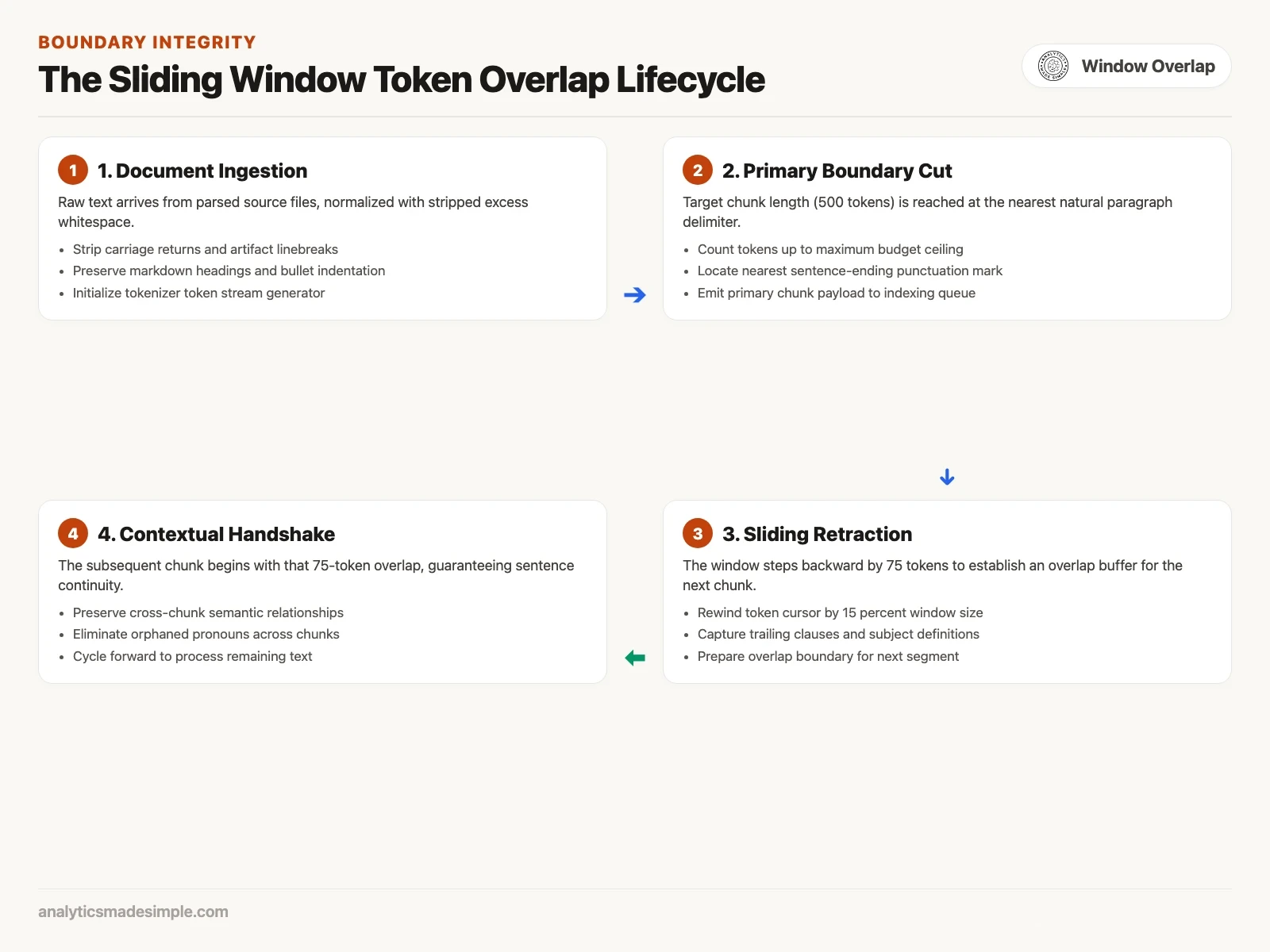
Sliding window overlap fixes that. Once chunk 1 hits its target size of 500 tokens, the chunking engine steps back 75 tokens, 15 percent, before it starts chunk 2. That means the last sentence of chunk 1 also opens chunk 2. A phrase like “this waiver,” “the contractor,” or “the maximum penalty” stays attached on both sides of the seam.
How to chunk tables, code, and lists without destroying structure
General text splitters should never touch a table or a block of code on their own. Convert tables to markdown, a simple text format that uses plain characters for headings and tables, and repeat the header row on every piece. Treat a code block as one unit that never gets cut mid-line.
Standard text splitters were built for regular prose, sentences that flow one after another. Point one at a markdown table, a JSON payload, or a block of Python code, and it tends to fail badly. JSON is a plain text format of labeled values. A payload is the data a message actually carries. Structured data depends on exact spacing and punctuation to mean anything at all.
A few rules keep structured documents intact:
- Repeat the table header. If a large table has to split across several chunks, add the header row and column names back to the top of every piece, because a row that just says
| 9402 | $450 | Active |means nothing to a search model unless| Procedure Code | Allowable Fee | Status |sits right above it. - Keep code functions whole. A function and its docstring (the explanation comment above it) belong in one chunk together. If a function runs longer than your token budget allows, split along its inner logical blocks, such as a helper class. Do not cut it off in the middle of a loop.
- Add a breadcrumb trail. When you pull chunks out of a nested markdown document, add the full heading path to the front of the chunk text, for example
[Document: Employee_Handbook > Section: Travel > Subsection: Meal Allowances]. That gives the embedding model its bearings right away, even when the chunk itself is just a couple of short bullet points.
Here is a working Python example that chunks markdown recursively, keeps section headers attached, and adds sliding window overlap.
import re

def recursive_markdown_chunker(
    text: str,
    max_tokens: int = 150,
    overlap_tokens: int = 30
) -> list[dict]:
    # Rough token approximation: 1 token ~= 4 characters
    max_chars = max_tokens * 4
    overlap_chars = overlap_tokens * 4

    sections = re.split(r'(\n#{1,3}\s[^\n]+)', text)
    chunks = []
    current_header = "General Overview"

    for i in range(1, len(sections), 2):
        header = sections[i].strip()
        body = sections[i + 1] if (i + 1) < len(sections) else ""
        combined_text = f"{header}\n{body.strip()}"

        # Split body if it exceeds target character limit
        start = 0
        while start < len(combined_text):
            end = start + max_chars
            if end >= len(combined_text):
                chunk_str = combined_text[start:].strip()
                chunks.append({
                    "header": header,
                    "tokens_approx": len(chunk_str) // 4,
                    "text": chunk_str
                })
                break

            # Find the nearest paragraph break, line break, or period before the cutoff
            split_idx = combined_text.rfind("\n\n", start, end)
            if split_idx == -1:
                split_idx = combined_text.rfind("\n", start, end)
            if split_idx == -1:
                split_idx = combined_text.rfind(". ", start, end)
            if split_idx == -1 or split_idx <= start:
                split_idx = end
            else:
                split_idx += 1  # Include the punctuation mark

            chunk_str = combined_text[start:split_idx].strip()
            chunks.append({
                "header": header,
                "tokens_approx": len(chunk_str) // 4,
                "text": chunk_str
            })
            start = max(split_idx - overlap_chars, start + 1)  # always move forward

    return chunks

# Sample corporate document excerpt
sample_doc = """
# Section 4: Travel Allowances
Employees traveling on official company business are entitled to meal reimbursement.
Daily meal allowances are calculated based on destination tiers established by human resources.

## Section 4.2: Urban Travel Rates
For Tier 1 metropolitan areas including New York, Chicago, and San Francisco, the maximum daily allowance is $120.
Receipts must be submitted within thirty days of travel completion through the automated expense portal.
Late submissions require explicit written approval from department directors.
"""

results = recursive_markdown_chunker(sample_doc, max_tokens=60, overlap_tokens=15)
for idx, c in enumerate(results, 1):
    print(f"--- Chunk {idx} ({c['header']} | ~{c['tokens_approx']} tokens) ---")
    print(c['text'])
Run it against the sample policy text above, and it prints the chunks below. Each one keeps its section header, and each new chunk starts with a short overlap from the end of the previous one, which is why chunks 3 and 4 begin partway through a sentence.
--- Chunk 1 (# Section 4: Travel Allowances | ~52 tokens) ---
# Section 4: Travel Allowances
Employees traveling on official company business are entitled to meal reimbursement.
Daily meal allowances are calculated based on destination tiers established by human resources.
--- Chunk 2 (## Section 4.2: Urban Travel Rates | ~37 tokens) ---
## Section 4.2: Urban Travel Rates
For Tier 1 metropolitan areas including New York, Chicago, and San Francisco, the maximum daily allowance is $120.
--- Chunk 3 (## Section 4.2: Urban Travel Rates | ~41 tokens) ---
go, and San Francisco, the maximum daily allowance is $120.
Receipts must be submitted within thirty days of travel completion through the automated expense portal.
--- Chunk 4 (## Section 4.2: Urban Travel Rates | ~34 tokens) ---
of travel completion through the automated expense portal.
Late submissions require explicit written approval from department directors.
The parent-child pattern: small chunks for search, big chunks for generation.
The parent-child pattern separates two jobs that usually fight each other. One job is finding the right passage. The other is giving the AI enough context to actually use it. It indexes compact 150-token snippets for sharp search matches, then hands the AI a fuller 800-token parent section once a match is found.
This tension between finding the right passage and giving the AI enough to work with runs through every RAG design. RAG means the system looks up your documents before the model answers. Small chunks make for sharp matches: ask about “late expense submission approval,” and a 100-token chunk containing that exact phrase will score extremely high on cosine similarity. But hand the model only that isolated 100-token sentence, and it has no idea which department, which software system, or which exceptions apply.
Chunk at 800 tokens instead to keep that context, and the vector gets diluted, so similarity scores drop and search gets less precise. The parent-child pattern gets around this by separating what gets searched from what gets handed to the model.
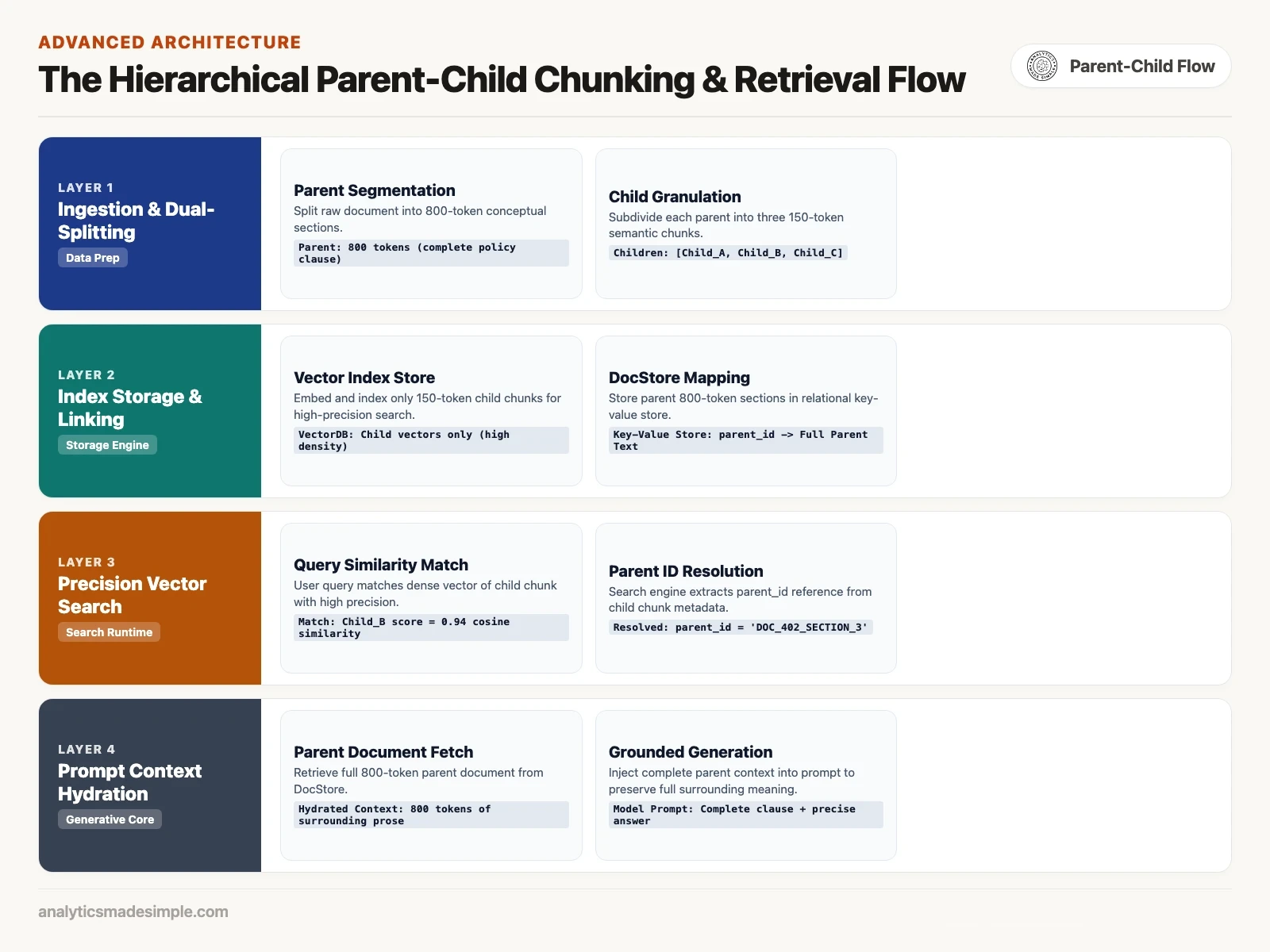
Here’s how it works when a document first comes in. The system splits it into large parent sections, around 800 tokens each, and saves each one under a unique ID in a plain document store such as Redis, MongoDB, or PostgreSQL. Then it breaks each parent into three or four smaller 150-token child chunks, and tags each child with the ID of the parent it came from. Only those child chunks get embedded and stored in the search database.
When someone asks a question, it gets compared against those child chunks. Say child chunk B scores highest. The search engine does not hand child chunk B to the model. Instead, it looks up child chunk B’s parent ID, pulls the full 800-token parent section from the document store, and sends that complete section to the model instead. You get the pinpoint accuracy of small chunks for finding the right spot, plus the full context of a complete document once you’re there.
Practical rules for sizing your chunks on Monday
For most business applications, start simple: recursive character splitting at 400 to 600 tokens with 15 percent overlap covers the majority of cases. Save the parent-child setup for documents where complex tables or clauses that span paragraphs actually demand it.
If you’re tuning your company’s search pipeline this week, resist the urge to reach for a complicated semantic clustering setup before you’ve tried the basics. A pipeline is the series of steps that prepare documents for search. These starting points, based on what tends to work for each document type, will get you most of the way there:
- Standard company wikis and markdown docs. Use recursive character splitting with a target window of 400 to 500 tokens and a 60-token overlap. That size lines up naturally with how long an average paragraph runs in everyday business writing.
- Technical documentation and API specs. An API is a way for one program to ask another program for data or an action. Use 600 to 800 tokens with a 100-token overlap, because code samples, function declarations, and parameter lists need bigger, uninterrupted blocks so the syntax stays intact.
- Customer support chat logs and transcripts. Use 200 to 300 tokens with a 40-token overlap, since dialogue turns are naturally short and bigger chunks will blend unrelated customer issues together into a confusing mess.
- Heavily formatted regulatory PDFs. Go straight to the parent-child pattern, with 150-token child chunks for search and 800-token parent sections for context, so legal covenants and financial tables never get cut apart.
The next post in this series looks at vector embeddings: how dense and sparse embedding models work, how top open and commercial models compare without vendor bias, and how to choose the right dimensional size for your production database.
Sources and reference reading
- LlamaIndex Documentation, Node Parsers and Chunking Modules (2024): https://docs.llamaindex.ai/en/stable/module_guides/loading/node_parsers/.
- LangChain Framework, RecursiveCharacterTextSplitter Architecture Guide (2024): https://python.langchain.com/docs/how_to/recursive_text_splitter/.
- Pinecone Systems, Chunking Strategies for Large Language Models (2024), technical blog: https://www.pinecone.io/learn/chunking-strategies/.
- Kamradt, G. (2023), 5 Levels of Text Splitting for Retrieval Augmented Generation, GitHub research repository: https://github.com/FullStackRetrieval-com/RetrievalTutorials.
- Anthropic (2024), Contextual Retrieval: Augmenting Chunks with Document Breadcrumbs, engineering research: https://www.anthropic.com/news/contextual-retrieval.
Series notes
This is Part 2 of RAG from scratch. Previous: what RAG is. Next: embedding models without religion.
Keep going
Same lessons in your feed
Short diagrams, hooks, and weekly tutorials on Substack, Instagram, X, and Facebook.