

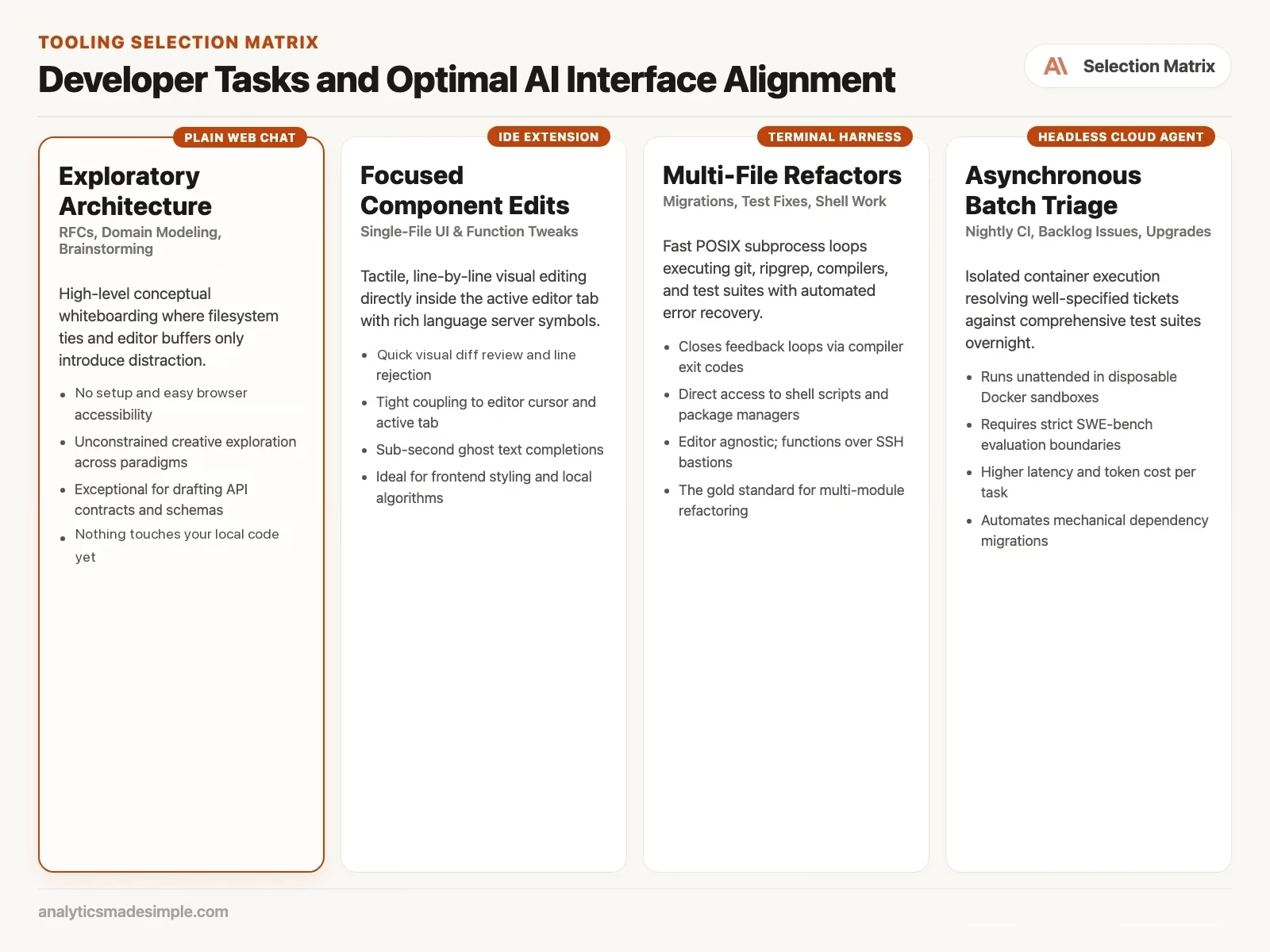
Not every job needs an agent. An agent is a program that can edit files and run commands on its own. Plain chat wins for brainstorming, naming, docs, and learning when you do not need tools running on disk. Reach for full autonomy only when the extra checking it demands is worth what it saves you.
When a plain chat beats a heavy agent
Imagine your team spends months building a powerful terminal (the text window where you type commands) agent with dozens of tools. It can query test databases, change settings, run tests, and draft change notes. For big changes that touch many files, it is a clear win.
But now you need to design a new payment flow from scratch, and you just want to think it through. To ask one big-picture question, you have to open the agent, wait while it scans the whole project, click through permission prompts, and watch your token count climb. A token is a small chunk of text, often part of a word, and you pay by the chunk.
So you open a plain chat window instead. You paste in a small sample of the data and talk through the design: what happens if a payment request is sent twice by accident, what could fail, and what to do about it. Within the hour, you have a plan.
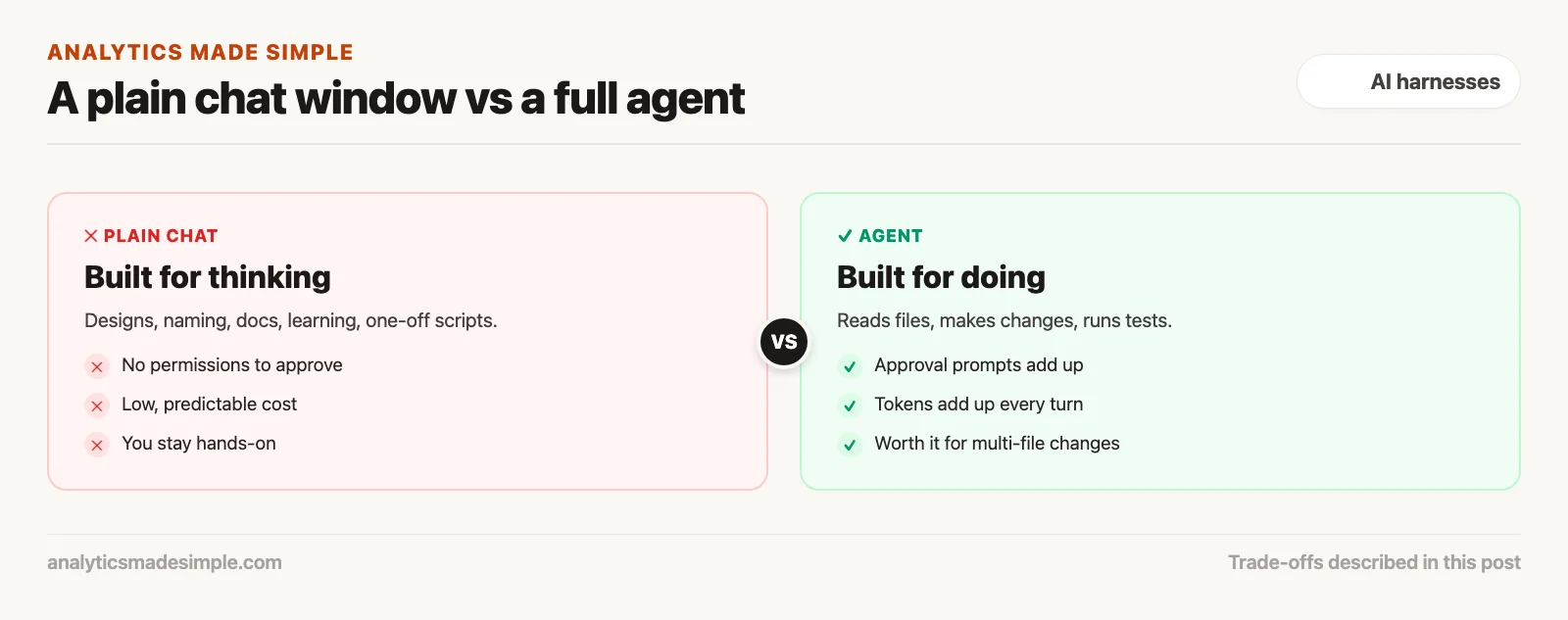
An agent is built for doing: reading files, making changes, running tests. A plain chat is built for thinking. Use the lightest tool that solves the problem.
The hidden costs of an autonomous agent
The software world often assumes more autonomy always beats less. In practice, a full agent setup carries four real costs. Weigh them before you reach for one:
1. Permission fatigue
A properly secured agent cannot change anything without your sign-off. Safe agents ask for approval before every file write or shell command, a pattern covered earlier in this series. But when an agent runs a fifteen-step refactor, you end up reviewing a dozen prompts in a row. If you get impatient, you start rubber-stamping: approving changes without reading the diff, the line-by-line list of what changed. That habit quietly cancels out the safety you built in. A plain chat window has no permissions to click through and no risk of a surprise side effect.
2. Token costs add up fast
Agents burn through a lot of tokens, the chunks of text a model reads and writes, and the thing you get billed for. The agent has to carry the whole conversation, its full tool list, git diffs, and error output across many turns. So the amount of text it processes grows fast as a task grows. A multi-step task that costs five cents in a single chat message can burn five dollars in an agent loop. For everyday questions, running a full agent wastes a team’s AI budget.
3. Jumping to code too soon
Point an agent at a codebase and it wants to start changing files right away. It reads the current folder layout and proposes edits. But early in a design, changing files is the wrong move. Writing code before you have settled on the shape of the problem locks you into an answer you have not tested against real edge cases. A plain chat window keeps you at the idea stage, checking requirements before a single file gets touched.
4. Slower feedback when something goes wrong
When an agent runs on its own, you wait while it searches files, runs tests, and writes a fix. If it heads down the wrong path, several minutes can pass before you notice the mistake. A plain chat session streams its answer back in under a second. You can redirect it the moment it goes off track, with a single sentence.
Five places plain chat wins
Good engineers do not throw out plain chat. They use it on purpose. Here are five spots where a simple chat window beats a heavy agent setup:
1. Whiteboarding a design or writing an RFC
When you are writing a design document (RFC, short for Request for Comments) or mapping the boundary between two services, the real challenge is clear thinking, not code. An agent wired into your codebase gets stuck on old patterns and existing tables. A plain chat window gives you a blank page instead. You can ask it to weigh two database options against each other, walk through what might fail in a multi-step transaction, or push back on your API design (an API is a way for one program to ask another program for data or an action), all without it getting distracted by your existing files.
2. Working out an algorithm or a formula
When you are designing a search over a graph, tuning a caching strategy, or writing a tricky pattern-matching rule, you want a small, isolated scratchpad. In a plain chat window, you can paste in example inputs, describe the output you want, and try five versions in seconds. Once the approach works, you paste the finished function into your codebase, knowing exactly how it works.
3. Learning a new language or framework
Say you are a Python developer picking up Rust, or a Go developer writing your first React component. An agent can get in the way of real learning here. It builds files in the background, which hides the patterns you actually need to understand. In a chat window, you can ask basic questions instead, such as why a line will not compile, and build real understanding rather than just copying an answer.
4. A quick one-off script
Need a small script to parse an odd CSV file (a plain text file where each line is a row and commas separate the columns), convert an old file format into a new one, or generate sample test data? Setting up a full agent, configuring permissions, and clicking through terminal prompts is more setup than the task deserves. Asking a chat window instead produces the script in seconds, ready to run.
5. Sensitive work you want kept off your machine
When you are exploring a sensitive question, or reviewing business logic where you would rather local files stayed out of it, a chat window gives you a clean split. The browser has no access to your files or your terminal. So there is no way for local keys, config files, or your repository history (a repository is the project folder that keeps every past version of every file) to get read or shared by accident.
Putting the four tools to work together
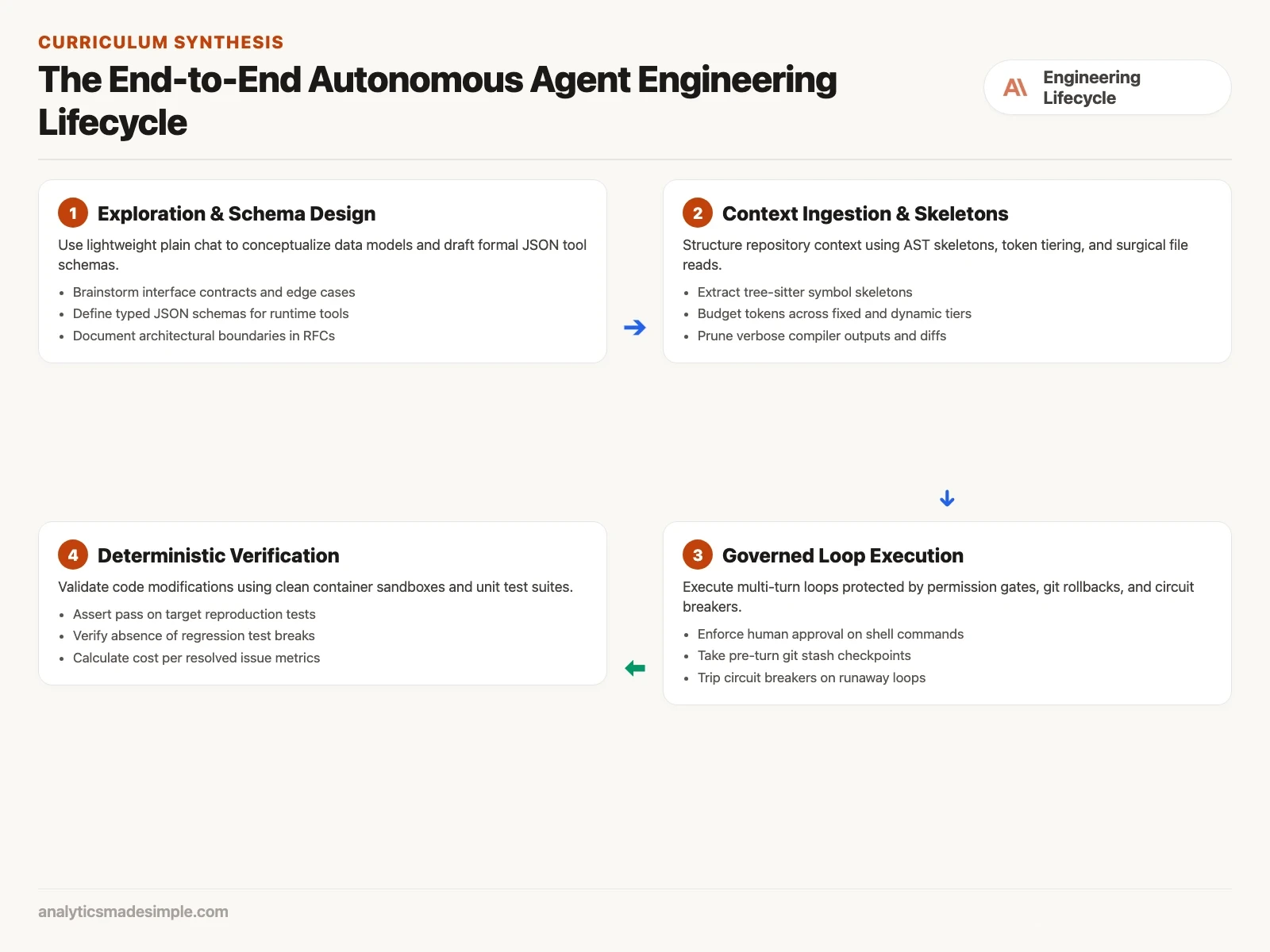
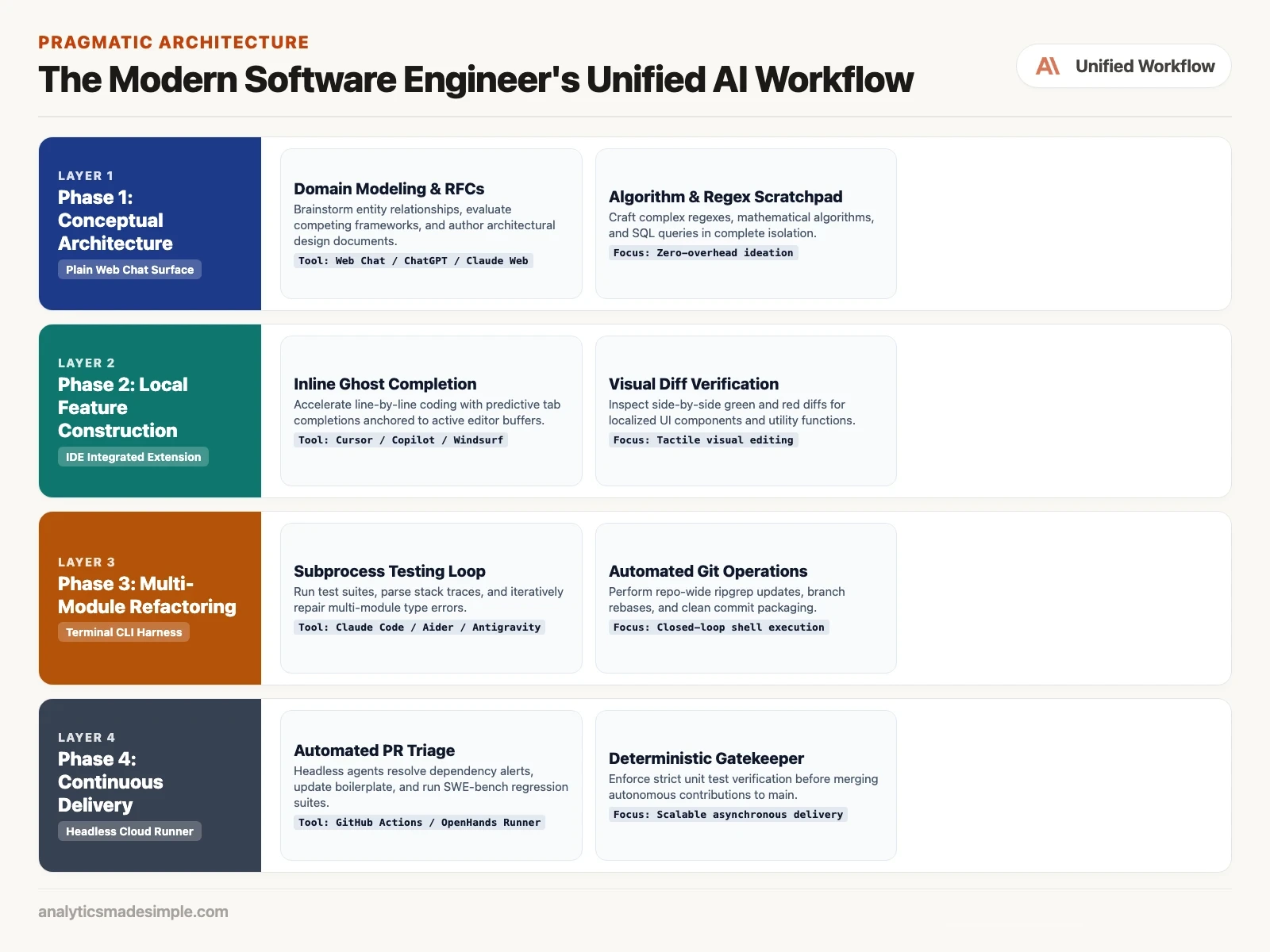
Rather than treating chat windows, editor extensions, terminal agents, and background agents as rivals, strong teams run them as one chain of steps. Each tool fits a different stage of building software:
Stage 1: think it through in plain chat
Before writing any code, start in a plain chat window. Sketch out the pieces of the system, draft the shape of the API, and list edge cases. Come out of this stage with a clear spec or RFC that states what you need, without touching your actual repository.
Stage 2: build it in your editor
Move to your main code editor (IDE, short for integrated development environment), using tools such as Cursor, Copilot, or Windsurf. Build the core pieces there. Use inline suggestions and visual diffs, side-by-side views of what changed, for fast, local edits.
Stage 3: verify it with a terminal agent
When a feature touches several files, or tests start failing across connected packages, bring in your terminal-based coding agent (CLI, short for command-line interface), such as Claude Code or Aider. Let it read error messages, run your test suite, search for where a function is used, and keep fixing until every test passes.
Stage 4: hand routine upkeep to a background agent
For ongoing upkeep, hand routine work to background agents. They run inside isolated containers, as part of the automated steps that test and ship your code changes. Let these agents flag security issues in your libraries, update outdated calls, and check pull requests against your test suite overnight.
Nine rules worth keeping
To close out this series, here are the nine ideas worth remembering from everything covered so far:
- 1. Models predict, the harness acts: A language model on its own just guesses the next words. What makes it act like an agent is the program around it: the loop that keeps it running, the part that calls tools, and the part that checks the results.
- 2. The tool shapes the job: Pick your tool on purpose. Plain chat is best for thinking things through, editor extensions for visual local edits, terminal agents for changes that span many files, and background agents for routine, repeated maintenance.
- 3. Instructions alone are not a safety net: Do not rely on written instructions to keep an agent from doing something risky. Build the real limits into the tool itself: which folders it can touch, which commands it can run, and which credentials it can never see.
- 4. Keep a human in the loop: Require a person to approve anything that changes real files or systems. Clear before-and-after views and explicit approval for commands keep you in charge.
- 5. Context is limited, so spend it carefully: Do not dump your whole codebase into a prompt. Use tools that pull out just the relevant structure (AST, a map of how your code is organized), targeted searches, and a fixed budget for how much text you send, so the model stays focused.
- 6. Trim what you feed back in: Cut repeated compiler messages and passing tests out of what you show the model. Give it only the errors that matter, so it does not lose track of the real problem.
- 7. If a test did not check it, it did not happen: Do not let a model grade its own work. Base your evaluation on real, automated tests running in a clean environment, with checks in place so the results cannot be faked.
- 8. Do not get locked into one vendor: Use open standards (MCP, a shared way for AI tools to connect to other tools). Then a price rise or a policy change at one vendor does not force you to rebuild, because you can move to another AI provider or your own self-hosted models.
- 9. Build in hard stops: Set a maximum number of steps, a real-time spending cap, a time limit, and an automatic way to roll back changes, on every agent loop you build.
Why staying hands-on protects your focus
Beyond the dollar cost and the approval fatigue, there is a mental cost worth weighing too: your focus. In software work, holding a picture of how all the pieces fit together in your head, sometimes called flow, is what produces good code.
Agents, for all their speed, tend to break that focus. When an agent works across twenty files on its own, you shift from building to watching. Instead of thinking through the problem, you are reading streaming logs, waiting for the next approval prompt, and skimming fast-moving diffs. That constant switching gets in the way of deep, steady thinking.
A plain chat conversation keeps you actively involved instead. The model works like a thinking partner: it pushes back on assumptions, suggests other approaches, and points out blind spots, while you stay the one making the calls. When you type the code yourself and run the tests yourself, you understand the system well enough to fix it later without first having to figure out what an agent did.
What each option actually costs over time
When leaders budget for AI tools, they often look only at the subscription price or the token rate. A closer look at total cost of ownership (TCO, everything a tool costs you, not just the sticker price) shows the real cost differs a lot across the four options:
Plain web chat: The lowest cost by far. A fixed, predictable monthly fee, commonly around twenty dollars a person, with no servers to run, no security work, and nothing to maintain. You get value right away with no risk of a surprise bill.
Editor extensions: A moderate cost. This combines a per-person subscription with occasional extra token charges. It needs some ongoing plugin upkeep plus a light review of how the tool indexes your code in the cloud.
Terminal agents: An efficient cost for what you get. Billed by token use with no extra per-seat fee. Needs setup time from your platform team to configure safety limits, rollback hooks, and training, but pays off well for experienced engineers.
Background cloud agents: The highest cost. Needs its own servers, ongoing monitoring of test results, automated review gates for pull requests, and real token spend per task. Worth it mainly for large codebases with a lot of routine maintenance work.
Where this leaves you
We are in the middle of a real shift in how software gets built. AI is not replacing engineers. It is changing what they spend their time on, moving people from typing every line by hand toward directing systems that can act on their own. But the best setup is not the one with the most moving parts. It is the one that solves the problem with the least friction and the most honesty about what actually happened.
Whether you are building a custom terminal agent from scratch, rolling one out across your team, or just opening a plain chat window to think through your next idea, you now have a working map for choosing the right tool for the job.
When a team keeps this balance, AI stops feeling like a source of stress or vendor lock-in. It becomes what good tools have always been: something that makes your existing skill go further. By using the full range, from plain chat to a fully autonomous terminal agent, you keep the tool serving your judgment, instead of the other way around.
Your next step
For your next design question, start in a plain chat window and write a one-page spec before you open an agent. Then use the agent only for the multi-file changes the spec calls for. Splitting thinking from doing usually makes both faster.
Series notes
This is Part 8 of AI harnesses from scratch, and it closes the planned harnesses track. Previous: safety.
Keep going
Same lessons in your feed
Short diagrams, hooks, and weekly tutorials on Substack, Instagram, X, and Facebook.



