You can use Qwen, Alibaba’s family of AI models, in two ways. You can download the open weights (the model’s files, the billions of numbers it learned in training) and run them on your own computers, or you can pay a hosted service that runs Qwen for you and bills you for what you use. Running it yourself gives you full control of your data, but you also pay for the hardware, the upkeep, and the time it sits idle.
Imagine you want AI to read the forms your team handles every day. The easy route is to send the forms to a hosted AI service. Then your legal team points out that those forms contain warehouse access codes, drivers’ ID numbers, and private supplier prices. Now you have a real choice to make: keep the data in-house by running Qwen yourself, or accept the hosted route and its rules.
As of October 2026, Alibaba’s free Qwen models range from tiny ones that run on a phone to large ones that need a rack of servers, and their license allows business use (checked October 5, 2026). Being allowed to download them does not make running them yourself the right call, though. This guide walks through what each path really costs and how to decide.
The central dilemma: control versus operational overhead
Running open weights yourself gives you full control: no outside company sees your data, and no one limits how often you can use the model. The price is that your team has to buy or rent the hardware, keep it running, and tune it. A hosted API (the service a program connects to over the internet) needs no servers and bills per use, but your data travels to someone else’s computers.
The first plan for the shipping project was simple: connect to a hosted API and pay a few cents per thousand requests. The compliance team stopped it. Customs forms held supplier prices, warehouse routing codes, and truck drivers’ passport details, and sending those to an outside service would break the company’s promises about where its data is kept.
Every team runs into the same trade-off. One option is full independence: download the Qwen files, run them on your own servers, and know that no data ever leaves your private network. The other option is convenience: a hosted service with no hardware to manage, that handles sudden spikes in use, and costs nothing when nobody is using it.
To choose well, set the sales pitches aside and do the math. Open weights give you real independence, but running them reliably takes skill with graphics hardware, compression, and serving software.
What open weights actually give you
Open weights are the model’s learned numbers, shared under a permissive license like Apache 2.0, so you can run, inspect, change, and further train the model on your own hardware. They do not include the data it was trained on or any ready-made servers, so how well it runs depends on your own setup.
When Alibaba publishes Qwen on sites like Hugging Face or ModelScope, you get large files in formats such as Safetensors or GGUF, two common file formats for a model’s learned numbers. Those files hold the billions of numbers that decide how the model turns text into answers. Because the main models use permissive licenses, your company may inspect them, run them on servers cut off from the internet, and even train them further on your own data.
That brings four practical advantages. First, your data stays yours. When the model runs inside your private cloud network or your own server room, questions and answers never leave your building. No outside company logs your prompts, learns from them, or sees how much you use the model.
Second, nobody limits your usage. Hosted services cap how many requests you can send per minute. During busy stretches, like the end-of-quarter inventory count, they often reply with a “too many requests” error. Your own servers answer as fast as their hardware allows.
Third, the model never changes under you. Hosted services update their models from time to time, which can quietly change the answers, the code style, or the formatting. With open weights, the exact file you tested is the file running two years later, and you decide when to upgrade.
Fourth, you can teach the model your own vocabulary. Say your business uses special codes, like logistics codes or internal database names. You can give the model a short round of extra training on your examples (a method called LoRA fine-tuning) so it learns them.
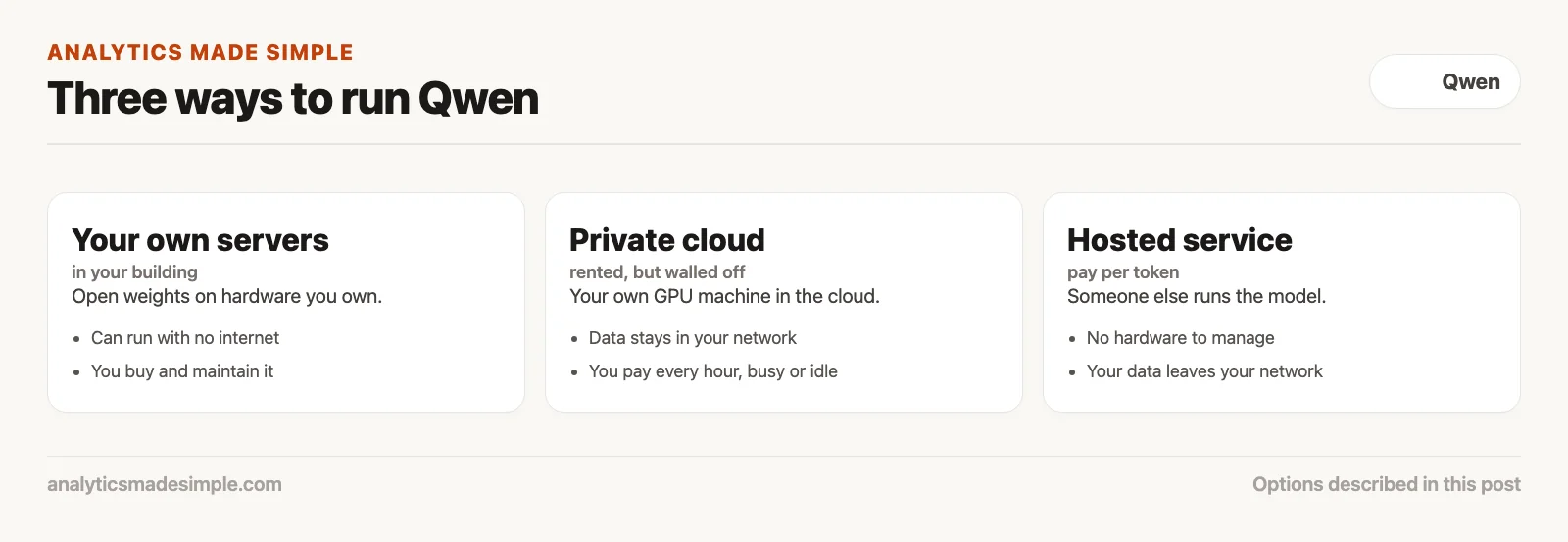
Before you buy any hardware, compare the three ways to deploy side by side in the chart below: on your own machines, in a private cloud, or through a hosted service.
The hidden price of self-hosting: GPUs, memory, and idle time
Running a large model yourself needs a lot of video memory (VRAM) on graphics cards, and you pay for that hardware even when nobody is using it. Renting a graphics processing unit (GPU), the chip that does the math, around the clock only beats hosted pricing at high, steady volume: about 83 million tokens (small chunks of text a model reads) a day in the example below.
The most common mistake is underestimating the hardware and the cost of idle time. AI models run far too slowly on a normal computer processor. To answer at a useful speed, the whole model, plus the working memory it uses to follow a conversation, has to fit in fast graphics memory.
Here is the memory math. At full precision, each parameter takes two bytes. A 7-billion-parameter model therefore needs 14 gigabytes just for its numbers, plus two to four more for the conversation. That fits on one good graphics card, such as the RTX 4090 gaming card from NVIDIA, the company that makes most AI chips, or an A10G in the cloud. A 32-billion-parameter model needs about 64 gigabytes, which means a data-center card like an A100 or H100.
Qwen3.8-27B needs about 54 gigabytes at full precision, so it fits on one 80-gigabyte card such as an H100. The largest open Qwen3.5 model needs about 244 gigabytes, and Qwen’s own example runs it on eight cards. On October 5, 2026, Lambda listed a single H100 80GB at $3.29 an hour on demand.
This is where self-hosting usually loses for small and medium use. The cloud bills you for every hour the machine is on, whether it is answering questions or sitting idle at 3 AM on a Sunday. If you only handle twenty thousand requests a day, you still pay for all 168 hours of the week.
Unless you have a steady flow of work that keeps the machine busy day and night, the idle hours cost far more than simply paying a hosted service per use.
How hosted Qwen works: Alibaba’s service and other providers
Hosted Qwen lets your programs use the models over the internet without managing any hardware. Alibaba’s own service and other providers such as OpenRouter, Together AI, and Fireworks run the servers and handle upgrades. They bill only for the tokens (small chunks of text) you send and receive.
If you want Qwen’s strengths, including its many languages, without running your own servers, a hosted provider is the simple option. Alibaba’s own service, Model Studio, offers its hosted Qwen models alongside the open ones.
Other providers also host the open Qwen models. On October 5, 2026, OpenRouter and Groq both listed Qwen3.8-27B. Most of them copy the connection format OpenAI uses, so moving a program to hosted Qwen often means changing just the web address and the API key (the secret password your program uses to connect).
Hosted providers win on scale. By pooling requests from thousands of customers on shared machines, they keep their hardware busy almost all the time. They can absorb sudden spikes, bill you only for the requests you send, and route around broken machines for you.
Hosted services also offer models you cannot download, such as Qwen3.8-Max. OpenRouter listed it at $2 per million input tokens on October 5, 2026.
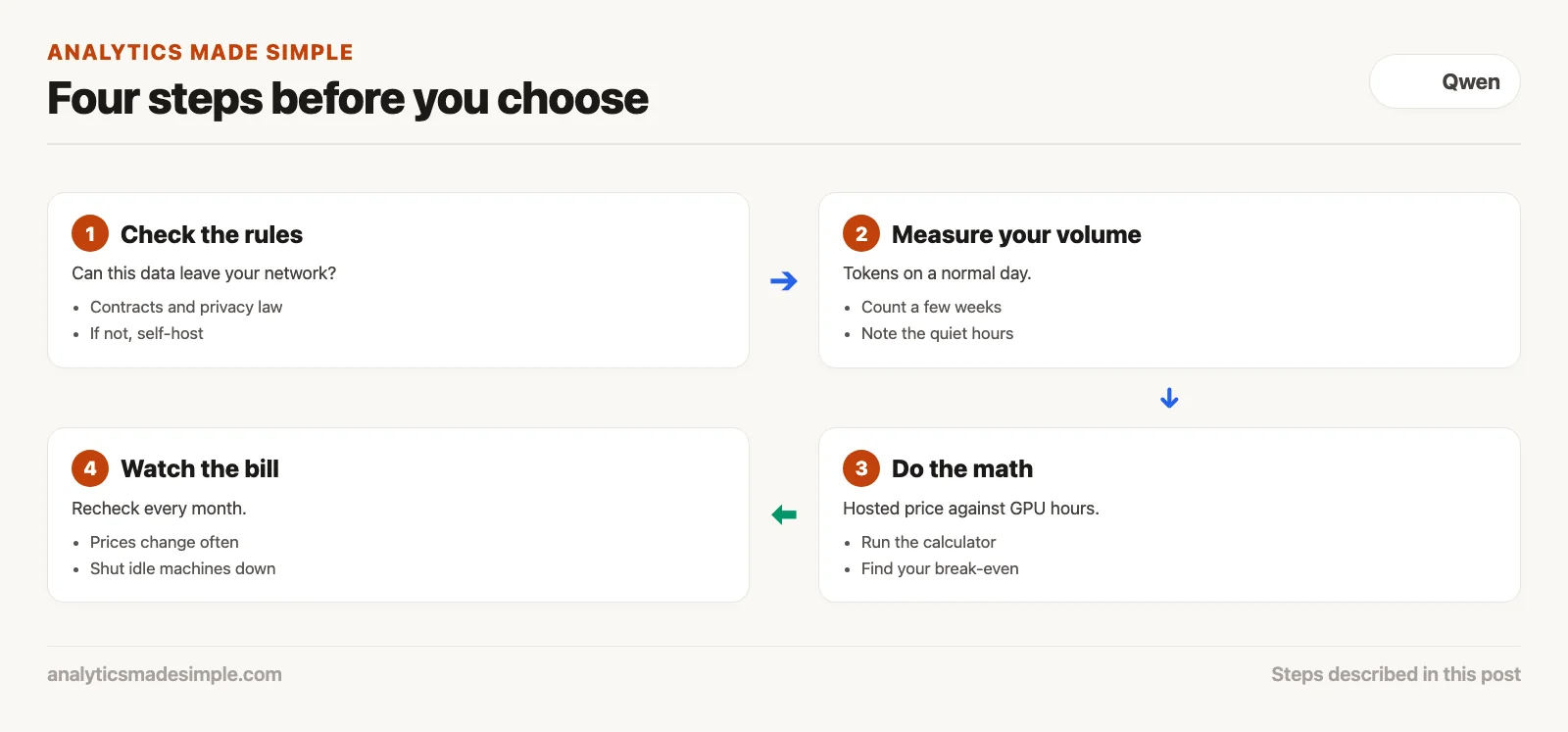
Before you choose, work through the four steps in the diagram below, starting with your own data rules and your own daily volume.
The economic break-even: tokens versus GPU hours
Whether hosting or renting is cheaper depends on how many tokens you process each day. With prices checked October 5, 2026, hosted Qwen3.8-27B costs about 96 cents per million tokens for a form-reading job. One rented H100 costs about $79 a day, so your own machine only wins above about 83 million tokens a day.
The script below does that math, so you can put in your own prices. It uses OpenRouter’s Qwen3.8-27B prices ($0.425 per million input tokens and $2.55 per million output tokens) and Lambda’s on-demand H100 price, all checked October 5, 2026. It needs only Python.
# Prices checked October 5, 2026; check the live pages before you budget.
HOSTED_IN = 0.425        # dollars per million input tokens (OpenRouter, Qwen3.8-27B)
HOSTED_OUT = 2.55        # dollars per million output tokens
INPUT_SHARE = 0.75       # reading forms: about three tokens in for every one out
GPU_PER_HOUR = 3.29      # one H100 80GB, on demand (Lambda)

hosted_per_million = HOSTED_IN * INPUT_SHARE + HOSTED_OUT * (1 - INPUT_SHARE)
gpu_per_day = GPU_PER_HOUR * 24
break_even = gpu_per_day / hosted_per_million

print(f"Hosted, blended: ${hosted_per_million:.2f} per million tokens")
print(f"Own GPU: ${gpu_per_day:.2f} per day, busy or idle")
print(f"Break-even: about {break_even:.0f} million tokens a day\n")
print(f"{'tokens a day':>14} | {'hosted':>9} | {'own GPU':>9}")
for millions in (1, 10, 50, 100, 200):
    print(f"{millions:>12}M | ${millions * hosted_per_million:>8.2f} | ${gpu_per_day:>8.2f}")
Running it prints:
Hosted, blended: $0.96 per million tokens
Own GPU: $78.96 per day, busy or idle
Break-even: about 83 million tokens a day

  tokens a day |    hosted |   own GPU
           1M | $    0.96 | $   78.96
          10M | $    9.56 | $   78.96
          50M | $   47.81 | $   78.96
         100M | $   95.62 | $   78.96
         200M | $  191.25 | $   78.96
At the October 5, 2026 prices, the output shows ten million tokens a day costing about $9.56 hosted against about $79 for a rented H100, busy or idle. Renting only wins past the break-even, and only if one card can keep up. That volume is close to a thousand tokens every second, day and night, so measure what your setup can handle first.
Data sovereignty, compliance, and the VPC boundary
Industries that handle health, financial, or cross-border shipping data often must keep AI models inside a private cloud network (VPC, a walled-off network inside a cloud provider) or their own building. In those cases, the law and customer contracts decide for you, not the price per token.
Saving money means nothing if the setup breaks the law or a customer contract. Many shipping and business contracts require that commercial documents stay within certain countries.
With a hosted service, your data crosses the internet to servers shared with other customers. Even when the provider promises not to keep your data or train on it, security reviewers often refuse shared services for sensitive work. If that provider has a breach or a mistake in its setup, your data could be exposed.
Running the model inside your own private network changes that picture. Your security team can place the model on internal servers with no connection to the public internet, reachable only by your own approved systems over encrypted connections.
Running it yourself also works for air-gapped setups, meaning computers that are never connected to the internet. Defense contractors, hospitals handling patient records under the US health privacy law (HIPAA), and European banks following the EU’s data protection law (GDPR) can run Qwen on machines that are fully cut off. For them, open weights are often the only legal option.
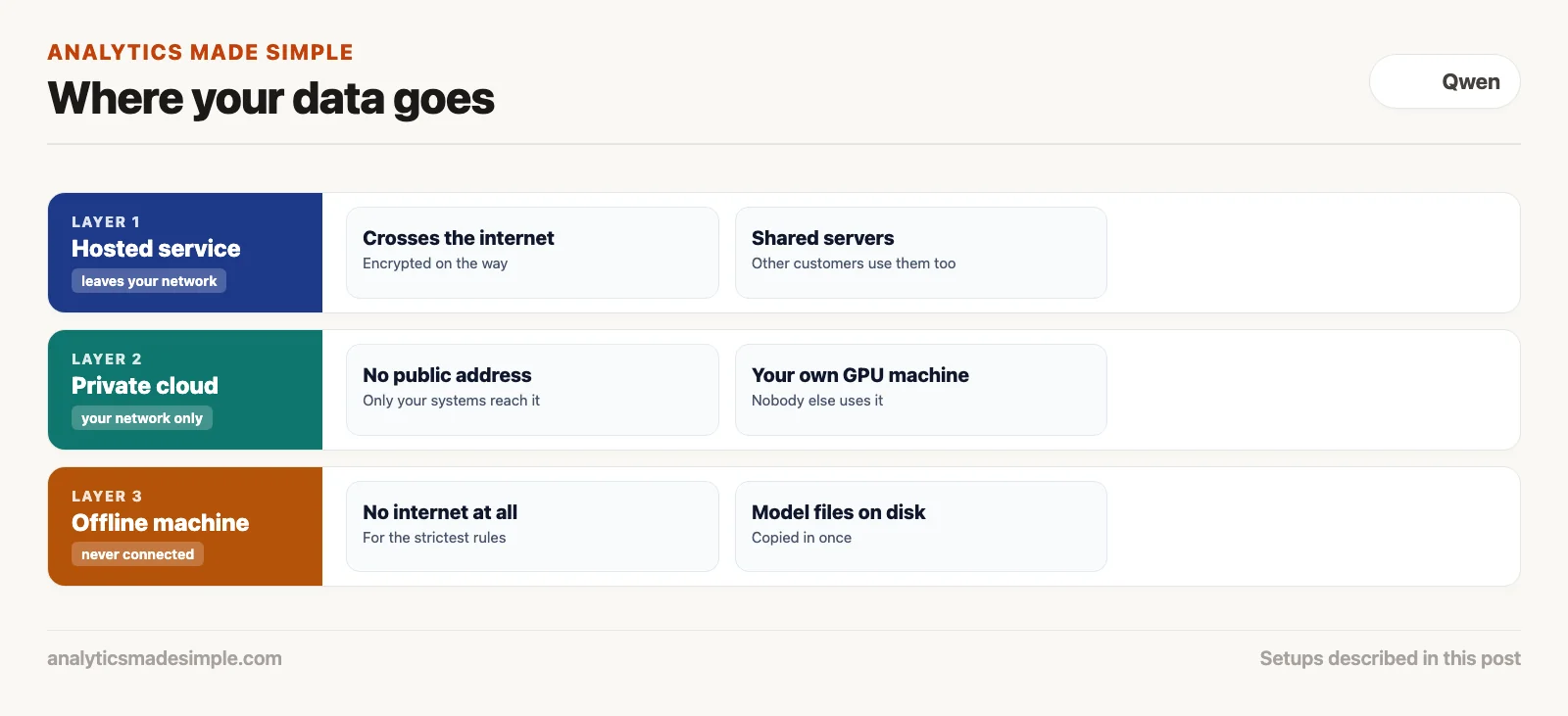
These rules often matter more than the cost math. The diagram below shows how data travels in each setup: a shared hosted service, a private cloud network, and a fully offline machine.
vLLM, Ollama, and PagedAttention compared
To run open weights well, you need serving software built for the job, not a basic Python script. vLLM uses a memory trick called PagedAttention and handles many requests at once; its 2023 launch post reported up to 24 times as many answers per second as the standard Hugging Face library. Ollama is the easy option for a single computer.
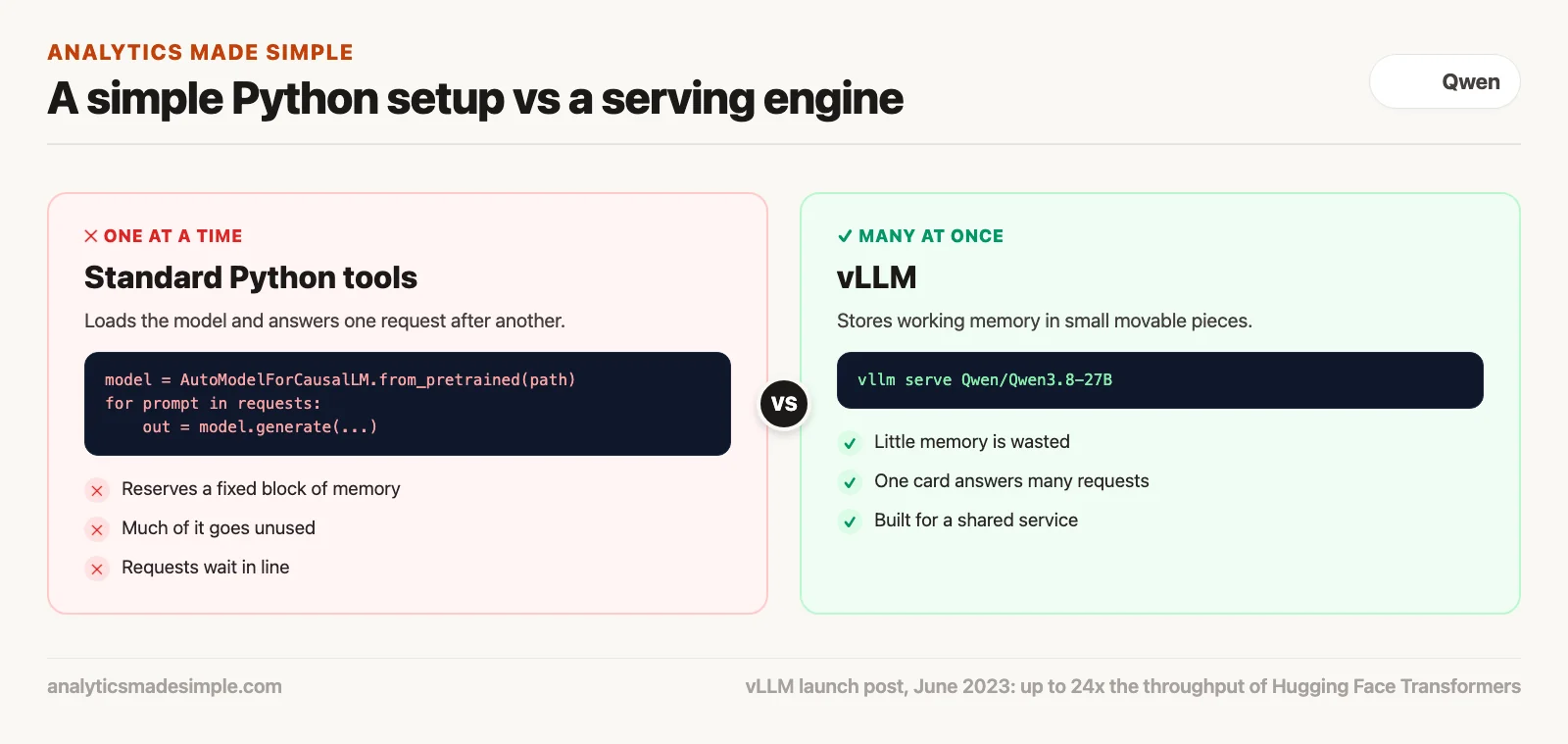
A common letdown for teams trying self-hosting is speed. Someone downloads a Qwen model, loads it with the standard Python tools, and finds it can only answer one question at a time, slowly. Simple setups reserve a fixed block of graphics memory for every request, which wastes most of it and makes requests wait in line.
Real deployments need serving software built for speed. The most popular choice for companies is vLLM. Its key idea, PagedAttention, stores the model’s working memory in small movable pieces, so nothing is wasted. That lets one graphics card answer dozens of requests at the same time.
For a single computer, a developer’s laptop, or a small office box, tools like Ollama and llama.cpp are much simpler. Each is one small program that runs compressed GGUF model files on Apple Silicon Macs or ordinary Linux machines, with no need to set up CUDA, NVIDIA’s graphics programming toolkit.
Pick based on the job. For a service many people use at once, choose vLLM or NVIDIA’s TensorRT-LLM. For a tool on your own desk or a small internal helper, Ollama gets you going right away.
The diagram below compares how a simple setup and vLLM use graphics memory.
With modern serving software, a private Qwen server takes only a few commands. Here is how to start Qwen3.8-27B with vLLM on one 80 GB card and send it a test request. The settings follow the model card; check it for the newest options before you deploy.
# Start a private server that speaks the OpenAI format
vllm serve Qwen/Qwen3.8-27B \
    --port 8000 \
    --max-model-len 32768 \
    --reasoning-parser qwen3

# Send it one test request
curl http://localhost:8000/v1/chat/completions \
    -H "Content-Type: application/json" \
    -d '{
        "model": "Qwen/Qwen3.8-27B",
        "messages": [
            {"role": "system", "content": "You are a precise customs manifest parser."},
            {"role": "user", "content": "Extract harmonized tariff codes from container bill #98421."}
        ],
        "temperature": 0.1
    }'
The hybrid path: local development with cloud fallback
A hybrid setup mixes both: small models on your own machines handle the everyday, high-volume work cheaply, and the harder questions, sudden spikes, or work with nothing sensitive in it go to a hosted service.
You do not have to pick only one. Many experienced data teams use both and get the best of each.
In a hybrid setup, you run small open models, such as Qwen3.5-9B, or Qwen3-Coder-30B-A3B for code, on developers’ computers and inexpensive in-house servers. They handle most daily work: suggesting code, writing tests, pulling fields out of invoices, and sorting text into categories.
Because these models run on your own hardware, there are no usage fees and no waiting on the internet. Some tasks need deep reasoning, a summary of hundreds of pages, or extra capacity in a busy week. For those, your app sends the task to a hosted service running Qwen3.8-Max or one of the large open models.
This keeps cloud bills low, keeps sensitive work in-house, and means your apps never stall when your own hardware is busy.
Decision framework: how to choose your deployment model
Choose using four questions: how sensitive is the data, how much will you process, can your team run servers, and how fast must answers be? If the rules require keeping data in-house, or your steady volume is well above the break-even (about 83 million tokens a day at October 2026 prices), run open weights yourself. Otherwise, start with a hosted service.
Before you set up anything, answer these four questions about your project.
First, what do your data rules say? If your policy forbids sending raw records outside your network, the decision is already made. Open weights in your own private cloud or server room are the only path that follows the rules.
Second, how much will you process each day? If it is under five million tokens a day, do not rent graphics cards. Hosted services will cost pennies compared with thousands of dollars a month in rental fees, so wait until your volume clearly justifies the hardware.
Third, can your team run servers? Keeping a reliable graphics-card server running takes experience with tools like Kubernetes (software for running many servers together), driver updates, monitoring, and automatic scaling. Without platform engineers to own that work, the servers will pull your team away from the work that matters.
Fourth, how fast and how reliable must it be? If customers use your app directly and need answers in under a second, a large hosted provider with machines around the world will usually beat a single server of your own.
Base the decision on real costs and real rules rather than hype, and you get Qwen’s strengths with the control you need and without wasted money.
Monday morning deployment checklist
Before you spend engineering time or reserve expensive graphics cards, go through this list with your infrastructure team.
- Check how sensitive the data is: find out whether customer contracts or privacy rules forbid sending this data to an outside service.
- Measure your volume: count how many tokens you process on a normal day. Under five million a day, start with a hosted service and wait on hardware.
- Test on a laptop first: download
qwen3.5:9b(6.6 GB) orqwen3.5:27b(17.5 GB) with Ollama and check that it handles your real examples well before you rent any graphics cards. - Make switching easy: have your app connect through one setting, so you can move between a hosted service and your own server by changing a single value.
- Set limits: if you run your own servers, cap how long each request can take and shut idle machines down automatically, so a runaway job cannot run up the bill.
Series notes
This is Part 5 of Learn Qwen. Previous: useful first tasks. Next: when Qwen fits vs Claude, ChatGPT, and Llama.
Sources
- Qwen Team, model cards for Qwen3.8-27B and Qwen3.5-122B-A10B, checked October 5, 2026.
- OpenRouter, Qwen3.8-27B and Qwen3.8-Max pricing, checked October 5, 2026.
- Lambda, GPU cloud pricing, checked October 5, 2026.
- Alibaba Cloud, Model Studio documentation.
- Kwon, W., et al. (2023). Efficient Memory Management for Large Language Model Serving with PagedAttention. SOSP.
- vLLM Project, vLLM launch post (June 20, 2023) and documentation.
Keep going
Same lessons in your feed
Short diagrams, hooks, and weekly tutorials on Substack, Instagram, X, and Facebook.