
DeepSeek’s thinking mode, a setting where the AI writes out its step-by-step working before it answers, can show you a long scratch pad that looks like proof even when it is not. Check the number in the workbook before you paste “3.7 percent (proof)” into a Slack channel your whole team reads.
Imagine you ask DeepSeek’s thinking mode to work out a product line’s profit margin from your sales spreadsheet. It shows 612 words of careful-looking reasoning and ends with 3.7 percent, so you post that number to your team chat as the answer. A few hours later, finance checks the actual spreadsheet and finds the real margin is 2.1 percent, because the model never counted the $14,280 in refunds on the second tab.
3.7 percent in Slack, 2.1 on the sheet
Picture an online shop that sells workshop kits: printed workbooks, sticker sheets, a thin marker pack. Q3 billed $412,800, and the cost of goods sold, or COGS, on the cogs tab was $397,526. Someone opens DeepSeek with thinking turned on, pastes those two cells, and mentions “we had some returns this quarter” as an aside rather than a number. The model writes a long chain of reasoning, guesses that returns “appear small relative to billed,” and settles on 3.7 percent.
You can check that arithmetic yourself, and you do not need DeepSeek to do it.
billed = 412_800
cogs = 397_526
returns = 14_280
cogs_recovered = 7_376

naive = (billed - cogs) / billed
net_rev = billed - returns
net_cogs = cogs - cogs_recovered
after = (net_rev - net_cogs) / net_rev

print(round(naive * 100, 1))
print(round(after * 100, 1))
That prints 3.7, then 2.1. The naive path is ($412,800 minus $397,526) divided by $412,800. The path after returns uses net revenue of $398,520 and net COGS of $390,150, for a contribution of $8,370. The returns tab actually held 47 refund threads, but volume was only ever mentioned as “some returns,” so the model never asked for the exact sum.
The 612-word dump looked like diligence: it named contribution margin, restated billed and cogs, and even warned in passing that a returns process can move a thin margin. Then it kept 3.7 percent anyway, because fluency plus length reads like a working paper, and a working paper you cannot tie back to returns_q3 is still just a guess.
Finance did not argue with the reasoning chain at all. They opened the file, filtered by refund date, added one sum formula, and pulled one recovered-cogs cell from restocked kits. By then the Slack message had already been screenshotted into the leadership packet, so someone had to post a correction under their own “proof” message. That is the whole incident in one line: the model was willing, the workbook was right, and the prompt simply left out the numbers that mattered most.
Rule of thumb: if you cannot find the percent with one filter in the workbook, the thinking dump is not proof. Share the sheet and the cell, or share nothing.
You will see this same pattern on any thin ratio, including contribution, take rate, refund rate, and attach rate. The model can handle the division fine. It cannot see a tab you never pasted, and a long scratch pad makes that gap harder to notice, because the gap is buried inside confident-sounding sentences.
Instant vs Expert vs the thinking toggle
An earlier post in this series covered signing into chat.deepseek.com. Consumer chat there is free today, though heavy use can run into fair-use throttling, and there is no official DeepSeek Plus tier shaped like ChatGPT Plus. Instant Mode maps to V4-Flash, and Expert Mode maps to V4-Pro. Read the live toggle text the week you draft, since labels change, and remember that clone apps or browser “Plus” checkouts are never the real lab.
Thinking is a separate knob from that choice. Instant versus Expert decides which V4 line answers you. Thinking decides whether that line writes a reasoning chain before its final paragraph, so you can run the faster Flash model with thinking on, or run either model with thinking off. Treating Expert mode plus a long visible chain as an automatic guarantee, something people casually call “proof,” is the trap, because those are two separate settings doing two different jobs.
On the API, thinking is on by default, and the default effort level is high. That matters if your team wraps DeepSeek in a Slack bot. You might assume you opted into a short reply, when the docs actually say the model will think first unless you disable it. Chat interface labels can also differ from the API defaults, so do not assume the website matches platform.deepseek.com.
Keep the lookup below next to the workbook. UI words (the labels you see in the app) sit on the left, and the matching fields from the thinking-mode guide sit on the right. Check the live docs page before you treat any single row as permanent, since vendors update these fields often.
| Where you click or type | Docs field (check the live page) | What comes back |
|---|---|---|
| Chat Instant | Model line deepseek-v4-flash | Faster hosted turn. Confirm whether the site still shows a separate think control. |
| Chat Expert | Model line deepseek-v4-pro | Heavier hosted turn. Still not an audit by itself. |
| Thinking on | OpenAI: thinking.type enabled. Anthropic: reasoning.effort other than none | reasoning_content (scratch) plus content (final) |
| Thinking off | OpenAI: thinking.type disabled. Anthropic: reasoning.effort none | content only. No chain to paste. |
| Effort | OpenAI: reasoning_effort low / high / max. Responses API: output_config.effort | How long the scratch runs. Default high. medium and xhigh map to high. |
If your team uses OpenAI’s Python code library to talk to DeepSeek, note that thinking does not sit next to model as a normal setting; you pass it inside extra_body instead. reasoning_effort, on the other hand, does sit directly on the create call, and mixing those two up means you might think you turned thinking off when you only changed the effort. The official sample puts both in one request: reasoning_effort="high" and extra_body={"thinking": {"type": "enabled"}}.
The older model ids deepseek-chat and deepseek-reasoner were retired after July 24, 2026, at 15:59 UTC (Coordinated Universal Time, the shared reference clock most engineering docs use), according to the lab’s update notes. New work should use deepseek-flash or deepseek-v4-pro along with the thinking object, so if an old notebook (a file that mixes code with its results, like a Jupyter notebook) still calls deepseek-reasoner, rewrite it before you trust a margin it produces.
V4-Flash is the roughly 284-billion-parameter model with about 13 billion active at once, and V4-Pro is the roughly 1.6-trillion-parameter model with about 49 billion active. Both currently list a 1-million-token context window (how much text the model can take in at once) on the API card, though none of those sizes makes 3.7 percent true. Size changes how the model writes; it does not change what is sitting in the workbook’s returns tab.
reasoning_content is a scratch pad
The thinking-mode guide is blunt about the two output fields it returns. The chain of reasoning comes back in reasoning_content, and the final answer comes back in content, sitting at the same level on the message. One is the notebook, and one is the paragraph you might actually show someone, but neither one is the signed ledger. The ledger is kits_margin_q3.xlsx.
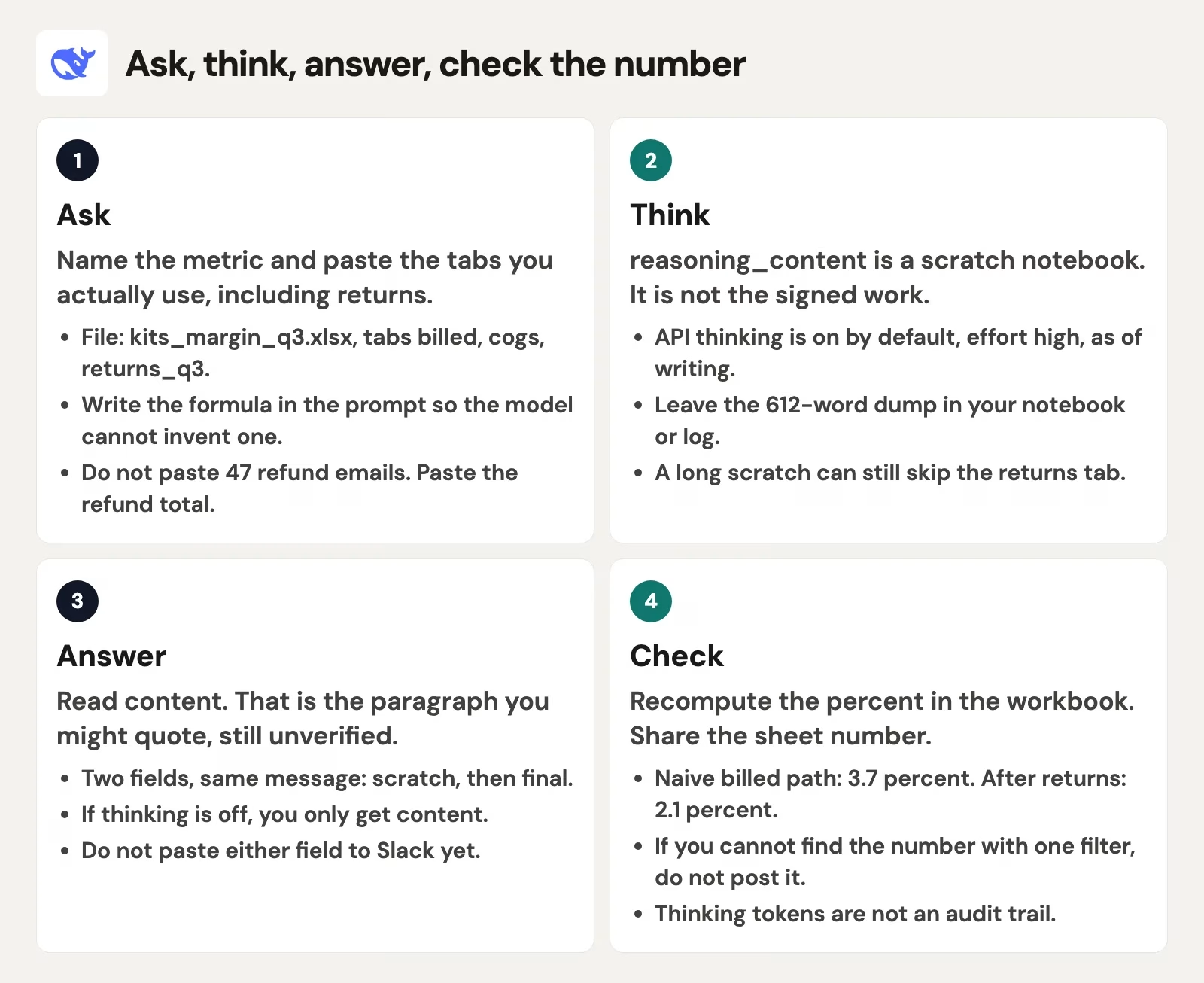
Walk that loop the next time you run an operations review. Ask with billed, COGS, and the refund total already in the prompt, and let the model think if you want the extra pass. Read content, then recompute the number yourself in Python or in the sheet, and only type a number into Slack once those two agree. Jumping straight from the reasoning output to sharing skips the one check that actually matters.
Here is the smallest bit of Python that keeps the two fields separate; swap in a real key from an environment variable (a setting stored outside your code), never from a chat log someone might screenshot.
from openai import OpenAI

client = OpenAI(
    api_key="YOUR_DEEPSEEK_API_KEY",
    base_url="https://api.deepseek.com",
)

response = client.chat.completions.create(
    model="deepseek-v4-pro",
    messages=[
        {
            "role": "user",
            "content": (
                "Contribution margin from billed 412800 and cogs 397526. "
                "Returns total 14280. Recovered cogs 7376. "
                "Do not treat this reply as an audit."
            ),
        }
    ],
    reasoning_effort="high",
    extra_body={"thinking": {"type": "enabled"}},
)

scratch = response.choices[0].message.reasoning_content or ""
final = response.choices[0].message.content or ""
print("scratch_words", len(scratch.split()))
print("final", final)
Print scratch_words so you can see that the dump is only a length, not a certificate, and print final so you know exactly which string you are allowed to quote after a sheet check. If you stream the response, the docs say the chunks accumulate delta.reasoning_content first, then delta.content, so the split stays the same either way. Do not concatenate the two into one Slack paste.
Multi-turn conversations have a sharp edge worth knowing. If the request does not carry tools, you do not need to send prior reasoning_content back, because the API ignores it and will not stitch it into context. If the request does carry tools, though, you must pass every prior reasoning_content back, even on turns where no tool was called, or the API returns an error. The safe pattern is messages.append(response.choices[0].message), so content, reasoning_content, and tool_calls all travel together. That part is just wiring. Keep the scratch pad off Slack regardless.
While thinking is turned on, settings like temperature, top_p, presence_penalty, and frequency_penalty have no real effect, even though setting them will not throw an error, for compatibility reasons. That also means they will not save you: you cannot “cool down” a 3.7 percent hallucination (a false answer the model states as fact) with a temperature of zero (temperature is the setting that controls how random the wording is) while thinking mode is enabled. Turn thinking off if you actually want those knobs to work, or leave thinking on and go check the sheet instead, since that second move is the one that changes the number in Slack.
One more mode is worth knowing about: fill-in-the-middle completion (FIM). It is documented as a non-thinking path only, so if your editor plugin is completing code against DeepSeek, it is not using the reasoning chain at all. Do not mix that behavior into a margin thread; it is a different job with a different output shape.
Your own app should treat reasoning_content as a log you keep behind a toggle for debugging, not as something you display. Show content to the person using the tool, and show the workbook cell to the channel. Inverting that order, showing the scratch pad log while hiding the source cell and calling the log proof, is exactly what creates false confidence.
Effort knobs (low, high, max) without worship
Effort controls how long the scratch pad is allowed to run; it is not a holiness ranking. The current user-facing values are low, high, and max, with high as the default, and if some code library still sends medium or xhigh, both of those map to high on V4-Flash and V4-Pro. There is no secret fourth quality tier hiding inside those aliases.
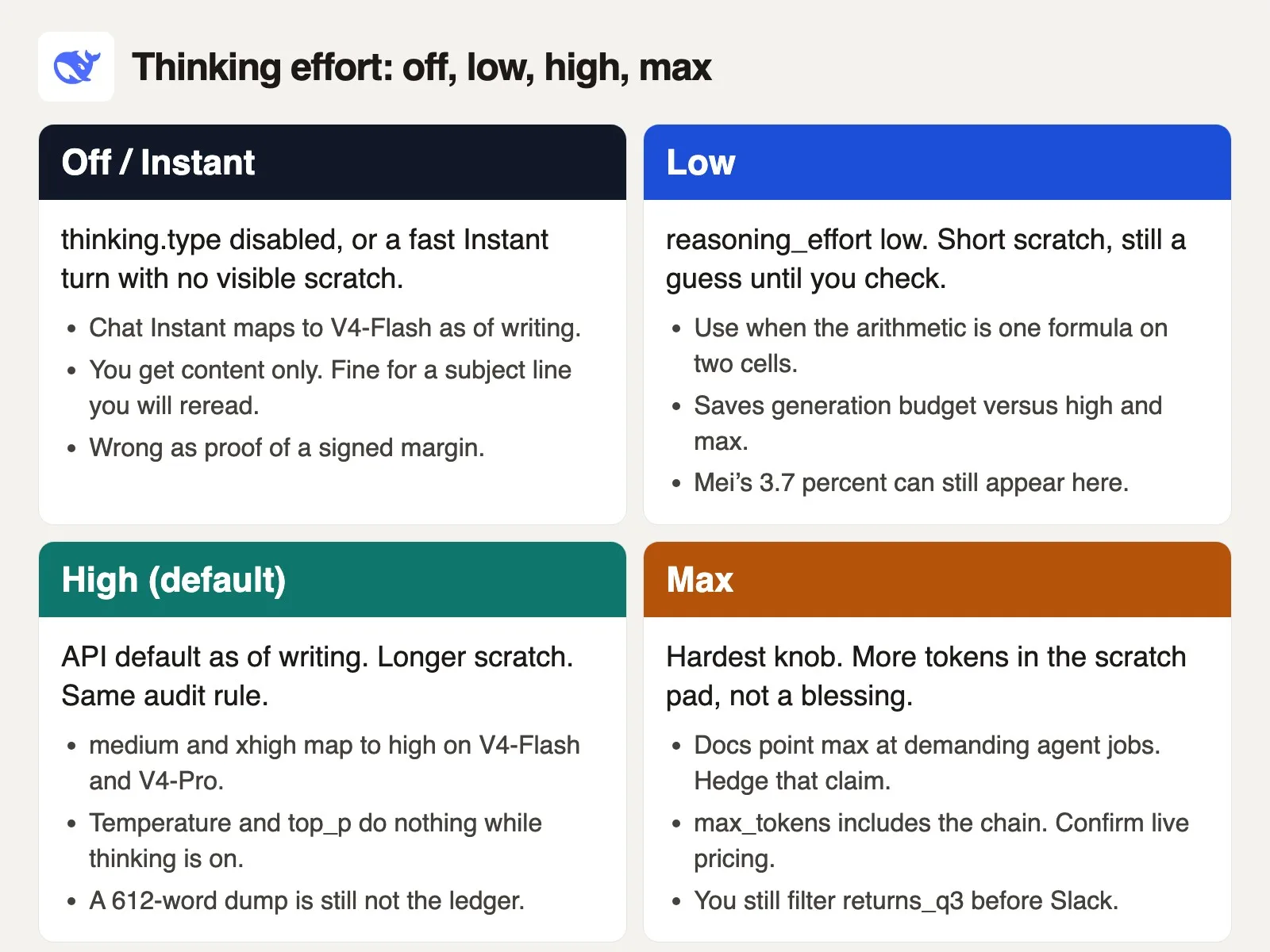
Pick a level based on the job in front of you, then still run the filter on the sheet afterward.
off(or Instant with no think control) fits a subject line, a recap of a meeting you actually attended, or a rewrite of text you already trust. You still reread it, and you never use it as the Q3 margin.lowfits one formula, two or three cells, or a unit check. It costs less to generate thanhigh, but an ungrounded 3.7 percent can still come out of it if the returns total is missing.highis the API default and produces a longer scratch pad, which is useful when the prompt already carries several constraints you pasted in. It is still only a draft until the sheet agrees with it.maxis the hardest setting, and some guides for AI tools that work on their own recommend it for demanding tool loops. That advice deserves a hedge: it spends more ofmax_tokenson the chain, and it does not create a returns tab you forgot to attach.
max_tokens counts the reasoning chain plus the final answer together, so a 612-word scratch pad is not free in time or in cost. Copy real prices from the live pricing page the week you draft, rather than treating this post as a rate card. Check the docs for the current peak-usage windows before you schedule heavy jobs. Running thinking mode during a peak window, set to max, on V4-Pro, is exactly how a “quick Slack check” turns into a real bill. Budget is a separate check from the workbook, and it is worth its own five minutes.
New API accounts may come with free starting credit, so check your platform wallet the morning you turn thinking on for a bot rather than assuming. Chat on the website runs on a different meter entirely: free with possible throttling, and no official Plus tier, so do not mix the two invoices in your head.
Worship sounds like this: “we set max, so the number is signed,” or its cousin, “we set Expert thinking, so the number is signed.” Effort only changes how much notebook the model fills before it answers. The signed number still comes from returns_q3 plus billed plus cogs, and if those three cells are not in the prompt, no effort setting will invent them correctly on purpose. It might guess close, but guesses do not belong in #ops-margin.
A cleaner team rule works better: store reasoning_effort in config next to the model id, log scratch_words for debugging, and never post scratch anywhere a teammate might screenshot it. Post final only after a human or a script reprints the same percent straight from the file. That process is boring on purpose. Boring is exactly what 2.1 percent needed.
What to paste, and what never to paste
Paste the definition of the metric in the same message as the numbers themselves. Something like “contribution after returns means (billed minus refunds minus net cogs) divided by (billed minus refunds), and net cogs is cogs minus recovered inventory” works well. Then paste the three cells, ask for the percent to one decimal, and ignore the answer entirely until your own snippet prints the same figure.
Paste a toy slice when the real tab is huge. You do not need all 47 refund emails in the prompt; you only need 14280. Those emails carried customer names, order ids, and “please process my return” threads, and pasting them would have been a privacy problem stacked on top of a math problem. DeepSeek’s Hangzhou-based processing and the work caution that comes with it are covered in a related post on data location and privacy. The short version here: if you would not forward the column to a vendor’s support inbox, do not drop it into Expert thinking just so you can screenshot a reasoning chain.
Never paste reasoning_content into Slack as proof, into a board deck, or into a customer email. The chain can contain discarded wrong paths, invented subtotals, and a final pivot that still misses a tab, and readers who are not you will treat its length as evidence on its own. That is how 3.7 percent survived from one Slack post to the next couple of hours.
Never paste only billed and cogs for a margin that is actually defined after returns, because the model will compute the only ratio the prompt made possible. If the definition includes refunds, the refund total is required input, the same way a WHERE clause is required input in a database query.
Never treat a chat screenshot from Instant or Expert as the full API contract. The website can hide the scratch pad, the API can return it in full, and your own bot can log it, which means you are dealing with three different surfaces under one lab name. An earlier post in this series already split those doors apart. Thinking mode is how people glue them back together with a long paragraph and a confident tone.
What you can paste after the check is short: the percent, the formula in plain words, the file name, and the filter you used. “2.1 percent contribution after returns, kits_margin_q3.xlsx, refunds $14,280, recovered COGS $7,376″ is shorter than 612 words, and it survives a screenshot without an argument.
Before you open a new DeepSeek thread for a ratio, run through this order:
- Write the formula in a cell or in four lines of Python, including the returns total if the definition includes returns.
- Decide Instant versus Expert (Flash versus Pro) and thinking on versus off as two separate choices; if you use the API, set
thinking.typeon purpose, since the default is on with effort set tohigh. - Keep
reasoning_contentin your notebook or server log, and readcontentinstead. - Recompute the number yourself. If the two percents disagree, the sheet wins, and only then does the number go into Slack.
If the next job on your list is a Django view or a SQL rewrite (SQL is the language for asking databases questions), a separate post on coding help from DeepSeek covers that in more depth. That help is real, and you still run the tests. A thinking dump that “explains” a patch is the same kind of object as a 600-word reasoning chain: useful scratch work, but weak proof on its own. The tenant filter belongs in the test suite, not in a chain you paste into a code review.
Series notes
This is Part 3 of Learn DeepSeek. Previous: chat and plans. Next: coding help that still runs tests.
Sources
Research and further reading used for this article:
- DeepSeek API Docs: Thinking Mode (default thinking on, default effort high,
reasoning_contentversuscontent, effort mapping, tools 400 rule, temperature ignored) - DeepSeek API Docs: Chat Completions (model ids,
thinkingobject,reasoning_effort) - DeepSeek API Docs: Models and pricing (V4-Flash / V4-Pro thinking support, peak windows, copy live rates the week you draft)
- chat.deepseek.com (consumer chat; confirm Instant / Expert / thinking labels live)
- DeepSeek (lab site)
- Hugging Face: deepseek-ai (open weights; not required for this thinking-mode job)
- AMS: What DeepSeek is (products plus open models) (DS1)
- AMS: DeepSeek chat app and plans without hype (DS2)
- AMS: DeepSeek for coding: useful, still run the tests (DS4)
- AMS series: DeepSeek from scratch
- AMS series: Open-source AI explained · OS1 · OS2 · Learn · chooser
Keep going
Same lessons in your feed
Short diagrams, hooks, and weekly tutorials on Substack, Instagram, X, and Facebook.



