
Every claim in an AI answer should link to the exact passage it came from, and your code should check that the quoted passage really is in the source before anyone sees the answer. A fluent answer with a citation nobody can check is worse than no citation, because it looks trustworthy.
Imagine you ask your company’s AI assistant how much the travel policy pays for hotels. It answers confidently and adds a footnote to the policy document. You click the footnote and land on a 100-page file with no sign of the number. Now you either spend fifteen minutes hunting for it or trust a figure you cannot check.
This post is part of the RAG from scratch series. RAG, short for retrieval-augmented generation, is a setup where an AI first looks up passages in your own documents and then writes an answer from them. The passages it looks up are called chunks.
Why AI models make up believable citations
AI language models write by predicting the next likely words, not by checking facts. In the books, papers, and manuals they learned from, a factual claim is usually followed by a citation, so they learn to add one. Unless you make the model tie each claim to a specific passage, it can attach a real-looking citation to a claim that the source never makes.
This gets worse when the model is handed many chunks at once. If it reads forty passages from ten documents, it may cite a document it saw recently even though that exact sentence came from somewhere else, or nowhere. In a casual search, a wrong footnote is an annoyance. When someone signs off on an expense report, a contract, or a safety procedure because of that footnote, it is a real risk.
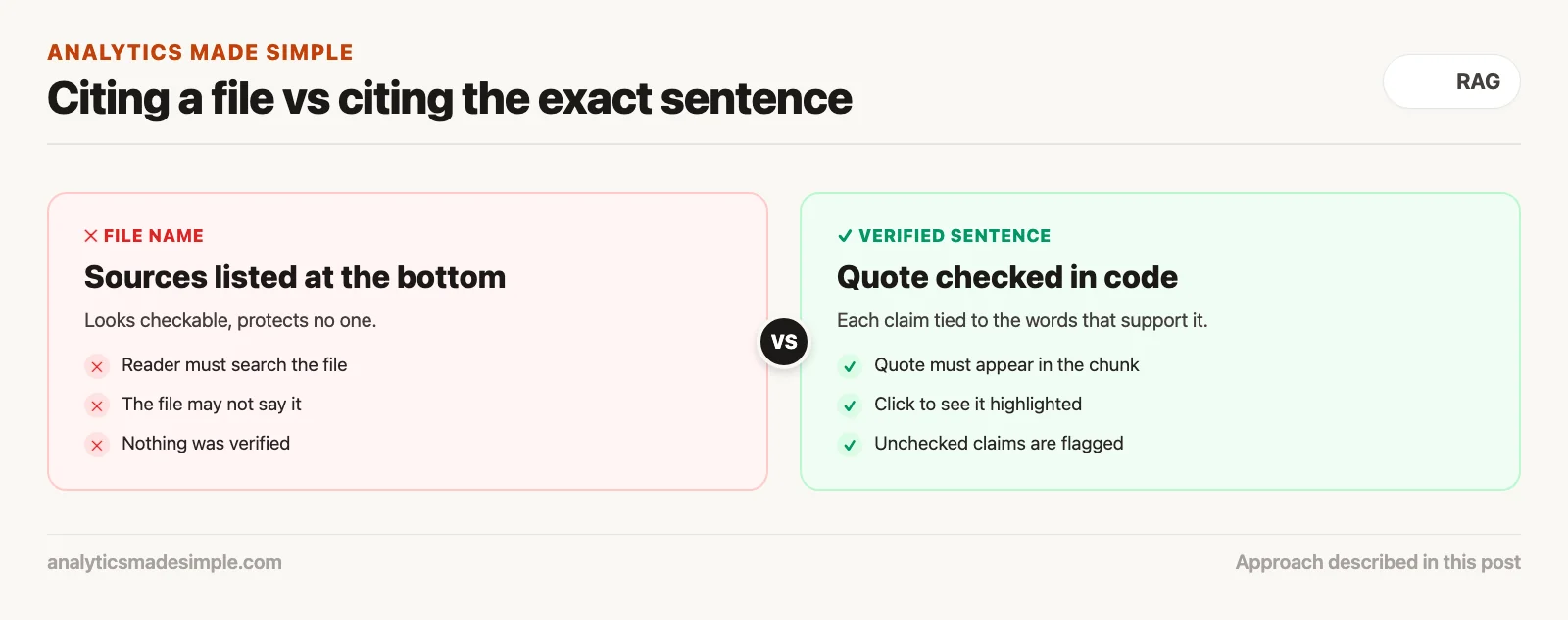
A list of document names at the bottom of an answer looks checkable, but it protects no one. The stronger approach is to check, in code, that each cited claim matches a real piece of text in the retrieved passages before the user ever sees it.
Four levels of citation detail
Citations can point at four levels of detail: a whole file, a page or section, the passage the AI was given, or the exact sentence that supports the claim. Each step down takes more engineering work and saves the reader more time.
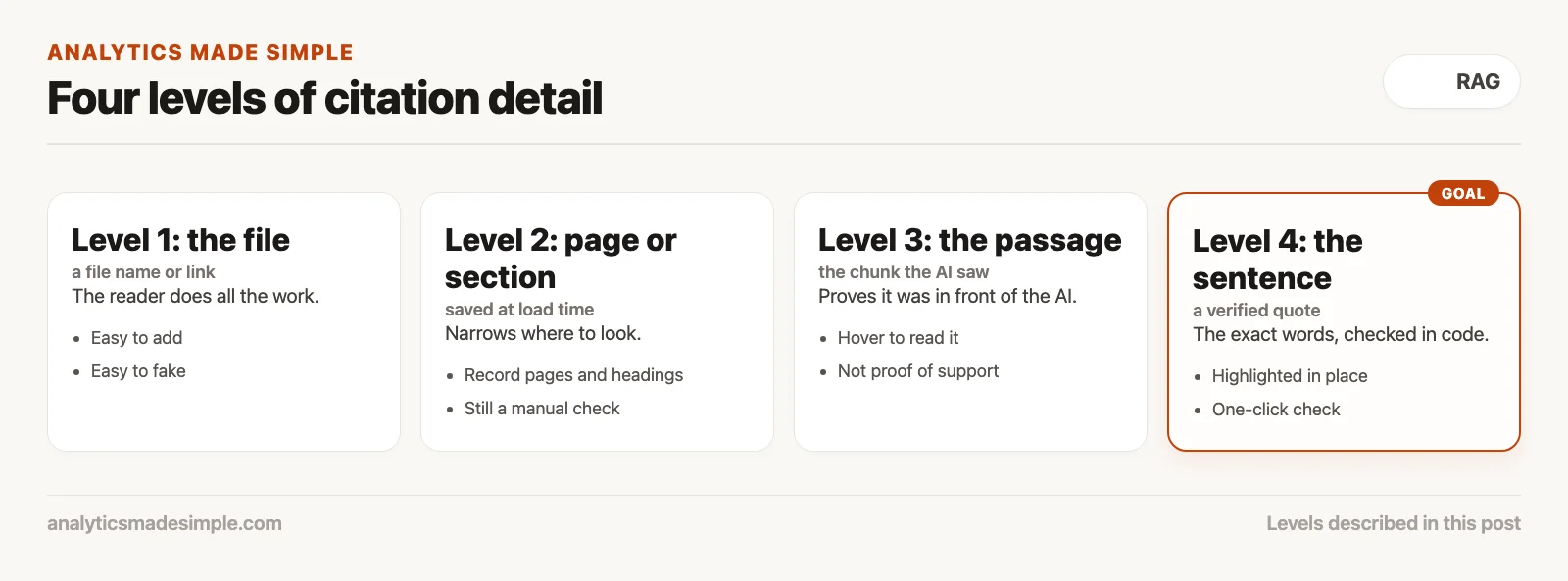
- Level 1: a link to the file. The answer ends with something like “Source: Travel_Policy.pdf.” The reader still has to search a long document to find the number. This is the least work to build and the most work to use.
- Level 2: a page or section. When you load documents, you also record page numbers or section headings, so the answer can say “Travel Policy, page 42.” That saves a lot of searching, but it still does not say which sentence supports the claim.
- Level 3: the retrieved passage. The app keeps the exact chunk the AI was given. Hovering over footnote [1] shows that chunk. This proves the text was in front of the AI, but not that the AI read it correctly or did not blend two passages together.
- Level 4: the verified sentence. The AI must quote the exact words behind each claim. Your app checks that the quote appears in the cited chunk and remembers where. The footnote then opens the source with that sentence highlighted. This is the level to aim for when mistakes are costly.
The four steps of checking citations
Reaching level 4 takes four steps: keep exact positions when you load documents, ask the AI for quotes in a fixed format, check those quotes in code, and show the reader a clickable source. Each step touches a different part of your system.
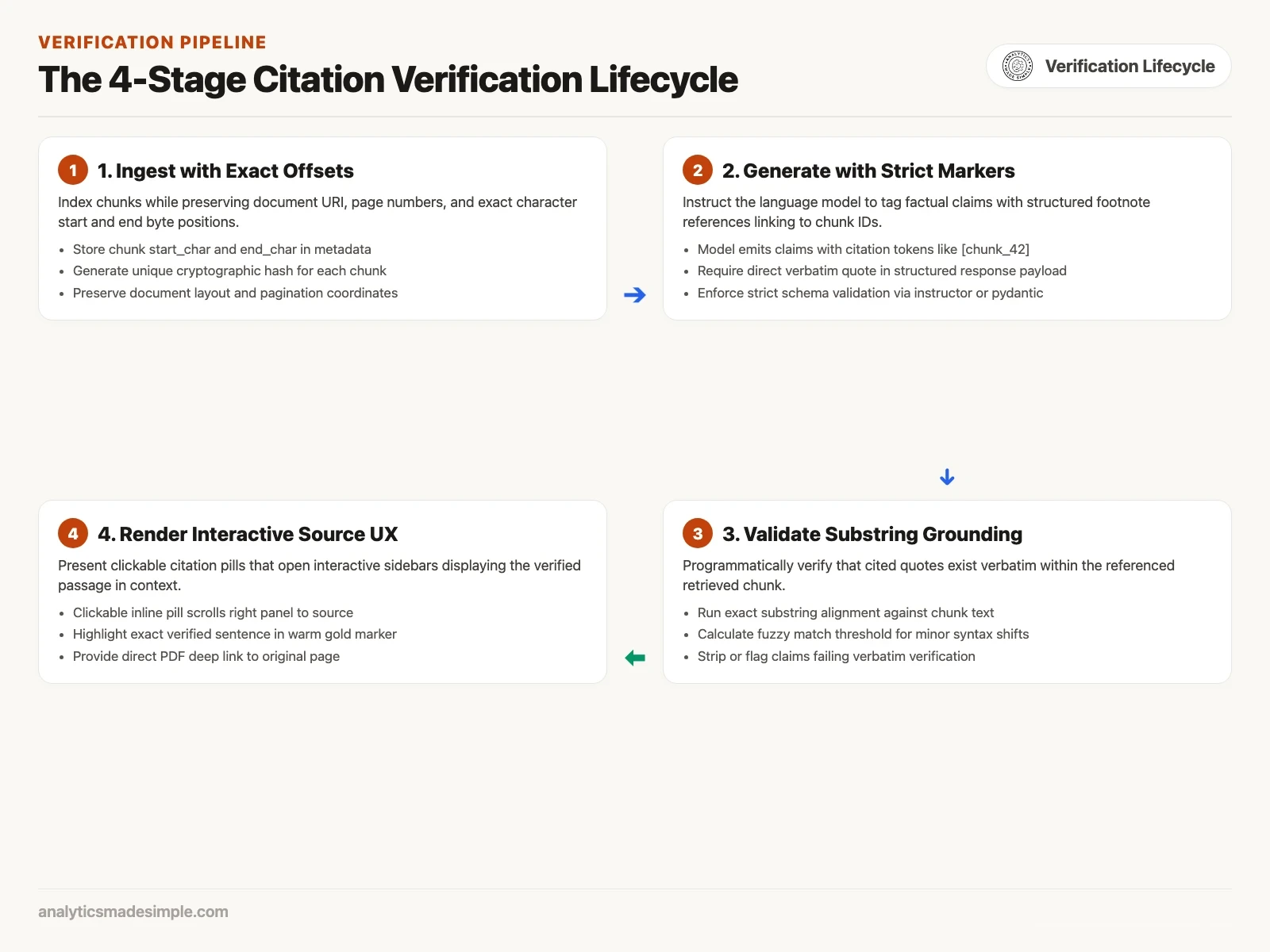
- Keep exact positions when you load documents. When you cut documents into chunks, also save where each chunk starts and ends in the original. For web pages and text files, save the start and end character positions. For PDFs, save the page number and the chunk’s position on the page. A short fingerprint of the chunk’s text, called a hash, lets you tell later whether it changed.
- Ask for quotes in a fixed format. Instead of asking the AI for a paragraph with footnotes, ask for a list of claims. Each claim should include the sentence, the ID of the chunk that supports it, and a short word-for-word quote from that chunk. Most AI services can return this kind of structured answer, often as JSON, a common text format for structured data.
- Check the quotes in code. Before the answer reaches the screen, your app looks up each cited chunk and checks whether the quote appears in it. If the exact text does not match only because of capital letters or extra spaces, a second, looser check can still accept it. If the quote is not there at all, the citation is removed and the claim is flagged for review.
- Show a clickable source. Checked claims get numbered footnotes such as [1]. Clicking one opens a side panel that scrolls to the passage and highlights it.
Designing the “show me the source” screen
Keep the answer and the evidence side by side, so the reader can check a claim without losing their place. Many simple AI apps dump raw text at the bottom of the chat or use tiny pop-ups that vanish when the mouse moves, and both make checking harder than it needs to be.
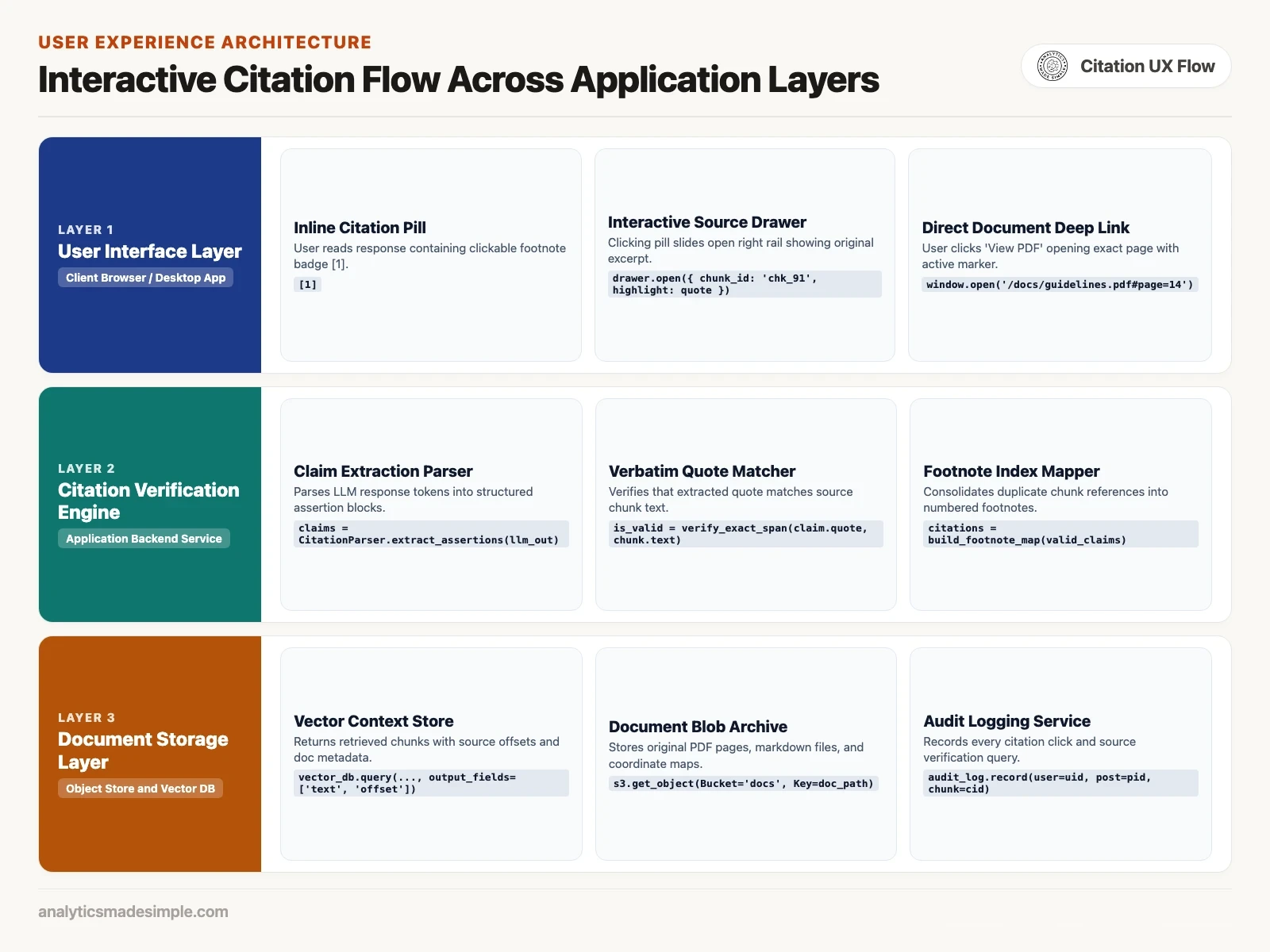
- Use small inline footnotes. Put a small clickable badge right after the claim it supports, for example: “Hotels are reimbursed up to 180 dollars per night in standard cities [1].” Long text links break up the sentence.
- Open a side panel, not a new page. When someone clicks a footnote, slide open a panel on the right, so they can read the answer on the left and the source on the right at the same time.
- Highlight the sentence, not the whole chunk. Use the saved positions to highlight only the sentence being cited. For a PDF, show the page itself, for example with the free PDF.js viewer, and scroll to the right spot.
- Flag claims you could not check. If a sentence cannot be tied to any passage, mark it, for example with a dashed amber underline. Clicking it should say plainly: “This could not be found in your documents.” Being open about gaps is what earns trust over time.
A citation checker in Python
The script below checks citations the way step 3 describes. It looks for the quote word for word first, and then tries again with capital letters and extra spaces ignored. Anything still not found is rejected. The documents and claims are a small made-up example from company policies.
import re
from dataclasses import dataclass
from typing import List, Optional, Tuple

@dataclass
class RetrievedChunk:
    chunk_id: str
    doc_title: str
    page_number: int
    text: str

@dataclass
class ModelClaim:
    assertion: str
    cited_chunk_id: str
    claimed_quote: str

@dataclass
class VerifiedCitation:
    claim: str
    chunk_id: str
    doc_title: str
    page_number: int
    is_verified: bool
    match_type: str
    confidence_score: float
    verified_passage: Optional[str]

class CitationVerifier:
    def __init__(self, chunks: List[RetrievedChunk]):
        self.chunk_map = {c.chunk_id: c for c in chunks}

    def _normalize(self, text: str) -> str:
        # Lowercase and collapse runs of spaces so small formatting slips still match
        cleaned = re.sub(r'\s+', ' ', text.strip().lower())
        return cleaned

    def verify_claim(self, claim: ModelClaim) -> VerifiedCitation:
        chunk = self.chunk_map.get(claim.cited_chunk_id)
        if not chunk:
            return VerifiedCitation(
                claim=claim.assertion,
                chunk_id=claim.cited_chunk_id,
                doc_title="Unknown",
                page_number=0,
                is_verified=False,
                match_type="MISSING_CHUNK",
                confidence_score=0.0,
                verified_passage=None
            )

        raw_chunk = chunk.text
        claimed_quote = claim.claimed_quote.strip()

        # Step 1: Check for exact verbatim substring
        if claimed_quote in raw_chunk:
            return VerifiedCitation(
                claim=claim.assertion,
                chunk_id=chunk.chunk_id,
                doc_title=chunk.doc_title,
                page_number=chunk.page_number,
                is_verified=True,
                match_type="EXACT_VERBATIM",
                confidence_score=1.0,
                verified_passage=claimed_quote
            )

        # Step 2: Check for normalized whitespace/case match
        norm_chunk = self._normalize(raw_chunk)
        norm_quote = self._normalize(claimed_quote)
        if norm_quote in norm_chunk:
            return VerifiedCitation(
                claim=claim.assertion,
                chunk_id=chunk.chunk_id,
                doc_title=chunk.doc_title,
                page_number=chunk.page_number,
                is_verified=True,
                match_type="NORMALIZED_MATCH",
                confidence_score=0.95,
                verified_passage=claimed_quote
            )

        # Step 3: Substring search failure - hallucinated quote
        return VerifiedCitation(
            claim=claim.assertion,
            chunk_id=chunk.chunk_id,
            doc_title=chunk.doc_title,
            page_number=chunk.page_number,
            is_verified=False,
            match_type="UNGROUNDED_HALLUCINATION",
            confidence_score=0.10,
            verified_passage=None
        )

# A small made-up example: two chunks from company policy documents
chunks = [
    RetrievedChunk(
        chunk_id="chk_travel_101",
        doc_title="Employee Travel Policy v4.2",
        page_number=42,
        text=(
            "Hotel stays are reimbursed up to 180 dollars per night in standard cities "
            "and up to 260 dollars per night in high-cost cities. "
            "Receipts are required for any single expense over 25 dollars."
        )
    ),
    RetrievedChunk(
        chunk_id="chk_equip_402",
        doc_title="Office Equipment Handbook",
        page_number=14,
        text=(
            "Section 4.2: Company laptops are replaced every 36 months. "
            "Lost or damaged equipment must be reported to IT within 2 business days."
        )
    )
]

claims_to_test = [
    ModelClaim(
        assertion="Hotels are reimbursed up to 180 dollars per night in standard cities.",
        cited_chunk_id="chk_travel_101",
        claimed_quote="reimbursed up to 180 dollars per night in standard cities"
    ),
    ModelClaim(
        assertion="Receipts are needed for expenses over 25 dollars.",
        cited_chunk_id="chk_travel_101",
        claimed_quote="Receipts are required for  any single expense over 25 Dollars."
    ),
    ModelClaim(
        assertion="Meals are reimbursed up to 90 dollars per day.",
        cited_chunk_id="chk_equip_402",
        claimed_quote="meals are reimbursed up to 90 dollars per day"
    )
]

verifier = CitationVerifier(chunks)
results = [verifier.verify_claim(c) for c in claims_to_test]

print("CITATION VERIFICATION AUDIT LOG:")
for r in results:
    status = "VERIFIED" if r.is_verified else "REJECTED"
    print(f"[{status}] Match: {r.match_type} | Conf: {r.confidence_score:.2f}")
    print(f"  Claim: {r.claim}")
    print(f"  Doc: {r.doc_title} (Page {r.page_number})")
    print(f"  Passage: {r.verified_passage}\n")
When you run it, the first claim is found word for word. The second is found once capital letters and the double space are ignored. The third cites the equipment handbook, which says nothing about meals, so it is rejected. The table below summarizes the result.
| Claim | Cited document and page | Match type | Confidence | Decision |
|---|---|---|---|---|
| Hotels are reimbursed up to 180 dollars per night in standard cities. | Employee Travel Policy v4.2 (p. 42) | EXACT_VERBATIM | 1.00 | Shown with footnote |
| Receipts are needed for expenses over 25 dollars. | Employee Travel Policy v4.2 (p. 42) | NORMALIZED_MATCH | 0.95 | Shown with footnote |
| Meals are reimbursed up to 90 dollars per day. | Office Equipment Handbook (p. 14) | UNGROUNDED_HALLUCINATION | 0.10 | Citation removed, claim flagged |
Trade-offs: cost, speed, and how strict to be
Checking citations costs a little more and adds a short delay, and you have to decide how strictly to match quotes. For answers people act on, that is usually a good trade.
- More text to pay for. Asking for claims, chunk IDs, and quotes makes the AI write more than a plain answer, and AI services charge for the text they write. Measure it on your own questions: compare the length of a normal answer with a structured one, then multiply by your provider’s price.
- Speed while the answer appears. Showing the answer word by word as it is written feels fast, but citations can only be checked once the claim is complete. A good pattern is to show the text right away with grey placeholder footnotes, then turn each one green or amber as its check finishes.
- How close a quote must be. AI models sometimes change a capital letter or drop a hyphen when quoting. Requiring an exact match will reject some honest citations, so a looser check for ordinary sentences is reasonable. For numbers, dates, prices, and anything safety-related, require an exact match, because a small change can flip the meaning.
Key takeaways
- AI models attach real document names to claims those documents do not make, because citations are part of the writing pattern they learned.
- A link to a whole file pushes the checking work onto the reader. A verified sentence lets them check a claim in one click.
- Keep exact positions when you load documents, ask the AI for quotes, check them in code, and show a clickable source panel.
- Clearly flag any claim you could not check.
The next post in this series looks at how RAG systems fail: out-of-date documents, the wrong passages, and confident nonsense, and how to find which one you are dealing with.
Your next step
Take one RAG answer your system gave recently and check its citations by hand: does each quoted sentence appear in the cited passage? Then add the short checker from this post to your pipeline (the chain of automatic steps that produces each answer). Finding even one false citation is a strong argument for checking every answer.
Sources and further reading
- Gao, Y., et al. (2023). Retrieval-Augmented Generation for Large Language Models: A Survey. arXiv:2312.10997.
- Lewis, P., et al. (2020). Retrieval-Augmented Generation for Knowledge-Intensive NLP Tasks. NeurIPS 2020. arXiv:2005.11401.
- Huang, L., et al. (2023). A Survey on Hallucination in Large Language Models: Principles, Taxonomy, Challenges, and Open Questions. arXiv:2311.05232.
- Es, S., et al. (2023). RAGAS: Automated Evaluation of Retrieval Augmented Generation. arXiv:2309.15217.
Keep going
Same lessons in your feed
Short diagrams, hooks, and weekly tutorials on Substack, Instagram, X, and Facebook.
Merch on Etsy
Open store →



Series notes
This is Part 5 of RAG from scratch. Previous: metadata filters. Next: RAG failure modes.