

Make is the automation tool to reach for when your data comes as lists, such as the line items on an invoice. It can split a list into single items, check each one, and gather the results back into one request, all on a visual canvas without code. Its error handlers let one bad item fail without stopping the rest.
Say you run a monthly workflow that posts a few hundred invoice lines into your accounting app, and every month one malformed line stops the whole run. You fix it by hand the next morning, and the other lines post late. In Make, you can send that one bad line to a log and let the rest post on time.
Make, formerly called Integromat, is an automation service like Zapier, but it lays workflows out on an open canvas instead of a top-to-bottom list. A workflow in Make is called a scenario.
Why Make fits list-heavy work
Make can branch into several paths, step through a list one item at a time, and gather the results back together. That lets you check each item on its own but still send one request to the destination app, which keeps the number of calls, and your bill, down.
How data moves in Make: bundles
In Make, data travels in packages called bundles. When a trigger finds five new spreadsheet rows, it sends out five bundles, and every step after it runs once per bundle.
Make is easy to debug because you can click any connection after a run and see exactly what passed through it. Every value and nested field is laid out in a tree you can open, so you never have to guess what a step received.
The iterator and aggregator pattern
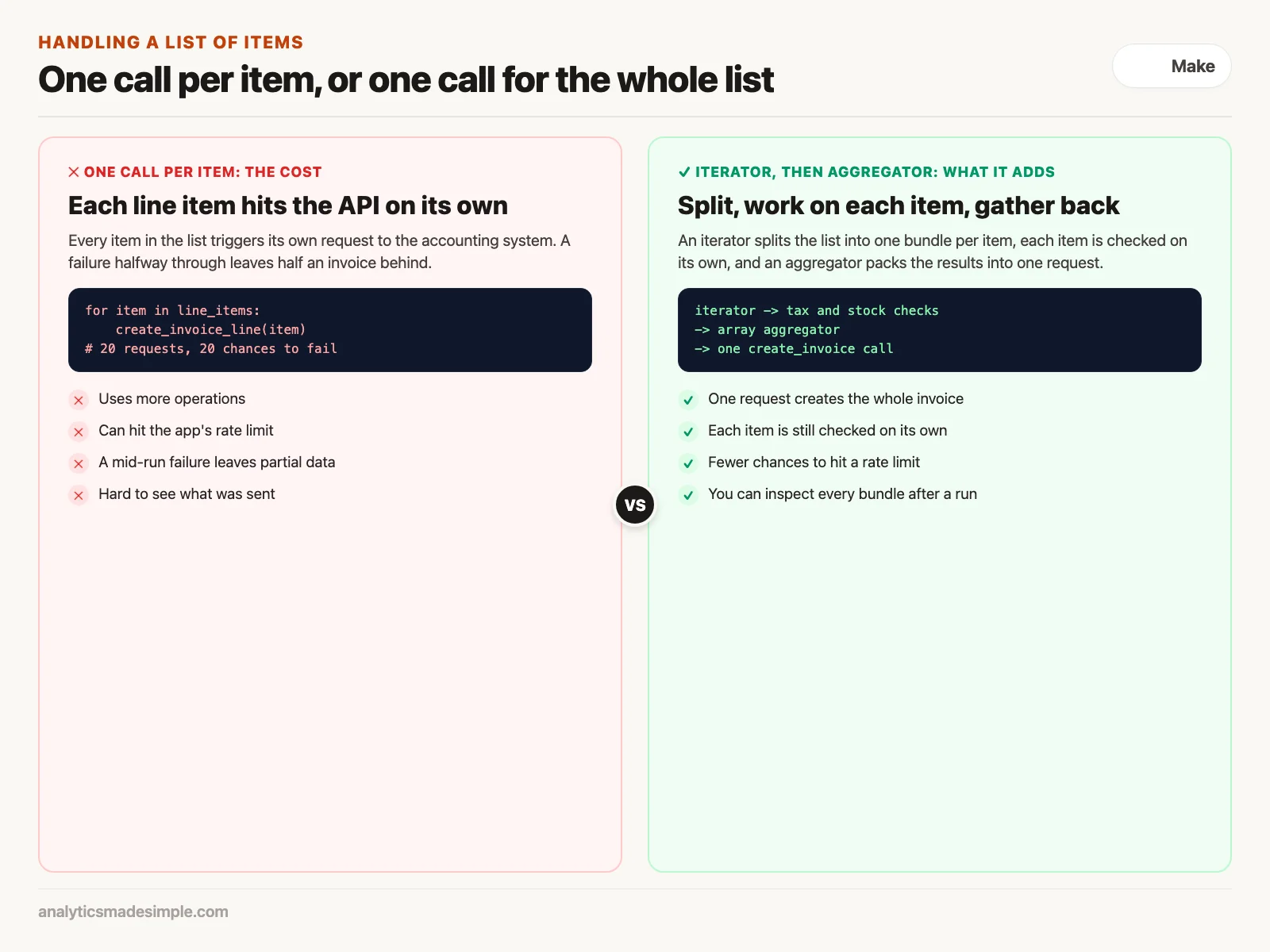
The most useful pattern in Make is to split a list with an iterator and gather it back with an aggregator. It lets you work on each item and still send one clean request at the end.
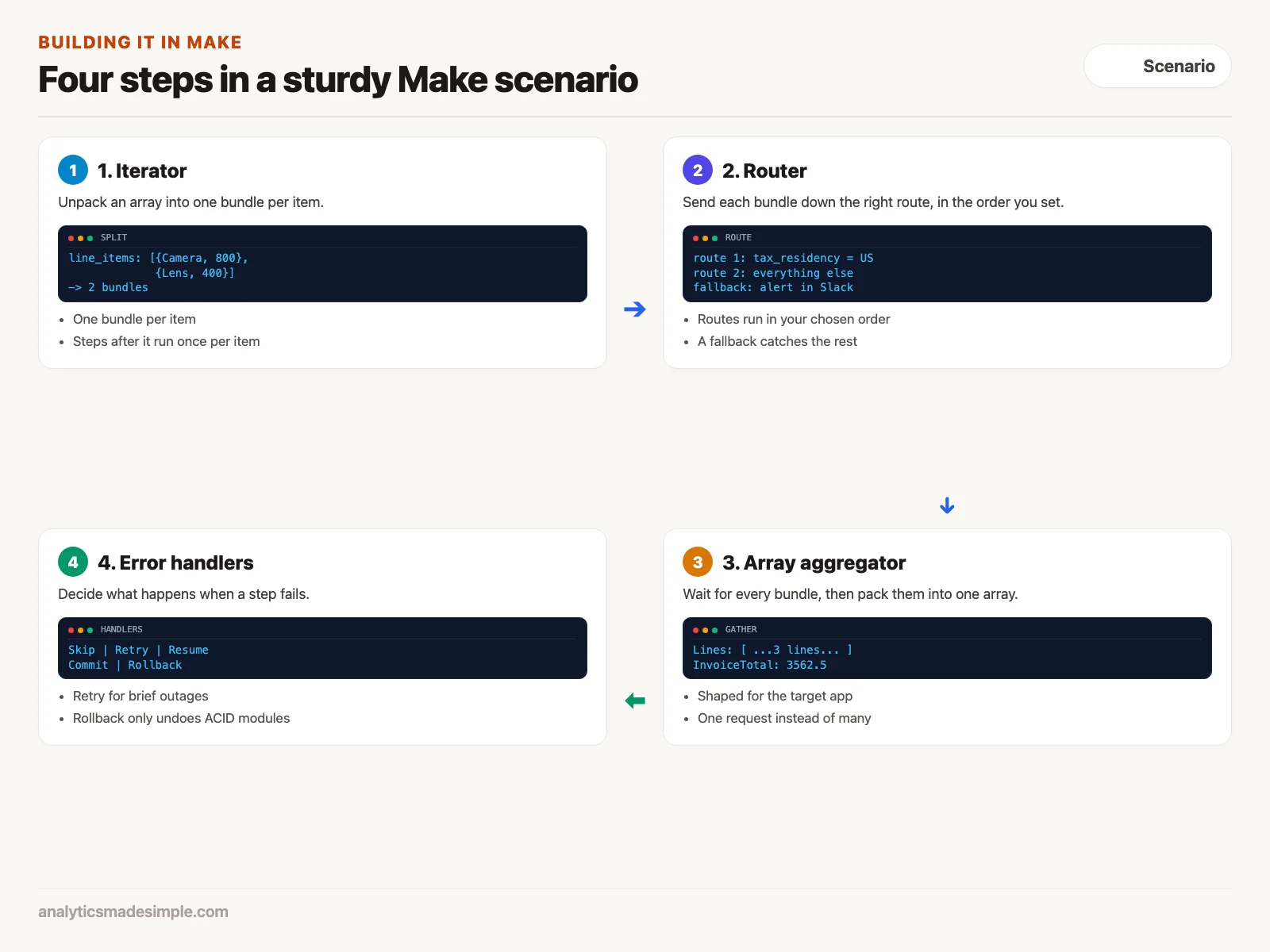
Many apps return a list inside their data, such as line_items: [{item: "Camera", price: 800}, {item: "Lens", price: 400}]. Hand that whole list to an ordinary step and you cannot check or format each item. Here is the fix:
- Add an iterator. Point it at the list field, and it sends out one bundle per item, so twenty items become twenty bundles.
- Work on each item. After the iterator, add steps that calculate tax, check stock, or clean text. Each runs once per item.
- Close with an array aggregator. Before calling the destination app, add an aggregator. It waits for all the bundles, then packs the results into one list shaped the way that app expects.
With the aggregator, you call your accounting system once instead of twenty times. That saves operations, avoids rate limits (caps on how many requests an app accepts per minute), and avoids an invoice that is half created when request eleven fails.
Routers: branching without code
In Make, branching uses a building block called a router. You can add one anywhere and connect as many routes as you need, each with its own filter.
According to Make’s router documentation, routes are processed in an order you set, and you can mark one as a fallback route. The fallback takes any bundle that matches no other route, which makes it the right place to catch bad data and send an alert, for example to Slack, before the record is lost.
Error handlers that keep a scenario running
Make lets you attach an error handler to any step, so you decide what happens when that step fails. As of its help center page updated September 8, 2026, Make has five:
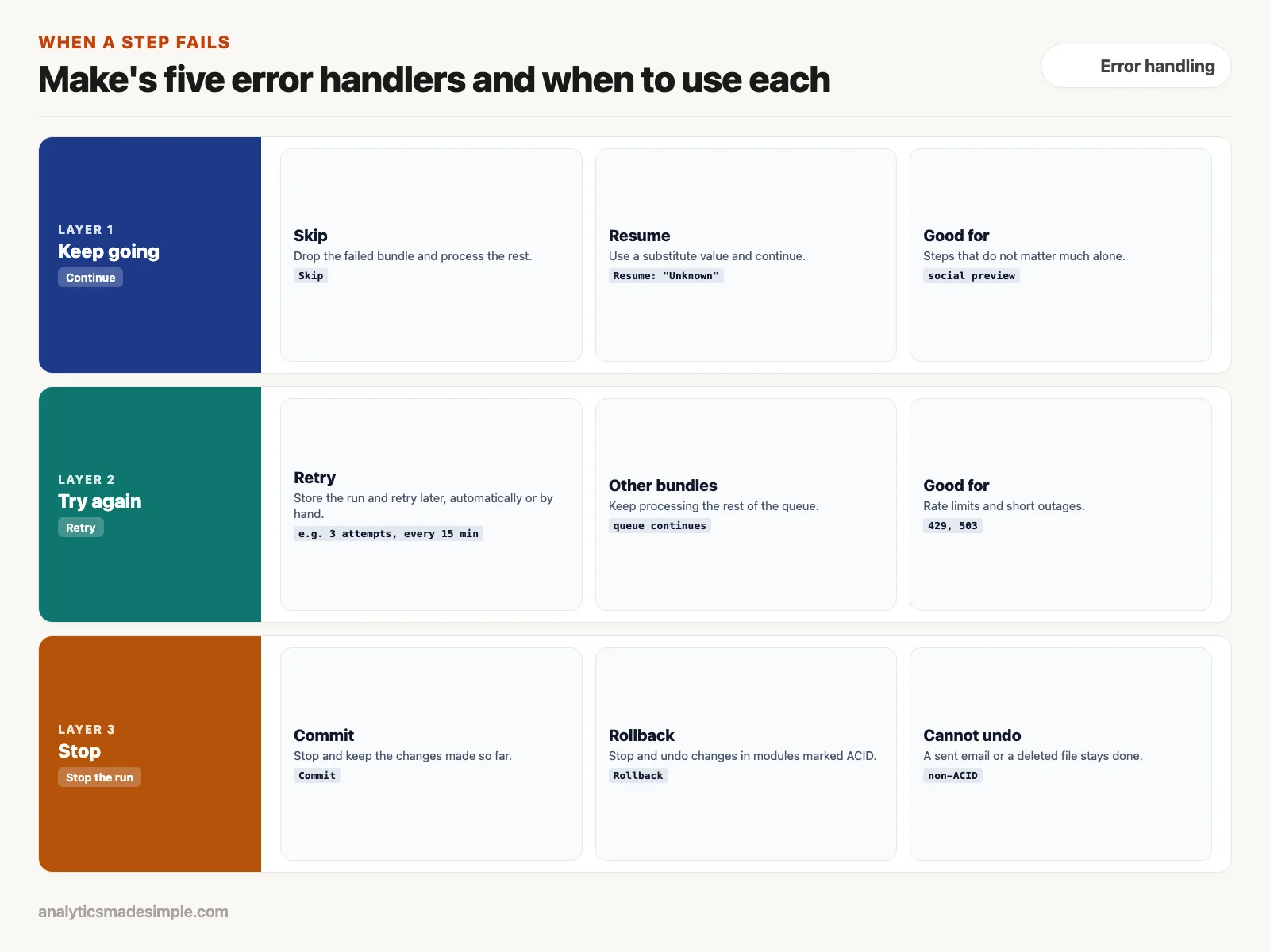
- Skip ignores the error, drops the failed bundle, and processes the rest. Use it for steps that do not matter much on their own.
- Retry stores the incomplete run so it can be retried automatically or by hand. Make’s own example retries 3 times, every 15 minutes, which suits rate limits and brief outages.
- Resume uses a substitute value for the failed step, such as “Unknown” for a missing company size, and continues.
- Commit stops the run and keeps the changes made so far.
- Rollback stops the run and undoes changes, but only in steps that support transactions, which Make labels “ACID,” such as MySQL or Make’s Data Store. Make’s documentation notes it cannot undo things like a sent email or a deleted file.
The aggregator logic in Python
To see what the aggregator does, here is the same idea in Python for a weekly contractor bill. It sorts each line by tax category, the way a router would, and gathers all lines into one invoice, the way an aggregator would.
from typing import List, Dict, Any

# Step 1: Raw bundles emitted by the Iterator
raw_bundles = [
    {"contractor": "Consultant A", "hours": 12.5, "rate": 85.0, "project": "Acme Brand Rebrand", "tax_residency": "US"},
    {"contractor": "Consultant B", "hours": 20.0, "rate": 95.0, "project": "FinTech Mobile UI", "tax_residency": "INTL"},
    {"contractor": "Consultant C", "hours": 8.0, "rate": 75.0, "project": "Acme Brand Rebrand", "tax_residency": "US"}
]

# Step 2 & 3: Router Filtering and Array Aggregation
def aggregate_invoice_bundles(bundles: List[Dict[str, Any]]) -> Dict[str, Any]:
    aggregated_lines = []
    total_spend = 0.0
    domestic_1099_total = 0.0
    international_total = 0.0

    for item in bundles:
        line_cost = round(item["hours"] * item["rate"], 2)
        total_spend += line_cost

        # Router logic evaluation
        if item["tax_residency"] == "US":
            domestic_1099_total += line_cost
            tax_category = "FORM_1099_NEC"
        else:
            international_total += line_cost
            tax_category = "W8_BEN_FOREIGN"

        # Format into QuickBooks expected JSON schema
        aggregated_lines.append({
            "Description": f"{item['contractor']} - {item['project']} ({item['hours']} hrs)",
            "Amount": line_cost,
            "DetailType": "SalesItemLineDetail",
            "TaxClassification": tax_category
        })

    # Single consolidated invoice object
    return {
        "InvoiceTotal": round(total_spend, 2),
        "DomesticTotal": round(domestic_1099_total, 2),
        "InternationalTotal": round(international_total, 2),
        "LineItemsCount": len(aggregated_lines),
        "Lines": aggregated_lines
    }

payload = aggregate_invoice_bundles(raw_bundles)
print(f"Consolidated Invoice: ${payload['InvoiceTotal']} across {payload['LineItemsCount']} lines")
Running it prints Consolidated Invoice: $3562.5 across 3 lines: 12.5 hours at $85, 20 hours at $95, and 8 hours at $75 add up to $3,562.50. Make does the same thing with dropdown mappings instead of code.
Answering a webhook with real results
Usually a trigger that waits for an incoming web message replies “accepted” right away, and the workflow runs in the background. Sometimes the person who sent the request needs the result itself.
Picture a form your support team uses to check a package’s status across several carriers. The support rep clicks submit and wants the answer on screen. Make’s webhook response module handles this: put it at the end of the scenario, and Make keeps the connection open while it checks the carriers, then replies with the result, such as {"status": "in_transit", "eta_days": 2}. A second response module can send back an error message when something fails.
What to do next
- Find per-item loops. Look for any workflow that calls an app once per list item, and count how many calls it makes each month, because those are the ones an aggregator shrinks.
- Rebuild one with an iterator and aggregator. Test it in a copy of the scenario and compare the number of operations before and after.
- Add Retry to flaky steps. Put a Retry handler on any step that calls a service with strict rate limits or occasional downtime, so a short outage does not need you to step in.
The next post covers running your own copy of n8n, an open-source workflow tool, on a server (a computer that runs software around the clock) you control.
Series notes
This is Part 4 of Automation platforms from scratch. Previous: Zapier. Next: n8n from zero.
Sources
- Make Help Center: error handlers, Rollback, and Retry, checked October 2, 2026.
- Make Help Center: Router.
Keep going
Same lessons in your feed
Short diagrams, hooks, and weekly tutorials on Substack, Instagram, X, and Facebook.



