Hermes Agent, an AI assistant that carries out tasks for you instead of only chatting, saves what it learns in plain files you can open, so you stop re-explaining the same job every week. Short facts go into a notes file it reads at the start of every chat. Longer how-to steps go into a skill, which is a written guide it loads only when a matching job comes up.
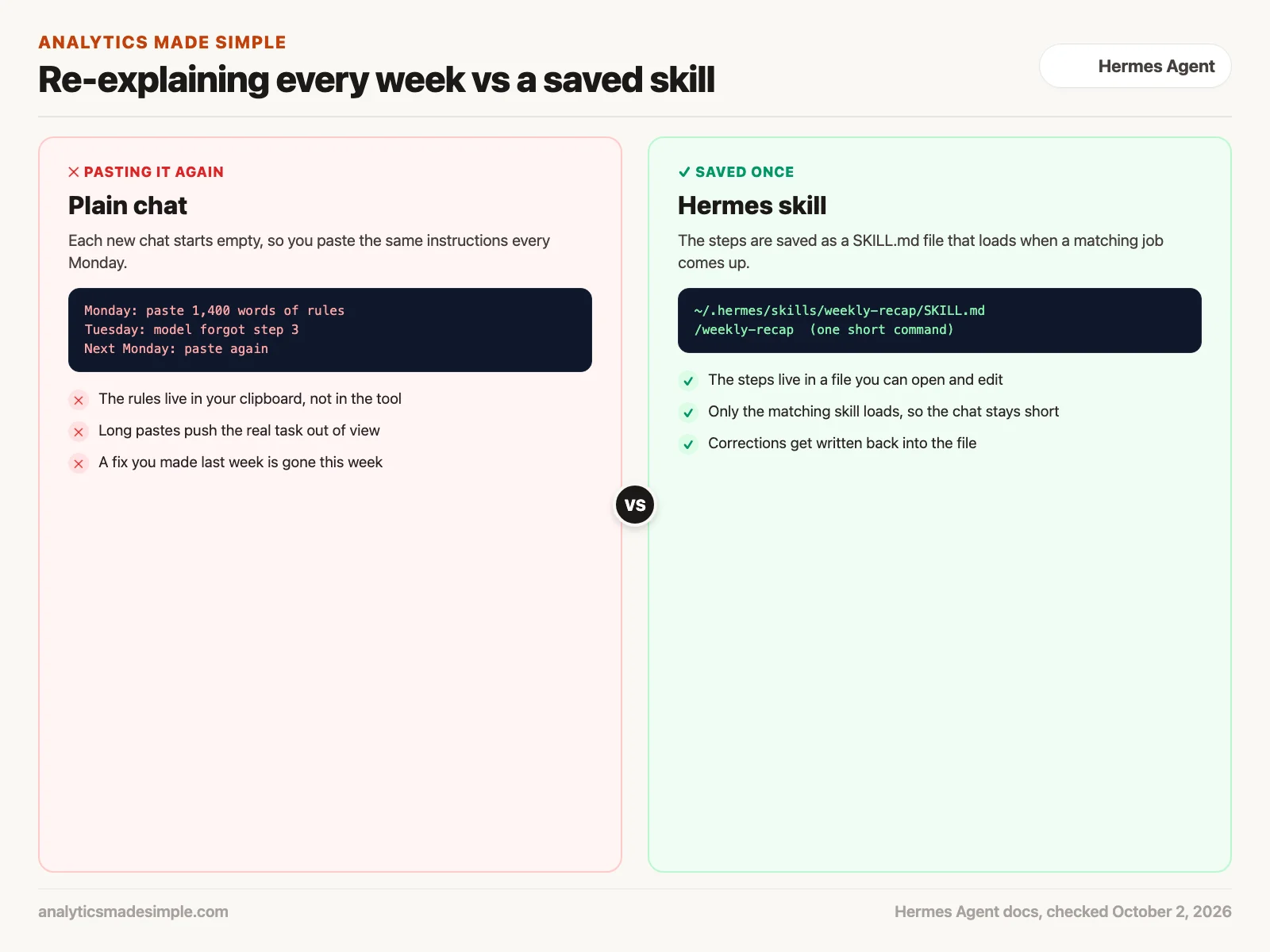
Say you spend forty-five minutes every Monday pasting the same 1,400-word explanation of how your team builds its weekly sales recap into a chat window. The model follows it, mostly. The next Monday the chat starts empty, and you paste it all again. A tool that keeps those steps in a file, and loads them when you ask for the recap, saves you that paste and the mistakes that come with it.
This post covers what Hermes Agent is, the four places it keeps what it learns, how a skill gets made, and how to keep that learning under your control. Product details come from the Hermes Agent documentation, checked on October 2, 2026. The project changes quickly, so check the docs again before you set it up.
Why a normal chat forgets your instructions
A regular chat tool keeps a running window of your recent conversation. When you close the tab or start a new chat, that window starts empty again. Some chat apps now save a few facts about you, but the long, step-by-step instructions for a job usually do not survive.
People usually work around this in one of two ways, and both get tiring.
- Pasting a long instruction block. You keep a document of rules and paste it at the start of each chat. It works, but it takes up room the model could use for the actual task, and long pastes are easy to get slightly wrong.
- Asking the tool to search your documents. Search is good at finding a fact in a handbook. It is weaker at a job with fixed steps, because finding a paragraph that describes the steps is not the same as following them in order every time.
What you want is a tool that writes the steps down once, keeps them somewhere you can read, and uses them the next time the same job comes up.
What this agent does and where it runs
Hermes Agent is a free, open-source AI agent from Nous Research, an AI lab known for its Hermes family of open models. An agent here means an AI that can take steps on its own, such as running commands or editing files, instead of only replying in a chat. The code is on GitHub under the MIT license (a short license that lets anyone reuse the code for almost any purpose).
Hermes is not tied to one AI model. You choose the model it talks to, for example through Nous Portal, OpenRouter, OpenAI, or a model you run yourself, and you can switch later with one command. You can chat with it in a terminal (the text window where you type commands) or connect it to Telegram, Discord, Slack, WhatsApp, or Signal. It can also run scheduled jobs, such as a daily report, without you sitting at the keyboard.
On a Mac or Linux computer, the docs give a one-line installer. Read any install script before you run it, because it changes your computer.
curl -fsSL https://hermes-agent.nousresearch.com/install.sh | bash
source ~/.zshrc     # or ~/.bashrc, to reload your shell
hermes setup        # pick a model and settings
hermes              # start chatting
The rest of this post is about the part that makes Hermes different from a plain chat window: what it keeps between conversations.
The four places Hermes keeps what it learns
Hermes stores what it learns in four places, and each one has a different job. Two are short notes it always reads, one is a searchable record of past chats, and one is a shelf of how-to guides.
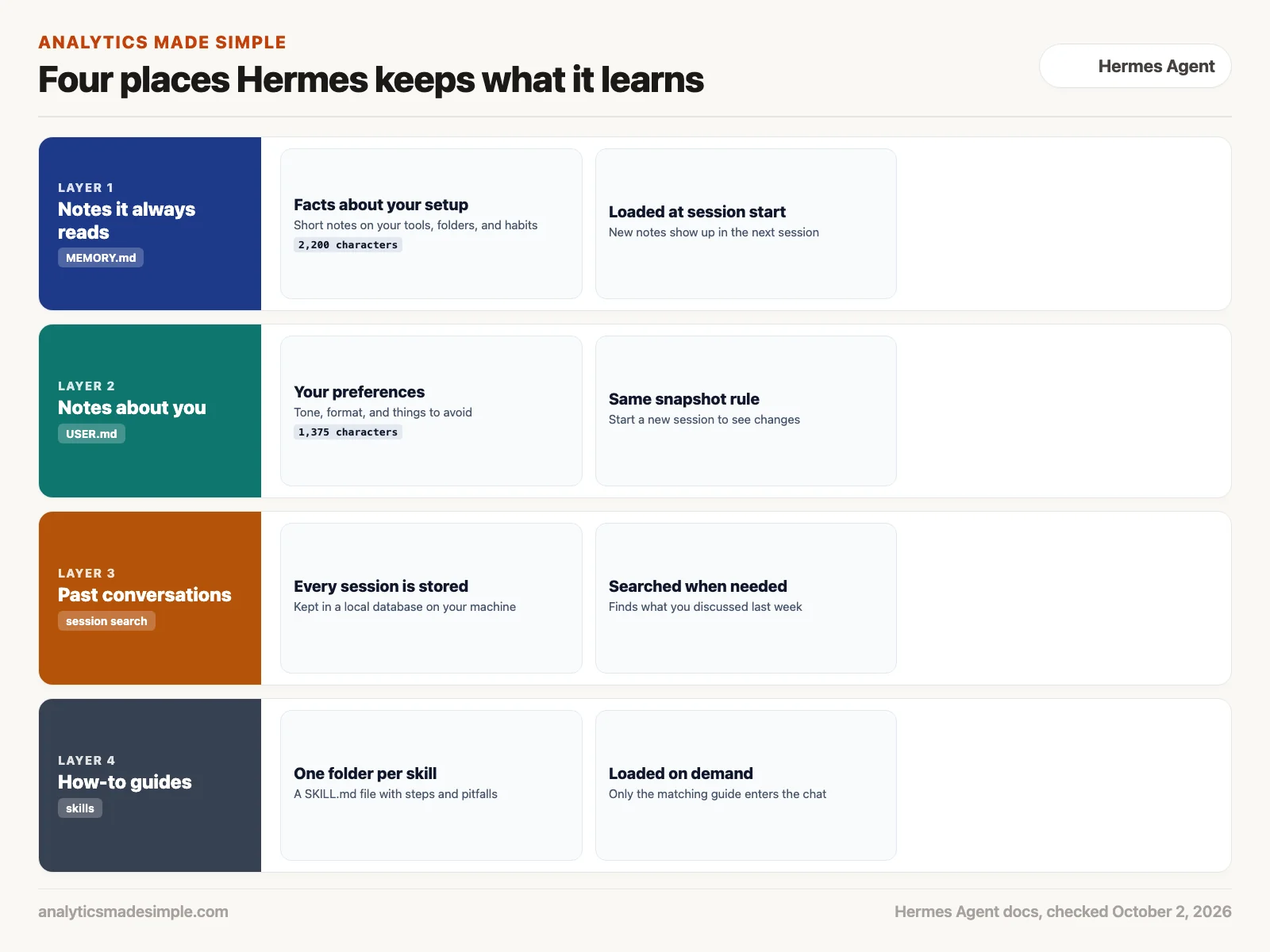
- MEMORY.md, the agent’s own notes. Facts about your setup, such as where your files live or which tools you use. As of October 2, 2026, the memory docs cap it at 2,200 characters, which keeps it focused.
- USER.md, notes about you. Your preferences, such as the tone you like or formats you hate. It is capped at 1,375 characters.
- Session search, the record of past chats. Every conversation is stored in a small database on your machine, and the agent can search it when you ask something like “what did we decide about the vendor last month?”
- Skills, the how-to guides. Each skill is a folder with a
SKILL.mdfile that lists the steps for one kind of job, the pitfalls, and how to check the result. The skills docs call this the agent’s procedural memory, meaning memory for how to do things.
The two notes files load at the start of each session as a fixed snapshot. That has a practical effect. If the agent saves a new note in the middle of a chat, the note is written to the file right away, but the agent will not see it in its instructions until the next session. In a messaging app, where one chat can run for weeks, the docs suggest typing /new at natural breaks, such as the end of a task, so fresh notes take effect.
Skills work differently. The agent first sees only a short list of skill names and descriptions. It opens the full guide only when a job matches, so you can keep many skills without stuffing them all into every chat.
A skill is a written guide, not hidden code
It is easy to imagine a self-improving agent as a black box that rewrites its own brain. Hermes is more ordinary than that, which is good news for you. A skill is a text file in Markdown (plain text with simple formatting marks). You can open it, read it, fix it, or delete it.
Here is the shape of a skill file, following the format in the skills docs. The content below is a made-up example for a weekly sales recap.
---
name: weekly-sales-recap
description: Build the Monday sales recap from the weekly export
version: 1.0.0
---

# Weekly sales recap

## When to Use
The user asks for the weekly recap or drops the Monday export.

## Procedure
1. Open the newest export in ~/reports/incoming/.
2. Drop test orders (customer name starts with TEST).
3. Total net sales by region; refunds subtract.
4. Write five bullets: total, biggest gain, biggest drop, refunds, one question.

## Pitfalls
- The export uses a comma as the thousands separator; strip it before adding.

## Verification
The regional totals must add up to the overall total.
A skill can also hold extra files, such as a reference table or a small script, in folders next to SKILL.md. The main idea stays the same. The guide is written in words you can check, not buried inside the model.
Every skill you install also becomes a short command. Once the guide above exists, typing /weekly-sales-recap loads it and starts the job. Hermes also comes with a catalog of ready-made skills and a Skills Hub where you can install more, and the docs say hub installs go through a security scan.
How Hermes makes and improves a skill
Hermes writes skills with a tool called skill_manage. According to the skills docs, its instructions tell it to save a skill in three situations: after it works out a job with several steps that is worth repeating, after it hits dead ends and finds the path that works, and after you correct its approach.
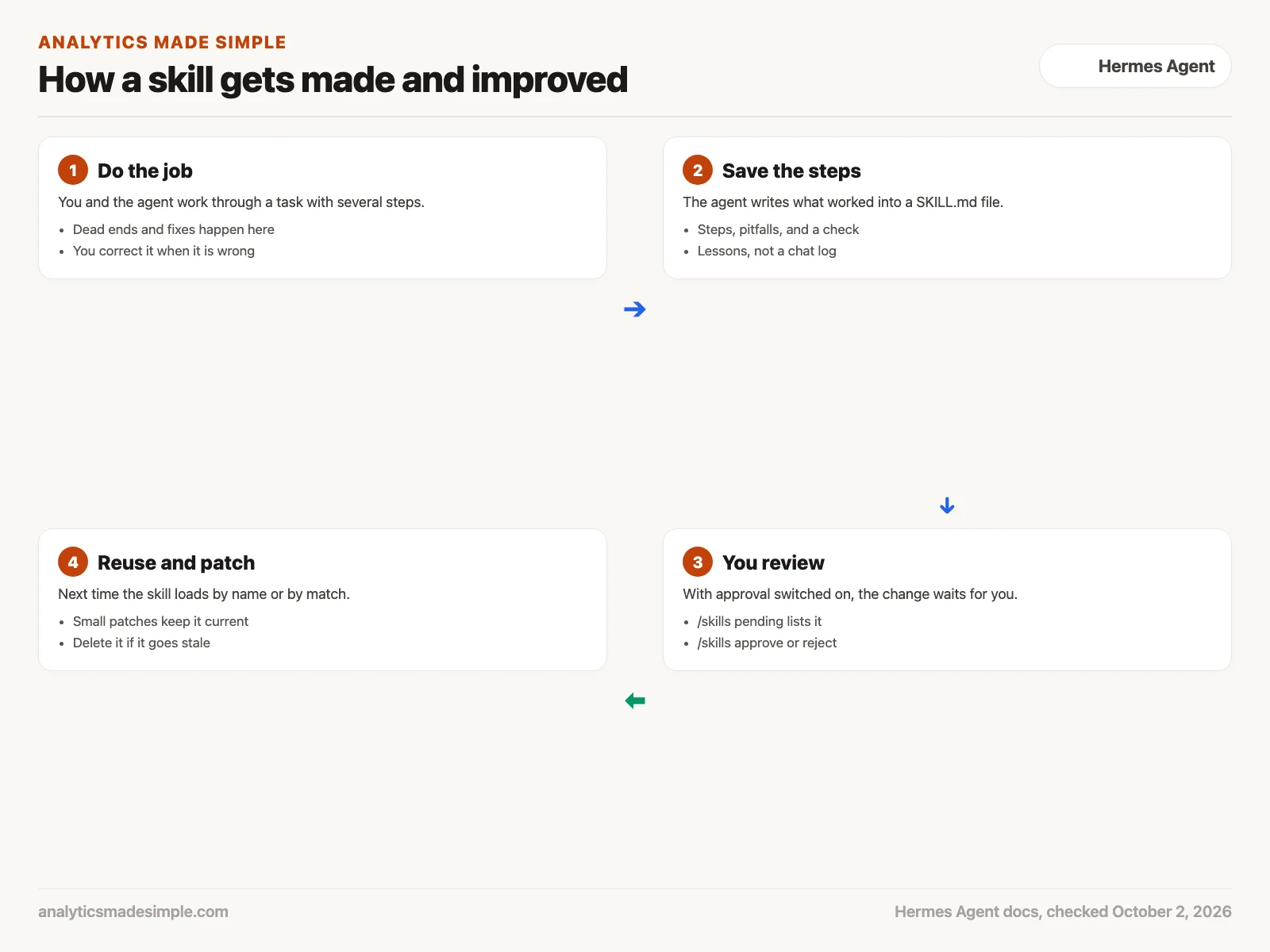
The docs are clear that a skill should capture lessons, not a diary. A good pitfall is a short rule plus the reason for it, attached to the step it affects. A transcript of last Tuesday’s chat does not belong in a skill.
Hermes can also review a session after it ends and suggest changes to its skills or notes. By default it writes those changes freely. You can turn on an approval step instead, so every change waits for you.
# in Hermes' config.yaml
skills:
  write_approval: true
memory:
  write_approval: true
With approval on, changes are held for review. Inside a chat, /skills pending lists them, /skills diff shows the exact change, and /skills approve or /skills reject settles each one. Turning this on is a sensible default while you learn what the agent tends to save.
When the agent says it saved something, check
A model can say “I’ll remember that” without actually saving anything. The memory docs list this as the most common complaint, and they note it happens more often with small models that run on a laptop. The save only counts if the agent really called its memory tool.
The fix is to look at the file yourself.
cat ~/.hermes/memories/MEMORY.md
cat ~/.hermes/memories/USER.md
ls ~/.hermes/skills/
These commands print the agent’s two memory files and list its saved skills. Reading the files yourself is how you confirm the agent really saved what it said it saved.
If the note is missing, ask again and name the tool, for example: “use the memory tool to save that my reports folder is ~/reports.” If it keeps failing, use a stronger model while you set things up. Once the notes exist, a smaller model can read them fine.
Two more things trip people up. Memory is kept per profile, so a Telegram bot running under one profile does not share notes with a terminal chat under another. And settings in a .env file are passwords and configuration, not memory.
Which kind of memory fits the job
Match the place to how often the information comes back. Not everything deserves a skill.
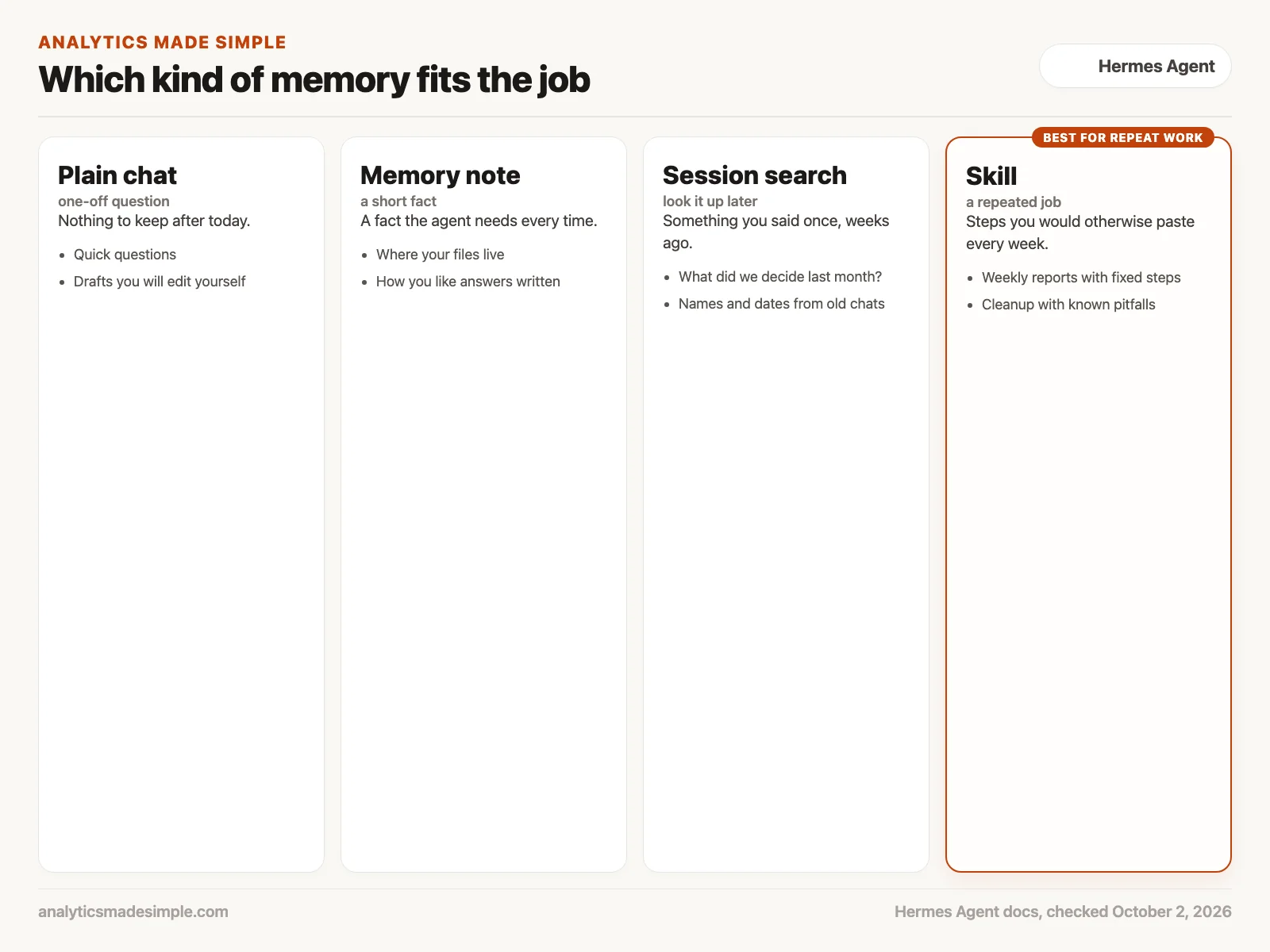
- A one-off question needs nothing saved. Plain chat is fine.
- A short fact the agent needs every time, such as the folder where your reports live, belongs in a memory note.
- Something you said once, weeks ago, can stay in session search. You do not need to save it on purpose.
- A job you repeat with the same steps, such as a weekly recap or a monthly cleanup, is what skills are for.
Worked example: turning a weekly recap into a skill
Here is how the Monday recap from the start of this post could move into Hermes. The file names and steps are made up for practice.
- Week one: do the job together. You drop the export into a folder and walk the agent through it: skip the test orders, subtract refunds, total by region, and write five bullets. When it adds the refunds instead of subtracting them, you correct it.
- Ask for a skill. At the end, you ask it to save the recap as a skill called
weekly-sales-recap, including the refund mistake as a pitfall. With approval on, you run/skills diff, read the change, and approve it. - Check the file. You open
~/.hermes/skills/weekly-sales-recap/SKILL.mdand make sure the steps match what you actually do. You fix one line by hand. - Week two: start fresh. You type
/new, then/weekly-sales-recap. The agent loads the guide and follows the same steps without your long paste. - Keep it honest. You still compare the regional totals with the overall total before you send anything. A saved guide makes the work repeatable, but it does not make the numbers correct by itself.
The time you save comes from not re-explaining the job and not re-fixing the same mistake. It does not come from trusting the output more than you would trust a coworker’s first draft.
Common mistakes
- Believing a “saved” message without opening the file to check.
- Leaving skill and memory writes on automatic while you are still learning what the agent tends to save.
- Putting passwords or customer records in a memory note or a skill. These files are plain text on your disk.
- Expecting a note saved mid-chat to take effect right away, when it only loads in the next session.
- Running two agents against the same Hermes folder. The docs warn that their notes will mix together, so give each one its own profile.
Quick recap
- Hermes Agent keeps short notes (MEMORY.md and USER.md), a searchable record of past chats, and skills, which are how-to guides in SKILL.md files.
- Skills are readable text you can edit or delete, and they load only when a job matches.
- New notes take effect in the next session, so start fresh chats at natural breaks.
- Check the files yourself, and turn on write approval while you learn.
Your next step this week
Pick one job you explain to an AI tool every week. Write its steps down as if for a new coworker: when to use it, the steps in order, the known pitfalls, and how to check the result. That page is a skill whether or not you install Hermes. If you do try Hermes, turn on write_approval first, build that one skill together, and read the file before you trust it.
Series notes
This is Part 4 of AI assistants everyday. Previous: OpenClaw. Next: Grokbot digital coworkers.
Sources and further reading
- Nous Research, Hermes Agent on GitHub (README, MIT license), checked October 2, 2026.
- Hermes Agent docs, Persistent Memory (MEMORY.md and USER.md limits, session search, write approval), checked October 2, 2026.
- Hermes Agent docs, Skills System (SKILL.md format, skill_manage, write approval, Skills Hub), checked October 2, 2026.
- Agent Skills, the open skill format specification that Hermes skills follow.
- Wang, G. and others (2023). Voyager: An Open-Ended Embodied Agent with Large Language Models, an early research example of an agent that keeps a library of skills.
Keep going
Same lessons in your feed
Short diagrams, hooks, and weekly tutorials on Substack, Instagram, X, and Facebook.