
In Grok, pick the model that fits the job, not the one with the biggest number. For quick everyday writing, a lighter choice is usually enough. Save the heaviest model for long, tricky work, especially when you pay for each use.
Imagine you spend a long chat rewriting a short status note, and a teammate says to always use 4.7. The note is still unfinished, and the meeting is soon. A bigger number was never going to fix that.
Model names and prices change often. The pages checked on October 8, 2026 were the Grok 4.7 model docs, the Grok 4.7 launch post, and x.ai/api. Open them again the week you set a team default.
Names vs products
Three labels get mashed together in team chat. Grok is the product family. The place you open it might be the chat website, Grok Build (a coding tool that makes changes on its own inside a project folder), Grok Imagine (images and video), or the developer Console. The model is the engine behind a request. “Use Grok 4.7” is incomplete until you say where, because 4.7 in grok.com is a chat turn, 4.7 in Grok Build is an agent working in a folder, and 4.7 on the API is a line item on a token bill. A token is a small chunk of text, often part of a word, and you pay by the chunk. An API is a way for one program to ask another program for data or an action. That is one family name with three different review habits and three different ways to fail. If the difference between company, product, and model still blurs, go back to the earlier post on what Grok is and who names it before you pick a number.
Chat apps also offer faster or cheaper modes, and those names change more often than the top model does. Think of them as one group called everyday chat, not as a second religion. If the menu says Auto, Fast, or something new on Thursday, use it for hallway questions and short rewrites. Save the top model for work that is long, needs tools, or is worth waiting for.
xAI builds Grok, and some marketing pages currently say SpaceXAI. That is branding and not a new model, so do not wait for a merger story before you pick a model. Choose from the job in front of you.
Grok 4.7, and the older 4.6 and 4.5, in plain English
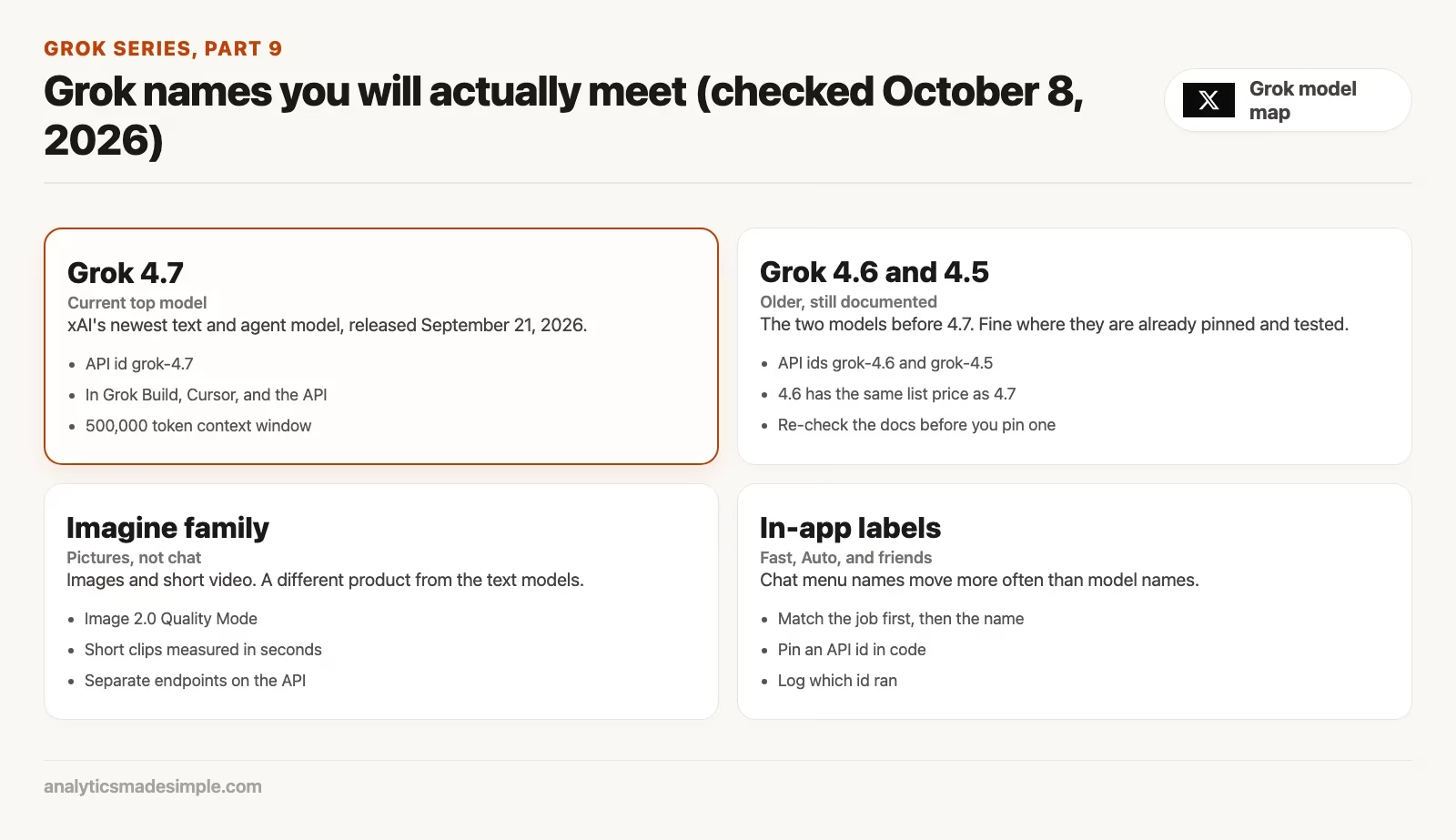
Grok 4.7 is xAI’s current top model for coding and knowledge work. xAI released it on September 21, 2026, and its model page (checked October 8, 2026) lists a 500,000 token context window. The context window is how much text the model can hold in mind at once. It can also read images, it can reason step by step before it answers, and its knowledge cutoff is May 2026. It is built for long agentic sessions, meaning the model takes many steps on its own. The API id, meaning the exact name your code must send, is grok-4.7. The launch post says it is available in Grok Build and Cursor, so if you are asking an agent to live in a project for a long stretch, 4.7 is the default to try and then review.
Grok 4.6 and Grok 4.5 are the two models before it. Both still have pages in xAI’s docs (checked October 8, 2026), with the API ids grok-4.6 and grok-4.5. The 4.7 launch post says 4.7 is served at the same price and speed as 4.6, and the 4.7 model page lists $2 per million input tokens and $6 per million output tokens for prompts under 200,000 tokens. Those numbers are a vendor list price and not your invoice, so confirm live pricing on x.ai/api and in the Console before you budget a bot. An older model is not useless. You might keep one pinned in a script that already works while you test 4.7 on a copy, because the same price means the switch is about results, not cost.
There is also grok-build-0.1 on the API, a coding model from May 2026 that was trained for agentic coding. It works best inside a coding agent such as Grok Build or Cursor. Do not drop it into a chat window and expect it to act like a folder agent, because the agent environment is the product and the id is only the engine.
This post does not reprint competitor scoreboards. Launch posts love them, but they go stale in a week, they depend on how the test was set up, and they do not tell you whether a 180-word status note needed any of that power. If you want the vendor’s own claims, read the 4.7 launch post and model page, and treat the numbers as marketing until you run your own task twice.
Context windows are a similar trap. A window of 500,000 tokens is a lot of room, but it is not a reason to paste the warehouse handbook, last month’s huddle notes, and three spreadsheets into the same 40-message thread. Long context is for work that is long. A status note is 180 words, and the model that finishes it in two turns beats the model that could in theory swallow a novel.
The Imagine family is not a chat model
Imagine has its own family of models. The consumer Quality Mode uses Imagine Image 2.0, which xAI released publicly on August 7, 2026. On the API you will see ids such as grok-imagine-image-2.0, plus a video family for short clips. Those strings do not belong in a chat model field you copied from a 4.7 snippet, and they do not belong in the “just use 4.7 for everything” sentence either.
A chat model can describe a poster, but an Imagine model has to draw the letters. That is why a teammate who asked 4.7 to “make the flyer” got a confident layout in prose and still had nothing to print. Open the studio instead, put the exact words in the brief, and inspect the still image. The Imagine posts in this series come later, so for now the chooser is one line: pictures go to the Imagine family, and words that will stay words stay on a text model.
Video follows the same split, with an extra catch on cost. Clips are measured in seconds, not in feature-film minutes. If someone says “have 4.7 make a trailer,” they have mixed chat, Imagine video, and maybe the API into one wish. Name the still image first, and then decide whether motion is worth the bill.
API ids vs in-app labels
The app can say “Grok 4.7,” but your code cannot. The JSON field (the structured text your program sends) wants a slug like grok-4.7, grok-4.6, or grok-imagine-image-2.0, whatever the live list prints. Spaces, marketing punctuation, and “the new one” will all come back as a 400 error. Copy the id from x.ai/api or the model docs, not from a screenshot of the chat picker.
In-app labels also hide routing. Fast modes, Auto, and similar toggles may send your request to a different engine than the top model named on the same screen. That is fine for chat, but it becomes a bug when you are trying to reproduce a result in a script (a small file of instructions the computer runs from top to bottom). For apps, pin an id and log it, so that when a reply looks “dumber than yesterday” you can check the id before you rewrite the prompt for the fourth time.
Build adds a third layer of labels. The command-line tool may say it is on 4.7 while a config file or a code-editor plugin still has grok-4.6 pinned. If a review comment says “Build got worse,” ask which id ran, from which place, against which folder. Version fights in a team meeting are often config fights wearing better posture.
When to switch, and when not to
How to switch Grok models in the interface and API
To switch Grok models in grok.com or the mobile app, open the model selector dropdown in your chat interface to choose between everyday fast chat and Grok 4.7. For developers and automated pipelines, switch models by changing the model parameter string in your API payload, the data the message actually carries, from grok-4.6 to grok-4.7.
Switch when the job changed, not when you are bored. A rewrite that is still a rewrite after 40 messages does not need a bigger number. It needs a constraint, such as “180 words, no new facts, keep the 14-aisle count, stop.” Switching to 4.7 there just spends a top-model turn on Oxford commas.
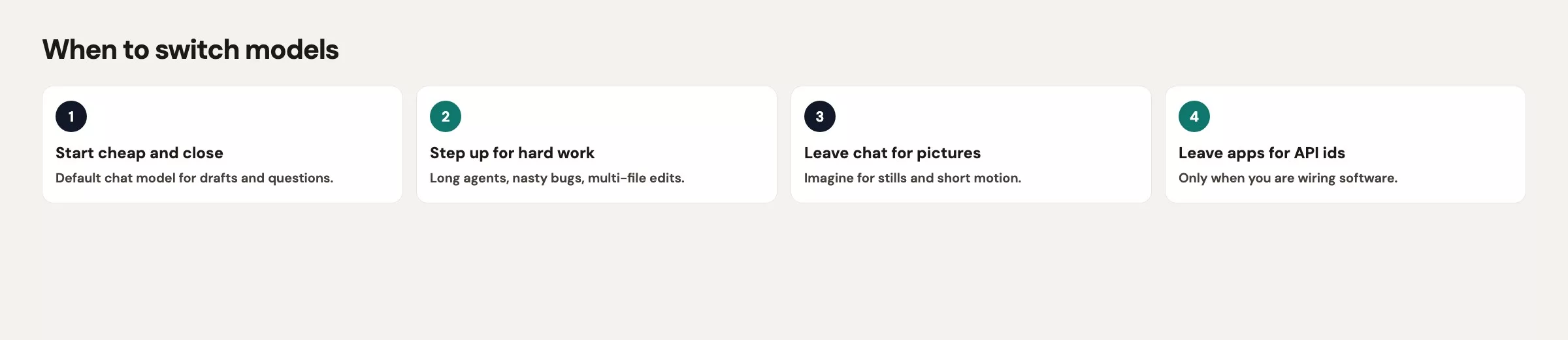
| Job | Start here | Switch if |
|---|---|---|
| Short rewrite, status note, explain a metric | Everyday chat mode (whatever the live fast or default label is) | After two tight turns you still lack a constraint, not after you are 40 messages in |
| Hard reasoning, long spec, multi-file code | Grok 4.7 in chat, or Grok Build if a folder must change | The model is looping on the same file, or you needed pictures |
| Office-style draft in Word, Excel, or slides | The Office add-in on a work account (covered in the next post) with whichever Grok model it offers | You are about to paste the whole mailbox into personal grok.com instead |
| Poster, still image, short clip | Imagine family | You are still in a text model writing captions about a picture that does not exist |
| A bot, a batch job, a code-editor plugin | An API id pinned in code (grok-4.7 in the docs checked October 8, 2026) | You are paying chat-plan money and wondering why the script gets a 401 error |
Do not switch because a coworker used the word “agentic,” and do not switch because a launch post used the word “frontier.” Do switch when you can point at a failure the current model keeps repeating, such as missing a type error after three tries, failing to keep a 12-section outline consistent, or inventing a column named rev_final. Then change one thing at a time, whether that is the model, the place you work, or the prompt constraint. Changing all three at once teaches you nothing.
Speed versus quality is a real trade, and the live numbers move. Launch posts lean on speed claims, while the 4.7 docs lean on long agent work and a large context window. For a 180-word note, the delay you feel in the huddle matters more than a 500,000 token ceiling you will never fill. For a two-hour Build session on a gnarly parser, the opposite is true. Match the meter to the job, and then stop talking about the meter.
A worked week with four tasks
Imagine you own warehouse analytics for 14 aisles. Your week is not “use Grok.” It is four tickets, and the model choice sits in a different spot for each one.
Monday: the 180-word huddle note
You already have the facts. Aisle 7 is short 40 cases of the product code WB-210, the Friday truck landed at 6:10 a.m., and overtime came to 11 hours. You paste those facts and ask for 180 words, no new numbers, and no pep. Everyday chat handles it in two turns. You read the note out loud, replace “landed early” with the exact arrival time, and send it. The 40-message version from the night before was a model-worship problem, because the note never needed 4.7. It needed the facts in the prompt and a word cap.
Tuesday: a flaky test in pick_wave.py
A test fails on 1 of 20 runs when wave_id wraps past 9999. This is a folder job, so you open Grok Build on a sandbox copy of the project, running 4.7, and ask where the wrap is handled. You do not paste 800 lines into grok.com. Build proposes a one-function change, you run the test 20 times, and you keep the diff (the list of changed lines). The place is Build and the model is 4.7. If Build were unavailable, chat with 4.7 plus a pasted function would be a fallback, not a lifestyle.
Wednesday: an aisle map for the safety board
Operations wants an 11 by 17 inch still image with 14 aisles, the words “Keep clear at dock 2” in real letters, and no cinematic fog. That belongs to the Imagine family. You put the words in the brief and reject two stills that misspell them. You do not ask 4.7 to “be better at design,” because that is a different product.
Thursday: an internal FAQ stub for 40 stores
You want a small bot that answers “what is a pick wave” from a six-paragraph instructions file. That is an API pin: grok-4.7, or the older grok-4.6 if that is what you already tested, with the key stored as an environment variable, a named setting the program reads when it starts, and a spend cap set in the Console. It is not SuperGrok on your phone answering store managers late at night. A chat-plan login does not turn into a multi-store app just because you forwarded the thread.
That is four tasks, four starting points, one week, and zero arguments about version numbers. The 40-message thread was the tell. When you are negotiating commas, you are not short on intelligence. You are short on a stop rule.
Common mistakes
- Treating the newest model as the answer to every task. Pick the default by job first, and then pick the model.
- Pasting an in-app label into JSON. Use the API id from the docs.
- Asking a text model to print a poster. Open Imagine instead.
- Treating list prices ($2 and $6 per million tokens on the 4.7 model page checked October 8, 2026) as your finance system. Confirm the live numbers.
- Switching models mid-thread without restating the constraint, so the new engine inherits the mess.
- Confusing
grok-build-0.1with a chat personality. It wants a coding agent around it. - Using a 500,000 token window as permission to dump the whole shared drive.
Product, place, and model are three separate words
Write your next four tasks in a column: the job, the place you will open Grok, the starting model, and the condition for switching. Run one day on that card. If a task took 40 messages, cut the transcript down to the facts and the constraint, and try two turns on the cheaper chat mode. Time both versions and keep the faster one that you would still send.
The next post in this series covers Grok in Outlook, Word, Excel, and Workspace. That is still product mapping, now with a work account and an add-in, and the model choice follows you into the inbox. The dangerous part there is the paste, not the version number. You can find it from the Grok series hub when it is up. If you still need the four places to open Grok, stay with the earlier post on the four ways in until you can name chat, Build, Imagine, and the API without looking down.
Quick recap
- Product, place, and model are three separate words, so use all three when you talk about Grok.
- In the docs checked October 8, 2026, 4.7 is the newest agent and text default (API
grok-4.7, 500k context, cutoff May 2026). - 4.6 and 4.5 still have docs pages (API
grok-4.6,grok-4.5). Confirm price and speed live, and do not worship the launch post. - The Imagine family makes pictures, and the chat family makes words.
- Pin API ids in code, and do not paste the pretty label.
- Switch when the job changed or a failure repeats, not to end an argument about commas.
- Everyday chat is allowed to stay everyday, which is how the huddle note ships with 18 minutes to spare.
Your next step
Write the product, the place, and the model name for how you use Grok today, for example: grok.com, web, and the current default. Then check xAI’s models page and note the date. Keeping all three words and the date in your notes avoids the mix-ups this post describes.
Series notes
This is Part 9 of the Grok series (product map). The previous post covered the four places to open Grok, and the next one covers Outlook and Office work.
Sources
Research and further reading used for this article:
- xAI docs: Grok 4.7 (id, context window, cutoff, list price; checked October 8, 2026)
- xAI: Introducing Grok 4.7 (September 21, 2026; same price and speed as 4.6, available in Grok Build and Cursor; vendor’s own claims)
- xAI API (live model list and pricing entry; confirm the week you pin an id)
- xAI: Grok Build (the coding command-line tool)
- xAI: Imagine Image 2.0 (Imagine family is a separate product)
- xAI docs: Imagine capabilities (API ids and image/video paths)
- xAI Console (where API ids become a bill)
- Analytics Made Simple: Learn (related paths on this site)
Keep going
Same lessons in your feed
Short diagrams, hooks, and weekly tutorials on Substack, Instagram, X, and Facebook.



