
Before you pay for anything from Grok, decide which of its four products the job actually needs, because each one is billed separately and the money does not carry over between them. For writing and questions, the chat app is usually enough. The API, the way your own programs use Grok, is only worth paying for when you are building software.
Imagine it is late on a Friday and you are making a flyer for a meetup on Tuesday. You have a Grok subscription on your phone, someone on your team bought $25 of developer credits, and the image tool keeps saying “try again later” after 11 attempts. The poster still says “Analtyics” in huge type. Now you have two receipts for one flyer and no clear idea which purchase you needed.
This post starts the product map in the Grok series. Earlier posts explained the company and the product names, walked through the chat apps, and covered when Grok is the wrong tool.
Plan names, usage limits, and button labels change, so treat this as a map based on xAI’s pages as checked in August 2026. Before you roll it out to a team, re-check the Grok website, the Grok Build page, the Imagine page, and the Grok FAQ.
Four products, four jobs
People say “I used Grok” the way they used to say “I used Excel,” and that sentence hides what they actually did. Did they type in a chat box? Did an agent (an AI that can take actions on its own, not just answer) open a code project? Did a studio render a still image? Did a script call an API (a way for one program to ask another for data), which is a way for software to ask the model for an answer? Those are four different jobs, and mixing them is how you get the Friday above: three receipts, one misspelled flyer, and a standup that starts with “which Grok?” Hold the split in your head before you touch any settings.
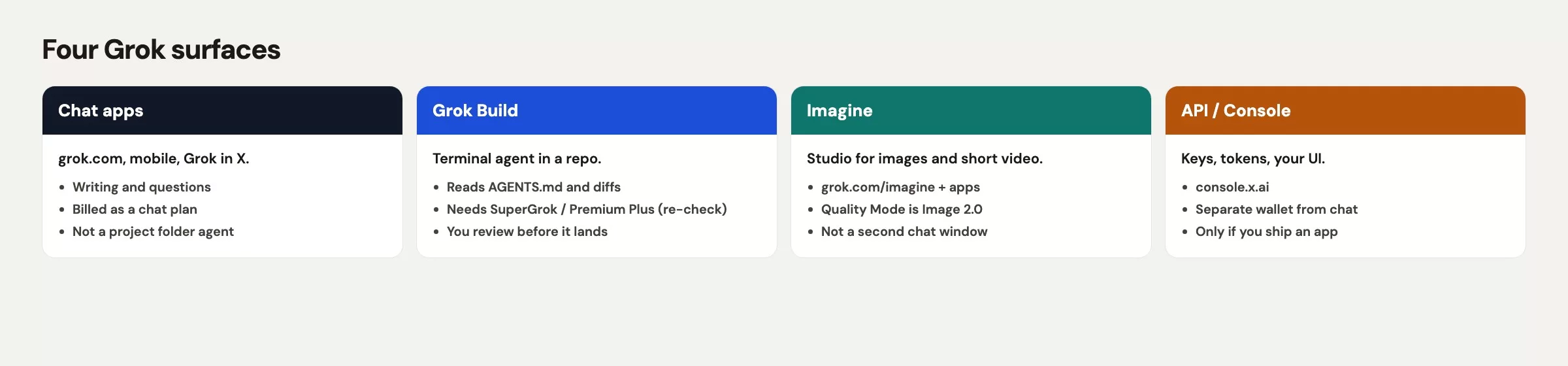
| Product | Job | Billing, checked August 2026 | Open this if |
|---|---|---|---|
| Chat apps | Writing, questions, and chat with images or files | Free, or an X Subscription plan (SuperGrok and paid X before October 12, 2026) | A human needs a reply, a draft, or a question answered |
| Grok Build | An agent that works inside a project folder | Chat-plan eligibility (the vendor has named SuperGrok and X Premium Plus; re-check) | You will let an agent read a code project and propose changes |
| Imagine | Images and short video | Chat quotas and/or separate Imagine meters (re-check the control you are in) | The output is pixels and not another paragraph |
| API / Console | Apps, scripts, and plugins for code editors | Token credits at console.x.ai, which is a separate wallet | Software will call the model without a person clicking Send |
If you remember one column, remember the last one. The product follows the job, and the brand name on the icon does not.
Rule of thumb: Chat money and API credits are separate systems, so do not promise they share a wallet. Confirm in the Console and on your chat plan page before you tell finance “we already pay for Grok.”
Chat apps (grok.com, mobile, X)
Chat is the default choice, and it is the right one for a huge share of real work. You type, you attach a file you are allowed to share, you read the reply, you push back, and you copy something into an email. The unit of work is a conversation, which sounds small but covers status notes, metric definitions, “explain this error like I am the analyst who has to present it,” and the first pass on a messy brief.
The conversation lives in three places that feel similar but are not identical: grok.com in a browser, the Grok iOS and Android apps, and Grok inside X. The product-map point is the job and not the icon. If what you need is language or judgment inside a thread, stay in chat. Do not graduate to a terminal (the text window where you type commands to your computer) agent because a blog post made folder access sound more serious.
What chat is good at
Use chat when you still own the paste. You can draft the meetup blurb from five ugly bullets, turn a 12-line Slack dump into three options with risks, or ask what “active store” should mean before anyone builds a chart. You can also critique a slide outline, translate a SQL (the standard language for asking a database questions) error into a sentence a product manager can use, or clean up a voice note you captured on the train. None of that needs a code project, a render queue, or a key that starts with xai-.
What chat is awkward for
Chat is awkward when the work is a tree of files that must stay consistent. You can paste a function, but you are still the glue: you copy, you apply, you re-paste the error message, and you hope you did not miss the helper two folders down. Chat is also a weak place to pretend you “made the poster,” because a long description of a flyer is not a flyer. And it is a poor place to stash an API key (a secret password that lets a program use your account) “so a teammate can try the docs,” since that is a Console job with a proper secret manager and not something to leave in a thread.
Work caution still applies, and the earlier post on privacy, public platforms, and work caution is the privacy pass. A personal grok.com login on cafe Wi-Fi is not your company’s mail system, and if a thread has a vendor’s contract markup in it, you are in the wrong place. For this post, the tell is simpler: if a human is talking to Grok, you are in chat, and if software is talking to Grok, you are not.
Grok Build is a folder agent
Grok Build is the terminal coding agent. You install a command-line tool called grok (a command-line interface (CLI), which you run by typing commands), you cd into a project, you let the agent read the files, and you review its proposed changes before anything lands. That is a different object from a chat bubble. The model family can be the same, but the damage a mistake can do is not, because an agent that can edit files will edit files.
Vendor pages put Build at x.ai/build, with an overview in the Build docs. Launch eligibility was described as SuperGrok and X Premium Plus, so re-verify before you tell a team they “already have it.” Details such as headless runs, plan mode, an AGENTS.md instructions file, skills, and the Model Context Protocol (MCP), a standard way to plug tools into an agent belong in the Build tutorial later in this series. The map point is shorter: open Build only when a real project folder is the work.
Open Build when the folder is the point
Good first jobs include “Where is ship_date parsed in this repo?”, “Propose a one-function fix for the CSV (a plain text file where commas separate the columns) export, then stop,” and “List the tests that touch billing.” Bad first jobs are rewriting the meetup blurb, generating the flyer, or “cleaning unused files” on a laptop that still holds yesterday’s production clone on the desktop. Chat will ramble, but Build will touch your disk.
If you do not have a sandbox copy of the project, you do not have a Build task yet. Clone a toy version, commit your starting point, and only then talk to the agent. That ritual is the whole safety story in a paragraph, and it is why Build is its own product and not a skin on grok.com.
Imagine is a studio
Imagine is where images and short video come from. The consumer studio lives at grok.com/imagine and in the apps. At the August 2026 check, its Quality Mode was Imagine Image 2.0, which the vendor announced as generally available (GA) on August 7, 2026. There is also an Imagine family on the API, with ids such as grok-imagine-image-2.0. Those ids are not a chat model with extra adjectives. They are a different product with different meters.
The 11 poster variants in our Friday story were an Imagine job. The misspelled “Analtyics” is the classic studio failure, because words inside an image are the hard part, and a chat model will happily describe a perfect poster while the pixels say something else. You have to inspect the still yourself. Do not paste the description into Slack and call it shipped. The Imagine tutorial later in the series starts from a brief that names the subject, setting, style, and any words that must appear. This map only needs the choice: if the output is a picture or a clip measured in seconds, open the studio, and if it is a paragraph, stay in chat.
Limits are local to the control you are in. A chat plan, a mobile quota, and an API image call can each say no for a different reason. Buying Console credits because the phone studio stalled is how you get a second receipt and still no flyer, so check which product returned the error before you open a second wallet.
Console is for apps
The xAI Console at console.x.ai is the control room for builders, where you manage API keys, usage, and credits. At the August 2026 check, the base address that your code talks to, a HyperText Transfer Protocol (HTTP) address, was https://api.x.ai/v1, and the docs live under x.ai/api. The Console is for software that calls Grok on a schedule, inside a plugin for a code editor, or behind your own interface. It is not a second chat box with a stricter login.
You do not need a key to finish the rest of this map. You also do not need one to write, to try Imagine in the consumer studio, or to run Grok Build under a chat plan that includes it. Opening the Console “because serious teams have keys” is how keys end up in screenshots, while opening it because you are shipping a small internal bot that posts a daily count is a real reason. A later post in this series covers the first light API request. For now the only rule is that if there is no app, there is no key.
Billing is the surprise that keeps showing up in finance Slack. Chat subscriptions, such as SuperGrok, paid X, or whatever the live plan is called this month, pay for a human talking to Grok. Since October 12, 2026, that plan is the X Subscription, which bundles Grok, Grok Bot, Cursor, and X Premium from $8 to $200 a month, according to xAI’s announcement (checked October 13, 2026). API credits pay for the tokens (the small chunks of text the model reads and writes) your code spends, and the two do not refill each other. The $25 credit top-up did not unstick Imagine on your phone, and it did not add Build minutes either. It bought token headroom for a script that did not exist yet.
Worked chooser: one messy Friday
Walk your Friday afternoon as four tickets and not one panic. The meetup is on Tuesday evening in the training room on the 14th floor. Ops wants a blurb, a door flyer, a tiny sign-up script in the events repo, and, as someone said in passing, a Slack bot that posts signups every morning. That last one is how wallets multiply.
Ticket 1 is the blurb. You have five bullets in Slack, and one of them still says “Tuesay.” Open grok.com on your work account, paste the bullets, and ask for a 90-word blurb with the room number and the start time. Tell it not to invent a speaker. Then edit two sentences so it sounds like Ops. This takes about 8 minutes, it happens in chat, and it costs nothing beyond the chat plan you already had.
Ticket 2 is the flyer. The subject is the Tuesday analytics meetup, the setting is cream paper on a cork board and not a cinematic city, and the style is print with high contrast and correctly spelled words. Open Imagine, generate, and read every letter on the still. The 11th variant is where you should have stopped and fixed the brief, by naming the words and banning script-style lettering, instead of buying API credits. The bill is whatever Imagine quota that phone login has. If it throttles, you wait or switch accounts on the same studio, and you do not open console.x.ai to unstick an image file.
Ticket 3 is the sign-up script. There is a folder, events-rsvp/, with one Python file and a broken date parse on meetup_on. That is a Grok Build job. Clone a copy and commit it, then ask a read-only question first, such as where the date is parsed. After that, ask for one tiny change and review the proposed edit. The bill is the chat-plan eligibility for Build, and it is not the $25 API top-up, unless you chose on purpose to run Build against an API key.
Ticket 4 is the Slack bot. That is software, so it needs a key, a safe place to store the key that is not Slack, a spend cap, and someone who will own retries. That is the Console, and it is not a job for the end of a Friday. Park it. If you skip the parking step, you get a wasted top-up and an exposed key waiting to happen.
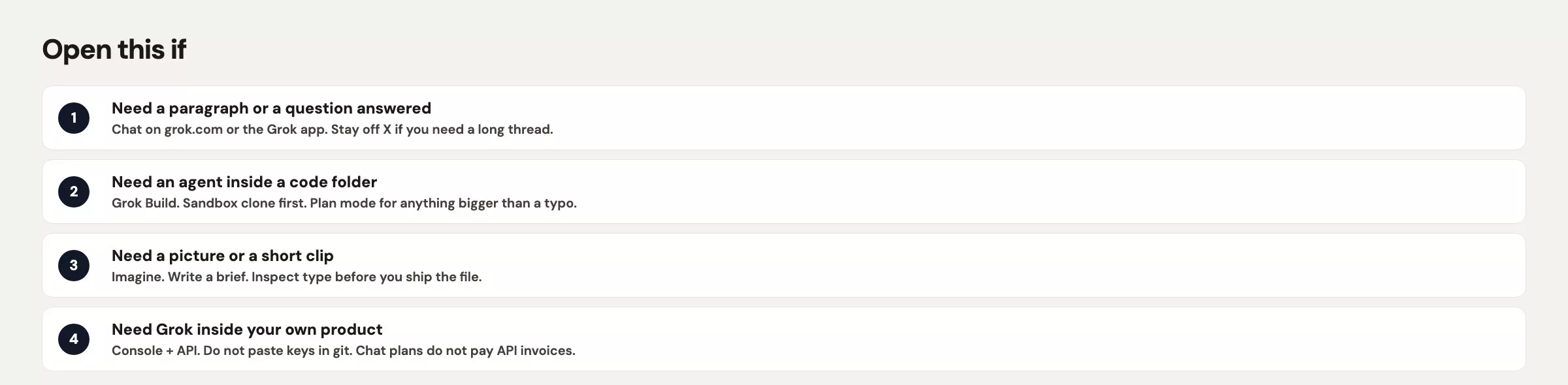
Here is the chooser in one breath, the version you can say before standup:
- Is the output words that a person will edit? If so, use chat.
- Is the output pixels, meaning a picture or a short clip? If so, use Imagine.
- Must a project folder change under your review? If so, use Grok Build.
- Is the caller a program that will run without you? If so, use the Console and API.
If two answers are yes, split the work. The blurb and the flyer are two tickets, so do not make Build “also write the poster,” and do not make chat “also push to main.”
Common mistakes
| Mistake | What you see | Fix |
|---|---|---|
| Buying API credits to unstick chat or Imagine | A Console balance and a phone that still says try again later | Read the error on the product that failed, because chat money and API money do not refill each other |
| Calling every window “Grok” | Standup arguments about “Grok being down” when only Imagine throttled | Name the product: chat, Build, Imagine, or API |
| Opening Build on the production clone | A set of edits across 14 files late in the evening | Use a sandbox copy, commit first, and ask a read-only question first |
| Pasting a key into a chat thread | An xai- key in Slack or a public snippet | No app, no key. Keys live in environment variables (private settings on a computer), not in grok.com |
| Using chat as a design studio | A beautiful description and a still that misspells the brand | Open Imagine and inspect the letters, and keep chat for the blurb |
| Assuming X Premium is the Console | No API keys on the chat plan page | The Console is console.x.ai, which is a different login for a different bill |
Practice: say the job before you say Grok
Pick one real task from your week and write one sentence: “The output is ___.” Then open only the product that matches. If you cannot finish the sentence, you do not have a Grok task yet, and what you have is a pile.
If your sentence is “a reply,” stay in chat and reuse the habits from the first 30 minutes with Grok. If it is “a still,” bookmark Imagine and wait for that tutorial. If it is “a diff,” which is a list of proposed edits to files, wait for Grok Build. If it is “a bot,” wait for the Console post.
The next post in this series, still on the product map, is the Grok models chooser: 4.5, 4.6, and when to switch. Version numbers are not a fifth product. They sit inside the one you already picked. Start from the Grok series hub when that post is up. For a wider set of paths, the Learn page lists the other tool families on this site, including ChatGPT, Claude, and Gemini. The same idea applies there: name the product before you name the model.
Quick recap
- Say the job before you say Grok: words, pixels, a folder, or an app.
- The chat apps (grok.com, mobile, X) are for a human in a thread.
- Grok Build is a terminal agent in a project folder that you review.
- Imagine is a studio, and a description of a poster is not a poster.
- The Console is for keys and token bills, so skip it until you ship software.
- Chat plans and API credits did not share a wallet at the August 2026 check, so re-check before you buy a second time.
- Split mixed Friday piles into tickets, with one product per ticket.
Series notes
This is Part 8 of the Grok series and the start of the product map. The earlier posts cover the company and product names, the chat apps, privacy at work, and where Grok is the wrong tool.
Sources
Research and further reading used for this article:
- grok.com (consumer chat product)
- Grok Imagine (consumer studio for images and short video)
- xAI: Grok Build (terminal coding agent product page)
- xAI docs: Grok Build overview (what the CLI is for)
- xAI API (builder entry and current model list to re-check)
- xAI Console (keys and API credits, separate from chat plans)
- Grok FAQ (plan and product questions that move; read the week you buy)
- Analytics Made Simple: Learn (related paths on this site)
Keep going
Same lessons in your feed
Short diagrams, hooks, and weekly tutorials on Substack, Instagram, X, and Facebook.



