

Ship the still first. Imagine video is for a short, simple loop, and only once the still already works on its own. Cap the length, skip violent zooms and on-screen type that morphs, and treat overnight clip farms as a budget burn and not a creative process.
Say you want a short looping video for a friend’s birthday invitation. Last night you generated twenty Imagine clips “to see the vibe,” and now you are scrubbing through them at 1.5 times speed on a laptop with 11% battery left. That is the situation this post is meant to prevent.
Still versus motion
A still has one job, which is to survive a pause. People take screenshots, calendar apps freeze on frame one, and Slack unfurls a JPEG. If the still is ugly, the clip will not save it, and if the still is good, you may not need a clip at all. So ask the rude question before you spend video credits: would you ship this JPEG if video did not exist? If the answer is no, go back to the earlier posts on making stills and on editing them in Imagine. Do not animate a misspelled sleeve and hope motion hides the letters, because motion makes letters worse.
Use motion when the page or story needs time. Good examples are a slow push toward a product, steam that already existed in the still, or light moving across a table. Skip motion for a quarterly deck cover, a print hallway poster, or a thumbnail that will sit paused 90% of the time. A looping earthquake behind a key metric does not make the metric any truer.
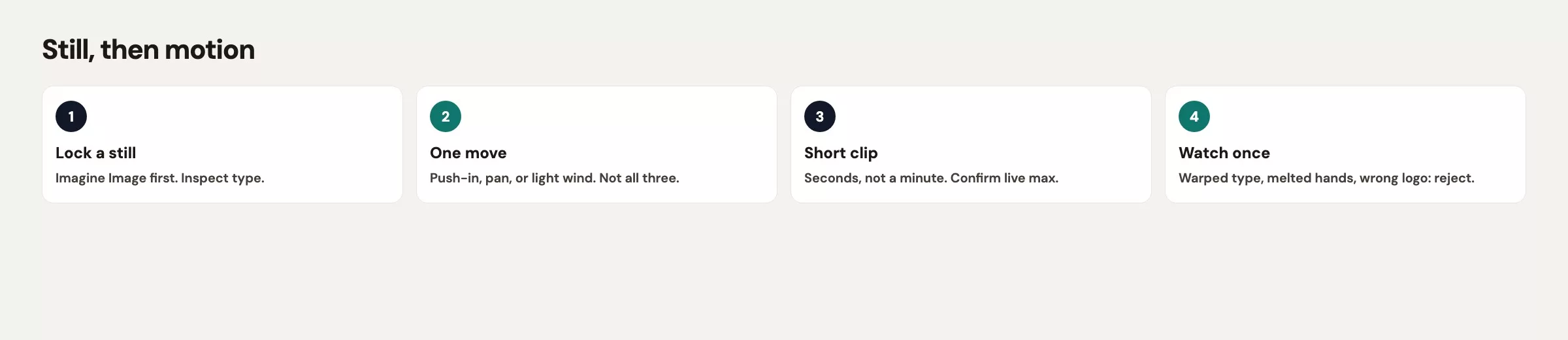
Twenty clips is a binge. Each clip has a cost, because video made through the API (the way one program asks another for data) is billed by length and resolution, and app quotas change. Twenty vibe tests also train your eye to like noise. Instead, pick one still and one camera move, then generate one or two clips and inspect them. Keep the best or kill them all. If both fail, change one line in the spec and leave the rest of the story alone.
Text-to-video versus image-to-video
Imagine’s video family (the 1.5 generation, per vendor docs checked in August 2026) can start from words or from a still. Text-to-video invents the first frame, which is fun for a private mood board but a poor default for work, because you already fought for a mug, a teal glaze, and a sleeve. Image-to-video takes your still as the starting picture and asks the model to move it. That is the path that respects the work you already did on the still.
The docs also describe other video jobs, such as editing an existing clip, reference-to-video, and extension. Those routes exist mainly for builders. For a launch page on Monday, you need image-to-video and a duration you can afford. If you call Imagine from your own code through the API, xAI’s video guide uses models in the grok-imagine-video-1.5 family as of October 2, 2026. Names move, so confirm the live list before you build.
Image-to-video still drifts from your picture. It can invent a hand, boil the type, or add a logo on a device. Your inspection pass is the same as for stills, with a few motion-specific fails added: warping type, extra objects fading in, and a camera move that fights the product. If the still had empty chairs, the clip should not grow a photoreal coworker in second 3.
Keep the shot simple
Use one camera move, and write it the way a camera operator would on a tiny set, not the way a movie treatment would. Here are three good examples.
- Slow push-in toward the mug (10% closer, no orbit)
- Locked tripod, steam rising, nothing else
- Gentle pan left across the table, stop before the plant exits
Refuse everything else: crash zooms, orbits around the product, and lines like “then the camera flies out the window into the city.” Leave out extra characters, new props, and title animation too. If the still has type on the image, which you already know is the hard part, tell the model to hold the letters still. Better yet, use a still with no type and put the words in the page HTML (the code that web pages are built from) or the slide, because type that must live inside a video is type you will have to inspect frame by frame.
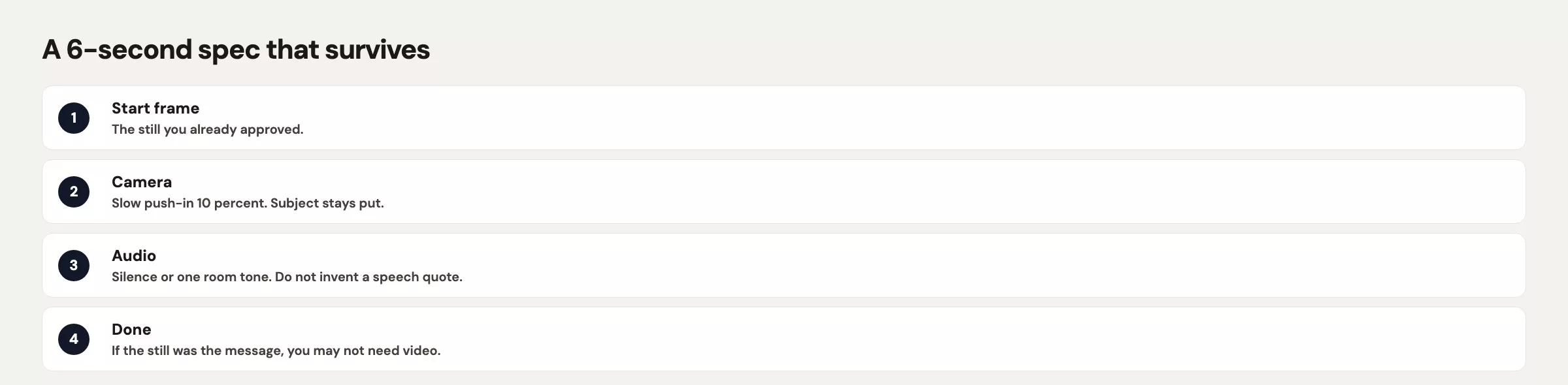
Audio is a maybe. Some Imagine video paths can add native sound, so confirm the live toggle. For a muted autoplay on a landing page, you often want silence anyway, since browsers mute autoplay and a sudden whoosh on a looping hero image is how you annoy people wearing headphones. If you do need sound, write it as “soft room tone, no voiceover, no licensed song.” Do not ask for a celebrity voice or a famous chorus.
Rule of thumb: If you need a storyboard with more than one arrow, you are making a film. Imagine is making a clip.
Length, audio, and cost hedges
Clips run from a few seconds up to about 15 seconds, which is the honest ceiling to plan around and not a promise of a 15-second slider every week. The API samples in the Imagine docs use durations like 12 seconds. Confirm the live limits and the maximum in your picker, and do not write a brief for a 90-second brand film, because you will get a smear, a bill, or both.
On cost, image generation is typically a flat per-image fee on the API, while video is billed per second and resolution adds to the bill. Consumer apps use plan quotas that change, so treat every number as a hedge. The work habit is the same on any plan: decide the duration before you generate. Six seconds is enough for a hero loop and eight is plenty, whereas twenty clips at 12 seconds is how a vibe test becomes a line item someone has to explain.
A landing-page loop does not need a cinema master, so pick the resolution the page will actually play. Then watch it on your phone in bright light, because compression will eat fine type. That is one more reason to keep letters out of the clip.
Some API routes let you extend a clip by continuing from its last frame, and each extension stacks more drift on top of the last. Extension is a builder feature. For Monday’s page, cut the clip where it ends, and do not stitch five extensions into a mini episode.
A worked 6-second spec
Here is a toy case. You have the Dock 4 mug still from the last two posts, in 16:9, with no people, a sleeve that reads DOCK 4, and a glaze in the teal family. You want a quiet loop for a launch block that already has its headline in HTML, and the fallback for calendar previews stays the JPEG.
Do the steps below in order, and do not skip the first one, which locks the still.
- Open the still at 100% zoom and confirm the spelling, the fingers, and the absence of fake marks, because small errors are invisible at normal size and obvious once printed.
- Decide the duration, which here is 6 seconds, and write it down so you do not bump it “a little longer” six times.
- Choose image-to-video and attach the still, so the clip starts from a picture you already approved.
- Paste one move, generate once or maybe twice, and watch at normal speed, not 1.5 times.
- If the type warps or a logo appears, kill the clip and keep the still, instead of generating clips 3 through 20.
Image-to-video from this still. Duration: 6 seconds. 16:9.
Camera: slow push-in, about 10 percent closer, locked horizon, no orbit, no tilt, no handheld shake.
Motion: faint steam from the mug if it already looks warm. Plant leaves still. No new objects. No people. No extra hands.
Type: hold the sleeve letters exactly as DOCK 4. Do not morph, flicker, or add words.
Marks: no logos on the laptop, mug, or speaker. No brand names.
Audio: silence.
Refuse: crash zoom, earthquake, city fly-through, photoreal staff, celebrity voice, fake Sony or apple-ish marks.
Once you have output, check it against the toy cases below. These describe what a pass and a fail look like in plain terms.
| Starting still | Motion request | Fail if |
|---|---|---|
| Dock 4 mug, 16:9, sleeve DOCK 4, no people | 6s slow push-in, steam only, silence | Type morphs, extra mug, fake mark, crash zoom |
Same still, type already wrong (DOK 4) | Any motion | You started video before fixing the still |
| Empty conference room, no product | Pan across the table | A photoreal coworker fades in |
| Product cutout on cream | Locked tripod, gentle light shift | A marble store appears behind the cutout |
| Poster with three lines of type | You insist on video anyway | Letters boil; use the PNG on the page instead |
Here is the ship rule for the toy launch: if the clip fails twice, the page goes live with hero_still_v3.jpg and a caption. You still have your Monday, and you do not have twenty unusable MP4 files and a dead battery.
Common mistakes and their fixes
| Mistake | Fix |
|---|---|
| Twenty vibe clips before a shippable still | Lock the JPEG. Then one clip. |
| Text-to-video for a product you already designed | Image-to-video from that still |
| Three camera moves plus a plot | One push, pan, or locked steam |
| Animating misspelled type | Fix letters in stills (the earlier post on Imagine edits), then consider video |
| Assuming 90-second films | Plan seconds to about 15s. Confirm live max. |
| Autoplay with a whoosh and a voice | Silence for muted heroes; no celebrity audio |
| Leaving the invite on a JPEG after a good clip | Fine. A still fallback is a feature. |
Quick recap
Take one still you would already publish, and write a six-second spec with one camera move. Generate at most two clips, watch them at normal speed on your phone, and then keep one or keep the JPEG. The next post covers Grok Imagine rights, deepfakes, and common fails, and it closes this Grok series. The hub is at analyticsmadesimple.com/series/grok, and the video docs to re-check are the Imagine overview.
- Ship the still first, because motion is optional.
- Default to image-to-video from a locked frame, not twenty text-to-video tests.
- Use one camera move, hold the type still, and add no new people or marks, because each extra change is another chance for the video to warp text or invent something.
- Plan for seconds up to about 15 seconds, and confirm duration, audio, and price the week you run it.
- Give it two tries and then fall back to the JPEG, since a steady still image beats a video where the text warps and shakes.
Series notes
This is Part 23 of the Grok series. Previous: Imagine edits. Next: Imagine rights and deepfakes.
Sources
Research and further reading used for this article:
- xAI docs: Imagine overview (text-to-video, image-to-video, duration notes up to about 15s, video family, pricing shape)
- xAI: Imagine Image 2.0 (stills, Quality Mode, world-building stills that can feed video later)
- Grok Imagine (consumer studio: images and short video)
- xAI API (Imagine models billed apart from chat subscriptions)
- xAI Console (keys if you script video; do not paste real keys)
- Analytics Made Simple: Grok series
- Analytics Made Simple: Learn
Keep going
Same lessons in your feed
Short diagrams, hooks, and weekly tutorials on Substack, Instagram, X, and Facebook.



