
Write your house rules first, and add an extra tool only when a plain chat window cannot finish the job. If you copy nine add-on servers from another project, you are more likely to end up with a frozen screen than a working setup.
Say you have a small ticket on your desk: add one sentence to the readme file about the Friday cutoff. A teammate hands you a .grok/config.toml from a different project, because “Claude has these too.” That file quietly brings along nine MCP servers, which are extra programs that Grok Build, the AI coding agent that reads and edits your files for you, can call for help (the full name is Model Context Protocol). One of them is a browser-review plugin that waits for a visible Chrome window, and your laptop is not running one. The terminal interface (the text screen Grok runs in, called the TUI) sits on a spinner for 11 minutes, and you have not typed a single word of the sentence yet.
Menu names inside the TUI change from release to release, and so do the marketplace catalogs of add-ons. Before you copy a teammate’s setup into a customer project, re-check the Grok Build product page and the Build overview.
The model versus the tooling around it
The model is the text engine, which in August 2026 was Grok 4.6 for Build. Everything around it is the tooling layer: the terminal screen, the permission prompts, the file tools, and any extra programs. People call that whole wrapper the harness. A smart model inside a noisy wrapper can still start nine MCP servers before it reads your readme, while a plain model in a quiet wrapper adds one sentence and stops.
The official docs are direct about what Grok does when it starts. It looks around the project and loads whatever it recognizes: an AGENTS.md file (or the Agents.md and AGENT.md spellings), skills, plugins, hooks, and MCP servers. It also reads some Claude and Cursor files so those setups keep working. That is handy on a project you built yourself, and it is a surprise on a project you cloned ten minutes ago just to fix one line.
Run this before you add anything:
cd ~/sandbox/warehouse-export-toy
grok inspect
The inspect command works like an x-ray. It lists every config source, instruction file, skill, plugin, hook, and MCP server, along with where each one came from. If it already shows a browser plugin that you never installed in this folder, you inherited it from somewhere else, so find out why it is there before you start the TUI.
Your personal settings live in ~/.grok/config.toml (on Windows, %USERPROFILE%\.grok\config.toml). Settings for one project often live in .grok/config.toml inside that project. The official settings notes say the project file is the right place for tools you want the whole team to share, while your personal model choice stays in your own file, so confirm this on the live settings page. The frozen laptop in our story came from a project file that was copied over like a souvenir.
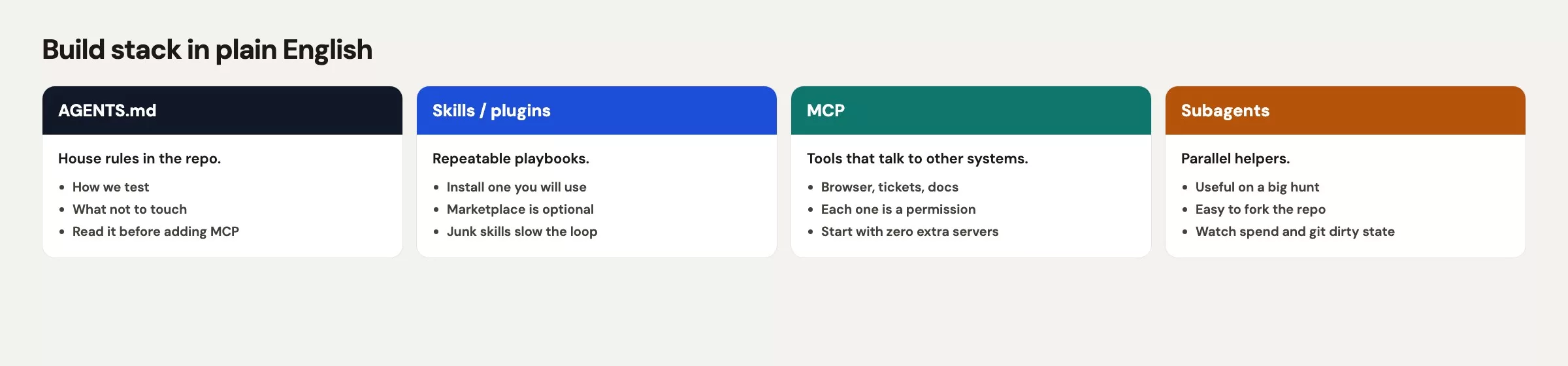
AGENTS.md as house rules
An AGENTS.md file at the top of a project is a plain text note that the agent reads at the start of every session. You use it to say how the code is written, how to run the tests, and what the agent must never do. Folders deeper in the project can carry their own file, and the docs say the deeper file wins when two rules disagree. Short, specific rules work better than long essays, and there is no size limit, but that is not a reason to paste in the employee handbook.
Write the rules you would give a contractor on their first day, and skip the slogans and the company history. If a line is not something you would insist on in a code review (a pull request, or PR, is a proposed change that a teammate looks over before it goes live), delete it.
# AGENTS.md

## House rules
- Default to small diffs. One function or one file unless I say otherwise.
- Do not commit, push, or deploy.
- Do not read, print, or rewrite `.env` files.
- Do not add MCP servers, plugins, or marketplace items unless I ask.
- Ask before touching CI or Docker.

## How to check
- Python tests: `python -m pytest`
- If you change a date helper, run the three-row print in `exports/csv_writer.py`.

## Do not
- Rewrite logging to fix a format string.
- Install a browser plugin for a README sentence.
- Spawn subagents for a one-line edit.
After you save that file, run grok inspect again and look for the rules file in the list. If it is missing, you are probably in a different folder than you think, which happens more often than people admit, especially when two terminal tabs sit in one window.
For a single run, you can skip the file and type grok --rules "Always use TypeScript." That rule vanishes when the session ends, so keep anything the next teammate needs in the file. The readme ticket will come back next Friday anyway.
Skills and plugins
A skill is a reusable folder: one SKILL.md file, plus optional scripts and notes. Grok looks in ./.grok/skills/ up to the top of the project, in ~/.grok/skills/, and inside any plugin you have turned on. Skills you can call yourself also appear as slash commands such as /skill-name. The name and description at the top of the file tell the agent when to use it, and extra keys are ignored. You do not need a skill to add one sentence to a readme.
A plugin is a bigger bundle that can ship skills, helper agents, hooks, MCP servers, and language-server pieces. Grok loads plugins from ./.grok/plugins/, from ~/.grok/plugins/, from marketplace installs, and from extra paths in your config. The TUI has one extensions screen, and the commands /plugins, /skills, /hooks, and /mcps open that same screen on different tabs.
Hooks are small scripts that run at set moments, such as before or after the agent uses a tool. A project’s hooks need your trust the first time (with /hooks-trust or the --trust flag), and Grok remembers that choice for the folder. Do not trust a project you unzipped from a chat message just so you could “try their Grok setup,” because you have not read what those scripts do.
The 11-minute hang in our story came from a browser plugin that expected a real Chrome window. A plugin that drives a browser is useful when the job is to click through a staging site, and it is dead weight when the job is one line of text. Marketplace installs also stick around. They sit in your personal plugin folder and can surprise you in the next project you open, so inspect first and disable whatever this ticket does not need.
MCP in plain English
MCP is a way to give an agent extra tools that live in another program: a browser, a database, a ticket system, a design file. Grok reads MCP settings from your personal config, from the project config, and, for compatibility, from some Claude and Cursor files. A project server with the same name as one of yours replaces yours. That is a useful feature, and it is also how a copied file quietly swaps your own server for a teammate’s.
Nine servers means nine programs that must start, sign in, and stay healthy before the agent writes a sentence. One will wait on a browser, one will want a token (a saved password-like key that proves you may use a service) you do not have on this laptop, and one will time out, so the screen looks frozen and you blame Grok. The model has not even seen your readme yet.
Add an MCP server only when the job is blocked without it. If you need live tickets, one ticket server makes sense. If everything you need is a file on your disk, you need zero servers, and a long list copied from another product’s screenshot does not change that.
| Add this | When the job needs it | Skip it when |
|---|---|---|
AGENTS.md | Any shared repo the agent will visit twice | A one-off personal scratch folder you will delete |
| One skill | You repeat the same checklist every week | The checklist is three bullets you can paste |
| One MCP server | The data lives outside the repo and you have auth | The file is already on disk |
| Browser plugin | You must see a real page | The change is Markdown or a unit test |
| Subagents | Two independent reads of a large tree | One function, one file, one sentence |
Subagents and worktrees
For bigger tasks, Grok Build can hand work to specialized helper agents, called subagents, that run at the same time. The launch post showed a fan-out where several helpers each look at one area, and then their findings are merged. A worktree is a second working copy of your project, so a helper can try changes there without touching the files you are editing by hand. Both are real features, and both are easy to overuse.
Use a subagent when two questions do not depend on the same file. “Where is the cutoff documented?” and “Where does the exporter read the cutoff?” can run side by side in a huge project. For a one-line readme change, five helpers only give you five summaries of the same paragraph while you wait.
A worktree helps when you want the agent to try something without wrecking your own edits, but it does not replace review. A worktree full of extra logging is still extra logging, so merge only the piece you asked for.
If the TUI offers workflows, which are saved scripts that chain several agents together, treat them like plugins. Inspect them, then run them in a sandbox folder first, and never drop one into your real branch just because it looked official.
When plain chat is enough
Open grok.com (or the Grok app) when the thing you need is words and you do not want a pile of running programs. Draft the cutoff sentence there and paste it into the readme yourself. That is not a failure to use agents. It just matches the size of the tool to the size of the ticket.
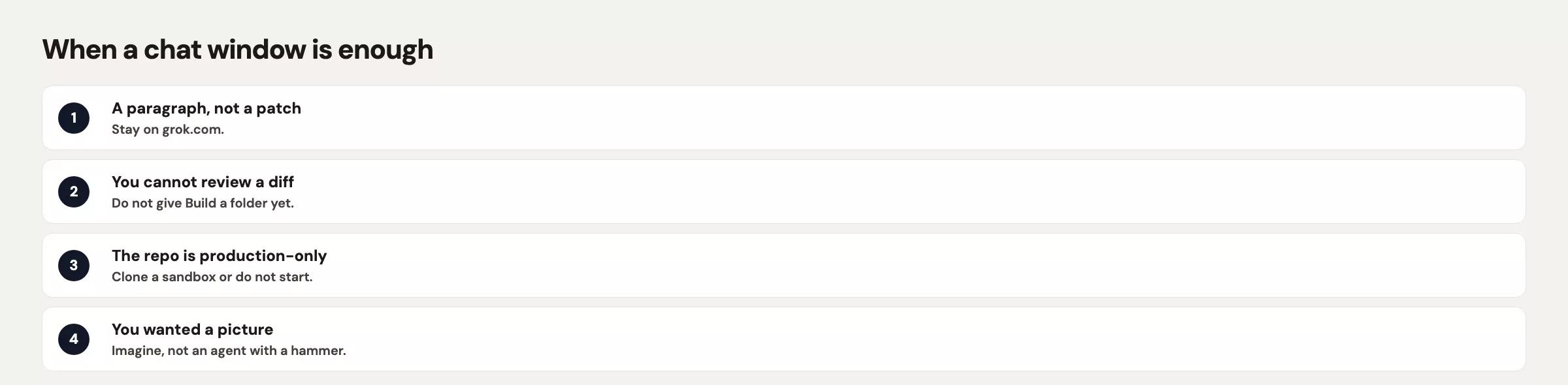
Stay in Build with a thin setup when the agent must look at several files and you want to see a diff (a side-by-side view of what changed). Add one skill when you repeat the same review every week. Add one MCP server when the answer lives in another system and you are allowed to connect to it. Add subagents when the project is large and the questions do not overlap, and stop adding once the inspect list is longer than the ticket.
A chat window is also the right choice when your company has not approved running a folder agent on your machine. SuperGrok and X Premium Plus subscribers were the launch audience for Build in May 2026, and your employer may still say no. Chat on an approved work account is the fallback, so do not sneak nine servers onto a laptop to avoid that conversation.
Common mistakes
| Mistake | What happens | Do this instead |
|---|---|---|
| Copy another repo’s MCP list | 11-minute hang on a browser plugin | Empty inspect, then add one server you can name |
No AGENTS.md, lots of tools | Agent improvises house rules | Write the short file first |
| Skill for a one-line job | Extra prompt noise, same sentence | Type the sentence or use grok.com |
| Trust a project hook on first open | Scripts run in a folder you have not read | Read the hook, then /hooks-trust if you still want it |
| Subagents on a README | Five summaries, no edit | One session, one file |
Quick recap
- The tooling layer loads rules and tools before you type, so run inspect first.
- Start with a short
AGENTS.md, and add skills or MCP servers only when the job is blocked without them. - Nine servers is a hang waiting to happen, not a setup.
- Subagents and worktrees are for large, independent reads, not for one sentence.
- The grok.com chat is enough when you only need words and will paste them yourself.
How to practice this week
Use the sandbox folder from the earlier post on installing Grok Build and add the AGENTS.md skeleton above. Run grok inspect and confirm the file appears, then leave MCP alone. Ask Build to add the Friday cutoff sentence under the house rules. If it opens a plugin screen anyway, you copied config again, so reset it and stay thin.
The next post covers using Grok Build for spreadsheets and research, carefully. Spreadsheets and web claims are where a long tool list plus a confident model can invent a margin formula, so keep the thin setup when you get there. The full list is in the Grok series.
Series notes
This is Part 18 of the Grok series. Previous: Explore, change, check. Next: Grok Build for sheets and research (carefully).
Sources
- xAI docs: Grok Build overview (
grok inspect, config path, custom models) - xAI: Introducing Grok Build (AGENTS.md, plugins, skills, MCP, parallel subagents, worktrees)
- xAI: Grok Build (product home)
- grok.com (chat surface when a folder agent is the wrong choice)
- xAI: Grok FAQ (plan and product questions to re-check)
- Analytics Made Simple: Learn (related paths on this site)
Keep going
Same lessons in your feed
Short diagrams, hooks, and weekly tutorials on Substack, Instagram, X, and Facebook.



