

When an AI helper works on your spreadsheet, give it a small practice range, ask for formulas you can check by hand, and never let it invent tax or price math in a file people rely on. A wrong formula can hide behind a row of tidy tabs, and the AI will happily build on top of the mistake. This post uses Grok Build (xAI’s coding agent, which works on the files in a folder), and the same habits apply to any similar tool. Open every research source it cites yourself.
Say you keep a pricing workbook, kit_margins_v2.xlsx, with six tabs: SKUs, Costs, Tax, Promo, Margin, and Deck. (The numbers in this post are made up for practice.) A SKU is a product code, and your kit KIT-214 sells for $48.00 and costs you $22.50. The Margin tab says you keep 53.1%. Then you open the Tax tab and notice that the $48.00 already includes 8.4% sales tax. The price before tax is $44.28, so the real margin is 49.2%. You already sent the slides to your supplier on Tuesday.
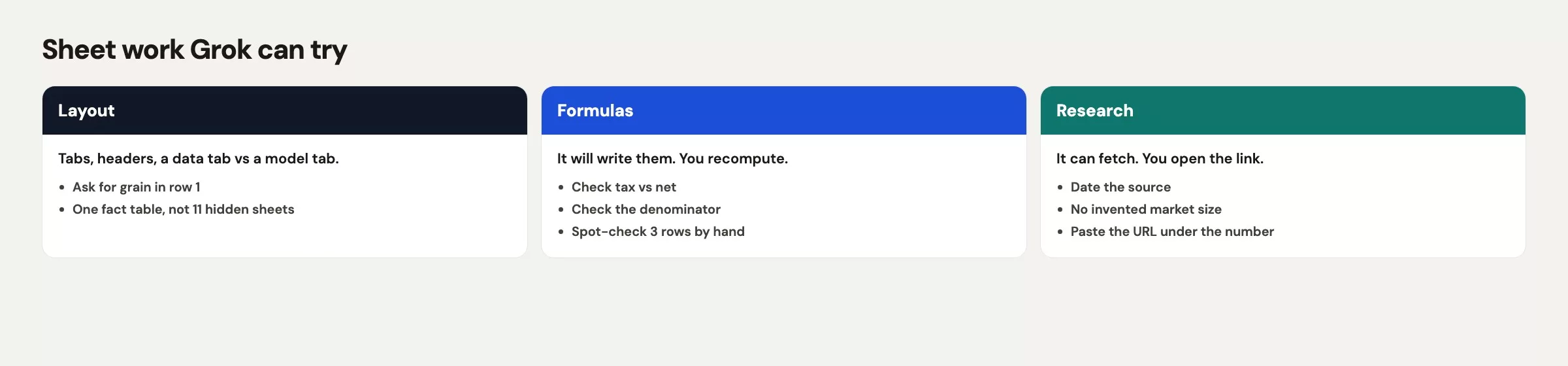
Feature names and office add-ins keep changing. Before you let an agent touch a workbook that finance will forward, re-check the Grok 4.5 announcement and the Grok 4.6 notes.
Why spreadsheets are a trap
A coding agent likes files it can rewrite. A workbook is a pile of separate pieces that all share one icon, and six tabs means six chances to define the word “price.” SKUs has a list price, Tax has a rate, Promo has a discount, and Margin divides one number by another. The Deck tab then copies the result as a slide that looks confident. Nobody wrote down what one row stands for, so nobody could say whether $48.00 is the sticker a customer sees or the pre-tax number Purchasing uses.
In the KIT-214 mess, both numbers were in the file. The agent built the Margin tab first, because you asked it to “build a margin workbook,” and it grabbed the largest money column on the SKUs tab. That column included tax. Dividing by a price that includes tax makes margin look healthier by roughly the tax rate, so 8.4 points of tax turned into 8.4 points of false comfort. The Deck tab then rounded 53.1% to “about 53%,” and the vendor saw a number that was too good.
Text in a .py file is easy to review, because git diff (a command that shows exactly which lines changed) puts every edit on screen. A formula buried in row 84 of the Margin tab is reviewable only if you click on it. Agents do not always leave a comment on the cell, and they sometimes add helper tabs called “Notes” that restate the wrong definition in friendlier English. A wrong definition that sounds friendly is still wrong.
Merged cells, hidden columns, and a frozen header make this harder to catch. The agent can read the values and still miss that the Promo tab already removed the tax. You asked for speed, and you received a consistent story across six tabs that all divide by the wrong number.
A safe sheet task
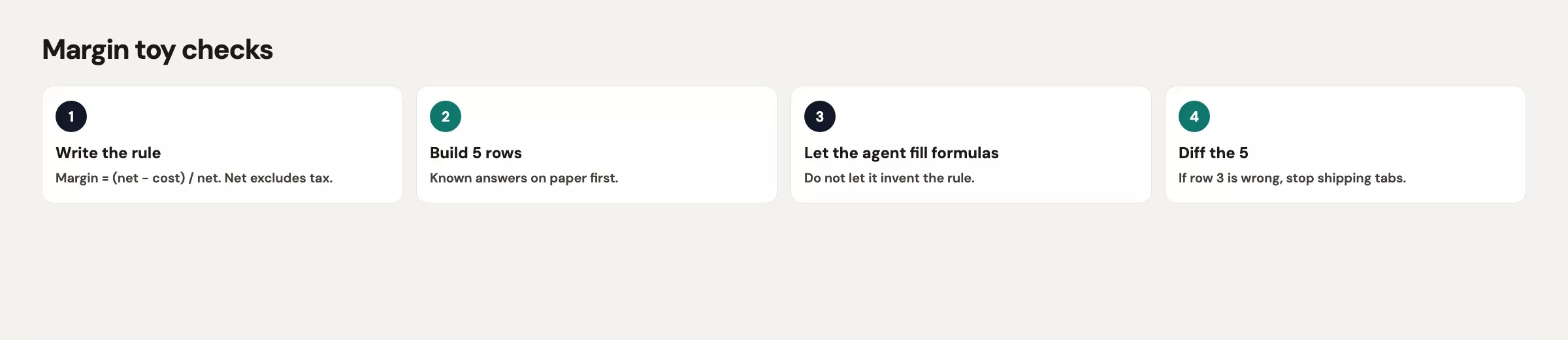
Give Build a sheet job that would fit on a whiteboard. Use one kind of row, one formula written in plain words, and one output tab. Add one check that you can run without Excel if you have to. Keeping the job that small is the whole trick, because every extra tab is another place for a hidden assumption.
Here is a prompt that stays small:
Create a toy workbook with two tabs only: Inputs and Margin.
Inputs columns: sku, list_price_tax_in, tax_rate, unit_cost.
Grain: one row is one kit SKU.
Formula in words: pre_tax = list_price_tax_in / (1 + tax_rate).
margin_pct = (pre_tax - unit_cost) / pre_tax.
Do not add a Deck tab.
Do not invent promo logic.
Write the formula in a cell comment and in README.md.
Stop after I can rerun the three SKUs in Python.
Notice what the prompt forbids. Deck tabs exist to present numbers, and presenting is how a wrong 53.1% leaves the building. Promo logic is a second project, so if you need it later, open a second session after Inputs and Margin match a hand calculation for KIT-214.
Stay in the terminal window (the text screen where you talk to Build) on the setting that asks before it acts. If the agent starts talking about “a full planning model,” switch to plan mode first, where it describes its steps before it does them. You asked for two tabs, and a full planning model is how you end up with six tabs again.
Your company may already have Grok in Excel as an add-in. That is a different tool from Grok Build working in a folder. An add-in sits inside a file you already have open, while Build will happily create a brand new xlsx next to your project files and a Python twin that disagrees with it. Pick one version as the one you trust. For teaching, the Python twin is easier to check. For a live finance file, work on a copy and leave kit_margins_v2.xlsx on the shared drive alone.
Research with sources you open
The same morning often includes a research question, such as “What tax rate does this county use?” or “Did the scanner vendor change the date on our contract?” Build can search and so can a chat window, but neither one is a filing cabinet. Treat every link as a lead to follow up, not as an answer.
Ask for sources in the prompt, and then open them. Check the date on the page, the version label, and whether the number is a list price or a shelf price that includes tax. If the agent cites a blog from 2024 for a 2026 county rate, throw the number out. The everyday chat version of this habit is covered in an earlier post on research with AI. The Build version is the same habit, plus a file that will outlive the chat.
Here is a research prompt that stays honest:
Find the official page for sales tax in this county.
Paste the URL. Quote the rate and the date on the page.
Do not write the rate into the workbook until I say the page matches.
If you cannot open a primary page, say so and stop.
Suppose you already know the rate is 8.4% because the Tax tab came from finance. Do not ask the model to “confirm” it, because models are agreeable and it will confirm. Type the rate yourself and leave a cell note that says “Finance Tax tab, 2026-08-11.” That note will matter in December, when someone asks why the Margin tab moved.
Notes and leftovers the model creates
Agents leave debris behind. You will find NOTES.md, plan.md, a second xlsx, a CSV (a plain spreadsheet-style text file) “for debug,” and a comment that says “assumed tax is already removed.” Those files feel like documentation, but they are often a diary of the wrong assumption.
After a sheet session, go through this list:
- Open every new file that
git statusshows, and delete the ones you did not ask for, because each one may hold a wrong assumption. - If a note disagrees with the cell formula, believe the cell only after you check it by hand, and then fix the note or delete it.
- Do not commit
Deck_final.xlsxjust because it looks finished. Commit the Inputs tab, the Margin tab, and the Python check. - If the agent wrote “verified against official docs” and there is no link, treat that sentence as empty.
A short set of house rules in AGENTS.md (a file the agent reads before it starts) helps here. Add a line such as “Do not add Notes or Deck tabs unless I ask, and do not write ‘verified’ without a URL I can open.” An earlier post covered how to write those house rules, and this is the reason that one line earns its place.
A worked mini model with toy margins
Here are three kits with the same 8.4% tax mistake in the first formula and the same fix in the second. Run this even if the xlsx already looks right.
rows = [
    {"sku": "KIT-214", "list_price_tax_in": 48.00, "tax_rate": 0.084, "unit_cost": 22.50},
    {"sku": "KIT-088", "list_price_tax_in": 36.00, "tax_rate": 0.084, "unit_cost": 19.00},
    {"sku": "KIT-301", "list_price_tax_in": 60.00, "tax_rate": 0.084, "unit_cost": 28.75},
]

print("sku, wrong_margin_pct, right_margin_pct, pre_tax")
for r in rows:
    wrong = (r["list_price_tax_in"] - r["unit_cost"]) / r["list_price_tax_in"]
    pre_tax = r["list_price_tax_in"] / (1 + r["tax_rate"])
    right = (pre_tax - r["unit_cost"]) / pre_tax
    print(
        f"{r['sku']}, {wrong * 100:.1f}, {right * 100:.1f}, {pre_tax:.2f}"
    )
Here is what that code prints. These are toy numbers, not a market study.
| sku | wrong margin % | right margin % | pre-tax list |
|---|---|---|---|
| KIT-214 | 53.1 | 49.2 | 44.28 |
| KIT-088 | 47.2 | 42.8 | 33.21 |
| KIT-301 | 52.1 | 48.1 | 55.35 |
Now check KIT-214 by hand: 48.00 / 1.084 = 44.28, and (44.28 − 22.50) / 44.28 = 0.492. If your Margin tab does not show 49.2% for that row, the workbook is still the Tuesday file, whatever the tab is named.
A second table you can keep next to the sheet lists the checks in one place:
| Check | How |
|---|---|
| Grain | Say out loud: one row is one kit SKU |
| Tax-in vs pre-tax | Hand-divide list by (1 + rate) for one SKU |
| Denominator | Margin uses pre-tax list, not tax-in, not cost |
| Promo | Absent until Inputs and Margin already match |
| Citation | Rate comes from a named tab or a URL you opened |
| Debris | git status shows only files you asked for |
If Build writes an xlsx, rerun the Python. If the two disagree, believe neither one until the hand calculation settles it, then fix the version you plan to keep and delete the other. Two versions of the truth is how 53.1% and 49.2% both survive into next quarter.
Common mistakes
| Mistake | What you get | Fix |
|---|---|---|
| “Build a full workbook” | Six tabs, one wrong denominator | Two tabs. Formula in words first |
| Tax-in list as revenue | Margin high by about the tax rate | Divide out tax. Hand-calc one SKU |
| Agent “confirms” a rate | A confident sentence, stale page | Open the URL. Type the rate yourself |
| Keep the Deck tab | Wrong % becomes a vendor slide | No Deck until Margin matches Python |
| Commit NOTES.md blindly | Wrong assumption looks official | Delete debris or rewrite after the check |
What to do next
Copy the three-row Python into a scratch folder and run it. Then ask Build for the two-tab workbook only, and do not hand it the Tuesday xlsx. When both match 49.2% for KIT-214, stop. If you want the agent to read a county tax page, do that in a second session and paste the URL into the Inputs tab yourself.
The next post covers reviewing an agent’s work, rolling it back, and staying safe. It explains git, how much freedom to give the agent, secrets, and what happens when a headless run (grok -p, which runs without a chat window) treats “clean unused files” as an order to delete. The full list is in the Grok series.
Takeaways
- Sheets hide the formula, so write down what one row means and the math in words before any tab exists.
- A list price with tax in it is a different number than the price before tax, and margin depends on which one you divide by.
- Research links are leads. Open them yourself, and do not let the agent stamp “verified” on its own work.
- Rerun a tiny Python check, and delete the Deck and Notes tabs until the numbers match.
- Office features can try to help, but you still own the cell that finance will forward.
Your next step
Before you ask Grok Build for a sheet, write what one row means and the math in words. When it is done, check one row by hand and open three of the research links yourself. Doing those checks on a small sheet teaches you where the agent’s work needs a second look.
Series notes
This is Part 19 of the Grok series. Next: Build review and safety. Hub: Grok series.
Sources
Research and further reading used for this article:
- xAI: Grok 4.5 (office-style claims; treat as “it can try”)
- xAI docs: Grok 4.6 (current Build-era model notes)
- xAI docs: Grok Build overview (folder agent, headless
grok -p) - xAI: Introducing Grok Build (plan mode and review-before-execute)
- xAI: Grok Build (product home)
- Analytics Made Simple: Learn (related tutorials)
Keep going
Same lessons in your feed
Short diagrams, hooks, and weekly tutorials on Substack, Instagram, X, and Facebook.



