You can make ChatGPT or Claude teach you SQL, the language for asking databases questions, by having it quiz you instead of handing you answers, using a free instruction file that the trading firm Jane Street published on November 3, 2026. You paste the file into the chat, say “teach me SQL joins”, and the AI tests what you already know, then quizzes you one question at a time until you can do it on your own.
Imagine you have asked a chatbot to explain SQL joins three times this month. Each time the explanation made sense while you read it, and each time you were stuck again the next day when you had to write one at work. The explanation was never the problem; what was missing was someone asking you to try, letting you get it wrong and making you try again.
This guide covers what the skill is, how its teaching method works, how to set it up in ChatGPT, Claude or a coding agent (an AI tool that can work with files on your computer), and how to run a first 20-minute session on SQL joins. If you are new to SQL itself, start with our SQL playground setup so you have somewhere to try the queries the tutor asks for.
What did the trading firm release?
Jane Street, a trading firm known for its education programmes, released a repository called agent_skills on GitHub on November 3, 2026, under the MIT licence, a short open-source licence that lets anyone use, copy and change the files. A repository is a project folder of files that GitHub hosts and tracks. When we checked on November 15, 2026, it held one skill, the socratic tutor, and had about 9,000 stars, GitHub’s version of bookmarks.
A skill, in this sense, is a plain text file of instructions called SKILL.md that tells an AI assistant how to handle a certain kind of request. Our guide on what AI skills are explains the format. This one tells the assistant how to tutor.
The name comes from Socrates, who taught by asking questions until his students worked out the answer themselves. The skill’s own description, in its skill file (checked November 15, 2026), says it is for when you explicitly ask to be taught, quizzed or drilled, and not for one-off questions like “what is X”.
How does the tutor teach?
It finds out what you know first, then asks one question at a time and only explains when you are truly stuck. The steps below come from the skill file as published on November 3, 2026.
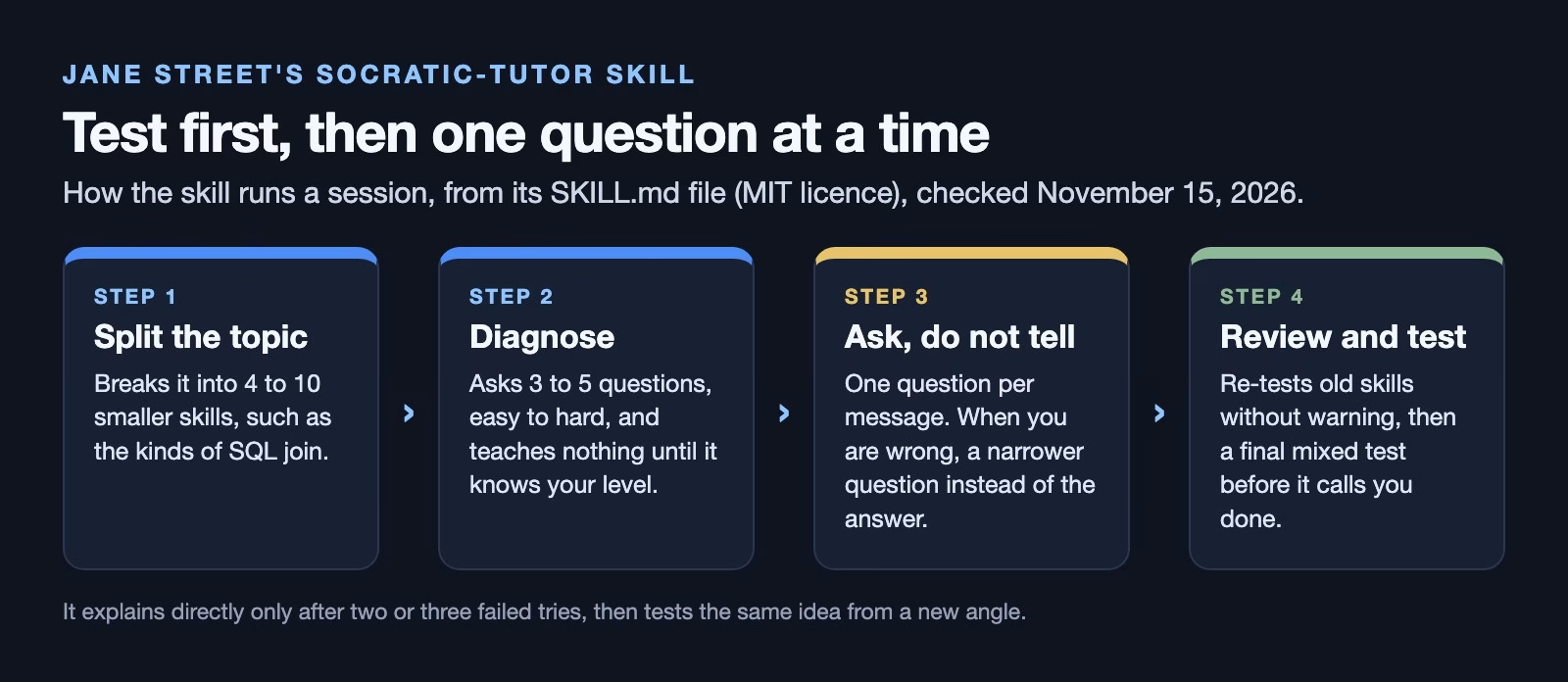
- It splits the topic. The skill breaks the subject into 4 to 10 smaller skills. For SQL joins, that might be inner joins, left joins, join keys, joining three tables and finding rows with no match.
- It tests you before teaching. It asks three to five questions, from easy to hard, to place you on each smaller skill, and teaches nothing until that is done.
- It asks instead of telling. Each message ends with a single question, and it waits. If you are wrong, it asks a narrower question that shows the contradiction, instead of giving the answer. It explains directly only after two or three failed attempts, then tests the same idea from a different angle.
- It reviews without warning. Skills you learned earlier come back as surprise questions, and a missed review lowers your level.
- It ends with a final test. When every skill reaches the target level, a mixed test with at least one question per skill and one problem that combines them decides whether you are done.
The skill map
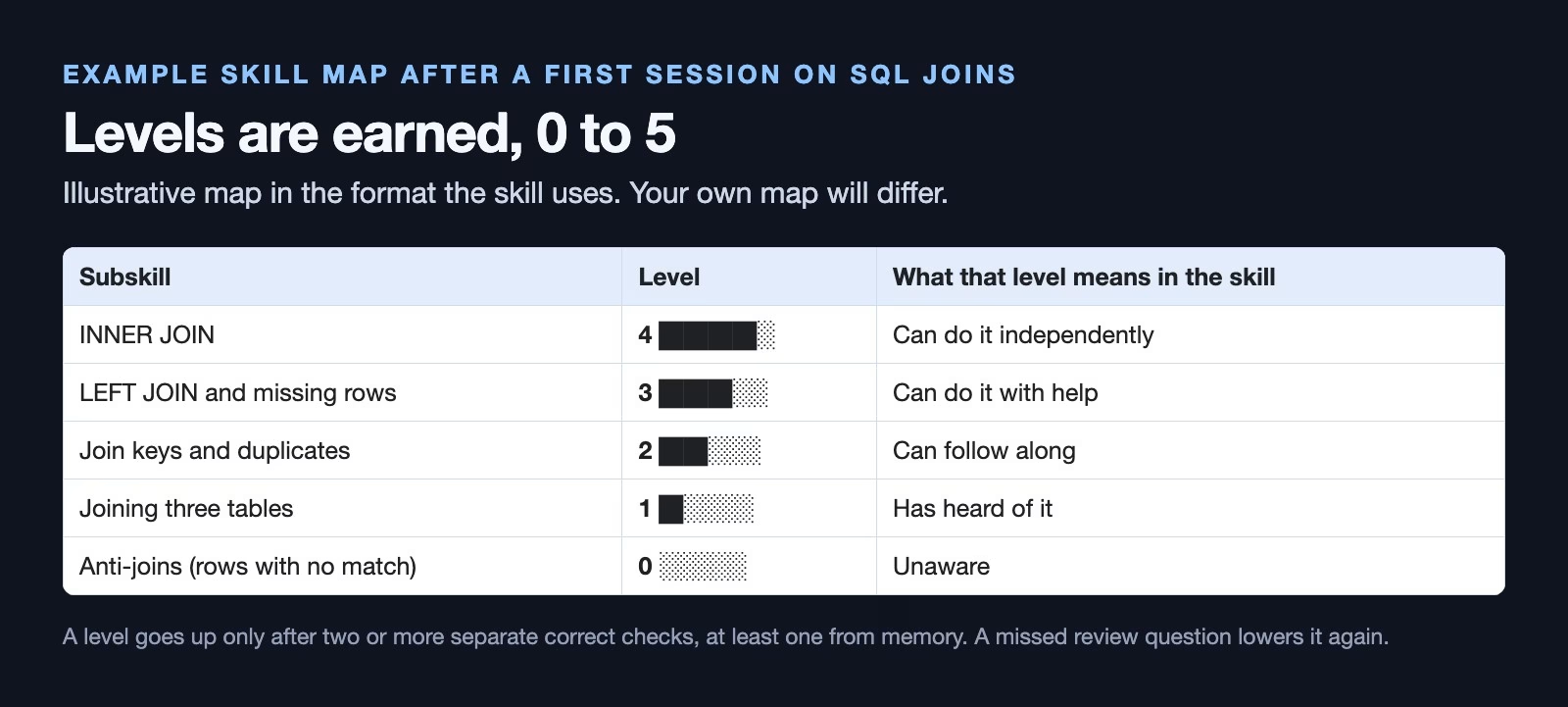
Throughout the session the tutor keeps a map of your levels, from 0 (unaware) to 5 (can teach it and handle odd cases), and shows it as small bar charts. The file says levels are “earned, not given”: a level goes up only after two or more separate correct checks, at least one from memory.
The file also tells the AI not to flatter you. Its example of a good reply to a wrong answer is a question that points at the flaw, rather than “Great try!”. If you are used to chatbots praising everything, this feels blunt at first, and it is also why it works.
How to set it up
You can use it in any chatbot by pasting the file, or install it in a coding agent that reads SKILL.md files. The project’s README, the introduction page every GitHub project opens with (checked November 15, 2026), describes both.
- ChatGPT, Claude, Gemini or any chatbot: open the skill file, copy everything below the header lines, paste it into a new chat or into the custom instructions, then add your request, such as “Teach me SQL joins.”
- Claude Code, Codex or another agent that reads skills: copy the
socratic-tutorfolder into your agent’s skills folder, then ask it to teach you something.
Pasting into a project’s custom instructions is the better option in a chatbot, because the instructions then apply to every chat in that project and you do not have to paste again each session.
Commands you can use during a session
The file lists a few commands you can type at any point. They are worth knowing before you start.
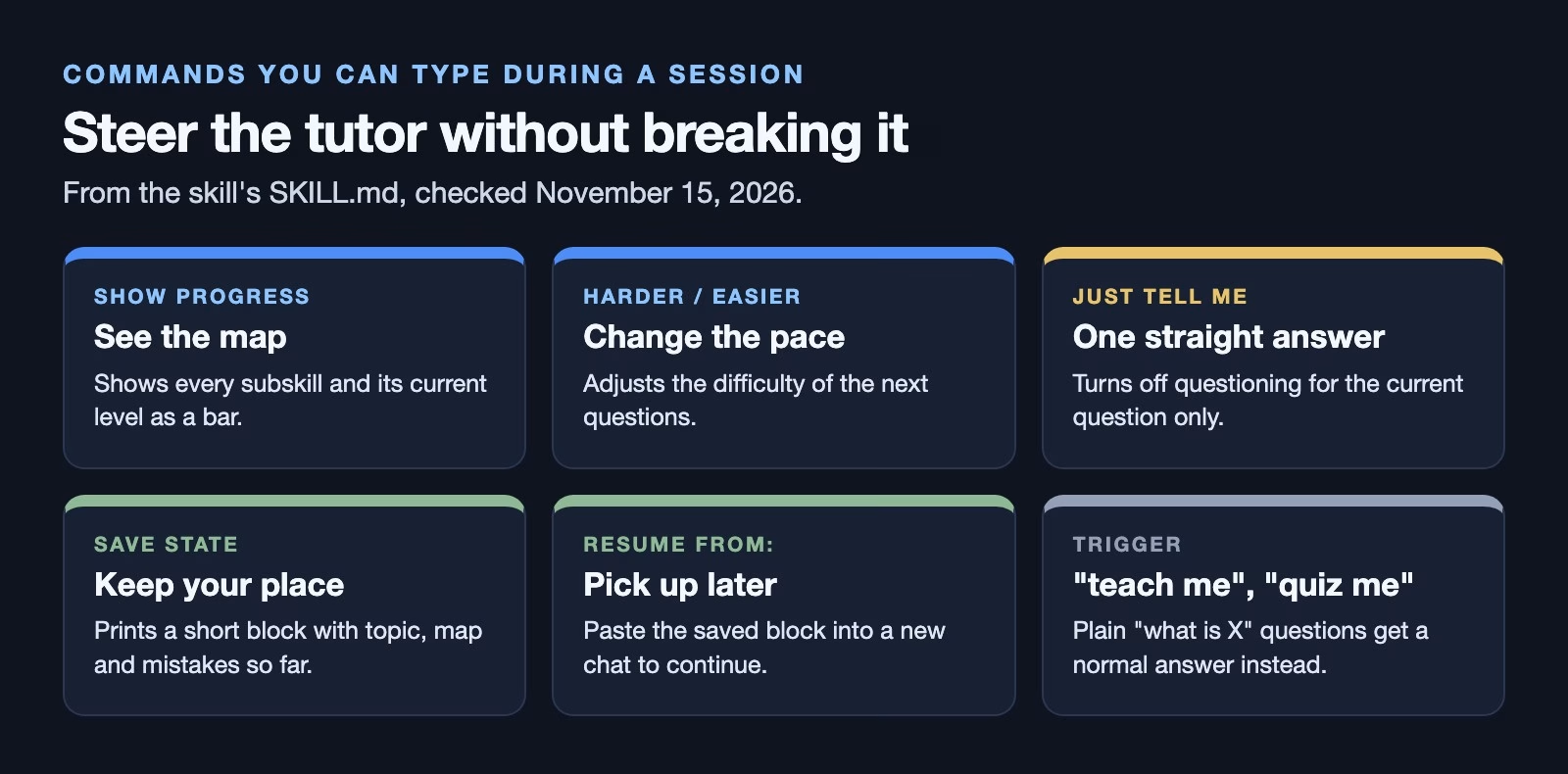
Save state matters more than it looks. A chatbot forgets your progress when you start a new chat, so ending each session with “save state” and starting the next with “resume from:” plus the saved block keeps your map and your known mistakes.
A first session on SQL joins
Twenty minutes is enough for the diagnosis and the first skill. Keep a SQL playground open so you can run what you write, because the file tells the tutor to check real output where it can, not your description of it.
- Start the session. Paste the skill, then type: “Teach me SQL joins. I can write
SELECTandWHEREqueries but get confused by joins.” - Answer the diagnosis honestly. If you do not know, say so. Guessing puts you at the wrong level and the questions will be too hard.
- Write real queries. When it asks what a query returns, run it in your playground and paste the result, rather than guessing.
- Use “harder” or “easier” if the pace is wrong after a few questions.
- End with “save state” and keep the block in a note for next time.
Here is the kind of exchange to expect after the diagnosis. The tutor asks what a LEFT JOIN from customers to orders returns for a customer with no orders. You say the customer is left out, and instead of correcting you, it asks how many rows the customers table has and how many the result has. You run both, see the numbers match, and realise the customer is still there with empty order columns. That realisation is the lesson, and it sticks better than a paragraph would have.
Where it struggles
The tutor is only as accurate as the model behind it. If it marks a correct answer wrong or states something you doubt, check it against a trusted source, such as our SQL joins tutorial, and tell it. Long sessions can also drift as the chat grows; saving state and starting a fresh chat every 30 to 40 minutes keeps it on track.
Other topics it handles well
The method is not specific to SQL. Anything with clear right and wrong answers that builds on itself suits it, because the tutor can check your work and bring back earlier pieces as review.
- Spreadsheet formulas. Lookups, conditional sums and date maths, where you can test every answer in a sheet.
- Statistics basics. Averages versus medians, percentages of percentages and what a confidence interval says, where a wrong intuition is common and worth catching.
- Python for data work. Filtering and grouping a table with pandas, where running the code shows you at once whether you were right.
- Reading a chart honestly. Axes, scales and what a trend line does and does not show, where the tutor can describe a chart and ask what you conclude.
Topics that are mostly opinion or memorised facts suit it less. A tutor that asks “why?” about a list of dates or a matter of taste has little to work with. For those, an ordinary explanation or a flash-card app does the job.
One practical tip: tell the tutor what you will use the skill for. “Teach me SQL joins so I can combine our orders and customers tables at work” gives it a reason to pick realistic examples instead of textbook ones.
Common mistakes
- Asking “what is a join?” and getting a normal answer, because the skill only starts on requests like “teach me” or “quiz me”.
- Guessing in the diagnosis, which places you too high and makes the next questions frustrating.
- Typing “just tell me” every time, which turns the tutor back into an ordinary chatbot.
- Answering from memory instead of running the query, when the point is to see real output.
- Losing progress between chats by not saving state.
- Trusting every verdict, when the model can be wrong about SQL details.
Try it this week
- Open the
SKILL.mdfile and paste it into a new ChatGPT or Claude chat, or a project’s instructions. - Type “Teach me SQL joins” and answer the diagnostic questions honestly.
- Run each query it asks about in a SQL playground before you answer.
- Stop after 20 minutes with “save state” and keep the block.
- Resume two days later and see which skills it re-tests without warning.
Quick recap
- Jane Street released a free socratic-tutor skill on November 3, 2026, under the MIT licence.
- It works by pasting one file into any chatbot, or installing it in a coding agent.
- It tests what you know first, asks one question at a time and holds back answers.
- Levels go from 0 to 5 and rise only after repeated correct answers.
- Use “save state” and “resume from:” to keep progress between chats.
- Run real queries while you learn, and check its verdicts against a trusted source.
Sources
- GitHub: janestreet/agent_skills (README) (created November 3, 2026; MIT licence; how to use the skills; checked November 15, 2026)
- socratic-tutor SKILL.md (teaching method, skill map, evaluation rules, commands; checked November 15, 2026)
- Sulat: Jane Street’s socratic tutor agent skill (November 10, 2026; context on the release)
Keep going
Same lessons in your feed
Short diagrams, hooks, and weekly tutorials on Substack, Instagram, X, and Facebook.