
Speech AI does three separate jobs: turning text into spoken audio, turning spoken audio into text, and copying a specific person’s voice. Figure out which one you actually need before you pay for a subscription or download a model.
Say you want your app to read help articles aloud, and you sign up for a voice-cloning service because its demo sounded the most human. A week later you realize you never needed anyone’s voice copied. You needed plain text-to-speech, which costs less and needs no one’s consent.
The three building blocks of speech AI
Speech AI does three different jobs. Synthesis turns written words into sound. Recognition turns sound back into words. Cloning makes generated speech sound like one real person.
To make sense of speech technology, stop thinking of audio like a text file. Audio is a physical vibration that changes constantly. When you speak, the air pressure hitting a microphone shifts tens of thousands of times every second. To turn digital text into physical sound (or the reverse), speech systems rely on three separate building blocks:
- Text-to-speech (TTS): building a sound wave from scratch. This is not just “reading words aloud.” The system turns written words into individual speech sounds. Then it maps those sounds over time. Then it renders the actual audio wave you hear. The goal is to sound human: correct vowel length, a natural rise and fall in tone, and small pauses in the right places.
- Speech-to-text (STT), also called automatic speech recognition: undoing that process. Speech-to-text runs text-to-speech in reverse. It takes in raw audio, filters out background noise, and slices the sound into overlapping snippets. Then it turns those snippets back into written words. The best systems separate what someone actually said from their accent, the room’s echo, and background hum.
- Voice cloning: copying how someone sounds, not what they said. It does not store or replay a recording. A specialized piece of software called a speaker encoder listens to a sample of someone’s voice. It turns that sample into a short list of numbers that captures how the person sounds. That list of numbers then tells a text-to-speech system how to speak brand-new sentences in that person’s voice.
Knowing these three jobs saves a lot of wasted effort. Don’t ask a speech recognition tool to make business decisions. It is only good at turning sound into text. Don’t ask a text-to-speech tool to reason about your data, either; you feed it text, and it reads that text aloud. Each tool does one specific job.
Why old computer voices sounded like a robot
Older computer voices sounded mechanical because of how they were built. The newer approach predicts a full picture of the sound first. Then it generates smooth audio from that picture. That’s why modern AI voices sound fluid instead of choppy.
To see how far speech synthesis has come, it helps to know why early computer voices sounded so unmistakably fake. For decades, the standard approach was to splice together tiny bits of real recordings. Voice actors spent weeks in soundproof rooms reading scripts that covered every possible two-sound combination in English. Engineers filed those recordings into huge databases.
When the computer needed to “speak,” it looked up the matching snippets and cut them out of the database. Then it stitched them together end to end. If a sentence needed to end on a rising, question-like tone, a signal-processing formula stretched or squeezed the recording to fake it. That stitching caused real, audible problems:
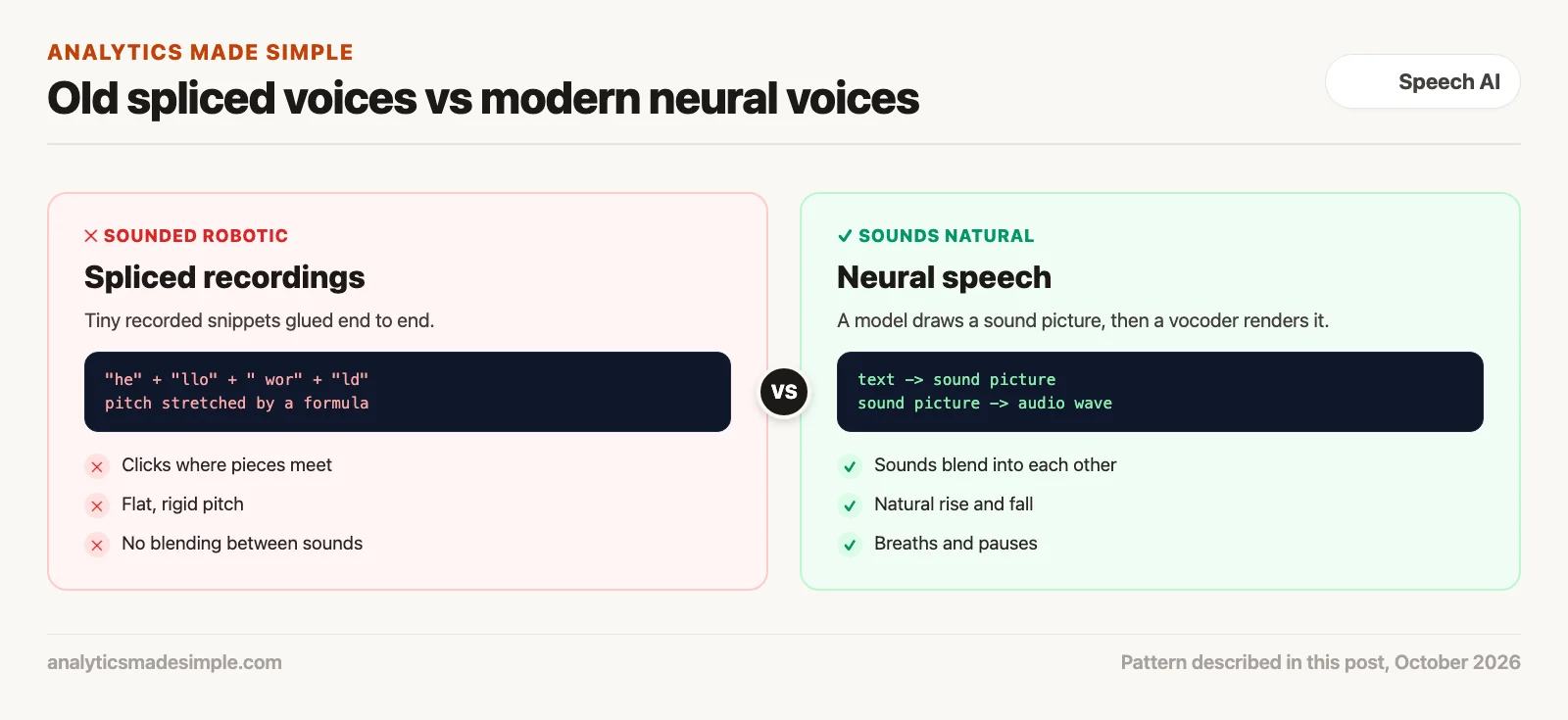
As Figure 1 shows, the problems with spliced synthesis were built into how it worked. Your tongue, lips, throat, and vocal cords never move in sudden jumps. They move in smooth, continuous curves, and each sound bleeds slightly into the next one. Say “tool” out loud. Your lips round for the “oo” sound before your tongue even finishes the “t.” Spliced systems could not fake that overlap, because each recorded snippet was frozen in isolation.
Modern speech synthesis throws out pre-recorded snippets entirely. Instead, a neural network trained on tens of thousands of hours of real conversation generates new audio from scratch. That happens in two steps:
- Step one: turn text into a sound map. The model takes your written text, breaks it into individual speech sounds, and predicts a detailed picture of frequency over time (audio engineers call this a mel-spectrogram). That picture captures the overlap between sounds, natural breathing, and the rise and fall of pitch, all at once.
- Step two: turn the sound map into audio you can hear. A second neural network, called a vocoder, reads that picture and generates the actual sound wave, sampled tens of thousands of times per second. Because this step works on continuous data rather than spliced fragments, it produces smooth transitions with none of the old clicking or metallic buzz.
How a live voice conversation with AI actually works
A real-time voice assistant runs four steps almost at once. It notices when you start and stop talking. It turns your speech into text. It gets a fast reply from the language model. Then it speaks that reply before you notice a pause.
Building a voice assistant you can talk to is much harder than building a text chatbot. In a text chat, waiting three seconds for a reply feels normal. In a spoken conversation, a three-second gap feels broken and awkward. In everyday conversation, the gap between one person finishing and the next starting is often around a fifth of a second, according to a 2009 study of ten languages. To feel natural, a voice assistant has to run all four steps in a tight loop:
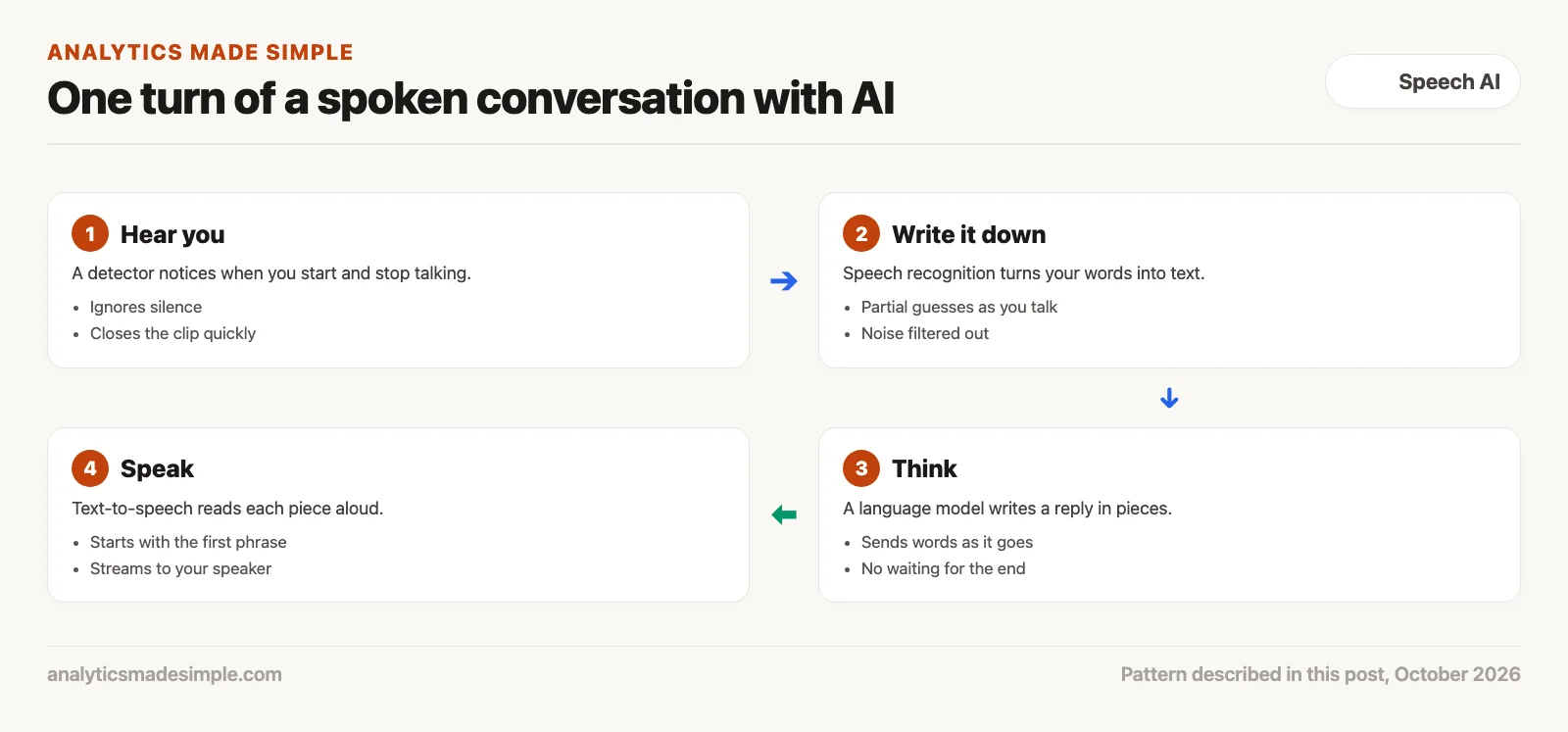
Here is what happens to your voice, step by step, in real time:
1. Catching your voice and knowing when you’re talking
Your device records raw audio continuously. Sending silence or background office noise to an expensive speech recognition service wastes both time and computing power. So a lightweight detector checks small chunks of audio, a fraction of a second at a time, and estimates whether you’re actually speaking. When it hears speech, it starts recording; once you’ve been quiet for under half a second, it closes that recording and sends it on for transcription.
2. Turning what you said into text
That recorded chunk gets converted into the same kind of frequency picture described earlier. A speech recognition model reads those pictures and turns them into words. In live setups, the system can output partial guesses as you’re still talking, so the assistant can start reacting before you finish your sentence.
3. Getting a reply from the language model
The text of what you said gets sent to the AI model that generates the reply. A key design rule here: the model has to send its words out as it generates them, rather than writing the whole reply first and only then handing it over. As the first few words arrive (say, “Sure, I can help you with that account balance.”), the system watches for a comma or period and sends that finished piece straight to the voice generator.
4. Speaking the reply back to you
The voice generator turns each finished piece of text into audio. That audio streams to your speaker or headphones as it’s made. Because the reply’s audio starts before the model has even finished thinking through the whole sentence, you hear the answer start almost instantly, so the reply can feel close to instant.
How voice cloning actually works
Cloning a voice does not mean retraining an AI model on that person’s voice. Instead, one small piece of software reads a short sample and pulls out a kind of voiceprint, then a separate system uses that voiceprint to steer normal text-to-speech toward sounding like that person.
One of the most common misunderstandings in AI is that cloning a voice requires retraining a model from scratch. Building a custom voice used to mean training on hours of clean studio recordings. Many current systems can copy a voice from a short sample instead, without changing the underlying model.
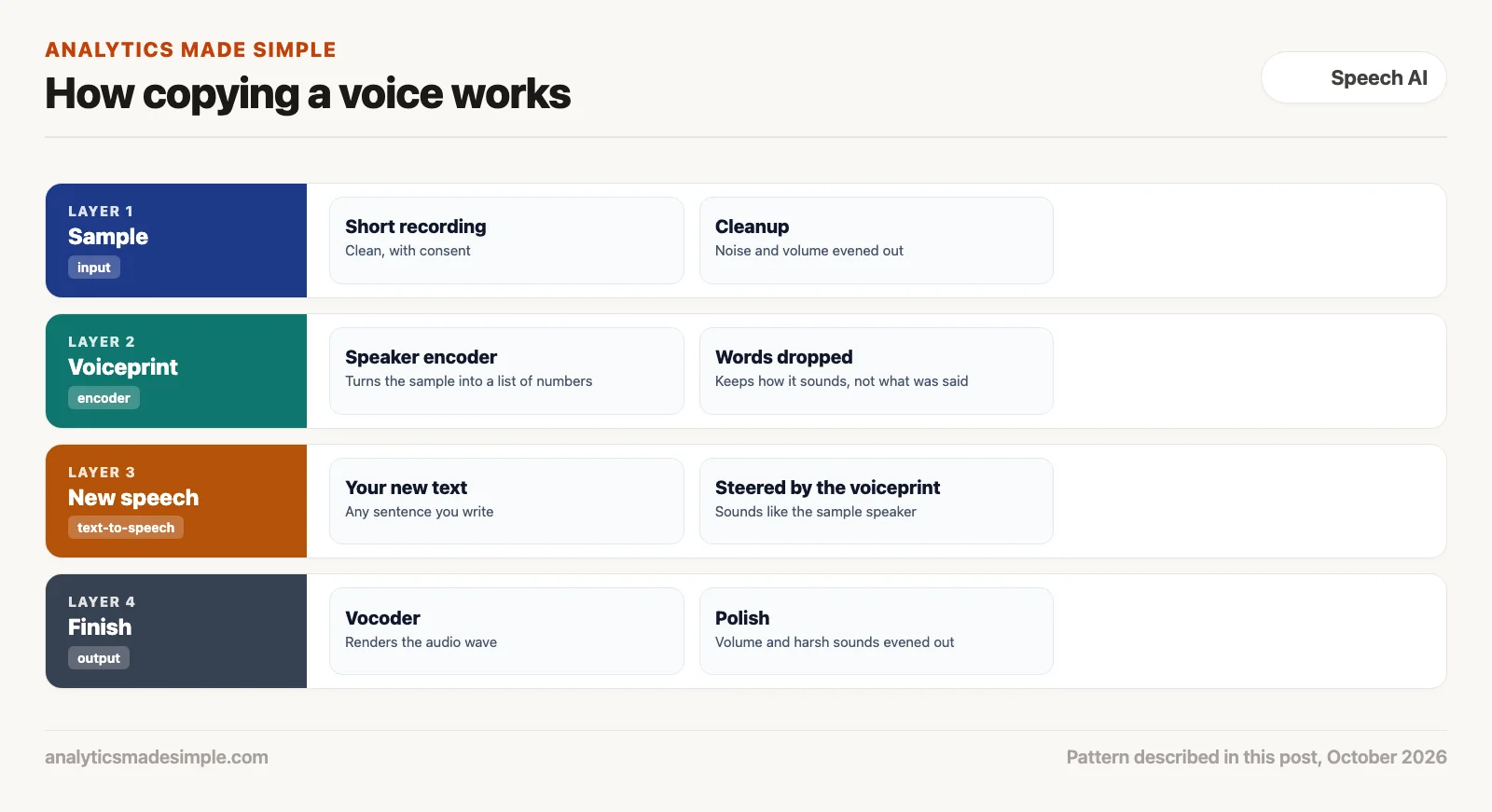
Here are the four steps shown in Figure 3 that make instant voice cloning possible:
Step 1: Cleaning up the sample recording
The system starts with a short recording of the voice you want to copy. How clean that recording is determines how good the final clone sounds. If the sample has background hum, room echo, or a clipped microphone, those flaws get baked permanently into the cloned voice. Production systems run the sample through noise-cleanup software first, level out the volume, and standardize the audio format before doing anything else.
Step 2: Turning the sample into a voiceprint
The cleaned-up audio passes through the speaker encoder, the specialized piece of software mentioned earlier. It has been trained on recordings from a very large number of people, with one goal. It keeps different people’s voices far apart in its internal math and recordings of the same person close together.
The result is a fixed list of numbers, a kind of compressed fingerprint of the voice. It drops the actual words that were spoken and keeps what makes the voice recognizable, such as its pitch and tone.
Step 3: Steering new speech with that voiceprint
When you give the system new text to speak, it compares that text against the voiceprint at every step of generating the audio. The voiceprint acts like a steering wheel, nudging the generated sound to match the reference speaker’s voice while saying entirely new words.
Step 4: Final polish and mastering
The resulting sound picture goes through the same vocoder step described earlier, producing a clean, full-quality audio wave. A final mastering pass then evens out the volume, softens harsh “s” and “sh” sounds, and caps the peak loudness so the clip is ready to publish.
Which setup fits which job
No single speech tool fits every job. Sensitive recordings usually call for a tool that runs on your own hardware. Live voice agents need a connection that stays open. Simple apps do fine with small models that need no special hardware.
Here’s a practical way to match the job to the right kind of setup:
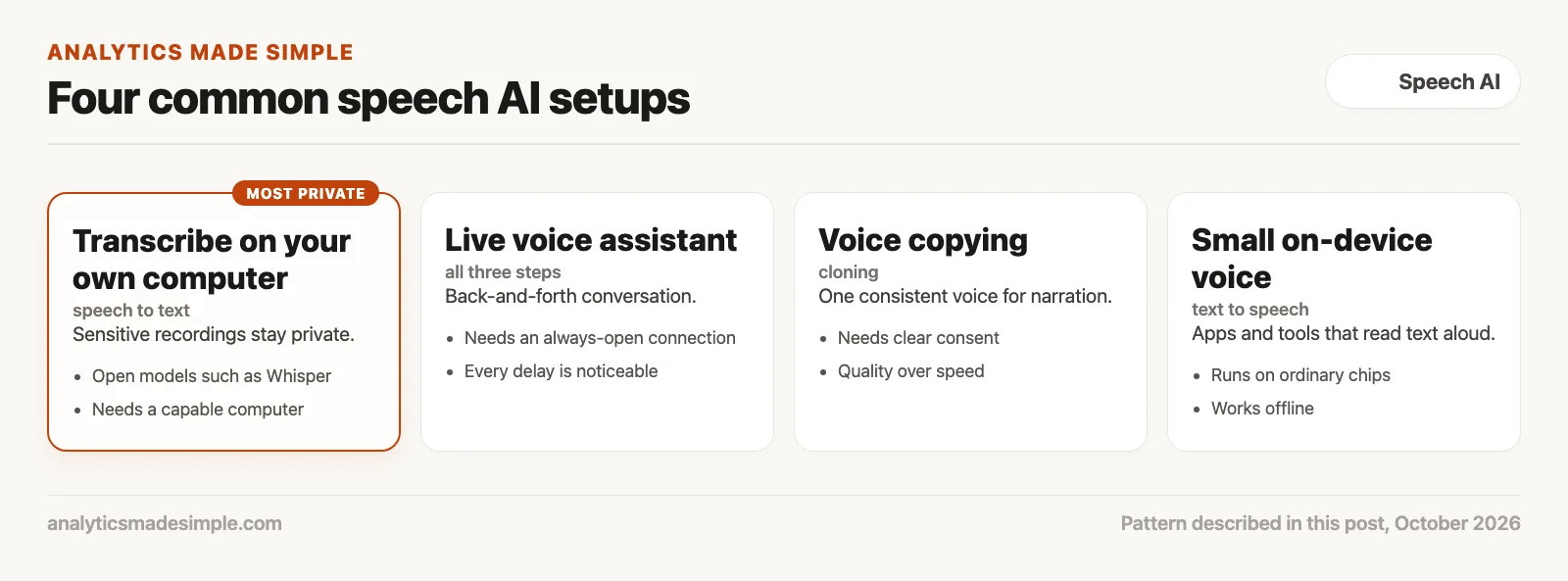
Here’s what each setup is good at, and where it runs into limits:
1. Running speech recognition on your own machine: maximum privacy
When transcribing sensitive material (hospital consultations, board meetings, legal depositions), sending audio to a third-party cloud service creates real compliance risk. Running an open speech recognition model directly on your own computer keeps every recording private: nothing ever leaves the building. Processing happens entirely on local hardware, with no audio sent over the network.
2. Live, always-open connections: for real conversations
For phone agents, live translators, or any tool you actually talk to back and forth, the normal way web pages request data (send a request, wait for the whole reply) is too slow. Opening a connection, uploading a full audio clip, waiting for a transcript, asking the language model, and then generating a reply can take a few seconds end to end. A constantly open, two-way connection instead lets audio flow in both directions continuously, which is what makes a natural back-and-forth conversation possible.
3. Voice cloning: for a consistent voice across a lot of content
For audiobooks, training videos, and podcast narration, voice cloning saves you from booking studio time each time the script changes. With one clean sample and the speaker’s consent, you can generate a lot of new narration in the same consistent voice. Because sound quality matters more than instant speed here, this kind of cloning usually runs in the background rather than live.
4. Small, on-device text-to-speech: instant and free of special hardware
Large cloud voice models are expensive to run at scale. For phone apps, desktop tools, and small embedded devices, small open-source voice models give solid quality and can run faster than real time on an ordinary processor, with no special graphics hardware.
Two numbers for checking a speech tool
When you try a speech tool, two numbers tell you a lot. Word error rate is the share of words that had to be fixed in a transcript. Real-time factor is how long processing takes compared with the length of the audio, and it needs to stay under 1.0 for live conversation, or the tool falls further behind with every sentence.
The short Python program below works out both for a made-up example. It needs nothing beyond Python, and you can paste in a real transcript and your own timings.
# Two numbers for checking a speech tool: word error rate and real-time factor.
# The transcript and timings below are made up for practice.


def word_error_rate(reference, heard):
    """Share of words that had to be changed, added, or removed to fix the transcript."""
    ref, hyp = reference.lower().split(), heard.lower().split()
    # d[i][j] = fewest edits to turn the first i reference words into the first j heard words
    d = [[i + j if i * j == 0 else 0 for j in range(len(hyp) + 1)] for i in range(len(ref) + 1)]
    for i in range(1, len(ref) + 1):
        for j in range(1, len(hyp) + 1):
            same = ref[i - 1] == hyp[j - 1]
            d[i][j] = min(d[i - 1][j] + 1, d[i][j - 1] + 1, d[i - 1][j - 1] + (0 if same else 1))
    return d[len(ref)][len(hyp)] / len(ref)


said = "please move the budget review to thursday at three"
heard = "please move the budget view to thursday at three pm"
print(f"Word error rate: {word_error_rate(said, heard):.0%}")

# Real-time factor: processing time divided by audio length. Under 1.0 keeps up with live speech.
audio_seconds, processing_seconds = 12.0, 3.0
print(f"Real-time factor: {processing_seconds / audio_seconds:.2f}")
Running it prints:
Word error rate: 22%
Real-time factor: 0.25
In plain words, the first function counts the fewest word changes needed to turn what the tool heard into what was actually said, then divides by the number of words said. Here the tool heard “view” instead of “review” and added “pm,” so 2 of 9 words were wrong. The second number divides 3 seconds of processing by 12 seconds of audio, giving 0.25, fast enough for live use.
Your next step this week
Write down one speech task you actually have, such as transcribing meetings, reading articles aloud, or narrating training videos. Decide which of the three jobs it is before you look at any tools. If it is voice copying, get written consent from the person whose voice it is first.
Series notes
This is Part 1 of Voice models from scratch. Next: everyday uses for speech AI.
Sources
- Alec Radford and others, Robust Speech Recognition via Large-Scale Weak Supervision (Whisper), OpenAI, 2022.
- Jungil Kong and others, HiFi-GAN: Generative Adversarial Networks for Efficient and High Fidelity Speech Synthesis, NeurIPS 2020.
- Sang-gil Lee and others, BigVGAN: A Universal Neural Vocoder with Large-Scale Training, 2022.
- Yushen Chen and others, F5-TTS: A Fairytaler that Fakes Fluent and Faithful Speech with Flow Matching, 2024.
- Silero, Silero VAD, an open-source voice activity detector.
- Tanya Stivers and others, Universals and cultural variation in turn-taking in conversation, PNAS, 2009.
Keep going
Same lessons in your feed
Short diagrams, hooks, and weekly tutorials on Substack, Instagram, X, and Facebook.



