When you ask an AI to help with a big project, give it only the few files and lines that matter, not the whole project. The AI can only read so much at once. Pile everything in, and the part that matters gets buried, the answer gets worse, and the bill goes up. Choosing what to include is called context packing.
Imagine you are fixing a failed card payment, and your AI helper can only read a short stack of pages. Hand it every file in the project, and the page that shows the bad charge gets buried. Hand it the search result and the twenty lines around the error, and it can see the problem.
Why pasting the whole project backfires
Imagine you use an AI agent, a tool that makes changes on its own, to update a large, shared codebase. The first version of your setup is simple: for every change, it finds every related file and pastes all of it into the prompt. On a small demo project with four files, it works beautifully.
Then you point it at the real codebase. A small change touches twenty shared files, and within a few turns the prompt holds tens of thousands of tokens (small chunks of text, often part of a word). Each run costs far more than you expected. Worse, the model starts inventing function details that do not exist, and it forgets its own instructions, because they are buried under pages of code it did not need.
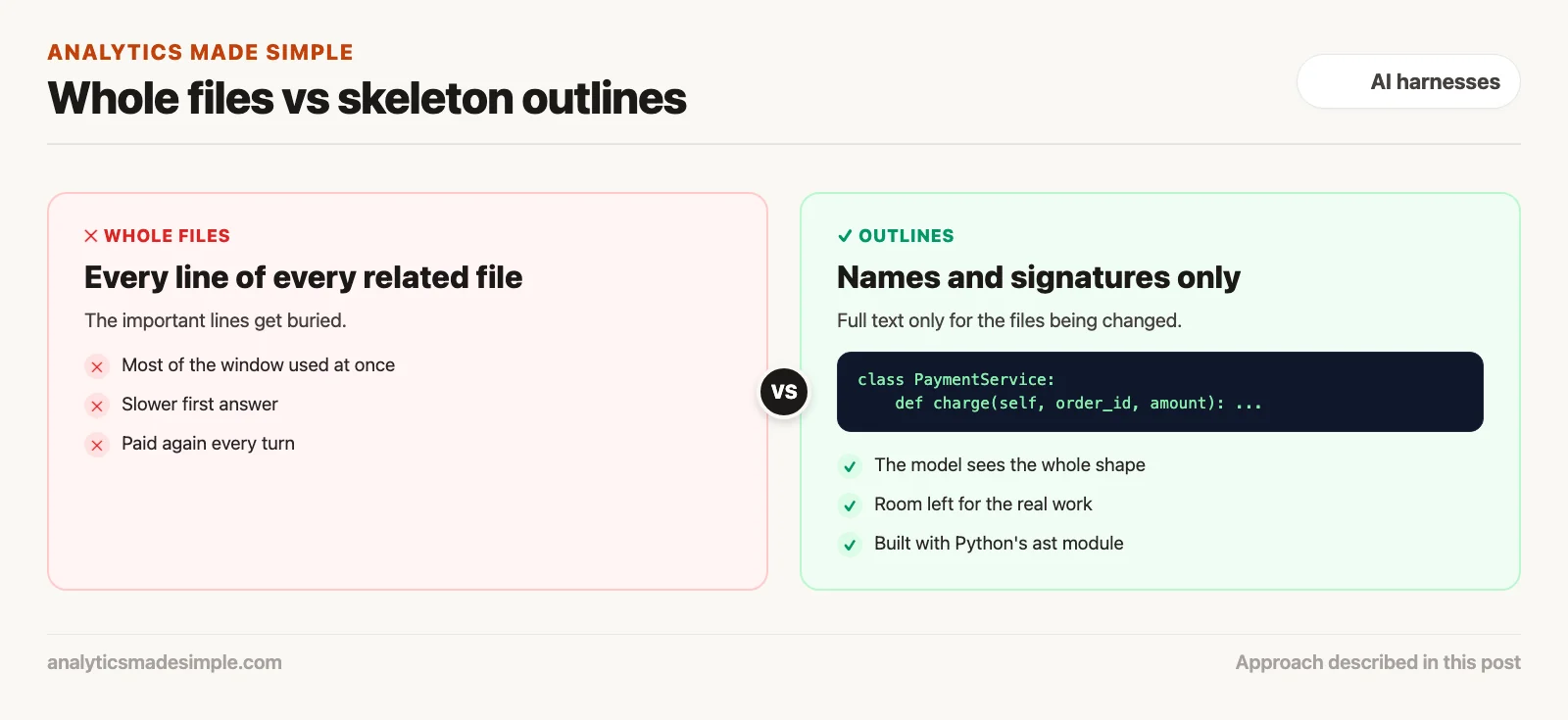
The fix is to send less, but better. Instead of whole files, give the agent a search tool and an outline of the code: the names of classes and functions and what they accept. Load the full text of a function only when that function is the one being changed. Filter test results down to the lines that describe a real failure.
Prompts get much smaller, answers come faster, and the agent stops losing track. The lesson: managing context is prompt writing applied to your whole system. Measure the change on your own project, because the savings depend on how your code is laid out.
Why a bigger context window does not mean better reasoning
Model vendors love to advertise huge context windows, a million or two million tokens at a time. Those big windows really do help with tasks like answering a question buried in a single long document. Coding agents run into a very different set of problems.
Inside the model, every new word it writes gets compared against every earlier word already in the prompt. With a hundred thousand tokens sitting in context, that is a hundred thousand comparisons for every single new token. As the prompt grows, three problems tend to show up:
- Instructions in the middle get lost. Studies on how models pay attention keep finding the same pattern: attention is strongest at the very start and the very end of a prompt. A rule placed in the middle of a huge prompt is much more likely to get missed.
- Everything gets slower. Even with caching tricks, a large prompt takes noticeably longer before the model produces its first word. That makes a coding tool feel sluggish instead of quick.
- The budget runs out fast. In a multi-turn agent loop, every token sitting in the prompt gets billed again on every single turn. A ten-turn loop carrying fifty thousand tokens adds up to half a million billed tokens, which makes routine work expensive fast.
Four ways to feed code into the model
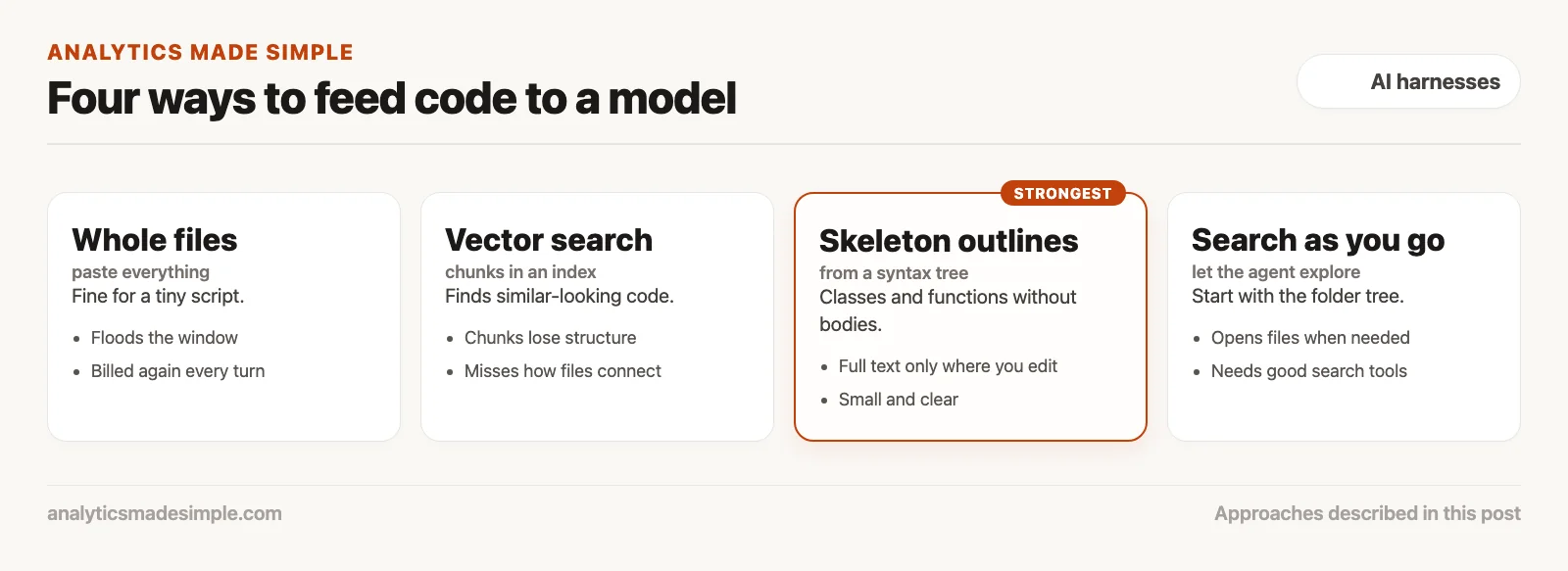
To give an agent the right context without drowning its attention, harnesses tend to use one of four approaches.
1. Dumping whole files in
The simplest option: read full source files off disk and paste them straight into the conversation. It works fine for a tiny script. It quickly becomes too messy once files carry thousands of lines of boilerplate, internal helper functions, and tests.
2. Vector search over chunks
Split code into fixed-size chunks, say fifty lines each, and store them in a searchable index, a technique often called RAG (RAG stands for retrieval-augmented generation). When someone asks a question, the harness pulls back the chunks that look most similar to the question. It works well for plain-language documents. It often fails on real code, though, because it slices functions apart at random points and has no sense of how one piece of code depends on another.
3. Skeleton outlines from a syntax tree
The strongest option available today. It works by parsing code into a syntax tree, a structured map of the code’s actual grammar. The harness can then strip out function bodies while keeping class structures, method names, argument types, and docstrings intact. The model gets a compact blueprint of the whole codebase using less than a tenth of the tokens a full-file dump would need.
4. Searching for files as you go
Instead of loading anything up front, give the model fast search tools and simple ways to open a file, and let it explore on its own. It starts with just the directory tree and your prompt, and digs into files only as it needs them. That is close to how an experienced engineer actually explores a codebase they have never seen, and it keeps the starting token count small.
Dividing the token budget into tiers
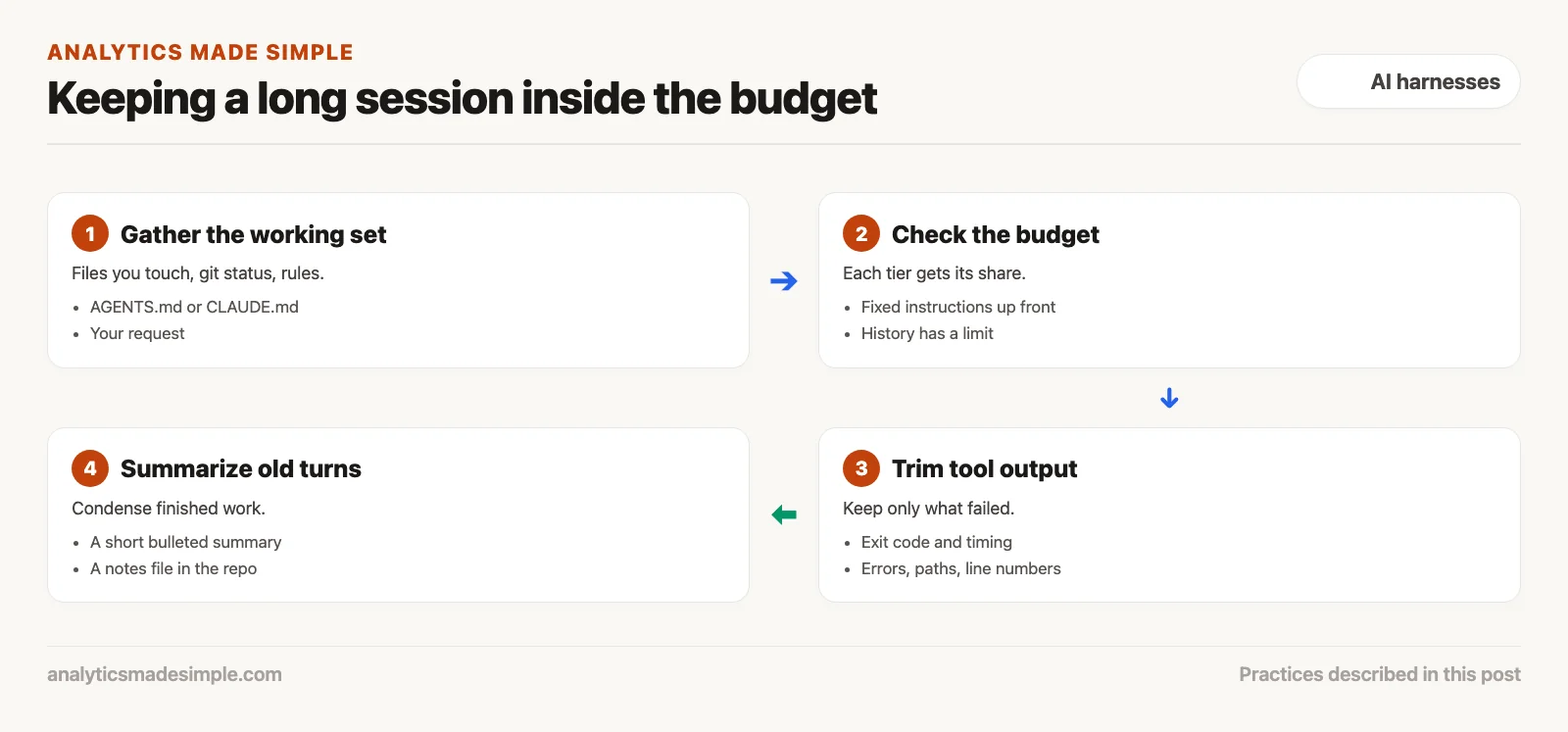
A well-built agent harness does not let whichever file loads first eat the whole context window. The context window is how much text the model can hold in mind at once. Instead, it splits the available space into fixed tiers, each with its own job.
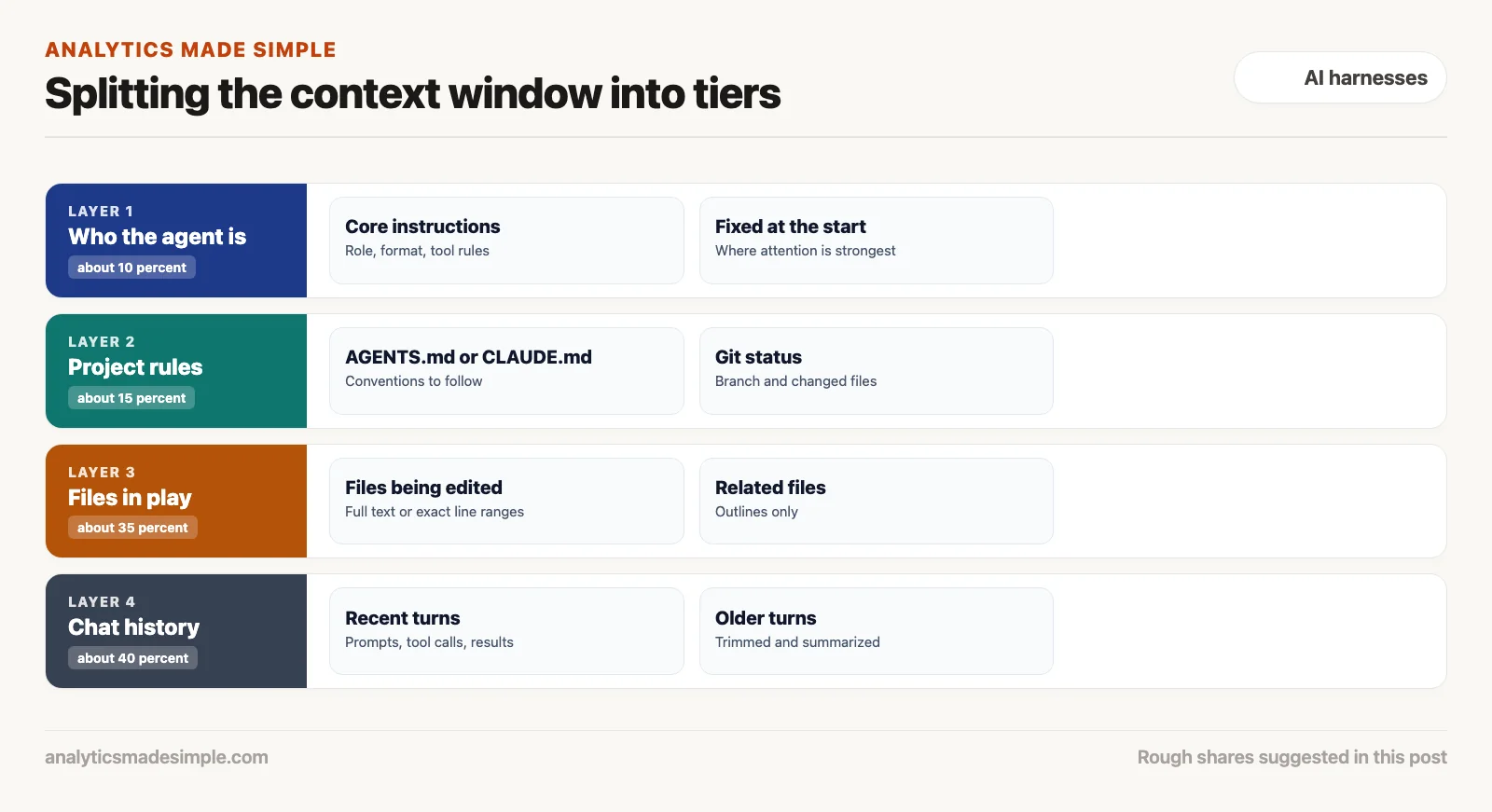
Tier 1: who the agent is, about 10 percent
The core instructions: what the agent is for, how it should format its answers, how it calls tools, and what it is not allowed to do. This part stays fixed and sits right at the start of the prompt, where the model pays the closest attention.
Tier 2: project rules and metadata, about 15 percent
Project-level instruction files (such as AGENTS.md or CLAUDE.md), the list of dependencies, and the current git status. This tells the agent right away what branch it is on and what conventions to follow, without cluttering the window with actual implementation code.
Tier 3: the files you are actually touching, about 35 percent
The code that is currently being read or edited. Files being changed get loaded in full, or in a precise line range. Related files that are not being changed only get their skeleton outline, so the model knows what they expose without spending tokens on their internals.
Tier 4: the running chat history, about 40 percent
The rolling record of your prompts, the agent’s tool calls, and what those tools returned. A separate process actively manages this tier, trimming old tool output and summarizing finished turns as the session goes on.
Trimming what a tool hands back
One of the most common reasons context balloons out of control is raw, untrimmed tool output. Run a command like pytest or npm test, and a test suite can print three thousand lines of passing test names, warnings, and progress bars. Pasting all of that straight into the context wastes thousands of tokens on noise nobody needs.
A well-built harness cleans that output up before it goes anywhere. Once a command finishes, the cleanup step:
- Pulls out the exit code and how long the command took.
- Drops the routine status lines and every test that passed.
- Keeps only the error details, file paths, and line numbers for whatever actually failed.
- Caps the total length at a fixed limit, such as 1,500 tokens, trimming the middle while keeping the final error summary intact.
By handing the model only what it can actually act on, the harness keeps the whole feedback loop tight, focused, and affordable.
Keeping memory straight across a long session
Once a task runs twenty turns deep, keeping the full word-for-word history around simply is not realistic. To stay coherent over a long session, harnesses lean on two strategies that work together.
Rolling summaries. As the chat nears its budget limit, a background process condenses the oldest turns into a short, bulleted summary. Finished actions, such as “diagnosed a null pointer in auth.py” or “updated the test assertions in test_auth.py,” stay as plain facts, while the back-and-forth chatter that led there gets dropped.
A persistent notes file. More advanced harnesses keep a running notes file inside the repository (the project folder that keeps every past version of every file) itself, something like MEMORY.md or an internal state file. The agent writes its key findings, decisions, and remaining to-dos into that file as it works. Because that file gets read back in on every turn, the agent never loses track of the original goal, even after most of the earlier chat has been summarized away.
Building a skeleton generator in plain Python
To see how surgical context extraction actually works inside tools like Aider or Claude Code, it helps to look at how a syntax-tree parser reads code. Plain regular expressions break down fast. They get confused by a brace inside a string, or by a function that spans many lines. A syntax-tree parser instead reads the source code into a proper tree structure in memory. The harness then walks that tree looking for class definitions, method names, argument types, and docstrings. It skips over the loops and local variables sitting inside each function body.
Here is a small Python example that pulls a lightweight outline of a file’s classes and functions, using Python’s own built-in syntax parser:
import ast

def generate_ast_skeleton(source_code: str) -> str:
    """Extract class and function signatures while stripping implementation bodies."""
    tree = ast.parse(source_code)
    skeleton_lines = []

    for node in tree.body:
        if isinstance(node, ast.ClassDef):
            skeleton_lines.append(f"class {node.name}:")
            # Extract docstring if present
            doc = ast.get_docstring(node)
            if doc:
                skeleton_lines.append(f'    """{doc.strip()}"""')
            for item in node.body:
                if isinstance(item, ast.FunctionDef):
                    args = [a.arg for a in item.args.args]
                    skeleton_lines.append(f"    def {item.name}({', '.join(args)}): ...")
        elif isinstance(node, ast.FunctionDef):
            args = [a.arg for a in node.args.args]
            skeleton_lines.append(f"def {node.name}({', '.join(args)}): ...")

    return "\n".join(skeleton_lines)

# Example usage:
# A 500-line service file with 12 methods is condensed into 25 lines of clear interface contracts.
Feed that skeleton into the context window, and the model immediately sees the module’s whole public shape: what classes exist, what methods each one exposes, and what arguments they take. It never spends twenty thousand tokens on internal details it does not need yet. If one specific method actually needs to change, the model can call a targeted read tool for just that line range.
Ranking which files matter most in a huge repo
In a truly large codebase with thousands of files, even skeleton outlines can blow past the token budget if you load them all with no filter. To handle that, the strongest harnesses build what is called a repository map. It is a graph connecting every function call, class relationship, and import across the whole codebase. Each piece of code becomes a node connected to the pieces it touches.
The harness then ranks that graph with an algorithm (a fixed set of steps a program follows) similar to the one search engines use to rank web pages. Code that other files import and rely on constantly, things like core database models, login logic, and shared utility functions, ends up with a high score. When the harness builds the first prompt, it picks the highest-ranked pieces that fit inside a tight two-thousand-token budget. The model starts the task already holding a reasonably accurate map of what matters most in the codebase, before it has read a single line on its own.
What to take away, and what comes next
Context packing is what makes an agent efficient or expensive. Move away from dumping whole files, and toward skeleton outlines, a fixed token budget split into tiers, aggressive trimming of tool output, and rolling summaries, and you get a harness that can handle a huge codebase quickly, accurately, and without a runaway bill.
The next post, on checking whether the result actually worked, takes on the hardest problem in AI-assisted software work: checking the result. It looks at how to score a coding agent and build a reliable test harness, such as SWE-bench (SWE stands for software engineering, and the bench is a standard test). It covers how to catch a quiet regression, a bug where something that used to work breaks again, before it ships, and how to tell whether your agent is truly speeding you up or just adding work you have not noticed yet.
Your next step
Run your agent on one real task and look at how much text it sends each turn, if the tool shows it. Then add a short project rules file and ask it to work from outlines instead of whole files. Comparing the two runs shows how much context the agent was wasting.
Series notes
This is Part 4 of AI harnesses from scratch. Previous: tools and permissions. Next: evaluation and did it actually work.
Keep going
Same lessons in your feed
Short diagrams, hooks, and weekly tutorials on Substack, Instagram, X, and Facebook.