

Workslop is work that looks finished but falls apart when you check it. It has wrong numbers, soft claims, and polish with no proof behind it. The remedy is a short quality loop that you run on every AI-made file before you share it, and the loop changes slightly depending on whether the file is a table, a deck, or an email.
Say an AI agent (an AI tool that takes several steps on its own to finish a task) hands you a deck that looks done. It has twelve slides, consistent fonts, a calm executive summary, and a chart that rises to the right. The vendor total is $18,400 on slide 3 and $14,200 on slide 9. Nobody notices, because the deck sounds professional.
Update, October 2, 2026: On September 16, 2026, Anthropic merged Cowork into the main Claude app, rolling out to Pro and Max first and to other plans later. What Cowork could do, such as working through a folder of files, is now available from any Claude conversation, so you may no longer see a separate Cowork tab. The advice below still applies to that kind of task.
What workslop is
This post explains why “it sounds professional” is not a quality bar, and it walks through a five-step quality loop: skim, numbers, names, scope, and human sign-off. It shows how to check tables, decks, and email drafts without redoing the whole task by hand, and it lists the failures that show up most often in agent office work. It ends with a short drill you can run on one real deliverable this week, and with the reason you still own the send, the share, and the number on the slide.
Claude Cowork, which this series covers, is Anthropic’s tool that plans and carries out multi-step office work with files on your computer. It is the “agent” in the examples below.
Why this post exists
Workslop is fluent, wrong, polished junk. It looks ready for a meeting, and it may even follow your brand colors. Under the finish, definitions drift, numbers do not add up, names are off by one letter, or the agent answered a slightly different question than the one you asked. The danger is social, because busy people forward work that reads finished. Chat answers can be wrong too, but they often still look like drafts. Cowork deliverables look like products.
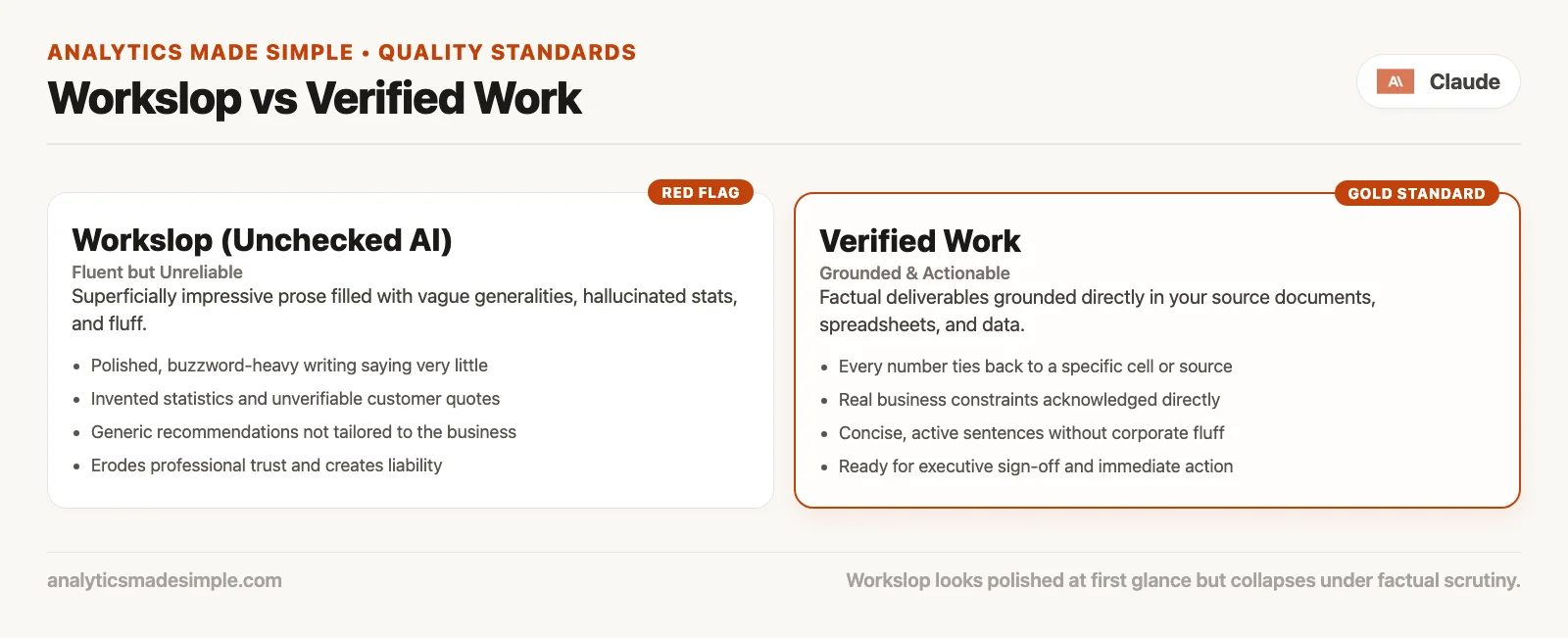
Workslop is not “AI writing with a personality,” since tone is a style choice. Workslop is a problem of truth and fitness for the job, and a blunt, correct table beats a silky wrong narrative. Analysts already know the pattern from AI-written SQL (the language used to ask databases for data), which produces confident queries that pull data at the wrong level of detail. Office agents carry the same kind of risk. If you want that SQL habit on this site, keep the guide to checking AI-written SQL nearby as a parallel skill.
Plain test: If the only review you did was “does this sound like something we would send,” you reviewed the outfit and not the body.
Why agents make workslop easier to ship
Cowork can plan, use tools, read folders, draft spreadsheets, and assemble decks across many steps. Anthropic describes it as multi-step work toward an outcome, and not as one chat bubble. Each step can introduce a small error that the next step polishes. A misread PDF page becomes a table cell, the table becomes a chart, and the chart becomes a bold claim in an email subject line. Polish adds up faster than accuracy does.
The earlier post on autonomy settings explained how often Claude asks before acting. Those settings are Manual, where Claude asks before each action, Auto, where it asks less and screens for dangerous moves, and Skip, where it skips approvals. None of them certifies your final spreadsheet. Auto’s safety screening watches for dangerous actions, such as sending data out or following hidden instructions, and it does not check whether Q2 revenue used the definition your finance team approved. Deletion protection stops permanent deletes unless you click Allow, but it will not stop a wrong number from looking beautiful. You still own the quality bar.
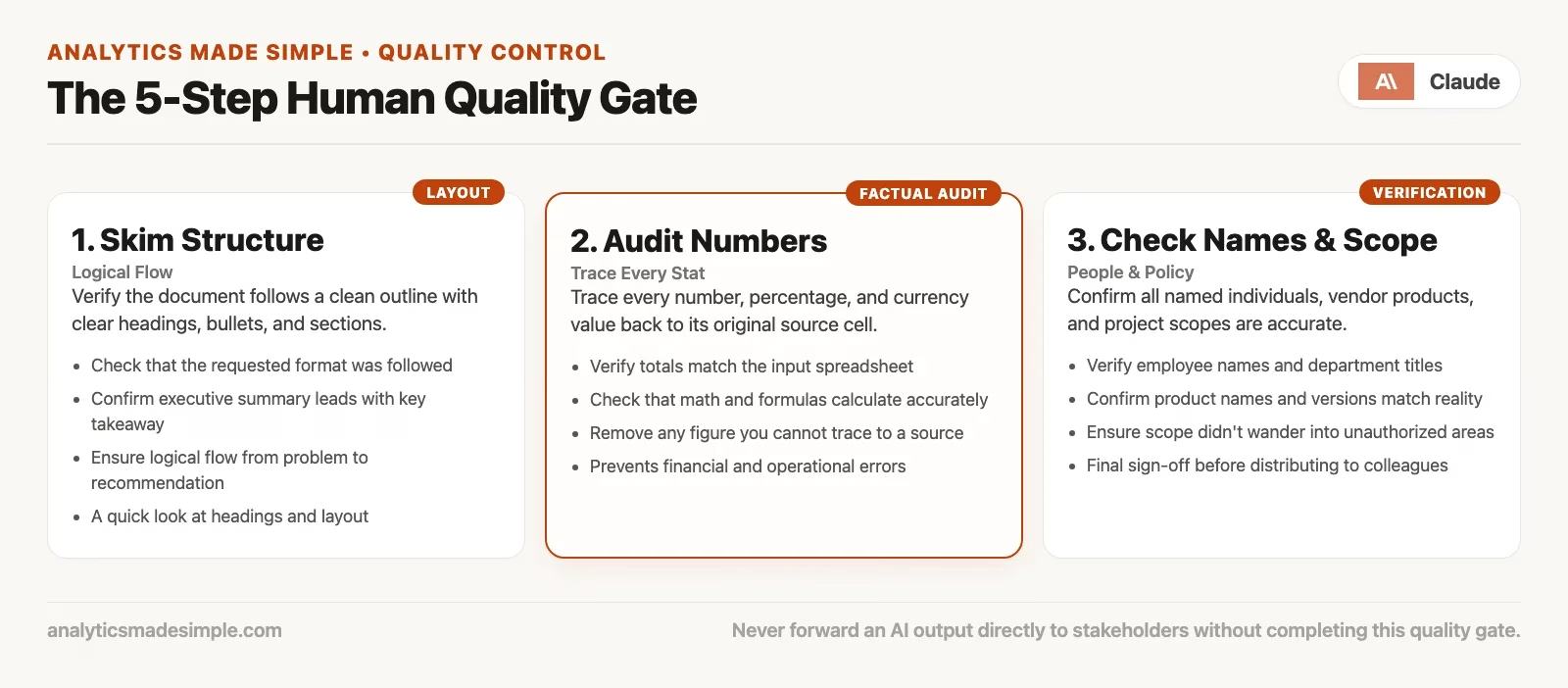
The quality loop (do not skip steps)
After Cowork finishes a deliverable, run this loop in order and keep it boring, because boring is the point. If the task was high stakes, run it before anyone else sees the file. If the task was low stakes, still run a shortened version so your standards do not rot.
1. Skim the structure
Before you read closely, map the file. For a document, look at the headings, the order of claims, and what is missing. For a spreadsheet, look at the tabs, column headers, filters, and whether formulas are still live or have been pasted in as fixed values. For a deck, read the slide titles first. Then ask whether the outline matches the goal you wrote. If you asked for a comparison of three vendors and you got a generic “market landscape,” stop and fix the goal, then re-run or narrow the task. Do not polish the wrong essay.
Skimming also catches empty sections that look full, such as a slide titled Risks with three vague bullets, a “methodology” paragraph that names no data source, or an appendix that is only a logo. These structure failures are cheap to catch if you refuse to be hypnotized by the layout.
2. Check the numbers
Pick the numbers that would change a decision, such as totals, rates, changes over time, rankings, and “as of” dates. Recompute at least three of them from the source files Claude used, or from the official source system you trust. Do not only re-read the agent’s summary of the numbers. Open the cells, open the PDF page, and open the export.
Here is a small reconciling habit that can save your reputation.
NUMBER_CHECK (use on any agent table)
1. Row count of source filter vs row count in summary
2. Sum of amount column vs dashboard / warehouse total for same filter
3. One rate = numerator / denominator with the definition written in plain English
4. As-of date and timezone if the metric moves daily
5. Currency and units (thousands? millions? local currency?)

If any fail: quarantine the file. Do not “fix the narrative” first.
If Claude built formulas, spot-check that they still point at the right ranges after sorting and filtering. If Claude pasted values, ask whether the sheet can be refreshed later. A static paste is fine for a one-off pack if it is labeled, but a silent paste that looks live is fuel for workslop.
3. Check the names
Names are a check that embarrasses people when skipped and takes little effort to do. Look at people, companies, product names, legal entities, region labels, and metric names, and compare them with your customer database, your contracts, or the source folder. Watch for near-misses such as one-letter swaps, old brand names, internal codenames that should never leave the building, and “Acme” placeholders that somehow survived into the external draft.
Also check that metric names match metric math. If the column says “gross margin” and the formula is revenue minus a partial set of costs, rename it or recompute it. Wrong labels are how workslop travels, because the number may be a real calculation of something else.
4. Check the scope
Scope failures are classic agent mistakes. You asked for a one-page table, and you received a twelve-slide strategy, three new folders, and a draft policy nobody requested. Or it goes the other way, and you asked for full vendor coverage but two PDFs were ignored without a note. A scope review asks four questions.
- Did the agent only touch the working folder and the tools I intended, following the habits from the earlier post on autonomy settings?
- Did every required input appear in the output, or in an explicit “not found” note?
- Did extra recommendations or actions appear that I did not ask the agent to carry out?
- Is any outgoing message still a draft, or did a connector (a link between Cowork and another app such as your mail) do something live?
If the scope grew, decide on purpose whether to accept the extra work, which is rare, delete it, or re-run with clearer limits on what is out of bounds. Do not ship the bonus novel just because the fonts match.
5. Human sign-off
Sign-off means a person accepts responsibility, and it is not a rubber-stamp emoji in chat. For low stakes, that person can be you after the four checks above. For customer-facing, board-facing, or regulated content, add a second pair of eyes, the way you would for a junior colleague’s work. Write one sentence that says what you verified, against which source, and on which date. That sentence is your audit trail when someone asks later, “who approved this?”
Anthropic’s official safety guidance for Cowork says that safeguards reduce risk and that users remain responsible for how they use the product. Sign-off is how that responsibility becomes something you actually do instead of something you only agree with.
Quality loop by artifact type
| Artifact | Skim | Numbers | Names | Scope | Sign-off cue |
|---|---|---|---|---|---|
| Comparison table | Columns match the ask | Recompute 3 cells from PDFs | Vendor legal names | All files included or noted missing | “Checked against folder X on date Y” |
| Spreadsheet model | Tabs and headers | Totals, rates, formula ranges | Metric labels vs math | No hidden sheets full of secrets | Owner initials on a README tab |
| Slide deck | Titles-only story | Every chart’s source cell | Customer and product names | No extra strategy chapter | Presenter agrees to defend each claim |
| Email / message draft | To, CC, subject, ask | Any figure in the body | Recipient names and titles | Still unsent; no surprise attaches | Human hits send after checks |
| Research brief | Claims vs sections | Cited figures openable | Source titles and orgs | Untrusted web limited; no live actions | Reader can re-find sources |
Worked example: the “finished” vendor pack
Suppose Cowork returns vendor_compare.xlsx and finance_note.docx from the practice folder you set up in the earlier post on autonomy settings. You run the loop.
Skim: The sheet has columns for Price, Term, Support hours, and Notes. The document has three short paragraphs and a “recommended next step.” The structure matches what you asked for, which is a good start.
Numbers: You open vendor B’s PDF and find that support is “business hours Eastern time,” not “24/7” as the sheet claims. The price band for vendor C is the list price, and not the discounted band in the appendix. Two cells fail, so you keep both files out of email.
Names: Vendor A’s legal name is wrong by one word, because it is the old brand. That is an easy fix, but it would be embarrassing if finance already knew them.
Scope: The note says “I can send this to the vendor reps this afternoon.” You never asked for outreach. You delete that paragraph and confirm that no connector sent anything.
Sign-off: You correct the two cells and the legal name, and you add a one-line source note, such as “cells B2:B4 checked against the PDFs in the vendors folder, 2026-07-24.” Only then do you forward the pack to finance. That is not distrust of Claude, but simply how adults ship numbers.
A review card you can paste into instructions
You can put part of the quality bar into Cowork’s global or folder instructions, so that drafts arrive closer to usable. Instructions do not replace the loop, but they shorten the distance to it.
OUTPUT_QUALITY (folder instructions sketch)
- Prefer tables with explicit units and as-of dates
- If a source is missing or unreadable, say so in a Gaps section
- Do not invent competitor prices or customer names
- Keep recommendations separate from facts
- Do not send messages or create calendar events unless I explicitly ask
- End with: Sources used (file names) and Checks I could not complete
That last line is the most valuable one. Forcing the agent to list what it could not verify gives you a head start on step 2 of the loop.
Workslop smells (checklist)
- No sources: confident claims with no file names, links, or system references.
- Suspiciously round numbers: every number ends in 0 or 5 without any match to the raw data.
- Definition drift: the same word carries new math, with no footnote.
- Mixed time references: a mix of years, quarters, and “recently” with no as-of dates.
- Extras you did not ask for: extra folders, policies, or outreach plans you did not order.
- Leftover placeholders: leftover text such as TODO, Acme, sample names, lorem ipsum, or “insert metric.”
- A chart without a table: a pretty picture with no underlying cells that you can audit.
- No gaps admitted: no gaps section at all on a messy source folder.
- Action already taken: “I went ahead and emailed…” when you asked for a draft.
If two or more smells show up, slow down. Switch to Manual mode for the fix pass, and do not stack more autonomy on a broken file.
Autonomy and quality are one system
| Situation | Permission mode | Quality loop intensity |
|---|---|---|
| Practice folder, reversible, no send | Auto after a few Manual wins | Full loop once; sample checks next time |
| Customer or executive facing | Manual, or Auto with close watching | Full loop plus a second human when stakes are high |
| Untrusted web or inbox inputs | Manual; limit write tools | Full loop; treat content as hostile until proven otherwise |
| Scheduled task | Simple jobs only | Review every run at first; then sample, with alerts for drift |
| Skip all approvals | Rare, fully trusted only | Full loop before anything leaves your machine |
Notice the pattern. As permission friction drops, review effort should rise, or at least stay honest. Skipping approvals and only skimming the result is how workslop becomes part of a team’s culture.
Team habits that keep workslop out of Slack
Individuals can run the loop alone. Teams need shared rules, so that the fastest person does not set the quality floor.
- Label agent drafts. Put
DRAFT-agentin the filename or the first line until someone signs off. - Keep raw agent output out of decision channels. Those channels should receive only signed-off files.
- Share sources with claims. A deck without a data tab is incomplete, not minimalist.
- Praise catches, not only speed. If the only hero story is “Claude did it in four minutes,” you will get four-minute fiction.
- Respect your organization’s controls. Team and Enterprise plans may require approval for connectors and admin policy. That is quality infrastructure, not red tape for its own sake.
A later post in this series covers team and enterprise notes in more depth, but the cultural rule starts here: speed is allowed, and unverified speed is not a virtue.
Common mistakes
- Reviewing only the chat summary. Summaries are stories, so open the files.
- Checking tone instead of numbers. Friendly prose can hide bad math.
- Fixing workslop by asking for “a more professional version.” Polish without verification is more workslop.
- Assuming Auto mode validated the business logic. Safety screening is not the same as certifying a metric.
- Skipping sign-off because the schedule ran overnight. A job that runs unattended in production still needs someone to accept its result.
- Letting connectors send drafts. A draft means a human presses send, unless you deliberately automated sending with open eyes.
- Comparing agents only on speed. Measure the hours of rework and the errors they catch, too.
You own the action (and the Send button)
Cowork can draft the email, and you own the send. Cowork can build the model, and you own the number in the staff meeting. Cowork can assemble research, and you own what the company believes afterward. Anthropic’s safety materials stress layered defenses, and they still put responsibility on the user for careful setup and use. Quality control is how that responsibility shows up on a Tuesday afternoon, when the file looks fine and you are late for another call.
If that feels slower than the demo videos, that is a good sign. Demos aim for wonder, while work aims for not lying to your future self.
Quick recap
- Workslop: fluent, wrong, polished junk that travels because it looks done.
- The loop: skim structure → check numbers → check names → check scope → human sign-off.
- Numbers: recompute the cells that drive decisions from the sources, and set the file aside if anything does not match.
- Names: people, vendors, and metric labels are fast to check and embarrassing to get wrong.
- Scope: no surprise actions, no missing inputs, and no bonus novels.
- Sign-off: a person accepts responsibility, and you write down what you verified.
- Autonomy: less permission friction should never mean lower review standards.
- Ownership: safeguards help, but you still own sends, shares, and decisions based on the work.
The next post covers team and enterprise notes: how organization settings, connector policies, and shared norms change the same habits at company scale. For the broader map of Claude products, see the Claude product map series. Everyday chat skills still live in Learn Claude from scratch. You can find more paths on the Learn hub.
Practice this week
- Pick one real Cowork deliverable, or a chat-with-files result, that you almost trusted, because a near miss teaches more than a made-up example.
- Run the five-step loop with a timer, and note which step found the first real issue.
- Add the
OUTPUT_QUALITYsketch to your folder or global instructions and re-run a similar task, so you can see whether the checks change the result. - Start a personal “smells” note, and add a new smell the first time it bites you.
- If you use scheduled tasks, review the last three runs on the Scheduled page with the same number checks.
Series notes
This is Part 6 of the Claude Cowork tutorial. Next: Team and enterprise notes.
Sources
Research and further reading used for this article:
- Claude Help Center: Use Claude Cowork safely (risk model, prompt injection, Auto vs Skip, monitoring patterns not every command, scheduled-task review, user responsibility)
- Claude Help Center: Get started with Claude Cowork (agentic multi-step work, permission modes, transparency and steering mid-task, scheduled tasks, professional outputs still under your control)
- Claude Help Center: Use Claude in Chrome safely (browser action risks when research or form-filling is part of the job)
- Claude Help Center: Claude in Chrome permissions guide (Manual / Auto / Skip modes for browser actions)
- Claude Help Center: Use Claude Cowork on Team and Enterprise plans (org-level connector approval controls that affect how drafts become actions)
- Analytics Made Simple: How to check AI-written SQL (parallel review habit for fluent wrong technical output)
- Analytics Made Simple: Learn (related series map on this site)
Keep going
Same lessons in your feed
Short diagrams, hooks, and weekly tutorials on Substack, Instagram, X, and Facebook.



