

“Claude” is one brand with several separate tools, and each one bills differently, touches different data, and needs different care. Name the tool you mean before you pick a plan or write a team policy. Say a teammate tells you to “use Claude.” You open the chat box and feel fine, until one coworker says they shipped a code change with Claude Code, Anthropic’s coding tool, another says Claude Cowork, its tool for working on your files, reorganized a folder of vendor PDFs, and a third forwards a bill for the API, the service that lets other programs use Claude, which is not the same as the Pro plan. Same brand, several different tools.
This post is part of the Claude product map series. If you finished Learn Claude from scratch, you already know company versus model versus product, Free versus paid plans in broad strokes, and when chat is the wrong tool. Now we map the whole product family, so you stop treating every Claude mode like one chat window with extra marketing.
Product names and plan bundling change often, so treat what follows as a dated map, first checked on Anthropic’s pages in July 2026. Re-check claude.com/pricing and the product pages before you buy anything or write policy. The public product list at that time included chat itself, Claude Code, Claude Cowork, specialized products such as Design and Science, and a developer platform with its own Console.
Update, October 2, 2026: On September 16, 2026, Anthropic merged Cowork into the main Claude app. What Cowork and Design could do is now available from any Claude conversation, rolling out to Pro and Max first and to other plans later. Anthropic also added Claude Docs and Claude Slides in beta on paid plans. The habit this post teaches still holds: say exactly which tool and which account you mean.
Why one brand needs a map
Anthropic ships models, but you almost never buy “a model” as an ordinary user. You open a product that uses one instead. That is good for the experience and bad for vocabulary, because people collapse everything into “Claude” the same way they once collapsed everything into “the cloud.”
At work, that collapse costs real money and real trust. IT may allow browser chat under a Team plan and still block AI tools that can edit local folders. Finance may approve a Pro seat and reject a surprise Console bill. An analyst may paste a CSV (a plain spreadsheet-style text file) file into chat while an engineer expects multi-file edits inside a repo. If you only know the chat box, you will either underuse the useful tools, or overtrust them in the wrong place.
The fix is boring and durable: name the mode you mean, such as Claude chat on claude.ai, Claude Code inside Visual Studio (VS) Code, Microsoft’s free code editor, Cowork on a folder on your Mac, or API calls billed through Console. (An API is the way one program asks another for data.) Once each mode has a name, plan fit, permission risk, and review habits all become things you can actually discuss.
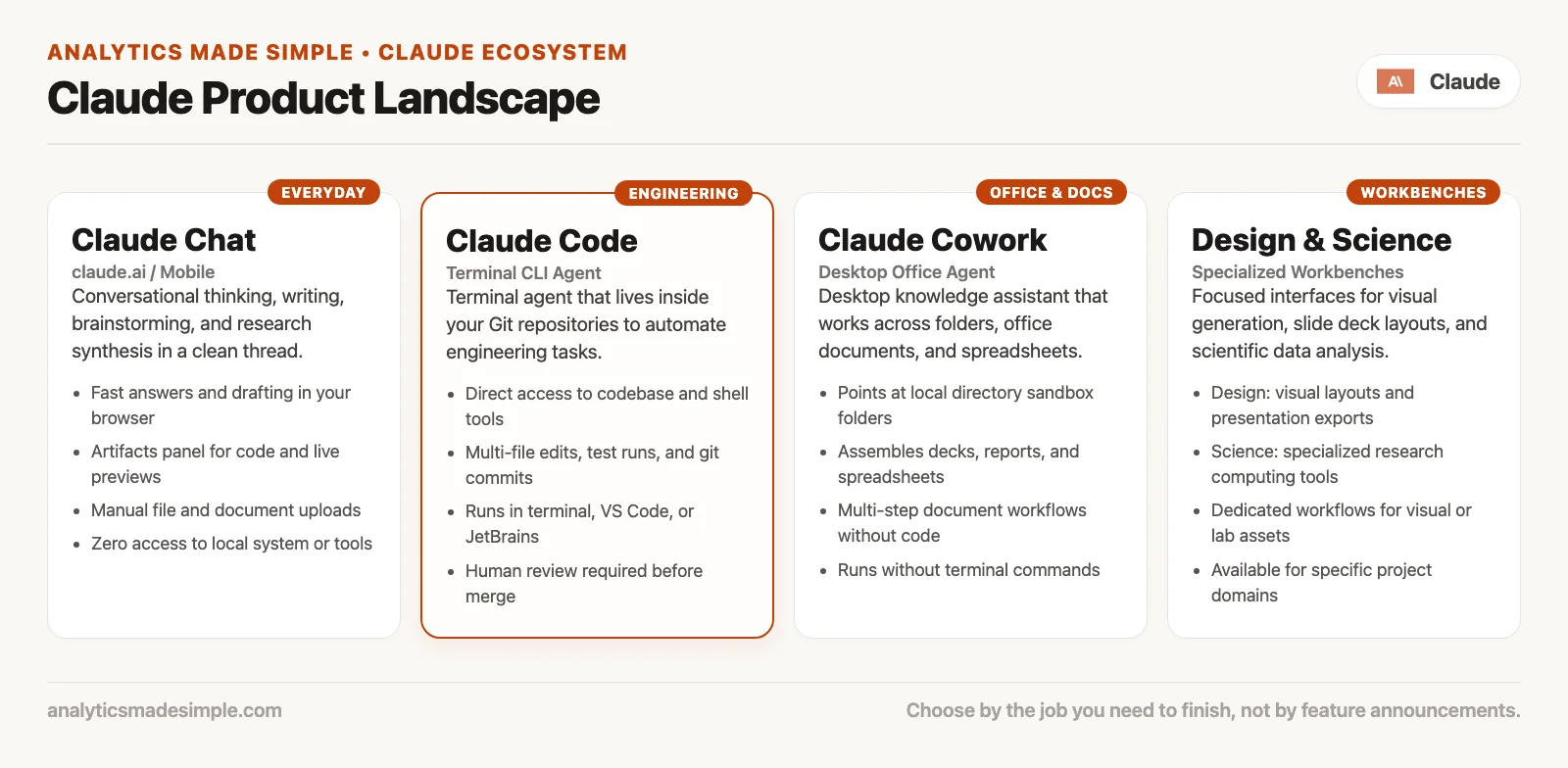
Claude chat: the one almost everyone means
When someone says they “asked Claude,” they usually mean the conversational assistant. That lives at claude.ai in the browser, in desktop apps for Mac, Windows, and Linux, and in mobile apps for iOS and Android. It is often the same account across those places. The habit stays the same too: you write a message, maybe attach a file, maybe use a project or memory feature, and Claude replies in the thread.
What chat is good at
Chat is the right tool when the unit of work is a conversation. Draft an email, critique a slide outline, or explain a policy PDF in plain terms. Turn messy notes into a checklist. Brainstorm five options, then ask for the strongest two with the risks listed. Translate jargon for a specific audience. Rewrite for tone. Let it help you think before you open a spreadsheet or a ticket.
Chat is also where a new user should start. You can learn prompting, verification, and “paste less private data” habits without giving an AI tool that acts on its own write access to a repo or a folder of contracts. That order matters more than any feature comparison chart.
What chat is bad at, or awkward for
Chat is awkward when the unit of work is a tree of files that has to stay consistent. You can paste snippets, but you are the glue: you copy, you apply, you re-paste errors, and you hope you did not miss a second file that depends on the first. Chat is also awkward when the job is “open these twelve spreadsheets, rename them, build a deck, and leave the results on disk.” You can force that through downloads and uploads, but you will feel the friction the whole way.
Chat is still not the official record of what happened. If the answer becomes a board number, a customer commitment, or a SQL (the standard language for asking a database for data) change that hits production, a human owns the check. That rule does not change just because the product has a prettier interface now.
Web, desktop, mobile: pick by where the work lives
The web is the lowest-friction start: any machine with a browser works, IT can often allow-list the domain, and you are not installing software. Desktop is useful when you want a dedicated window, local file habits the app supports, or less browser tab chaos. Mobile is for capture and light review: dictate a thought on the train, reread a draft, or kick off something that continues elsewhere when the product supports that. Anthropic markets chat across all of these, but exact feature parity still moves, so treat mobile as “great for many tasks,” not as an identical twin of desktop.
Rule of thumb: If the job is thinking, drafting, or explaining, open chat first. If the job is changing a codebase or completing multi-step work inside files and tools you choose, you are probably looking at an agent product, not a longer chat thread.
Chat vs agents: the split that actually matters
Marketing will sell you “smarter Claude.” Your workflow should care about something else: how much it can act on its own. In chat, Claude mostly responds inside the thread. In agent-style products, Claude plans steps, uses tools, reads and writes files with your permission, and can keep going while you step away. That is a different level of risk, and it calls for a different review habit.
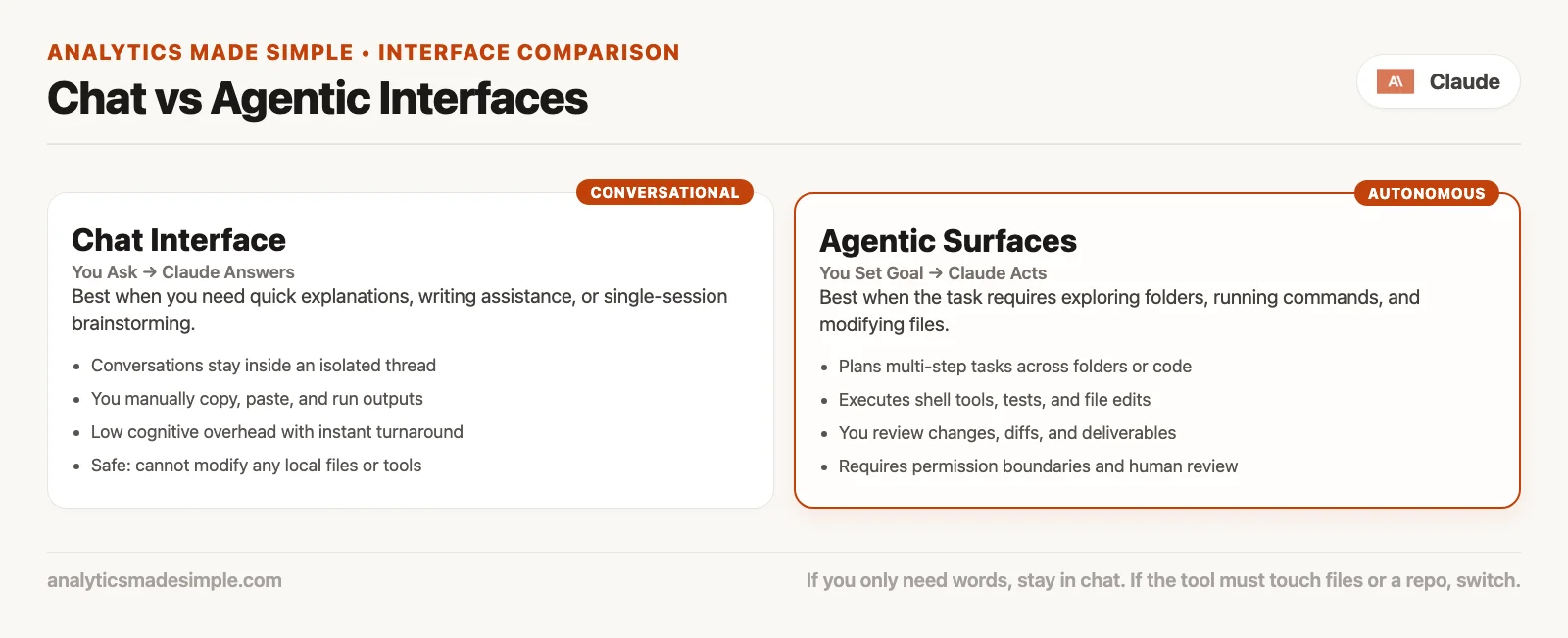
Think of chat as a sharp colleague on a video call. Think of an agent product as that same colleague sitting at your keyboard, working under rules you set. You still review the work either way. You just review outcomes and diffs now, not only paragraphs.
Two agent-shaped products cause most of the everyday confusion right now: Claude Code and Claude Cowork. Anthropic’s own product pages describe them as siblings with different primary jobs. Code is built for software work in repositories and developer tools. Cowork is built for knowledge work on folders, documents, spreadsheets, research, and office tools. Both share the same family idea of handing off a goal and reviewing the result, but they default to very different worlds.
Claude Code in one honest paragraph
Claude Code is Anthropic’s coding agent. It shows up in the terminal (the text window where you type commands), in VS Code and JetBrains, in Claude’s desktop app, on the web at claude.ai/code, in Slack integrations, and on mobile entry points Anthropic documents for coding work. Plan access commonly ties to Pro, Max, and team or enterprise seating, so verify live pricing pages, since bundling has shifted more than once. In practice, people use it to explore a repo, make multi-file edits, run tests, and open pull requests, with permission prompts before it changes anything or runs a command. A related post in this series goes deep on what it is for. The install and first-run walkthrough lives in a later Claude Code tutorial series, not here.
If you never touch a codebase yourself, you can still understand Code as “Claude with hands inside software projects.” You do not need to become a full-time engineer to benefit from that mental model when an engineer asks you to review a pull request description they drafted with Code.
Claude Cowork in one honest paragraph
Claude Cowork is the agent for knowledge work. Anthropic positions it for goals across files and tools you choose: research, decks, spreadsheets, organizing folders, and multi-step office tasks. Its own materials describe paid-plan access, Pro and above in consumer language, plus team and enterprise options, and they emphasize review, permissions, and visibility into each step. Cowork is not the coding-first product. If your job is mostly docs, analysis packs, ops admin, and “turn this pile into something I can send,” Cowork is the mode to learn next after chat. A related post in this map series is dedicated to it.
Design and Science: specialized products, not chat skins
Anthropic also lists specialized products such as Claude Design and Claude Science on claude.com. Treat them as purpose-built tools for visual design collaboration and science-oriented workflows, not as “chat with a different wallpaper.” Exact feature sets move quickly, since new launches and renames happen often in this area. For this map, the useful rule is simple: if your work is mainly design artifacts or scientific research pipelines, check whether a specialized product is available on your plan before you force everything through generic chat.
You do not need to master every specialized product on day one. You need to know they exist, so that a teammate’s “Claude did the mock” does not get misread as “someone typed into claude.ai.” Later parts of this series cover Design and Science, choosing a model, and the API in more depth. The map image above is enough for orientation now.
API Console: same models, different store
Developers and product teams call Claude through an API, short for application programming interface, which just means code talking to code instead of a person typing into a chat box. Anthropic’s developer home and docs live under its platform story, with Console login and docs on Anthropic’s developer sites, and product navigation on claude.com points at Platform or API. Billing for API usage is not the same mental model as a consumer Pro chat subscription. You pay for tokens (small chunks of text, about three-quarters of a word each) and platform usage under Console billing, rate limits, and org settings. You also take on engineering responsibilities: keys, logging, retention, evaluation, and user-facing safety.
If you only write emails and decks, you can ignore Console until IT or engineering invites you into that world. If someone asks you to “just put Claude in the product,” you are no longer in chat-map territory. You are in build territory instead. A later post in this series covers when the API path is actually worth it. For now, keep one hard line in your head: a chat seat is not the same thing as an API bill.
A chooser table for real Mondays
Use this when a meeting gets fuzzy. Pick the row that matches the job, not the hype.
| Job you actually have | Default mode | Why |
|---|---|---|
| Draft, rewrite, explain, brainstorm in a thread | Claude chat (web, desktop, or mobile) | Conversation is the unit of work; low setup |
| Explore a repo, edit many files, run tests, open a PR | Claude Code | Built for software projects and developer work |
| Multi-step office work on folders, docs, sheets, research packs | Claude Cowork | Agent for knowledge work, not coding-first |
| Design collaboration / science-specialized workflows | Design or Science (if available on your plan) | Specialized products; check current product pages |
| Ship Claude inside your app or backend | API + Console | Separate billing, keys, and engineering ownership |
| Unclear, sensitive data, or high liability | Slow down: check policy, use a chat sandbox first | Do not grant folder or repo access by default |
Two people can share the same brand subscription and still need different modes for different hours of the day. An ops lead might live in chat and Cowork. An engineer might live in Code and only open chat for prose. That is normal. Shared vocabulary beats shared habits.
Plans, limits, and what “included with” really means
Anthropic markets Claude Code and Claude Cowork as included with certain paid consumer plans, with Pro and Max named on product pages, plus team and enterprise seating stories that have changed across 2025 and 2026. Usage limits still apply either way. Agentic work, where the AI carries out several steps on its own, often burns capacity faster than a short chat, and that is not a flaw. It is just a product reality: multi-step tool use costs more than one reply does.
Before you roll out a team habit, write down three facts on one page:
- Which products each seat type includes today. Screenshot the pricing page, since dates help later.
- Whether Console API spend is allowed, who owns the keys, and what the monthly alert threshold is.
- What data is banned from personal accounts, even if a feature would make the work faster.
Skip that page, and you will learn the rules from a surprise invoice or a compliance email instead. Neither one is a fun teacher.
Worked example: four people, one phrase
Imagine a thirty-minute standup. The product manager says, “Let’s use Claude on the launch.” Without a shared map, four people walk away with four different plans.
The product manager opens claude.ai, pastes the brief, and asks for a timeline critique. That is the right mode for that slice of work.
An engineer on the team opens Claude Code against the repo, asks for a dark-mode toggle that matches existing patterns, reviews the diff, runs the tests, and opens a pull request. Right mode again.
Someone in ops points Cowork at a folder of partner PDFs and asks for a one-page risk table plus renamed files. That is the right mode too, as long as policy allows folder access.
Meanwhile, someone on the data team starts wiring an internal tool to call the Messages API through Console, because the team wants Claude inside a support console. That is the right mode only if engineering already owns that path. It is the wrong mode if what that person actually meant was “chat with me about the SQL.”
The phrase “use Claude” was incomplete on its own. The fixed version is longer, but clearer: chat for the brief, Code for the interface change, Cowork for the partner pack if legal says yes, and no API work this week unless engineering is in the thread. That one sentence saves two days of crossed wires later.
Common mix-ups that waste time
Treating Code as chat that writes code
You can paste code into chat. Claude Code is still a different product: repo context, multi-file edits, terminal and editor tools built around it, pull request workflows. If you only ever paste snippets into chat, you are not “doing Code.” You are coding with chat. That can be fine. Just call it what it is.
Treating Cowork as chat with file upload
Uploading a PDF to chat is not the same thing as granting an agent a whole folder and a goal. Permissions, how much it can do on its own, and the review loop all differ. If your company allows chat but bans local-folder agents, those are different policy lines for a real reason.
Mixing Console spend with chat seats
A Pro subscription does not automatically mean unlimited API calls for your product. Console billing can show up as a separate line on a separate invoice. Put ownership on a named human before anyone pastes an API key (a password that lets a program use a service) into a side project on a laptop.
Assuming mobile has every desktop agent feature
Mobile is excellent for many chat tasks, and for checking on agent progress when the product supports it. It is a weak place to invent your whole security policy. Start your policy from desktop and web realities, then layer mobile on top of that.
Skipping verification because the product feels agentic
More steps completed by software does not mean more truth. It just means there is more to check, not less. Diffs, numbers, names, and “did this touch the wrong folder?” still sit with you.
What stays the same across every mode
Maps can make products feel more different than they really are. A few constants still hold wherever you click.
Models still predict text under product limits. A prettier agent interface does not turn Claude into a database of your private company facts. If a fact was not in the prompt, the files you attached, the tools you connected, or reliable retrieval (looking up the relevant documents first) your company already built, treat any detailed “memory of last quarter’s numbers” with suspicion until you verify it.
Humans still own liability. A chat draft, a Code pull request, a Cowork deck, an API response inside a customer-facing tool: if it ships wrong, your name is still on the outcome. Agents increase speed and the amount of work to check. They do not absorb responsibility for it.
Data handling still matters. Personal Free and Pro accounts, team seats, and enterprise controls are different trust boxes. The paste rules from Learn Claude and from your own IT policy still apply once you open Code or Cowork. Folder access is not a free pass to drop payroll exports onto a home laptop account.
Names still change. Model labels, plan bundles, and which seat includes which agent have all moved more than once already. Date your notes, and prefer screenshots of the pricing page over tribal knowledge from a Slack thread last spring.
Frequently asked questions
Is Code simply better Claude?
No. It is a different product for software work. For writing a client email, chat is usually better. For multi-file repo changes, Code is usually better. “Better” only makes sense next to an actual job.
Do I need Cowork if I already upload files in chat?
Not always. Uploads in chat handle plenty of one-off reads. Cowork earns its keep when the job is multi-step work on folders and tools, with an agent completing work for review rather than only answering inside a thread. If your company has not approved folder agents yet, stay on chat.
Is the API just Pro with a developer skin?
No. Console billing, keys, logging, and product integration are a separate store and a separate risk model. Building “Claude into our app” is an engineering project, not a settings toggle on a chat seat.
Should every teammate install every product?
No. Start with chat fluency for everyone. Add Code for people who touch repositories. Add Cowork for people who run multi-step file and office workflows under policy. Add specialized Design or Science products only if those jobs are real for your team. Unused agent access still creates permission questions and support load for no benefit.
Series notes
Part 2 of this series is Claude Code: what it is for, covering the jobs, the places to open it, and honest non-goals for people who will actually touch a project. A related part covers Cowork. Later parts cover Design and Science, model names without hype, and the API and Console path for builders. Deeper install tutorials for Code and Cowork live in their own series once this map is clear.
If you still want everyday chat habits before you expand into other products, stay with Learn Claude from scratch. If you want broader AI workflow habits that are not tied to one vendor, the Practical AI series sits beside this track.
Quick recap
- One brand, many modes: chat, Code, Cowork, specialized products, and API Console.
- Chat is the default for conversation work on web, desktop, and mobile.
- Agent products change files and use tools under permissions; review outcomes, not only prose.
- Code is coding-first, Cowork is knowledge-work-first, and Design and Science are specialized products.
- Console billing is separate from chat seats. Name an owner before any keys appear.
- When someone says “use Claude,” answer with a mode name, not a vibe.
Try it this week
- Write down the last three times someone said “Claude” at work, and label each one with a mode: chat, Code, Cowork, specialized, or API/unknown, so you can see which product people actually mean.
- Open Claude’s product overview and pricing. Note what your actual plan includes today, and date the note.
- Pick one real task you will do tomorrow. Force yourself to choose a mode before you open a tab. If you choose chat, write one sentence on why Code or Cowork would have been worse for that task.
- If you have never used anything beyond chat, stop here for now and let this map settle in. Do not install every agent on day one “just in case.”
Sources
Official product pages and docs used for this map, checked in July 2026 (re-check before purchase or policy; product details change):
- Claude product overview: https://claude.com/product/overview
- Claude Code product page: https://claude.com/product/claude-code
- Claude Code documentation overview: https://code.claude.com/docs/en/overview
- Claude Code on the web: https://claude.ai/code
- Claude Cowork product page: https://claude.com/product/cowork
- Claude Design product page: https://claude.com/product/design
- Claude Science product page: https://claude.com/product/claude-science
- Claude download (desktop and app entry points): https://claude.com/download
- Claude plans and pricing: https://claude.com/pricing
- Claude Platform / API overview: https://claude.com/platform/api
- Developer docs home: https://platform.claude.com/docs
- Anthropic company site: https://www.anthropic.com/
- AMS Learn Claude series: https://analyticsmadesimple.com/series/learn-claude/
- AMS Practical AI series: https://analyticsmadesimple.com/series/practical-ai/
Keep going
Same lessons in your feed
Short diagrams, hooks, and weekly tutorials on Substack, Instagram, X, and Facebook.



