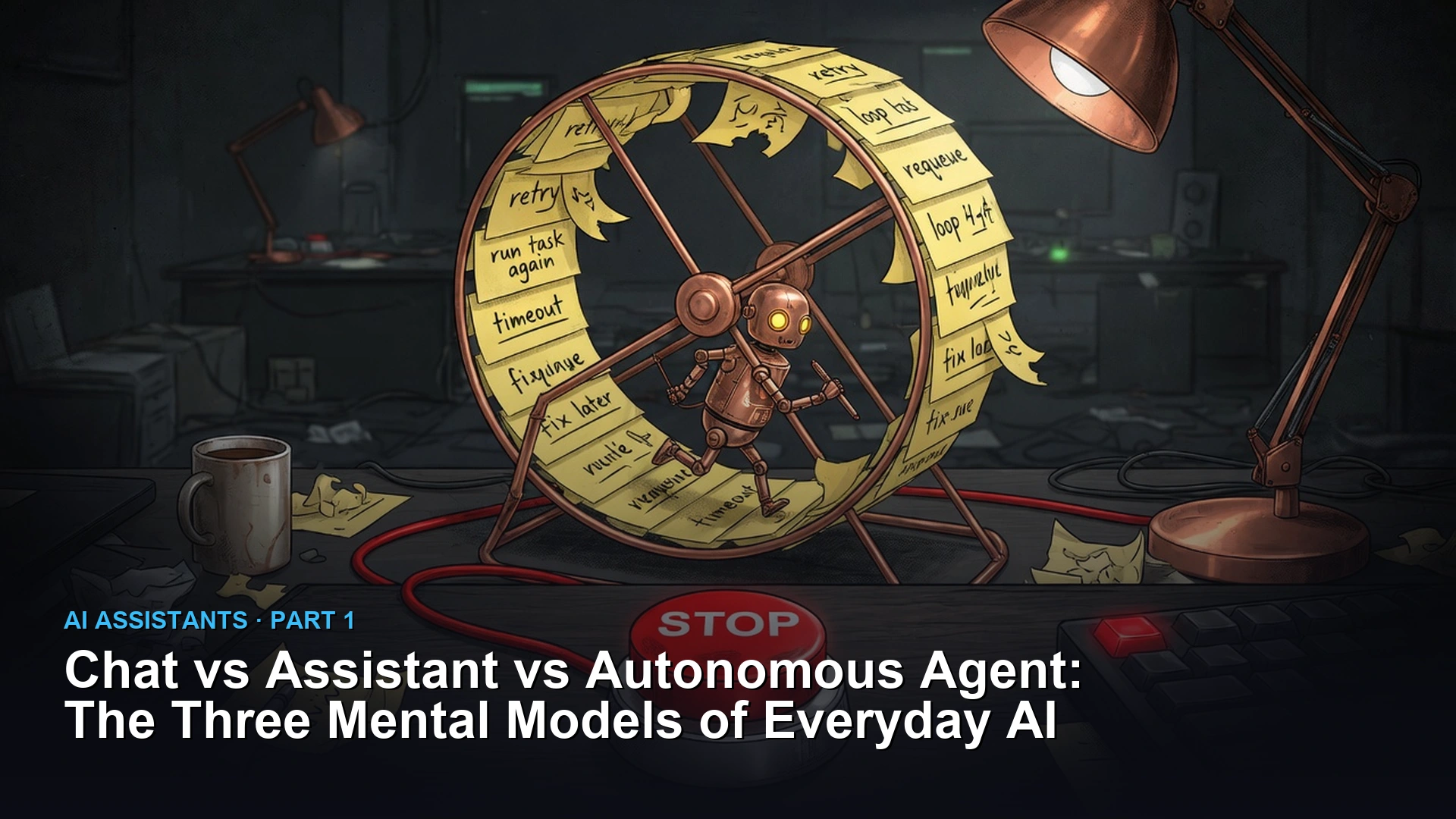
AI tools come in three very different levels, even though people call them all “AI.” A chat window writes an answer and stops, so you do everything else. An assistant can look up real data for you, but waits for your OK before it acts. An agent works on its own and fixes its own mistakes as it goes. Knowing which one you are using saves you time.
Imagine you face thirty-four clinic spreadsheets before your first coffee, each in a slightly different format. Pasting one file at a time into a chat works for the first few, then wears you down. An assistant that checks each file against a template is a better fit. A fully independent agent might be more than a once-a-week job needs.
Why the umbrella term AI breaks down in everyday work
Calling every AI tool “a chatbot” mixes up two different things. One predicts the next words. The other actually does something in the real world. Mix those up, and you either give up on AI too early, or trust it with a task it was never built to check.
Around most offices, “AI” has become a catch-all word for anything built on a language model. You’ll hear a coworker say they “had the AI audit the budget” or “told the AI to sync the warehouse.” Underneath, a language model alone is a pattern-matching engine. It predicts the next likely words from what it learned in training and what you just typed.
A language model on its own has no clock and no view of your files. It cannot reach your company’s network either, unless other software wraps around it and grants that access. That’s why a plain browser tab can do so much less than a terminal (the text window where you type commands) tool like Claude Code, or a service like OpenClaw that runs quietly in the background watching several chat apps at once. The gap isn’t about which model is smarter. It’s about how much of the outside world each tool is actually wired into.
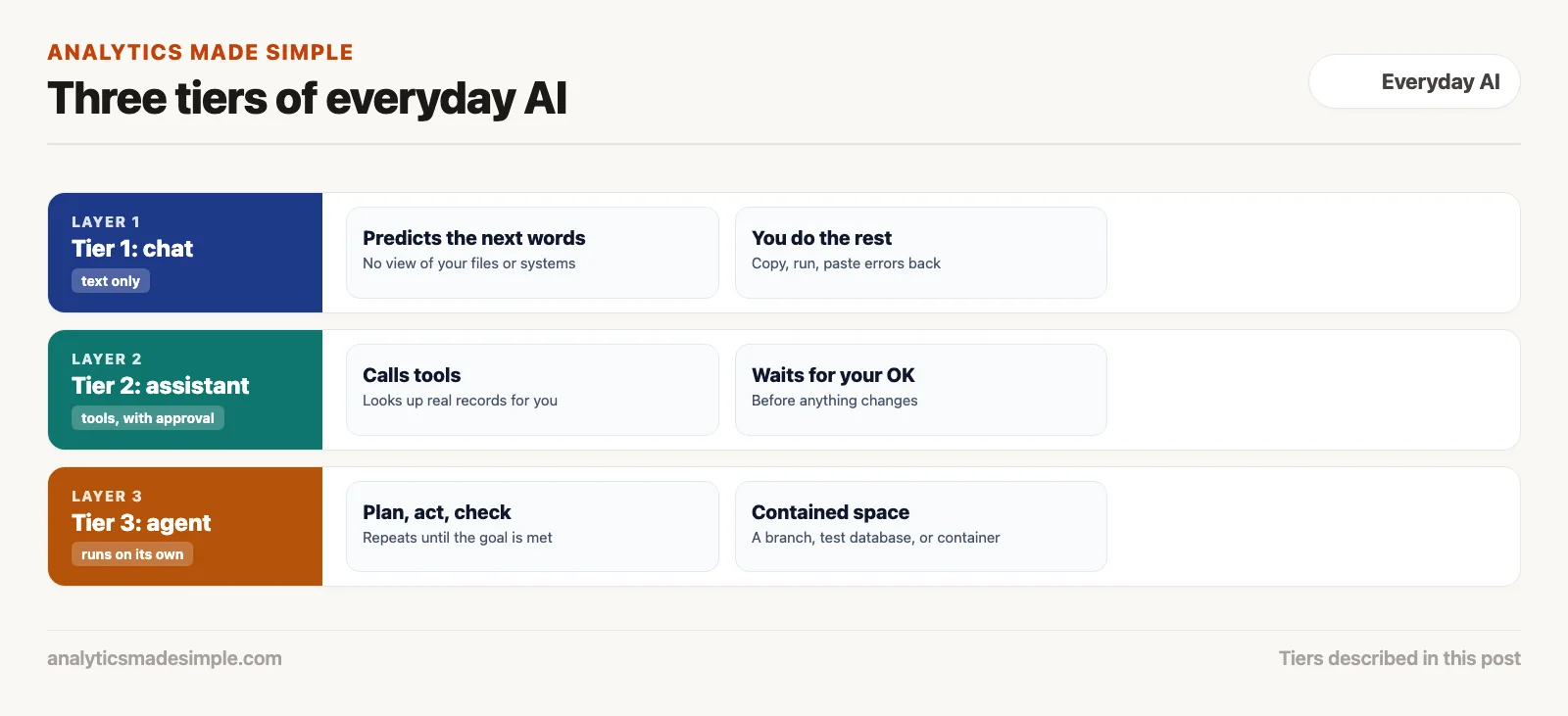
To actually save time instead of losing it to busywork, it helps to separate what the AI is thinking from how much it’s allowed to touch. Here are the three levels you’ll run into in everyday work.
Tier 1: plain chat, where you are the runtime
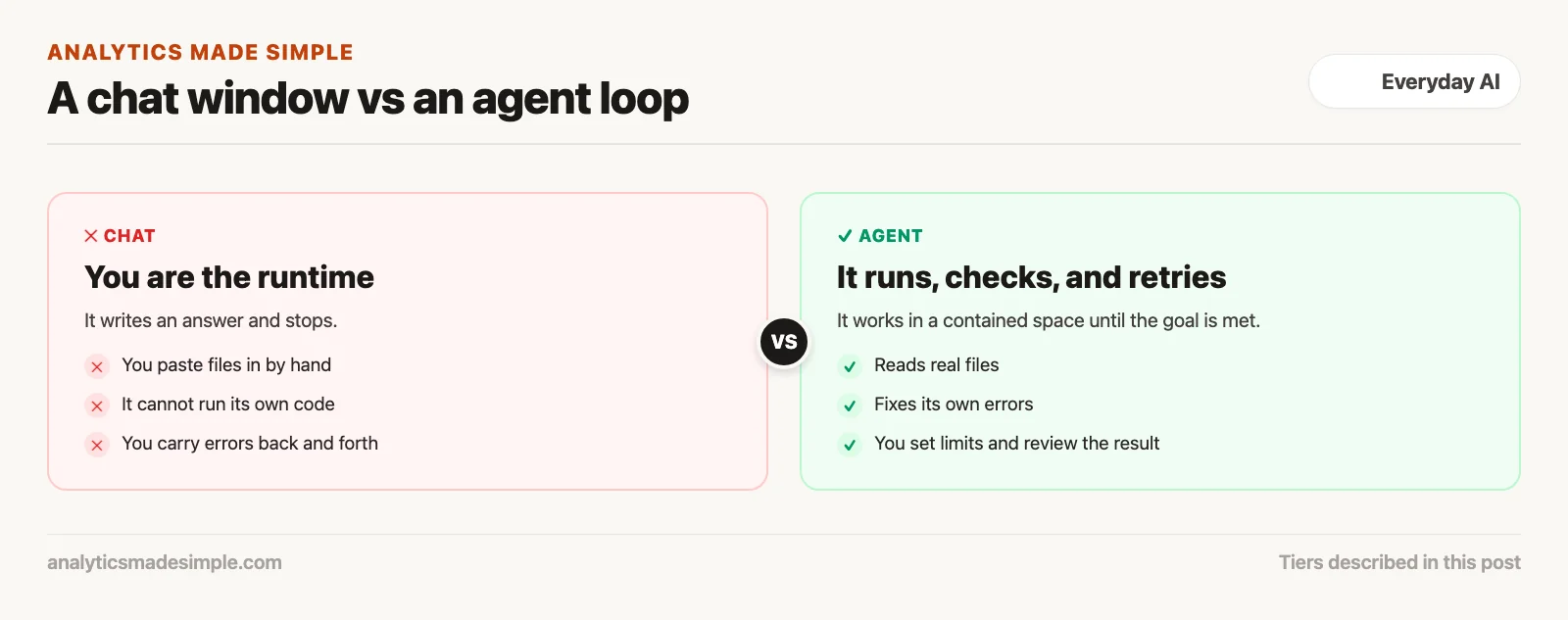
A plain chat window only predicts the next words in a sentence. It has no memory between sessions beyond what’s in the current conversation, so you end up being the one who actually runs anything it suggests, copies text around, and fixes errors.
This is the familiar chat box you get with ChatGPT, Claude.ai, or Microsoft Copilot. You type a question, hit send, and watch the words appear one at a time. Once the answer finishes, that’s it: nothing keeps running in the background, and the model has no direct link to your computer’s files or operating system.
In this tier, you are the machine that actually does the work. Here’s what really happens when you ask a chat window to help clean up a script or look at a dataset:
- You paste everything in by hand. Code or data has to be copied into the chat window yourself. If the file is too big to fit in one message, you have to break it into pieces and paste them in one at a time.
- The model can’t check its own work. It writes an answer based only on what it already learned and what’s in front of it right now. It can’t actually run the code to see whether it works.
- You’re the bridge between the chat and your computer. You copy the code it wrote, switch over to your own editor or terminal, paste it in, and run it yourself.
- You carry errors back and forth too. If the script fails, you copy the error message, switch back to the chat, paste it in, and ask the model to try again.
Tier 1 is great for brainstorming, drafting an email, summarizing an article, or getting your head around a new topic. Used as a full workflow, though, it turns you into a human clipboard, moving text back and forth all day. It also tends to agree too easily. Built to sound helpful, a chat tool will sometimes claim it finished a task when it only wrote a plausible example. That matters.
Tier 2: assistants that look things up for you
An assistant wraps the language model with a set of tools it can call on, like looking up a database record, but it still waits for you to approve anything before it happens.
The jump from Tier 1 to Tier 2 happens when developers give the model a set of tools it can reach for. It’s no longer limited to what it learned during training. Through a standard like OpenAI’s Function Calling or the open Model Context Protocol (MCP), the app tells the model exactly which tools exist and what shape of data each one expects back.
The model still never touches your systems directly. Ask a Tier 2 assistant “what’s the current inventory count for Clinic 14,” and the model doesn’t connect to your database itself. It recognizes it needs outside data and sends back a structured request for it instead:
// Model emits structured function call payload:
{
  "tool": "get_clinic_inventory",
  "arguments": {
    "clinic_id": "CLINIC-014",
    "status": "in_stock"
  }
}
The app running the assistant catches that request, actually runs the database query, and hands the result back to the model. The model reads that real data and turns it into a plain-English answer for you.
Tier 2 turns a language model from a creative writer into a dependable fact-finder. Think of a support tool that looks up an order’s status, or a code-editor plugin that searches your code. Or picture an internal search tool that pulls real passages from company documents before it answers. That last method is called Retrieval Augmented Generation (RAG).
Even so, Tier 2 only reacts, one step at a time. Every action still needs you to ask for it and confirm it. If a multi-step task hits an unexpected error partway through, the assistant just stops and waits for you to figure out what to ask next. It has no way to notice its own mistake and keep going on its own.
Tier 3: agent loops that fix their own errors
An autonomous agent is software that keeps running on its own. It plans a step, tries it out in a safely contained environment, checks whether that step actually worked, and fixes its own mistakes until the goal is done.
Tier 3 is the newest and most capable level of everyday AI. Instead of waiting for your next message, an autonomous agent runs continuously inside its own working environment. Most agents today are built on the ReAct approach, short for Reasoning and Acting, or the older Observe, Orient, Decide, Act loop (OODA), a decision cycle borrowed from military strategy.
In this tier, you hand over a goal instead of steps. The agent runs the work itself:
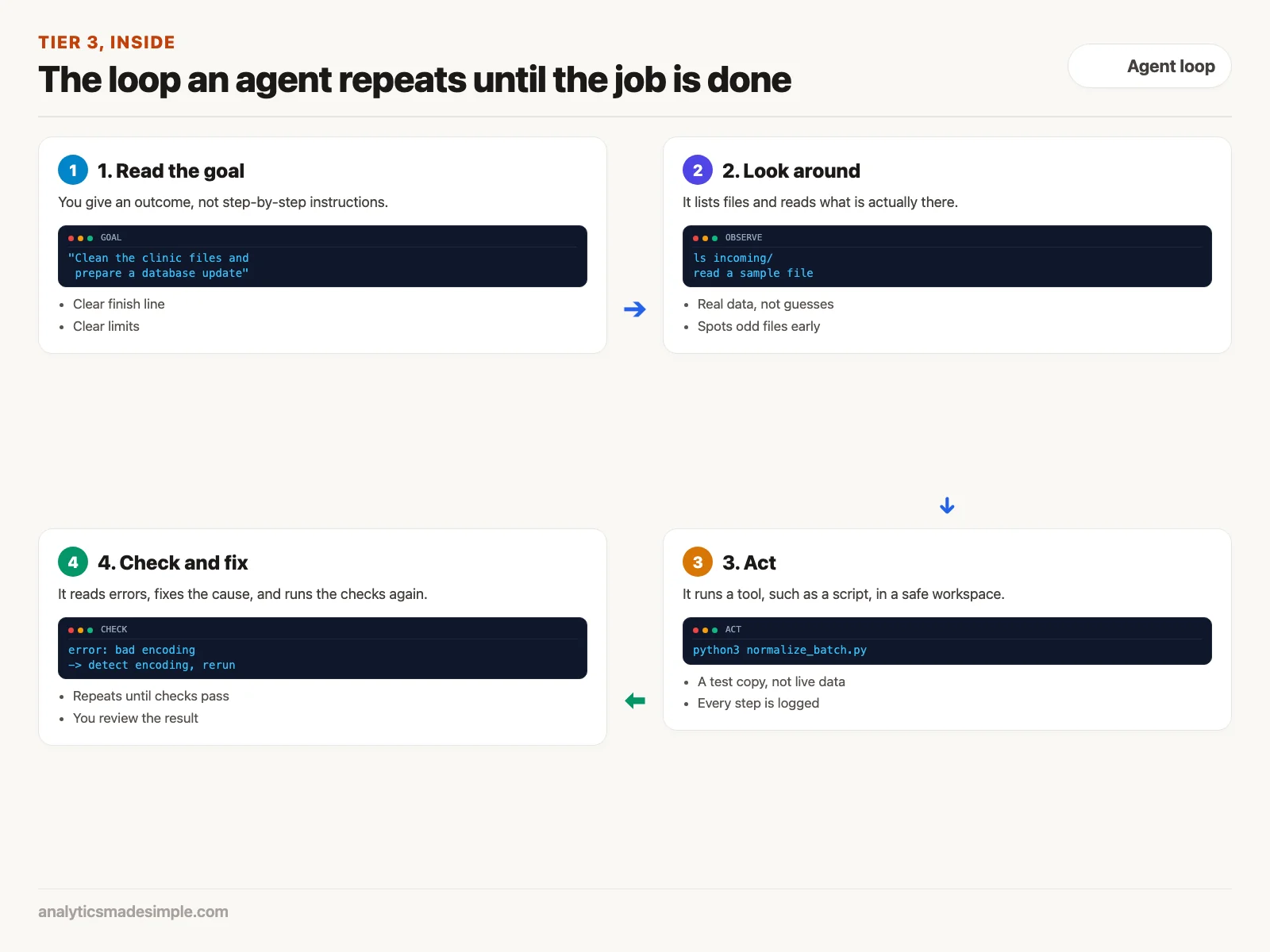
Here’s the real difference. When something breaks, an autonomous agent doesn’t stop and ask what to do. It reads the exact error message, works out which line of code caused it, fixes that line, and tries again. It keeps its own running notes and working files the whole time, until it can actually confirm the task is done.
Today, Tier 3 agents mostly show up in two forms:
- Coding tools that live in your terminal. Tools like Claude Code, Google Antigravity’s command-line tool, and Grok Build work directly inside your project’s files. They run in a command-line interface (CLI), the plain text window developers type commands into. You ask for a feature or a fix. The tool reads the code, runs the tests, and rewrites files. Then it checks that everything still passes and saves a set of changes you can review.
- Background assistants that just keep running. Systems like OpenClaw and Hermes Agent stay active on a private server or your own computer. Connected to WhatsApp, Telegram, Slack, and email at once, they watch for incoming messages, run scheduled tasks, remember what happened earlier, and only ping you when a real decision is needed.
Comparing all three tiers on the same real task
These three levels make the most sense side by side, handling the exact same messy real-world problem.
Say you work at a healthcare logistics company and need to process 34 clinic inventory spreadsheets. Three ordinary problems show up. Clinic 18 saved its file in an older text format instead of UTF-8, the web’s standard text encoding (UTF stands for Unicode Transformation Format). Clinic 27 has extra spaces on every product code. Clinic 4 has duplicate records with two different stock counts. Here’s how each tier handles it.
Tier 1: the manual clipboard slog
In Tier 1, you open each spreadsheet by hand in Excel or Notepad. Pasting Clinic 18’s file into the chat window shows a wall of broken characters, so you ask how to fix it. The model gives you a short Python script using the pandas library. You paste it into your editor and run it, and it crashes, because Clinic 27’s extra spaces break a number conversion. You copy that error back into the chat and try again. By the time all 34 files are clean and a database script is ready, you have spent hours on dozens of copy-and-paste trips.
Tier 2: the interactive copilot
In Tier 2, you use an internal tool connected to the company’s data through MCP. You type: “scan the incoming clinic files and flag anything unusual.” The assistant checks the file list and the headers on its own and reports back: “Found 34 files. Clinic 18 has an encoding problem, Clinic 27 has extra spaces. Want me to run the standard cleanup?”
You click approve. The assistant runs the cleanup, tells you how many records came out clean, and asks you to confirm before anything goes into the database. You stay in control at every step, and since every number it shows you comes from a real, live lookup rather than a guess, there’s nothing for it to make up. It is far faster than the copy-and-paste route, though you watch over its shoulder the whole time.
Tier 3: the autonomous sandbox loop
In Tier 3, you use an autonomous coding tool like Google Antigravity’s CLI or Claude Code inside your project, or just send a command over Slack: “clean up the incoming clinic batch, check it against the clinics table, and prepare a database update.”
The agent takes it from there. Here is an illustration of the kind of step-by-step log such an agent produces in its own contained workspace. It is a sketch to show the pattern, not a recording of a real run:
[agent:plan] Objective: Normalize 34 incoming CSVs and build staging SQL migration.
[agent:exec] ls -la incoming/ -> Found 34 files
[agent:exec] python3 -c "import pandas as pd; pd.read_csv('incoming/clinic_018.csv')"
[agent:catch] UnicodeDecodeError: 'utf-8' codec can't decode byte 0xe9 in position 142
[agent:heal] Detected Latin-1 encoding artifact in clinic_018.csv. Patching ingest script with charset detection.
[agent:exec] python3 scripts/normalize_batch.py --detect-encoding --strip-whitespace
[agent:output] Processed 34/34 files. Rows loaded to temp_staging.
[agent:exec] python3 scripts/verify_integrity.py
[agent:check] Validation passed: 0 orphaned foreign keys, 0 duplicate lot codes.
[agent:exec] git diff --stat
[agent:done] Migration script generated: migrations/20261225_clinic_inventory_sync.sql
Summary posted to Slack #logistics-ops: 34 clinics processed, checks passed.
The agent runs into the exact same encoding problem that slowed things down in Tier 1. Instead of stopping to ask for help, it catches the error, works out the fix, patches its own script, and checks the result against the rules you set. You spend a minute or two looking over the change it made, then approve the database update.
Matching the job to the right tier
Picking the right level means weighing speed against risk. A faster tool that can act on its own is only worth it if a mistake is cheap, or if you’ve built a safe space for it to make that mistake in.
More autonomy isn’t automatically better. Using a full autonomous agent to write a short thank-you note is overkill, and asking a plain chat window to manage a database update on its own is asking for trouble. Each tier has a job it’s genuinely good at, and a line it shouldn’t cross.
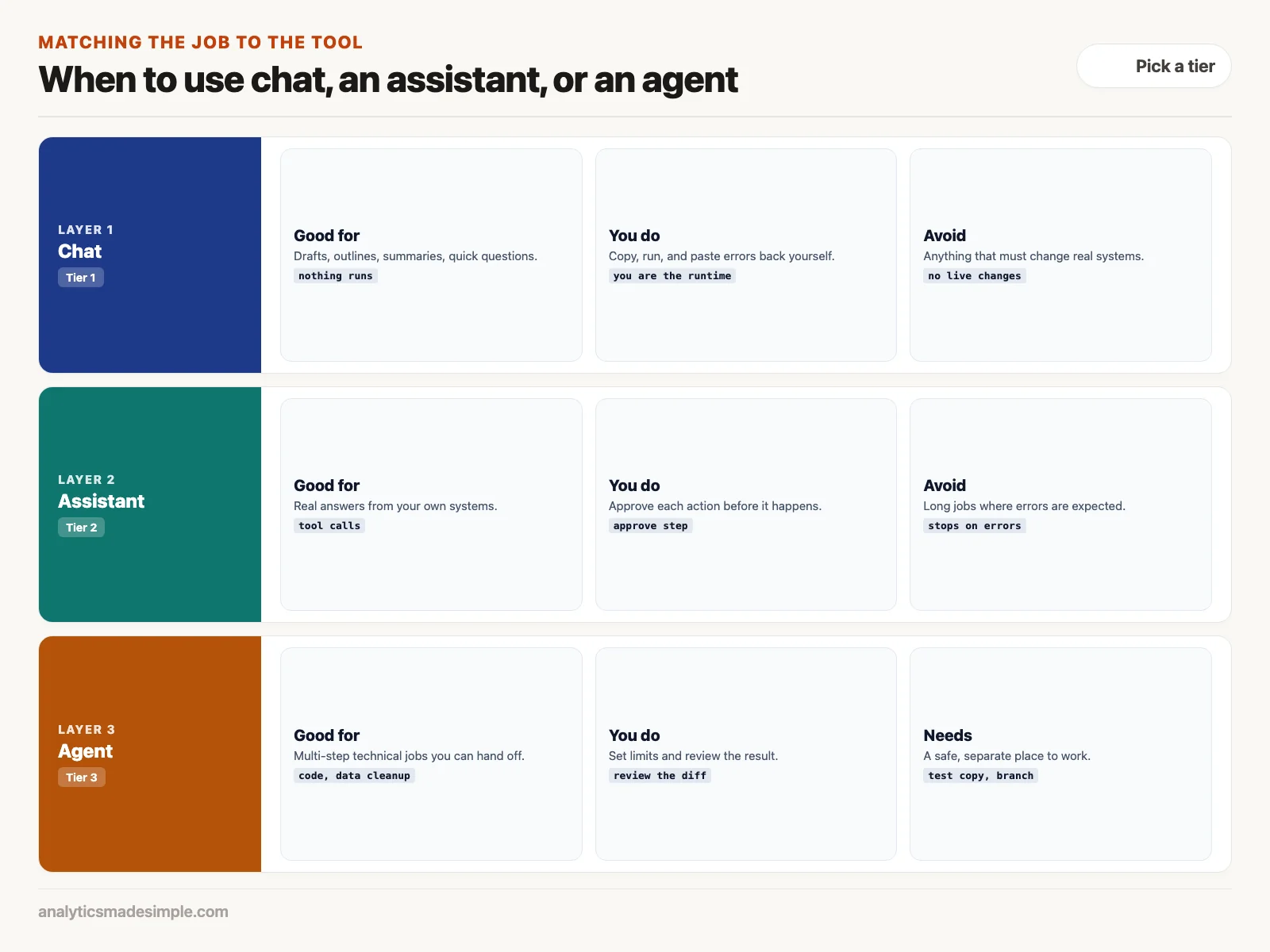
Use this as a rough guide when handing tasks to your team:
- Reach for Tier 1, plain chat, when:
- The task is exploratory or creative, like drafting an outline or summarizing a research paper.
- Nothing gets run and nothing real gets changed. No code executes, no database gets touched.
- You just need a quick answer on your phone, with nothing to set up first.
- Reach for Tier 2, an assistant with tools, when:
- You need a real, current answer pulled from an existing database or system, not a guess.
- Any action that changes something, sending an email, editing a record, charging a card, should wait for your explicit okay.
- You’re building something for coworkers who aren’t technical and need a guided, conversational tool.
- Reach for Tier 3, a full autonomous agent, when:
- The task takes several technical steps where errors are expected along the way, like rewriting code, changing a database’s structure, or running a large batch data job (ETL is short for extract, transform, load).
- You can give it a safe, contained space to work in, like a separate code branch, a test database, or an isolated container (a sealed package that runs one piece of software).
- The value is in handing the whole thing off, not in working through it together step by step.
Monday morning: audit your AI workflows
Look at how your team actually uses AI today. Find where you’re stuck copying and pasting by hand, set clear boundaries for anything that runs on its own, and move routine tasks up a tier once you trust the checks you’ve put around them.
To get real time back instead of just generating more text to read, take these three steps this week:
- Notice how much copying and pasting you’re doing. Every time you copy text out of a chat, run it, and paste an error back, take note. That task likely belongs with a Tier 3 coding tool instead.
- Build a safe space before you give anything more freedom. Never give an autonomous agent direct access to your real systems without some kind of separation in place first, like a separate code branch, a local test container, or a copy of the database used just for testing. If an agent can run your test suite or check its own numbers against a known-good count, it can catch its own mistakes without putting anything real at risk.
- Let it look before you let it touch. Start by giving assistants and agents wide access to read things, logs, code, database structure, while keeping any actual change behind your approval. As your own tests get more thorough, you can safely widen how much it’s allowed to do on its own.
The next post in this series covers privacy defaults, sandboxes, and permission limits: how to lock down local files, scope API keys tightly, and run assistants and agents inside contained environments so they can work freely without leaking anything sensitive.
Sources and further reading
- Yao, S., Zhao, J., Yu, D., Du, N., Shafran, I., Narasimhan, K., and Cao, Y. (2022). ReAct: Synergizing Reasoning and Acting in Language Models. arXiv:2210.03629.
- Model Context Protocol: modelcontextprotocol.io, the open standard first published by Anthropic.
- Nous Research: Hermes Agent on GitHub.
- OpenClaw: OpenClaw on GitHub.
- Schick, T., Dwivedi-Yu, J., Dessi, R., Raileanu, R., Lomeli, M., Zettlemoyer, L., Cancedda, N., and Scialom, T. (2023). Toolformer: Language Models Can Teach Themselves to Use Tools. arXiv:2302.04761.
Series notes
This is Part 1 of AI assistants everyday. Next parts expand everyday assistant patterns.
Keep going
Same lessons in your feed
Short diagrams, hooks, and weekly tutorials on Substack, Instagram, X, and Facebook.