

An embedding turns a piece of text into a list of numbers, so a computer can tell which texts mean similar things. It is how “smart search” finds a helpful old support ticket even when it uses different words than your question. It is useful, but it does not understand your business the way a person does.
Imagine you type “customer can’t download their report” into your support tool. It returns an old ticket titled “export button not working,” which has the fix, even though the two share almost no words. Behind the scenes, both were turned into lists of numbers that sit close together. Those lists are embeddings.
This plain-English guide shows how embeddings work, where they help, and how they fail. For how the numbers get stored, see getting up to speed on vector databases.
Embedding in one breath
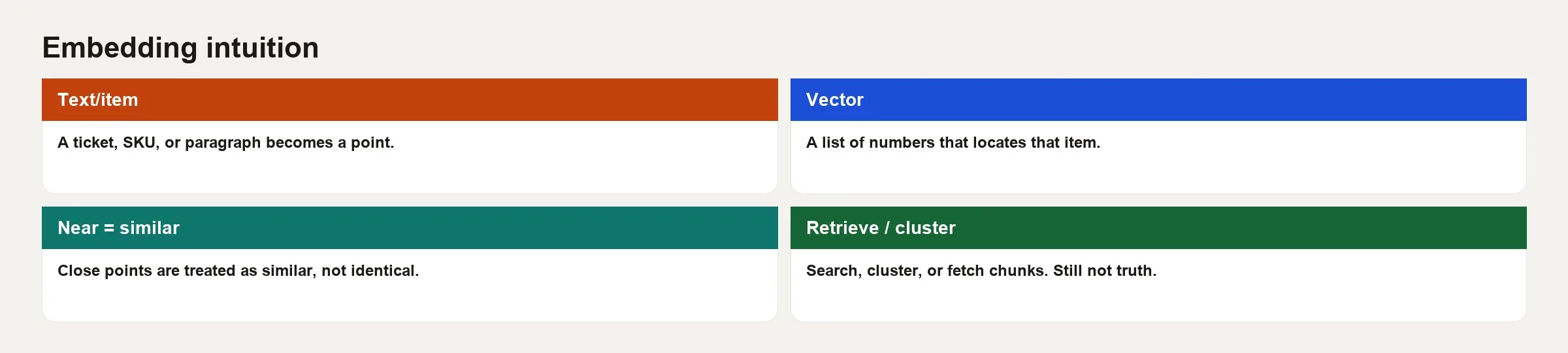
An embedding is a vector, meaning a list of decimal numbers, produced by a model to represent a piece of content. OpenAI’s docs say it plainly: text embeddings measure how related text strings are, and the distance between two vectors tells you how related they are for that embedding model. Similar meaning tends to land nearby, and unrelated text lands farther away. Each item usually gets hundreds or thousands of numbers, and the exact count depends on the model.
You do not write those numbers by hand. You call an embedding model, either through an online service or a program on your own machine, with text going in and a vector coming out. The same model should embed both your documents and your questions so they live in the same space. Mixing models without a plan is like measuring in inches and centimeters and then arguing about the tape.
Rule of thumb: An embedding is a lossy map of meaning for similarity tasks. It is not a citation, a fact store, or a guarantee of truth.
The intuition: maps, not magic
Imagine every support article pinned on a huge map with far more than two directions. Articles about single sign-on land in one neighborhood, and articles about CSV (a plain text file where each line is a row and commas separate the columns) export land in another. A ticket about “sign-on then export fails” may sit between them, or near a known incident cluster. Retrieval finds the neighbors of the pin your question makes. That is the geometric story behind the phrase “semantic search.”
Two important caveats sit inside the metaphor:
- The map belongs to one model. If you retrain or swap models, the neighborhoods move, so you need to re-embed everything when you change models.
- Nearby does not mean true. Two wrong policies can sit near each other, and marketing copy can sit near a legal definition. Humans still decide.
From text to vectors to search
A typical pipeline for this kind of content has five steps. A pipeline is the series of steps that prepare text for search.
- Collect content: wiki pages, metric cards, tickets, and text pulled from PDFs, with care for privacy.
- Chunk: split long documents so each vector represents a usable passage instead of a 40-page blob.
- Embed: send each chunk through the embedding model, and store the vector along with details such as the source URL, product line, and last-updated date.
- Index: put the vectors in a vector database (a database that finds items by meaning) or similar index so nearest-neighbor lookups are fast. Keyword search can sit beside it, which people call hybrid search.
- Query: embed the user’s question, find the closest few chunks, and return them. You may also pass them to a large language model (LLM) so it can write an answer.
Steps 3 and 4 are where embeddings and vector databases meet. The embedding is the representation, and the vector store is the filing cabinet built for “find the nearest.” The details of how the index is built matter once you have millions of items. The product idea does not change. The vector databases post linked above covers the cabinet side.
Similarity in practice
Systems compare vectors with a distance or similarity function. Cosine similarity is common for text embeddings because it cares about the angle between two vectors more than their raw length, which fits the idea of a “direction of meaning.” Each provider documents which measure its models expect, so follow their guide. You rarely build this by hand in a first prototype, but you should know that a score like 0.82 is not a universal truth meter. It is relative to one model and one collection of documents.
What people use embeddings for at work
| Use case | What embeddings do | What still needs humans or other systems |
|---|---|---|
| Semantic search | Rank passages by meaning, not only keywords | Access permissions, freshness, labels for the official source |
| RAG lookup | Pick context chunks for an AI prompt | Checks that answers match sources, citations, tests |
| Removing duplicates and grouping | Group similar tickets or survey responses | Names for each group, rules for what to do next |
| Recommendations | Find similar items or users in vector space | Business constraints, fairness, inventory |
| Spotting oddities | Flag texts far from a normal cluster | Investigation, because outliers can be rare truths |
Notice what is missing from that list: “store the official revenue definition as a vector and trust the nearest neighbor as if it were Finance.” Metric truth still belongs in a semantic layer, a metric card, or a governed table, not in vibes-based geometry.
Worked sketch: three metric blurbs
Suppose your wiki has three short definitions. This is toy text and not your real policy:
- A: “Active customer: logged in at least once in the last 28 days.”
- B: “Active customer: completed a paid order in the last 28 days.”
- C: “Warehouse slotting: how we place product codes in aisles for pick efficiency.”
You embed A, B, and C. A and B should sit closer to each other than either sits to C, because both discuss “active customer,” even though they disagree on the rule. A query like “What is an active customer?” should retrieve A and B near the top. That is useful, because it surfaces the conflict. It is also risky, because an LLM told to “answer from context” might blend A and B into a fluent hybrid that Finance never approved.
Here is the flow as pseudocode, which is a sketch and not a production client:
# Pseudocode: embed docs and a query, rank by cosine similarity
docs = {
  "A": "Active customer: logged in at least once in the last 28 days.",
  "B": "Active customer: completed a paid order in the last 28 days.",
  "C": "Warehouse slotting: how we place SKUs in aisles for pick efficiency.",
}

doc_vecs = {k: embed(text) for k, text in docs.items()}
q = embed("What is an active customer?")

ranked = sorted(
  doc_vecs.keys(),
  key=lambda k: cosine_similarity(q, doc_vecs[k]),
  reverse=True,
)
# Expect something like ["A", "B", "C"] or ["B", "A", "C"]
print(ranked)
What you should do with the result is open A and B, settle the definition in a metric card, and point the search metadata at the winning source. Embeddings helped you find the fight, and they did not win it.
Chunking, metadata, and hybrid search
Bad chunking, meaning documents cut into pieces at the wrong places, creates bad neighbors. If you embed an entire handbook as one vector, a query about one policy gets a diluted average of everything in the book. If you chunk too small, you lose the sentence that held the exception. Practical defaults are to split on headings, keep a few hundred to a couple of thousand tokens per chunk depending on the model’s limits (a token is a small piece of a word) and store the parent titles. That way you can show “from: Revenue policy / Refunds.”
Metadata filters matter as much as the vectors. Restrict results to product=mobile or doc_type=metric_card, either before or after the vector search, so you do not retrieve a deprecated PDF. Hybrid search, which combines keyword and vector matching, helps with product codes, error codes, and exact metric names, where pure semantic matching gets clever and misses the exact string ARR_GROSS.
Limits and failure modes
- Similar does not mean permitted. The nearest neighbor can surface documents the user should not see if you skip the access-permission filters.
- Stale vectors. If content was updated but the embeddings were not refreshed, search returns yesterday’s policy under today’s title.
- Domain shift. General models may map your internal jargon poorly until you choose a better model, tune one (which is rare for embeddings at many companies), or improve the document text.
- One word, several meanings. “Python” the language, the snake, and a project codename can collide without metadata.
- Adversarial or junk text. Garbage in still embeds somewhere, and retrieval can rank confident nonsense if that is what you indexed.
- Over-trust in RAG. RAG means the system looks up your documents before it writes an answer. Retrieved chunks can be wrong, and the LLM may still sound sure. Pair it with the tests described in the Practical AI series.
How embeddings relate to LLMs, and how they differ
Large language models generate text one token at a time. Embedding models map an input to a fixed-length vector for comparison. Some vendors offer both, and many systems use a smaller specialized embedding model for retrieval and a larger generative model for answers. Do not assume the chatbot “has embeddings” of your private wiki unless you built a retrieval pipeline. What a model memorized in training is not the same as your vector index.
Fine-tuning a generative model is also not the same as embedding your documents. Fine-tuning changes how the model writes, while embeddings power lookup. The next Key Term in this batch, on fine-tuning versus RAG, separates those two paths cleanly.
Common mistakes
- One giant chunk per PDF, and then wondering why retrieval is mushy.
- Re-embedding only half the collection after a model upgrade.
- No metadata filters, so legal drafts rank next to customer FAQs.
- Treating similarity scores as probabilities of truth.
- Indexing secrets, such as API keys and private tickets, into a shared vector store. An API is a way for one program to ask another program for data or an action, and the key is its secret password.
- Skipping hybrid search when users search for exact IDs and codes.
- Expecting embeddings to fix conflicting metric definitions without governance.
How to practice
- Write a 60-second explanation of embeddings for a stakeholder who has never studied machine learning. Use the map metaphor once, and avoid saying the AI “understands.”
- Pick ten internal document titles and guess which pairs should be nearest. If you have a search tool with a semantic mode, check whether reality matches, and note any surprises.
- Read your vector database or search vendor’s note on distance measures and embedding model versions, and write down the model name your organization uses, because vectors from different embedding models cannot be compared with each other.
- Add a freshness field to any retrieval prototype by showing
updated_atnext to each hit, so staleness is visible. - For any AI-written SQL (code that asks a database for data) that came out of a “docs search,” still run the AI SQL checks. Retrieval does not certify that the joins are right.
Quick recap
- Embeddings turn content into vectors so related items can be found by proximity.
- Use the same embedding model for documents and queries, and re-embed when the model changes.
- Chunking, metadata, and hybrid search decide whether the neighbors are useful.
- Common uses are semantic search, RAG lookup, grouping, and recommendations.
- Similarity is not truth, permission, or a metric definition, so keep humans and governance in the loop.
Once you see embeddings as a similarity layer, a lot of AI product demos get less mysterious. The hard work moves back to where analytics people already live: clean sources, clear definitions, permissions, and tests.
Your next step
Take ten short documents you know well, embed them with one model, and search them with three questions whose answers you already know. Check whether the top results make sense. A tiny test you can judge by eye teaches more about embeddings than any diagram.
Series notes
Related to RAG and Practical AI on Learn. Pair it with RAG explained in plain English when you wire retrieval into chat.
Sources
Further reading and references used for this article:
- OpenAI, vector embeddings guide: https://platform.openai.com/docs/guides/embeddings
- OpenAI API embeddings resource reference: https://platform.openai.com/docs/api-reference/embeddings
- Analytics Made Simple: Vector databases, What are LLMs?, Practical AI series, How to check AI-written SQL, Learn
Keep going
Same lessons in your feed
Short diagrams, hooks, and weekly tutorials on Substack, Instagram, X, and Facebook.



