
A feature store makes sure a prediction model gets the same numbers when it learns and when it runs for real. Machine learning (ML) is software that learns patterns from past data to make predictions, such as which customers are about to cancel. The numbers it learns from are called features, and a feature store keeps one shared definition of each one.
Imagine you build a model that predicts which customers will leave. One input is “days since last purchase.” While training, you calculate it from last night’s data. When the app scores a customer live, it calculates the same input a slightly different way. The model looked accurate in testing but makes worse calls in production, and the only thing wrong is that the two numbers don’t match.
That mismatch is the problem a feature store solves. It does not make a model more accurate on its own, and it does not replace your data warehouse (the central database your company reports from). It gives you one place to define, store, find, and serve features, so training and live predictions read the same logic. If you only score customers once a night from tables you already trust, you may not need one yet. If your app scores customers live and several teams keep rebuilding the same customer flags, you already have the problem.
This guide is for analysts who work next to machine learning teams. For how data moves between systems, see the Data pipelines series. For more plain-English terms, start at Learn, and for everyday AI habits, the Practical AI series.
Feature store in plain English
In machine learning, a feature is an input variable the model uses, such as days since last purchase or average order value. Others are the count of support tickets in 30 days, or a flag for premium customers. A feature store is a system, or a disciplined stack of systems, that helps teams do five things:
- Define features as code or as written specs that give each one a name, an entity key, a type, and a transformation.
- Compute and store historical values for training and for batch scoring.
- Serve current values quickly, in milliseconds, for live predictions when needed.
- Discover and reuse features so marketing’s “active user” flag is not reinvented four times.
- Reduce train-serve skew by sharing definitions between training datasets and production lookups.
Open-source projects like Feast describe three parts. There is offline storage for history and online storage for fast reads. A feature server (a program that answers requests from other programs) sits in front of both. Commercial platforms add a user interface, streaming, monitoring, and governance. The core idea stays the same. Features are products with owners, not one-off columns in a notebook, which is a document that mixes code with its results.
Rule of thumb: If training and production disagree on how a feature is calculated, fix the shared definition before you retune hyperparameters.
The shape of the system
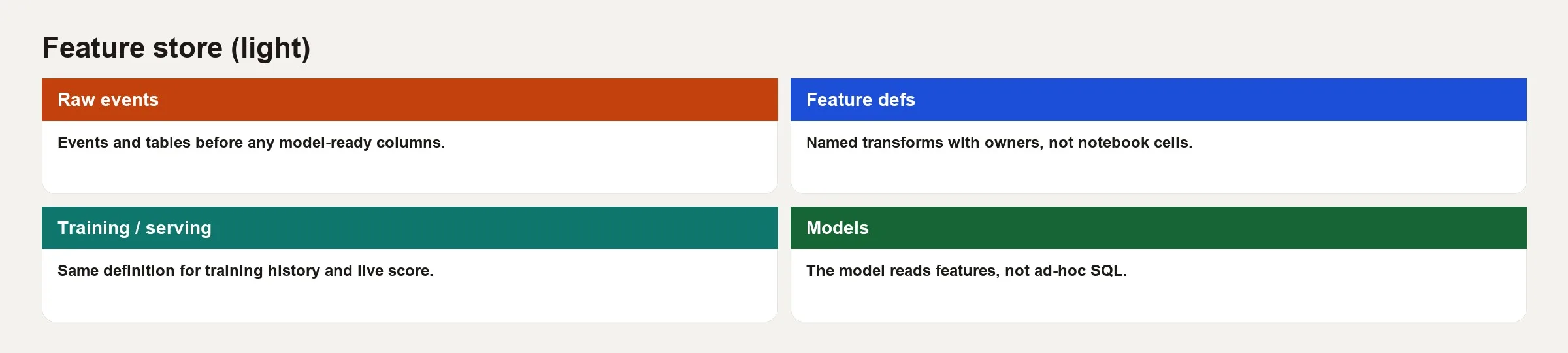
Most feature store designs share a few main pieces. The names vary from product to product, but the responsibilities do not.
Entities and keys
Features attach to entities. An entity is the thing you predict about, such as a user, an account, a device, or a product code. The entity key is how you look up a row at score time, for example user_id=42. This is grain again. “User features as of Tuesday morning” is a different contract than “user lifetime totals with no timestamp.” Write down the grain of each entity, just as you would for a fact table.
Offline store
The offline store holds historical feature values, or the ability to compute them, for training models and for batch scoring. It is often a set of tables in a warehouse or lakehouse. Training jobs ask for point-in-time correct rows, which means each training example gets the features as they were known at that moment. Nothing leaks in from later purchases.
Online store
The online store serves the latest feature values with very little delay. It usually runs on fast databases such as Redis, DynamoDB, or Bigtable. At prediction time the model service asks for “features for user 42 right now” and quickly gets back a list of numbers. If those online values are built with different SQL (the standard language for asking a database questions) than the offline history, the skew returns.
Registry and serving API
A registry lists feature names, owners, types, and how to build each one. A serving layer, either a library or a service, fetches the feature values for training datasets or for online keys. Humans browse the catalog and machines call the API (a way for one program to ask another for data). Without a registry you only have tables, and with a registry that people actually use, you have a store.
Problems a feature store is trying to solve
Train-serve skew
Imagine training used warehouse SQL while production used application code. Missing values were handled differently, and so were time zones. The offline accuracy score looked heroic, but the business results in production sagged. A shared feature definition and a shared way of building the values is the boring fix.
Point-in-time leakage
When you join labels to features naively, information from the future leaks into the past. For example, you might predict churn on day zero using a “next 30 days of revenue” total. That total was computed with no cutoff. Feature stores and careful point-in-time joins exist so that training rows only see data available at that timestamp. This is a data correctness problem first and a tooling problem second.
Reuse and discovery
Without a catalog, every project rebuilds “is_enterprise” and “tickets_30d” from scratch, so definitions drift and governance turns into archaeology. A store that lists features with owners turns them into shared assets, closer to certified metrics than to notebook leftovers.
Operational serving
Batch scores can live in the warehouse, but real-time fraud checks or ranking need lookups in a few milliseconds. Online stores and feature servers are the path from “we have a table” to “the app can call it under heavy load.”
What a feature store is not
| Thing | Job | Relation to feature store |
|---|---|---|
| Data warehouse | Analytics facts, metrics, history | Often the offline backbone, but not a full online serving path by itself |
| Metric semantic layer | Consistent business metrics for dashboards and reports | A cousin problem (definitions), with different consumers and speed needs |
| Model registry | Version models, files, and release stages | Models consume features, and registries do not compute feature values |
| Experiment tracker | Log training runs, settings, and results | Complements training, but does not serve production features |
| Feature engineering notebook | Explore transformations | A source of ideas, and not a production contract |
Teams sometimes rename a dbt project “the feature store” because it produces tables that machine learning can use. dbt is a tool that builds and tests warehouse tables from SQL. That can be a fine offline layer. Call it a feature store only if you also solve discovery, consistent serving paths, and, when needed, fast lookups while the model is running. Honest naming prevents budget theater.
Worked example: churn features without the fairy tale
Imagine a software-as-a-service churn model that is scored nightly for email campaigns and, later, inside the app for retention offers.
The entity is account_id. The label, meaning the outcome the model learns to predict, is whether the account churned within 28 days of the snapshot date. The candidate features are these four:
days_since_last_login.tickets_open_count.mrr(monthly recurring revenue as of the snapshot)pct_seats_used.
The offline path, used for training, looks like this:
-- Pseudocode grain: one row per account_id per snapshot_date
-- Features must only use events with event_time <= snapshot_date
SELECT
  s.account_id,
  s.snapshot_date,
  DATE_DIFF('day', last_login.login_date, s.snapshot_date)
    AS days_since_last_login,
  COALESCE(t.open_tickets, 0) AS tickets_open_count,
  b.mrr,
  u.seats_used * 1.0 / NULLIF(u.seats_purchased, 0) AS pct_seats_used,
  s.churned_28d AS label
FROM account_snapshots s
LEFT JOIN ... -- point-in-time style joins, not "latest forever"
;
On the online path, which is the in-app score, the feature service returns the same four fields for an account_id. It uses the shared definitions. The values are copied into an online store on a schedule. Fast-changing fields like tickets may use a live stream if freshness matters. The model file from the registry supplies the learned weights (the numbers the model learned in training). The feature store supplies the inputs. Keep those two jobs separate.
Without shared plumbing, three things go wrong:
- Training uses login events from the warehouse, while the online path uses an app session table with bots filtered out differently.
- The
mrrvalue in training is Finance’s booked revenue. The online path uses a field from the CRM (the software a company uses to track customers and deals) that ignores discounts. - The snapshot grain is daily in training but “whenever the job runs” online, so day boundaries drift.
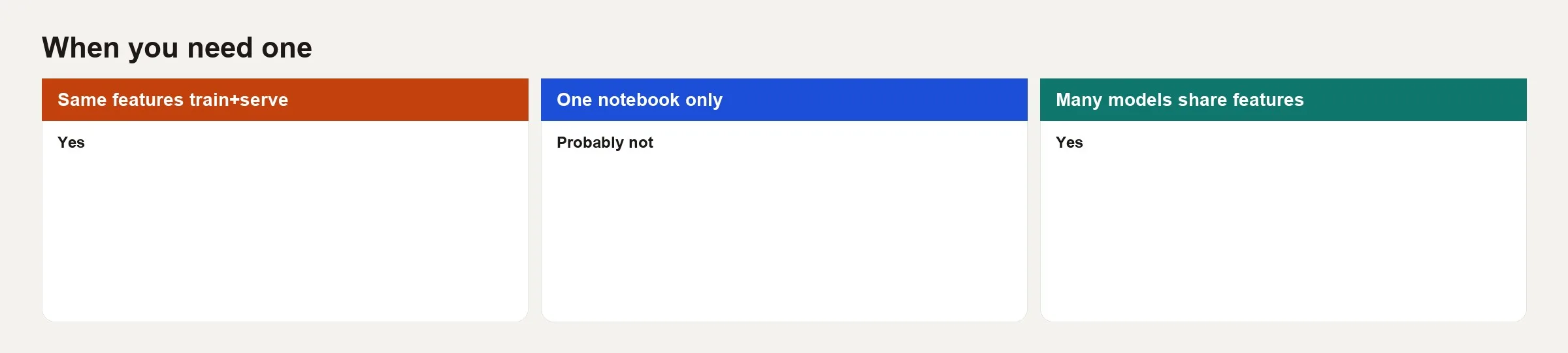
Use the when-card above as a conversation tool with your machine learning and platform partners. Start with shared offline definitions and tests. Add online serving when speed needs or the number of users demand it. Do not add it because a conference slide said “feature store” in large type.
When you probably need one, and when you do not
Signals you are ready
- Multiple models share overlapping features.
- Live predictions with strict speed limits, or many requests per second.
- Documented train-serve incidents, such as skew postmortems.
- Feature logic copy-pasted across code repositories with silent drift.
- Compliance needs that trace a score back to its feature definition.
Signals you can wait
- One batch model, one team, and scoring only inside the warehouse.
- Features that are already certified dbt models with tests and owners, used only in batch.
- You have not yet stabilized grain, labels, or basic monitoring.
- The real pain is bad source data and not feature serving.
Many teams take a lighter path. They treat dbt, or a similar tool, as the offline feature project with strict tests. They add Feast or a managed store once online serving and multi-team discovery become real needs. Avoid buying a platform to make up for labels you never defined.
How this connects to analytics work
Analysts often own the business definitions that machine learning needs, such as active user, paid seat, and churn. Feature stores fail when those definitions are vague, so your metric cards and stewardship habits feed feature quality. The reverse also holds. Features invented only in notebooks never reach dashboards, so the company ends up arguing over two truths. Prefer shared meaning where metrics and features overlap (monthly recurring revenue is a common example), even if the serving paths differ.
Quality monitoring transfers too, including null rates, shifts in distribution, and how fresh the data is. If days_since_last_login suddenly goes empty for 40% of users, both the business intelligence dashboards and the models should alert someone. The pipeline (a set of steps that moves data from one system to another on a schedule) ownership patterns from the pipelines series apply directly.
Common mistakes
- Installing a store before defining entities and grain. You will only make a tidy list of messy data.
- Rewriting the offline SQL for the online path in another language without parity tests.
- Ignoring point-in-time correctness because “it trained fine on a random split.”
- Leaving features without owners. Features nobody owns go stale while models keep using them.
- Treating the store as a dumping ground for every experimental column, with no plan to retire any.
- Skipping monitoring of feature freshness and sudden spikes of missing values in production.
- Confusing a feature store with “we do machine learning operations now.” You still need labels, tests, and a disciplined rollout.
How to practice
- List five features used by any model or score at your company. For each one, write the entity, the grain, the offline source, the online source if there is one, and the owner. The gaps are your backlog.
- Pick one feature and compare the training SQL, or notebook, to the production code. Look for differences in filters, time zones, and how missing values are handled, and file skew findings even if they are tiny.
- Add a uniqueness test and a freshness test to the offline table that feeds training, so duplicated or stale rows do not quietly shape the model. Then write one sentence that says what each row means.
- Read Feast’s introduction, or your vendor’s architecture page, only after the inventory. Then map their terms to your pieces: registry, offline, and online.
- Run a 45-minute design review on whether you need online serving this quarter. Use the when-card, and write the decision down.
Quick recap
- A feature store shares definitions and serving paths for machine learning inputs across training and production.
- Offline history and online low-delay stores solve different access patterns, and both need the same meaning.
- Train-serve skew and point-in-time leakage are the expensive failures the pattern targets.
- Warehouses, semantic layers, and model registries are related but not substitutes.
- Adopt one when reuse, online serving, or skew pain is real, and stabilize grain and labels first.
Feature stores reward boring consistency. If that sounds like analytics engineering with stricter speed limits, you are not wrong. The win is fewer mystery scores and fewer “but it worked in the notebook” postmortems.
Your next step
List the three model inputs your team recomputes in more than one place, and check whether training and production calculate them the same way. If they differ, that is train-serve skew. Fixing one shared definition is a better first step than buying a feature store.
Series notes
This pairs with grain and warehouse habits on Learn. Read what grain in data means before you invent feature keys.
Sources
Further reading and references used for this article:
- Feast documentation, introduction and components: https://docs.feast.dev/.
- Feast project overview (offline/online consistency goals): https://feast.dev/.
- Google Cloud blog on Feast and feature store operational patterns: https://cloud.google.com/blog/products/databases/how-feast-feature-store-streamlines-ml-development.
- Analytics Made Simple: Data pipelines series, Practical AI series, Data quality series, Learn.
Keep going
Same lessons in your feed
Short diagrams, hooks, and weekly tutorials on Substack, Instagram, X, and Facebook.



