
A key is a code that names one real-world thing, such as one customer or one order, so two lists can be matched without guessing. Matching on names looks fine until it quietly fails, and that is what this post is about.
Say you have two tabs in a workbook, and both list a customer called “Acme.” In one tab the name has a trailing space. In the other it reads “ACME Inc.” Your lookup formula fails, so you “fix” it by typing a number straight into the cell. Three months later you no longer remember why revenue for Acme is a special case. The problem was never the formula. The two lists had no shared key.
This post is part of a series on moving from spreadsheets to real data. It covers what keys and IDs are for, how joining two tables works in ordinary words, and how habits built around matching names create wrong answers that nobody notices. The series on moving from spreadsheets to real data has the rest.
| customer_id | order_id | amount |
|---|---|---|
| 101 | 9 | 40 |
| 101 | 10 | 15 |
| 202 | 11 | 22 |
A key is a stable nickname for a real-world thing
| customer_id | order_id | sku |
|---|---|---|
| 101 | 9 | A1 |
| 101 | 10 | B2 |
| 202 | 11 | A1 |
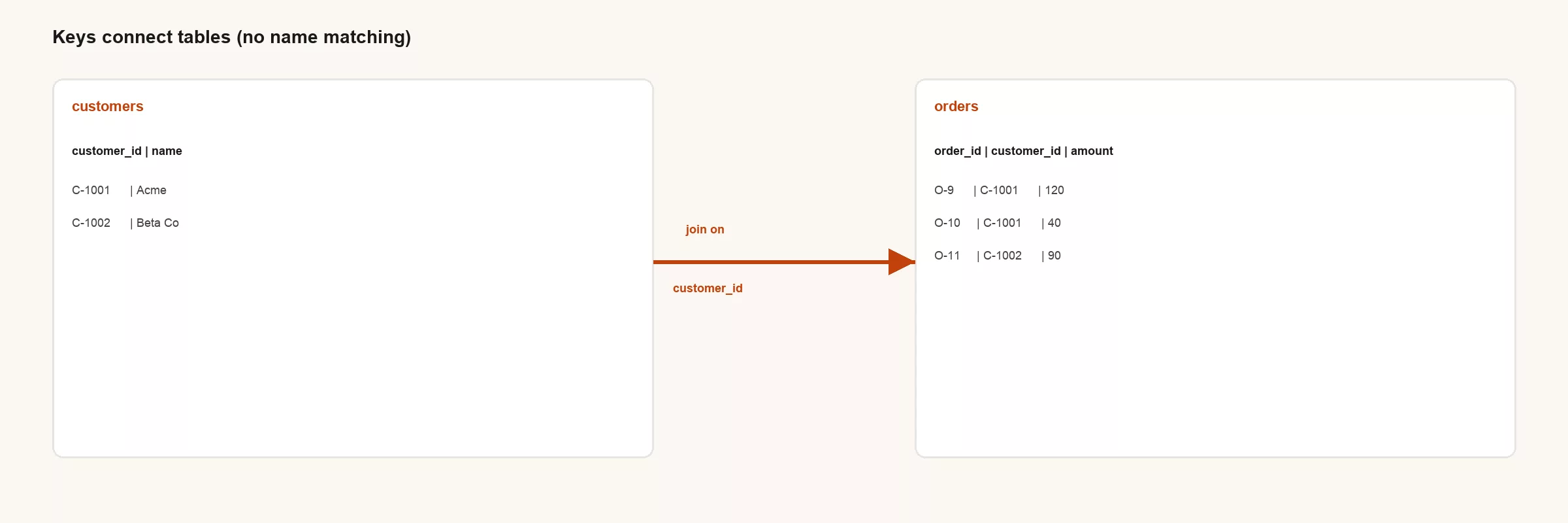
A primary key is a value that points to exactly one row in a table. Each customer gets one customer_id, and each order gets one order_id. A foreign key is a copy of that ID stored in a second table so the second table can point back. In the orders table, the customer_id column points at the matching customer_id in the customers table. Together they let you combine facts from two places without hoping the labels match.
Names lie, and IDs are boring on purpose
| Join attempt | What goes wrong |
|---|---|
| Match on customer name | Typos, renames, legal suffixes, duplicates |
| Match on email | Shared inboxes, changes, personal vs work |
| Match on customer_id | Stable if your system issues IDs carefully |
People read names, but software should join on IDs, because an ID does not change when a company is renamed. Once the join is done, you can show the name next to each row so the result is still easy to read.
One customer, many orders, and the exploding sum
One customer can place many orders. If you join customers to orders and then add up a field that belongs to the customer, such as credit_limit, that field gets counted once for every order. A customer with four orders now has four times the credit limit, and the sheet reports it with total confidence. People call this a fan-out, because one row fans out into many.
-- Smell test after any join
-- row_count should match expectations for the grain you want
-- If sums of parent fields jump, you probably fanned out
After every join, say out loud what one row means now. “One row is now one order, not one customer.” The word for this is grain, and every total you calculate has to respect it.
Sheet habits that keep keys healthy
- Put IDs in their own columns and never hide them, because names change and repeat while IDs do not, “to make it pretty.”
- Store IDs as text if leading zeros matter, as with employee 00058, so the sheet does not turn it into 58.
- Copy IDs from the source system’s export instead of retyping them from memory.
- When you create rows by hand, reserve an ID pattern such as TMP-001 and mark the row status as manual.
- Do not allow “fixups” that overwrite an ID because a name changed.
Lookup formulas versus real keys
A lookup formula such as VLOOKUP is not the enemy. Matching on names and hoping it works is the weak spot, because every unusual case becomes an exception someone has to remember. If your weekly process is “match on name and hope,” you end up with a growing list of special cases someone has to remember. Ask for a proper ID from the export of your customer system (the CRM, or customer relationship management software, where sales tracks customers) or your finance system (the ERP, or enterprise resource planning software, which runs orders, billing, and inventory), even if the sheet stays your workspace for a while.
A support ticket example
Say your support team exports tickets with an account_name that agents typed by hand. Finance exports accounts with an account_id and a legal_name. Leadership wants to know how many tickets each account opened. In this example, matching on names recovers about 80% of the rows and silently drops the rest into a bucket called “Other.” If the ticket had carried an account ID from the moment it was created, the join would have been boring, which is exactly what you want.
How SQL will feel later
SQL is the language most databases use to ask questions of tables, and its joins follow the same idea with stricter grammar. If you already think in keys, the join lessons in the SQL series will click faster. If you think in names, SQL will feel as if the computer is being picky. It is protecting you from the mismatch you would otherwise find in a board deck.
SELECT c.name, o.order_id, o.amount
FROM customers c
JOIN orders o ON o.customer_id = c.customer_id;
Read it as: start from customers, then attach each order where the two customer IDs are equal.
Practice this week
- Open one workbook with several tabs and highlight every column that is really an ID, because IDs are what let tabs join without matching on names.
- Find one lookup that matches on names and write down the ways it could fail.
- Add a foreign key column to a child tab, even if you still display names.
- Write down the grain after your most common join, in one sentence.
Common mistakes
- Using display names as join keys.
- Reusing an ID after the row that owned it was deleted.
- Joining first and then summing customer-level numbers without re-adding them at the right grain.
- Hiding ID columns so the sheet “looks clean.”
Temporary keys without fooling yourself
When a system will not give you an ID, people invent name-based “keys” that look unique until the real world changes. A safer stopgap is an explicit mapping table with these columns: source_name, resolved_id, confidence, owner, as_of. Daily joins use resolved_id, and a person maintains the map when two names collide. That is more work than a hopeful lookup, and far less work than explaining a wrong number to customers.
Never overwrite an ID because a display name changed. A name is a description, while an ID is an identity. If legal renames Acme to Acme Holdings, the ID should survive the change. If two companies merge, that is a planned event in your data, not a casual cell edit late on a Friday.
In a sheet, protect the key columns or mark them clearly. Hide them only if you also give readers a visible, stable code. “Looks clean” is not a data quality plan. Clean means a stranger could rebuild the join from your written notes.
Fan-outs you will meet
Orders fan out into order lines. Customers fan out into subscriptions. Tickets fan out into ticket events. Each one is harmless until somebody averages a customer-level number on the child rows. Teach your team to say the grain after every join. For example: “We are on order lines now, so the order-level shipping fee must not be added up naively.”
A simple check in a sheet is to count the rows before and after the join. If the count multiplies, ask whether that was expected. If yes, write it down. If no, stop before the board deck freezes a wrong total.
Keys also help privacy and support work. Tickets should carry an account_id so that renames and typos in free text do not strand the history of a customer. The same habit that helps analytics helps operations.
Practice beyond the happy path
Find one broken name match from last month and write the ID-based alternative next to it. Estimate how many rows the name match dropped, then share that number with whoever asked for speed over keys. Speed without keys often means speed into a ditch.
Putting it into daily practice
Think about the last time two dashboards disagreed. The argument was rarely about chart colors. It was about definitions, grain, filters, and who changed a file without telling anyone. Spreadsheet discipline exists to make those arguments shorter and rarer, because every hour spent on keys, cleaning, and written rules is an hour you do not spend in an emergency meeting.
A useful test for any process is whether it survives a vacation. If the owner disappears for two weeks, can someone else reproduce the number from written rules and one agreed file? If the answer depends on one person’s memory, you have a single point of failure wearing a friendly grid, so document the boring parts while they are still small enough to remember.
Tools will keep changing: Sheets today, a warehouse tomorrow, a notebook (a document that mixes code, its results, and notes) the week after. Habits transfer, and so do grain statements and clear ownership. Hopeful name matching does not transfer, because it just fails again in a new syntax.
Stakeholders often reward speed where everyone can see it and quality where nobody can. Your job includes making quality visible with row counts, as-of times, lists of excluded rows, and links to definitions. Quality that people can see gets valued. Quality that stays hidden gets treated as optional polish, and then gets blamed when something breaks in public.
When you cannot get a system ID yet
Sometimes the upstream tool will not give you a key. Build a temporary substitute with care: a stable hash of fields that should never change, or a hand-assigned code list with a named owner. Record that it is temporary in the written description of the table. Do not pretend a fuzzy name match is good enough forever if money or customers depend on it.
Also keep entity resolution, which means working out that two names are one company, separate from your daily joins. Resolution is a project. Daily joins should use its result as a lookup map of IDs, instead of rediscovering Acme every Monday.
Quick recap
Keys identify things, and foreign keys point from one table to another. Join on IDs and show names for the humans. Watch for one-to-many fan-outs so your sums stay honest. Sheet habits that protect IDs today will make SQL and warehouses easier tomorrow.
Next in this series: Cleaning before you analyze (Sheets edition). Series: From spreadsheets to real data.
Your next step
Open one workbook you use every week and find one lookup that matches on names. Add a real ID column, or a temporary code with a named owner if the system will not give you one, and rerun the lookup. Matching on an ID instead of a name is what stops the quiet mismatches this post describes.
Sources
- Database key fundamentals (any standard intro to primary/foreign keys; e.g. PostgreSQL docs on primary keys): https://www.postgresql.org/docs/current/ddl-constraints.html
- Analytics Made Simple SQL series on joins, and the earlier post in this series on tidy tables
Keep going
Same lessons in your feed
Short diagrams, hooks, and weekly tutorials on Substack, Instagram, X, and Facebook.



