
You can write elegant CTEs and still inherit a database that has not been backed up in months, or a dashboard farm that runs unindexed scans every Monday at 9:00 a.m. while finance waits. Maintenance is the unglamorous half of SQL literacy: backups, monitoring, statistics, cleanup concepts, access grants, and the human habits that keep systems trustworthy when you are not the original author. Analysts who “only read data” still feel maintenance failures as missing extracts, weirdly slow days, and numbers that drift after a restore nobody tested.
This is Part 13 of the SQL series, the closer for the path. Parts 0 through 12 took you from “what is SQL” through querying, changing data, views, indexes, advanced patterns, procedural objects, and optimization mindset. Now you learn how to live with databases over time. The full list sits on the SQL series page. Keep the Learn hub open for what comes next.
What you will learn
- Why backups only count if restores work
- How analysts should notice and report slow queries
- What statistics, vacuum, and analyze mean in plain language
- Access grants and least privilege without becoming a full-time DBA
- On-call hygiene when you inherit a database-shaped problem
- A recap of the whole series path and where to go next (Python, data quality)
Maintenance is product reliability for data
Example output:
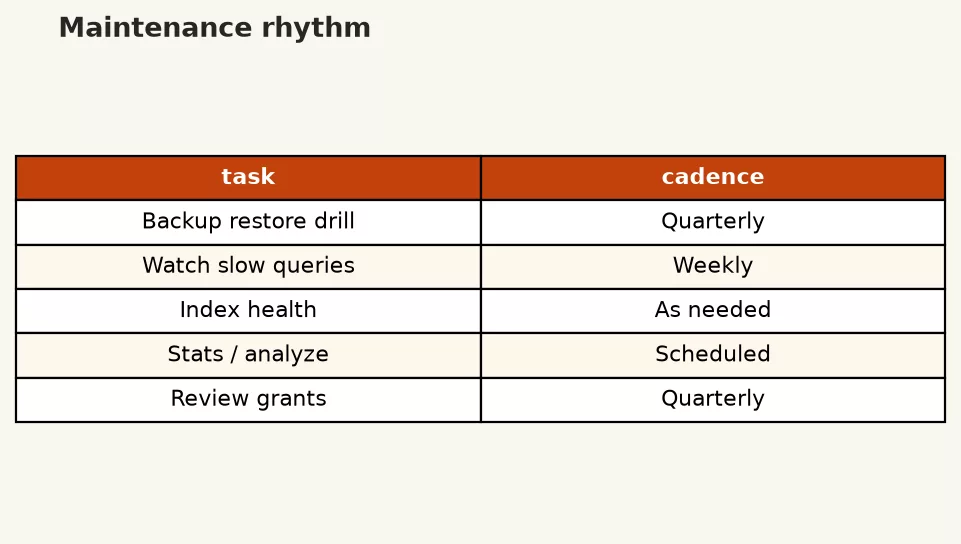
Applications get uptime targets. Data stores need the same seriousness. A query that was correct yesterday can fail today because a disk filled up, a credential expired, a replication lag grew, or an overnight job never ran. Maintenance is how teams reduce those surprises. Even if your title says analyst, understanding the checklist makes you a better incident partner and a safer owner of practice databases.
Backups: copies you can actually restore
A backup is a recoverable copy of data and enough metadata to bring a system back. Snapshots, logical dumps, managed service automated backups, and warehouse time travel features are all cousins. The feature name matters less than three questions:
- What is covered? All databases, or only production? Schema only, or data too?
- How old can a copy be? Recovery point objective in plain English: how much work can we lose?
- When did we last restore successfully? Untested backups are hopeful fiction.
For a local SQLite toy file, backup can be as simple as copying the file while nothing is mid-write, or using the engine’s backup API. For managed Postgres or MySQL, use the provider’s backup tooling and document who can restore. For warehouses, learn whether failed transforms can be rebuilt from sources or whether you rely on table clones and time travel.
Analyst habits that help:
- Before mass UPDATE/DELETE (Part 8), confirm a restore path or stage a copy table.
- Store critical extract definitions in git so you can rebuild logic even if a table vanishes.
- Know who owns backup policy. If the answer is “nobody,” escalate kindly and early.
- After a restore drill, re-run a small data quality checklist so you trust the recovered numbers.
Monitoring slow queries (without living in panic)
Slow queries are signals. Sometimes the signal is “we need an index.” Sometimes it is “the dashboard is scanning raw facts for a KPI that should be pre-aggregated.” Sometimes it is “someone cross joined two big tables.” Part 12 gave you EXPLAIN. Maintenance adds ongoing visibility.
What to watch for in practice:
- Queries that regularly exceed a time budget during business hours
- Sudden plan changes after a data growth spike or stats update
- Locks and blocked sessions when writers and long readers collide
- ETL jobs that start overlapping because yesterday’s run never finished
Many engines expose slow query logs or statistics views. Cloud consoles show top offenders. You may not have admin access. You still can:
- Record the SQL text, approximate runtime, and business impact.
- Note whether the slowness is new or chronic.
- Capture EXPLAIN output when allowed.
- Suggest a tighter query or curated table rather than only saying “the database is slow.”
Example of a report-shaped query you would rather schedule once into a summary table than run raw every page load:
SELECT
  c.region,
  DATE(o.order_date) AS order_day,
  COUNT(*) AS paid_orders,
  SUM(o.amount) AS paid_revenue
FROM orders AS o
INNER JOIN customers AS c
  ON c.customer_id = o.customer_id
WHERE o.status = 'paid'
  AND o.order_date >= '2024-05-01'
GROUP BY c.region, DATE(o.order_date)
ORDER BY order_day, c.region;
If twelve dashboards run that scan daily, a maintained daily summary table (refreshed by a job you monitor) is maintenance and optimization at once.
Statistics: the planner’s map of your data
Query planners estimate costs using statistics about tables and columns: roughly how many rows, how common values are, and related info. When statistics are stale, plans go weird. A selective filter might be treated as unselective, or the opposite. Symptoms look like “it got slow after we loaded a huge batch.”
Engines auto-update stats on schedules or thresholds, and they offer manual commands (names vary: ANALYZE, UPDATE STATISTICS, and friends). As an analyst, you do not need to tune every setting. You should know that:
- Big loads can deserve a stats refresh before you judge a query “forever bad.”
- Bad plans after bulk changes are a reason to ping owners with evidence, not only vibes.
- Disabling auto-stats “for speed” is a classic foot-gun unless experts own the consequences.
Vacuum, analyze, and cleanup concepts
Storage engines differ. A useful conceptual picture for several systems (especially Postgres-style MVCC): updates and deletes leave versions of rows that must be cleaned so space and visibility stay healthy. Vacuum-like processes reclaim or mark reusable space and support visibility maps. Analyze-like processes refresh statistics. Other engines use different vocabulary (optimize table, purge, compaction in warehouses, rebuild indexes).
What you should take away without memorizing knobs:
- Heavy update/delete workloads create maintenance work, not only “new data.”
- Autovacuum / auto-cleanup exists because humans forget manual chores.
- Table bloat and long-dead row versions can slow scans even when “row counts” look fine.
- Warehouse platforms may separate storage compaction from query stats; still someone owns the policy.
If you manage a small internal Postgres and deletes are frequent, learn the vendor’s cleanup guidance rather than inventing a weekly ritual from a random blog. If you only consume a warehouse, ask how failed loads and time travel interact with storage costs so finance is not surprised.
Access grants: least privilege is a feature
Grants control who can SELECT, INSERT, UPDATE, DELETE, and administer objects. Least privilege means each role gets only what it needs. Analysts often need read access to curated schemas, not write access to raw production. Service accounts for dashboards should not use personal credentials. Shared “admin” passwords in a chat channel are an incident waiting to happen.
-- Illustrative privilege idea; exact syntax and roles vary widely
-- GRANT SELECT ON v_paid_orders TO role_analyst_readonly;
-- REVOKE ALL ON orders FROM role_analyst_readonly;
-- GRANT SELECT ON orders TO role_analyst_readonly; -- only if truly required
Practical grant hygiene:
- Prefer group roles over one-off personal grants when your platform supports them.
- Separate read-only analytics roles from migration/admin roles.
- Rotate credentials when people leave or tools are decommissioned.
- Document which schema is the curated source of truth (views/models from Part 9).
- Never put production write credentials in notebooks you might commit.
Application passwords and API tokens for tools follow the same spirit. If you connect Python to SQL, use parameterized queries and secret stores as you would in any professional pipeline from the Python series.
On-call hygiene for analysts who inherit databases
You may not wear a pager. You may still be the person who gets the Slack ping: “Revenue looks off” or “The SQLite file on the shared drive is locked again.” A calm checklist beats heroics.
When numbers look wrong
- Confirm the time range, filters, and grain the stakeholder means.
- Compare to a known-good prior extract or quality scorecard.
- Check whether a job failed, ran twice, or has not run yet.
- Look for recent schema changes, view redefinitions, or permission errors.
- Escalate with evidence: query text, screenshots of counts, timestamps.
When the system is slow
- Note start time and whether the issue is global or one query.
- Avoid “fixing” production with untested UPDATEs during the fire.
- Reduce load if you own the heavy dashboard: pause refreshes, switch to a summary table.
- Hand off to platform owners with EXPLAIN and impact (“board pack blocked”).
When you inherit a mystery database
- Inventory tables, views, scheduled jobs, and known procedures/triggers (Part 11).
- Find backup and restore owners.
- Map credentials and who has write access.
- Identify the curated layer consumers should use.
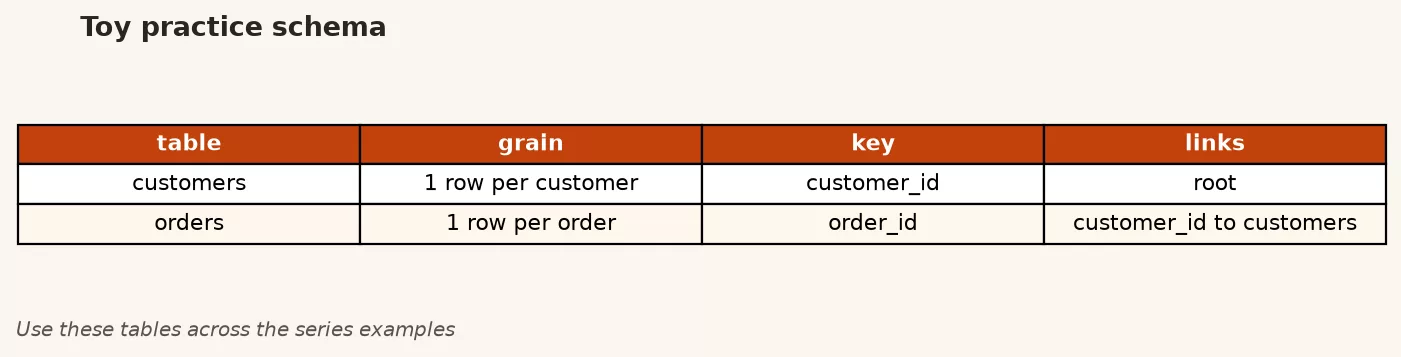
- Write a one-page README even if the schema is the toy customers/orders scale.
Rule of thumb: During an incident, prioritize truth and safety over clever SQL. After the incident, prioritize automation and docs so the same fire cannot rhyme next quarter.
Worked story: the Monday extract that “sometimes” fails
A weekly paid-revenue extract fails about once a month. Nobody owns it. You inherit the script. You add three maintenance moves:
- Observability: log start time, row counts, and end time to a small run_log table or file.
- Correctness check: after load, assert paid revenue is not null and customer_id uniqueness holds on the customer dimension.
- Backup awareness: write outputs to a dated path so last week’s file still exists if this week fails.
-- Lightweight post-check you can run after a refresh job
SELECT
  COUNT(*) AS paid_order_rows,
  SUM(amount) AS paid_revenue,
  COUNT(DISTINCT customer_id) AS distinct_customers
FROM orders
WHERE status = 'paid'
  AND order_date >= '2024-05-01';

-- Expect non-zero rows on weekdays with traffic; investigate zeros
SELECT COUNT(*) AS suspicious_zero_day_check
FROM orders
WHERE status = 'paid'
  AND order_date = CURRENT_DATE;
Those checks are cousins of the data quality series: make failures loud, not silent. Maintenance is not only vacuum schedules. It is also making sure the business notices broken pipes quickly.
A lightweight runbook template you can steal
When you own even a small database-backed process, keep a short runbook next to the SQL. Future you will thank present you. A practical template:
- Purpose: one sentence on what the job or database powers
- Dependencies: source systems, upstream jobs, network paths
- Schedule: when it runs and how long it should take
- Success checks: row counts, not-null keys, revenue floor/ceiling sanity
- Failure signs: zero rows, runtime > N minutes, permission errors
- Rollback: how to restore last good output or re-run safely
- Contacts: platform owner, data owner, escalation path
- Credentials: where secrets live (not the secret values themselves)
Paste that into a README beside your toy project and fill it as if a stranger will run the Monday extract during your vacation. If you cannot fill a section, that section is your risk. Maintenance is mostly making those risks visible before the vacation starts.
For larger organizations, runbooks live in the same place as incident tooling. For a team of five, a markdown file in the analytics repo is already a step change from “ask the person who built it if they are online.” Combine the runbook with the quality habits from the data quality series and you get a boring, reliable system: the best kind.
Common mistakes
- Never testing restores.
- Using personal admin accounts for BI tools.
- Ignoring slow query patterns until a board meeting.
- Treating stats and cleanup as superstition instead of platform-owned processes.
- Changing production data mid-incident without a preview or backup story.
- Leaving no README when you hand off a database you temporarily saved.
- Assuming warehouses need zero maintenance because the vendor markets “serverless.”
How to practice
- Backup your toy SQLite or Postgres schema, delete a table on a copy, restore, and verify row counts.
- Create a tiny run_log pattern for a weekly query you already use.
- List every credential you personally use to touch data systems. Mark any that should be rotated or narrowed.
- Write a one-page inheritance doc for the customers/orders practice database as if a stranger will own it next month.
- Pair with a platform teammate for a 30-minute tour of backups and slow query tooling in your real environment.
Quick recap of Part 13
- Backups matter only with tested restores and clear ownership.
- Slow queries need evidence, EXPLAIN, and often better grain or summary tables.
- Statistics and cleanup processes keep planners and storage healthy.
- Least-privilege grants and non-personal service accounts reduce blast radius.
- On-call hygiene is structured communication plus safety, not lone-hero SQL.
Series close: the path from Part 0 to Part 13
If you followed the whole SQL series, you built a practical spine rather than a trivia list:
- Part 0: What SQL is and why it still matters for analytics work
- Part 1: Setting up a playground so practice stays safe and repeatable
- Part 2: Core verbs at a glance (read and modify as a map)
- Part 3: SELECT as asking precise questions with columns and rows
- Part 4: Filtering and sorting so answers match the decision
- Part 5: Aggregates and GROUP BY for summaries
- Part 6: Joins that connect customers, orders, and other related tables
- Part 7: Subqueries for questions inside questions
- Part 8: INSERT, UPDATE, DELETE with preview and transaction caution
- Part 9: Views for shared meaning and indexes for access paths
- Part 10: CTEs, window functions, and recursive ideas for harder shapes
- Part 11: Procedures, triggers, and UDFs, plus when scripts fit better
- Part 12: Optimization habits with EXPLAIN, sargable filters, and simplicity
- Part 13: Maintenance, grants, and operational hygiene over time
That path is enough to be useful in real workplaces: read carefully, change safely, share definitions, measure performance, and respect the system when you are not the only user.
Where to go next
SQL is necessary and not always sufficient. Strengthen the rest of the craft:
- Python for analytics when you need reshaping, light modeling, automation, and careful handoffs beside the warehouse.
- Data quality when you need dimensions of trust, profiling, validation, and scorecards so pretty queries do not launder bad facts.
- From spreadsheets to real data when the real battle is messy files and unofficial ledgers on the way into SQL.
- Learn hub for the full map of AMS series and tutorials.
If you use AI assistants to draft SQL, keep the skepticism you earned here: check grain, preview filters, read the plan when it is slow, and never run unreviewed DML on production. Tools accelerate typing. They do not inherit accountability for the number that hits a slide.
Thank you for working through the series. Ship small queries that tell the truth, leave the next person a README, and treat maintenance as part of analysis, not an optional afterparty. When you are ready for another skill spine, start with Python or data quality and keep SQL as the durable backbone underneath both.
Sources
Research and further reading used for this article:
- PostgreSQL documentation: Backup and restore
- PostgreSQL documentation: Routine vacuuming
- PostgreSQL documentation: Statistics used by the planner
- MySQL Reference Manual: Backup and recovery
- SQLite documentation: Backup API
- PostgreSQL documentation: Database roles and privileges
- Analytics Made Simple: SQL series
- Analytics Made Simple: Python series
- Analytics Made Simple: Data quality series
- Analytics Made Simple: Learn hub