
If your Google Analytics 4 (GA4) reports suddenly show thousands of “direct” visits from Singapore or China that last a second or two, you are almost certainly looking at automated traffic, not readers. You cannot delete it from past data, but you can hide it from your reports in a few minutes with a comparison or a segment, and then see what your real visitors actually do.
Imagine you open your website’s analytics on a Monday and the numbers look like good news at first: visits are up five-fold. Then you look closer. The average visit lasts eight seconds, almost nobody scrolls, and most of the new traffic comes from one country you have never marketed to. Your real readers are still there, buried under visits that never read a word.
This guide explains how to recognise the pattern, what GA4 can and cannot do about it, how to build a comparison and a segment that show your real readers, and when it is worth blocking the traffic before it reaches your site. The worked example uses this site’s own GA4 data. For the separate question of whether AI answers are taking your search clicks, see our guide on checking AI search traffic.
What does the bot pattern look like?
It shows up as a flood of visits in the Direct channel, from one or two countries, mostly on desktop computers, that end within a few seconds. Direct is GA4’s label for visits where it cannot tell where the person came from, such as a typed address, a bookmark or, in this case, an automated program that sends no referral.
The pattern has been widely reported since late 2025. A Stan Ventures report, published December 16, 2025, describes a wave of Direct traffic from China and Singapore, including cities such as Lanzhou, with extremely low engagement. It says the traffic made up 30% to 60% of total sessions for some sites. Search Engine Watch reported on November 1, 2026 that the Singapore wave is back and that some of it now looks more human than before.
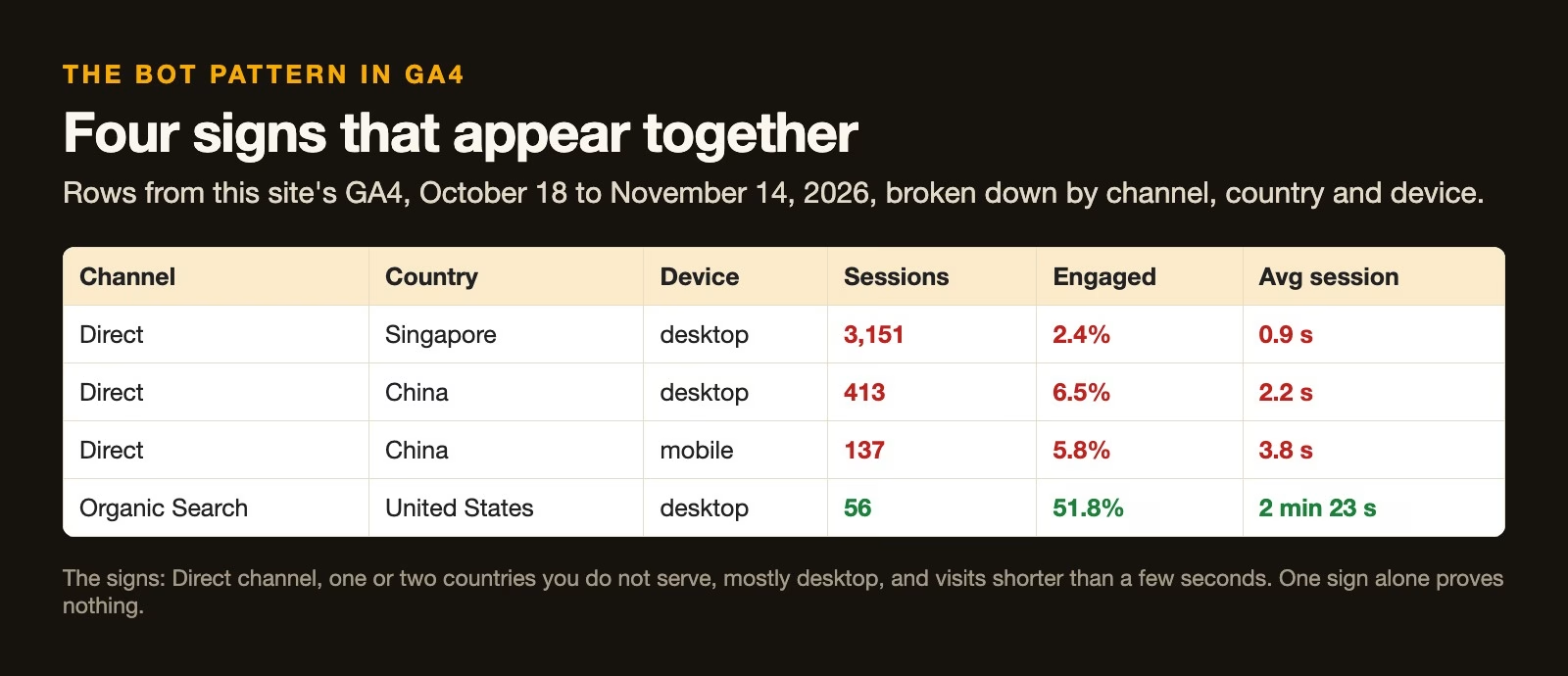
On this site, the pattern was easy to spot once the report was broken down by channel, country and device. Over the 28 days from October 18 to November 14, 2026, Direct desktop visits from Singapore alone came to 3,151 sessions with an average session of under one second. By contrast, 56 desktop sessions from United States search engines averaged 2 min 23 s, about two and a half minutes.
One sign is not enough
Each sign on its own has an innocent explanation. Plenty of real people type your address, live in Singapore or use a desktop. What gives the bots away is all four together, in volumes that do not match anything you did, such as a campaign or a mention in the news.
Why GA4 does not remove it for you
GA4 does filter out known bots automatically, but this traffic is not on the list it uses. Google’s help page on known bot-traffic exclusion (checked November 15, 2026) says known bots are identified from Google’s own research and the International Spiders and Bots List kept by the Interactive Advertising Bureau, and that you cannot turn the exclusion off or see how much it removed.
New automated traffic that runs your page code like a browser does not appear on those lists until someone adds it. Until then, GA4 records it like any other visit, and every average on your dashboard includes it.
What you can and cannot do in GA4
You have four options, and only two of them fix the reports you already have. The difference is whether a tool hides traffic when you look at it or removes it when it arrives.
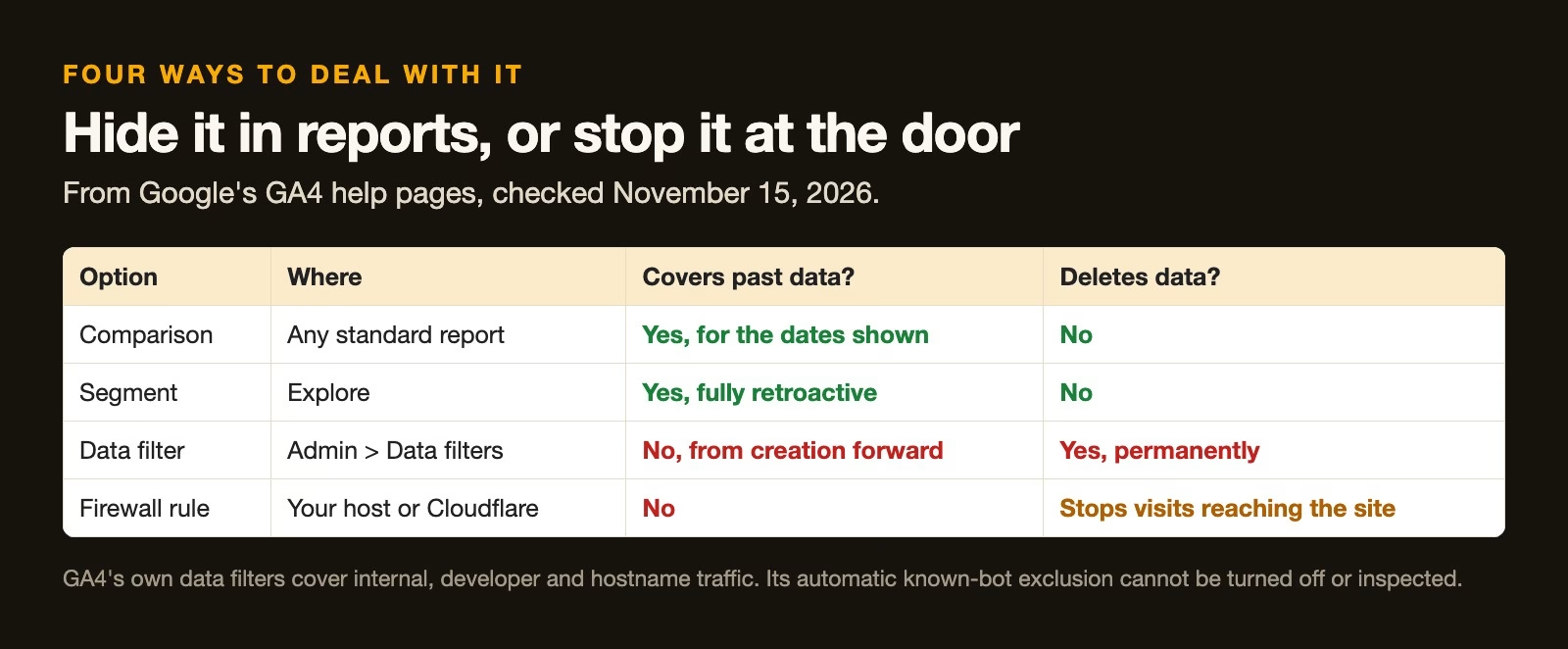
- Comparisons apply to standard reports for whatever dates you are viewing, and change nothing underneath, according to Google’s page on applying comparisons (checked November 15, 2026).
- Segments live in Explore, GA4’s area for custom analysis, and Google’s segment builder page (checked November 15, 2026) says a segment “is fully retroactive”, so it works on old data too.
- Data filters are permanent and only apply from the moment you create them. Google’s data filters page (checked November 15, 2026) says they “do not affect historical data” and that excluded data is never processed. The built-in types cover internal traffic by IP address (the number that identifies a device on the internet), developer traffic and hostnames, not a country-and-channel pattern like this one.
- Blocking at your host or firewall stops the visits from reaching the site at all. That changes future data only, and it needs care, covered below.
For most site owners the right first step is the non-destructive one: hide the pattern in reports, measure what is left, and only then decide whether to block anything.
How to build a comparison in a standard report
A comparison puts your filtered numbers next to the full numbers in any standard report, so you can see both at once. Google’s comparisons help page (checked November 15, 2026) gives the steps.
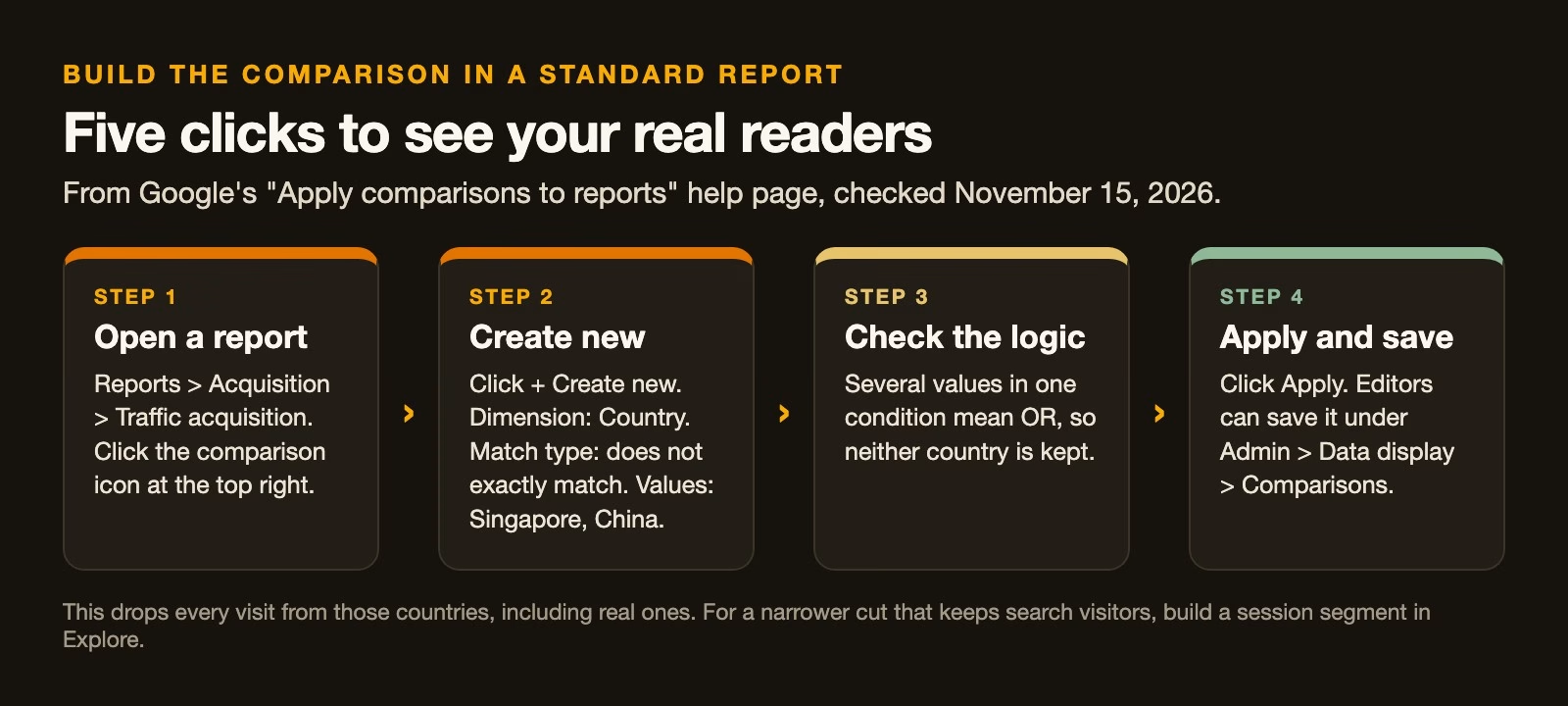
- Open Reports > Acquisition > Traffic acquisition and click the comparison icon at the top right.
- Click + Create new, choose the Country dimension and the match type does not exactly match.
- Enter Singapore and China as values. Several values in one condition count as either one, so both countries are left out.
- Click Apply. To reuse it, an editor can save it under Admin > Data display > Comparisons.
This is a blunt cut. It removes every visit from those two countries, including real readers and real search visitors. If you have a genuine audience there, use a segment instead.
How to build a segment that keeps real visitors
A session segment in Explore can leave out only the sessions that match the whole pattern, so real visitors from the same countries stay in. The segment builder page (checked November 15, 2026) describes the options used here.
- Open Explore and start a blank exploration.
- Click the plus sign next to Segments, then Create a custom segment and choose a session segment.
- Click Add condition group and switch it to exclude.
- Inside that one group add the conditions Session default channel group exactly matches Direct, and Country is one of Singapore, China. Conditions in the same group must all be true, so only Direct visits from those countries are excluded.
- Apply the segment and compare it with all sessions.
Check the preview count on the right before you apply it. If it removes far more sessions than the pattern rows you saw earlier, one condition is wider than you meant.
The worked example: this site’s own numbers
Here is what the cleaned view looked like on this site for the 28 days from October 18 to November 14, 2026, using the same logic as the segment: leave out Direct sessions from Singapore and China and keep everything else.
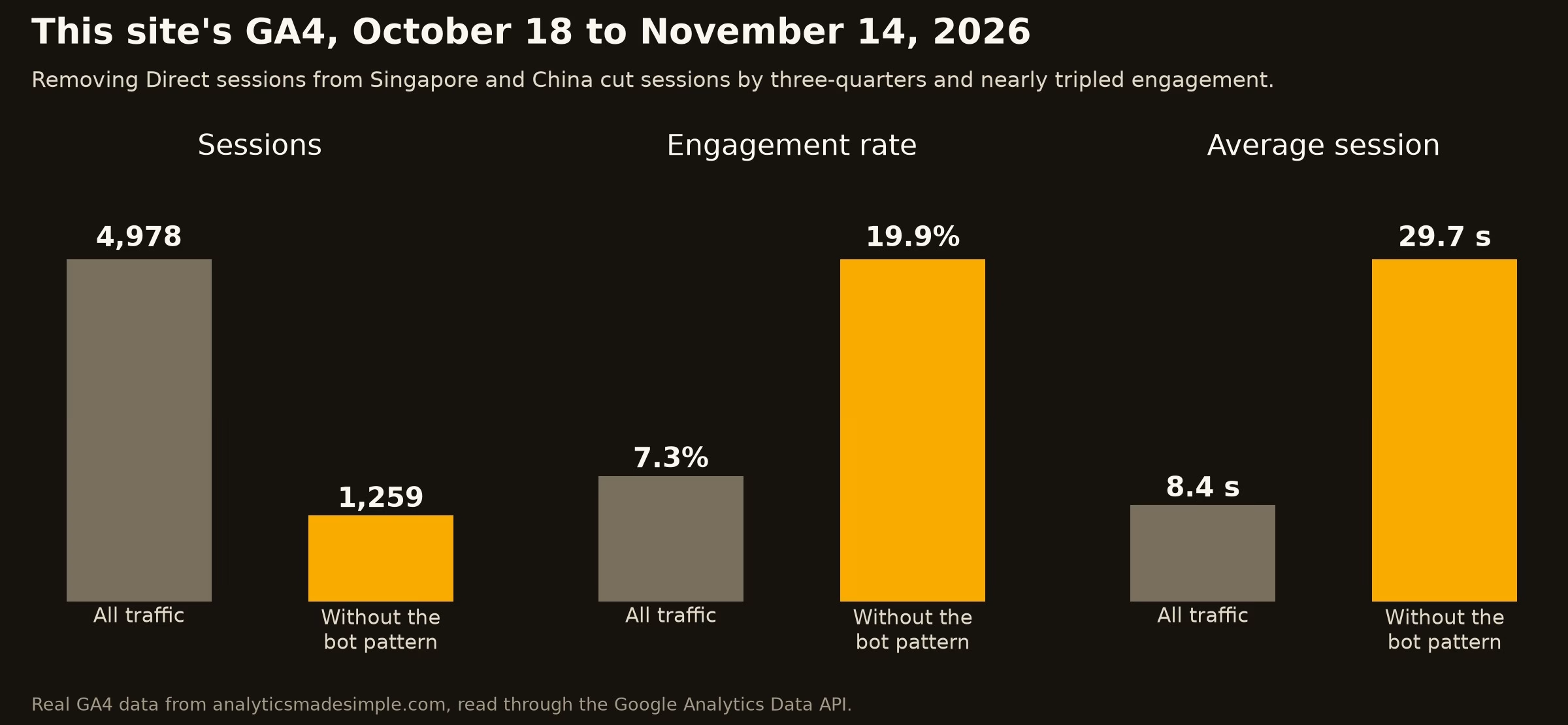
Sessions dropped from 4,978 to 1,259, so roughly three in four sessions in the raw report matched the pattern. The share of engaged sessions rose from 7.3% to 19.9%, and the average session went from 8.4 seconds to 29.7 seconds. An engaged session is GA4’s term for a visit where the person stayed a while, viewed more than one page or did something you count as important.
The cleaned numbers are not a flattering filter; they are closer to the truth. Search visitors on their own averaged more than two minutes, which is what you would expect from people reading a tutorial. The raw eight-second average was describing the bots.
Should you block the traffic?
Block it only when the reports are not enough, for example when the bots load your server, skew ad decisions or make every dashboard you share need a footnote. Blocking happens at your web host or at a service in front of your site, such as Cloudflare, with a rule that challenges or refuses matching requests.
The Stan Ventures report of December 16, 2025 mentions site owners using country blocks and firewall rules, and warns that this can also shut out real users and crawlers you want. Three precautions keep you safe:
- Start with a challenge, not a block. A challenge asks the visitor’s browser to prove it is real, which real visitors rarely notice.
- Never block search engine crawlers. Check that your rule does not catch Googlebot or Bingbot, or your search traffic will suffer.
- Record a baseline first. Note a week of the pattern rows before the rule, so you can see whether it worked.
Common mistakes
- Reporting the raw average to your team or clients, when most of it is bots.
- Creating a data filter and expecting old reports to change, when filters only apply going forward.
- Using a country-only comparison when you have real readers there, instead of a Direct-plus-country segment.
- Blocking a whole country at the firewall without a baseline, so you cannot tell whether it helped.
- Catching search crawlers in a firewall rule, which costs you the traffic you actually want.
Try it this week
- Open Traffic acquisition and add Country and Device category as secondary breakdowns.
- Write down any rows with thousands of Direct sessions and averages under five seconds.
- Build the Direct-plus-country segment in Explore and note sessions, engagement rate and average session with and without it.
- Save a comparison for your weekly report, and add a one-line note explaining it.
- Decide whether the cleaned numbers are enough, or whether a firewall challenge is worth testing.
Quick recap
- The bot pattern is Direct traffic, from one or two countries, mostly desktop, lasting seconds.
- GA4’s automatic bot filter does not catch it and cannot be adjusted.
- Comparisons and segments hide it in reports, including old data.
- Data filters and firewall rules only affect new data, and filters delete what they exclude.
- On this site, removing the pattern cut sessions by three-quarters and nearly tripled engagement.
- Block at the firewall only with a baseline, a challenge first and crawlers left alone.
Sources
- Google Analytics Help: Known bot-traffic exclusion (how GA4 identifies known bots; cannot be disabled or inspected; checked November 15, 2026)
- Google Analytics Help: Apply comparisons to reports (steps, match types, OR and AND logic, saved comparisons; checked November 15, 2026)
- Google Analytics Help: Segment builder (session segments, exclusion groups, fully retroactive; checked November 15, 2026)
- Google Analytics Help: Data filters (filter types, not retroactive, excluded data never processed; checked November 15, 2026)
- Stan Ventures: GA4 flooded with bot traffic from China and Singapore (December 16, 2025; pattern, share of sessions, blocking cautions)
- Search Engine Watch: GA4’s Singapore bot problem is back (November 1, 2026)
Keep going
Same lessons in your feed
Short diagrams, hooks, and weekly tutorials on Substack, Instagram, X, and Facebook.