Claude Meetings is a new beta from Anthropic in which Claude joins your Google Meet call as a visible participant, takes notes, answers questions in the chat and builds documents while you talk. It is on Claude’s Team and Enterprise plans, and before you let it into a call you should check who is invited, whether everyone is fine with being transcribed, and what your admin has switched on.
Imagine your team’s weekly planning call ends the way it always does: five people agree on a plan, nobody writes it down properly, and by Thursday two of them remember different deadlines. An assistant that sits in the call, writes the plan as you talk and sends everyone the same notes sounds like the fix. It can be, as long as you know what it records, who sees it and when it should stay out.
This guide covers what Claude Meetings does, how to add it to a call, the admin settings that decide where it can go, what it keeps afterwards, and a short checklist for your first meeting with it. For the general habit of turning any meeting transcript into action items you can trust, see our guide on meeting transcripts and action items.
What does Claude do in the call?
Claude joins as its own tile in the call, listens, and works on what you ask while the meeting runs. Anthropic’s product post, dated November 12, 2026, describes it drafting the plan being discussed, building a timeline on a whiteboard and looking up figures from your connected work tools.
The Help Center article “Use Claude Meetings” (checked November 15, 2026) lists what you can ask during the call:
- Questions. Say “Claude” and ask, or type in the Meet chat. Answers appear in the chat by default.
- Documents and boards. Say “Claude, make a doc” or “Claude, make a whiteboard”. What it builds is attached to the meeting page, and teammates on the invite can edit it.
- Your connected tools. Claude can use tools you have connected to Claude, such as a team chat app, if you approve. It asks each person the first time, and for spoken requests it checks who is speaking each time.
- Pause and leave. Ask it to stop listening, or to leave. You can also remove it from the meeting page.
A connector is a link you set up between Claude and another app, so Claude can read from it or act in it on your behalf. Connected-tool requests post approval prompts in the Meet chat where possible, and anything in that chat is visible to everyone on the call, which matters if outside guests are present.
How do you add Claude to a meeting?
You add it from Claude’s Meetings page by picking a meeting from your Google Calendar. The Help Center article (checked November 15, 2026) gives four steps, once your admin has switched the feature on.
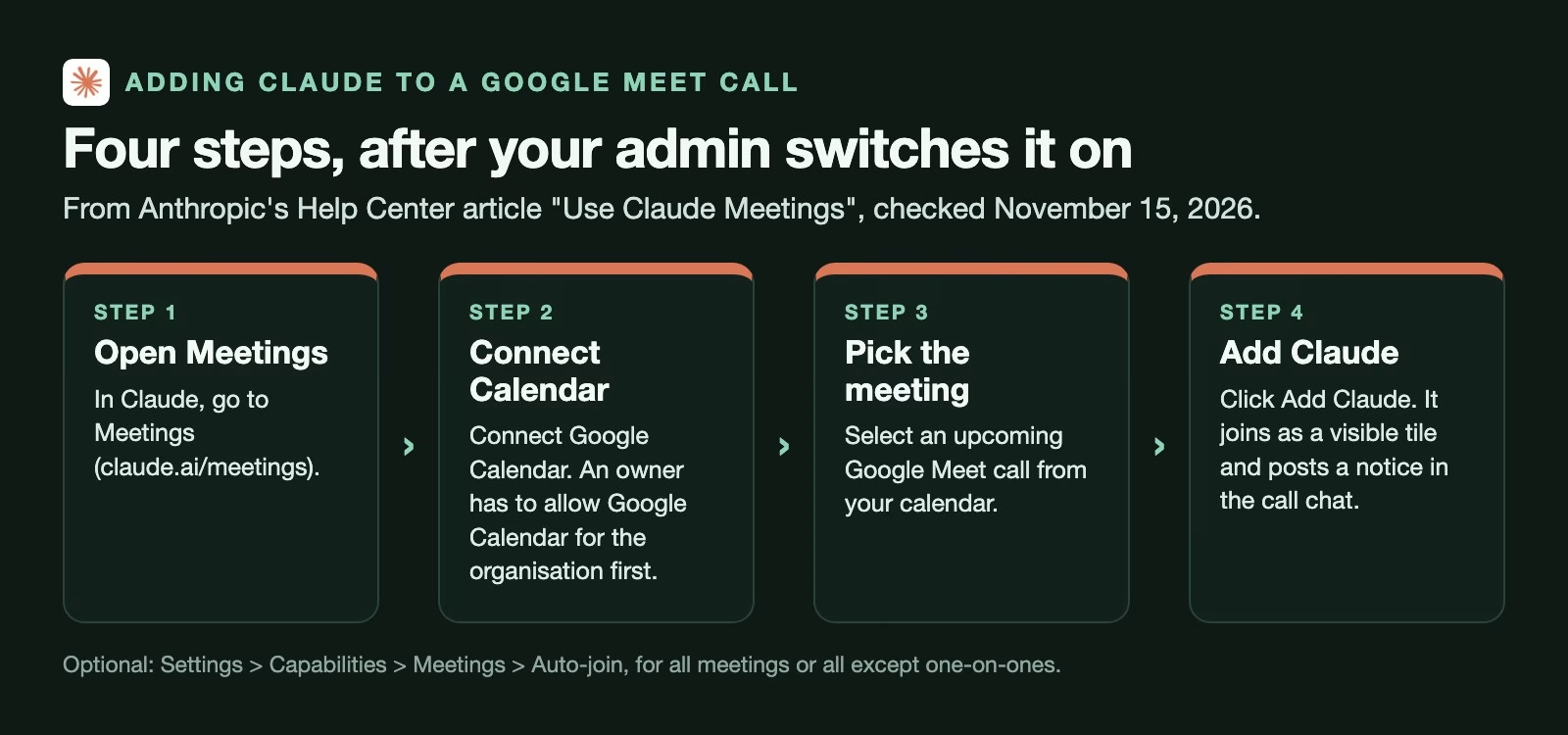
- Go to Meetings in Claude.
- Connect Google Calendar. An owner has to allow Google Calendar for your organisation first.
- Select a Google Meet call on your calendar.
- Click Add Claude.
You can also set Claude to join automatically under Settings > Capabilities > Meetings > Auto-join, either for all your meetings or all except one-on-ones, according to the same article. Owners cannot turn auto-join on for you. If the host is asked to admit Claude and declines, it does not try again unless someone adds it again.
Google Meet is the only platform for now. Both the product post and the Help Center (checked November 15, 2026) say other video platforms are coming, without a date.
What your admin decides
Your organisation’s owner decides whether Claude Meetings is on, and whether Claude can join calls with people from outside the company. The settings sit under Organization settings > Products > Claude Meetings (beta), according to the Help Center article checked November 15, 2026.
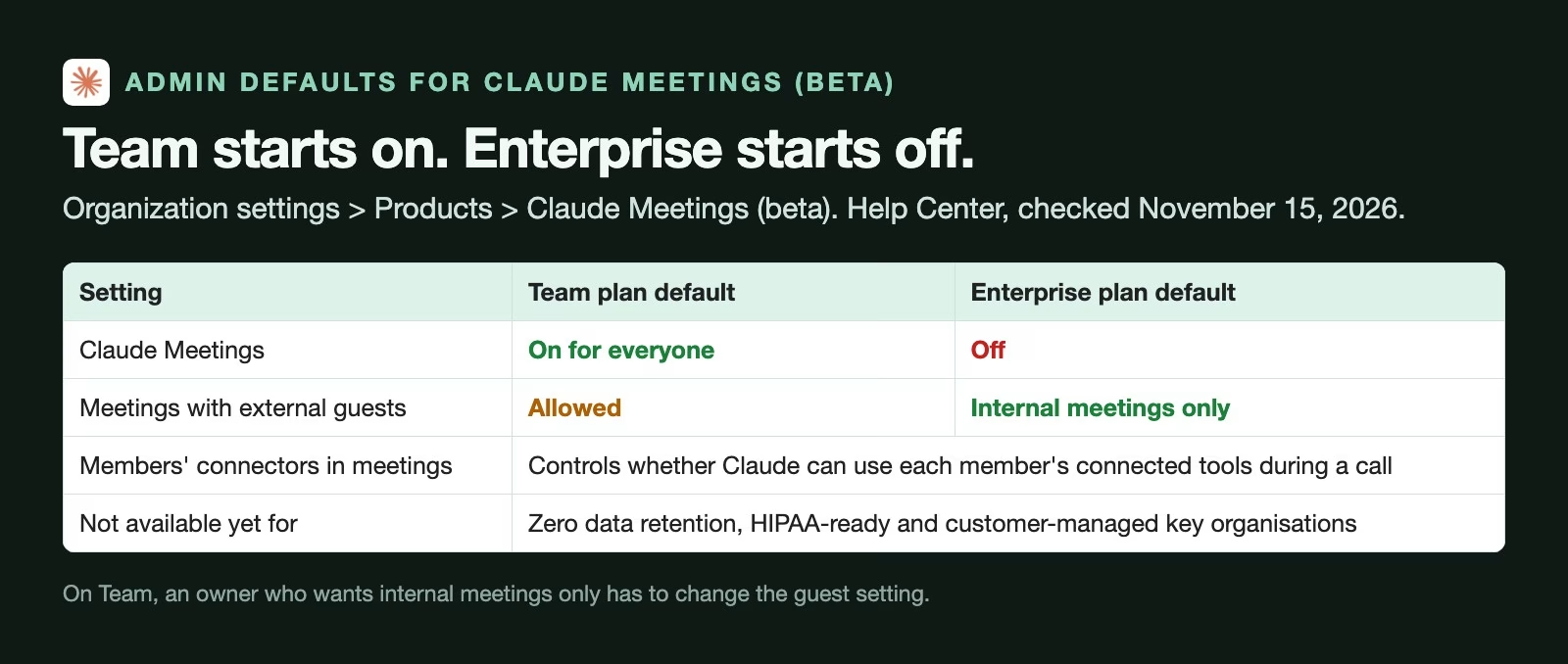
The defaults differ by plan, and the difference matters:
- Team plan: Meetings is on for everyone, and meetings with external guests are allowed. An owner who wants Claude kept to internal calls has to change that setting.
- Enterprise plan: Meetings is off until an owner turns it on, for everyone or for chosen roles, and Claude joins internal meetings only unless the owner allows guests.
- Connectors: a separate setting decides whether Claude can use members’ connected tools during calls.
The Help Center also says the beta is not available yet to organisations using zero data retention (where Anthropic keeps no data after a request), a HIPAA-ready setup (the US health-privacy configuration) or customer-managed encryption keys.
What happens with outside guests
Anthropic’s product post says that by default Claude stays out of calls with people from outside the organisation and leaves if an outsider joins, including another company’s note-taking bot. The Help Center’s plan defaults say Team allows guests from the start, so check your own setting rather than trusting either page’s general statement.
When guests are allowed, the Help Center (checked November 15, 2026) says Claude still takes notes, posts its notice in the chat but does not reply there, and includes what guests say in the notes and transcript. Guests do not get the meeting page or the recap email.
What does it keep after the call?
It keeps a transcript, a summary with action items, descriptions of shared screens and everything it made, but not the audio. The Help Center article (checked November 15, 2026) says Claude saves the transcript, summary and screen descriptions and does not save audio.
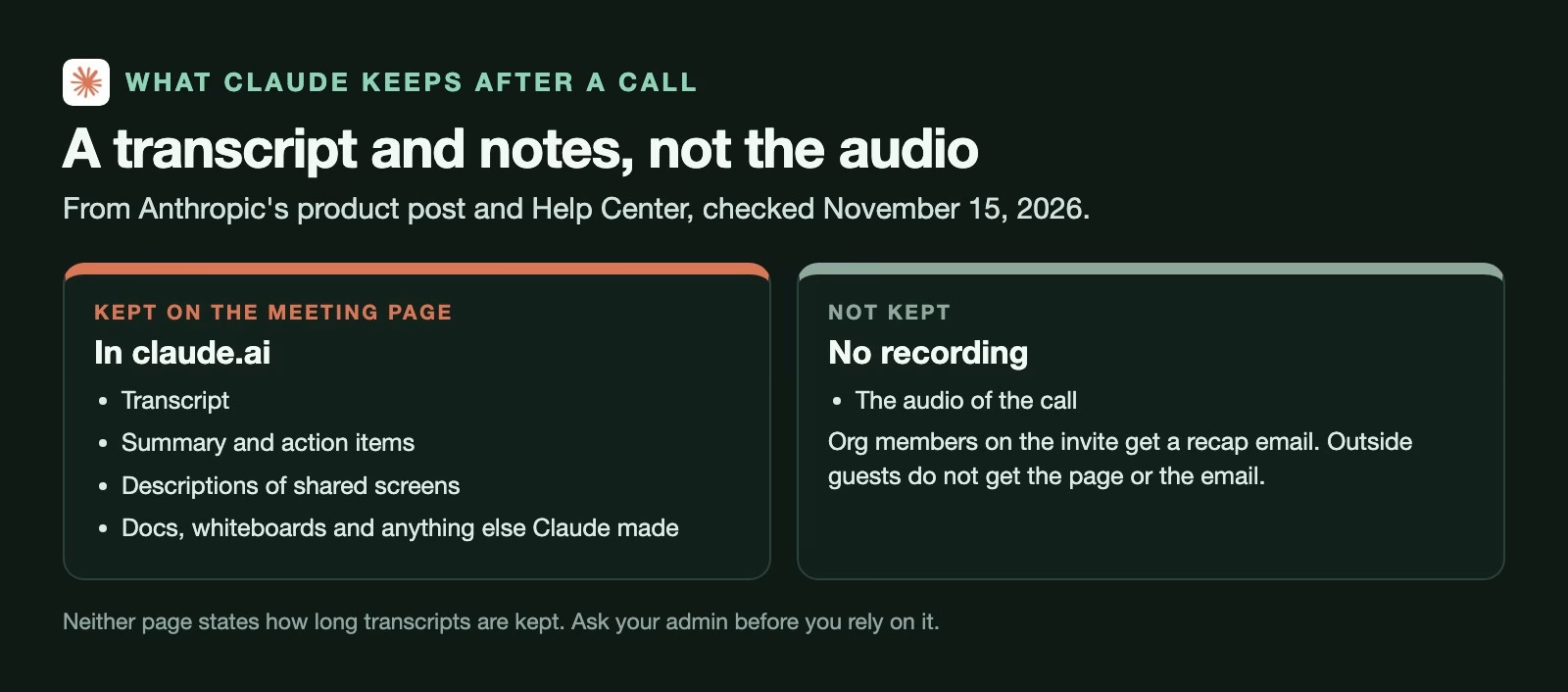
After the call, each meeting has its own page in Claude with the notes, the transcript and the documents. Members of your organisation who were on the invite get a recap email with a link, and they can edit what Claude made. You can also ask Claude about past meetings in an ordinary chat, as long as you have access to them.
Neither page says how long transcripts are kept. If your company has rules about how long meeting records may exist, ask your admin before you start using it for sensitive calls.
What it costs during the beta
Notes, transcripts and answers that do not use connected tools are free on Team and Enterprise during the beta, according to the product post and the Help Center article (checked November 15, 2026). Documents, whiteboards and other things Claude makes in a call are free through February 10, 2027. Requests that use connected tools count toward your normal usage. The Help Center also says Claude can stay in a call for up to eight hours and warns before it leaves.
The checklist before you let it in
Use these five checks before the first meeting, and before any call that is not routine. Each one comes from a rule or default in Anthropic’s pages.
- Ask for consent. Both of Anthropic’s pages tell you to make sure everyone on the call is fine with being transcribed before you add Claude or turn on auto-join. In some places recording or transcribing a call without everyone’s agreement is against the law, so treat this as a requirement, not a courtesy.
- Check the guest list. If anyone from outside the company is invited, find out what your guest setting is. On Team, the default lets Claude stay.
- Watch the chat. Approval prompts and answers appear in the Meet chat, which every participant can read. Do not ask Claude to look up anything you would not say aloud to the whole call.
- Decide on auto-join. Turning it on for all meetings means Claude joins one-on-ones too, unless you pick the option that excludes them. Performance reviews and HR calls are good reasons to keep it manual.
- Read the action items. After the call, compare Claude’s list with what was agreed. Fix any wrong owner or date on the meeting page before the recap goes around.
A worked example: the weekly planning call
Let’s go back to the planning call. Five people from the same company, no guests, an hour long. You add Claude from the Meetings page, it joins as a tile and posts its notice in the chat, and you mention at the start that Claude is taking notes.
Halfway through, someone asks what last year’s version of the event cost. You say “Claude, what did we spend on this last year?” and it asks you to approve a lookup in a connected tool, then posts the figure in the chat. Near the end you say “Claude, make a doc with the plan and owners”, and the doc appears on the meeting page.
After the call you open the page and compare the action items with your own memory. Claude has one deadline as Friday when the team agreed on Thursday, so you fix it before anyone acts on it. Everyone on the invite gets the recap email with the corrected plan.
The total extra work was a sentence at the start of the call and two minutes of checking at the end.
Common mistakes
- Adding Claude without telling people, when Anthropic’s own guidance is to make sure everyone is fine with being transcribed.
- Assuming it stays out of guest calls, when the Team default allows them.
- Asking for sensitive lookups in the shared chat, which every participant can read.
- Turning on auto-join for every meeting, including one-on-ones and HR calls.
- Sending the recap without reading it, when one wrong date can undo the point of the notes.
- Planning around Zoom or Teams, when it works only with Google Meet for now.
Try it this week
- Ask your admin whether Claude Meetings is on and what the guest setting is.
- Pick one internal, routine meeting and tell the attendees in advance.
- Add Claude from the Meetings page and ask it one question during the call.
- Ask it to make a doc with the plan and owners before the call ends.
- Compare its action items with your own notes and fix any differences before the recap goes out.
Quick recap
- Claude Meetings is a beta on Team and Enterprise plans, for Google Meet only.
- Claude joins as a visible tile, posts a notice in the chat and builds docs while you talk.
- Team has it on with guests allowed by default; Enterprise starts with it off.
- It keeps the transcript, notes and documents, not the audio.
- Notes and transcripts are free during the beta; documents are free until February 10, 2027.
- Get consent, check the guest list and read the action items every time.
Sources
- Anthropic: Introducing Claude Meetings, now in beta (November 12, 2026; what Claude does in calls, guest default, no audio kept, beta pricing)
- Claude Help Center: Use Claude Meetings (setup steps, auto-join, admin settings and defaults, guests, storage, eight-hour limit, consent; checked November 15, 2026)
- TechCrunch: Anthropic launches Claude Meetings (announcement coverage, November 10, 2026)
Keep going
Same lessons in your feed
Short diagrams, hooks, and weekly tutorials on Substack, Instagram, X, and Facebook.