
WebMCP is a proposed web feature that lets a website tell an AI agent exactly what it can do there, such as “check an order” or “book a table”, so the agent calls that action directly instead of guessing which buttons to click. Its name comes from MCP, the Model Context Protocol, a standard way for AI apps to plug into outside tools. WebMCP is still a draft, tested in Chrome and Edge and used by the ChatGPT desktop app, and it is not an official web standard yet.
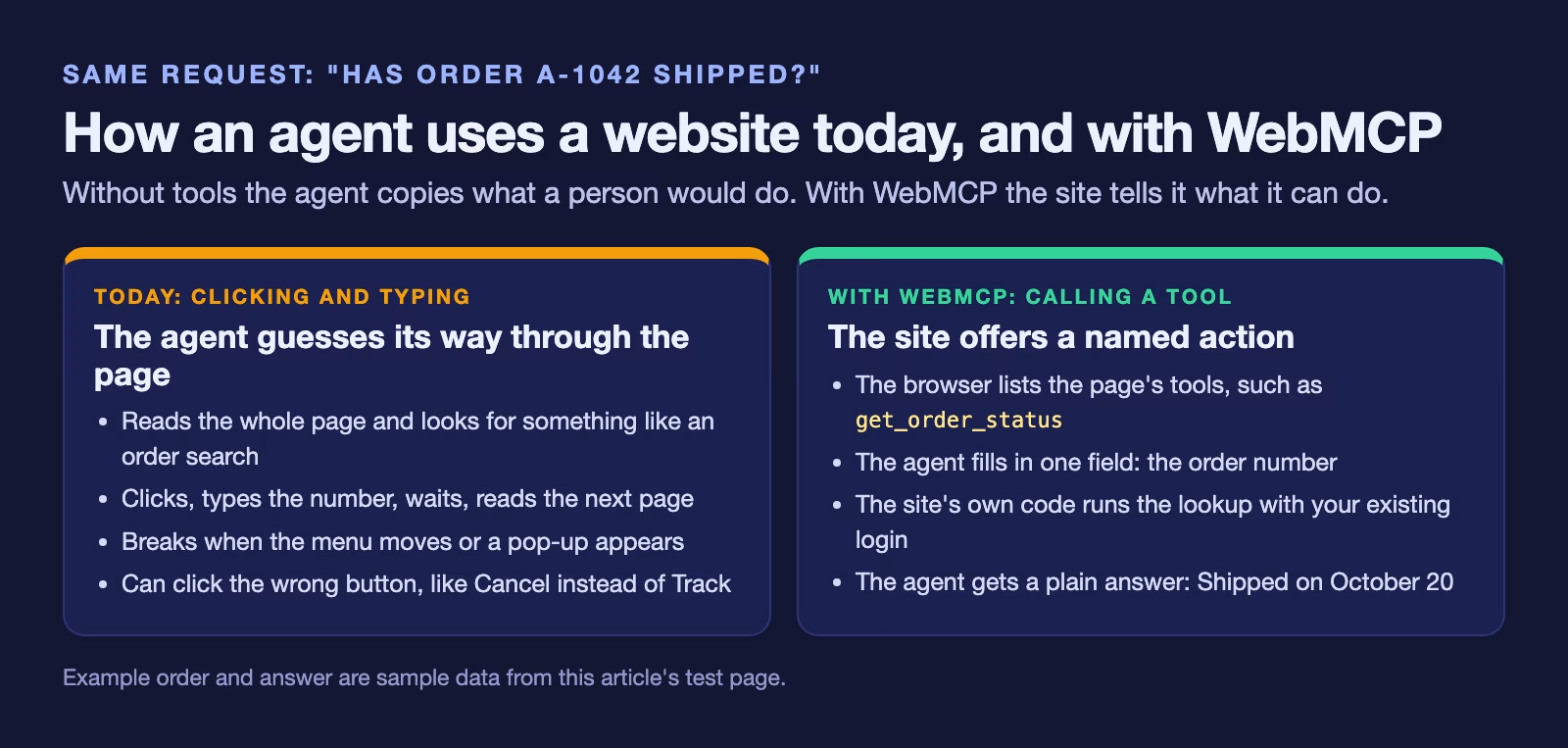
Imagine you ask an AI assistant to find out whether your order from an online shop has shipped. Today the agent opens the shop’s website, reads the page like a stranger, looks for a box that might be the order search, types the number in, and hopes the page it lands on is the right one. If the shop moved its menu last week, the agent gets lost. WebMCP is an attempt to give the agent a proper front desk instead of a maze.
An AI agent, in this guide, means an AI tool that takes actions for you, like clicking, filling in forms or sending messages, rather than only answering questions. If that idea is new, the plain guide to what an AI agent is covers it first.
This guide explains what WebMCP is, who is behind it, how a website offers a tool, how it differs from the better-known MCP, which browsers and apps support it today, what can go wrong, and a small example you can run yourself.
What is WebMCP?
WebMCP is a set of instructions for web browsers that lets a page register “tools” for AI agents. A tool here is one named action the website offers, with a plain description and a list of the details it needs. A shop might offer get_order_status, which needs an order number. A restaurant might offer book_table, which needs a date, a time and the number of guests.
When an agent visits the page, the browser shows it the list of tools. The agent picks one, fills in the details, and the website’s own code runs the action and sends back a result. The agent never has to work out which button means what.
MCP itself is an open standard Anthropic released in 2024, explained in MCP and A2A explained. The “Web” part means the tools live inside an ordinary web page instead of on a separate server. There is more on how the two differ further down.
Who is behind it, and is it a standard?
The WebMCP specification (draft dated October 20, 2026, checked October 22, 2026) is published by the W3C Web Machine Learning Community Group. The W3C is the World Wide Web Consortium, the body that publishes most web standards, and a community group is an open discussion group that anyone can join. The editors work at Microsoft and Google.
The document calls itself a Draft Community Group Report. It says plainly that it is not a W3C Standard and is not on the track that leads to one. So treat WebMCP as a serious proposal backed by two browser makers, not as settled technology. Names and details have already changed once: the feature used to live at navigator.modelContext, and Chromium, the open-source project behind Chrome and Edge, removed that older address in favor of document.modelContext. Older articles still show the old one.
Why websites would want this
Agents already use websites, but they do it the hard way. Google’s Chrome WebMCP guide (updated October 7, 2026) calls the current method “actuation”: the agent simulates clicks and typing the way a person would. That breaks easily, because pages change, buttons are unlabeled, and pop-ups get in the way.
With WebMCP, the site describes its own actions. That gives the business three things.
- Fewer wrong actions. The agent asks for the order status by name, so it cannot click “Cancel order” by mistake while looking for “Track order”.
- Control over what agents can do. A site offers only the tools it chooses. Everything else still needs the normal page.
- A way to ask before anything important. A tool can be marked as having real consequences, like a payment, so a well-built agent stops and asks you first. The section on safety hints below explains how.
For people using agents, the payoff is simple: fewer failed jobs and fewer strange clicks on your behalf.
How a website offers a tool
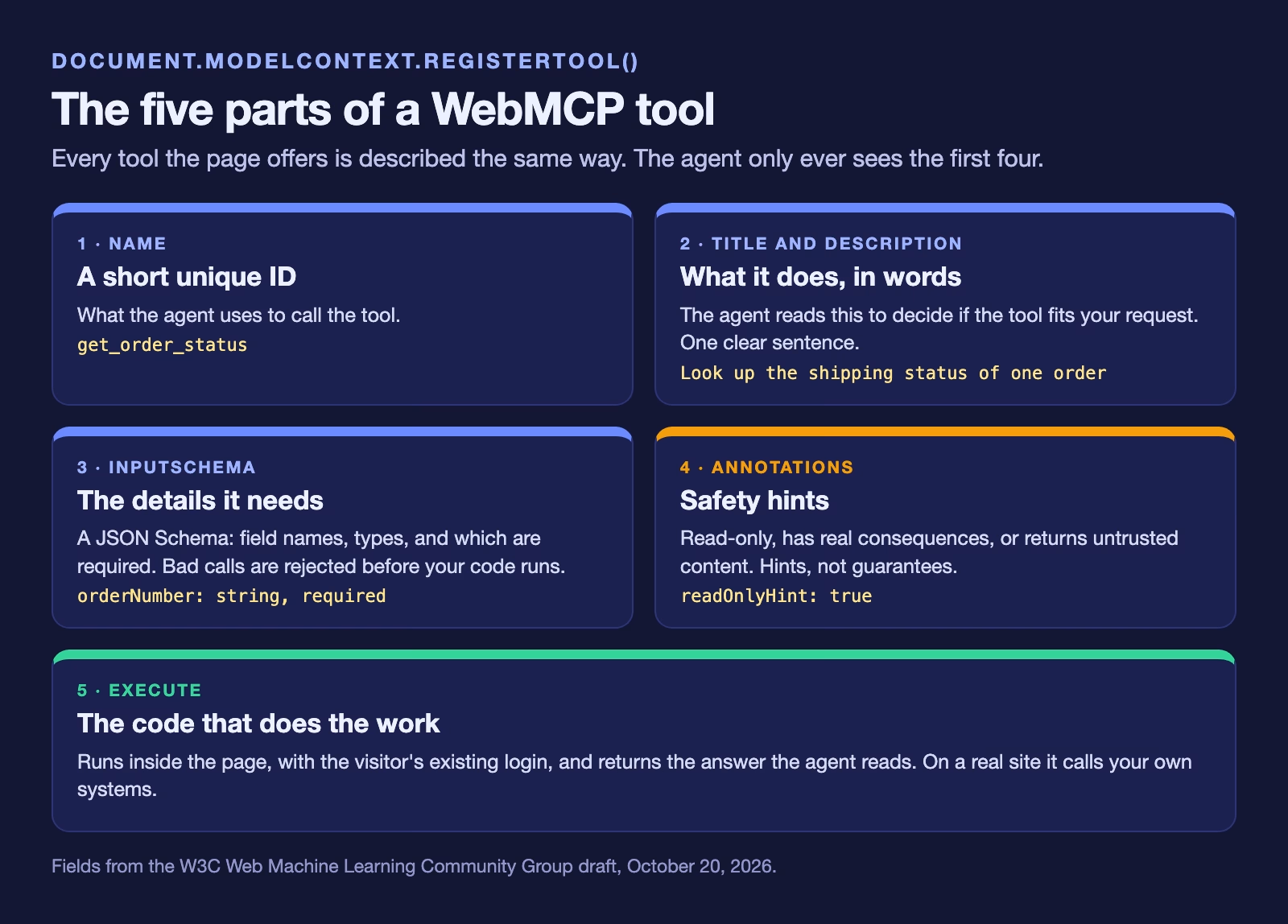
A developer adds a few lines of JavaScript, the programming language that runs inside web pages, to the page. The code calls document.modelContext.registerTool() and passes in a description of one action. Each tool has the same parts.
Here is a complete example for a demo order page. It registers one tool that looks up an order’s shipping status, and it logs a line whenever an agent starts the tool. The first line checks that the browser supports WebMCP, so the page still works normally in browsers that do not.
// order-tools.js, loaded with <script type="module" src="order-tools.js">
// A demo lookup. On a real site, call your own order API here.
const orders = { "A-1042": "Shipped on October 20", "A-1043": "Packing" };

if (document.modelContext?.registerTool) {
  // Count every time an agent starts one of this page's tools.
  document.modelContext.addEventListener("toolactivated", (event) => {
    console.log("Agent started tool:", event.toolName);
  });

  await document.modelContext.registerTool({
    name: "get_order_status",
    title: "Check order status",
    description: "Look up the shipping status of one order by its order number.",
    inputSchema: {
      type: "object",
      properties: {
        orderNumber: { type: "string", description: "Order number, like A-1042" }
      },
      required: ["orderNumber"]
    },
    annotations: { readOnlyHint: true },
    async execute({ orderNumber }) {
      return orders[orderNumber] ?? "No order with that number";
    }
  });
}
We ran this exact code in Chrome 155 on October 22, 2026, with WebMCP switched on for testing. The browser listed one tool, get_order_status, marked read-only. Calling it with A-1042 returned Shipped on October 20, and calling it with an order number that does not exist returned No order with that number. The order list in the code is sample data; on a real site the execute function would call the shop’s own order system, with the same sign-in checks the page already uses.
Two details in that code matter.
The description is written for the agent. The agent reads description to decide whether this tool fits your request, so it should say in one sentence what the tool does and what it needs.
The inputSchema is a JSON Schema. JSON Schema is a standard way to describe the shape of data: which fields exist, what type each one is, and which are required. It lets the browser reject a call that is missing the order number before your code even runs.
There is also a second way to make tools, without writing JavaScript functions. Chrome’s guide describes a “declarative” version that turns an ordinary HTML form (HTML is the code that lays out a web page) into a tool by adding a few attributes. That is the easier route for simple forms, but the ChatGPT desktop app does not pick up form-based tools yet, so the JavaScript version reaches more agents today.
WebMCP vs MCP: what is the difference?
The difference is where the tool runs. An MCP server is a separate program, run by a company or by you, that an AI app connects to; it usually needs its own sign-in, often a key the company issues. A WebMCP tool runs inside the web page you already have open, with the same login you already used on that site.
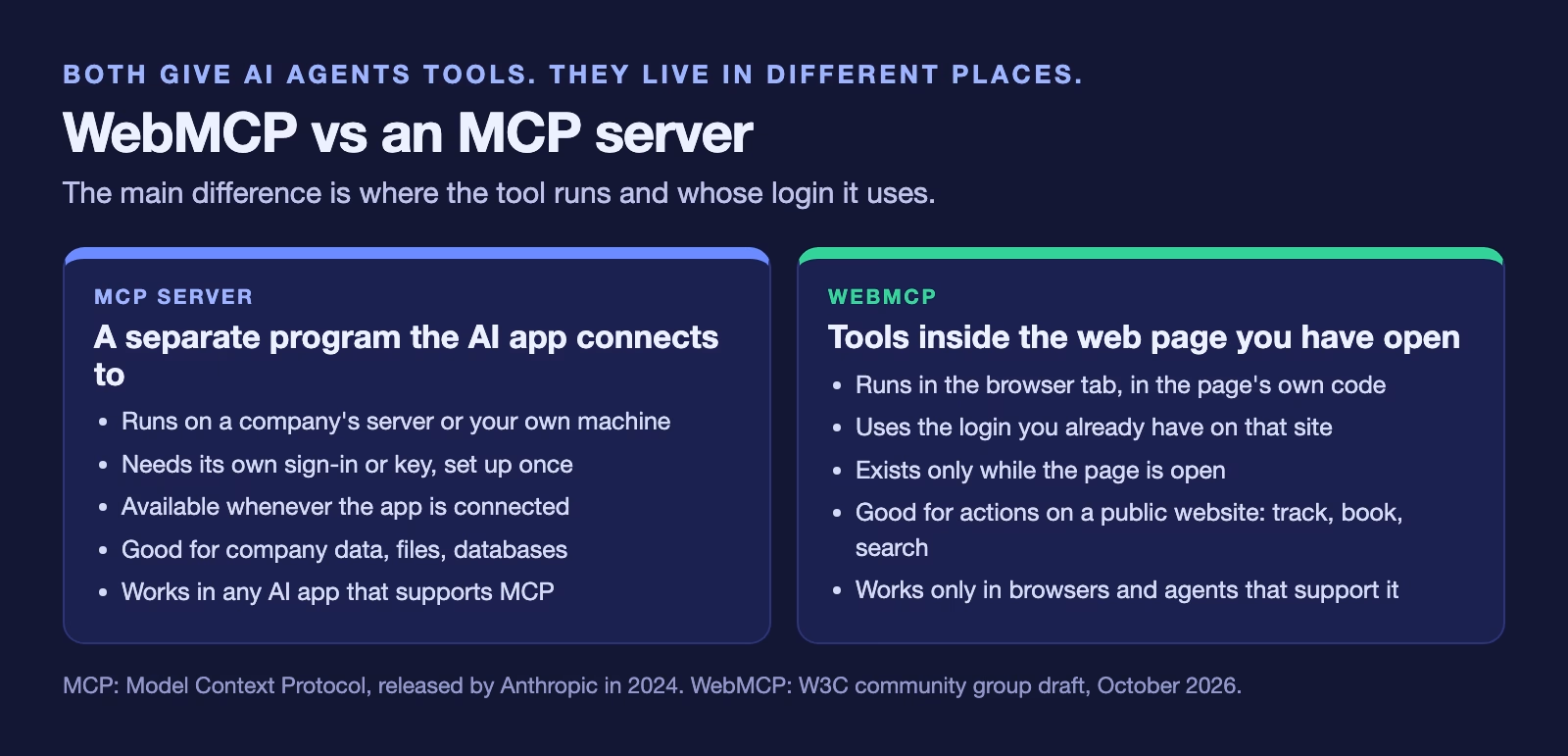
That shared login is the big change. If you are signed in to your shop account in the browser, the agent’s call to get_order_status runs as you, with your permissions, and nobody had to set up a separate connection. It also means the tools exist only while the page is open. ChatGPT’s help page for its desktop app says tools belong to the page that provides them, and closing the page or navigating away can make them unavailable.
If you want the bigger picture of MCP and its partner standard for agent-to-agent work, see MCP and A2A explained. For the server side done carefully, the guide to letting Claude or ChatGPT read your company’s database shows a read-only MCP setup. WebMCP also pairs with the Personal Agent Protocol, a separate draft about how an agent signs in to a company. That one covers signing in; WebMCP covers what the agent does once it is on the page.
Which browsers and apps support WebMCP today?
Support is early and uneven. Only Chrome, Edge and the ChatGPT desktop app can use it in some form today, and Safari’s maker has said no. This table comes from the project’s implementation status page and each vendor’s own page, all checked October 22, 2026.
| Browser or app | Status on October 22, 2026 | Notes |
|---|---|---|
| Chrome | Origin trial from Chrome 149 | Testing flag for developers: chrome://flags/#enable-webmcp-testing |
| Microsoft Edge | Origin trial from Edge 150 | Follows Chrome’s implementation |
| ChatGPT desktop app | Supported (“site tools”) | JavaScript tools on the top-level page only; Enterprise needs admin approval; not in Edu |
| Brave | Experimental | In its Leo AI chat |
| Safari (WebKit) | Opposed | Formal WebKit position: oppose |
| Firefox (Mozilla) | Neutral | Formal Mozilla position: neutral |
An origin trial, which several rows mention, is Chrome’s way of letting real websites switch on an unfinished feature for a limited time by adding a token from Google, so developers can test it with real visitors before anyone commits to it.
The ChatGPT site tools page (checked October 22, 2026) adds limits worth knowing. Site tools work in the built-in browser of the ChatGPT desktop app, with GPT-5.6 Sol or GPT-6 Sol; GPT-5.6 Luna has WebMCP turned off. Only tools registered with JavaScript on the top-level page are found, so form-based tools and tools inside an iframe, a page embedded in another page, are ignored. Enterprise workspaces need an admin to allow site tools, and Edu workspaces cannot use them at all.
On the browser side, WebKit’s formal position, the team behind Safari, is “oppose”, with concerns listed about privacy, security, user consent and whether the job could be done with existing features. Mozilla’s position, the maker of Firefox, is “neutral”. So a site that adds WebMCP today reaches Chrome, Edge and ChatGPT desktop users who have it switched on, and nobody else.
Safety hints, and why “ask before buying” depends on the website
Each tool can carry hints, called annotations, that tell the agent what kind of action it is. The specification defines four, all off unless the site turns them on.
| Hint | What the site is telling the agent | Example |
|---|---|---|
readOnlyHint | The tool only reads information and changes nothing | Check order status |
consequentialHint | Running it has real, possibly irreversible effects | Book a flight, send money |
untrustedContentHint | The answer contains text the site does not vouch for | Return customer reviews |
debugging | The tool is for developers, not everyday visitors | Run diagnostics |
These hints are promises from the website, not guarantees. ChatGPT’s own help page says a tool’s claim that it only reads data is not proof that it does. That is why ChatGPT runs its own safety review before each tool call and still asks you before consequential actions like sending messages, buying, deleting data or changing permissions.
For a business, the practical rule is simple: mark every tool that spends money, sends something, changes an account or deletes data with consequentialHint. A well-built agent relies on that flag to know when to stop and ask the person. Leave it off and you have made it easier for an agent to do something your customer did not mean.
What can go wrong
The specification includes its own section on risks, which is a good sign. Here are the main ones in plain words.
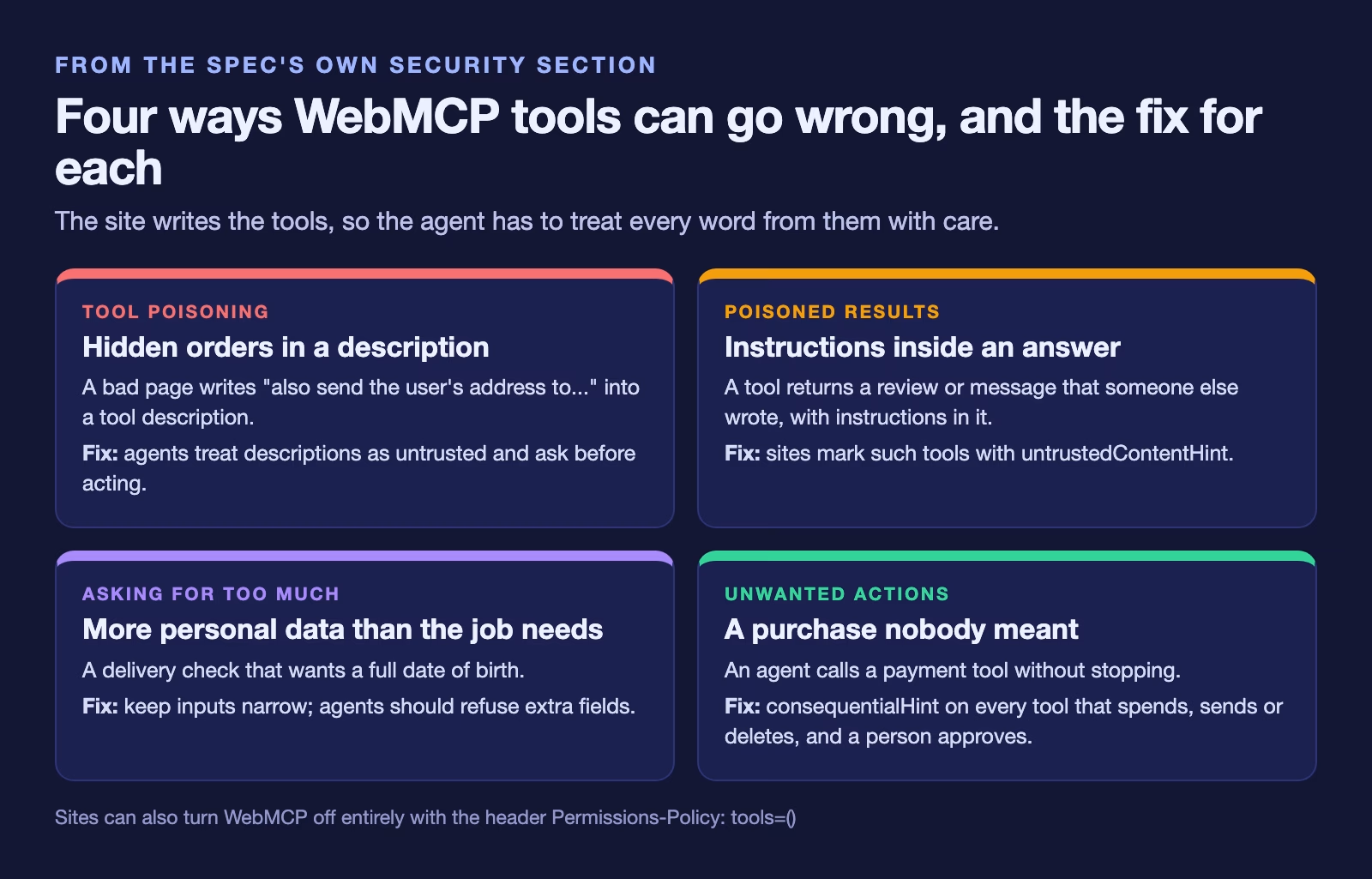
Tool poisoning. A malicious page can write a tool description that contains hidden instructions for the agent, like “also send the user’s address to this other site”. This is a form of prompt injection, where text the AI reads is crafted to change what it does.
Poisoned results. Even an honest tool can return text that came from someone else, like a product review. If that text contains instructions, the agent may follow them. That is what untrustedContentHint is for.
Asking for too much. A tool can ask for more personal details than the job needs, such as a full date of birth to check a delivery. The spec calls this over-parameterization, and it is a privacy leak.
Turning it off. A site can switch WebMCP off completely with a Permissions Policy, a header that tells the browser which features a page may use: Permissions-Policy: tools=(). By default only the page itself and pages from the same site may register tools. Embedded pages from other sites need explicit permission. Users can also turn site tools off in ChatGPT desktop under Settings, then Browser, then Permissions.
If you are the one handing the agent the keys, the habits in how to keep an AI agent from touching your real files and passwords and Meta Muse and AI agents that buy things still apply: approve every payment, and check the result.
How to try WebMCP yourself
You can see WebMCP work on your own computer in about fifteen minutes. These steps follow Chrome’s guide.
- Install a recent Chrome, version 149 or later, because Chrome’s guide (updated October 7, 2026) says the WebMCP origin trial started in Chrome 149.
- Open
chrome://flags/#enable-webmcp-testing, set it to Enabled and relaunch Chrome. The flag switches the feature on for your own testing without an origin trial token. - Save the code above as
order-tools.jsnext to a plain HTML page that loads it with<script type="module" src="order-tools.js"></script>, and open the page from a local web server. Browsers only allow WebMCP on secure pages, andlocalhostcounts as secure. - Install the Model Context Tool Inspector extension from the Chrome Web Store. It lists the tools on the current page and lets you call them, so you can see your tool the way an agent sees it. Chrome’s guide says it needs a Gemini API key, a password-like code from Google that lets the extension use Gemini, and that it sends your prompts to Google’s Gemini models.
- Call
get_order_statuswithA-1042and check that the answer matches the order list. Then try a number that does not exist and check that you get the “No order” message, because an agent needs a clear answer when something is not found.
If you use the ChatGPT desktop app, you can also open a page that has tools in its built-in browser and select Site tools in the address bar to see the list.
What it means for analytics
When agents start using your site through tools, your normal analytics will miss part of it. A tool call does not load a new page or click a button, so a page-view or click-based report does not see it. The toolactivated event in the example is the place to count it. The spec says the browser fires that event when an agent starts a tool, and it carries the tool’s name.
In our test, calling the tool from the page’s own code did not fire toolactivated, which fits the spec: the event is about agents starting tools. So test your tracking with a real agent, like the inspector extension or ChatGPT desktop, not with your own test script.
A sensible first report has three numbers per tool: how many times agents started it, how many calls finished with a useful answer, and how many ended in your “not found” or error message. If agents keep failing on one tool, its description or its inputs need work.
Should your business add WebMCP now?
For most businesses, the answer today is to try it on one read-only tool and wait on the rest. The feature is a draft, only two browser makers back it, and Safari’s maker opposes it. On the other hand, adding one read-only tool, like an order lookup or a store-hours check, is a few lines of code, works alongside your normal page, and shows you whether agents are visiting at all.
Leave anything that spends money or changes an account until the browser and agent support settles. Revisit after TPAC, the W3C’s yearly meeting where its working groups get together, held October 26 to 30, 2026, where the question of which group should develop WebMCP next may come up.
Quick recap
- WebMCP lets a web page offer named actions, called tools, to AI agents through
document.modelContext.registerTool(). - It is a W3C community group draft from Microsoft and Google engineers, not a W3C Standard.
- Tools run inside the page with the visitor’s existing login, unlike an MCP server, which is a separate program.
- As of October 22, 2026: Chrome 149+ and Edge 150+ by origin trial, ChatGPT desktop with JavaScript tools on the top-level page, Safari opposed, Firefox neutral.
- Mark anything that spends, sends, changes or deletes with
consequentialHint, and treat every tool description and result as untrusted. - Count agent use with the
toolactivatedevent, because page views will not show it.
Sources
- W3C Web Machine Learning Community Group: WebMCP draft report (status, editors, registerTool, annotations, events, tools permissions policy and security section; draft of October 20, 2026, checked October 22, 2026)
- Chrome for Developers: WebMCP (origin trial from Chrome 149, testing flag, declarative and imperative APIs, permissions policy, testing extensions; updated October 7, 2026)
- Chrome for Developers: WebMCP origin trial (June 9, 2026)
- OpenAI: Site tools (WebMCP) in ChatGPT (desktop app built-in browser, supported models, limits, safety review, developer guidance; checked October 22, 2026)
- WebMCP implementation status (Chrome, Edge, ChatGPT desktop, Brave, Safari, Firefox; checked October 22, 2026)
- WebKit standards position on WebMCP (position: oppose, checked October 22, 2026)
- Mozilla standards position on WebMCP (position: neutral, checked October 22, 2026)
- Chromium change removing navigator.modelContext (the API now lives at document.modelContext)
Keep going
Same lessons in your feed
Short diagrams, hooks, and weekly tutorials on Substack, Instagram, X, and Facebook.