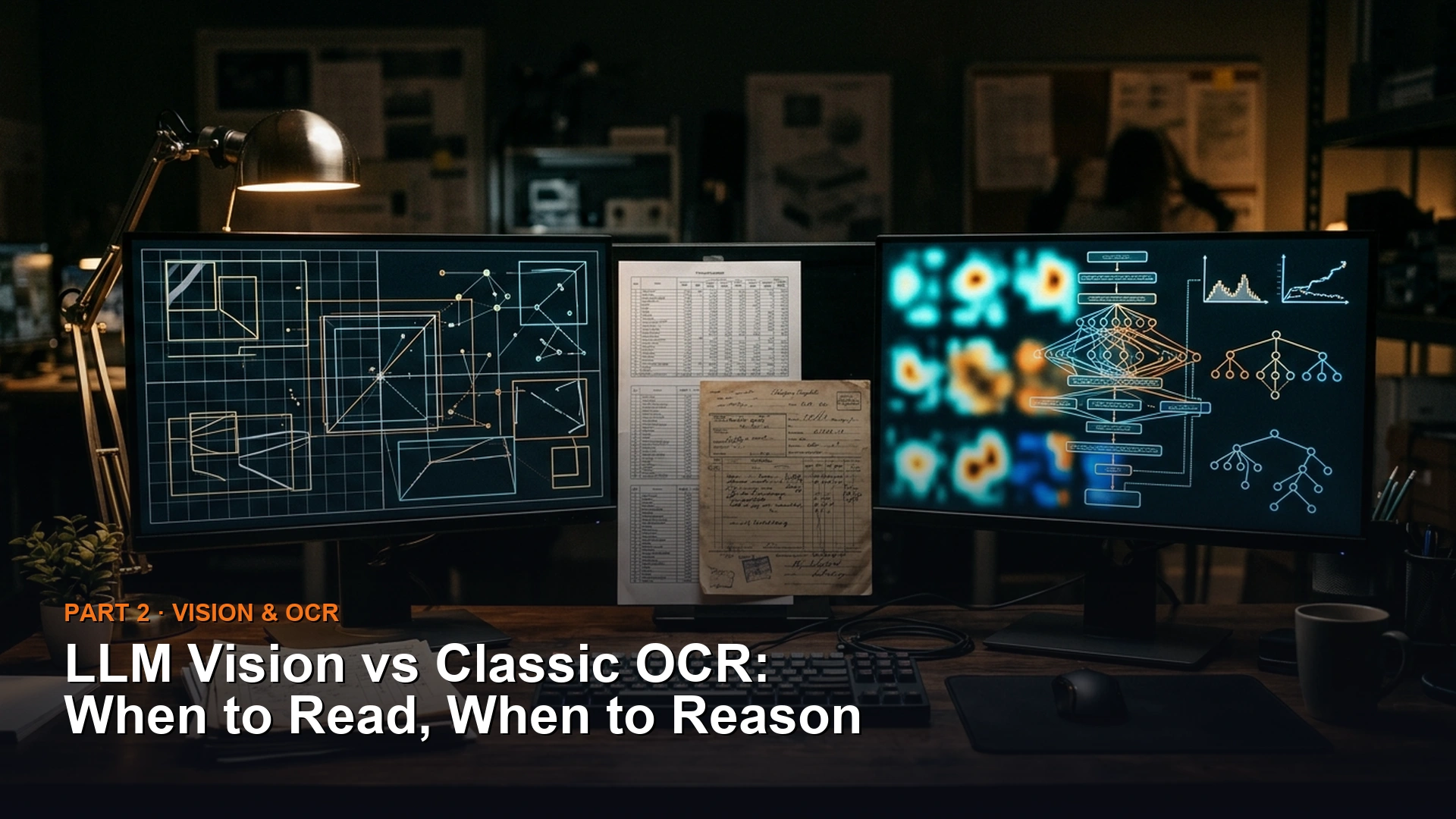
Classic text recognition software reads individual characters. AI models that can read images reason about what a whole page actually means. Use classic OCR (optical character recognition, the software that reads printed characters one at a time) for exact digits, and a vision model, an AI that can look at an image, when handwriting or layout needs real judgment.
Say you use an AI model to read scanned invoices into your accounting sheet. One invoice has a smudged digit in the total. Instead of flagging it, the model writes a clean, confident number that is wrong, and nobody notices until the books do not balance. Reading plain numbers with classic OCR, and checking the math, would have caught it.
Two totally different ways of “reading” a page
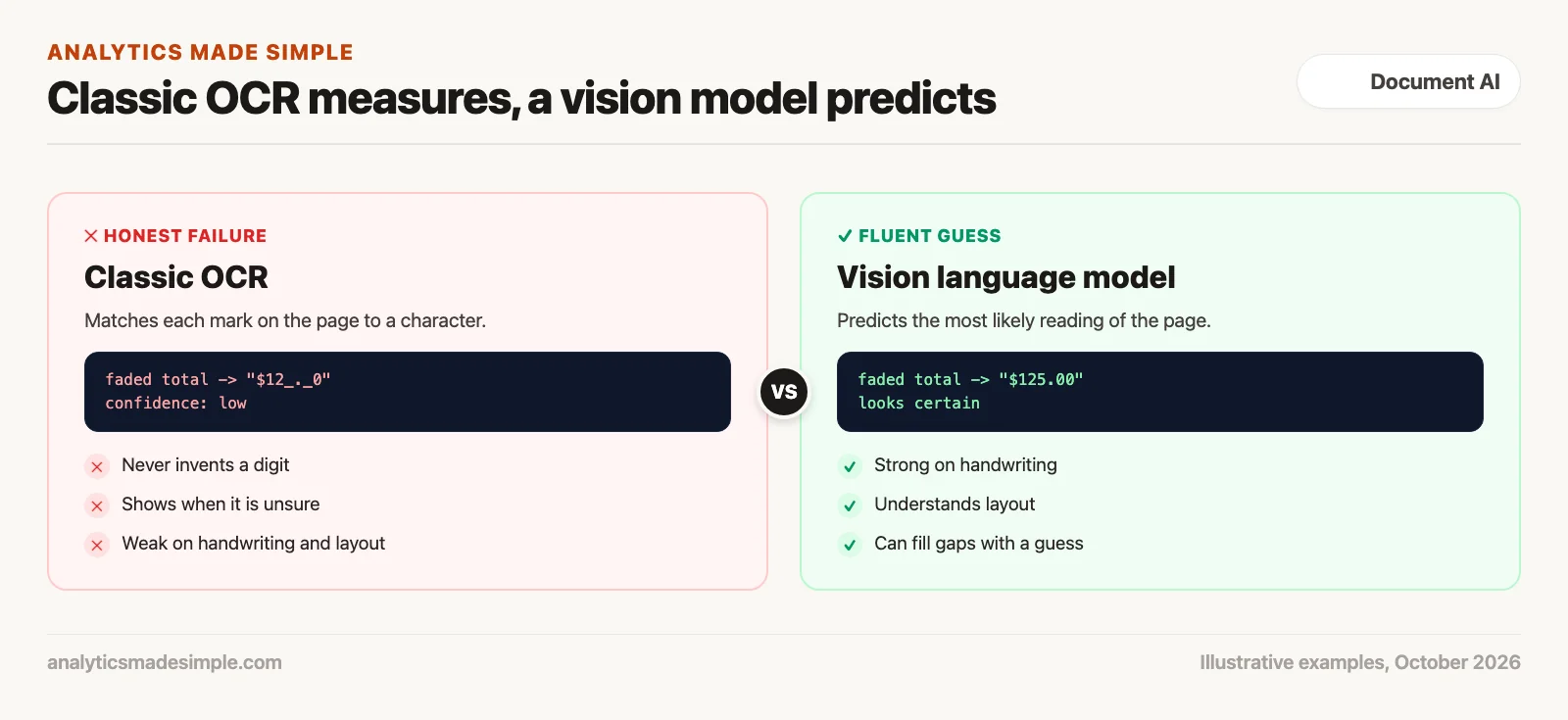
To choose well, look at how each one actually handles an image. Classic OCR (optical character recognition) works like a precise measuring tool. A vision-capable language model works more like an educated guesser, drawing on everything it’s ever read.
In a classic OCR engine, like Tesseract, PaddleOCR, or EasyOCR, processing starts with straightforward image transformations. The image gets converted to grayscale, noise gets filtered out, and pixels get sorted into black strokes and white background. A detection step finds where the text sits, and a recognition step maps each visual chunk directly to a specific character. The model checks whether a cluster of black pixels matches the physical shape of a letter E, a B, or an 8. It has zero understanding of what an invoice actually is. It has zero knowledge of corporate finance, and no interest in making the text sound nice.
Classic OCR
Precise, pixel-level measurement. Runs quickly on an ordinary processor with no per-page fee. Never invents a fictional number, but struggles with cursive handwriting and complex layouts.
A vision-capable language model
Reads an image the way it reads text: by predicting what’s most likely. Handles messy handwriting and answers open-ended questions about a page, but carries a real risk of confidently guessing wrong.
A vision-capable model, such as the ones from OpenAI, Anthropic, or Google that accept images, works on an entirely different foundation. The input image gets sliced into a grid of small visual patches. A separate part of the model turns each patch into a rich numerical representation. Those visual pieces then get combined with the text of your prompt and fed into a large language model.
The vision model doesn’t mechanically transcribe strokes. Instead, it weighs all those visual pieces together and generates its answer piece by piece, based on statistical likelihood. When a vision model reads the words “Payment Due:”, everything it’s learned about language strongly predicts that what comes next should be a currency symbol and a number. If the print is blurry or creased, the model fills the gap with the most likely number. That number may be wrong.
Figure 1 shows the sharp difference between the precise, stroke-by-stroke approach of classic OCR and the prediction-based approach of a vision-capable model.
Why a confident wrong number is worse than a blank one
In everyday chat, an AI that makes something up usually does little harm. It might invent a small detail or over-polish an email. In business document processing, a wrong number is a different story entirely. Suppose the system misreads an invoice total or a tax ID, or adds a zero to a customs value. The result can be an audit, a held shipment, or lost money.
Here is how the two approaches tend to behave on worn paper, with coffee spills, folds, uneven toner, and faded receipts. The examples in the table are illustrative, not measurements.
| The problem. | What classic OCR does. | What a vision model does. | Business risk. |
|---|---|---|---|
| A faded thermal-printed number. | Returns a low-confidence fragment: “$12_._0” | Confidently fills in a number: “$125.00” | A silent error slips past automated checks. |
| A fold crease across a digit. | Drops the character or returns a low confidence score. | Guesses the digit from nearby context. | Corrupts serial numbers, container IDs, and account numbers. |
| A multi-column balance sheet. | Scrambles the text order with no sense of layout. | Preserves the table structure as clean, organized data. | The vision model clearly wins on layout. |
| A doctor’s cursive prescription. | Produces completely illegible noise. | Works out the medication name from medical context. | The vision model handles handwriting far better. |
When classic OCR hits a faded receipt where the top bar of a “5” has worn away, it recognizes only the lower curve. It returns an unclear fragment with a low confidence score. That failure is honest and visible: the code downstream sees the low confidence and flags the document for a human to check. The automated system stops itself before it can corrupt the accounting records.
When a vision model hits that exact same faded receipt, it recognizes that the prompt is asking for a clean, structured invoice. It doesn’t want to return a broken fragment. Because its whole design is built around producing coherent, complete output, it predicts what number probably belongs there, and generates a crisp “$125.00” with total confidence. The software sees neat data and saves it. A wrong number lands in the ledger, and no one notices. In high-volume financial work, a confident, plausible-looking mistake is far more dangerous than an obvious, honest failure.
Where a vision model genuinely wins: handwriting and judgment calls
Vision models need care with numbers, but they have strengths classic OCR cannot match. When a task needs reasoning across pages, understanding meaning, or reading messy handwriting, a vision-capable model is a genuine leap forward.
Take cursive handwriting. For decades, automated handwriting recognition needed custom models trained on specific handwriting styles, and they still struggled with medical records and field notes. A human reading a doctor’s scrawled prescription doesn’t recognize every letter on its own. They use their knowledge of medicine instead. A squiggle starting with A, ending in n, and followed by 500mg has to be a common antibiotic. A vision model works the same way. Because it combines a huge amount of language knowledge with the ability to see, it can decipher rough handwriting with real fluency.
Vision models also remove a lot of brittle setup work that used to be needed for irregular forms. Picture an insurer that gets claims from thousands of repair shops, each with its own layout. Writing classic OCR rules for every layout takes months of work. A vision model, by contrast, can be asked directly to pull out the labor hours, hourly rate, and replaced parts into a list. It reads the layout and tells parts and labor apart on its own. It standardizes different date formats too, without a single line of custom layout code.
The real answer: route documents between the two
Using a vision model for everything has real weaknesses: cost, speed, and the risk of a confident wrong number. Using classic OCR for everything has its own real weaknesses: handwriting failures and brittle layout rules. Once you see both sides clearly, the right architecture becomes obvious. Build a router that sends each document to the right tool.
Figure 2 shows a four-stage routing process. Rather than sending every document to one single model, each document passes through a series of quality and validation checks.
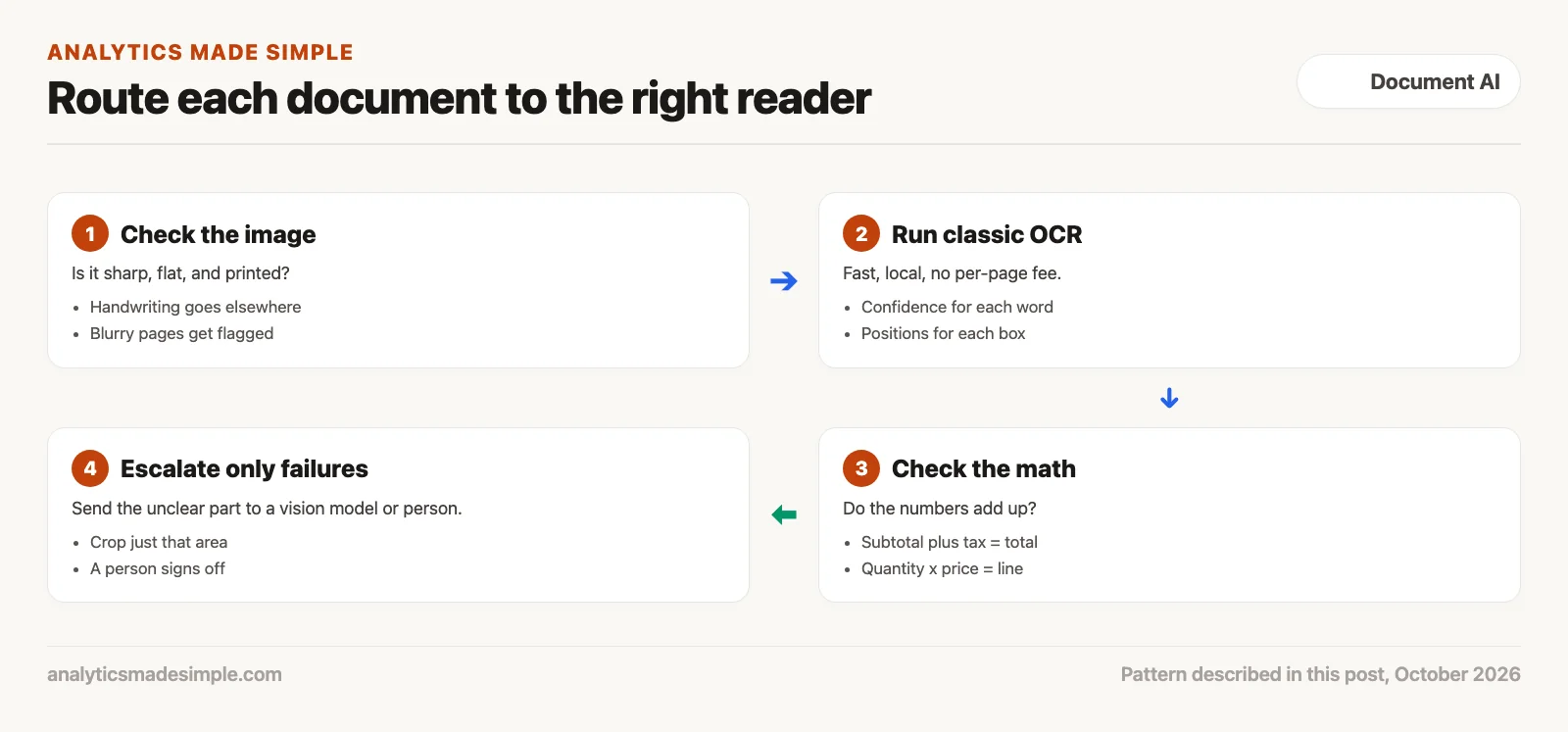
In this setup, routine printed documents, such as laser-printed invoices and digital statements, are handled by fast, local text recognition on an ordinary processor, with no per-page fee.
The extracted data then runs through a math check. It checks the confidence scores and the arithmetic. Does the subtotal plus tax equal the total? Do quantities times prices match each line? If the math checks out and confidence is above a cutoff you choose, the record is saved.
A document goes to a vision model only when it fails a check. That could mean handwriting, a blurry image, or numbers that do not add up. Crucially, the system doesn’t always send the whole page. It can crop just the unclear part, like a damaged total, and send only that. This costs less and leaves less room for a wrong guess.
Figure 3 lays out the complexity tiers that decide whether a document goes to a local processor, a layout-aware model, or a cloud vision model.
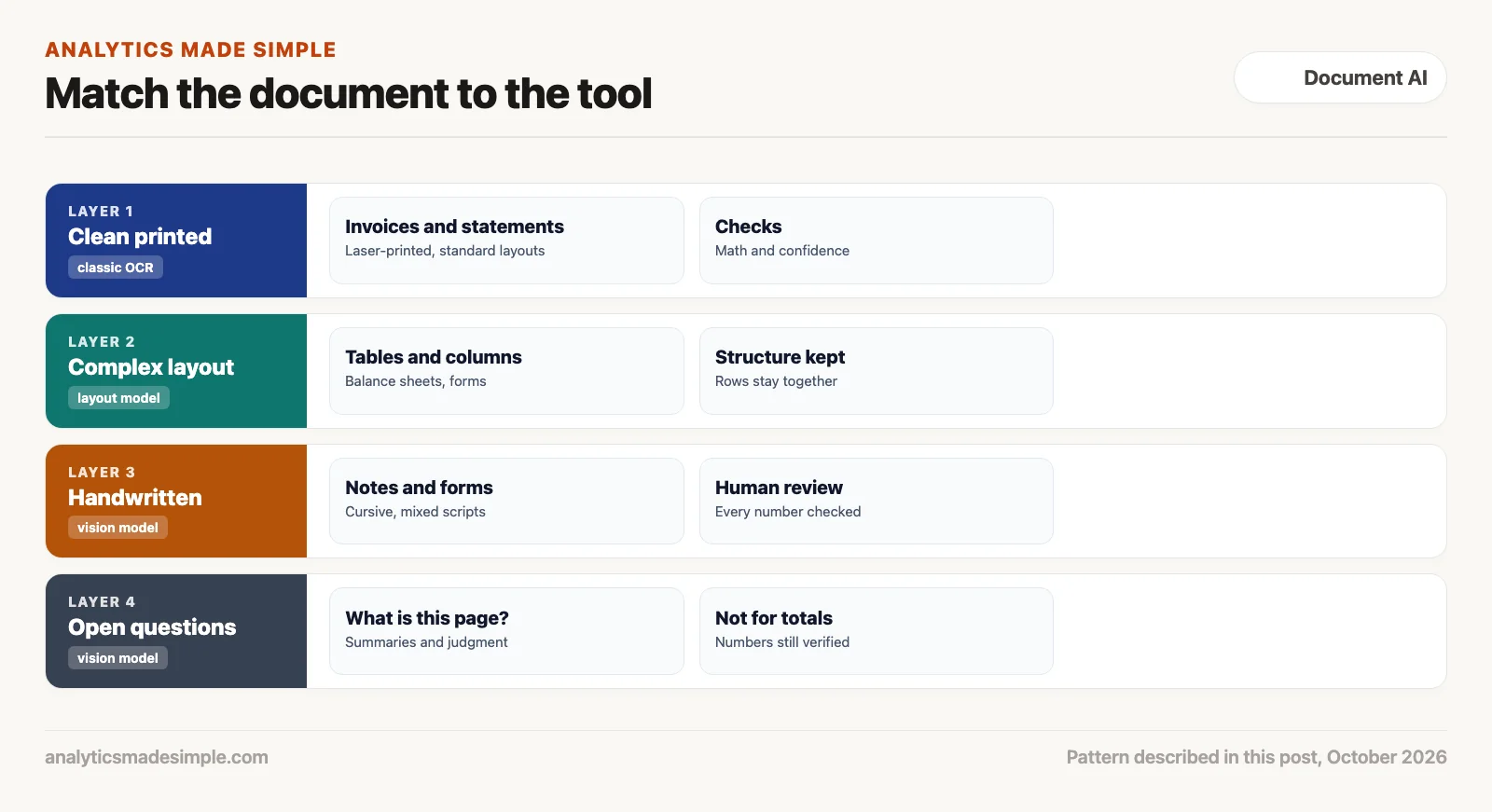
A working example of a hybrid router in Python
The short Python program below shows the routing decision for four made-up invoices. Each one holds what a classic OCR engine might return. It needs nothing beyond Python.
# Decide which invoices can be saved and which need a second look.
# Each result is what a classic OCR engine might return; the values are made up for practice.
CONFIDENCE_CUTOFF = 0.90

invoices = [
    {"id": "A-101", "subtotal": 100.00, "tax": 8.25, "total": 108.25, "lowest_confidence": 0.97,
     "handwritten": False},
    {"id": "A-102", "subtotal": 240.00, "tax": 19.80, "total": 295.80, "lowest_confidence": 0.95,
     "handwritten": False},
    {"id": "A-103", "subtotal": 56.10, "tax": 4.63, "total": 60.73, "lowest_confidence": 0.41,
     "handwritten": False},
    {"id": "A-104", "subtotal": None, "tax": None, "total": None, "lowest_confidence": 0.20,
     "handwritten": True},
]


def decide(inv):
    if inv["handwritten"]:
        return "send to a vision model, then a person checks it"
    if inv["lowest_confidence"] < CONFIDENCE_CUTOFF:
        return "low confidence: crop the unclear part and check it"
    if round(inv["subtotal"] + inv["tax"], 2) != inv["total"]:
        return "numbers do not add up: send to a person"
    return "save"


for inv in invoices:
    print(f"{inv['id']}: {decide(inv)}")
Running it prints:
A-101: save
A-102: numbers do not add up: send to a person
A-103: low confidence: crop the unclear part and check it
A-104: send to a vision model, then a person checks it
In plain words, the decide function sends handwriting to a vision model with a person checking the result. It sends anything with a low-confidence word back for a closer look, and anything whose subtotal plus tax does not equal the total to a person. Only A-101 is saved. A-102 reads cleanly but does not add up, which is exactly the kind of error a confident model could hide.
Choosing the right tool isn’t one-size-fits-all
The takeaway is simple: document extraction isn’t a single technology choice. Choosing between classic OCR, managed cloud services, and vision-capable models means weighing speed, cost, and how much risk of a wrong-but-confident answer you can tolerate.
Figure 4 pulls together speed, cost per page, and accuracy across all four approaches to document extraction.
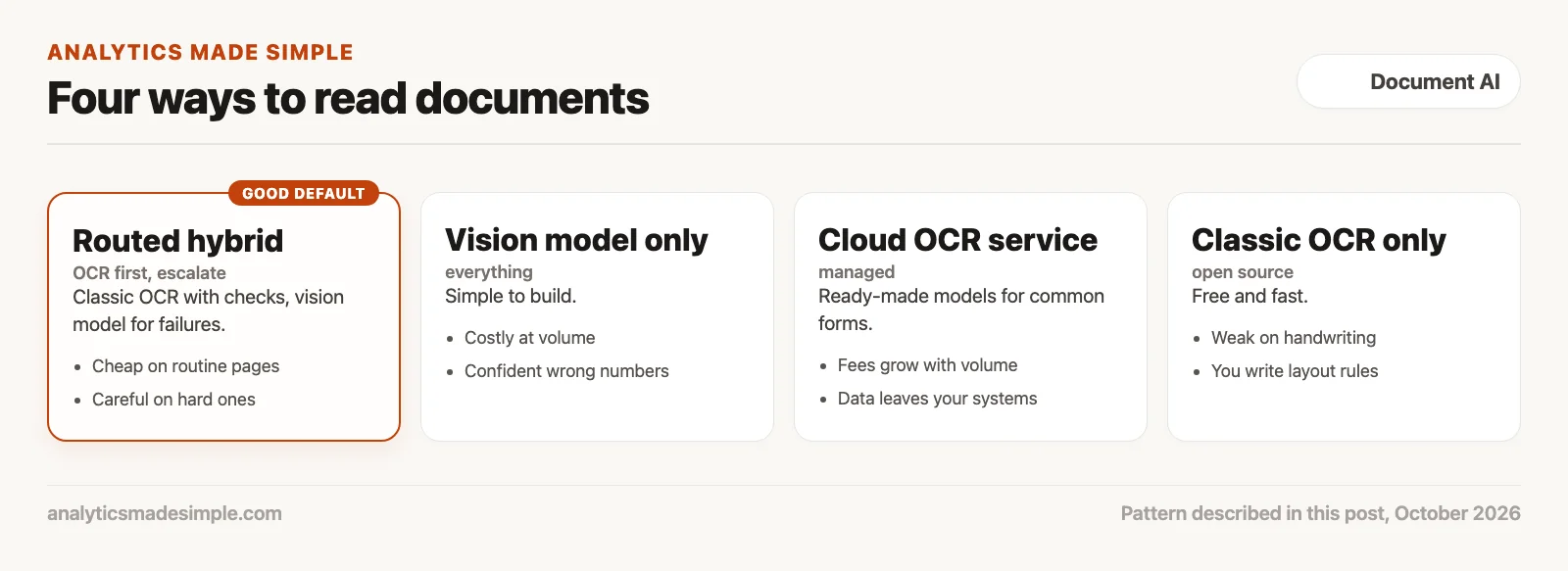
The lesson is a clear plan: use classic OCR as your fast, free workhorse for the vast majority of predictable printed pages. Add arithmetic checks to catch anything ambiguous. And bring in a vision-capable model only where its real strength matters: reading messy human handwriting, interpreting complex tables, and answering genuinely open-ended questions about a page.
Your next step
Take five scanned pages you know well and run them through classic OCR and through a vision-capable model. Compare the extracted numbers with the originals and note any wrong but confident answers. A side-by-side check on your own pages is the fairest way to choose.
Keep going
Same lessons in your feed
Short diagrams, hooks, and weekly tutorials on Substack, Instagram, X, and Facebook.
Merch on Etsy
Open store →



This path is for you if a photo of a receipt or a scanned contract needs to become text you can check, not a guess in a chat. It is the vision and document path: what the model can read, and where a human still has to look. No part is live on this page yet. Start with Practical AI for what not to paste, and come back when part 1 is up.
- 1 How OCR and AI turn photos of paper documents into useful text Build document capture as a pipeline: correct the image, detect text, then extract structure. Classic OCR still matters before any LLM reasons.
- 2 AI vision models vs classic OCR: which to use for reading documents Hybrid document AI: OCR for precise text and numbers, vision LLMs for semantic layout and messy handwriting. Do not let fluent models invent totals.
- 3 How to get clean text out of PDFs and scanned documents with AI Detect PDF type, preserve reading order, and chunk on layout before you embed. Columns and tables break if you slice by character count alone. Scheduled · November 8, 2026
- 4 How to extract text from PDFs on your own computer with Docling Run open document tools like Docling on CPU or GPU for private, batch extraction. Keep cloud APIs for spikes that need managed scale. Scheduled · November 10, 2026
- 5 How to extract tables, invoices, and form fields from documents with AI Extract structured documents with table geometry plus schema validation. Plain text dumps are not invoice systems. Scheduled · November 12, 2026
- 6 How to have people check AI-extracted document data before you trust it Design document AI with confidence scoring and human review queues. High softmax alone is not a payment authorization. Scheduled · November 14, 2026
- 7 How to remove private data from documents before an AI tool reads them Sanitize document AI inputs at the byte layer before OCR or LLM vision. Overlays and cloud defaults are not enough for PHI, PII, and regulated filings. Scheduled · November 16, 2026
- 8 When a phone scanner app is enough to turn paper forms into data Use good lighting and a scanner app when field capture quality matters more than fancy models. Save heavy document AI for pages that still fail after clean scans. Scheduled · November 18, 2026
Series notes
This is Part 2 of Vision OCR extraction from scratch. Previous: photos to text. Next: PDF and scan pipelines.
Sources
- Tesseract, Tesseract user manual.
- JaidedAI, EasyOCR on GitHub.
- Google Cloud, Document AI overview.
- Amazon Web Services, What is Amazon Textract?