
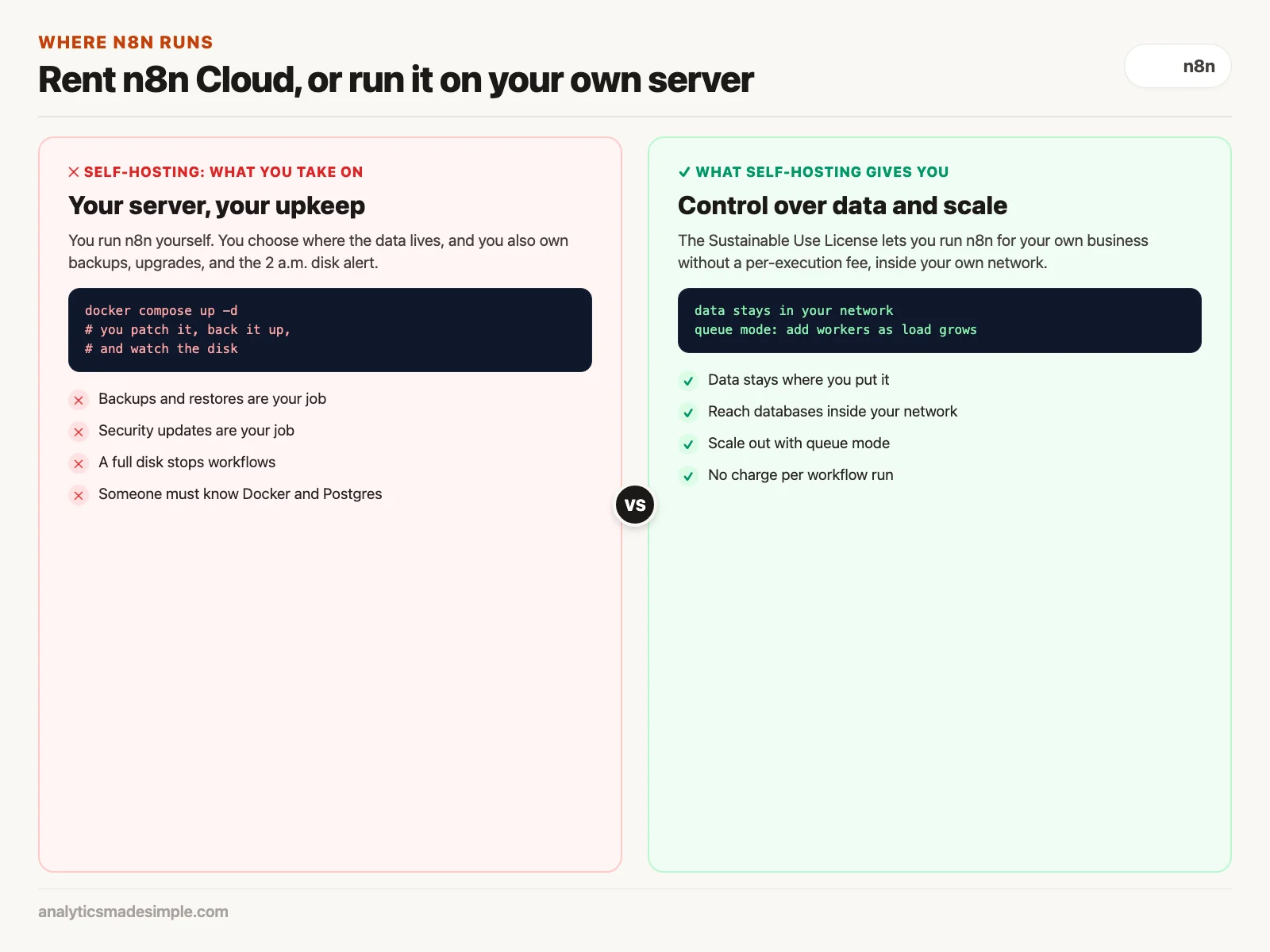
n8n is a workflow automation tool you can either rent as a hosted service, n8n Cloud, or run yourself on your own server. Run it yourself when your data must stay in your own network or you run a very high volume of workflows. Rent the cloud version when nobody on your team has time to look after a server.
Say your online store has a busy weekend, and your automation plan runs out of included runs on Saturday afternoon. Orders keep arriving, but the workflow that sends them to your warehouse stops. With a self-hosted n8n, there is no monthly cap on runs, only the limits of the server you chose.
A workflow here is an automated chain of steps, such as “when an order arrives, add it to the spreadsheet and message the warehouse.” Self-hosting means installing the software on a computer you control, usually with Docker, a tool that packages an app so it runs the same on any machine.
When self-hosted n8n makes sense
Running n8n in your own Docker or Kubernetes setup gives you workflows with no per-run fee, data that stays inside your network, and direct access to databases that are not on the public internet. In exchange, you take on the upkeep: backups, updates, and disk space.
The n8n license, in plain terms
Before you use n8n at work, check the license. It is not a standard open-source license such as MIT or Apache 2.0, which let you do almost anything. n8n uses its own Sustainable Use License.
In short, you can read and change the source code and run n8n for your own business’s internal use without paying a license fee. What you cannot do is sell n8n itself as a hosted service to other companies. Paid plans add features such as single sign-on and audit logs. Read the license text yourself, or have someone in legal read it, before you build on it.
A production setup with Docker Compose
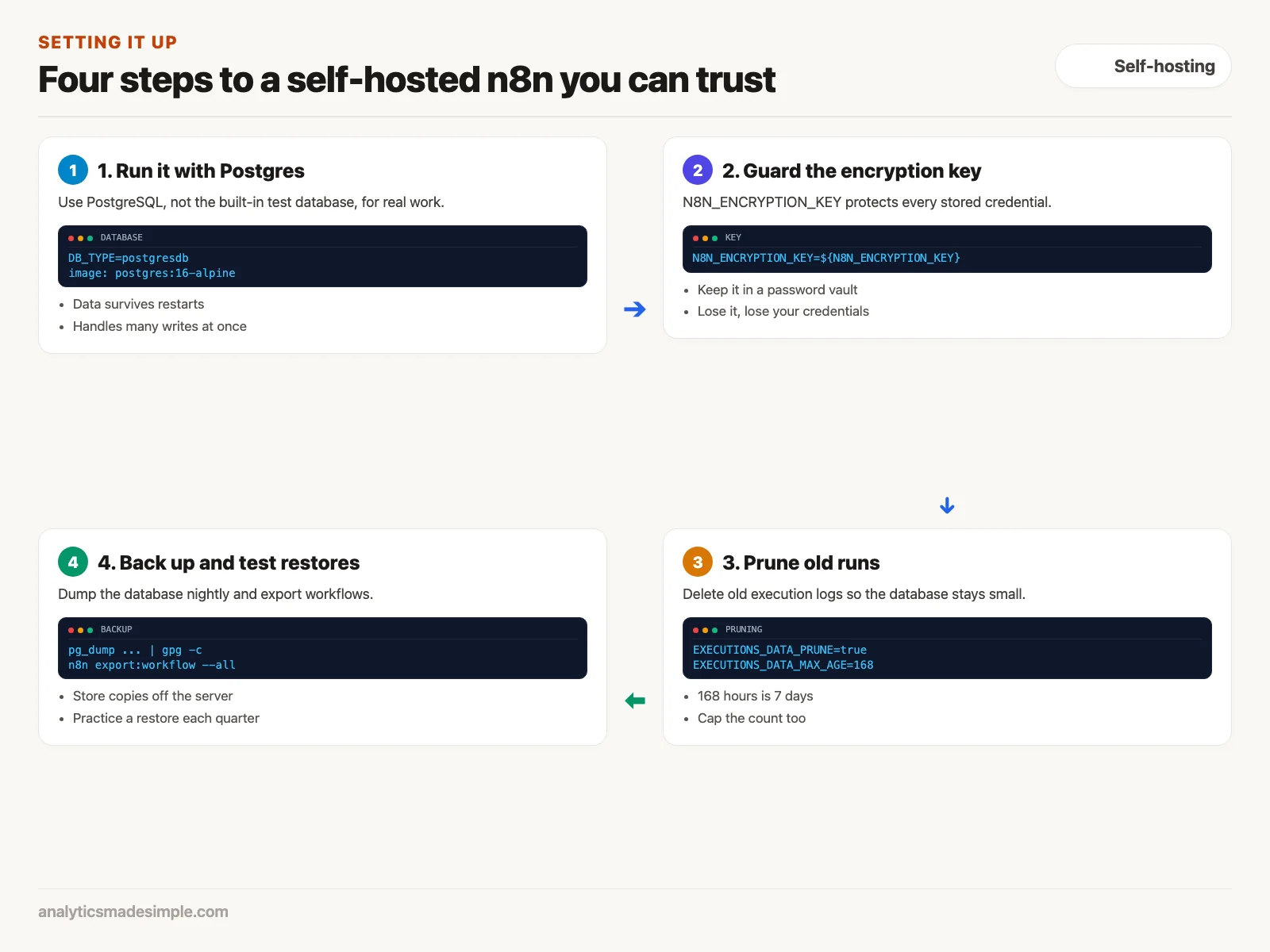
For real work, run n8n with a separate PostgreSQL database instead of the small built-in one meant for testing. Docker Compose, a tool that starts several containers together from one file, makes that a single command.
This docker-compose.yml file starts n8n and PostgreSQL 16, keeps their data in folders on the server so it survives restarts, and turns on automatic cleanup of old run logs. Passwords and the encryption key come from an .env file next to it, so they never sit in the file itself:
services:
  postgres:
    image: postgres:16-alpine
    restart: always
    environment:
      - POSTGRES_USER=n8n
      - POSTGRES_PASSWORD=${POSTGRES_PASSWORD}
      - POSTGRES_DB=n8n
    volumes:
      - ./postgres_data:/var/lib/postgresql/data
    healthcheck:
      test: ["CMD-SHELL", "pg_isready -U n8n -d n8n"]
      interval: 5s
      timeout: 5s
      retries: 10

  n8n:
    image: docker.n8n.io/n8nio/n8n:latest
    restart: always
    ports:
      - "5678:5678"
    environment:
      - DB_TYPE=postgresdb
      - DB_POSTGRESDB_HOST=postgres
      - DB_POSTGRESDB_PORT=5432
      - DB_POSTGRESDB_DATABASE=n8n
      - DB_POSTGRESDB_USER=n8n
      - DB_POSTGRESDB_PASSWORD=${POSTGRES_PASSWORD}
      - N8N_ENCRYPTION_KEY=${N8N_ENCRYPTION_KEY}
      - WEBHOOK_URL=https://automation.example.com/
      - GENERIC_TIMEZONE=America/New_York
      - EXECUTIONS_DATA_PRUNE=true
      - EXECUTIONS_DATA_MAX_AGE=168
      - EXECUTIONS_DATA_PRUNE_MAX_COUNT=50000
    volumes:
      - ./n8n_data:/home/node/.n8n
    depends_on:
      postgres:
        condition: service_healthy
Two settings deserve care. N8N_ENCRYPTION_KEY is the key n8n uses to encrypt every stored credential, such as API keys (codes that let a program use another service) and passwords. If you lose it, you lose access to all of them, so keep a copy in your company’s password manager. The EXECUTIONS_DATA_* lines delete run logs older than 168 hours, which is 7 days, and keep at most 50,000, so the database does not slowly fill the disk.
If you followed an older guide, note that the N8N_BASIC_AUTH_* settings no longer work. n8n’s 1.0 migration notes say version 1.0 made user accounts mandatory and removed basic authentication. You create the owner account in the browser the first time you open n8n.
Queue mode, for when one process is not enough
A single n8n process is enough for many teams. When workflows get heavy, such as processing large files or many events at once, the queue mode described in n8n’s documentation spreads the work across several processes.
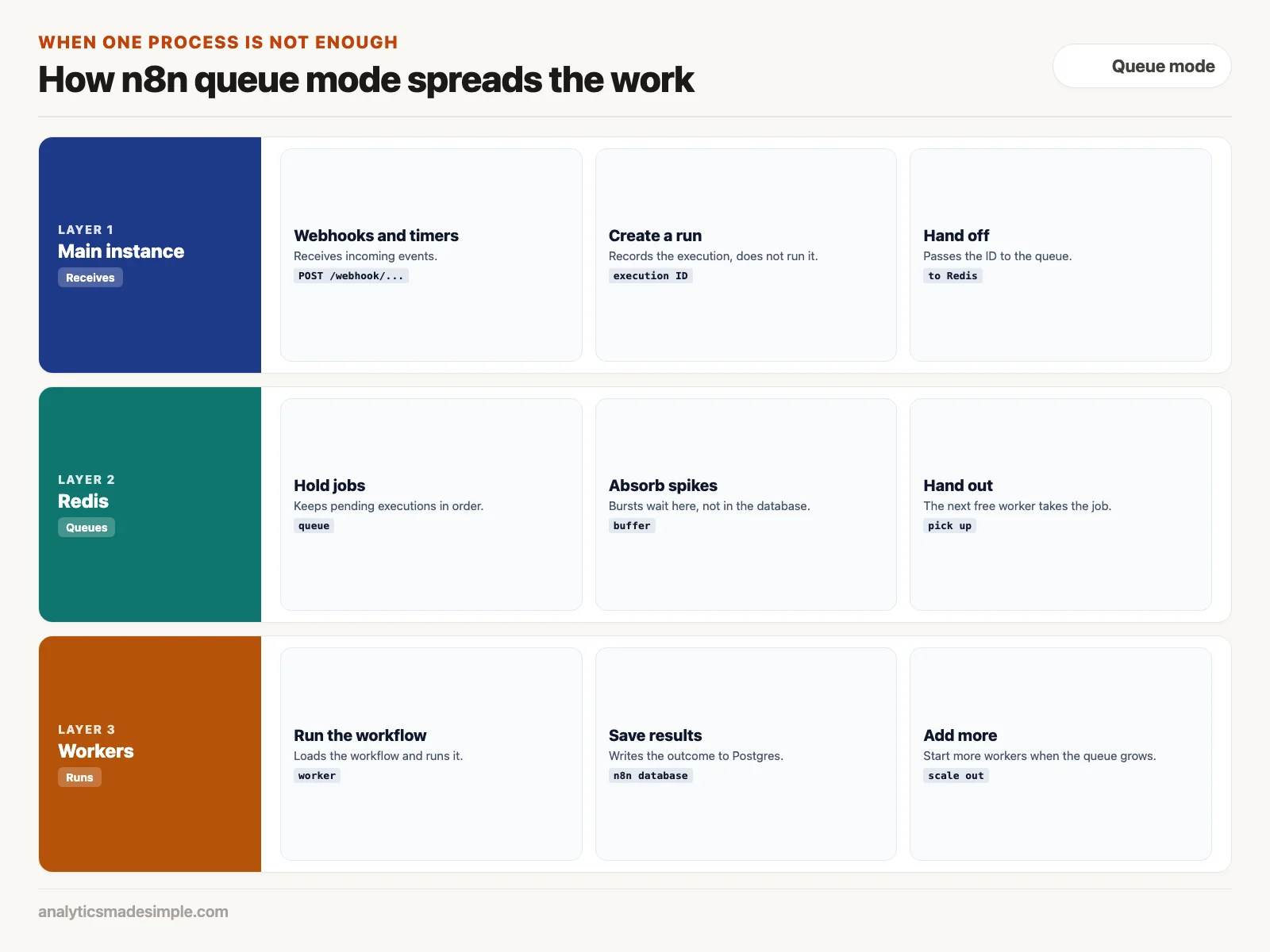
- The main instance receives webhooks and timers and creates each run, but does not run it.
- Redis, a fast in-memory data store, holds the queue of waiting runs, so bursts wait there instead of piling onto the database.
- Workers take runs off the queue and execute them. When the queue grows, you start more workers.
Hands-on code: checking that n8n is up
When you self-host, you also watch it. This short Python script checks that n8n is reachable and, if you give it an API key (a secret code that proves which account a program belongs to), counts how many workflows are switched on. Create the key in n8n under Settings, then n8n API, and set it as N8N_API_KEY.
import os
import sys

import requests

N8N_HOST = os.environ.get("N8N_HOST", "http://localhost:5678")
API_KEY = os.environ.get("N8N_API_KEY")  # create one in n8n under Settings > n8n API


def check_n8n():
    # 1. Is the instance reachable? /healthz returns HTTP 200 when it is.
    try:
        up = requests.get(f"{N8N_HOST}/healthz", timeout=5).status_code == 200
    except requests.RequestException as error:
        print(f"n8n unreachable: {error}")
        sys.exit(1)
    print(f"n8n reachable: {up}")

    # 2. How many workflows are switched on? Needs an API key.
    if not API_KEY:
        print("Set N8N_API_KEY to also count active workflows.")
        return
    resp = requests.get(
        f"{N8N_HOST}/api/v1/workflows",
        params={"active": "true"},
        headers={"X-N8N-API-KEY": API_KEY},
        timeout=5,
    )
    resp.raise_for_status()
    print(f"Active workflows: {len(resp.json().get('data', []))}")


if __name__ == "__main__":
    check_n8n()
In plain words: it calls the /healthz address, which answers with the web status code 200 when the instance is reachable, and stops with an error if it is not. Then, with a key, it asks n8n’s API for active workflows and prints how many there are. n8n’s monitoring guide notes that /healthz does not check the database, so pair it with a database check if you need one. Without n8n running, the script prints that it is unreachable and exits with an error code, which is exactly what an uptime monitor wants to see.
When n8n Cloud is the better choice
Self-hosting gives you control, and control comes with chores. If the server’s disk fills up on a Sunday, someone has to fix it. If a security update comes out, someone has to install it. If nobody on your team does that kind of work, start with n8n Cloud.
As of October 2, 2026, n8n’s pricing page lists the Starter cloud plan at €20 a month, billed annually, with 2,500 workflow executions, and says hosted data is stored on servers in Frankfurt, Germany. You get the same visual editor without running anything yourself.
Backups and recovery
On your own server, a failed disk or a deleted virtual machine is your problem to fix. Without an off-site backup, your workflows and stored credentials can be lost for good.
- Back up the database nightly. Schedule
pg_dumpagainst the PostgreSQL container (one packaged, running app inside Docker). That file holds your workflows, credentials, and users. Encrypt it with GPG (GNU Privacy Guard, a common tool for encrypting files) and copy it to storage off the server, such as a versioned cloud storage bucket. - Export workflows as files. The
n8n export:workflow --allcommand, listed in n8n’s command-line docs, saves your workflows as JSON (a plain text data format) files you can keep in a private Git repository (a project folder that tracks every change), so you have a history of changes. - Practice a restore. Once a quarter, restore the backup onto a fresh test server, check that the encryption key unlocks your credentials, and run a test webhook (a message another app sends to n8n the moment something happens). A backup you have never restored is a hope, not a plan.
What to do next
- Try n8n locally. With Docker installed, run
docker run -it --rm --name n8n -p 5678:5678 -v ~/.n8n:/home/node/.n8n docker.n8n.io/n8nio/n8nand open localhost:5678, so you can explore the editor before committing to anything. - List your sensitive workflows. Note which automations touch customer, health, or financial data, because those are the ones where where data lives matters most.
- Decide who would run it. If nobody can own backups and updates, start on n8n Cloud and move later if you need to.
The next post builds a real workflow in n8n: an alert triage pipeline (a chain of automated steps) that receives webhooks, removes duplicates, and posts interactive messages to Slack.
Series notes
This is Part 5 of Automation platforms from scratch. Previous: Make. Next: an n8n workflow people keep.
Sources
- n8n: license text and pricing, checked October 2, 2026.
- n8n documentation: queue mode, monitoring, CLI commands, and the 1.0 migration checklist.
- Docker documentation: Docker Compose.
Keep going
Same lessons in your feed
Short diagrams, hooks, and weekly tutorials on Substack, Instagram, X, and Facebook.



