Kimi, the AI assistant from the Chinese company Moonshot AI, can hold a very long document in one conversation, but holding text is not the same as reading all of it carefully. Give it a limited set of files, ask it to quote its sources, and expect it to miss things buried in the middle of a huge upload.
Imagine you review companies your firm might buy, and each one sends a folder of filings, leases, and environmental reports. You upload ten filings at once, ask for the risks, and paste the answer into your memo. Later you find out it never mentioned an open state investigation sitting deep inside the third filing. The file was loaded. The model simply did not use that part of it.
This post explains how big Kimi’s window really is, why facts in the middle of a long input get missed, what research says about the tests vendors like to quote, and the habits that make a long-context answer something you can check.
How much text can Kimi actually hold?
As of October 3, 2026, Kimi’s pricing page for its API (the service other programs connect to) lists kimi-k3 with a context window of 1,048,576 tokens, about a million, and the K2.6 and K2.7-Code models with 262,144 tokens. A context window is everything the model can see at once: your files, your question, earlier messages, and room for the reply. A token is a small chunk of text, roughly three-quarters of an English word.
You may still see “two million” quoted for Kimi. That number comes from a 2024 Kimi Chat beta that counted Chinese characters, not tokens, so it does not describe today’s models. If a teammate quotes a window size, ask which model and which page it came from.
A million tokens is a lot of room. It is still only room. Whether the model gives every page the same care is a separate question, and the answer is no.
Why does a bigger window not mean better reading?
Because the model does not weigh every part of a long input equally. Its attention, the way it decides which parts of the text matter for the answer, spreads across everything you send, and some positions get more of it than others.
Holding more text also costs more memory. While a model reads, it keeps working notes about each token, called the key-value (KV) cache, in fast graphics memory. Those notes grow with every page you add, which is why very long requests take longer before the first word appears and cost more to run.
Moonshot has worked on that cost. The Kimi K3 model card says K3 mixes 69 layers of Kimi Delta Attention with 24 layers of a more standard design. Moonshot’s Kimi Linear report describes Kimi Delta Attention as a cheaper kind of attention and reports cutting KV cache use by up to 75% in its tests. That makes long inputs more affordable. It does not make the model read the middle of your upload as carefully as the start.
What does “lost in the middle” mean?
It means models recall facts best near the start and the end of a long input, and worse when the fact sits in the middle. Liu and colleagues showed this U-shaped pattern across several models, including ones built for long inputs.
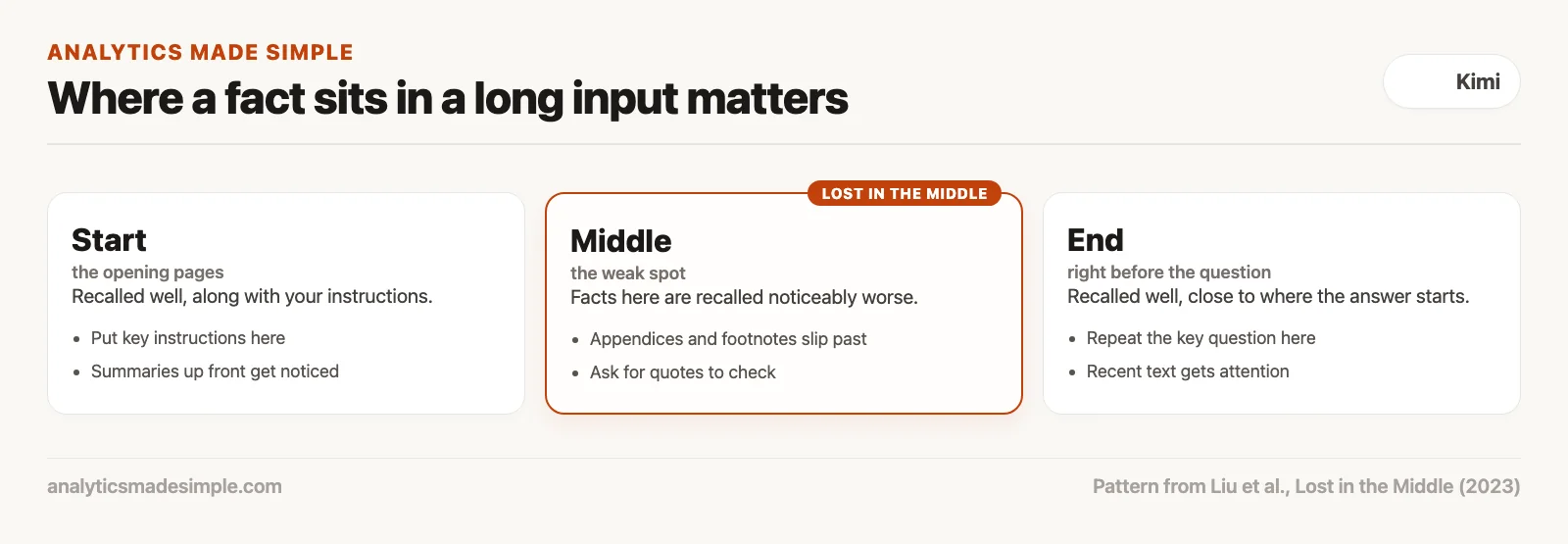
People do something similar. After a long contract, you remember the summary at the top and the signatures at the bottom better than the appendix in the middle.
In the deal above, the missed investigation sat about halfway through the uploaded files. That is exactly the spot this research warns about. So put your instructions and your question at the start or the end of a long request, where the model pays the most attention, and do not assume the middle got read.
Why are needle-in-a-haystack scores not enough?
Because they test the easiest kind of long-context job. A needle-in-a-haystack test hides one odd sentence, such as a made-up coffee recipe, inside a huge pile of unrelated text and asks the model to find it. The sentence stands out, so modern models find it almost every time.
Researchers at NVIDIA, the company that makes most AI chips, built a harder test called Ruler. Models that scored nearly perfectly on the simple needle test dropped sharply as inputs grew and tasks got harder, such as following a chain of facts or counting things across the text. Only about half of the models that claimed windows of 32,000 tokens or more still did well at 32,000.
Real filings are closer to Ruler than to the needle test. Lease costs show up in several footnotes, and checking them means combining facts from different pages. That is where a confident long-context answer most needs checking.
How do you get answers you can check?
Ask for quotes before conclusions. For every finding, have Kimi give the file name, the nearest heading, and the exact words, and only then write the summary. A quote is something you can search for. A summary is not.
Here is a prompt you can adapt. Each step has a job: the quotes tie the answer to real text, and the “no evidence” line stops the model from filling a gap with something that only sounds right.
You are reviewing the attached filings.

1. Find every passage about regulatory inquiries, pending lawsuits,
   or environmental cleanup costs.
2. For each one, give:
   - File name
   - Nearest section heading
   - An exact quote of about 25 words
3. If you find no passage for a topic, write:
   "No passage found." Do not guess.
4. Only after the quotes, summarize the risks in plain words.
   Do not estimate dollar totals.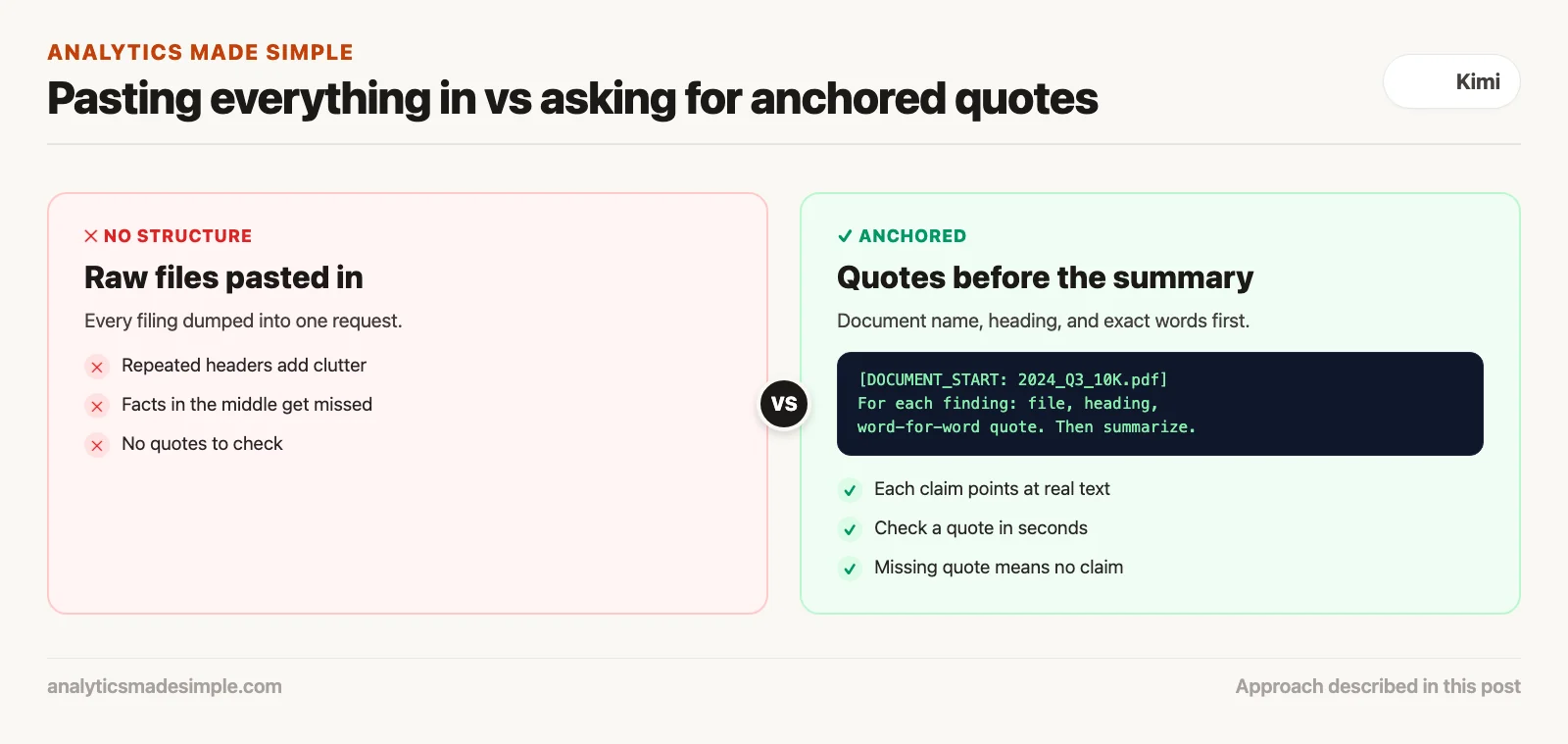
Checking the quotes takes seconds, and a short script can do it for you. The one below uses a made-up filing and three quotes a model might return, and reports whether each quote really appears in the source. It needs only Python.
import re

# Made-up filing text and quotes for practice
filing = """Item 3. Legal Proceedings. In March the state Department of
Environmental Quality opened an investigation into groundwater at the
Riverside facility. The Company has not recorded a reserve because the
amount of any loss cannot yet be estimated."""

quotes = [
    "opened an investigation into groundwater at the Riverside facility",
    "The Company has recorded a reserve of $2 million",
    "the amount of any loss cannot yet be estimated",
]


def norm(text):
    """Lowercase and squeeze line breaks and spaces, so wrapping does not matter."""
    return re.sub(r"\s+", " ", text).strip().lower()


source = norm(filing)
for q in quotes:
    status = "found" if norm(q) in source else "NOT IN SOURCE"
    print(f"{status:14} {q}")
Running it prints:
found          opened an investigation into groundwater at the Riverside facility
NOT IN SOURCE  The Company has recorded a reserve of $2 million
found          the amount of any loss cannot yet be estimated
In plain words, norm lowercases the text and squeezes line breaks and spaces, so a quote still matches when the filing wraps across lines. The loop then checks each quote against the filing. The second quote claims a $2 million reserve that the filing never mentions, so it is flagged. In real use you would paste in the filing’s text and the quotes from Kimi’s answer.
When should you paste everything in, and when should you search first?
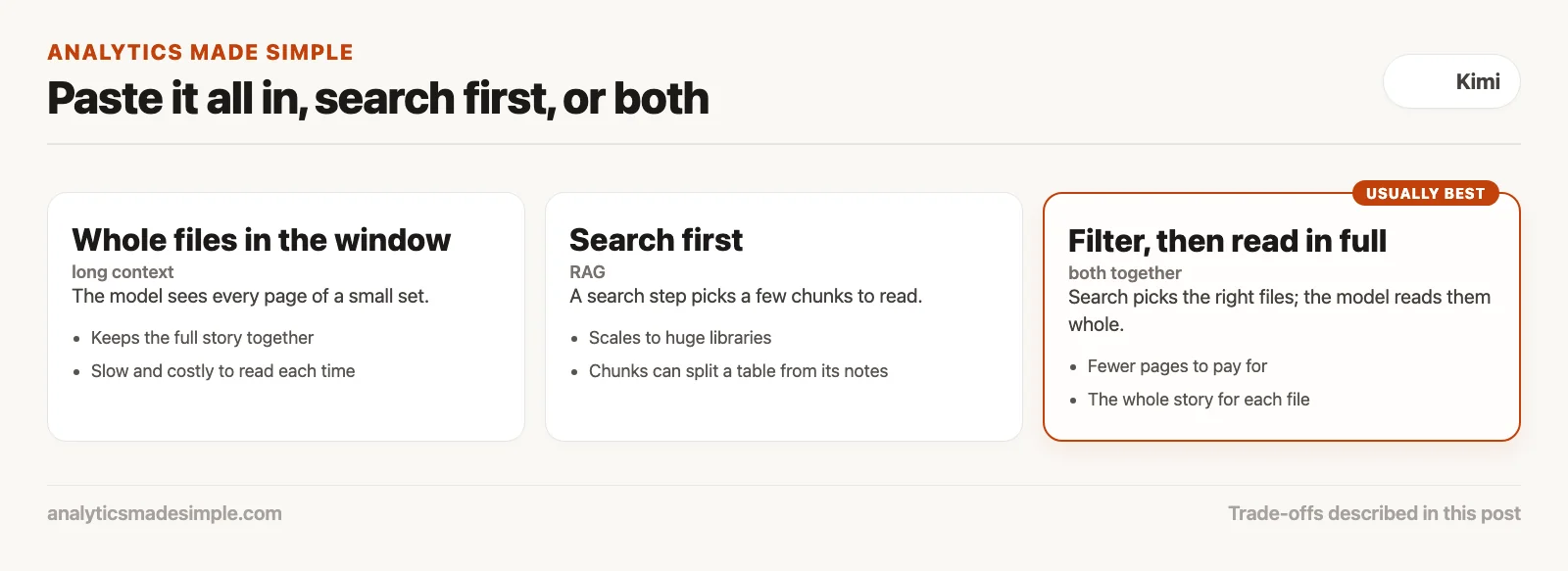
Paste whole files in when you have a small, related set, such as one company’s filings, and you need the full story. Search first when you have a large library. Retrieval-augmented generation (RAG) means a search step picks the most relevant chunks and the AI reads only those.
Each approach has a weakness. Long context is slow and costly to read every time. RAG cuts documents into chunks, which can split a table from the footnote that explains it. Using both usually works best: a search or a filter picks the right files, and then Kimi reads those files in full.
How should you clean files before you upload them?
Clean them up so the model has clear landmarks. Text copied out of a PDF often repeats the same header on every page, splits words at line breaks, and mashes table columns together. That clutter makes the facts you need harder to find and harder to quote.
- Remove repeated headers and footers, so they stop competing with the content.
- Turn tables into simple text tables with a header on every column, so numbers stay under the right label.
- Put a clear marker before each file, such as [DOCUMENT_START: 2024_Q3_10K.pdf], so quotes can name the file they came from.
Test whether it helps on your own files. Ask the same question with the raw files and the cleaned ones, and count how many quotes come back correct.
What should you check before you rely on the answer?
Run four checks. They cover the four ways a long-context answer usually goes wrong: a file that never loaded, a claim with no source, a fact missed in the middle, and arithmetic done by a model that predicts text.
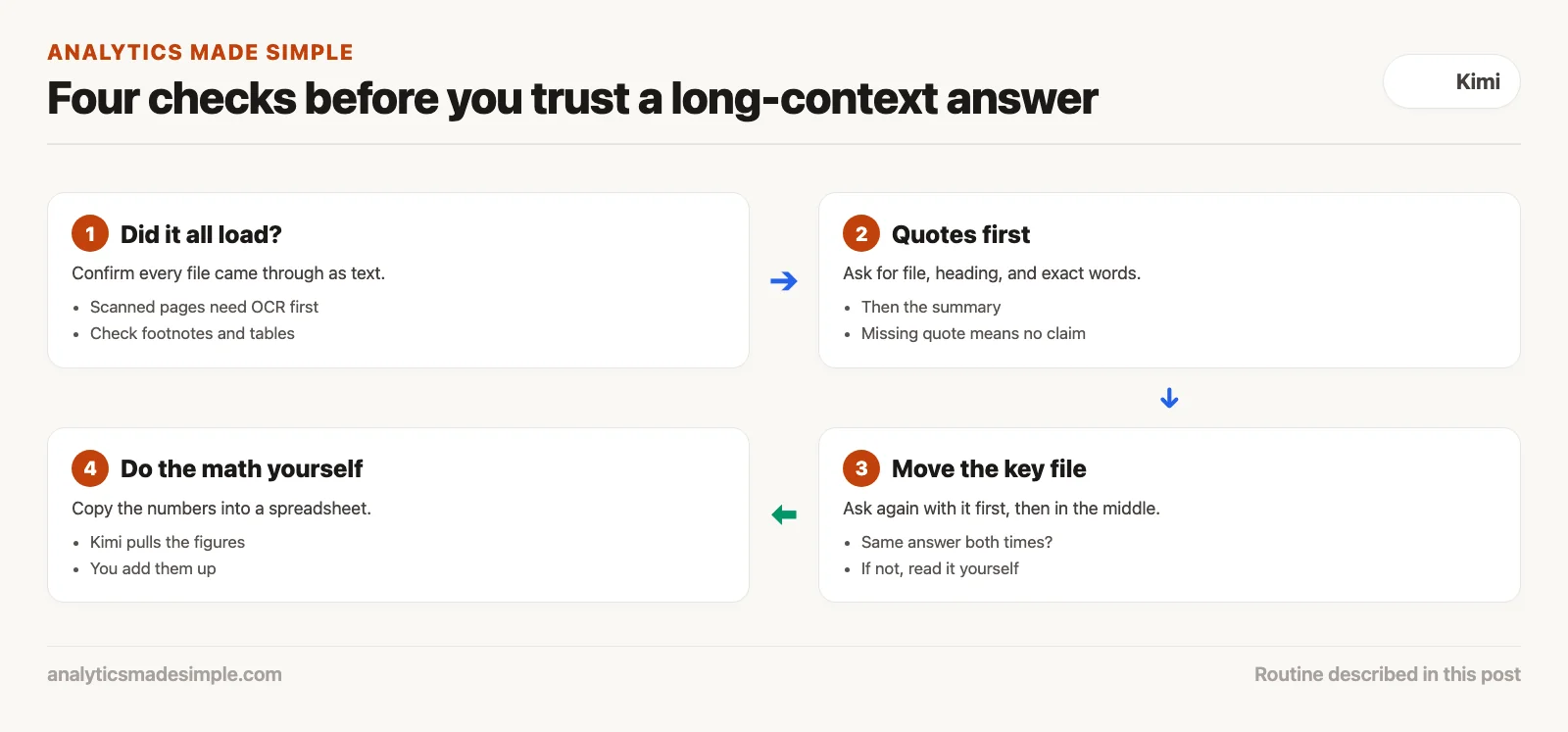
- Make sure every file loaded as text. Scanned pages need optical character recognition (OCR), software that turns a picture of text into real text, first, or the model never sees them.
- Require quotes for every important fact, because a quote is something you can search for.
- If a decision depends on one file, ask twice: once with that file first and once with it in the middle. If the answers differ, read the file yourself.
- Let Kimi pull out the numbers, then add them up in a spreadsheet, because a language model predicts digits rather than calculating them.
Quick recap
- As of October 3, 2026, kimi-k3 holds about a million tokens and the K2.6 and K2.7-Code models hold 262,144.
- Models recall the start and end of a long input best and the middle worse.
- Simple needle tests overstate how well models handle real, multi-fact questions.
- Ask for quotes first and check them, because a quote can be searched and a summary cannot. Do any math yourself.
Your next step
Pick one long document you already know well, such as last year’s annual report. Upload only that file to Kimi, use the prompt above, and run the quote checker on what comes back. Then move the most important section to the middle of a longer upload and ask again. Seeing the difference yourself is the fastest way to learn how much checking your own work needs.
Series notes
This is Part 2 of Learn Kimi. Previous: what Kimi is. Next: your first hour with docs and research.
Sources
- Kimi API platform, model pricing and context lengths, checked October 3, 2026.
- Moonshot AI, Kimi K3 model card on Hugging Face, checked October 3, 2026.
- Liu and colleagues, Lost in the Middle: How Language Models Use Long Contexts (2023).
- Hsieh and colleagues (NVIDIA), RULER: What’s the Real Context Size of Your Long-Context Language Models? (2024).
- Kimi Team, Kimi Linear: An Expressive, Efficient Attention Architecture (2025).
Keep going
Same lessons in your feed
Short diagrams, hooks, and weekly tutorials on Substack, Instagram, X, and Facebook.