

Consumer Gemini and Workspace Gemini share a family name but work under different contracts. Choose between them by asking who owns the login and who owns the data, and ignore which logo happens to be on the browser tab.
Say you “use Gemini at work.” Some days that means the personal app in a browser profile that still holds your Gmail vacation photos. Other days it means the side panel inside a company Google Docs file, with a data classification banner across the top. Both are Gemini. Mixing the two without noticing is how you end up with company data in a personal account.
Two versions with the same family name
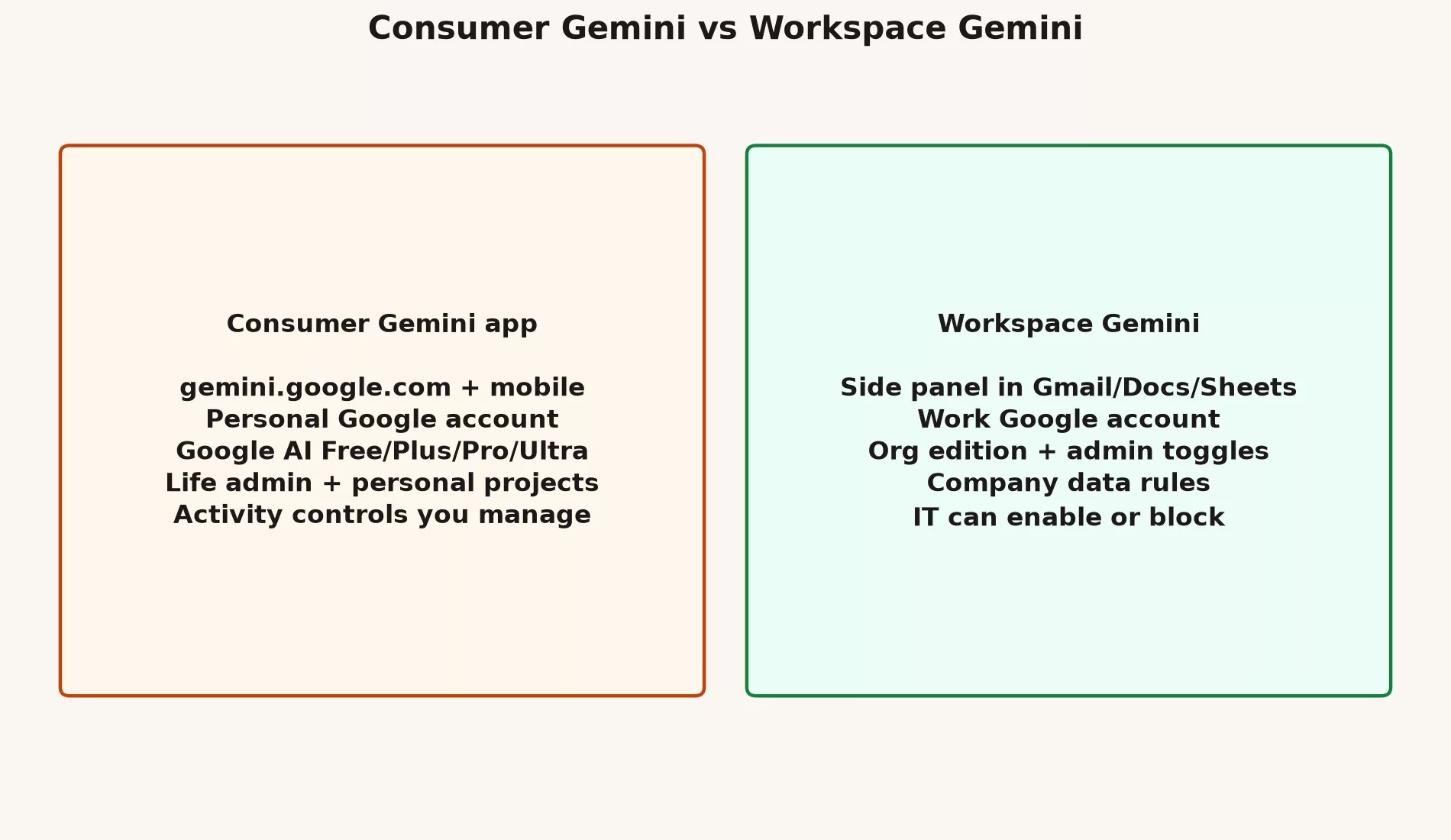
Consumer Gemini is the assistant at gemini.google.com and in the mobile apps. You sign in with a personal Google account, or sometimes a school account. The plans stack up as Free and the paid Google AI tiers (Plus, Pro, and Ultra). You manage your own activity settings. It is great for life admin, learning, and personal projects, as long as the data is appropriate for a personal tool.
Workspace Gemini is AI help built into Google’s work products, including Gmail, Docs, Sheets, Drive, and Meet, plus work-managed access to whichever Gemini features your administrator turns on. The bill and the rules sit with your organization. What you can use depends on your Workspace edition and your admin’s settings, and it has nothing to do with whether a shiny screenshot in a blog post looks the same as your screen.
Same brand word. Different legal contract, different admin, and a different answer to “should I paste this?”
Side-by-side comparison
| Topic | Consumer Gemini app | Workspace Gemini |
|---|---|---|
| Primary home | gemini.google.com / mobile app | Side panel and help features in Workspace apps |
| Account | Personal Google account (usually) | Work Google account |
| Who enables features | You + Google consumer plans | Admin + Workspace edition |
| Best data | Personal, public, low-risk learning | Work content under company policy |
| Upgrade path | Google AI Free/Plus/Pro/Ultra | Business/Enterprise seats and add-ons |
| Failure mode | Work secrets in a personal tab | Assuming every user has every button |
What each version is good at
Consumer app strengths
- Long, multi-turn chats, without having to fight a narrow side panel.
- Multimodal experiments, which means mixing text with images, using personal photos and public PDFs.
- Personal research, study, and life logistics.
- Trying new consumer features before they show up at work.
Workspace strengths
- Drafting right next to the real email or document.
- Staying inside your company’s sign-in and sharing boundaries.
- Team-wide norms, when IT publishes a page about AI use.
- Less need to export work files into a personal tool.
Nearby products people confuse with the Gemini app
| Name | What it is | Not the same as |
|---|---|---|
| NotebookLM | Notebook product grounded on sources you add | Open-ended consumer chat |
| Search AI Mode / AI Overviews | AI answers inside Search | A drafting environment for memos |
| Google AI Studio | Builder playground + API key path | Everyday mail assistant |
| Vertex / Cloud Gemini | Enterprise platform access | Clicking Upgrade in the consumer app |
The earlier Learn Gemini series covered this map of names in more detail. The practical point here is simple: when someone says “Gemini blocked my file,” ask which version they were using.
A chooser for which version fits which job
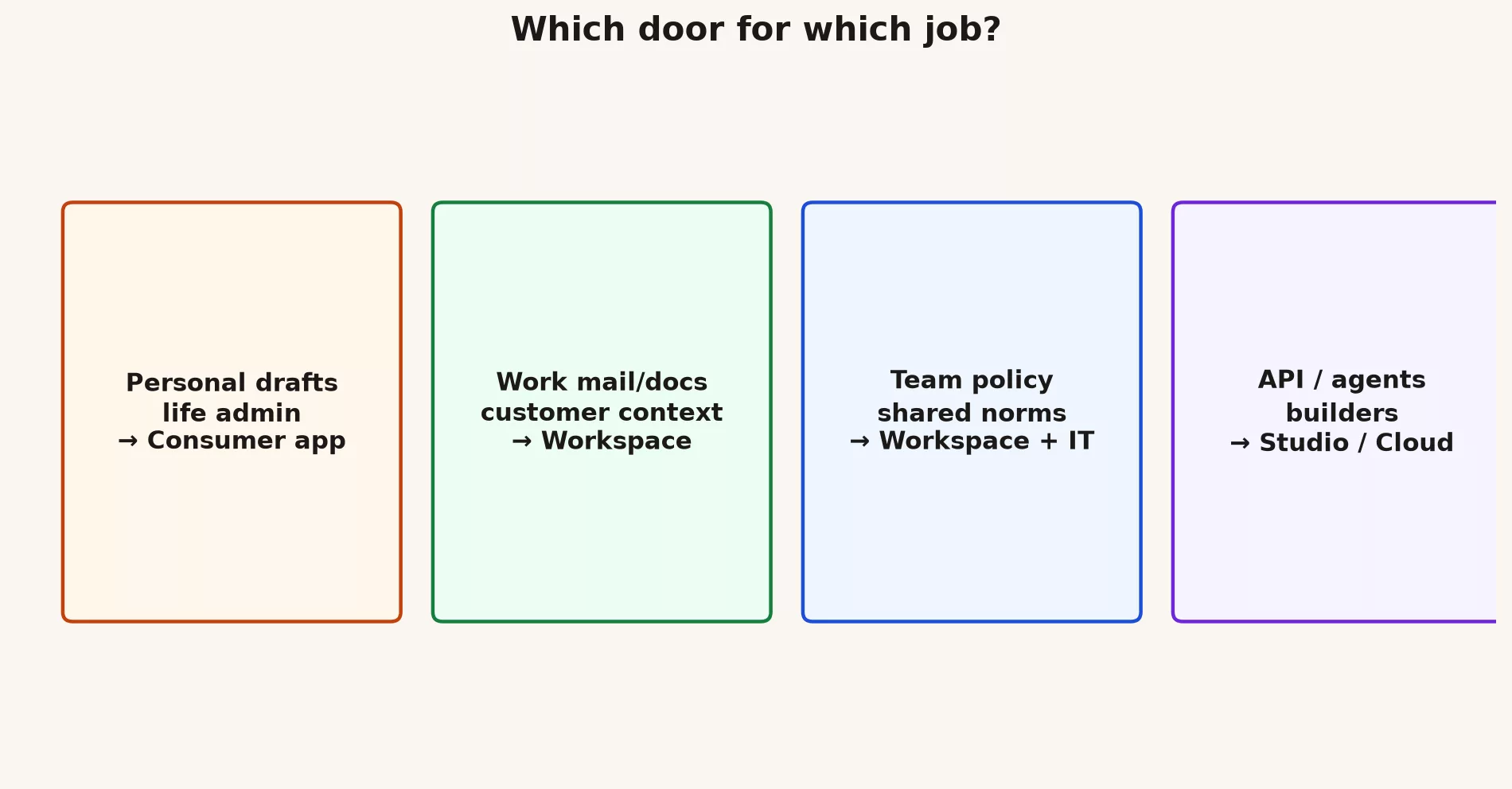
- If the content is personal and low risk, the consumer app is fine.
- If the content is work related and your organization has Workspace Gemini, use the work account first.
- If the work button is missing, ask IT before you open a personal tab “just this once.”
- If you are building software that calls models, you want Google AI Studio, the API (the way one program asks another for data), or Google Cloud, and a chat plan alone will not do.
- If your team needs shared rules, write them down, because advice passed around in Slack expires.
The missing button problem
Say a coworker shows you a video of Gemini drafting text inside Sheets, and your own Sheets has no side panel. That does not mean you are bad with computers. It usually means one of these things is true:
- Your Workspace edition does not include the feature.
- Your admin turned it off for your organizational unit (OU), which is a group of accounts in the admin console.
- You are signed in to the wrong account in your browser.
- The feature is rolling out by region or as an experiment.
- You are watching a consumer demo while you work in a locked-down company account.
The fix is almost never to export the spreadsheet to a personal Gemini Pro account. The fix is a clear question to IT and, if needed, a business case for the right seat.
A worked example: three tasks, three paths
Task A: Rewrite a birthday party invite. Use the consumer app, since no company data is involved.
Task B: Summarize a customer escalation thread in your work Gmail. Use the Workspace side panel if it is enabled, and remember that you still own the send button.
Task C: Prototype a small internal tool that sorts support tickets by calling an API. Use AI Studio to work out the prompts, then get API keys with a budget attached. A chat subscription alone does not cover this job.
Shadow IT patterns to stop early
Shadow IT means tools that people use for work without the company’s knowledge or approval. These are the patterns to watch for:
- Five personal Pro seats bought on personal cards for a ten-person team.
- Shared passwords to a single “team Gemini” login.
- Customer CSV (a plain spreadsheet-style text file) files cleaned in a personal chat because “Workspace AI is slow.”
- Contractors using their own consumer accounts on company laptops, with no data loss prevention (DLP) plan, meaning no tools that stop sensitive data from leaving.
These habits feel fast for a week. Then they become incident tickets for a quarter.
Stories from real teams
An operations team once settled on personal consumer accounts because Workspace AI was “not rolled out yet.” Six months later they had no audit trail and three conflicting prompt templates. The rebuild cost more than the original seat conversation with IT would have.
A mobile team installed every AI editor plugin they could find. The completions overlapped, the secret scanner kept firing, and the junior developers accepted multi-file edits they could not explain. They cut back to one approved tool and a written review rule, and they got faster, because review took less time.
A prototype used Studio keys in a public demo with no rate limits. A scraper found the keys over a weekend. The budget alerts fired, but only after the bill was already ugly. Caps set in the code and on the cloud project are cheaper than a postmortem.
If you keep only one idea from this post, keep this one. Product packaging and account type decide what you can click long before any debate about model quality matters. Get the version right first, then get the habit right, and only then worry about which label sits in the dropdown this month.
A one-page briefing you can send to a manager
Managers do not need the family tree of the models. They need the risk and the cost, in plain language. Here is a briefing skeleton you can adapt:
- We have two versions of Gemini, a personal app and Workspace, and they are not interchangeable for company data.
- Today our team uses: (list). The gaps are: (missing Workspace features, training, or policy).
- The risk if we keep using personal accounts for work files is shadow IT and no admin control.
- The ask: turn on Workspace Gemini for a named organizational unit, publish a one-page table of which data goes where, and schedule 45 minutes of training.
- The success measure after 30 days: fewer work pastes into personal accounts, faster first drafts on approved tools, and zero “I did not know” incidents.
Hybrid workers and contractors
Contractors often arrive with personal Google habits and personal Pro subscriptions. Put the rules about which version to use into the onboarding checklist on day one, and do not wait until the first customer spreadsheet shows up in a consumer chat history. If contractors cannot get Workspace seats quickly, give them an explicit temporary rule, such as templates only and no customer personal data, instead of leaving a silence that they will fill with improvisation.
Hybrid employees who switch between personal phones and work laptops need to be disciplined about the account chooser. A sticker on the laptop that says “Work Google only for customer data” is low-tech and effective.
NotebookLM as a third lane
Some teams discover NotebookLM and declare it “our Gemini.” It is a strong choice for studying and writing briefings from sources you supply, but it is still no replacement for Workspace mail drafting or for consumer multimodal chat. If your team’s map has only one bubble labeled Gemini, add NotebookLM as its own bubble with its own jobs. Confusion here creates duplicate work and odd permission questions.
Measuring adoption without vanity metrics
“Number of Gemini messages” is a weak measure. It is better to track how long it takes to get a first draft on approved tools, what percent of external emails got a human edit pass, how many policy exceptions people requested, and how many incidents involved unapproved tools. Adoption that raises the number of incidents is not a win.
Mistakes to avoid
- Treating consumer and Workspace as interchangeable because the logo matches.
- Training people only on the consumer screens while the staff live in Workspace.
- Ignoring admin policy until after a paste incident.
- Buying Ultra personally to “fix” a missing Workspace feature.
Quick recap
- The consumer app and Workspace Gemini are related products with different rules.
- Choose by the kind of data and by your admin’s settings, and do not choose by how polished a demo looks.
- A missing button is usually a policy or an edition issue and not a personal failure.
- Next up are the coding tools in the editor, including Android Studio and Code Assist.
Practice this week
- Open gemini.google.com and note which account is active, because personal and work accounts follow different data rules.
- Open work Gmail or Docs, if you have it, and check for a Gemini side panel.
- Write one line: “My default for work content is ___ because ___.”
- If the work version is closed to you, draft one sentence to ask IT, and do not draft a workaround plan.
Series notes
This is Part 1 of the Gemini product map (Gemini series). The Learn Gemini series covers the beginner path, and this map splits consumer from Workspace. The rest of the map: GM9 covers editor and Code Assist help, GM10 covers Gemini CLI versus Antigravity CLI, GM11 covers AI Studio and the API, and GM12 helps you choose a model without the hype. Deeper how-tos live in later Gemini tutorials on everyday use, Workspace, and coding.
Sources
- Gemini app.
- Google Workspace with Gemini.
- Workspace with Gemini admin overview.
- Gemini subscriptions.
- Analytics Made Simple (AMS) Learn Gemini.
Keep going
Same lessons in your feed
Short diagrams, hooks, and weekly tutorials on Substack, Instagram, X, and Facebook.



