

To work with a long document in ChatGPT, do not ask for one big summary. Break the job into steps: split the document into parts, list what each part covers, and check every number and quote against the page.
Imagine you drop a 47-page report and three spreadsheets into the chat and ask for a summary before a meeting. The reply sounds confident. It invents a number that is not on page 12, and it quotes a sentence that is not in the file. You almost paste that fake number into the team chat.
This post is part of the ChatGPT everyday tutorial. Limits on file sizes and file counts change by plan, so check OpenAI’s Help Center (checked September 2026) before you set team rules.
Why long docs break naive prompts
ChatGPT can read files you attach or paste, but that doesn’t mean you can throw an entire annual report in and trust the first paragraph it hands back. The model has limited attention in any single turn, so long inputs get compressed in ways you don’t control, and the product may retrieve pieces of a file rather than reading every line the way a person with a highlighter would. When people say “it hallucinated from my PDF,” they usually mean one of these failure modes:
- Blended pages. A claim from page 4 gets fused with a number from page 19, as if they always belonged together.
- Plausible filler. The model fills a gap with industry-sounding prose because your prompt asked for “a complete summary.”
- False quotes. Quotation marks appear around a sentence that only sounds close to the real text.
- Wrong grain. You wanted “what changed versus last quarter” and got a generic brochure of the whole PDF instead.
- File soup. Three CSVs, plain text files where each line is a row and commas separate the columns, and a slide deck get treated as one story, without saying which file each claim actually came from.
None of that means you should never use files. It means long-document work is a process, not a one-shot magic trick. The same discipline that works for short structured prompts, stating the role, the goal, the constraints, an example, and the output format, still applies here. You just add file hygiene on top of it.
Rule of thumb: If you would not trust a junior analyst who skimmed for eight minutes, do not trust a one-shot “summarize this PDF” reply either. Give it structure, demand citations, and check the quotes.
The three-step loop: chunk, index, verify
Use this loop for any document longer than a few pages, or for any job that mixes more than one file. It’s boring on purpose, and boring is exactly how you avoid the kind of mistake that ends up in Slack.
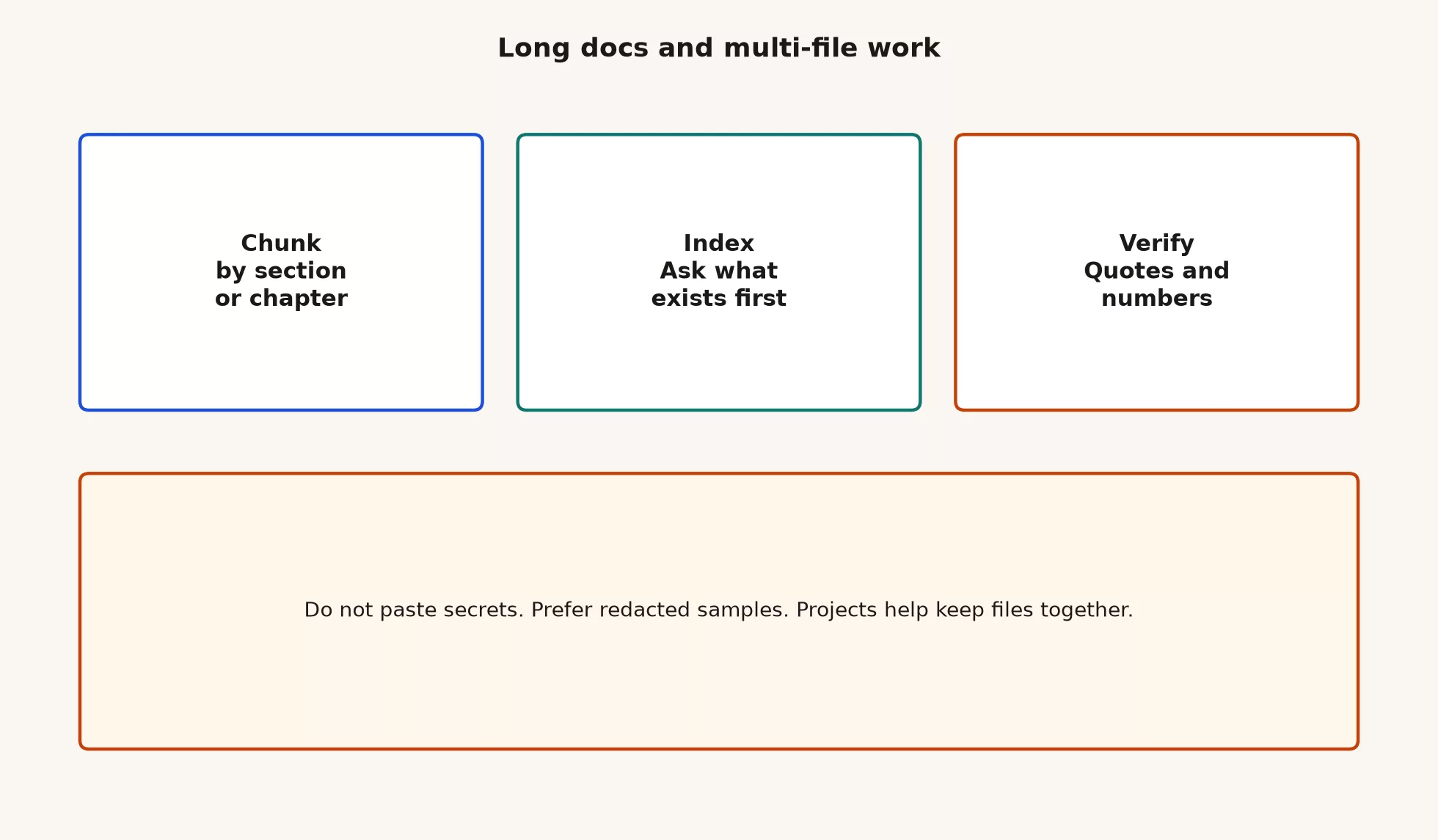
1. Chunk by section or chapter
Chunking means you don’t ask for the whole document in one breath. Instead you split the work the way a careful person would: by table of contents, by heading, by appendix, or by file. For a 40-page policy PDF, that means working chapter by chapter. For a slide deck, it means working in slide ranges, and for logs or exports, one logical table at a time.
Chunking helps in two ways: each answer stays closer to the text you actually care about, and when something is wrong, you know exactly which chunk to reopen. “Wrong somewhere in the 47 pages” is not a fixable bug report. “Wrong in Section 4, refunds” is.
Practical chunk sizes for everyday Chat, not a hard product limit, just a working habit:
- One chapter or major heading at a time for prose PDFs.
- One sheet, or one clear question, per CSV, starting with the filters, the grain, and the key columns.
- One decision question per turn, such as “What does Section 3 say we must do before launch?”, instead of “Tell me everything.”
2. Index: ask what exists first
Before you ask for analysis, ask for a map first. Call this an index pass: you’re not requesting a narrative yet, you want an inventory of what’s actually there.
- What sections or sheets exist?
- Which pages mention refunds, SLAs (an SLA is the promised level of service, such as how often it stays up), pricing, or the metric you care about?
- What columns are in each CSV, and what does one row mean?
- Where are the tables, and where is it pure prose?
- What is missing that you expected to find?
Here is a prompt pattern you can paste and adapt. Swap in your own file names and topic.
You have the attached files only. Do not invent sections or columns.

Task: INDEX PASS only (no recommendations yet).

1) List each file by name and type.
2) For each PDF or doc: list headings / sections you can see, with page or section labels if available.
3) For each spreadsheet: list sheet names, column headers, and a one-line guess of the grain (what one row means). Mark guesses as guesses.
4) Flag anything unreadable (scans, image-only pages, truncated tables).
5) End with: "I have not analyzed content yet."

Refuse any request to invent missing pages.
If the index pass comes back wrong, stop there. Fix the attachment, re-export the PDF, or work from a cleaner file, because analysis built on a broken map is just theater.
3. Verify quotes and numbers
When you finally ask for summaries or comparisons, demand checkable claims: a short excerpt with a page or section pointer beats a long paraphrase every time. Then you do the human part of the job, which is opening the source and confirming it.
Verification prompt pattern:
Using only the attached files, answer: [specific question].

Rules:
- Every factual claim must include a pointer: file name + section/heading or page if available.
- For any number, quote the surrounding phrase or table row in quotation marks.
- If the files do not contain the answer, say "Not in the provided files" and stop.
- Do not invent metrics, dates, or quotes.
- Separate: (A) what the files say (B) my interpretation (label both).
Your own verification checklist takes about two minutes, and it isn’t optional once the output is going to other people:
| Check | What you do | Pass means |
|---|---|---|
| Quote hunt | Search the PDF for a distinctive phrase from the reply | Exact or clearly matching text exists |
| Number hunt | Find the same figure in the source table or sentence | Same units, same period, same filter |
| File label | Confirm the claim points to the right file | No CSV claim labeled as “from the PDF” |
| Scope | Confirm the answer matches your question grain | No “whole company” claim from one region sheet |
| Missing | Look for “Not in the provided files” | Gaps are honest, not filled with invented detail |
If a quote fails the hunt, treat the whole answer as suspect until you rerun it with tighter constraints. Don’t just “edit around” one bad number and keep the rest, because bad quotes usually travel in packs.
Projects: keep files and chats in one workspace
OpenAI’s Help Center describes Projects as workspaces that group chats, reference files, and instructions for an ongoing effort. That’s the product answer to “I keep re-uploading the same five PDFs into random threads and losing track of what we decided.”
Use a Project when:
- The same set of files will matter for days or weeks, such as a policy pack, a vendor RFP (a request for proposal, the packet you send when you ask vendors to bid), or a quarterly review binder.
- You want standing instructions for that effort only, for example “cite section headers, never invent KPIs (a KPI is one of the few numbers a team agrees to watch), and write for a non-finance audience.”
- You’ll run many small chats (index, extract, rewrite, quiz yourself) against the same materials.
- You want separation from your personal chats and your other work streams.
Stay in a plain chat when the job is a one-off attachment you’ll never open again. Projects are organization, not magic accuracy: a Project full of secrets is still a secrets problem, and a Project with a vague goal still produces vague work.
Project setup checklist (ten minutes)
- Name the Project after the outcome, not the vibe, so “Q3 vendor comparison” instead of “AI stuff.”
- Write five to ten lines of project instructions: audience, a refuse list, citation rules, and output defaults. Every chat in the project follows them, so you set the rules once.
- Upload only the current file set, and delete superseded drafts so the model doesn’t blend v3 and v7.
- Run an index pass as the first chat inside the Project, and save or pin that map if the interface lets you find it later.
- Do analysis chats as separate turns with one question each when the stakes are high.
File counts and storage caps differ by plan, and OpenAI’s Help Center articles on Projects, uploads, and Library (ChatGPT’s list of files you have uploaded) carry the current numbers. If an upload fails, check your plan’s limits and whether the file is actually an unreadable scan. Re-export text-based PDFs when you can, because image-only scans are harder for any tool that needs clean, readable text.
No secrets: redaction before upload
The privacy habits covered earlier in the Learn ChatGPT series, and your own workplace policy, still apply here. Multi-file work is where people get sloppy, because the job feels urgent, and urgency is never a policy exception.
Do not upload or paste:
- API keys, passwords, private keys, session tokens. An API is a way for one program to ask another program for data or an action. An API key is the secret password for that connection. A token here is a saved proof that you are signed in.
- Full customer PII dumps (PII is personal data that can identify someone, such as a name plus an email), health data, or regulated datasets your policy forbids.
- Unreleased financials, if policy says consumer ChatGPT is off-limits for that class of data.
- Source code with embedded secrets, connection strings, or production credentials.
- Anything your company labeled “no AI tools” or “approved tools only,” if this product isn’t on the list.
Prefer instead:
- Redacted samples: fake names, shuffled IDs, truncated tables.
- Public docs and already-approved internal templates.
- Structure-only exports, such as column headers plus three fake rows, when you only need help writing a formula or query shape. A query is a question you send to a database.
- Enterprise or workspace products your IT team actually approved, when the data class requires it.
Here’s a useful way to think about it: ChatGPT is like a skilled intern with an imperfect memory and no security clearance of its own. You decide what enters the room. If you wouldn’t paste something into a random vendor’s web form, don’t paste it here either, unless your policy explicitly allows that type of data on this specific plan.
Multi-file recipe (copy and reuse)
When you have two or more files, use a fixed recipe so you don’t improvise under time pressure. The diagram below is the spine, and the table after it is the filled-in example.
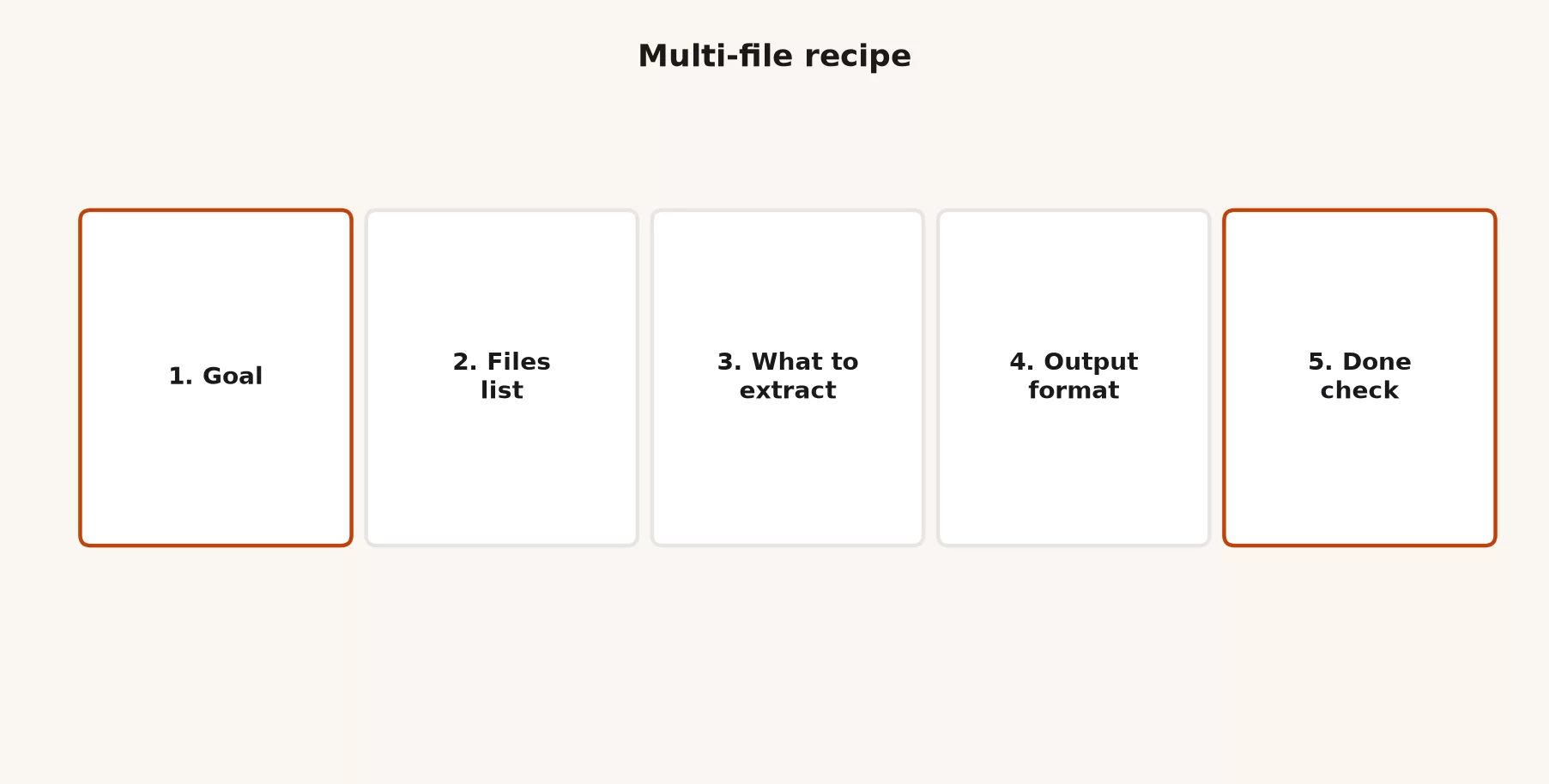
| Step | What you write | Toy example |
|---|---|---|
| 1. Goal | One decision or deliverable | “Two-page brief: does Vendor A meet our SLA and price caps?” |
| 2. Files list | Exact names + what each is for | rfp.pdf (our requirements), vendor_a.pdf (response), pricing.csv (their quote) |
| 3. What to extract | Bullets only, no essay yet | SLA hours, uptime %, price per seat, exclusions, open questions |
| 4. Output format | Shape for humans | Table: requirement | vendor claim | file pointer | pass/fail/unclear |
| 5. Done check | How you will verify | Every row has a pointer; no invented numbers; list gaps |
Full multi-file prompt skeleton:
CONTEXT
Goal: [one decision or deliverable in one sentence]
Audience: [who reads this]
Refuse list: inventing numbers, inventing quotes, blending files without labels

FILES (use only these)
1) [filename]: [why it is here]
2) [filename]: [why it is here]
3) [filename]: [why it is here]

PROCESS
Step A: Index pass (sections/columns only).
Step B: Extract the fields listed below. One bullet per field with file pointer.
Step C: Build the output format. Mark unclear items as UNCLEAR, not guesses.

EXTRACT
- [field 1]
- [field 2]
- [field 3]

OUTPUT FORMAT
[table / bullets / one-pager structure]

DONE CHECK (print this checklist filled)
- [ ] Every number has a file pointer
- [ ] Every quote is exact
- [ ] Gaps listed under "Not in files"
- [ ] Interpretation separated from source claims
Worked toy example (sanitized)
Suppose you have three redacted files for a vendor decision. You are not pasting real customer data. You care about the uptime SLA, the promised share of time the service stays up, the support hours, and the list price.
After an index pass, a good extract table might look like this, using toy numbers for teaching:
| Requirement | Vendor claim | Pointer | Status |
|---|---|---|---|
| Uptime SLA | 99.9% monthly | vendor_a.pdf §3.2 | Pass if we accept monthly window |
| Support hours | 9 to 5 US Eastern weekdays | vendor_a.pdf §5.1 | Fail vs 24/7 requirement in rfp.pdf §2 |
| Price per seat | $48 / seat / month annual | pricing.csv row “Pro annual” | Pass under $50 cap |
| Data residency | Not stated | (none) | UNCLEAR / Not in files |
Notice the last row: “not stated” is actually a successful use of the tool, while inventing “US-only hosting” because that’s common in the industry would be a failure. Your job is to carry that UNCLEAR row into the human meeting instead of smoothing it away.
What good looks like: a short dialogue
Here’s a compressed version of a clean session. Your real session will run longer, but the shape is what matters.
You: Project “Vendor A decision.” Files: rfp.pdf, vendor_a.pdf, pricing.csv. Index pass only. No recommendations.
ChatGPT: Lists sections in both PDFs, columns in the CSV, flags one scanned appendix as unreadable, ends with “I have not analyzed content yet.”
You: Extract uptime SLA, support hours, list price per seat, data residency. Table with requirement, claim, pointer, status. No invented fields. Mark missing as UNCLEAR.
ChatGPT: Fills three rows with pointers. Data residency UNCLEAR. You open vendor_a.pdf §3.2 and confirm the 99.9% line before you paste the table into the decision doc.
That’s the whole job in miniature: inventory, a constrained extract, then a human verifying it. There’s no heroic single prompt, no secret dump, and no fake confidence pasted over the blank field.
File types and awkward formats
Not every attachment behaves the same way, so adjust your expectations file by file:
| Format | Usually fine for | Watch out for |
|---|---|---|
| Text PDF / DOCX | Section maps, quotes, policy extract | Headers/footers mistaken for body; multi-column layouts |
| Scanned PDF | Rough orientation if OCR works | Garbled text; verify every number by eye |
| CSV / XLSX | Column inventory, filters, simple comparisons | Wrong sheet; date formats; silent unit mixups |
| Slide decks | Claim lists, “what the deck promises” | Speaker notes missing; charts without data tables |
| Images of tables | Quick read when text export is impossible | Misread digits; always retype critical numbers from the source system |
| Mixed zip of everything | Almost never a good first move | Start with three named files max, then add |
If a chart in a deck actually matters, ask for the underlying number from the table or from finance directly, not from a description of a screenshot. Models misread chart pixels more often than people expect, so when a number really matters, go back to wherever it’s officially tracked and confirm it there.
When Chat is enough, and when to switch tools
This series stays in everyday Chat on purpose. Still, multi-file work is where people start wondering about Work mode, meaning agentic office steps, or Codex, meaning repo work. Use the product map when the job actually changes shape:
- Stay in Chat for read, extract, compare, rewrite, and brief writing against a small set of attachments you control.
- Consider Work when the product needs multi-step office deliverables with apps, longer runs where the AI works on its own, and approval loops, covered in the later Work tutorial.
- Consider Codex when the files are a software repo and the output is code changes, not a management brief.
- Consider a Custom GPT only after the recipe is stable and weekly, not while you’re still inventing the process.
If you’re not sure which ChatGPT tool you’re actually using right now, open the ChatGPT product map before you grant it broader permissions. More power is not the same thing as more truth.
Common mistakes
These show up again and again, especially under deadline pressure:
| Mistake | What it looks like | Fix |
|---|---|---|
| One-shot the novel | “Summarize this 80-page PDF” | Chunk + index first |
| No file labels | Claims with no pointer | Require file + section on every fact |
| Secret soup | Full CRM export “just this once” | Redact or use approved workspace only |
| Stale Project files | v2 and v5 both uploaded | Delete superseded files; date names |
| Trusting quotes | Pretty quotation marks, never checked | Quote hunt before send |
| Wrong grain | Company-wide story from one region CSV | State grain in the goal and extract list |
| Essay without decision | Beautiful summary, no recommendation structure | Start from the decision in Step 1 |
| Agent leap too early | Jump to Work/Codex for a simple extract | Finish the Chat recipe; switch tools only when the job needs it |
Quick recap
- Long documents fail when you skip structure, so chunk the document, index what’s in it, then verify before you trust it.
- Demand file pointers and exact quotes for any number that matters.
- Use a Project when the same materials will stick around, and still delete stale files as you go.
- Run the multi-file recipe: goal, files list, extract list, output format, done check.
- Keep secrets out of consumer tools; prefer redacted samples and policy-approved workspaces instead.
- Stay in Chat for extract and brief work, and open the product map when a job actually needs Work or Codex.
How to practice this week
- Pick one long public PDF, such as a product’s terms page, an open report, or a sanitized internal document you’re allowed to use.
- Run an index pass on it, and save the section list.
- Ask three specific questions with citation rules, then verify every quote by hand.
- If you have a second file, even a tiny CSV of toy numbers, run the multi-file recipe from start to finish.
- Optional: create one Project for a real recurring binder, and add instructions that ban invented metrics.
Series notes
This is Part 3 of the ChatGPT everyday tutorial series. The next post shifts from documents to learning: explaining hard topics simply, quizzes, teach-back, and study habits that beat copy-paste theater, and the one after that covers email, meetings, and workplace writing. If foundation habits like plans, Project basics, privacy, and judgment still feel shaky, start with Learn ChatGPT from scratch. When Chat, Work, Codex, Custom GPTs, or API talk starts to blur, the ChatGPT product map sorts it out. This series’ home is ChatGPT everyday tutorial, and the full path board is on Learn.
Sources
Research and further reading used for this article. Product limits and interface labels change, so verify on the live pages before you write policy or training materials.
- OpenAI Help: Projects in ChatGPT (workspaces that group chats, files, and instructions)
- OpenAI Help: File uploads FAQ (size limits, rate and storage notes; confirm current numbers)
- OpenAI Help: File storage and Library in ChatGPT (Library on web, storage separate from daily attachment limits)
- OpenAI Help: Data controls FAQ (training and control orientation; pair with workplace policy)
- OpenAI Help Center (live product help for ChatGPT features)
- ChatGPT (product entry)
- OpenAI policies (terms and usage policies)
- Analytics Made Simple: Learn ChatGPT from scratch (foundation series)
- Analytics Made Simple: ChatGPT product map (Chat vs Work vs Codex and related surfaces)
- Analytics Made Simple: ChatGPT everyday tutorial (this series home)
- Analytics Made Simple: Learn (paths hub)
Keep going
Same lessons in your feed
Short diagrams, hooks, and weekly tutorials on Substack, Instagram, X, and Facebook.



