Sooner or later someone on your team will say, “I have Claude Pro, so I’ll just generate an API key and wire the bot into Slack.” That one sentence mixes two products, two bills, and two sets of risks. A chat subscription is for a person talking to Claude. The API Console (the builder’s dashboard) is for software that calls the model on behalf of users, scheduled jobs, or a backend. Mixing the two is how people end up with surprise token invoices, keys leaked into a code repository, and a bot that cheerfully invents metrics in a public channel.
This post closes the Claude product map. The earlier posts covered chat versus agent-style tools, Claude Code, Claude Cowork, Design and Science, and how to choose a model. Here we answer a builder’s question without pushing every reader into builder life: when do you need the API and Console at all? If you only write, plan, code with Claude Code, or work on files with Cowork, you can finish the map, bookmark this page, and come back the day you ship an app. Everyday skills still live in the beginner series on Claude.
How chat Pro/Max and the API Console differ
Two products, two jobs
Hold this split in your head, because most of the confusion comes from it.
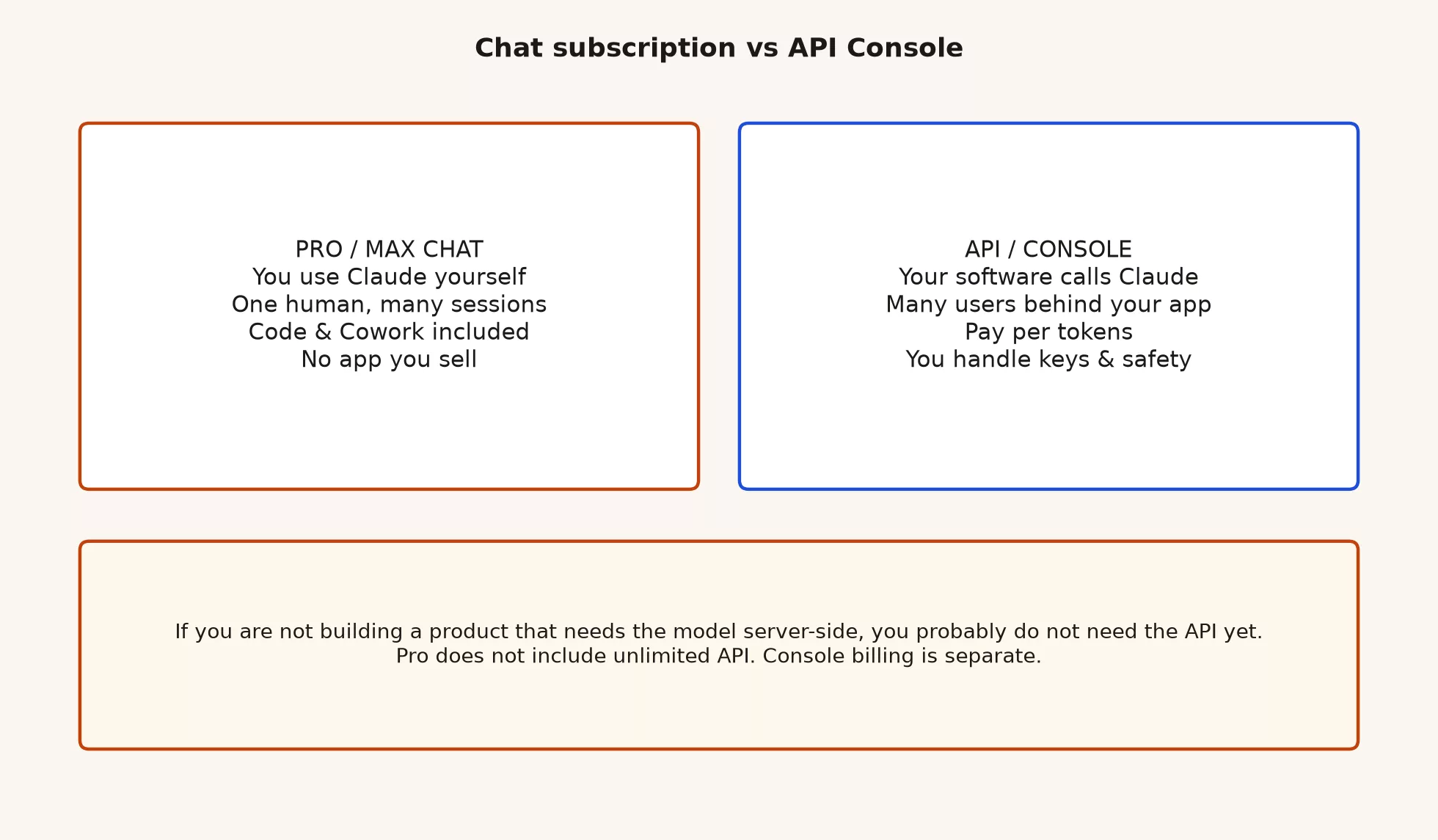
| Chat (claude.ai + desktop/mobile) | API / Console (platform.claude.com) | |
|---|---|---|
| Primary user | You (a human) | Your application or service |
| Typical goal | Write, think, code with Code, run Cowork tasks | Ship features that call models for many users or batch jobs |
| Billing shape | Subscription / plan usage pool | Usage billed in tokens (and related API meters) |
| Secrets | Login session; app passwords for integrations you configure | API keys, org roles, possibly cloud IAM |
| Safety burden | What you paste; what you ship from the reply | Keys, logging, prompt injection, rate limits, user data paths |
| Need it day one? | Yes for most AMS readers learning Claude | No, unless you are building software that needs server-side model calls |
Claude Code and Claude Cowork can run on paid chat plans. They feel agent-like, but they are not the same thing as you creating a production API key for a customer-facing product. Claude Code edits your repository while you watch, and Cowork works on files under permissions you set. The API is how your backend or automation calls Anthropic (or a cloud host) without a human clicking Send each time.
What the Console is for
The Claude Platform Console lives at platform.claude.com. Think of it as the builder’s control room, where you can do four things:
- Create and manage API keys, which are long secret strings that let software call the model.
- See usage and billing for model calls.
- Read the docs for the Messages API, models, rate limits, and pricing.
- Configure organization settings that matter when more than one developer shares an account.
Docs and pricing for builders also live there, including the Platform pricing documentation. The consumer pages on claude.com explain Pro, Max, Team, and the products meant for people, while Anthropic’s company site at anthropic.com covers research, news, and trust materials. Use the site that matches your job: the human product, the builder platform, or the company.
You do not need a Console account to finish the beginner series or to use chat, Claude Code, or Cowork on a normal subscription. Opening the Console just to look around is fine. Opening it because someone online said every serious person has an API key is how keys end up in screenshots.
Token billing in one coffee
API usage is usually metered in tokens, which are small chunks of text (and related content) that the model reads and writes. Here is a rough way to think about it. It is for teaching, not for accounting.
- Input tokens are what you send: your prompt, system instructions, conversation history, and any file text.
- Output tokens are what the model writes back.
- Price per million tokens differs by model tier. Heavier models cost more, and long conversations cost more because you keep resending the history.
- Traffic multiplies cost. One person in chat is one usage story, but an app with 5,000 daily active users who each trigger three model calls is a very different story.
Exact rates change, so read the live pricing table on platform.claude.com before you promise a finance leader a fixed monthly number. A good habit is to build a small load estimate by multiplying calls per day, average input size, average output size, and price. Then add headroom for retries, tool loops, and the day someone asks for streaming summaries on every page.
Here is a toy example, with numbers invented only to show the shape of the estimate:
# Toy estimate shape (replace with live rates from platform.claude.com)
calls_per_day = 3000
avg_input_tokens = 1200
avg_output_tokens = 400
# Suppose mid-tier model: $X / 1M input, $Y / 1M output (look up live)

daily_input_tokens = calls_per_day * avg_input_tokens
daily_output_tokens = calls_per_day * avg_output_tokens
# monthly ≈ 30 * (daily_input * X + daily_output * Y) / 1_000_000
# Then add 20 to 40% for retries, longer threads, and peak days
If that napkin math already scares your finance team, shrink the product design instead. You can reuse answers you have already computed, write shorter prompts, use cheaper models for easy requests, and keep a human in the loop for expensive ones. The model-chooser advice from the earlier post applies in the API too: default to a capable mid-tier model and move up only for hard routes.
Pro is not free unlimited API
The plain version is short.
- Claude Pro (and Max or Team seats) buys you human product access and a plan usage allowance for chat and related tools.
- API Console billing is separate, and you pay for tokens and related meters under the Platform terms.
- Pro does not mean unlimited free API. Do not design a customer bot on the assumption that your personal subscription covers production traffic.
Some accounts may offer limited promotional credits or trial capacity for developers, but those are not a substitute for a production budget. Read the live Console billing page for your organization, and never write “it’s free because I pay for Pro” in a roadmap deck.
The same split shows up in how a company is organized. Marketing might own a few Pro seats while engineering owns a Platform organization with cost alerts. Putting both on one person’s personal card is a common early-stage mess, so give them separate owners when you can.
When you actually need the API
Open the Console when at least one of these is true.
- You are building a product feature that calls a model for end users, such as a support bot, an in-app writing aid, or an internal tool behind your login.
- You need server-side automation that runs without a person sitting in claude.ai, such as batch classification, a nightly report that writes its own summary, or a continuous integration (CI) job that calls models under company policy.
- You must control keys, logging, retention, and rate limits as a software system instead of as a personal chat habit.
- You are reaching Claude through a cloud provider your company already standardizes on (more on that below).
You probably do not need the API yet when any of these describes you.
- You write documents, emails, and plans in chat.
- You use Claude Code on your own machine for a repository you review yourself.
- You use Cowork for office files and multi-step knowledge work under a paid plan.
- You are still learning Projects, privacy, and judgment from the beginner Claude series.
- Your “integration” is copy and paste between Claude and Slack, which is annoying but is not an API product.
Most readers of this site land in the second list for months, and that is normal. The map includes the API so you can recognize it, not so you feel behind.
Only open the Console if…
Use this checklist before you create a key.
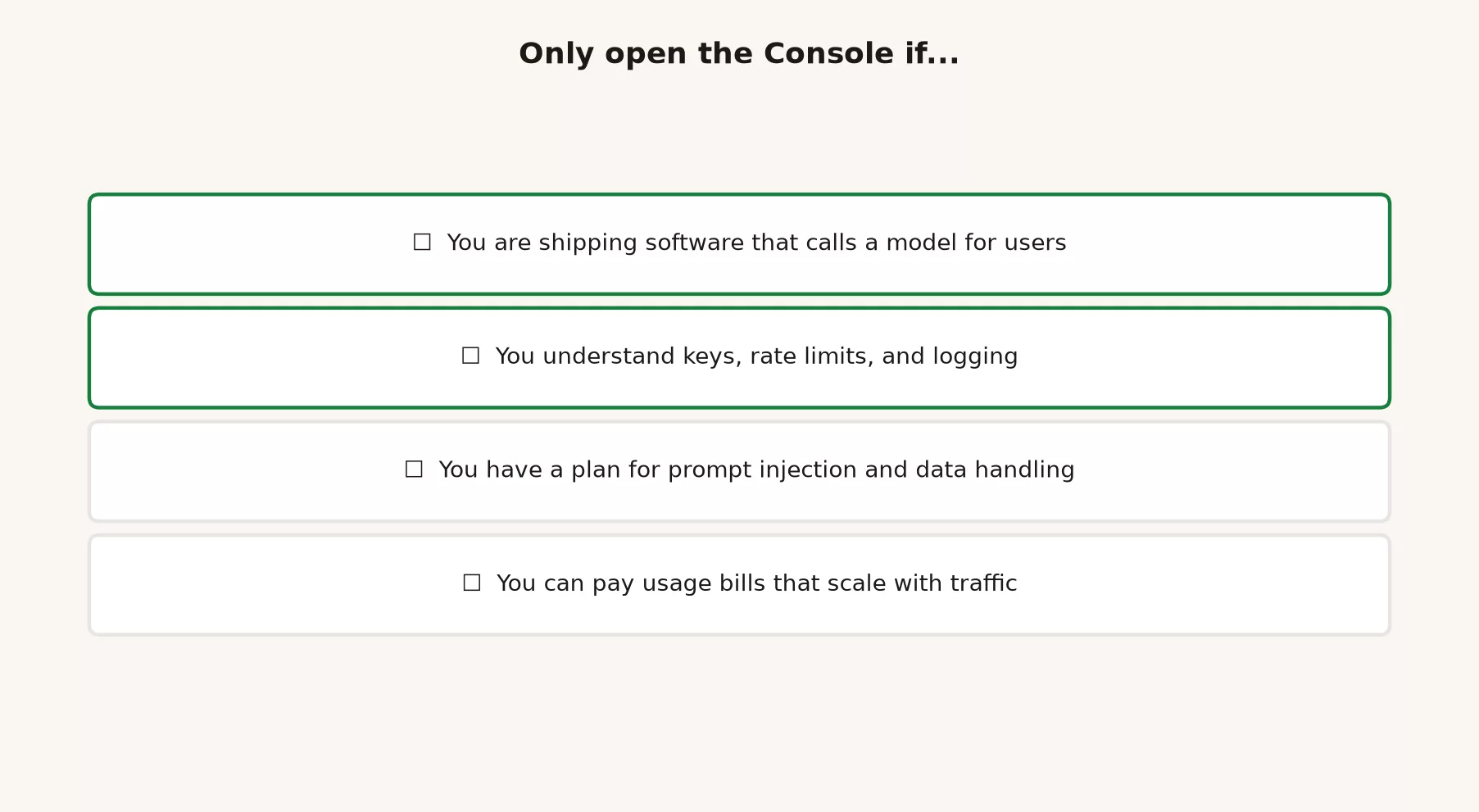
| Check | Why it matters |
|---|---|
| You are shipping software that calls a model for users or jobs | Otherwise chat/Code/Cowork already cover the need |
| You understand keys, rate limits, and logging | Keys are passwords for money and data access |
| You have a plan for prompt injection and data handling | Users and tools can try to make the model misbehave or leak context |
| You can pay usage bills that scale with traffic | Success can look like a surprise invoice |
| You know who owns incidents when the bot is wrong | Liability stays human and organizational |
| You will not paste production keys into chat logs or public repos | Rotation is work; prevention is cheaper |
If three or more rows are “not yet,” stay on the human products for now. Learn the craft, sketch the feature design on paper, and come back when you can answer the checklist honestly.
Cloud hosts for builders
Anthropic’s own API is not the only place models run. Many companies call Claude models through cloud platforms they already use for security, billing, and data residency (the rules about which country your data sits in). These are the names you will hear, though availability and branding change, so verify them for your organization:
- Amazon Bedrock, part of Amazon Web Services (AWS).
- Google Vertex AI, part of Google Cloud Platform (GCP).
- Microsoft Foundry and the related Azure model hosting paths, whose names shift often enough that enterprise buyers know the current product wording.
- Other regional or partner hosts, depending on your contract.
Teams pick a cloud host for four common reasons:
- They get one cloud bill and reuse their existing identity and access management (IAM), meaning the system that decides who may do what.
- Procurement has already signed a contract with that cloud.
- The network and data controls match enterprise patterns.
- An internal platform team requires that every model call go through one approved route.
Teams pick Anthropic’s own Platform for different reasons:
- They get direct docs and new API features sooner.
- It is a simpler path for startups without a cloud specialist team.
- The builder tooling assumes the platform.claude.com workflow.
You do not need to choose a cloud host to understand the product map. You only need to know the category exists, so that a platform engineer saying “we’ll put Claude on Bedrock” does not sound like a different AI brand. It is the same model family reached by a different route, with different access rules and a different line on the invoice.
If you are an individual contributor without cloud admin rights, your practical move is to ask the platform team which route is approved and then stop collecting random API keys on personal cards. Unapproved model APIs create the same mess as unapproved software subscriptions, except that the usage meter can spike overnight.
Keys, logging, and the boring risks
If you do open the Console, the first week of safety work is boring and important.
API keys
- Store keys in a secret manager or environment configuration, never in source control.
- Use separate keys for development, staging, and production, so a leak in one does not expose the others.
- Replace a key if it ever appeared in a ticket, screenshot, or chat, because you cannot know who saw it.
- Limit who in the organization can create keys.
Logging
- Decide what you log, such as prompts, outputs, user IDs, and response time.
- Avoid logging secrets, full payment card data, or health records unless you have a deliberate, approved design.
- Remember that logs become a second database of whatever users typed.
Prompt injection and tool use
- If the model can call tools such as email, a database, or webhooks, treat any untrusted text as hostile input, because someone can hide instructions inside it (this is called prompt injection).
- Do not give the model write access to production tools on day one.
- A human approval step beats trusting that the model seemed confident.
Eval before scale
Before you open the floodgates, run a small golden set of tasks, meaning a fixed list of test questions with the answers you expect. Measure how the model fails. The practical AI series on this site covers evaluation habits, and the same ideas apply when the caller is your app instead of your own fingers. Shipping without that testing is how a demo becomes an outage.
A walkthrough for the curious non-builder
If you are not building apps but a teammate keeps waving “API” around, use this script of questions:
- “Are we building software that must call a model without a person in claude.ai?” If not, stop there.
- “Whose budget pays the token bill when usage doubles?” If nobody owns it, stop.
- “Where do the keys live, and who replaces them?” If the answer is a shared Notion page, stop.
- “What happens when the model is wrong in front of a customer?” If the answer is “we’ll prompt better,” ask for a human fallback.
- “Can Claude Code or Cowork solve the internal version of this job first?” Often the answer is yes for a pilot.
You are not blocking innovation by asking these questions. You are protecting the team from a surprise invoice and a public incident.
Common questions
Can I use my Pro login as the API?
Do not plan a product that way. Pro is a human subscription, while the Console is a builder path with its own login, keys, and bills. If a tutorial tells you to paste a chat cookie into a script, close the tab.
Is Claude Code “using the API behind the scenes”?
How the products connect inside can change, and you should not guess at billing from a hunch. From a product-map view, Claude Code is a tool you use as a person (or under a team seat) for software work, while the Console is what you open when your application must call models as a system. If your company routes Claude Code through Platform credits in some enterprise setup, that is a purchasing detail. You still review the changes and you still own the merge.
When should a data team care?
A data team should care when it ships an internal tool that calls a model on warehouse text, ticket text, or customer text at scale. At that point you care about keys, which data classes may be sent, testing, and cost per run. Until then, chat and Claude Code cover exploration, and the real numbers still live in the warehouse.
Five example situations
An analyst learning Claude
You summarize meetings, draft decks, and check SQL drafts. Stay on chat, use Projects, and follow the beginner series, and skip the Console entirely. When the SQL is written by AI, still run your check habit.
A developer using Claude Code daily
You clean up a service under review. A paid plan with Claude Code is enough. You need the API only if you are building a product feature that calls models for other people, or wiring a CI job that must reach the Platform under company policy, and either way you review every change.
An ops lead automating a weekly report pack
You want a weekly folder of CSV files turned into a written report. Try Cowork first, or chat with a careful process. If the company later wants a scheduled internal service with a login and an audit log, that is the time to design an API-backed job with an owner and a budget.
A startup shipping an in-app writing helper
You need the Platform or a cloud host. Create an organization, set up one key per environment, add cost alerts and retention rules, and build a minimal test set. Do not put the key in the mobile app itself, because anyone can extract it. Call the model from a backend you control, start with a mid-tier model, and escalate only the hard tickets.
An enterprise already standardized on one cloud
Your platform team says Bedrock, Vertex, or Foundry-style hosting is the only approved route, so follow that route. The product map still applies, with the same model-family thinking but different purchasing and access rules. Your job is still to test the output, handle data carefully, and keep a human owner for wrong answers.
Mistakes to avoid
- Assuming Pro covers production API traffic. The bills are separate, and so is the design.
- Putting API keys in frontend code or public repositories. Treat keys like production passwords.
- Building a customer bot before a human fallback exists. Fluent wrong answers scale faster than your ability to apologize.
- Ignoring rate limits until launch day. Load test early with realistic prompts.
- Logging everything “for debugging” forever. Logs inherit the sensitivity of the prompts they contain.
- Skipping cost alerts. A viral feature can look like a finance incident.
- Using the API for a job chat already does. Extra complexity is not the same as maturity.
- Confusing Claude Code with “we integrated the API.” Claude Code is a tool for software work, while the API is how your own systems call models at scale.
- Never reading the live Platform docs. This post will age, while platform.claude.com and claude.com stay authoritative.
Twenty-minute practice
- Write your current Claude uses on a sticky note: chat, Claude Code, Cowork, or none.
- Mark each one as “human product is enough,” “needs the API within 90 days,” or “needs the API now”.
- If anything says “needs the API now,” fill in the Console checklist honestly with a partner who owns security or platform work.
- If nothing needs the API, add a calendar reminder for next quarter, and do not create a key “just in case”.
- Skim the platform.claude.com docs home once so you recognize what builder pages look like, then close the tab if you are not building.
The product map, closed
You now have a full map of the Claude family as this site teaches it. Here is what each earlier post covered, in one line apiece:
- Chat versus agent-style tools and how to tell them apart.
- Claude Code and the jobs it fits.
- Claude Cowork and the jobs it fits.
- Claude Design and Claude Science and their niche uses.
- The model chooser without the hype.
- This post: the API and Console, only if you build apps.
The everyday on-ramps (plans, the first half hour, Projects, writing jobs, memory, work connectors, and judgment) live in the beginner series on Claude. Keep it bookmarked for new teammates.
What comes next on this site:
- The Claude Code tutorial series covers installing or opening the tool, talking to a codebase, commands, skills, memory, instruction files, tools, and review habits for people who will touch a project, not only senior engineers.
- The Claude Cowork tutorial series covers agent-style knowledge work on folders and office tasks, with review loops and a sense of policy.
You do not need Platform access to start those tutorials. You need a paid plan where Claude Code or Cowork is available, a clear job, and the same habit of checking the output that you already practice in chat.
Quick recap
- Chat subscriptions and the API Console are different products with different bills.
- The Console at platform.claude.com is for builders and covers keys, usage, docs, and organization controls.
- Pro does not include free unlimited API use, and tokens scale with traffic.
- Most readers should stay on human tools until they ship software that needs server-side model calls.
- Cloud hosts (Bedrock, Vertex, Foundry-style paths, and others) are alternate routes to the same model family under enterprise rules.
- Keys, logging, prompt injection, and cost alerts are part of the product, not optional polish.
- Next up are the Claude Code tutorial and then the Claude Cowork tutorial, and the beginner series is there for everyday fundamentals.
Sources
Billing rules, model IDs, and cloud partner names change. Prefer live official pages for decisions.
- Claude Platform (Console / API home): https://platform.claude.com/
- Claude Platform docs: https://platform.claude.com/docs
- Claude Platform pricing documentation: https://platform.claude.com/docs/en/about-claude/pricing
- Claude consumer product overview: https://claude.com/product/overview
- Claude plans and pricing: https://claude.com/pricing
- Anthropic company site: https://www.anthropic.com/
- Anthropic news (API and product announcements): https://www.anthropic.com/news
- Anthropic engineering: https://www.anthropic.com/engineering
- Anthropic Trust Center: https://trust.anthropic.com/
- Anthropic Privacy Policy: https://www.anthropic.com/legal/privacy
- Usage limit best practices (chat plan limits, separate from API meters): https://support.claude.com/en/articles/9797557-usage-limit-best-practices
- Analytics Made Simple, beginner Claude series: https://analyticsmadesimple.com/series/learn-claude/
- Analytics Made Simple, Learn hub: https://analyticsmadesimple.com/learn/
- Analytics Made Simple, Practical AI series: https://analyticsmadesimple.com/series/practical-ai/
- Analytics Made Simple: How to check AI-written SQL before you ship it: https://analyticsmadesimple.com/tutorials/how-to-check-ai-written-sql/
Keep going
Same lessons in your feed
Short diagrams, hooks, and weekly tutorials on Substack, Instagram, X, and Facebook.