
The Personal Agent Protocol is a draft open standard for how your AI agent, an AI that carries out tasks for you rather than only chatting, signs in to a company and what it is allowed to do there. Instead of typing your password into a website as if it were you, the agent sends you to the company’s own sign-in page, and you choose whether it can only look at your account or also make changes. It is a draft, and no big company supports it yet, so nothing changes for you today.
Imagine you ask your AI agent to move a hotel booking from Friday to Saturday. Today it has two options. It can log in with your password and click through the hotel’s website like a person, or the hotel’s site can spot it and block it. Neither is great. With your password the agent can do anything, including things you never asked for, and a blocked agent can do nothing at all. This post explains what the protocol changes, who is behind it, and what to watch for before you let an agent near your accounts.
The problem it is trying to fix
A personal agent is an AI that does tasks for one person, such as Meta Muse, ChatGPT dots, or Grok Bot. Many of those tasks end at a company: an airline, a bank, a shop. The draft’s introduction (checked October 14, 2026) puts the problem simply: “Today it is all or nothing.”
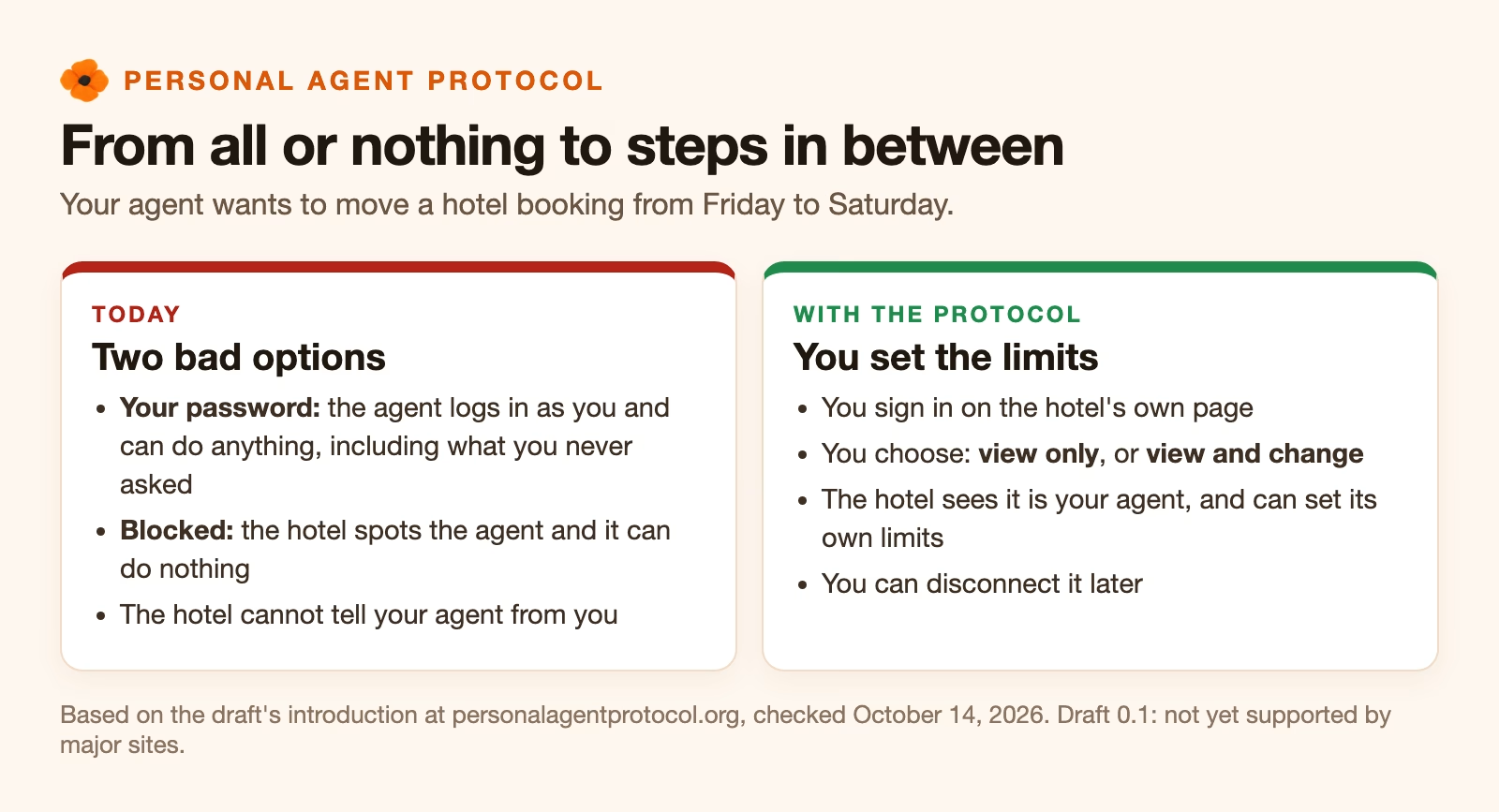
Either the agent passes as you, with your full password, or the company blocks it. The introduction says that with the first option “the user can’t limit what the agent does once it’s in, and the company can’t tell an agent from a person.” The draft’s answer is a range of steps in between. An airline might let any agent search flights, let a signed-in agent see your trips, and ask for your approval before a ticket is bought.
Who is behind it
Sierra, a company that builds customer service agents, announced the protocol with Meta on October 6, 2026. Sierra named Genesys, Instinct, Rocket, Shopify, Stripe, and Walmart as partners that day. The draft is published under the Apache 2.0 license, an open license that lets anyone use it for free.
The list has grown since. The Path to 1.0 page (checked October 14, 2026) names 43 design partners. Three of them build personal agents: Instinct, Meta, and OpenAI. Twenty-one are companies your agent would deal with, including Bank of America, Target, United Airlines, Walmart, and Wells Fargo. The rest are technology suppliers such as 1Password, Okta, Visa, and Mastercard.
A design partner has agreed to help shape the draft. That is not the same as supporting it. When we checked on October 14, 2026, none of ten partner websites we tried, including Walmart, Target, and Shopify, published the file the protocol uses to say a company supports it.
How it works, in four steps
The protocol uses standards that already run most of the web’s sign-ins. OAuth is the system behind “Sign in with Google” buttons: you sign in on the real company’s page, and the app gets a limited pass instead of your password. A token is that pass, a long string the agent shows the company on each request.
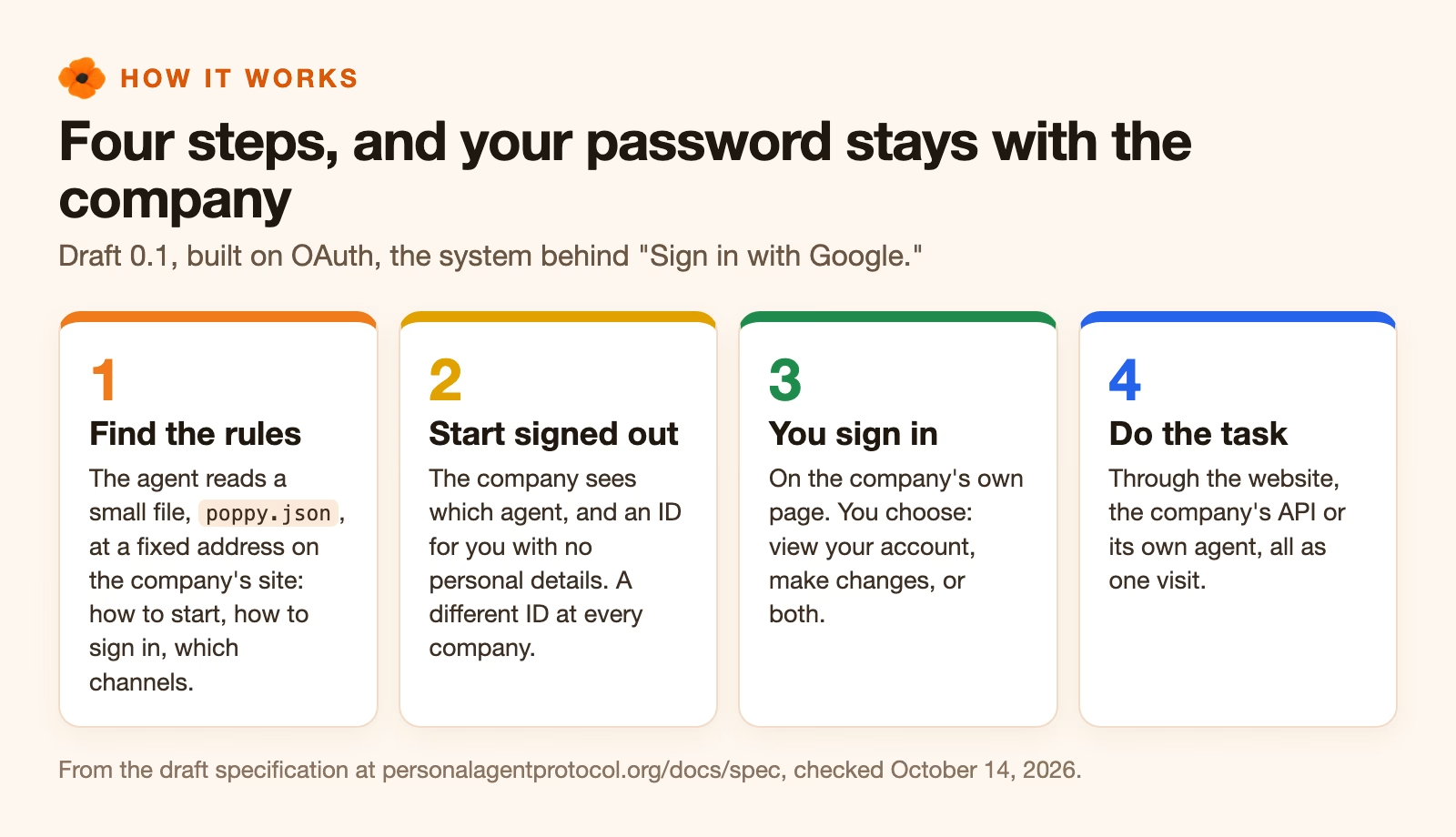
- The agent finds the company’s rules. A company that supports the protocol publishes a small file at a fixed address on its website,
/.well-known/poppy.json(“Poppy” is the protocol’s nickname). The file says how to start, how you can sign in, and which channels the company offers. - The agent starts signed out. The company knows which agent is asking, but knows you only by an ID that contains no personal information. Each company gets a different ID for you, so two companies cannot compare notes and match you up.
- You sign in, if the task needs your account. Usually you do this on the company’s own page, and you choose what the agent can do. The draft defines two broad permissions, called scopes: view your account, such as orders and bookings, and make changes, such as exchanging an item.
- The agent does the task. It can use the company’s website, its API (a direct connection that programs use instead of web pages), or the company’s own customer service agent. All three count as one visit, so a question asked before you signed in and a change made after are part of the same conversation.
The access levels a company can choose
The protocol does not decide what agents may do. The company and you do. The draft’s home page (checked October 14, 2026) shows this with a hotel example that runs from no access to full access.
| Level | Who it applies to | What the agent can do |
|---|---|---|
| Blocked | No agents allowed | Nothing |
| Search rooms | Any agent, signed out | Check prices and availability |
| See reservations | After you sign in | View your bookings |
| Book a room | With your approval | Make a booking you confirm |
| Full access | You allow it | Act as you on the account |
You get your own say on top of that. When you sign in, the company’s page shows which agent is asking and the permissions it wants, and you can approve some, all, or none. If you only want your agent to check a booking, approve viewing and leave changes off. The agent then has to ask you to sign in again before it can change anything.
Three ways you might sign in, and which to prefer
The draft specification (checked October 14, 2026) allows three kinds of sign-in. Companies choose which ones they offer. Each one keeps your password in a different place.
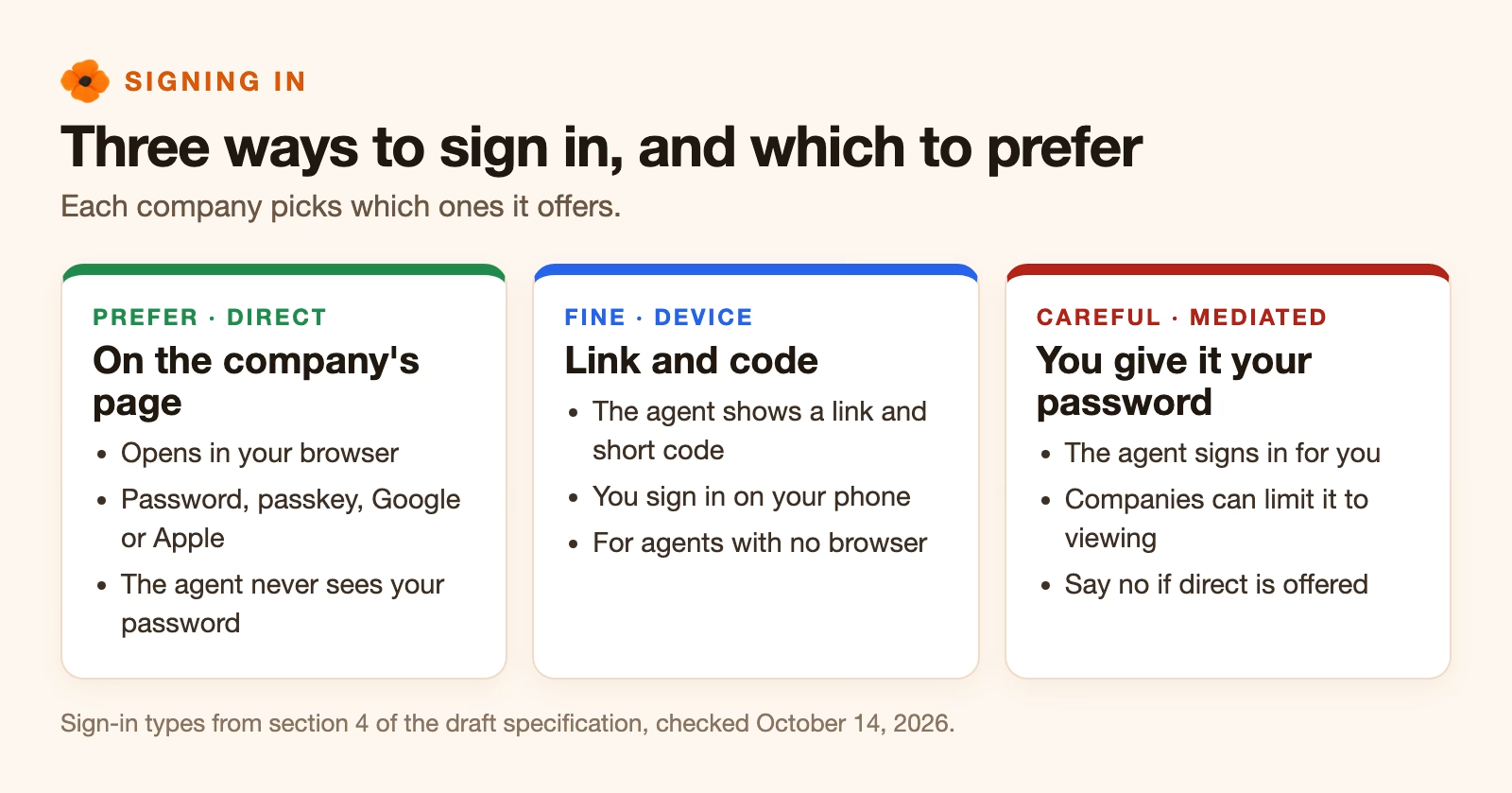
Direct sign-in is the one to prefer. Your agent opens the company’s sign-in page in your browser, you sign in there with your password, passkey, or Google or Apple account, and the agent never sees your password. Device sign-in is the same idea for agents that cannot open a browser: the agent shows you a link and a short code, and you sign in on your phone.
Mediated sign-in is the old way with rules around it. You give the agent your email and password for that company, and it signs in for you. The draft lets companies limit this kind to viewing only, and the example in the specification does exactly that. If an agent asks for your password when the company offers direct sign-in, say no.
What the company learns, and how you take access back
Companies get more visibility under the protocol, by design. They can see which agent they are dealing with, keep lists of agents they allow or block, and revoke an agent that misbehaves. Every message in a conversation is labeled as written by a person or by an AI. That rule is strict. The specification says a summary of your words counts as the agent’s, not yours, and either side can ask for a person.
Taking access back is meant to be easy. Under the specification, you can disconnect the agent from the company’s account settings, which cancels its passes for that account. The agent can also sign out itself. Until you do one of those, a sign-in can last a while: the example in the specification lets an agent get fresh passes for 30 days without asking you again, though each company sets its own limit.
What it does not cover yet
The draft is version 0.1, and the specification says any part of it “can change before a stable version.” Three big areas are missing on purpose, according to the Path to 1.0 page (checked October 14, 2026).
- Payments. How an agent pays fits into the protocol later, alongside payment systems that already exist.
- Notifications. How a company tells your agent that an order has shipped, when no request is open.
- Attachments. How a company sends receipts, return labels, or forms for you to fill in.
Payments are the gap you are most likely to notice. Agents that buy things today, such as Meta Muse, use separate checkout systems such as Stripe’s Link. Visa runs its own Trusted Agent Protocol for agent checkout, and Visa, Mastercard, Stripe, and Shopify are all on the design partner list. So agent sign-in and agent payment may end up as two standards that work together.
How it fits with MCP and A2A
You may have heard of two other agent standards. MCP connects an AI to tools and data, and A2A lets agents talk to each other. The Personal Agent Protocol sits on top of them. A company can offer its API through MCP, and the conversation with a company’s agent works like A2A, but the new part is the sign-in and the permissions for one person’s account. The post on what MCP and A2A are covers those two in more detail.
What to do now
If you use a personal agent, nothing changes yet, so the useful step is a check. Look at which of your accounts your agent can already reach, especially any where it holds your actual password. For each one, ask whether it needs to make changes or only look. Then remove the password where a narrower option exists, such as a connected-apps setting that you can switch off later. The post on setting limits on an AI agent before it touches company data has a longer checklist.
If you work at a company that customers’ agents already visit, read the draft specification and decide where you would draw the lines in the hotel table. The draft asks for feedback through GitHub issues, and it says anyone can send it, partner or not.
Sources
- Sierra: Introducing Personal Agent Protocol (October 6, 2026 announcement with Meta, launch partners, planned extensions)
- Personal Agent Protocol: Introduction (the all-or-nothing problem, principles)
- Personal Agent Protocol: Draft specification 0.1 (poppy.json discovery, sessions, scopes, sign-in types, sign-out, human or AI labels)
- Personal Agent Protocol: Path to 1.0 (design partners, open topics, feedback)
- Personal Agent Protocol home page (hotel access-level example, Apache 2.0 license)
- The Next Web: Sierra announces Personal Agent Protocol (Visa Trusted Agent Protocol and payments context)
Keep going
Same lessons in your feed
Short diagrams, hooks, and weekly tutorials on Substack, Instagram, X, and Facebook.



